
目录
1 修改驱动程序出现段错误
2 根据PC分析出错位置
2.1 驱动程序作为模块加载
2.1.1 根据pc值确定该指令属于内核还是外加的模块
2.1.2 假设它是加载的驱动程序引入的错误,怎么确定是哪一个驱动程序?
2.1.3 找到了first_drv.ko
2.2 驱动程序编入内核
2.2.1 根据pc值确定该指令属于内核还是外加的模块
2.2.2 反汇编内核: arm-linux-objdump -D vmlinux > vmlinux.dis
1 修改驱动程序出现段错误
我们仍然使用之前的first_drv.c驱动程序来试验,我们故意把驱动程序改错,我们都知道在驱动程序中不能使用寄存器的物理地址,需要将寄存器的物理地址进行ioremap之后才能使用,这里我们故意使用物理地址,
static int first_drv_init(void) { major = register_chrdev(0, "first_drv", &first_drv_fops); // 注册, 告诉内核 firstdrv_class = class_create(THIS_MODULE, "firstdrv"); firstdrv_class_dev = class_device_create(firstdrv_class, NULL, MKDEV(major, 0), NULL, "xyz"); /* /dev/xyz */ gpfcon = (volatile unsigned long *)0x; //(volatile unsigned long *)ioremap(0x, 16); gpfdat = gpfcon + 1; return 0; } 讯享网
完整程序是
讯享网#include <linux/module.h> #include <linux/kernel.h> #include <linux/fs.h> #include <linux/init.h> #include <linux/delay.h> #include <asm/uaccess.h> #include <asm/irq.h> #include <asm/io.h> #include <asm/arch/regs-gpio.h> #include <asm/hardware.h> #include <linux/device.h> static struct class *firstdrv_class; static struct class_device *firstdrv_class_dev; volatile unsigned long *gpfcon = NULL; volatile unsigned long *gpfdat = NULL; static int first_drv_open(struct inode *inode, struct file *file) { //printk("first_drv_open\n"); /* 配置GPF4,5,6为输出 */ *gpfcon &= ~((0x3<<(4*2)) | (0x3<<(5*2)) | (0x3<<(6*2))); *gpfcon |= ((0x1<<(4*2)) | (0x1<<(5*2)) | (0x1<<(6*2))); return 0; } static ssize_t first_drv_write(struct file *file, const char __user *buf, size_t count, loff_t * ppos) { int val; //printk("first_drv_write\n"); copy_from_user(&val, buf, count); // copy_to_user(); if (val == 1) { // 点灯 *gpfdat &= ~((1<<4) | (1<<5) | (1<<6)); } else { // 灭灯 *gpfdat |= (1<<4) | (1<<5) | (1<<6); } return 0; } static struct file_operations first_drv_fops = { .owner = THIS_MODULE, /* 这是一个宏,推向编译模块时自动创建的__this_module变量 */ .open = first_drv_open, .write = first_drv_write, }; int major; static int first_drv_init(void) { major = register_chrdev(0, "first_drv", &first_drv_fops); // 注册, 告诉内核 firstdrv_class = class_create(THIS_MODULE, "firstdrv"); firstdrv_class_dev = class_device_create(firstdrv_class, NULL, MKDEV(major, 0), NULL, "xyz"); /* /dev/xyz */ gpfcon = (volatile unsigned long *)0x; //(volatile unsigned long *)ioremap(0x, 16); gpfdat = gpfcon + 1; return 0; } static void first_drv_exit(void) { unregister_chrdev(major, "first_drv"); // 卸载 class_device_unregister(firstdrv_class_dev); class_destroy(firstdrv_class); iounmap(gpfcon); } module_init(first_drv_init); module_exit(first_drv_exit); MODULE_LICENSE("GPL");
然后会出现段错误,根据内核打印出来的oops信息调试,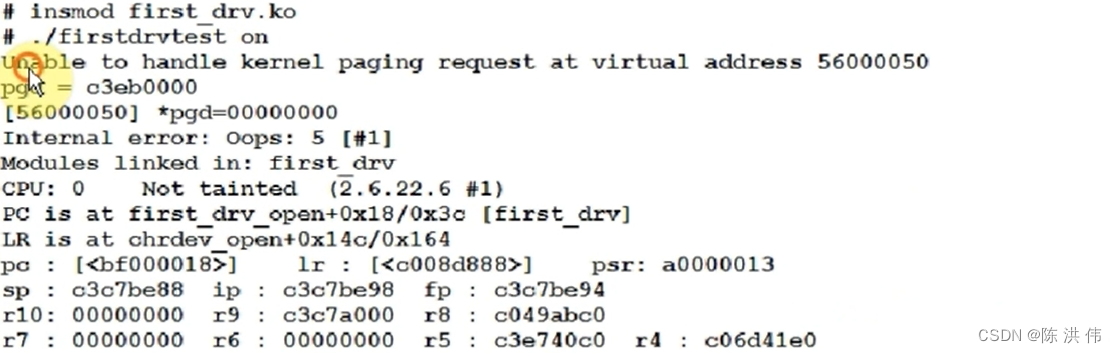
讯享网
Unable to handle kernel paging request at virtual address
内核使用来访问时发生了错误
pgd = c3eb0000
[] *pgd=00000000
Internal error: Oops: 5 [#1]
Modules linked in: first_drv
CPU: 0 Not tainted (2.6.22.6 #1)
PC is at first_drv_open+0x18(该指令的偏移)/0x3c(该函数的总大小) [first_drv]
PC就是发生错误的指令的地址
大多时候,PC值只会给出一个地址,不会指示说是在哪个函数里
LR is at chrdev_open+0x14c/0x164
LR寄存器的值
pc = 0xbf000018
pc : [<bf000018>] lr : [<c008d888>] psr: a0000013
sp : c3c7be88 ip : c3c7be98 fp : c3c7be94
r10: 00000000 r9 : c3c7a000 r8 : c049abc0
r7 : 00000000 r6 : 00000000 r5 : c3e740c0 r4 : c06d41e0
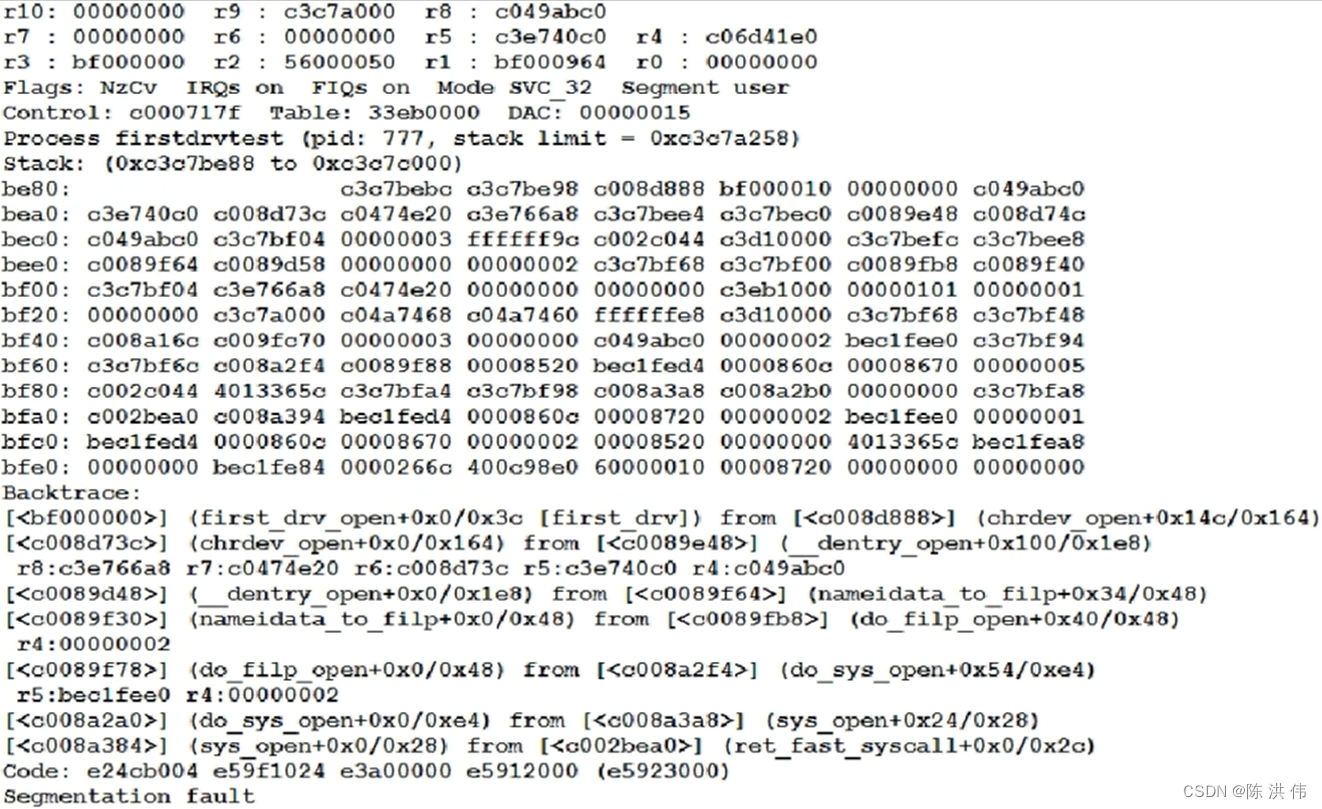
r3 : bf000000 r2 : r1 : bf000964 r0 : 00000000
执行这条导致错误的指令时各个寄存器的值
Flags: NzCv IRQs on FIQs on Mode SVC_32 Segment user
Control: c000717f Table: 33eb0000 DAC: 00000015
Process firstdrvtest (pid: 777, stack limit = 0xc3c7a258)
发生错误时当前进程的名称是firstdrvtest
栈
Stack: (0xc3c7be88 to 0xc3c7c000)
be80: c3c7bebc c3c7be98 c008d888 bf000010 00000000 c049abc0
bea0: c3e740c0 c008d73c c0474e20 c3e766a8 c3c7bee4 c3c7bec0 c0089e48 c008d74c
bec0: c049abc0 c3c7bf04 00000003 ffffff9c c002c044 c3d10000 c3c7befc c3c7bee8
bee0: c0089f64 c0089d58 00000000 00000002 c3c7bf68 c3c7bf00 c0089fb8 c0089f40
bf00: c3c7bf04 c3e766a8 c0474e20 00000000 00000000 c3eb1000 00000101 00000001
bf20: 00000000 c3c7a000 c04a7468 c04a7460 ffffffe8 c3d10000 c3c7bf68 c3c7bf48
bf40: c008a16c c009fc70 00000003 00000000 c049abc0 00000002 bec1fee0 c3c7bf94
bf60: c3c7bf6c c008a2f4 c0089f88 00008520 bec1fed4 0000860c 00008670 00000005
bf80: c002c044 c c3c7bfa4 c3c7bf98 c008a3a8 c008a2b0 00000000 c3c7bfa8
bfa0: c002bea0 c008a394 bec1fed4 0000860c 00008720 00000002 bec1fee0 00000001
bfc0: bec1fed4 0000860c 00008670 00000002 00008520 00000000 c bec1fea8
bfe0: 00000000 bec1fe84 0000266c 400c98e0 00008720 00000000 00000000
Backtrace: (回溯)
[<bf000000>] (first_drv_open+0x0/0x3c [first_drv]) from [<c008d888>] (chrdev_open+0x14c/0x164)
[<c008d73c>] (chrdev_open+0x0/0x164) from [<c0089e48>] (__dentry_open+0x100/0x1e8)
r8:c3e766a8 r7:c0474e20 r6:c008d73c r5:c3e740c0 r4:c049abc0
[<c0089d48>] (__dentry_open+0x0/0x1e8) from [<c0089f64>] (nameidata_to_filp+0x34/0x48)
[<c0089f30>] (nameidata_to_filp+0x0/0x48) from [<c0089fb8>] (do_filp_open+0x40/0x48)
r4:00000002
[<c0089f78>] (do_filp_open+0x0/0x48) from [<c008a2f4>] (do_sys_open+0x54/0xe4)
r5:bec1fee0 r4:00000002
[<c008a2a0>] (do_sys_open+0x0/0xe4) from [<c008a3a8>] (sys_open+0x24/0x28)
[<c008a384>] (sys_open+0x0/0x28) from [<c002bea0>] (ret_fast_syscall+0x0/0x2c)
Code: e24cb004 e59f1024 e3a00000 e (e)
Segmentation fault
这里的Backtrace只有配置了内核的CONFIG_FRAME_POINTER为yes才会有回溯信息
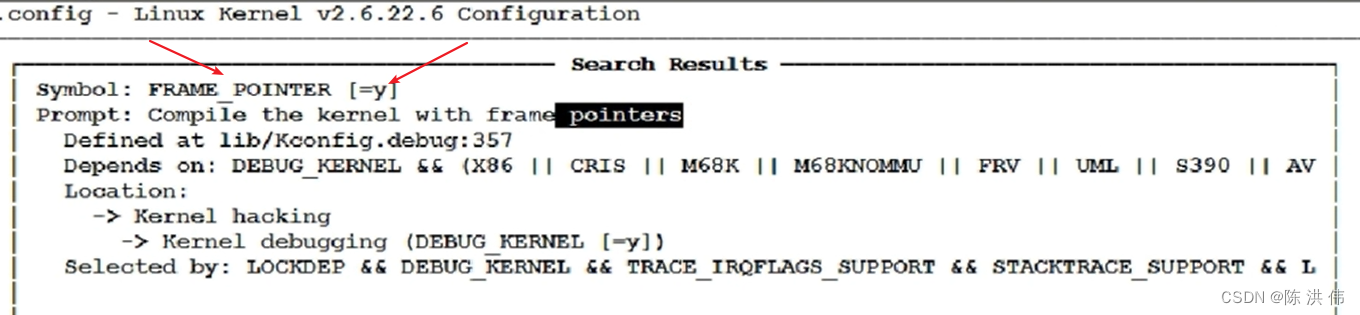
如果我们没有配置这一项,那么我们就要自己分析栈,把调用信息分析出来。

2 根据PC分析出错位置
接下来我们看下能否根据PC值找到发生错误的代码在哪里,这个要分为两种情况。
2.1 驱动程序作为模块加载
2.1.1 根据pc值确定该指令属于内核还是外加的模块
我们make uImage将内核编译一下,会看到有个System.map文件,然后vi System.map,从第一行到最后一行,可以看到内核函数的地址范围。
如果不属于System.map里的范围,则它属于insmod加载的驱动程序
2.1.2 假设它是加载的驱动程序引入的错误,怎么确定是哪一个驱动程序?
先看看加载的驱动程序的函数的地址范围
cat /proc/kallsyms (内核函数、加载的函数的地址)kallsyms:k指内核,all所有的,syms符号。
从这些信息里找到一个相近的地址, 这个地址<=0xbf000018
比如找到了:
bf000000 t first_drv_open [first_drv]
意思是在驱动程序first_drv中有个first_drv_open函数,它的地址是bf000000,那个PC就是这个open函数加上18的地方,
2.1.3 找到了first_drv.ko
first_drv.ko: file format elf32-littlearm Disassembly of section .text: 00000000 <first_drv_open>: 0: e1a0c00d mov ip, sp 4: e92dd800 stmdb sp!, {fp, ip, lr, pc} 8: e24cb004 sub fp, ip, #4 ; 0x4 c: e59f1024 ldr r1, [pc, #36] ; 38 <__mod_vermagic5> 10: e3a00000 mov r0, #0 ; 0x0 14: e ldr r2, [r1] 18: e ldr r3, [r2] // 在这里出错 r2= 1c: e3c33c3f bic r3, r3, #16128 ; 0x3f00 20: e str r3, [r2] 24: e ldr r2, [r1] 28: e ldr r3, [r2] 2c: e3833c15 orr r3, r3, #5376 ; 0x1500 30: e str r3, [r2] 34: e89da800 ldmia sp, {fp, sp, pc} 38: 00000000 andeq r0, r0, r0 first_drv.dis文件里 insmod后
00000000 <first_drv_open>: bf000000 t first_drv_open [first_drv]
00000018 pc = bf000018
出错的这条指令是ldr r3, [r2],这条指令的意思是去r2所指的地方取一个值,把这个值存给r3,然后从之前报错时的打印信息可以看到r2的值是,然后要根据汇编语言找到C语言,
我们的first_drv_open C语言很简单,
讯享网static int first_drv_open(struct inode *inode, struct file *file) { static int cnt = 0; myprintk("first_drv_open : %d\n", ++cnt); /* 配置GPF4,5,6为输出 */ *gpfcon &= ~((0x3<<(4*2)) | (0x3<<(5*2)) | (0x3<<(6*2))); *gpfcon |= ((0x1<<(4*2)) | (0x1<<(5*2)) | (0x1<<(6*2))); return 0; }
这里其实是对应
18: e ldr r3, [r2] // 在这里出错 r2= 1c: e3c33c3f bic r3, r3, #16128 ; 0x3f00 20: e str r3, [r2]是把gpfcon的值读出来,清除某一位,然后再存回去,然后就是*gpfcon &= ~((0x3<<(4*2)) | (0x3<<(5*2)) | (0x3<<(6*2)));出错,然后看一下gpfcon是在哪里赋值的,从而找到了init函数赋值那里的错误。
2.2 驱动程序编入内核
我们把驱动编进内核,先把驱动程序拷贝到内核目录中

然后修改Makefile 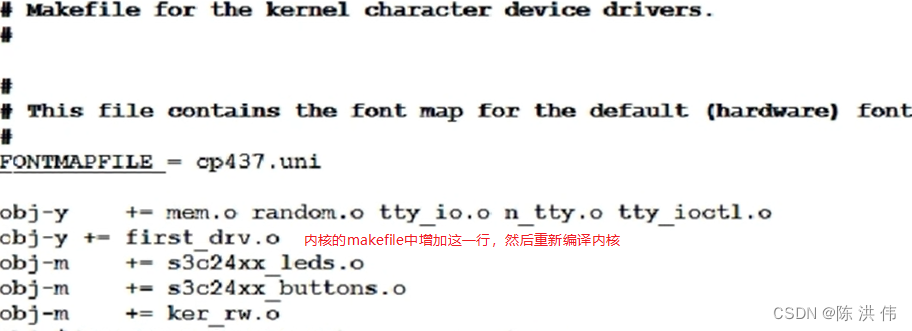
重新编译内核,并启动这个有问题的内核,
讯享网make uImage cp arch/arm/boot/uImage /work/nfs_root/uImage_bad reboot nfs 192.168.1.123:/work/nfs_root/uImage_bad bootm
然后执行第一个驱动程序的测试程序,出现段错误
Modules linked in:
CPU: 0 Not tainted (2.6.22.6 #2)
PC is at first_drv_open+0x18/0x3c
LR is at chrdev_open+0x14c/0x164
pc : [<c014e6c0>] lr : [<c008638c>] psr: a0000013
sp : c3a03e88 ip : c3a03e98 fp : c3a03e94
r10: 00000000 r9 : c3a02000 r8 : c03f3c60
r7 : 00000000 r6 : 00000000 r5 : c38a0c50 r4 : c3c1e780
r3 : c014e6a8 r2 : r1 : c031a47c r0 : 00000000
Flags: NzCv IRQs on FIQs on Mode SVC_32 Segment user
Control: c000717f Table: 339f0000 DAC: 00000015
Process firstdrvtest (pid: 750, stack limit = 0xc3a02258)
2.2.1 根据pc值确定该指令属于内核还是外加的模块
pc=c014e6c0 属于内核(看System.map)
2.2.2 反汇编内核: arm-linux-objdump -D vmlinux > vmlinux.dis
在dis文件里搜c014e6c0
c014e6a8 <first_drv_open>:
c014e6a8: e1a0c00d mov ip, sp
c014e6ac: e92dd800 stmdb sp!, {fp, ip, lr, pc}
c014e6b0: e24cb004 sub fp, ip, #4 ; 0x4
c014e6b4: e59f1024 ldr r1, [pc, #36] ; c014e6e0 <.text+0x1276e0>
c014e6b8: e3a00000 mov r0, #0 ; 0x0
c014e6bc: e ldr r2, [r1]
c014e6c0: e ldr r3, [r2] // 在此出错 r2=
然后同样根据汇编语言找到C语言函数。
版权声明:本文内容由互联网用户自发贡献,该文观点仅代表作者本人。本站仅提供信息存储空间服务,不拥有所有权,不承担相关法律责任。如发现本站有涉嫌侵权/违法违规的内容,请联系我们,一经查实,本站将立刻删除。
如需转载请保留出处:https://51itzy.com/kjqy/51757.html