
前言
为什么要写这一篇文章?
- 加深对promise的理解,以及再实际工作中的灵活运用。
- 知其然,知其所以然。
- 面试需要。(重点!!!)
1:声明promise
首先我们先来聊聊promise的几个特性:
- 一个promise有三种状态:pengding,fulfilled,rejected.
- promise状态一旦被改变,就不允许被改变了。
- new Promise构造函数接受一个函数参数,这个函数有两个参数分别为resole和reject函数。
其实代码很好写,我们就来检验以下resolve的参数是否能正确传递吧
const PENDING = "pengding"; const FUFILLED = "fulfilled"; const REJECTED = "rejected"; class MP { constructor(executor) { this.status = PENDING; this.value = null; executor(this.resolve, this.reject); } resolve(value) { this.value = value; console.log("resolve:" + this.value); } reject(season) {} } // test new MP((resolve, reject) => { resolve("你好"); }); 讯享网
打开控制台,我们发现无法设置属性value,

讯享网 查看代码我们很容易发现其实代码this绑定的问题,我们用bind绑定以下就好了。
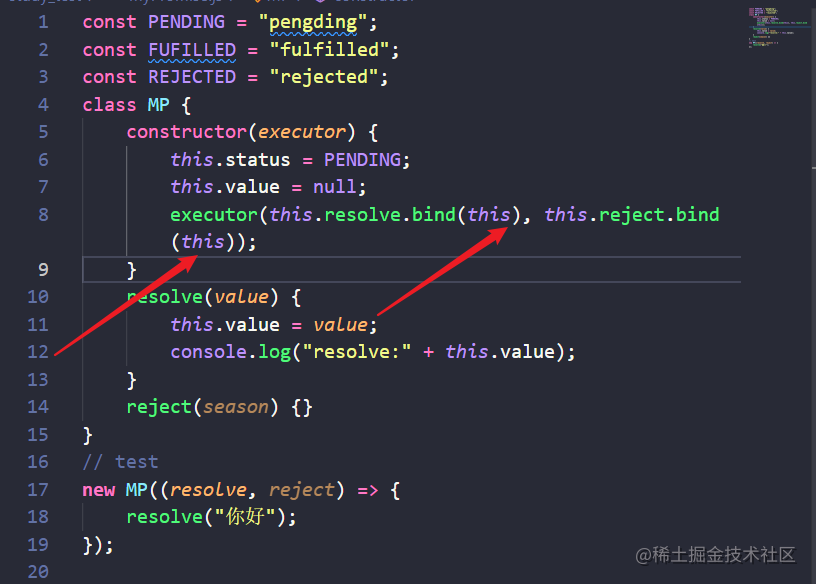
 this问题解决了,但是还有一个问题,状态只能改变一次。所以我们在resolve和reject函数执行的时候要判断一下状态。
讯享网const PENDING = "pengding"; const FUFILLED = "fulfilled"; const REJECTED = "rejected"; class MP { constructor(executor) { this.status = PENDING; this.value = null; executor(this.resolve.bind(this), this.reject.bind(this)); } resolve(value) { if(this.status == PENDING){ this.status = FUFILLED; this.value = value; console.log("resolve:" + this.value); } } reject(season) { if (this.status == PENDING) { this.status = REJECTED; this.value = season; console.log("reject:" + this.value); } } } // test new MP((resolve, reject) => { resolve("你好"); });
2:then的基础构建
2.1:then的用法
- 接受两个参数,当promise成功执行第一个函数参数,失败执行第二个函数参数。
- then里面也可以不传参数。
- then里面的函数为异步操作。(promise是微任务)
then(onFulfilled, onRejected) { // 判断两个参数是不是函数类型,如果不是函数,需要手动封装,否则下面执行时会报错。 if (typeof onFulfilled !== "function") { onFulfilled = () => {}; } else if (typeof onRejected !== "function") { onRejected = () => {}; } if (this.status === "fulfilled") { onFulfilled(this.value); } else if (this.status === "rejected") { onRejected(this.value); } else { } } // test new MP((resolve, reject) => { resolve("你好"); }).then( res => { console.log("then res", res); }, rej => { console.log(rej); } );  then可以接收到resolve传过来的数据。
2.2:异步操作(任务队列不懂的先去学学)
这里我们使用queueMicrotask来创建微任务:
讯享网then(onFulfilled, onRejected)
版权声明:本文内容由互联网用户自发贡献,该文观点仅代表作者本人。本站仅提供信息存储空间服务,不拥有所有权,不承担相关法律责任。如发现本站有涉嫌侵权/违法违规的内容,请联系我们,一经查实,本站将立刻删除。
如需转载请保留出处:https://51itzy.com/kjqy/50387.html