
1 多attachment切换
let goblingirl = this.spine2.findSlot("left-arm"); let attachment = goblingirl.getAttachment(); let gun = this.spine.findSlot('gun'); gun.setAttachment(attachment);讯享网
优点:web、native等多端统一代码。
缺点:随着可换装的部位越多、同一个部位皮肤越多,动画文件变得越来越大,由于spine动画文件是一次性加载进内存等,导致占用内存较多,实例化速度变慢。
2 使用外部图片更新局部皮肤
由于attachemnt即是图片资源在spine内的表达,我们可以通过加载一张外部图片来更新attachment达到局部换装功能。
优点:spine动画每个部位可以只做一个attachment,这样动画文件结构简单,体积较小,内存占用较小加载速度也较快。
缺点:一是由于引擎本身不提供此功能,需要自己动手实现,而且web端和native端需要两套代码,必须修改引擎代码并重新编译引擎。二是动画在使用realtime模式时修改一个动画会影响使用同一个动画文件创建的其他动画,这个问题还需要研究。
2.1 web端代码:
讯享网updatePartialSkin(ani: sp.Skeleton, tex2d: cc.Texture2D, slotsName: string) { let slot: sp.spine.Slot = ani.findSlot(slotsName); let attachment: sp.spine.RegionAttachment = slot.getAttachment() as sp.spine.RegionAttachment; if (!slot || !attachment) { cc.error('error...'); return; } let region: sp.spine.TextureAtlasRegion = attachment.region as sp.spine.TextureAtlasRegion; let skeletonTexture = new sp.SkeletonTexture(); skeletonTexture.setRealTexture(this.tex2d); region.u = 0; region.v = 0; region.u2 = 1; region.v2 = 1; region.width = tex2d.width; region.height = tex2d.height; region.originalWidth = tex2d.width; region.originalHeight = tex2d.height; region.rotate = false; region.texture = skeletonTexture; region.page = null; attachment.width = region.width; attachment.height = region.height; attachment.setRegion(region); // mark: 不需要创建新的sp.spine.TextureAtlasRegion, 直接更新原attachment下的region即可。 // let region: sp.spine.TextureRegion = this.createRegion(tex2d); // attachment.setRegion(region); // attachment.width = region.width; // attachment.height = region.height; attachment.updateOffset(); slot.setAttachment(attachment); // skeleton如果使用了缓存模式则需要刷新缓存 ani.invalidAnimationCache(); } createRegion(tex: cc.Texture2D): sp.spine.TextureAtlasRegion { cc.log('创建region'); let skeletonTexture = new sp.SkeletonTexture(); skeletonTexture.setRealTexture(tex); // mark: 可以不设置page // let page = new sp.spine.TextureAtlasPage(); // page.name = tex.name; // page.uWrap = sp.spine.TextureWrap.ClampToEdge; // page.vWrap = sp.spine.TextureWrap.ClampToEdge; // page.texture = skeletonTexture; // page.texture.setWraps(page.uWrap, page.vWrap); // page.width = tex.width; // page.height = tex.height; let region = new sp.spine.TextureAtlasRegion(); // region.page = page; region.width = tex.width; region.height = tex.height; region.originalWidth = tex.width; region.originalHeight = tex.height; region.rotate = false; region.u = 0; region.v = 0; region.u2 = 1; region.v2 = 1; region.texture = skeletonTexture; return region; }
2.2 native端代码:
native端我们需要分别修改C++实现和jsb-adapter, C++实现我们要分别在 SkeletonRenderer.cpp和SkeletonCacheAnimation.cpp 添加对应的方法。C++代码在cocos2d-x目录下,我们可以git上下载对应版本的最新代码。
记得头文件要加声明
SkeletonRenderer.cpp
void SkeletonRenderer::updateRegion(const std::string &slotName, cocos2d::middleware::Texture2D *texture) { // auto skeletonData = _skeleton->getData(); // auto slotIndex = skeletonData->findSlotIndex(String(slotName.c_str())); // auto skin = skeletonData->findSkin(String("default")); // RegionAttachment * attachment = (RegionAttachment *)skin->getAttachment(slotIndex, String("cap_1")); Slot *slot = _skeleton->findSlot(slotName.c_str()); RegionAttachment *attachment = (RegionAttachment *)slot->getAttachment(); // Texture *texture2D = texture->getNativeTexture(); // float width = texture2D->getWidth(); // float height = texture2D->getHeight(); float wide = texture->getPixelsWide(); float high = texture->getPixelsHigh(); attachment->setUVs(0, 0, 1, 1, false); attachment->setRegionWidth(wide); attachment->setRegionHeight(high); attachment->setRegionOriginalWidth(wide); attachment->setRegionOriginalHeight(high); attachment->setWidth(wide); attachment->setHeight(high); // attachment->setRegionOffsetX(0); // attachment->setRegionOffsetY(15); // texture->setPixelsWide(width); // texture->setPixelsHigh(height); // texture->setRealTextureIndex(1); AttachmentVertices *attachV = (AttachmentVertices *)attachment->getRendererObject(); if (attachV->_texture == texture) { return; } CC_SAFE_RELEASE(attachV->_texture); attachV->_texture = texture; CC_SAFE_RETAIN(texture); V2F_T2F_C4B *vertices = attachV->_triangles->verts; for (int i = 0, ii = 0; i < 4; ++i, ii += 2) { vertices[i].texCoord.u = attachment->getUVs()[ii]; vertices[i].texCoord.v = attachment->getUVs()[ii + 1]; } attachment->updateOffset(); slot->setAttachment(attachment); } SkeletonCacheAnimation.cpp
讯享网void SkeletonCacheAnimation::updateRegion(const std::string &slotName, cocos2d::middleware::Texture2D *texture) { _skeletonCache->updateRegion(slotName, texture); }
修改C++代码后我们需要重新跑一般自动绑定脚本,生成js绑定接口,目录在cocos2dx/tools/tojs/genbindings.py,绑定成功后我们需要修改jsb adapter以提供给js层调用,
adapter在引擎安装目录下/Resources/builtin/jsb-adapter/engine/jsb-spine-skeleton.js ,添加如下方法:
skeleton.updateRegion = function (slotsName, jsbTex2d) { if (this._nativeSkeleton) { this._nativeSkeleton.updateRegion(slotsName, jsbTex2d); return true; } return false; }; 全部修改完成后我们需要在creator引擎中自定义cocos2d-x引擎,指向我们刚修改的cocos2d-x目录。如果想要在模拟器预览效果我们还需要重新编译模拟器
2.3 使用方法:
以上全部修改完成后,我们可以在js/ts代码中这样使用了:
讯享网changeClouth() { if (cc.sys.isNative) { cc.log('native 换肤.'); let jsbTex = new middleware.Texture2D(); jsbTex.setPixelsHigh(this.tex2d.height); jsbTex.setPixelsWide(this.tex2d.width); jsbTex.setNativeTexture(this.tex2d.getImpl()); this.player.updateRegion("cap", jsbTex); } else { cc.log('web 换肤.'); this.updatePartialSkin(this.player, this.tex2d, 'cap'); } // 缓存模式下需要刷新缓存 this.player.invalidAnimationCache(); }
认真测试一下,其实可以发现如果共用一个sp.SkeletonData,其中一个实例换装了,其他实例也换装了。
解决办法
给 spine 重新拷贝一份 skeletonData 数据,让他们不重复,
let date = new Date(); var spdata = this.spine.skeletonData;//spineComp某个sp.Skeleton组件 var copy = new sp.SkeletonData()//拷贝一份纹理,避免重复纹理缓存 cc.js.mixin(copy, spdata) copy._uuid = spdata._uuid + "_" + date.getTime() + "_copy";//增加一个时间戳 读取到毫秒应该不会重复吧? var old = copy.name; var newName = copy.name + '_copy' copy.name = newName; copy.atlasText = copy.atlasText.replace(old, newName) copy.textureNames[0] = newName + '.png' copy.init && copy.init() this.spine.skeletonData = copy;//重新设置一下数据
2.4 使用Spine挂点功能
Spine挂点功能是cocoscreator 2.3版本开始提供的,初衷是为了动态给动画添加部分节点,比如武器等,这里也可以非常规使用来做局部换皮。具体流程为生成挂点——>获取指定节点——>给该节点添加对应的子节点。
优点: 引擎提供的功能,三端表现统一,无需hack源码
缺点: 如果需要换装的图集过多无法合并到一张图集上,则每增加一个挂载节点都会增加一个drawcall,这里要特别注意。
讯享网 // this.ani: sp.Skeleton let node = new cc.Node(); let sp = node.addComponent(cc.Sprite); sp.spriteFrame = this.spf; let attachUtil = this.ani.attachUtil; // attachUtil.generateAttachedNodes("hair"); attachUtil.generateAllAttachedNodes(); let bones = attachUtil.getAttachedNodes('hair'); bones[0].destroyAllChildren(); bones[0].addChild(node); bones = attachUtil.getAttachedNodes('left_hand_a'); let node2 = cc.instantiate(node); bones[0].destroyAllChildren(); bones[0].addChild(node2); bones = attachUtil.getAttachedNodes('right_hand_a'); let node3 = cc.instantiate(node); bones[0].destroyAllChildren(); bones[0].addChild(node3); // attachUtil.destroyAttachedNodes('hair'); // attachUtil.destroyAllAttachedNodes();
主要用到的接口在AttachUtil.js里都可以找到
/ * !#en Traverse all bones to generate the minimum node tree containing the given bone names, NOTE that make sure the skeleton has initialized before calling this interface. * !#zh 遍历所有插槽,生成包含所有给定插槽名称的最小节点树,注意,调用该接口前请确保骨骼动画已经初始化好。 * @method generateAttachedNodes * @param {String} boneName * @return {Node[]} attached node array */ generateAttachedNodes (boneName) { let targetNodes = []; if (!this._inited) return targetNodes; let rootNode = this._prepareAttachNode(); if (!rootNode) return targetNodes; let res = []; let bones = this._skeleton.bones; for (let i = 0, n = bones.length; i < n; i++) { let bone = bones[i]; let boneData = bone.data; if (boneData.name == boneName) { res.push(bone); } } let buildBoneTree = function (bone) { if (!bone) return; let boneData = bone.data; let boneNode = this._getNodeByBoneIndex(boneData.index); if (boneNode) return boneNode; boneNode = this._buildBoneAttachedNode(bone, boneData.index); let parentBoneNode = buildBoneTree(bone.parent) || rootNode; boneNode.parent = parentBoneNode; return boneNode; }.bind(this); for (let i = 0, n = res.length; i < n; i++) { let targetNode = buildBoneTree(res[i]); targetNodes.push(targetNode); } this._sortNodeArray(); return targetNodes; }, / * !#en Destroy attached node which you want. * !#zh 销毁对应的挂点 * @method destroyAttachedNodes * @param {String} boneName */ destroyAttachedNodes (boneName) { if (!this._inited) return; let nodeArray = this._attachedNodeArray; let markTree = function (rootNode) { let children = rootNode.children; for (let i = 0, n = children.length; i < n; i++) { let c = children[i]; if (c) markTree(c); } rootNode._toRemove = true; } for (let i = 0, n = nodeArray.length; i < n; i++) { let boneNode = nodeArray[i]; if (!boneNode || !boneNode.isValid) continue; let delName = boneNode.name.split(ATTACHED_PRE_NAME)[1]; if (delName === boneName) { markTree(boneNode); boneNode.removeFromParent(true); boneNode.destroy(); nodeArray[i] = null; } } this._rebuildNodeArray(); }, / * !#en Traverse all bones to generate a tree containing all bones nodes, NOTE that make sure the skeleton has initialized before calling this interface. * !#zh 遍历所有插槽,生成包含所有插槽的节点树,注意,调用该接口前请确保骨骼动画已经初始化好。 * @method generateAllAttachedNodes * @return {cc.Node} root node */ generateAllAttachedNodes () { if (!this._inited) return; // clear all records this._boneIndexToNode = {}; this._attachedNodeArray.length = 0; let rootNode = this._prepareAttachNode(); if (!rootNode) return; let bones = this._skeleton.bones; for (let i = 0, n = bones.length; i < n; i++) { let bone = bones[i]; let boneData = bone.data; let parentNode = null; if (bone.parent) { let parentIndex = bone.parent.data.index; parentNode = this._boneIndexToNode[parentIndex]; } else { parentNode = rootNode; } if (parentNode) { let boneNode = parentNode.getChildByName(ATTACHED_PRE_NAME + boneData.name); if (!boneNode || !boneNode.isValid) { boneNode = this._buildBoneAttachedNode(bone, boneData.index); parentNode.addChild(boneNode); } else { this._buildBoneRelation(boneNode, bone, boneData.index); } } } return rootNode; }, / * !#en Destroy all attached node. * !#zh 销毁所有挂点 * @method destroyAllAttachedNodes */ destroyAllAttachedNodes () { this._attachedRootNode = null; this._attachedNodeArray.length = 0; this._boneIndexToNode = {}; if (!this._inited) return; let rootNode = this._skeletonNode.getChildByName(ATTACHED_ROOT_NAME); if (rootNode) { rootNode.removeFromParent(true); rootNode.destroy(); rootNode = null; } } 2.5 隐藏骨骼最简单的办法
直接改变透明度

讯享网 let slot: sp.spine.Slot = this.skeleton.findSlot(soltName); let attachment: sp.spine.RegionAttachment = slot.getAttachment() as sp.spine.RegionAttachment; if (!slot || !attachment) { continue; } let color = slot.color; color.a = 0;
3. 自定义引擎遇到的问题
3.1
F:\cocos\cocos2d-xs-erlf\tools\tojs\genbindings.py 运行问题 参考README.mdown 文档
On Windows:
- Make sure that you have installed
android-ndk-r16or later. - Download python2.7.3 (32bit) from (http://www.python.org/ftp/python/2.7.3/python-2.7.3.msi).
- Add the installed path of python (e.g. C:\Python27) to windows environment variable named 'PATH'.
- Download pyyaml from http://pyyaml.org/download/pyyaml/PyYAML-3.11.win32-py2.7.exe and install it.
- Download Cheetah-2.4.4.tar.gz, extract and install it by
python setup.py. ( python setup.py install) - Set environment variables (
NDK_ROOT) andPYTHON_BIN - Go to "cocos2d-x/tools/tojs" folder, and run "genbindings.py". The generated codes will be under "cocos\scripting\auto-generated\js-bindings".
3.2

用 node-v10.20.1-x64
3.3

C:\Users\Administrator\AppData\Roaming\npm 加入Path 环境变量
3.4
编译模拟器 问题
gulp gen-simulator gulp update-simulator-config编译不过
F:\ccc\CocosDashboard_1.0.8\resources\.editors\Creator\2.4.3\resources\cocos2d-xself\tools\simulator\frameworks\runtime-src\proj.win32\simulator.sln
打开 vs 工程(目前需要 vs2017) , 修改windowsSdk 为自己的版本 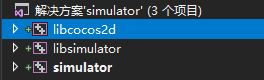

修改完后,记得清理下项目工程,避免其它报错,然后再进行上面两句话的编译
版权声明:本文内容由互联网用户自发贡献,该文观点仅代表作者本人。本站仅提供信息存储空间服务,不拥有所有权,不承担相关法律责任。如发现本站有涉嫌侵权/违法违规的内容,请联系我们,一经查实,本站将立刻删除。
如需转载请保留出处:https://51itzy.com/kjqy/50032.html