
在之前的文章 “Elasticsearch:Elasticsearch SQL 介绍及实例” 里,我们简要介绍了新的 Elasticsearch SQL 功能以及 _translate API。 这篇特定的文章通过探索更复杂的功能来继续该系列。如果你还没准备好自己的数据,请先阅读我前面指出来的文章。
复杂的例子和 Elasticsearch 的优点
Grouping
Elasticsearch 的聚合框架(能够汇总数十亿个数据点)代表了堆栈中最强大和最受欢迎的功能之一。 从功能的角度来看,它与 SQL 中的 GROUP BY 运算符具有自然的等效性。 除了提供一些 GROUP BY 功能的示例外,我们还将再次使用 translation API 来显示等效的聚合。
“找到飞往伦敦的每个来源目的地国家的平均飞行时间。 按照国家的字母顺序排列。”
sql> SELECT AVG(FlightTimeHour) Avg_Flight_Time, OriginCountry FROM flights GROUP BY OriginCountry ORDER BY OriginCountry LIMIT 5; Avg_Flight_Time | OriginCountry ------------------+--------------- 9.4574 |AE 13.201 |AR 4.1018 |AT 15.0724|AU 7.5511 |CA 讯享网
检查此查询的 DSL 将显示 “composite aggregation” 的使用。
讯享网GET flights/_search { "size": 0, "_source": false, "stored_fields": "_none_", "aggs": { "groupby": { "composite": { "size": 1000, "sources": [ { "3471": { "terms": { "field": "OriginCountry.keyword", "order": "asc" } } } ] }, "aggs": { "3485": { "avg": { "field": "FlightTimeHour" } } } } } }
这里使用的是 composite aggregation。它可以帮我实现在 aggregration 里的 scroll 功能。如果大家对这个不是很明白的话,请参阅我的另外一篇文章 “在 Elasticsearch 中的 Composite Aggregation”。上面查询的结果返回的是:
{ "took" : 21, "timed_out" : false, "_shards" : { "total" : 1, "successful" : 1, "skipped" : 0, "failed" : 0 }, "hits" : { "total" : { "value" : 10000, "relation" : "gte" }, "max_score" : null, "hits" : [ ] }, "aggregations" : { "groupby" : { "after_key" : { "3471" : "ZA" }, "buckets" : [ { "key" : { "3471" : "AE" }, "doc_count" : 385, "3485" : { "value" : 9.4574 } }, { "key" : { "3471" : "AR" }, "doc_count" : 258, "3485" : { "value" : 13.201 } }, { "key" : { "3471" : "AT" }, "doc_count" : 120, "3485" : { "value" : 4.1018 } }, { "key" : { "3471" : "AU" }, "doc_count" : 518, "3485" : { "value" : 15.0724 } }, ... 我们还可以使用函数对 select 中定义的别名字段进行分组。
“查找每月航班的数量和平均飞行时间。”
讯享网POST /_sql?format=txt { "query":"SELECT COUNT(*), MONTH_OF_YEAR(timestamp) AS month_of_year, AVG(FlightTimeHour) AS Avg_Flight_Time FROM flights GROUP BY month_of_year" }
上面的查询结果是:
COUNT(*) | month_of_year | Avg_Flight_Time ---------------+---------------+----------------- 5687 |4 |8.4027 7372 |5 |8.8286Composite aggregation 的使用具有一个主要优点-可以确保 GROUP BY 实现甚至可扩展用于高基数字段,并提供一种机制来流传输特定聚合的所有存储桶,类似于滚动对文档所做的操作。 这也确保了实现不会像使用术语聚合那样遭受相同的内存限制。 我们可以通过如下命令来翻译相对应的 composite aggregation:
讯享网POST /_sql/translate { "query":"SELECT AVG(FlightTimeHour) Avg_Flight_Time, OriginCountry FROM flights GROUP BY OriginCountry ORDER BY Avg_Flight_Time" }
相应的翻译的结果是:
{ "size" : 0, "_source" : false, "stored_fields" : "_none_", "aggregations" : { "groupby" : { "composite" : { "size" : 1000, "sources" : [ { "bee1e422" : { "terms" : { "field" : "OriginCountry.keyword", "missing_bucket" : true, "order" : "asc" } } } ] }, "aggregations" : { "803ccc93" : { "avg" : { "field" : "FlightTimeHour" } } } } } }Filtering Groups
为了过滤组,我们可以利用 HAVING 运算符,该运算符也可以利用 SELECT 子句中指定的别名。 这对于某些 SQL 专家可能是不寻常的,因为在基于 RDBMS 的实现中通常是不可能的,因为 SELECT 是在 HAVING 之后执行的。 在这里,HAVING 子句使用的是在执行阶段声明的别名。 但是,我们的分析器足够聪明,可以向前看,并选择要在 HAVING 中使用的声明。
“找到每个出发城市的航班数量,平均飞行距离和第95个百分位,平均距离在3000到4000英里之间。”
讯享网sql> SELECT OriginCityName, ROUND(AVG(DistanceKilometers)) avg_distance, COUNT(*) c, ROUND(PERCENTILE(DistanceKilometers,95)) AS percentile_distance FROM flights GROUP BY OriginCityName HAVING avg_distance BETWEEN 3000 AND 4000; OriginCityName | avg_distance | c |percentile_distance ---------------+---------------+---------------+------------------- Verona |3078.0 |120 |7927.0 Vienna |3596.0 |120 |7436.0 Xi'an |3842.0 |114 |7964.0
为了实现 HAVING 功能,SQL Elasticsearch 利用 Bucket Selector 管道聚合,使用参数化的 painless 脚本过滤值。 请注意下面的内容,将自动为聚合选择 OriginCityName 字段的关键字变体,而不是尝试使用标准文本变体,这可能由于未启用字段数据而失败。 avg 和 percentile 指标聚合提供与 SQL 变体等效的功能。
POST /_sql/translate { "query": """ SELECT OriginCityName, ROUND(AVG(DistanceKilometers)) avg_distance, COUNT(*) c, ROUND(PERCENTILE(DistanceKilometers,95)) AS percentile_distance FROM flights GROUP BY OriginCityName HAVING avg_distance BETWEEN 3000 AND 4000 """ }上面翻译的结果是:
讯享网{ "size" : 0, "_source" : false, "stored_fields" : "_none_", "aggregations" : { "groupby" : { "composite" : { "size" : 1000, "sources" : [ { "ff6ca116" : { "terms" : { "field" : "OriginCityName.keyword", "missing_bucket" : true, "order" : "asc" } } } ] }, "aggregations" : { "b54e054" : { "avg" : { "field" : "DistanceKilometers" } }, "7171c519" : { "percentiles" : { "field" : "DistanceKilometers", "percents" : [ 95.0 ], "keyed" : true, "tdigest" : { "compression" : 100.0 } } }, "having.8bcff206" : { "bucket_selector" : { "buckets_path" : { "a0" : "b54e054", "a1" : "b54e054" }, "script" : { "source" : "InternalSqlScriptUtils.nullSafeFilter(InternalSqlScriptUtils.and(InternalSqlScriptUtils.gte(InternalSqlScriptUtils.round(params.a0,params.v0), params.v1), InternalSqlScriptUtils.lte(InternalSqlScriptUtils.round(params.a1,params.v2), params.v3)))", "lang" : "painless", "params" : { "v0" : null, "v1" : 3000, "v2" : null, "v3" : 4000 } }, "gap_policy" : "skip" } } } } } }
文字运算符和相关性
与传统的 RDBMS 相比,Elasticsearch 作为搜索引擎的独特功能之一是它能够通过使用相关性计算来考虑文本数据的属性,从而对匹配进行评分,而不仅仅是简单的“是/否”。扩展 SQL 语法使我们可以公开此功能,并且超越了传统 RDBMS 可能提供的功能。
因此,我们引入了两个新的运算符:QUERY 和 MATCH。对于熟悉 Elasticsearch 的人员,这些等效于基础的 multi_match 和 query_string 运算符。 Kibana 的用户将熟悉 query_string 运算符的行为,因为它用于为默认搜索栏提供动力。它提供了智能的解析功能,并允许自然的语言风格的查询。这两个运算符的详细信息不在本博客的讨论范围之内,但是 权威的指南条目 对这些概念进行了很好的介绍。
例如,请考虑以下内容:
“查找按日期排序的2018-06-06至2018-06-17之间所有往返Kastrup机场的延迟航班。”
Edmonton一座服务于加拿大阿尔伯塔省埃德蒙顿市及周边地区的国际机场,全称是“Edmonton International Airport”。 使用 QUERY 运算符,我们只需搜索 Edmonton。
sql> SELECT timestamp, FlightNum, OriginCityName, DestCityName FROM flights WHERE QUERY('Edmonton') AND FlightDelay=true AND timestamp > '2018-06-20' AND timestamp < '2020-06-27' ORDER BY timestamp; timestamp | FlightNum |OriginCityName | DestCityName ------------------------+---------------+---------------+--------------- 2020-04-14T22:19:48.000Z|1C0ZWE9 |Cologne |Edmonton 2020-04-16T04:55:07.000Z|48DVRFT |Edmonton |Torino 2020-04-16T19:17:14.000Z|14KTFQB |Edmonton |Oslo 2020-04-19T06:25:17.000Z|EN9FHUD |Detroit |Edmonton 2020-04-21T20:35:16.000Z|H5Y0MJK |Edmonton |Palermo 2020-04-23T02:03:18.000Z|KCNMKVI |Edmonton |Erie 2020-04-23T09:34:02.000Z|XH9H5H3 |Paris |Edmonton 2020-04-25T04:22:28.000Z|GJTJ47T |Edmonton |Bangalore 2020-04-26T13:23:09.000Z|PPZN0Y7 |Edmonton |Indianapolis 2020-04-27T00:20:57.000Z|IKFEGFL |Edmonton |Warsaw 2020-04-27T22:11:51.000Z|300JHDQ |Green Bay |Edmonton 2020-04-30T15:02:33.000Z|PK1ETRA |Rome |Edmonton 2020-05-01T17:52:50.000Z|A2NRDPQ |Edmonton |Manchester 2020-05-01T22:19:38.000Z|S9AY152 |Edmonton |Buenos Aires 2020-05-03T15:52:05.000Z|PJXXO9P |Edmonton |Buenos Aires 2020-05-05T09:00:47.000Z|QTPABGR |Edmonton |Jeju City 2020-05-05T18:49:49.000Z|YVEUZNO |Edmonton |Ottawa 2020-05-06T12:46:16.000Z|TCPDEBY |Edmonton |Bergamo 2020-05-07T00:00:00.000Z|SW1HB5M |Abu Dhabi |Edmonton 2020-05-07T12:47:25.000Z|0HZ3PHM |Cape Town |Edmonton 2020-05-08T15:26:39.000Z|T5YFSWW |Paris |Edmonton 2020-05-08T16:35:16.000Z|E92FNK2 |Edmonton |Vienna 2020-05-09T02:34:40.000Z|PB8BSSH |Edmonton |Tokyo 2020-05-10T14:06:58.000Z|ADWMNQL |Edmonton |Zurich 2020-05-11T15:21:31.000Z|YB4FNOI |Edmonton |Vienna 2020-05-12T22:16:10.000Z|TCE99LO |Copenhagen |Edmonton 2020-05-14T00:19:45.000Z|RBJT1ZG |Edmonton |Palermo 2020-05-15T12:35:39.000Z|M1NHZTB |Edmonton |Guangzhou 2020-05-17T15:23:49.000Z|WC862JS |Dublin |Edmonton 2020-05-18T19:39:08.000Z|99R1VXK |Edmonton |Naples 2020-05-21T05:30:11.000Z|PJP5R9L |Edmonton |Portland 2020-05-21T07:59:04.000Z|PK7R8IF |Edmonton |Winnipeg 2020-05-22T00:00:00.000Z|RLMOSMO |Edmonton |Rome 2020-05-22T17:10:22.000Z|K0SUJFG |Tokoname |Edmonton 2020-05-22T19:06:34.000Z|ECEIAND |Edmonton |Treviso 2020-05-23T01:20:52.000Z|VG2K3M9 |Amsterdam |Edmonton 2020-05-23T22:34:45.000Z|8FXIRFY |Edmonton |Miami 注意,这里没有要求指定该字段。 只需使用 QUERY 运算符搜索 Edmonton 就足够了。 此外,请注意,我们往返卡斯特鲁普的航班都延迟了。 Elasticsearch 查询在这里:
讯享网POST /_sql/translate { "query": """ SELECT timestamp, FlightNum, OriginCityName, DestCityName FROM flights WHERE QUERY('Edmonton') AND FlightDelay=true AND timestamp > '2018-06-20' AND timestamp < '2020-06-27' ORDER BY timestamp """ }
{ "size" : 1000, "query" : { "bool" : { "must" : [ { "bool" : { "must" : [ { "query_string" : { "query" : "Edmonton", "fields" : [ ], "type" : "best_fields", "default_operator" : "or", "max_determinized_states" : 10000, "enable_position_increments" : true, "fuzziness" : "AUTO", "fuzzy_prefix_length" : 0, "fuzzy_max_expansions" : 50, "phrase_slop" : 0, "escape" : false, "auto_generate_synonyms_phrase_query" : true, "fuzzy_transpositions" : true, "boost" : 1.0 } }, { "term" : { "FlightDelay" : { "value" : true, "boost" : 1.0 } } } ], "adjust_pure_negative" : true, "boost" : 1.0 } }, { "range" : { "timestamp" : { "from" : "2018-06-20", "to" : "2020-06-27", "include_lower" : false, "include_upper" : false, "boost" : 1.0 } } } ], "adjust_pure_negative" : true, "boost" : 1.0 } }, "_source" : { "includes" : [ "FlightNum", "OriginCityName", "DestCityName" ], "excludes" : [ ] }, "docvalue_fields" : [ { "field" : "timestamp", "format" : "epoch_millis" } ], "sort" : [ { "timestamp" : { "order" : "asc", "missing" : "_last", "unmapped_type" : "date" } } ] }对于 Elasticsearch 的新用户来说,这代表了一个相对复杂的查询。 我们有一个带有嵌套范围,术语限制和查询字符串运算符的布尔查询。 对于从 SQL 迁移应用程序的用户而言,这在传统上可能是一项相当艰巨的任务,甚至在担心最终查询在功能上是否正确和**之前也是如此。 实际的 query_string 运算符已嵌套在过滤器中,因为不需要相关性(我们按日期排序),从而使我们能够利用过滤器缓存,跳过评分并缩短响应时间。
这些运算符的参数也在 SQL 中公开。 最后一个示例说明了如何将 MATCH 查询与跨多个字段的多个搜索词一起使用以限制结果。

“找到往返巴塞罗那的天气晴朗的航班”
出于示例目的,我们还通过 Score() 函数进行排序并显示相关性得分。
讯享网sql> SELECT Score(), timestamp, FlightNum, OriginCityName, DestCityName, DestWeather, OriginWeather FROM flights WHERE MATCH('*Weather,*City*', 'Lightning Barcelona', 'type=cross_fields;operator=AND') ORDER BY Score() DESC LIMIT 5; Score() | timestamp | FlightNum |OriginCityName | DestCityName | DestWeather | OriginWeather ---------------+------------------------+---------------+---------------+---------------+---------------+------------------- 6. |2020-04-16T06:00:41.000Z|L637ISB |Barcelona |Santiago |Rain |Thunder & Lightning 6. |2020-04-16T01:58:51.000Z|ZTOD7RQ |Barcelona |Dubai |Sunny |Thunder & Lightning 6. |2020-04-22T14:02:34.000Z|QSQA5CT |Barcelona |Naples |Rain |Thunder & Lightning 6. |2020-04-29T12:23:44.000Z|0GIHB62 |Barcelona |Buenos Aires |Clear |Thunder & Lightning 6. |2020-04-30T07:42:21.000Z|L09W9TV |Barcelona |Dubai |Cloudy |Thunder & Lightning
我们使用通配符模式来指定要匹配的字段,并要求匹配为布尔 AND。 跨字段参数不需要术语全部出现在一个字段中,而是允许它们出现在不同的字段中,前提是两个字段都存在。 给定数据的结构,这对于匹配至关重要。
这里的示例返回列和组。 但是,QUERY 和 MATCH 运算符也可以与 GROUP BY 一起使用-有效地过滤到 Elasticsearch 的聚合。
交叉索引搜索和别名
到目前为止,我们的查询仅针对单个表/索引。 如果我们复制flights索引,并通过 reindex 请求将文档复制到新的命名版本,则只要两个索引具有相同的映射,就可以同时查询这两个索引。 映射中的任何差异都可能导致查询在分析时出错。 为了一起查询多个索引,用户可以将它们添加到 Elasticsearch 别名中,也可以在 WHERE 子句中使用通配符。如果大家还记得的话,在上一篇文章 “Elasticsearch:Elasticsearch SQL介绍及实例” 中,我们已经把之前的索引 kibana_sample_data_flights 通过 reindex 的方法导入到 flight1 索引中。现在我们也可以通过如下的方法复制这个索引到索引 flight2 中。
POST _reindex { "source": { "index": "flight1" }, "dest": { "index": "flight2" } }我们可以通过如下的方法来设置 flight1 和 flight2 的别名为 f_alias:
讯享网POST /_aliases { "actions": [ { "add": { "index": "flight1", "alias": "f_alias" } }, { "add": { "index": "flight2", "alias": "f_alias" } } ] }
那么我们可以通过如下的方法来查询:
sql> SELECT FlightNum, OriginCityName, DestCityName, DestWeather, OriginWeather FROM f_alias ORDER BY timestamp DESC LIMIT 2; FlightNum |OriginCityName | DestCityName | DestWeather | OriginWeather ---------------+---------------+---------------+---------------+--------------- GDZWNB0 |London |Shanghai |Rain |Clear GDZWNB0 |London |Shanghai |Rain |Clear JOINs
传统 RDBMS SQL 实现中的 JOIN 允许通过单独的表格响应中的相关列来合并不同的表格。 与 Elasticsearch 本地可用的选项 相比,这允许数据的关系建模,并且代表了一个重要的主题。 尽管 Elasticsearch SQL 当前不支持 JOIN 运算符,但它确实允许用户利用嵌套文档,该文档提供了一对多的简单关系建模。 嵌套文档 的查询对用户是透明的。 为了演示此功能,我们需要一个包含此类数据的索引。 该索引的文档代表电子商务网站的订单,并包含诸如 order_date,billing_city 和 customer_last_name 之类的字段。 此外,“products” 字段包含订单中每个产品的嵌套子文档。 为了加载这个文档,我们安装之前文章 “Elasticsearch:Elasticsearch SQL介绍及实例 (一)” 中介绍的那样,只不过这次我们加载的是 eCommerce 的数据:
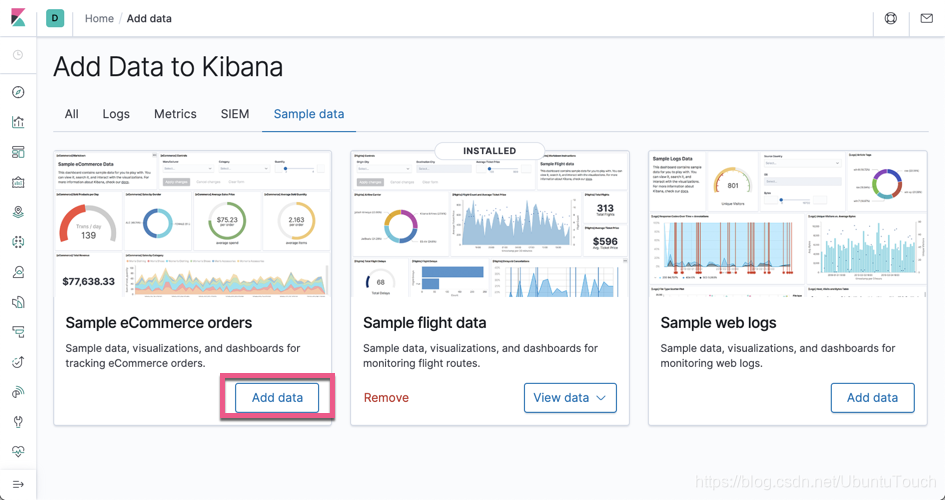
一旦数据加载完毕,我们可以在 Kibana 中找到一个叫做 kibana_sample_data_ecommerce 的索引。它的文档的一个例子:
讯享网{ "category" : [ "Men's Clothing" ], "currency" : "EUR", "customer_first_name" : "Eddie", "customer_full_name" : "Eddie Underwood", "customer_gender" : "MALE", "customer_id" : 38, "customer_last_name" : "Underwood", "customer_phone" : "", "day_of_week" : "Monday", "day_of_week_i" : 0, "email" : "", "manufacturer" : [ "Elitelligence", "Oceanavigations" ], "order_date" : "2020-05-04T09:28:48+00:00", "order_id" : , "products" : [ { "base_price" : 11.99, "discount_percentage" : 0, "quantity" : 1, "manufacturer" : "Elitelligence", "tax_amount" : 0, "product_id" : 6283, "category" : "Men's Clothing", "sku" : "ZO0", "taxless_price" : 11.99, "unit_discount_amount" : 0, "min_price" : 6.35, "_id" : "sold_product__6283", "discount_amount" : 0, "created_on" : "2016-12-26T09:28:48+00:00", "product_name" : "Basic T-shirt - dark blue/white", "price" : 11.99, "taxful_price" : 11.99, "base_unit_price" : 11.99 }, { "base_price" : 24.99, "discount_percentage" : 0, "quantity" : 1, "manufacturer" : "Oceanavigations", "tax_amount" : 0, "product_id" : 19400, "category" : "Men's Clothing", "sku" : "ZO0", "taxless_price" : 24.99, "unit_discount_amount" : 0, "min_price" : 11.75, "_id" : "sold_product__19400", "discount_amount" : 0, "created_on" : "2016-12-26T09:28:48+00:00", "product_name" : "Sweatshirt - grey multicolor", "price" : 24.99, "taxful_price" : 24.99, "base_unit_price" : 24.99 } ], "sku" : [ "ZO0", "ZO0" ], "taxful_total_price" : 36.98, "taxless_total_price" : 36.98, "total_quantity" : 2, "total_unique_products" : 2, "type" : "order", "user" : "eddie", "geoip" : { "country_iso_code" : "EG", "location" : { "lon" : 31.3, "lat" : 30.1 }, "region_name" : "Cairo Governorate", "continent_name" : "Africa", "city_name" : "Cairo" } }
通常,查询这些文档将要求用户理解为什么我们要对产品字段使用嵌套的数据类型,并且还要了解嵌套的查询语法。 但是,通过 Elasticsearch SQL,我们能够查询这些嵌套文档,就好像每个嵌套文档都使用其父级字段代表一个单独的行一样(即,我们有效地扁平化了表示结构)。 考虑上面有两个产品的订单。 当从产品子文档中请求字段时,查询时将其显示为两行。 如果需要,每一行还可以包含父订单的字段。 例如:
“查找航班所使用的帐单名称和购买的产品。”
如果我们查看一下 kibana_sample_data_ecommerce,我们发现这个索引的 products 字段并不是我们想象的 nested 类型。为此,我们需要重新定义它的 mapping:
PUT orders { "mappings": { "properties": { "category": { "type": "text", "fields": { "keyword": { "type": "keyword" } } }, "currency": { "type": "keyword" }, "customer_birth_date": { "type": "date" }, "customer_first_name": { "type": "text", "fields": { "keyword": { "type": "keyword", "ignore_above": 256 } } }, "customer_full_name": { "type": "text", "fields": { "keyword": { "type": "keyword", "ignore_above": 256 } } }, "customer_gender": { "type": "keyword" }, "customer_id": { "type": "keyword" }, "customer_last_name": { "type": "text", "fields": { "keyword": { "type": "keyword", "ignore_above": 256 } } }, "customer_phone": { "type": "keyword" }, "day_of_week": { "type": "keyword" }, "day_of_week_i": { "type": "integer" }, "email": { "type": "keyword" }, "geoip": { "properties": { "city_name": { "type": "keyword" }, "continent_name": { "type": "keyword" }, "country_iso_code": { "type": "keyword" }, "location": { "type": "geo_point" }, "region_name": { "type": "keyword" } } }, "manufacturer": { "type": "text", "fields": { "keyword": { "type": "keyword" } } }, "order_date": { "type": "date" }, "order_id": { "type": "keyword" }, "products": { "type": "nested", "properties": { "_id": { "type": "text", "fields": { "keyword": { "type": "keyword", "ignore_above": 256 } } }, "base_price": { "type": "half_float" }, "base_unit_price": { "type": "half_float" }, "category": { "type": "text", "fields": { "keyword": { "type": "keyword" } } }, "created_on": { "type": "date" }, "discount_amount": { "type": "half_float" }, "discount_percentage": { "type": "half_float" }, "manufacturer": { "type": "text", "fields": { "keyword": { "type": "keyword" } } }, "min_price": { "type": "half_float" }, "price": { "type": "half_float" }, "product_id": { "type": "long" }, "product_name": { "type": "text", "fields": { "keyword": { "type": "keyword" } }, "analyzer": "english" }, "quantity": { "type": "integer" }, "sku": { "type": "keyword" }, "tax_amount": { "type": "half_float" }, "taxful_price": { "type": "half_float" }, "taxless_price": { "type": "half_float" }, "unit_discount_amount": { "type": "half_float" } } }, "sku": { "type": "keyword" }, "taxful_total_price": { "type": "half_float" }, "taxless_total_price": { "type": "half_float" }, "total_quantity": { "type": "integer" }, "total_unique_products": { "type": "integer" }, "type": { "type": "keyword" }, "user": { "type": "keyword" } } } } 在上面,我们对原有的 mapping 做了如下的修改:
讯享网 "products": { "type": "nested", "properties": { "_id": { "type": "text", "fields": { "keyword": { "type": "keyword", "ignore_above": 256 } } }, "base_price": { "type": "half_float" }, "base_unit_price": { "type": "half_float" }, "category": { "type": "text", "fields": { "keyword": { "type": "keyword" } } }, "created_on": { "type": "date" }, "discount_amount": { "type": "half_float" }, "discount_percentage": { "type": "half_float" }, "manufacturer": { "type": "text", "fields": { "keyword": { "type": "keyword" } } }, "min_price": { "type": "half_float" }, "price": { "type": "half_float" }, "product_id": { "type": "long" }, "product_name": { "type": "text", "fields": { "keyword": { "type": "keyword" } }, "analyzer": "english" }, "quantity": { "type": "integer" }, "sku": { "type": "keyword" }, "tax_amount": { "type": "half_float" }, "taxful_price": { "type": "half_float" }, "taxless_price": { "type": "half_float" }, "unit_discount_amount": { "type": "half_float" } } }
在上面我加入了如下的一句:
"type": "nested",这样我们把 products 这个字段设置为 nested 数据类型。如果大家对 nested 数据类型还是不太清楚的话,请参阅我之前的文字 “Elasticsearch: nested 对象”。我们使用如下命令来做 reindex:
讯享网POST _reindex { "source": { "index": "kibana_sample_data_ecommerce" }, "dest": { "index": "orders" } }
我们通过如下的方式来继续查询:
sql> SELECT customer_last_name, customer_first_name, products.price, products.product_id FROM orders WHERE order_id=; customer_last_name|customer_first_name| products.price |products.product_id ------------------+-------------------+------------------+------------------- Underwood |Eddie |11.8164|6283 Underwood |Eddie |24.8164|19400 _translate API 将显示如何使用嵌套查询构造此查询:
讯享网POST /_sql/translate { "query": """ SELECT customer_last_name, customer_first_name, products.price, products.product_id FROM orders WHERE order_id= """ }
上面的显示结果是:
{ "size" : 1000, "query" : { "bool" : { "must" : [ { "term" : { "order_id" : { "value" : , "boost" : 1.0 } } }, { "nested" : { "query" : { "match_all" : { "boost" : 1.0 } }, "path" : "products", "ignore_unmapped" : false, "score_mode" : "none", "boost" : 1.0, "inner_hits" : { "name" : "products_1", "ignore_unmapped" : false, "from" : 0, "size" : 99, "version" : false, "seq_no_primary_term" : false, "explain" : false, "track_scores" : false, "_source" : { "includes" : [ "products.product_id", "products.price" ], "excludes" : [ ] } } } } ], "adjust_pure_negative" : true, "boost" : 1.0 } }, "_source" : { "includes" : [ "customer_last_name", "customer_first_name" ], "excludes" : [ ] }, "sort" : [ { "_doc" : { "order" : "asc" } } ] }相反,如果仅查询父字段,则仅显示一行:
“查找航班用于订单的帐单名称”
讯享网sql> SELECT customer_last_name, customer_first_name FROM orders WHERE order_id=; customer_last_name|customer_first_name ------------------+------------------- Underwood |Eddie
版权声明:本文内容由互联网用户自发贡献,该文观点仅代表作者本人。本站仅提供信息存储空间服务,不拥有所有权,不承担相关法律责任。如发现本站有涉嫌侵权/违法违规的内容,请联系我们,一经查实,本站将立刻删除。
如需转载请保留出处:https://51itzy.com/kjqy/44784.html