
用到的软件:ArcGIS Pro 2.4及以上,ArcGIS Enterprise 10.7.1,ArcGIS API for JavaScript 4.12
在pro2.4中,安装路径下的\Resources\TilingSchemes的众多切片方案中,有一个名为CGCS2000_Geographic_Coordinate_System.xml的文件,接下来的发布切片的时候会用到它
一、4490切片在全球场景中展示(无底图)
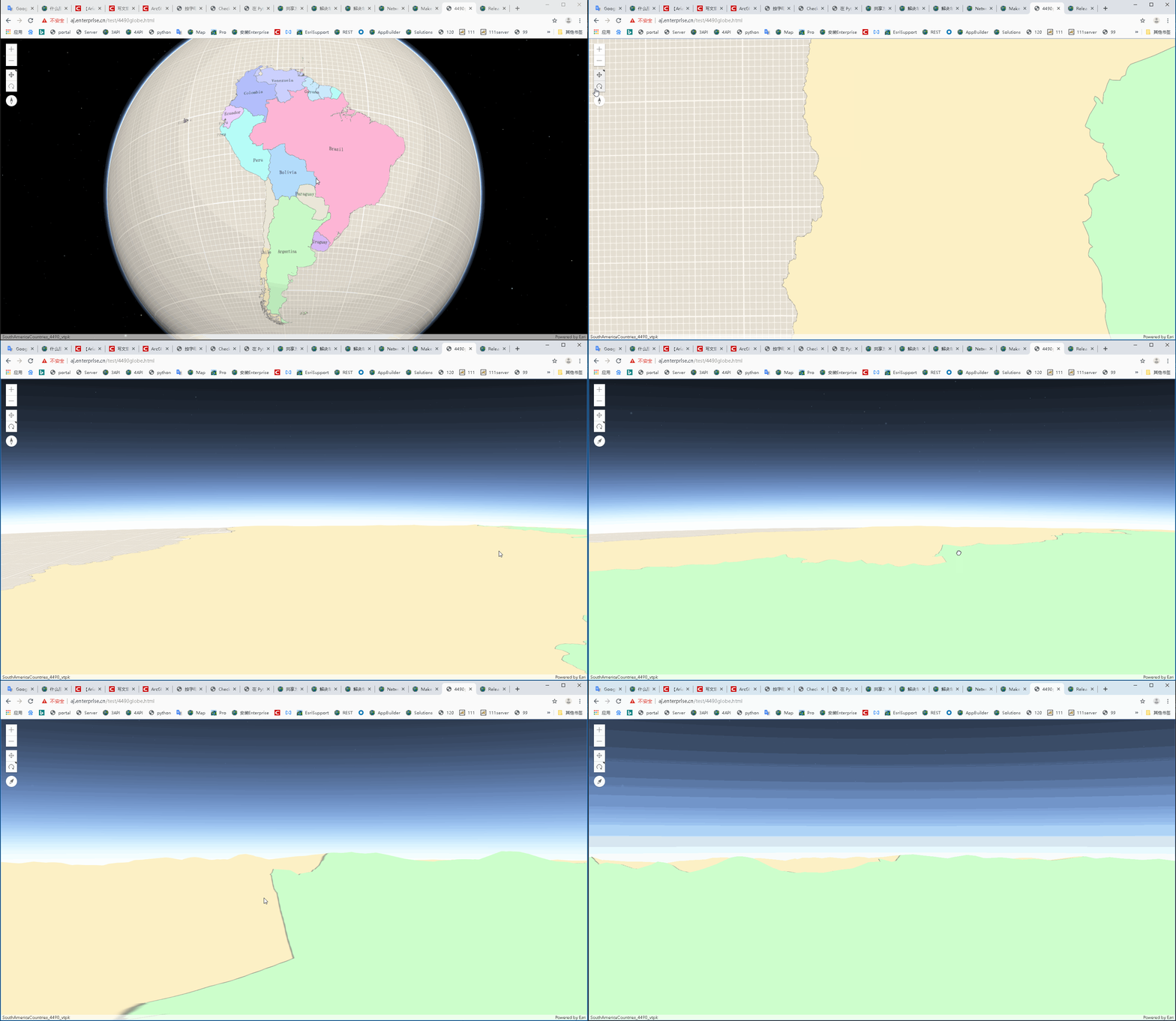
4490的矢量切片+4490地形
生成vtpk没有什么好说的,只需选择上面说的那个切片方案即可
发布地形之前需要注意,复制一份上面的切片方案,以记事本或者其它能编辑的状态打开,将最下面的CacheTileFormat由PNG改为LERC后保存,发布服务的时候用这份改过的切片方案即可。
注:为什么要改切片格式?因为地形要发布为高程服务,而高程服务的切片格式为lerc,为了服务与切片方案的对应,此处需要更改。还有,4490的切片不能在10.7.1中的portal场景查看器中浏览,这是正常的现象,应该是因为10.7.1的portal内置的js API是4.11和3.28,而从4.12开始才支持全球场景中加载和展示4490的切片。莫慌,前端能用。
Portal中内置API版本
代码及效果如下:

<!DOCTYPE html>
<html>

<head>
    <meta charset="utf-8" />
    <meta name="viewport" content="initial-scale=1, maximum-scale=1, user-scalable=no" />
    <title>4490globe</title>
    <style>
        html,
        body,
        #viewDiv {
            padding: 0;
            margin: 0;
            height: 100%;
            width: 100%;
        }
    </style>
    <link rel="stylesheet" href="https://js.arcgis.com/4.12/esri/themes/light/main.css" />
    <script src="https://js.arcgis.com/4.12/"></script>
    <script>
        require(["esri/Map", "esri/views/SceneView",
            "esri/layers/VectorTileLayer", "esri/layers/ElevationLayer"],
            function (Map, SceneView, VectorTileLayer, ElevationLayer) {
                var map = new Map();
                var view = new SceneView({
                    container: "viewDiv",
                    map: map
                });
                var vtpkUrl = "https://linux111.esrichina.com/server/rest/services/Hosted/SouthAmericaCountries_4490_vtpk/VectorTileServer";
                var vtpkLayer = new VectorTileLayer(vtpkUrl);
                map.add(vtpkLayer);
                var elevUrl = "https://linux111.esrichina.com/server/rest/services/SouthAmericaCountriesDEMLerc/ImageServer";
                var elevLyr = new ElevationLayer({ url: elevUrl, spatialReference: 4490 });
                map.ground.layers.add(elevLyr);
            });
    </script>
</head>

<body>
    <div id="viewDiv"></div>
</body>

</html>
讯享网
添加4490slpk,以multipatch为例
讯享网 var sceneUrl = "https://linux111.esrichina.com/server/rest/services/Hosted/cgcs/SceneServer"; var sceneLyr = new SceneLayer(sceneUrl); map.add(sceneLyr);

二、在全球场景中加载天地图为底图
参考链接
<!DOCTYPE html>
<html lang="en">

<head>
    <meta charset="UTF-8">
    <meta name="viewport" content="width=device-width, initial-scale=1.0">
    <meta http-equiv="X-UA-Compatible" content="ie=edge">
    <title>加载天地图4.12版本</title>
    <link rel="stylesheet" type="text/css" href="https://js.arcgisonline.cn/4.12/esri/css/main.css">
    <link rel="stylesheet" type="text/css" href="https://js.arcgisonline.cn/4.12/dijit/themes/soria/soria.css">
    <script type="text/javascript" src="https://js.arcgisonline.cn/4.12/dojo/dojo.js"></script>
    <style>
        html,
        body,
        #map {
            width: 100%;
            height: 100%;
            padding: 0;
            margin: 0;
        }
    </style>
    <script>
        require(["esri/Map",
            "esri/views/SceneView",
            "esri/layers/WebTileLayer",
            "esri/layers/support/TileInfo",
            "dojo/domReady!"
        ], function (Map, SceneView, WebTileLayer, TileInfo) {
            var tileInfo = new TileInfo({
                dpi: 90.71428571427429,
                rows: 256,
                cols: 256,
                compressionQuality: 0,
                origin: {
                    x: -180,
                    y: 90
                },
                spatialReference: {
                    wkid: 4490
                },
                lods: [
                    { level: 0, levelValue: 1, resolution: 0.703125, scale: 295497593.05875003 },
                    { level: 1, levelValue: 2, resolution: 0.3515625, scale: 147748796.52937502 },
                    { level: 2, levelValue: 3, resolution: 0.17578125, scale: 73874398.264687508 },
                    { level: 3, levelValue: 4, resolution: 0.087890625, scale: 36937199.132343754 },
                    { level: 4, levelValue: 5, resolution: 0.0439453125, scale: 18468599.566171877 },
                    { level: 5, levelValue: 6, resolution: 0.02197265625, scale: 9234299.7830859385 },
                    { level: 6, levelValue: 7, resolution: 0.010986328125, scale: 4617149.8915429693 },
                    { level: 7, levelValue: 8, resolution: 0.0054931640625, scale: 2308574.9457714846 },
                    { level: 8, levelValue: 9, resolution: 0.00274658203125, scale: 1154287.4728857423 },
                    { level: 9, levelValue: 10, resolution: 0.001373291015625, scale: 577143.73644287116 },
                    { level: 10, levelValue: 11, resolution: 0.0006866455078125, scale: 288571.86822143558 },
                    { level: 11, levelValue: 12, resolution: 0.00034332275390625, scale: 144285.93411071779 },
                    { level: 12, levelValue: 13, resolution: 0.000171661376953125, scale: 72142.967055358895 },
                    { level: 13, levelValue: 14, resolution: 8.58306884765625e-005, scale: 36071.483527679447 },
                    { level: 14, levelValue: 15, resolution: 4.291534423828125e-005, scale: 18035.741763839724 },
                    { level: 15, levelValue: 16, resolution: 2.1457672119140625e-005, scale: 9017.8708819198619 },
                    { level: 16, levelValue: 17, resolution: 1.0728836059570313e-005, scale: 4508.9354409599309 },
                    { level: 17, levelValue: 18, resolution: 5.3644180297851563e-006, scale: 2254.4677204799655 },
                    { level: 18, levelValue: 19, resolution: 2.68220901489257815e-006, scale: 1127.23386023998275 },
                    { level: 19, levelValue: 20, resolution: 1.341104507446289075e-006, scale: 563.616930119991375 }
                ]
            });
            var tdtUrl = "http://{subDomain}.tianditu.com/vec_c/wmts?SERVICE=WMTS&VERSION=1.0.0&REQUEST=GetTile&LAYER=vec&STYLE=default&FORMAT=tiles&TILEMATRIXSET=c&TILEMATRIX={level}&TILEROW={row}&TILECOL={col}&tk=你的tk"
            //此处天地图的坐标系为CGCS2000
            var tiledLayer = new WebTileLayer(tdtUrl, {
                subDomains: ["t0", "t1", "t2", "t3", "t4", "t5", "t6", "t7"],
                tileInfo: tileInfo,
                spatialReference: { wkid: 4490 }//重点在这一句,如果不指定,那么默认为102100,在前端就会报坐标系的错误
            });
            var map = new Map({
                basemap: {
                    baseLayers: [tiledLayer]
                }
            });
            var view = new SceneView({
                container: "map",
                map: map
            });
        })
    </script>
</head>

<body>
    <div id="map"></div>
</body>

</html>

</html>
三、在全球场景中加载天地图为底图,并叠加其他业务图层,如slpk,vtpk等
注:要保证各种类型的切片能叠加到一起,一定要保证切片方案的一致,以上代码中加载的所有由ArcGIS Server发出的服务,切片方案都是ArcGIS Pro 2.4 中CGCS2000_Geographic_Coordinate_System.xml这个切片方案
还是二中的代码,加上以下代码即可
讯享网 var vtpkUrl2 = "https://tiles.arcgis.com/tiles/YQzQEGkNrQsMdJlx/arcgis/rest/services/SouthAmericaCountries_4490_vtpk_layer/VectorTileServer"; var vtpkLayer = new VectorTileLayer(vtpkUrl2); map.add(vtpkLayer); var elevUrl = "https://linux111.esrichina.com/server/rest/services/SouthAmericaCountriesDEMLerc/ImageServer"; var elevLyr = new ElevationLayer({ url: elevUrl, spatialReference: 4490 }); map.ground.layers.add(elevLyr);
版权声明:本文内容由互联网用户自发贡献,该文观点仅代表作者本人。本站仅提供信息存储空间服务,不拥有所有权,不承担相关法律责任。如发现本站有涉嫌侵权/违法违规的内容,请联系我们,一经查实,本站将立刻删除。
如需转载请保留出处:https://51itzy.com/kjqy/41714.html