
0)YUM 简单介绍
0.1)YUM 是什么
YUM(Yellow Dog Updater Modified)为多个 Linux 发行版的软件包管理器,例如 Redhad RHEL CentOS & Fedora。YUM 主要用于自动安装,升级 rpm 软件包,他能自动查找并解决 rpm 包的依赖关系
YUM 自动下载YUM包并安装,类似软件管家的一键安装功能:

0.2)YUM 源是什么
- 要成功的使用 YUM 工具安装更新软件或系统,就需要有一个包含各种 rpm 软件包的 repository(软件仓库),这个软件仓库我们习惯称为 yum 源。
- 网络上有大量的 yum 源,但由于受到网络环境的限制,导致软件安装耗时过长甚至失败,特别是当有大量服务器大量软件包需要安装时,缓慢的进度条令人难以忍受,因此我们在优化系统时,都会更换国内的源
- 相比较而言,本地YUM源服务器最大优点是局域网的快速网络连接和稳定性,有了局域网中的YUM源服务器,即便在Internel连接中断的情况下,也不会影响其他YUM客户端的软件安装和升级。
0.3)YUM 源工作原理
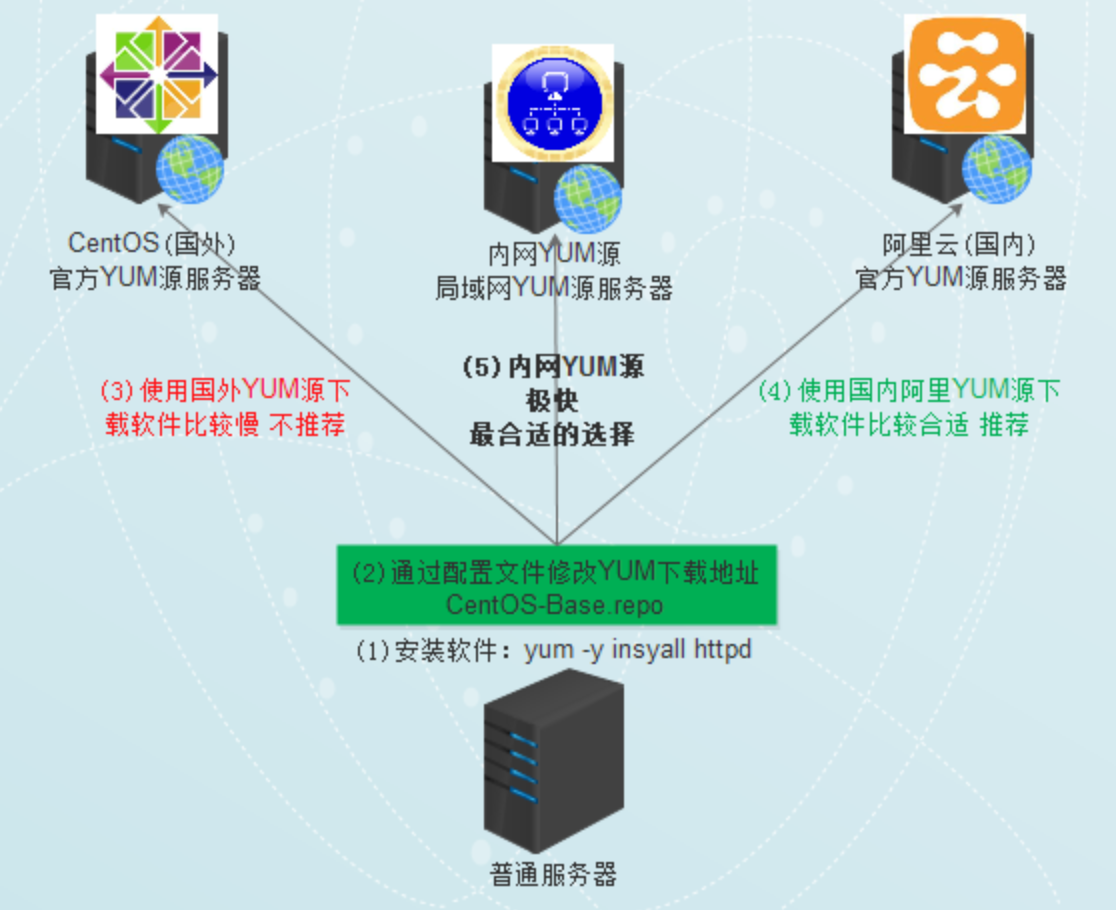
YUM 源 Client 配置文件的存放路径
[root@localhost packages] cd /etc/yum.repos.d/ [root@localhost yum.repos.d] ls CentOS-Base.repo CentOS-fasttrack.repo epel.repo CentOS-Base.repo CentOS-Media.repo CentOS-Debuginfo.repo CentOS-Vault.repo 讯享网
0.4)国内 YUM 仓库推荐
以下为国内常见 yum 仓库
讯享网网易 163 yum 源 安装方法查看:http://mirrors.163.com/.help/ 中科大的 yum 源 安装方法查看:https://lug.ustc.edu.cn/wiki/mirrors/help sohu 的 yum 源 安装方法查看: http://mirrors.sohu.com/help/ 阿里云的 yum 源 安装方法查看: https://opsx.alibaba.com/mirror 清华大学的 yum 源 安装方法查看: https://mirrors.tuna.tsinghua.edu.cn/ 浙江大学的 yum 源 安装方法查看: http://mirrors.zju.edu.cn/ 中国科技大学 yum 源 安装方法查看: http://centos.ustc.edu.cn/
0.5)RPM 包版本号说明
rpm 包的命名规范
name-version-release-arch.rpm
名称 - 版本 - 发行版本 - 平台 - 后缀
version:版本号
主版本号:软件有重大改进
次版本号:某个子功能发生变化
修订号:软件发布时解决了一个BUG,或者调整了一部分功能
release:发行版本号
1)YUM 仓库搭建部署
方案一:使用 ISO 镜像搭建 YUM 仓库
- 将镜像文件提前下载到服务器
mkdir -p /data/mirrors/ && cd /data/mirrors/ rz CentOS-7-x86_64-DVD-1810.iso 
- 将光驱进行挂载到 /mnt 目录下
讯享网// 挂载 ISO 镜像文件 mount CentOS-7-x86_64-DVD-1810.iso /mnt // 将挂载目录中的所有文件复制到 /data/mirrors/centos/ 目录 mkdir -p /data/mirrors/centos/ \cp -rf /mnt/* /data/mirrors/centos/ // 检查文件是否复制完毕 ls -l /data/mirrors/centos/ du -sh /data/mirrors/centos/ // 取消挂载的 iso 文件 umount /mnt/
- 安装 Nginx 服务
扩展:reset_centos.sh < 可以使用该脚本配置在线源安装 Nginx >
yum install nginx vim -y - 配置 Nginx 服务
讯享网\cp -f /etc/nginx/nginx.conf /etc/nginx/nginx.conf_bak // 配置 Nginx 服务 vim /etc/nginx/nginx.conf http {
    autoindex on; autoindex_exact_size on; autoindex_localtime on; server {
    root /data/mirrors/;

nginx -t - 启动 Nginx 服务
讯享网systemctl start nginx systemctl enable nginx
- 访问 Web 界面
如报错:403 Forbidden,关闭 SELinux 再尝试访问


- 客户端配置 YUM 仓库
注意将 baseurl 改为你主机的 IP 地址
rm -rf /etc/yum.repos.d/*.repo cat >/etc/yum.repos.d/CentOS-Base.repo<<EOF [centos] name=CentOS-$releasever - Base baseurl=http://10.0.59.114/centos/ gpgcheck=0 enabled=1 EOF - 客户端使用 YUM 仓库
讯享网// 清理 yum 缓存 yum clean all // 更新 yum 仓库 yum makecache // 验证 yum repolist

- 使用 Yum 仓库安装软件
[root@web01 ~] yum -y install httpd // 安装 apache 软件测试 
方案二:使用 RPM 包搭建 YUM 仓库
例如:单独下载某个软件所依赖的所有 RPM 软件包,而后放置 Yum 仓库生成 repodata 索引文件即可。
- 清理上面的实验环境
讯享网rm -rf /data/mirrors/centos/
- 配置公网 YUM 仓库
rm -rf /etc/yum.repos.d/*.repo curl -o /etc/yum.repos.d/CentOS-Base.repo http://mirrors.cloud.tencent.com/repo/centos7_base.repo curl -o /etc/yum.repos.d/epel.repo http://mirrors.cloud.tencent.com/repo/epel-7.repo yum clean all yum repolist 

- 创建目录用来做 YUM 仓库的使用,准备下载 rpm 包软件
讯享网mkdir -p /data/mirrors/centos/ yum install --downloadonly --downloaddir=/data/mirrors/centos/ java
- 安装 createrepo 软件,用于生成 yum 仓库数据库的软件
yum -y install createrepo rpm -qa | grep createrepo - 初始化 repodata 索引文件(每次发布新的内容都需要更新,)
讯享网createrepo -pdo /data/mirrors/centos/ /data/mirrors/centos/

- 每加入或者更新一个 rpm 包就要更新一下
createrepo --update /data/mirrors/centos/ 
- 使用 Nginx 当 Web 服务器
讯享网yum -y install nginx cp /etc/nginx/nginx.conf{
   ,.source.bak} vim /etc/nginx/nginx.conf http {
    autoindex on; autoindex_exact_size on; autoindex_localtime on; server {
    root /data/mirrors/;

- 检查并启动 Nginx
nginx -t systemctl start nginx systemctl enable nginx - 访问 Web 界面
如报错:403 Forbidden,关闭 SELinux 再尝试访问
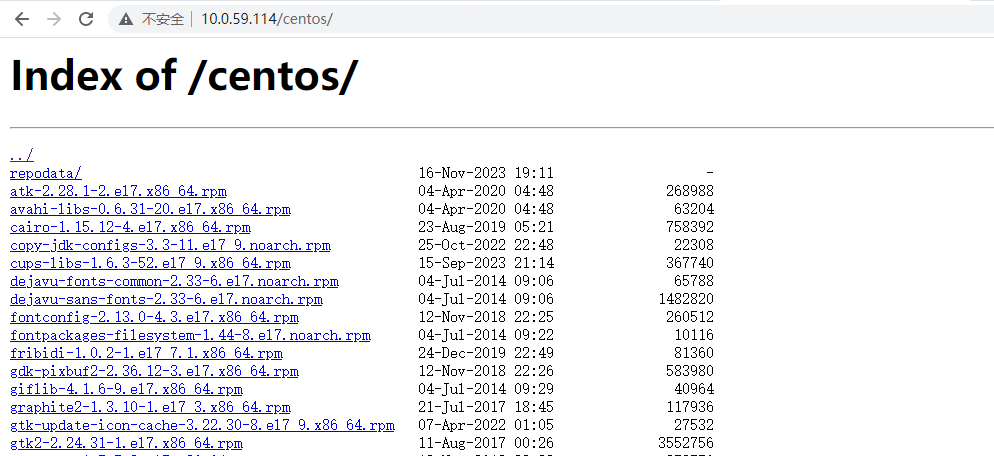
- YUM 客户端设置
注意将 baseurl 改为你主机的 IP 地址
讯享网rm -rf /etc/yum.repos.d/*.repo cat >/etc/yum.repos.d/local.repo<<EOF [local-repo] name=local baseurl=http://10.0.59.114/centos/ gpgcheck=0 enabled=1 EOF // 验证 yum clean all yum repolist // 安装软件 yum install java
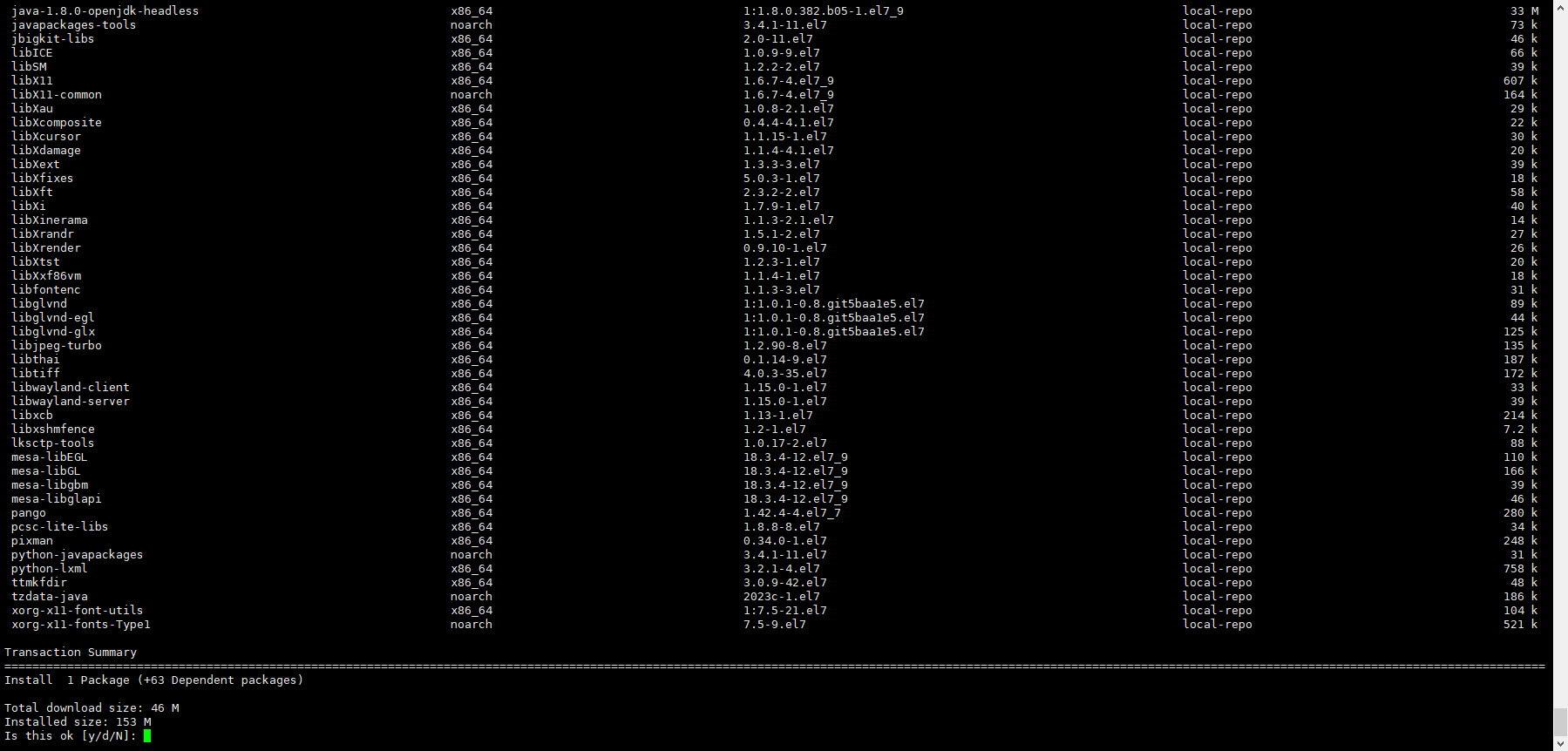
方案三:公网镜像同步搭建 YUM 仓库
上述方案都只是将系统现有的 rpm 包,放置在 yum 源。
但还有一种企业需求,说的更具体一点,平时学生上课 yum 安装软件都是从公网下载的,占用带宽,因此在学校里搭建一个内网 yum 服务器,但又考虑到学生回家也要使用 yum 安装软件,如果 yum 软件的数据库文件 repodata 不一样,就会有问题。因此我想到的解决方法就是直接使用公网 yum 源的 repodata。
// '上游 yum 源必须要支持 rsync 协议, 否则不能使用 rsync 进行同步' http://mirrors.ustc.edu.cn/status/ CentOS 源:rsync://mirrors.tuna.tsinghua.edu.cn/centos/ epel 源:rsync://mirrors.tuna.tsinghua.edu.cn/epel/ 备用源:rsync://mirrors.ustc.edu.cn/ 
讯享网yum provides rsync yum install rsync -y
同步方案 1:此方案适合磁盘空间不是很富裕,但是想最小化使用 YUM 私有仓库的需求 ( 仅适用于 CentOS7 系列系统 )
mkdir -p /data/mirrors/ mkdir -p /data/mirrors/centos/7/os/x86_64/ mkdir -p /data/mirrors/centos/7/extras/x86_64/ mkdir -p /data/mirrors/centos/7/updates/x86_64/ mkdir -p /data/mirrors/epel/7/ rsync -avzuP rsync://mirrors.tuna.tsinghua.edu.cn/centos/7/os/x86_64/ /data/mirrors/centos/7/os/x86_64/ rsync -avzuP rsync://mirrors.tuna.tsinghua.edu.cn/centos/7/extras/x86_64/ /data/mirrors/centos/7/extras/x86_64/ rsync -avzuP rsync://mirrors.tuna.tsinghua.edu.cn/centos/7/updates/x86_64/ /data/mirrors/centos/7/updates/x86_64/ rsync -avzuP rsync://mirrors.tuna.tsinghua.edu.cn/epel/7/ /data/mirrors/epel/7/ 同步方案 2:此方案适合磁盘空间还算富裕,但是想最性价比的使用 YUM 私有仓库的需求 ( 仅适用于 CentOS7 系列系统 )
讯享网mkdir -p /data/mirrors/ mkdir -p /data/mirrors/centos/7/ mkdir -p /data/mirrors/epel/7/ rsync -avzuP rsync://mirrors.tuna.tsinghua.edu.cn/centos/7/ /data/mirrors/centos/7/ rsync -avzuP rsync://mirrors.tuna.tsinghua.edu.cn/epel/7/ /data/mirrors/epel/7/
同步方案 3:此方案适合磁盘空间富裕,使用 YUM 私有仓库的需求 ( 适用于CentOS系列系统 )
mkdir -p /data/mirrors/ mkdir -p /data/mirrors/centos/ mkdir -p /data/mirrors/epel/ rsync -avzuP rsync://mirrors.tuna.tsinghua.edu.cn/centos/ /data/mirrors/centos/ rsync -avzuP rsync://mirrors.tuna.tsinghua.edu.cn/epel/ /data/mirrors/epel/ 完成上述三种方案的其中一种后…
- 使用 Nginx 当 Web 服务器
讯享网yum -y install nginx cp /etc/nginx/nginx.conf{
   ,.source.bak} vim /etc/nginx/nginx.conf http {
    autoindex on; autoindex_exact_size on; autoindex_localtime on; server {
    root /data/mirrors/;
- 检查并启动 Nginx
[11:14:01 root@blog ~] nginx -t nginx: the configuration file /etc/nginx/nginx.conf syntax is ok nginx: configuration file /etc/nginx/nginx.conf test is successful 讯享网systemctl start nginx systemctl enable nginx
- 访问 Web 界面
如报错:403 Forbidden,关闭 SELinux 再尝试访问

- YUM 客户端设置
注意将 baseurl 改为你主机的 IP 地址
rm -rf /etc/yum.repos.d/*.repo cat >/etc/yum.repos.d/local.repo<<EOF [local-repo] name=local baseurl=http://10.0.59.114/centos/ gpgcheck=0 enabled=1 EOF // 验证 yum clean all yum makecache // 查看 yum repolist // 安装软件 yum install java
版权声明:本文内容由互联网用户自发贡献,该文观点仅代表作者本人。本站仅提供信息存储空间服务,不拥有所有权,不承担相关法律责任。如发现本站有涉嫌侵权/违法违规的内容,请联系我们,一经查实,本站将立刻删除。
如需转载请保留出处:https://51itzy.com/kjqy/37154.html