

2022最后一个月充满了期待,平安夜、圣诞节、元旦节;2023年也是一个早年,因此关于程序方面的浪漫,大家应该趁早准备。下面我将分享一个元旦的倒计时和圣诞树的绘制核心代码。大家可以依据自身的需求,稍微调整即可用。
2022 圣诞树
下载地址:Java200行代码画了三种浪漫的圣诞树的实例代码-Java文档类资源-CSDN下载
效果如下:

如何用纯Java语言,200行代码,画三种不同的“圣诞树”,直接使用Graphics2D进行绘制一层树层,然后封装成组件可以重复使用。最后把几个树层堆积起来,添加上树干就完成啦!但是勇哥写的程序永远没那么简单,我还在树上填充了积雪、或者直接把整颗树填充成你女朋友的名字,浪漫一把! 此程序你值得拥有,你可以用来:
- 向你女朋友制造浪漫圣诞 - 用来学习高级绘画API 总体支持的功能有:
- 支持纯绿模式
- 支持绿色+白色积雪模式
- 支持绿色+白色积雪+你女朋友名字模式
- 支持层数的自定义修改 - 程序内置一个动画彩蛋,谁用谁知道牛逼!
从此案例中你能学习到什么:
- 能学习到高级轮廓(比如树)的纯代码绘制
- 能学习到不规则图形,如何进行纹理填充
- 能学习到面向对象的高级编程思想
参考代码:
package com.madou.yy.turnover; import javax.swing.*; import java.awt.*; import java.awt.geom.GeneralPath; import java.awt.geom.Rectangle2D; import java.awt.image.*; import java.util.Random; // 圣诞树核心代码 public class TreeLeafPanel extends JPanel implements Runnable { Color color = new Color(0, 208, 158); int margin = 5 ; Stroke stroke = new BasicStroke(2); String text = "向日葵"; / * 0 = 不填充 * 1 = 线程动态填充 * 2 = 文字 */ int fillType = 0; public TreeLeafPanel(int fillType){ this.fillType=fillType; this.setLayout(null); this.setOpaque(false); } public void paintComponent(Graphics g) { if(image==null) { initialize(); } Graphics2D g2d = (Graphics2D) g; g2d.setRenderingHint(RenderingHints.KEY_ANTIALIASING,RenderingHints.VALUE_ANTIALIAS_ON); g2d.setPaint(color); g2d.setStroke(stroke); int leftY= (int) (getHeight()-margin-getHeight()*0.3); int step = (getWidth()-margin*2)/32; System.out.println(step); GeneralPath polygon = new GeneralPath(GeneralPath.WIND_EVEN_ODD); polygon.moveTo(getWidth()/2,margin); polygon.quadTo(getWidth()/2-5,margin+(leftY-margin)*3/5,margin,leftY); for (int i = 1; i < 6; i++) { polygon.quadTo(margin+step*i*3,leftY,margin+step*i*3,leftY-3); polygon.quadTo(margin+step*i*3,leftY+3,margin+step*(i*3-1),leftY+step*2-(6-i)); } for (int i = 6; i < 10; i++) { polygon.quadTo(margin+step*i*3,leftY,margin+step*i*3,leftY-3); polygon.quadTo(margin+step*i*3,leftY+3,margin+step*(i*3+4),leftY+step*2-(7-i)); } polygon.quadTo(getWidth()/2+5,margin+(leftY-margin)*3/5,getWidth()/2,margin); polygon.closePath(); Rectangle2D bounds2D = polygon.getBounds2D(); if(image!=null) { TexturePaint texture = new TexturePaint(image, bounds2D); g2d.setPaint(texture); } g2d.fill(polygon); g2d.setColor(Color.BLACK); g2d.draw(polygon); } byte[] data; BufferedImage image; Random random; public void initialize() { random = new Random(); int w = getSize().width, h = getSize().height; int length = ((w + 7) * h) / 8; data = new byte[length]; imageFactory(); if(fillType==1) { new Thread(this).start(); } } public void imageFactory(){ if(fillType==0){ image = null; }else if(fillType==1){ imageBW(); }else{ imageName(); } } public void imageBW(){ int w = getSize().width, h = getSize().height; int length = ((w + 7) * h) / 8; data = new byte[length]; DataBuffer db = new DataBufferByte(data, length); WritableRaster wr = Raster.createPackedRaster(db, w, h, 1, null); ColorModel cm = new IndexColorModel(1, 2, new byte[] { (byte) 255, (byte) 0 }, new byte[] { (byte) 255, (byte) 208 }, new byte[] { (byte) 255, (byte) 158 }); if(image==null) { image = new BufferedImage(cm, wr, false, null); } } public void imageName(){ int w = getSize().width, h = getSize().height; if(image==null) { image = new BufferedImage(w, h, BufferedImage.TYPE_INT_ARGB); } Graphics2D g2d = image.createGraphics(); g2d.setColor(color); g2d.fillOval(0,0,w,h); Rectangle2D rectangle = g2d.getFont().getStringBounds(text, g2d.getFontRenderContext()); for (int i = 0; i < w; i+=rectangle.getWidth()+5) { for (int j = 0;j< h; j+=rectangle.getHeight()+5) { g2d.setPaint(Color.WHITE); g2d.drawString(text,i,j); } } g2d.dispose(); } public void run() { while (true) { random.nextBytes(data); repaint(); try { Thread.sleep(100); } catch (InterruptedException e) { /* die */ } } } } 讯享网
2023元旦倒计时
下载地址:java版卡通元旦倒计时程序-新时间API学习好案例-Java文档类资源-CSDN下载
效果演示:
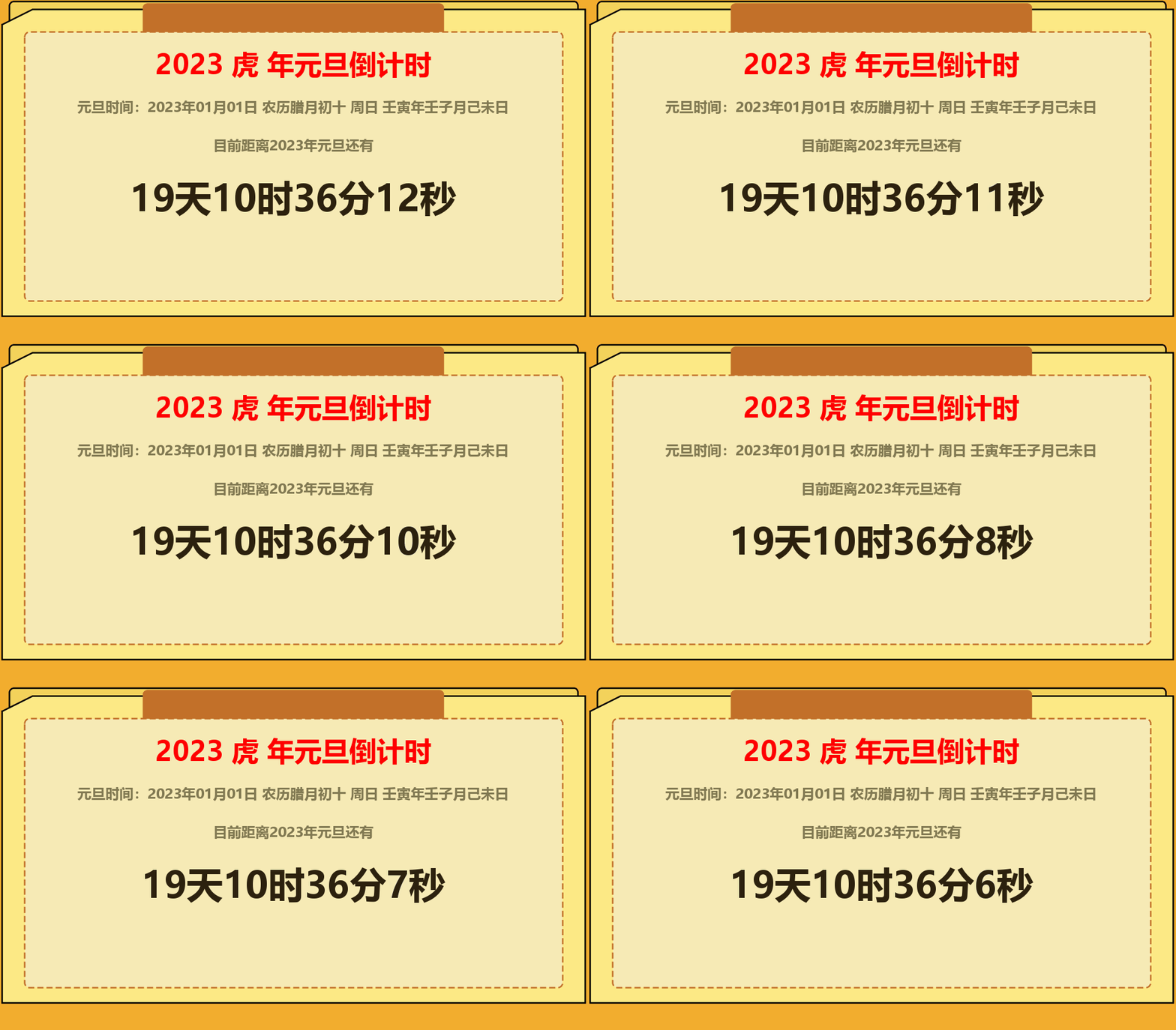

使用纯java+swing技术,来实现的《元旦倒计时》程序,界面卡通漂亮,另程序支持的功能如下: - 通用元旦倒计时,今年能用、明年也能用
- 支持生肖显示 - 支持农历显示 - 支持天干地支显示
- 支持倒计时显示 代码特点:基于Jdk1.8的新时间操作类进行开发,对于大家学习新时间API大有帮助。
【时间API】
- LocalDate
- LocalDateTime
- ChineseDate
- Duration
【SwingAPI】
- 自定美化组件样式
- 实线+虚线的绘制
- 多边形+圆角矩形绘制
- 动态文字的动态大小计算
【多线程】
- 如何使用多线程进行倒计时+swing界面刷新
参考代码:
讯享网package com.madou.yy.newyear; import cn.hutool.core.date.ChineseDate; import javax.swing.*; import java.awt.*; import java.awt.font.FontRenderContext; import java.awt.geom.PathIterator; import java.awt.geom.Point2D; import java.awt.geom.QuadCurve2D; import java.awt.geom.Rectangle2D; import java.text.SimpleDateFormat; import java.time.Duration; import java.time.LocalDate; import java.time.LocalDateTime; import java.time.format.DateTimeFormatter; import java.time.format.TextStyle; import java.util.ArrayList; import java.util.Calendar; import java.util.Locale; public class TimePanel extends JPanel implements Runnable { Color bgColor0 = new Color(242, 173, 46); Color bgColor1 = new Color(243, 210, 91); Color bgColor2 = new Color(253, 233, 133); Color bgColor3 = new Color(194, 112, 41); Color bgColor4 = new Color(246, 234, 181); Color lineColor = bgColor3; Stroke stroke = new BasicStroke(2); Stroke stroke2 = new BasicStroke(2,BasicStroke.CAP_SQUARE,BasicStroke.JOIN_MITER,1.0f,new float[]{6F},10f); Color font1 = Color.RED; Color font2 = new Color(129, 121, 82); Color font3 = new Color(44, 33, 14); String title1 = "",title2="",nong="",dao=""; public void paintComponent(Graphics g) { // 设置抗锯齿 Graphics2D g2d = (Graphics2D) g; g2d.setRenderingHint(RenderingHints.KEY_ANTIALIASING,RenderingHints.VALUE_ANTIALIAS_ON); // 最底层背景 g2d.setColor(bgColor0); g2d.fillRect(0,0,getWidth(),getHeight()); // 第2层背景 g2d.setColor(bgColor1); g2d.fillRoundRect(20,5,getWidth()-40,getHeight()-60,10,10); // 第2层背景边框 g2d.setStroke(stroke); g2d.setColor(Color.BLACK); g2d.drawRoundRect(20,5,getWidth()-40,getHeight()-60,10,10); // 多边形 int px[] = new int[]{10,50,getWidth()-10,getWidth()-10,10,10,}; int py[] = new int[]{35,15,15,getHeight()-45,getHeight()-45,35}; g2d.setColor(bgColor2); g2d.fillPolygon(px,py,px.length-1);// 多边形填充 g2d.setColor(Color.BLACK); g2d.drawPolyline(px,py,px.length);// 多边形边 // 深色 第3层背景+线 g2d.setColor(bgColor3); g2d.fillRoundRect((int)(getWidth()*0.25),8,(int)(getWidth()*0.5),100,10,10); g2d.drawRoundRect((int)(getWidth()*0.25),8,(int)(getWidth()*0.5),100,10,10); // 第4层背景+虚线 g2d.setColor(bgColor4); g2d.fillRoundRect(40,45,getWidth()-80,getHeight()-110,12,12); g2d.setStroke(stroke2); g2d.setColor(lineColor); g2d.drawRoundRect(40,45,getWidth()-80,getHeight()-110,12,12); // 绘制文字 第一排 Font font = new Font("微软雅黑",Font.BOLD,36); g2d.setColor(font1); g2d.setFont(font); Rectangle2D title1Bounds = font.getStringBounds(title1, g2d.getFontRenderContext()); g2d.drawString(title1,(int)(getWidth()-title1Bounds.getWidth())/2,100); // 绘制文字 第二排:农历 font = new Font("微软雅黑",Font.BOLD,18); g2d.setColor(font2); g2d.setFont(font); Rectangle2D nongBounds = font.getStringBounds(nong, g2d.getFontRenderContext()); g2d.drawString(nong,(int)(getWidth()-nongBounds.getWidth())/2,150); // 绘制文字 第三排 font = new Font("微软雅黑",Font.BOLD,18); g2d.setColor(font2); g2d.setFont(font); Rectangle2D title2Bounds = font.getStringBounds(title2, g2d.getFontRenderContext()); g2d.drawString(title2,(int)(getWidth()-title2Bounds.getWidth())/2,200); // 绘制文字 第四排 倒计时 font = new Font("微软雅黑",Font.BOLD,48); g2d.setColor(font3); g2d.setFont(font); Rectangle2D daoBounds = font.getStringBounds(dao, g2d.getFontRenderContext()); g2d.drawString(dao,(int)(getWidth()-daoBounds.getWidth())/2,280); } @Override public void run() { LocalDate localDate = LocalDate.now(); localDate = localDate.plusYears(1).withMonth(1).withDayOfMonth(1); LocalDateTime localDateTime = localDate.atTime(0, 0, 0, 0); while (true){ ChineseDate chineseDate = new ChineseDate(localDate); title1 = String.format("%s %s 年元旦倒计时",localDate.getYear(),chineseDate.getChineseZodiac()); nong = String.format("元旦时间:%s 农历%s%s %s %s", localDateTime.format(DateTimeFormatter.ofPattern("yyyy年MM月dd日")), chineseDate.getChineseMonthName(), chineseDate.getChineseDay(), localDate.getDayOfWeek().getDisplayName(TextStyle.SHORT, Locale.CHINESE), chineseDate.getCyclicalYMD() ); title2 = String.format("目前距离%s年元旦还有",localDate.getYear()); Duration duration = Duration.between( LocalDateTime.now(),localDateTime); dao =String.format("%s天%s时%s分%s秒", duration.toDays(), duration.toHours()%24, duration.toMinutes()%60, duration.getSeconds()%60 ); try { repaint(); Thread.sleep(1000); } catch (InterruptedException e) { e.printStackTrace(); } } } public void start() { new Thread(this).start(); } }
版权声明:本文内容由互联网用户自发贡献,该文观点仅代表作者本人。本站仅提供信息存储空间服务,不拥有所有权,不承担相关法律责任。如发现本站有涉嫌侵权/违法违规的内容,请联系我们,一经查实,本站将立刻删除。
如需转载请保留出处:https://51itzy.com/kjqy/36851.html