
1、API注册
https://www.themoviedb.org/,打开改中文语言,然后注册—验证邮箱—登录

2、API申请

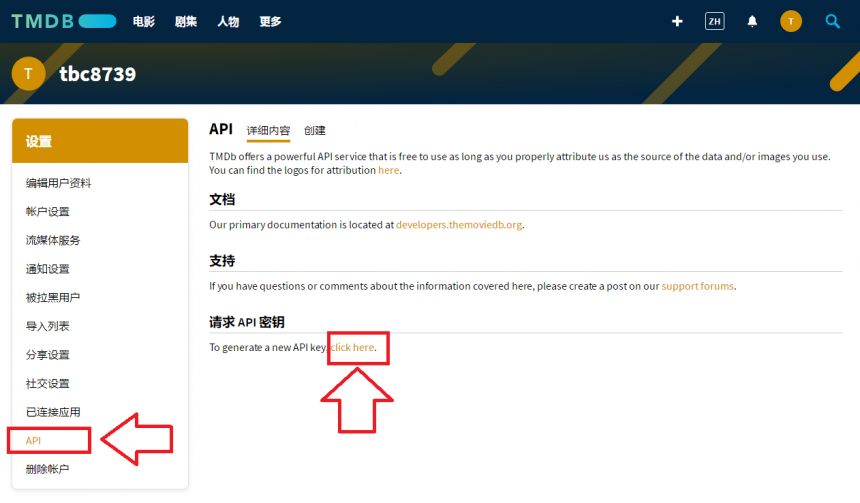


应用简介,样板:Data is at the heart of every industry’s transformation, and this is where Synology has a profoundly important role to play. At its very core, our mission is to manage and protect the world’s data. Synology uniquely enables every business to manage, secure, and protect their data wherever access is needed from flash to disk to multiple cloud architectures – at the scale needed to accommodate the exponential data growth of the digital world.
3、复制API密钥到Video Station设置—高级


测试连接,如果显示“连接成功”,完活,不用往下看了,但是:国内环境大部分是失败的,继续执行第四步即可。
4、一键修改host
1、打开链接,ctrl+f,查找 china
https://dnschecker.org/#A/api.themoviedb.org

根据你自己跳出来的dns地址修改如下格式,复制一下,后面有用到
52.85.132.41 api.themoviedb.org 52.85.132.87 api.themoviedb.org 52.85.132.26 api.themoviedb.org 52.85.132.60 api.themoviedb.org讯享网
2、开启群晖SSH(控制面板/终端机和SNMP)

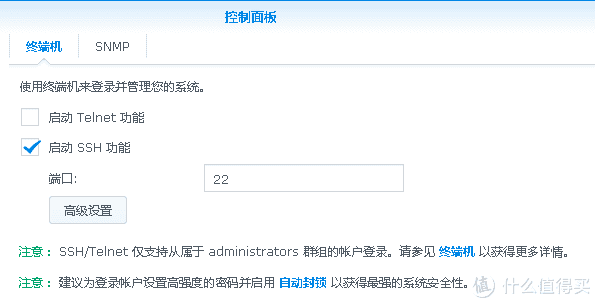 开启群晖SSH
3、登陆SSH(以PuTTY为例)
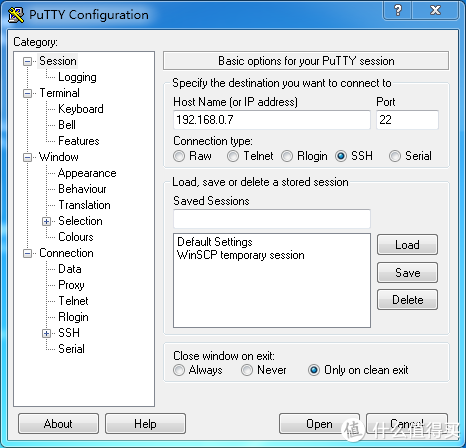

5,接着输入命令:
讯享网vi /etc/hosts6,按下链接 i 键盘进行编辑
7,把生成的dns地址复制到最下面

8,按下键盘 esc键, 9,再同时按下 ,shift+:(冒号键盘) 10,输入命令:wq (保存退出)11,再次回到,VideoStation 点测试连接即可。


版权声明:本文内容由互联网用户自发贡献,该文观点仅代表作者本人。本站仅提供信息存储空间服务,不拥有所有权,不承担相关法律责任。如发现本站有涉嫌侵权/违法违规的内容,请联系我们,一经查实,本站将立刻删除。
如需转载请保留出处:https://51itzy.com/kjqy/36336.html