
1.Slate编辑器使用槽的方式构建布局

2. SlateCore中的部分类图

只有继承自SWidge的类,才能被Slate绘制,一般不直接使用。
SCompundWidget经常被继承用来排版,期包括一个ChildSlot,再ChildSlot中构建SWidget
SWindow是窗口类,其用于构建窗口。
SHorizontalBox及SerticalBox经常用于布局。期可以使用多个Slot进行布局,如:
SNew(SScrollBox) // Default settings example +SScrollBox::Slot() .Padding(5) [ SNew(STextBlock) .ShadowOffset(HeadingShadowOffset) .Font( LargeLayoutFont ) .Text( LOCTEXT("ExampleLayout-DefaultSettingsLabel", "Default Settings (AutoSize):") ) ] +SScrollBox::Slot() .Padding(10,5) [ SNew(SHorizontalBox) +SHorizontalBox::Slot() .AutoWidth() [ SNew(SButton) .Text( LOCTEXT("ExampleLayout-TextLabel01", "Default.\n Slot is auto-sized.") ) ] +SHorizontalBox::Slot() .AutoWidth() [ SNew(SButton) .Text( LOCTEXT("ExampleLayout-TextLabel02", "Slots are packed tightly.") ) ] +SHorizontalBox::Slot() .AutoWidth() [ SNew(SButton) .Text( LOCTEXT("ExampleLayout-TextLabel03", "Alignment within the slot\n does not matter.") ) ] ] // Fill Size example +SScrollBox::Slot() .Padding(5) [ SNew(STextBlock) .ShadowOffset(HeadingShadowOffset) .Font( LargeLayoutFont ) .Text( LOCTEXT("ExampleLayout-FillSizeLabel", "Fill Size:") ) ] +SScrollBox::Slot() .Padding(10,5) [ SNew(STextBlock) .Font(SmallLayoutFont) .Text( LOCTEXT("ExampleLayout-TextLabel04", "Will stretch to fill any available room based on the fill coefficients.") ) 讯享网
3. Slate中的部分类图,其中的layout及Widge很多都继承自SWidge中的类

SDockTab用于创建Tab也,其可以装入其他的布局。SBorder可以添加背景图,背景颜色框。SGirdPanel可以网格布局。SBox是最简单的布局,没有子Slot。
4. 使用。创建继承自SCompoundWidge的类。使用引擎的 文件->新建C++类 创建。



选择TestEditor后能够自动将C++文件创建到对应打的目录,创建完之后如下图

修改代码,完整代码如下
SMyCompoundWidget.h
讯享网// Fill out your copyright notice in the Description page of Project Settings. #pragma once #include "CoreMinimal.h" #include "Widgets/SCompoundWidget.h" #include "Slate.h" / * */ class TESTEDITOR_API SMyCompoundWidget : public SCompoundWidget { public: SLATE_BEGIN_ARGS(SMyCompoundWidget) {} SLATE_END_ARGS() / Constructs this widget with InArgs */ void Construct(const FArguments& InArgs); TSharedPtr<SHorizontalBox> mainWidge; TSharedRef<ITableRow> OnGenerateWidgetForList(TSharedPtr<FString> Item, const TSharedRef<STableViewBase>& OwnerTable); void OnComponentSelected(TSharedPtr<FString> InItem, ESelectInfo::Type InSelectInfo); TArray< TSharedPtr<FString> > Items; void OnFilterTextChanged( const FText& InFilterText ); };
SMyCompoundWidget.cpp
// Fill out your copyright notice in the Description page of Project Settings. #include "SMyCompoundWidget.h" #include "SlateOptMacros.h" BEGIN_SLATE_FUNCTION_BUILD_OPTIMIZATION void SMyCompoundWidget::Construct(const FArguments& InArgs) { mainWidge = SNew(SHorizontalBox) + SHorizontalBox::Slot(). FillWidth(0.2f) [ SNew(SBorder).BorderBackgroundColor(FLinearColor(0.0, 1.0, 0.0)) ] + SHorizontalBox::Slot(). FillWidth(0.6f) [ SNew(SBorder).BorderBackgroundColor(FLinearColor(1.0, 0.0, 0.0)) ] + SHorizontalBox::Slot(). FillWidth(0.2f) [ SNew(SBorder).BorderBackgroundColor(FLinearColor(.0, 0.0, 1.0)) [ SNew(SEditableText). OnTextChanged(this,&SMyCompoundWidget::OnFilterTextChanged) ] ]; Items.Empty(); Items.Add(MakeShareable(new FString("Test1"))); Items.Add(MakeShareable(new FString("Test2"))); Items.Add(MakeShareable(new FString("Test3"))); TSharedPtr<SListView< TSharedPtr<FString> >> sListView = SNew(SListView< TSharedPtr<FString> >) .ListItemsSource(&Items) .OnGenerateRow(this, &SMyCompoundWidget::OnGenerateWidgetForList); mainWidge->AddSlot() [ SNew(SBox) .WidthOverride(100) [ SNew(SListView< TSharedPtr<FString> >) .ListItemsSource(&Items) .OnGenerateRow(this, &SMyCompoundWidget::OnGenerateWidgetForList) .OnSelectionChanged(this,&SMyCompoundWidget::OnComponentSelected) ] ]; ChildSlot [ SNew(SVerticalBox) +SVerticalBox::Slot() [ mainWidge.ToSharedRef() ] ]; } TSharedRef<ITableRow> SMyCompoundWidget::OnGenerateWidgetForList( TSharedPtr<FString> Item, const TSharedRef<STableViewBase>& OwnerTable ) { return SNew(STableRow< TSharedPtr<FString> >, OwnerTable) [ SNew(STextBlock).ColorAndOpacity(FLinearColor::Blue).Text(FText::FromString(*Item.Get())) ]; } void SMyCompoundWidget::OnComponentSelected(TSharedPtr<FString> InItem, ESelectInfo::Type InSelectInfo) { } void SMyCompoundWidget::OnFilterTextChanged(const FText & InFilterText) { } END_SLATE_FUNCTION_BUILD_OPTIMIZATION TestEditor.cpp
讯享网 TSharedRef<SDockTab> FTestEditorModule::OnSpawnPluginTab(const FSpawnTabArgs& SpawnTabArgs) { /*FText WidgetText = FText::Format( LOCTEXT("WindowWidgetText", "Add code to {0} in {1} to override this window's contents"), FText::FromString(TEXT("FTestEditorModule::OnSpawnPluginTab")), FText::FromString(TEXT("TestEditor.cpp")) );*/ //return SNew(SDockTab) // .TabRole(ETabRole::NomadTab) // [ // // Put your tab content here! // SNew(SBox) // .HAlign(HAlign_Center) // .VAlign(VAlign_Center) // [ // SNew(STextBlock) // .Text(WidgetText) // ] // ]; return SNew(SDockTab) .TabRole(ETabRole::NomadTab) [ // Put your tab content here! SNew(SMyCompoundWidget) ]; }
分析:
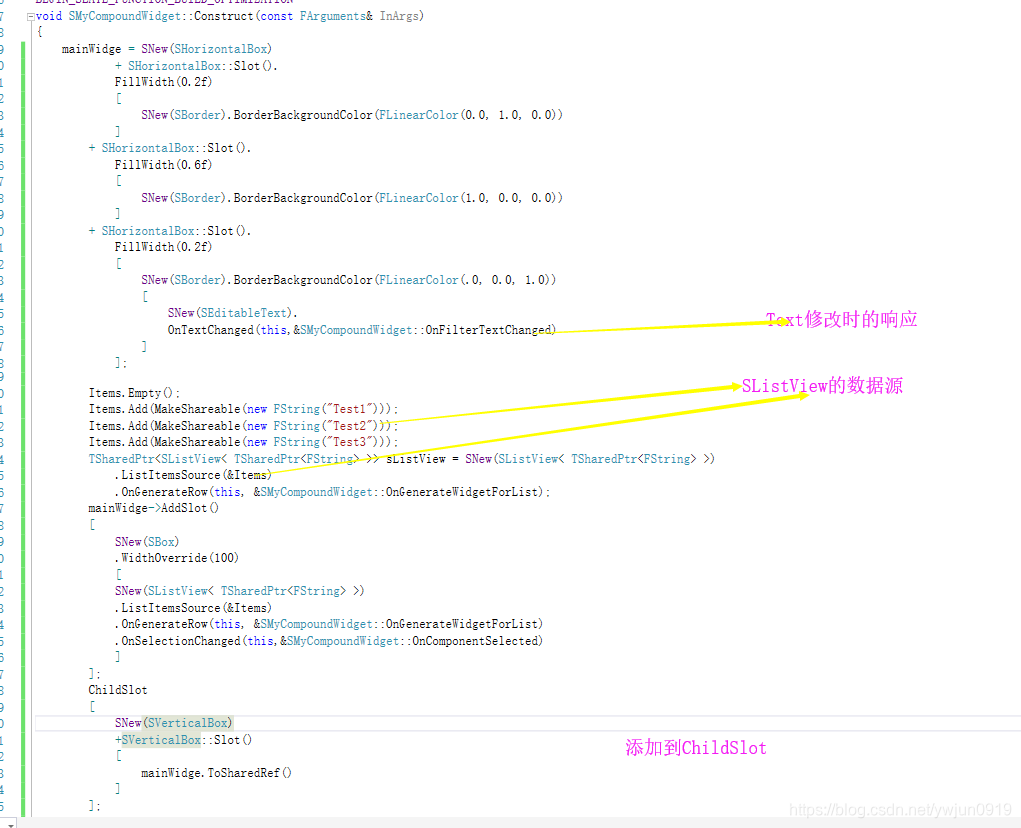
注意这里的数据绑定,不能是临时变量,否则不能显示list。
如果需要对SWidge进行修改,需要声明为属性,使用SAssignNew(mWidge,SMyCompoundWidget),
SButton,SText,SViewList,STextComboBox(下拉框),都有相应的点击或选择相应时间,如果需要能够进行监听。
版权声明:本文内容由互联网用户自发贡献,该文观点仅代表作者本人。本站仅提供信息存储空间服务,不拥有所有权,不承担相关法律责任。如发现本站有涉嫌侵权/违法违规的内容,请联系我们,一经查实,本站将立刻删除。
如需转载请保留出处:https://51itzy.com/kjqy/35812.html