
RabbitMQ——RabbitMQ的Fanout消息模型
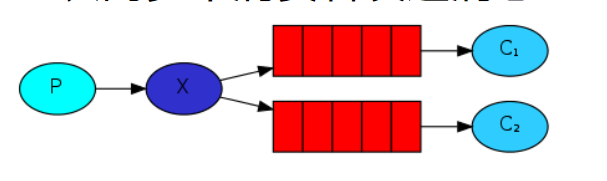
Fanout消息模型结构
讯享网
P:生产者,向Exchange发送消息
X: Exchange(交换机),接收生产者的消息
C:消费者,领取消息并消费消息
Fanout消息模型可以有多个消费者;
每个消费者都绑定有自己的队列queue(临时队列);
每个队列绑定到交换机exchange,这里使用的交换机是扇型交换机(funout exchange);
生产者生产的消息,只能发送到交换机,由交换机决定发送给哪个队列,生产者通常不知道消息是否会被传递到哪个队列;
交换机把消息发送给绑定到该交换机的所有队列,这也是扇型交换机的特点,所以也叫广播模型;
队列的消费者都能拿到消息,实现一条消息被多个消费者消费。
1、Fanout消息模型之发布者发布消息
消息生产者的开发
package com.cheng.fanout; import com.cheng.utils.ConnectUtils; import com.rabbitmq.client.Channel; import com.rabbitmq.client.Connection; import com.rabbitmq.client.MessageProperties; import java.io.IOException; import java.util.concurrent.TimeoutException; public class Provider {
    public static void main(String[] args) throws IOException, TimeoutException {
    Connection connection = ConnectUtils.getConnection("121.199.53.150", 5672, "/ems", "ems", "ems"); Channel channel = connection.createChannel(); //声明与通道连接的交换机,参数一:交换机名称,如果没有,会自动创建,参数二:交换机类型 fanout扇形交换机 channel.exchangeDeclare("logs","fanout"); //发送消息 channel.basicPublish("logs","",false,"fanout rabbitmq".getBytes()); channel.close(); connection.close(); } }
讯享网
运行后,查看rabbitmq的管理控制页面:

发送了一条消息,Exchanges里面多了一个名为logs交换机。
2、Fanout消息模型之消费者消费消息
消息消费者的开发

Consumer1:
讯享网public class Consumer1 {
    public static void main(String[] args) throws IOException {
    Connection connection = ConnectUtils.getConnection("121.199.53.150", 5672, "/ems", "ems", "ems"); final Channel channel = connection.createChannel(); //声明与通道连接的交换机 channel.exchangeDeclare("logs","fanout"); //创建临时队列 String queue = channel.queueDeclare().getQueue(); //通道绑定队列和交换机 channel.queueBind(queue,"logs",""); //消费消息 channel.basicConsume(queue,true,new DefaultConsumer(channel){
    @Override public void handleDelivery(String consumerTag, Envelope envelope, AMQP.BasicProperties properties, byte[] body) throws IOException {
    System.out.println("consumer1 fanout rabbitmq" + new String(body)); } }); } }
Consumer2:
public class Consumer2 {
    public static void main(String[] args) throws IOException {
    Connection connection = ConnectUtils.getConnection("121.199.53.150", 5672, "/ems", "ems", "ems"); final Channel channel = connection.createChannel(); //声明与通道连接的交换机 channel.exchangeDeclare("logs","fanout"); //创建临时队列 String queue = channel.queueDeclare().getQueue(); //通道绑定队列和交换机 channel.queueBind(queue,"logs",""); //消费消息 channel.basicConsume(queue,true,new DefaultConsumer(channel){
    @Override public void handleDelivery(String consumerTag, Envelope envelope, AMQP.BasicProperties properties, byte[] body) throws IOException {
    System.out.println("consumer2 fanout rabbitmq" + new String(body)); } }); } }
Consumer3:
讯享网public class Consumer2 {
    public static void main(String[] args) throws IOException {
    Connection connection = ConnectUtils.getConnection("121.199.53.150", 5672, "/ems", "ems", "ems"); final Channel channel = connection.createChannel(); //声明与通道连接的交换机 channel.exchangeDeclare("logs","fanout"); //创建临时队列 String queue = channel.queueDeclare().getQueue(); //通道绑定队列和交换机 channel.queueBind(queue,"logs",""); //消费消息 channel.basicConsume(queue,true,new DefaultConsumer(channel){
    @Override public void handleDelivery(String consumerTag, Envelope envelope, AMQP.BasicProperties properties, byte[] body) throws IOException {
    System.out.println("consumer2 fanout rabbitmq" + new String(body)); } }); } }
先执行三个消息消费者,监听队列中的消息,再执行消息生产者发送消息,查看控制台的输出信息:
consumer1:

consumer2:
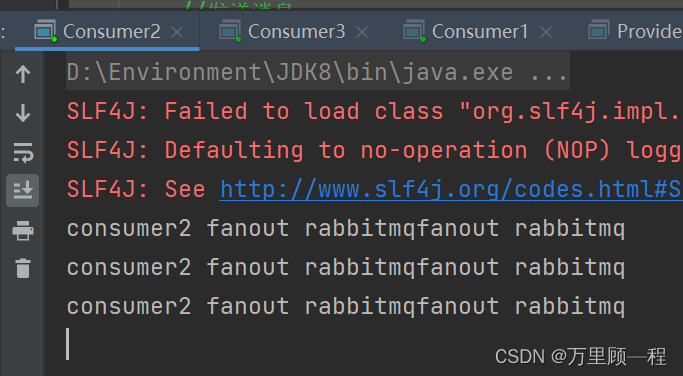
consumer3:

实现了同一条消息被多个消费者消费。
扇型交换机的应用案例:
- 大规模多用户在线(MMO)游戏可以使用它来处理排行榜更新等全局事件
- 体育新闻网站可以用它来近乎实时地将比分更新分发给移动客户端
- 分发系统使用它来广播各种状态和配置更新
- 在群聊的时候,它被用来分发消息给参与群聊的用户。(AMQP没有内置presence的概念,因此XMPP可能会是个更好的选择)
版权声明:本文内容由互联网用户自发贡献,该文观点仅代表作者本人。本站仅提供信息存储空间服务,不拥有所有权,不承担相关法律责任。如发现本站有涉嫌侵权/违法违规的内容,请联系我们,一经查实,本站将立刻删除。
如需转载请保留出处:https://51itzy.com/kjqy/35026.html