
本节开始使用AXI GPIO,通过AXI总线控制PL端的LED等,同时介绍PL端按键的使用。
使用ZYNQ最大的疑问就是如何把PS和PL结合起来使用,在其他SOC芯片中一般都会有GPIO,本实验使用一个AXI GPIO的IP核,让PS端通过AXI总线控制PL端得到LED灯。
原理介绍:
一个AXI GPIO模块有两个GPIO,分别是GPIO和GPIO2,也就是channel1和channel2,为双向IO。

讯享网
一、Vivado工程建立
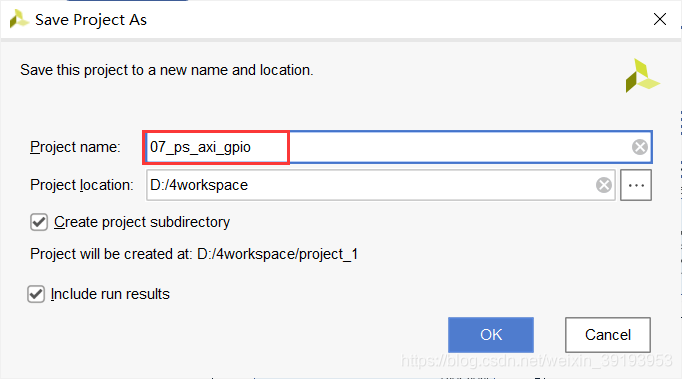
1)打开“ps_hello”另存为一个名为“07_ps_axi_gpio”的Vivado工程,表示PS通过AXI总线控制gpio
2)双击xx.bd打开block design(工程已经创建完成)

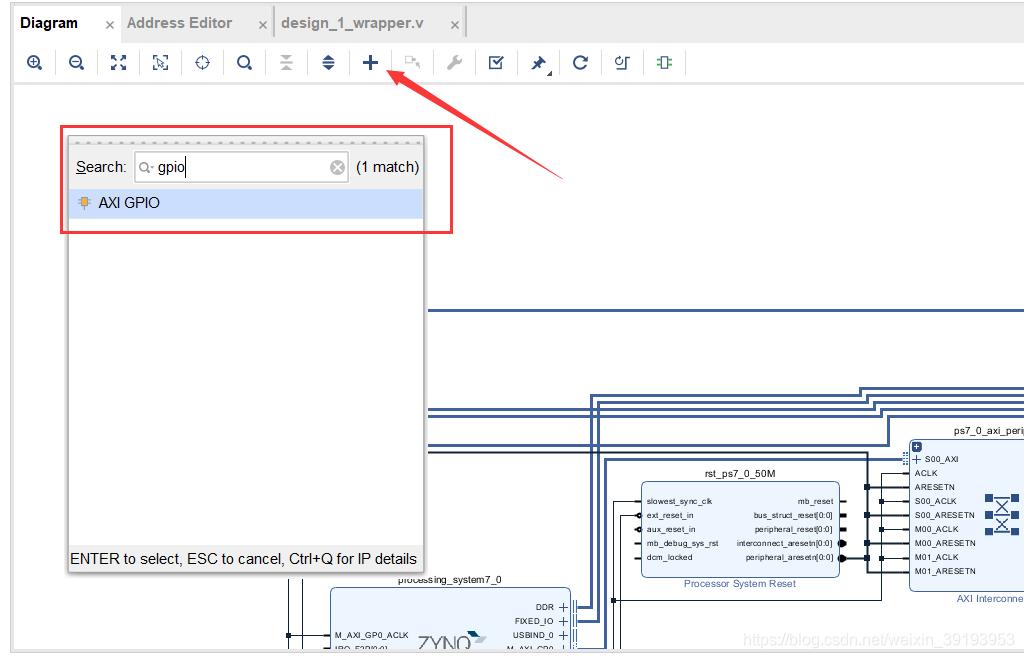
3)添加一个AXI GPIO的IP核

4)双击刚才添加的“axi_gpio_0”配置参数,因为控制LED,只要输出就可以了,“GPIO Width”填4,控制4颗LED,点击OK,如果想使用channel2,只需要把Enable Dual Channel打开,也就是使能GPIO2

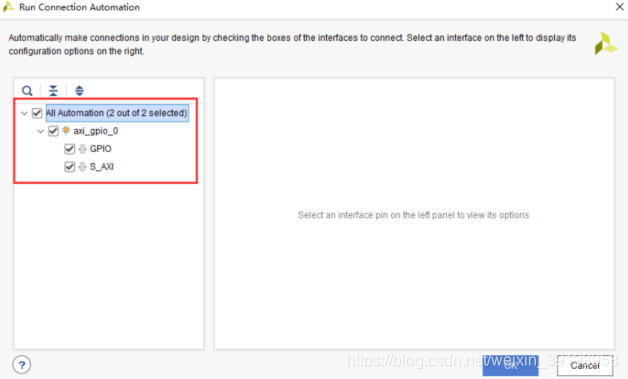
5)点击"Run Connection Automation"可完成部分自动连线

6)选择自动连接的端口,这里全选,点击OK
7)点击“Optimize Routing”,可以优化布局,同时可以看到多了两个模块,一个是Processor System Reset模块,为同步复位模块,提供同一时钟域的复位信号。AXI Interconnect模块为AXI总线互联模块,用于AXI模块交叉互联

可以看到ZYNQ的GPIO端口,M_AXI_GP0,M代表的是master,此口用于访问PL端的数据,大部分应用中是为了配置PL端模块的寄存器。

复位信号由ZYNQ的复位输出提供,最好是每个时钟域都加一个复位模块,可以根据模块下面的名称搜索添加。

8)修改GPIO端口名称为leds


9)再添加一个AXI GPIO,连接PL端按键
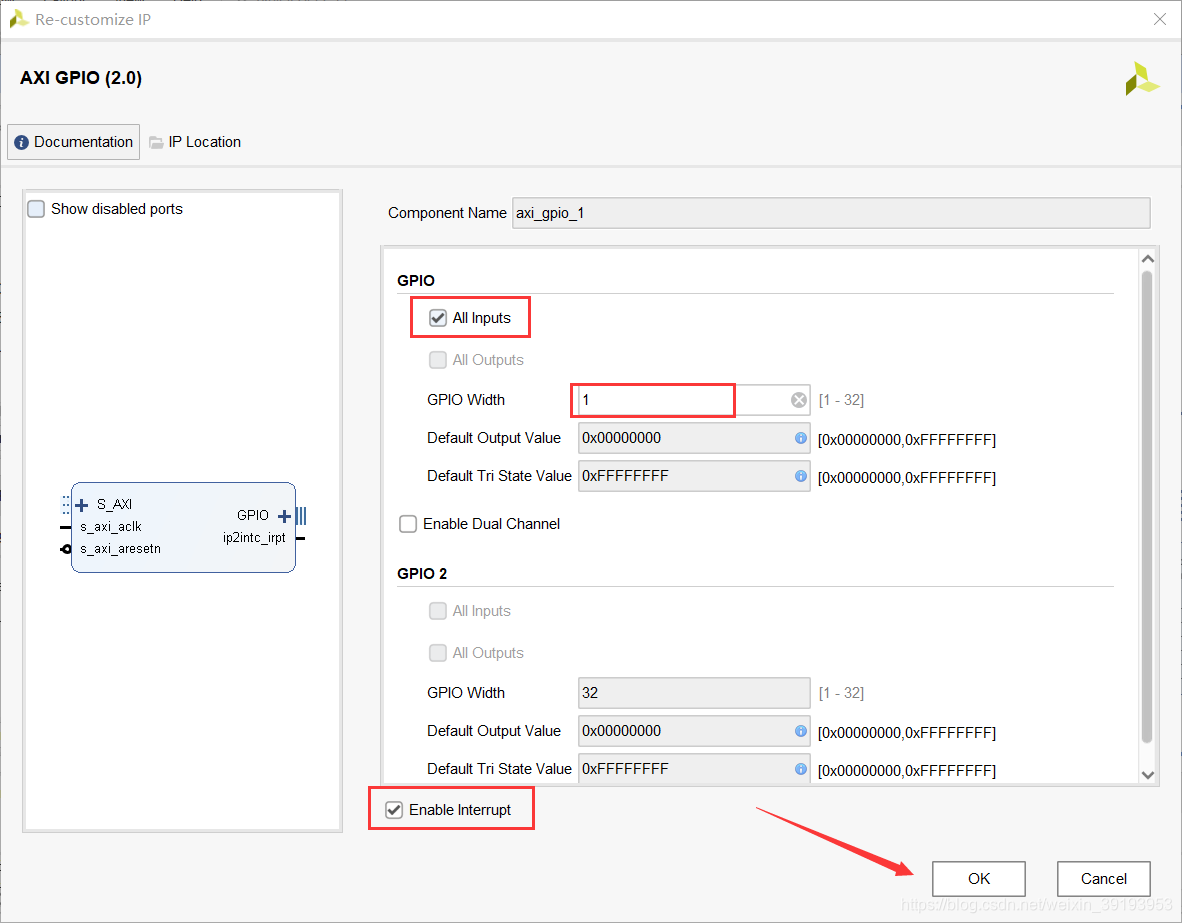
配置GPIO参数,都为输入,宽度为1,使能中断
10)使用自动连接

11)端口改为keys
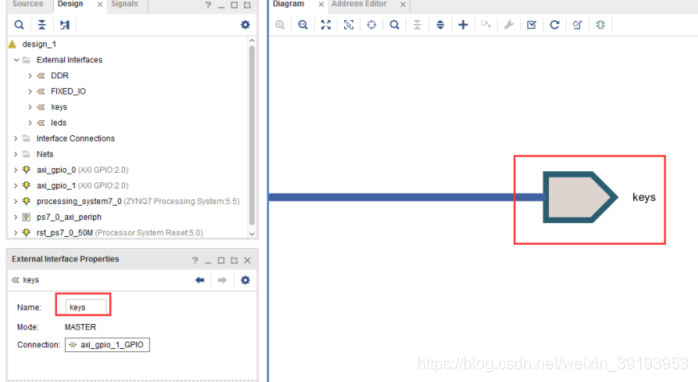
12)由于是PL端过来的中断,这里需要配置ZYNQ处理器的中断,勾选IRQ_F2P

13)连接ip2intc_irqt到IRQ_F2P

14)保存设计,点击xx.bd右键Generate Output Products

15)在生成Verilog文件中,可以看到有个"leds_tri_o"和“keys_tri_i”的端口,要为他们分配管脚,在绑定引脚时,以这个文件里面的引脚名称为准。
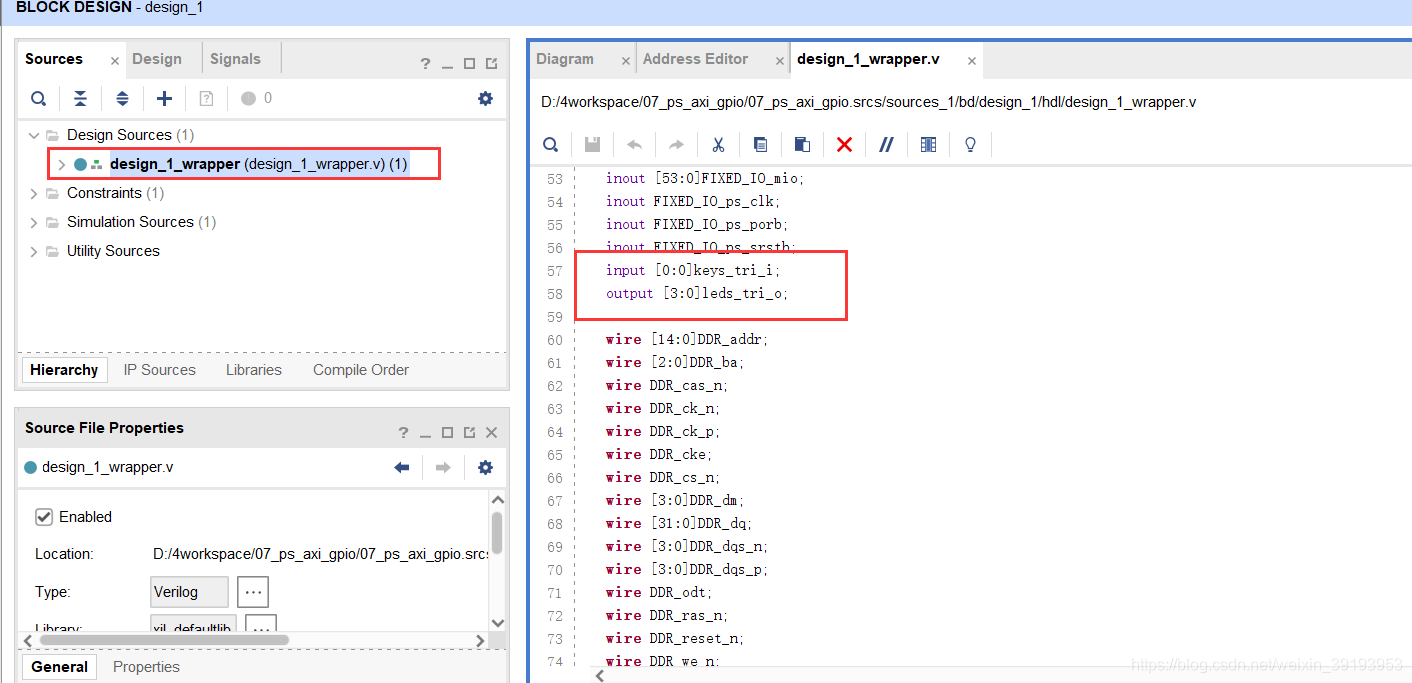
16)XDC文件约束PL管脚,创建新的xdc约束文件

17)文件名称为led,打开led.xdc添加内容
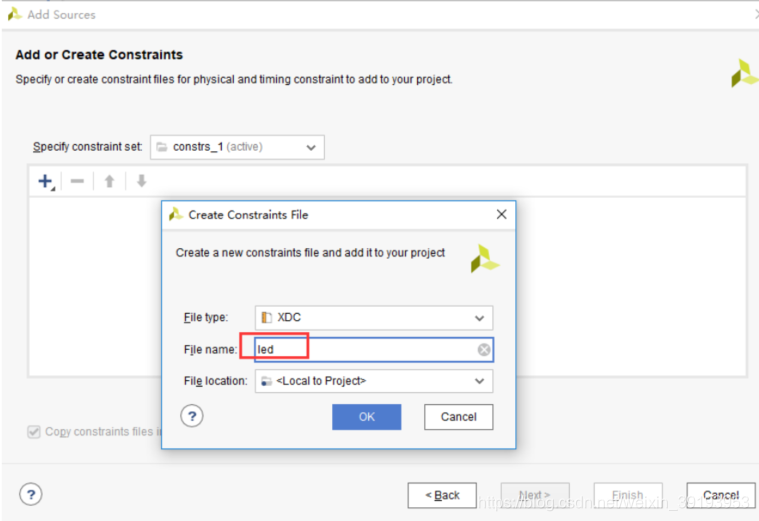
set_property IOSTANDARD LVCMOS33 [get_ports {
   leds_tri_o[3]}] set_property IOSTANDARD LVCMOS33 [get_ports {
   leds_tri_o[2]}] set_property IOSTANDARD LVCMOS33 [get_ports {
   leds_tri_o[1]}] set_property IOSTANDARD LVCMOS33 [get_ports {
   leds_tri_o[0]}] set_property PACKAGE_PIN M14 [get_ports {
   leds_tri_o[0]}] set_property PACKAGE_PIN M15 [get_ports {
   leds_tri_o[1]}] set_property PACKAGE_PIN K16 [get_ports {
   leds_tri_o[2]}] set_property PACKAGE_PIN J16 [get_ports {
   leds_tri_o[3]}] set_property IOSTANDARD LVCMOS33 [get_ports {
   keys_tri_i[0]}] set_property PACKAGE_PIN N15 [get_ports {
   keys_tri_i[0]}]
讯享网
18)生成bit文件
19)导出硬件File->Export->Export Hardware,因为用到了Pl,所以选择“include bitstream”,点击“OK”


软件工程师相关内容
1)运行SDK,创建一个名为“axi_led”的APP,工程模板选择Hello World

2)双击"system.mss"找到"axi_gpio_0"这里可以点击“Documentation”来查看相关的文档,点击"Import Examples"

3)在弹出的对话框中有多个例程,从名称中可以猜到大概,这里选第一个“xgpio_example”

讯享网/ * * Copyright (C) 2002 - 2015 Xilinx, Inc. All rights reserved. * * Permission is hereby granted, free of charge, to any person obtaining a copy * of this software and associated documentation files (the "Software"), to deal * in the Software without restriction, including without limitation the rights * to use, copy, modify, merge, publish, distribute, sublicense, and/or sell * copies of the Software, and to permit persons to whom the Software is * furnished to do so, subject to the following conditions: * * The above copyright notice and this permission notice shall be included in * all copies or substantial portions of the Software. * * THE SOFTWARE IS PROVIDED "AS IS", WITHOUT WARRANTY OF ANY KIND, EXPRESS OR * IMPLIED, INCLUDING BUT NOT LIMITED TO THE WARRANTIES OF MERCHANTABILITY, * FITNESS FOR A PARTICULAR PURPOSE AND NONINFRINGEMENT. IN NO EVENT SHALL * XILINX BE LIABLE FOR ANY CLAIM, DAMAGES OR OTHER LIABILITY, * WHETHER IN AN ACTION OF CONTRACT, TORT OR OTHERWISE, ARISING FROM, OUT OF * OR IN CONNECTION WITH THE SOFTWARE OR THE USE OR OTHER DEALINGS IN THE * SOFTWARE. * * Except as contained in this notice, the name of the Xilinx shall not be used * in advertising or otherwise to promote the sale, use or other dealings in * this Software without prior written authorization from Xilinx. * / /*/ / * @file xgpio_example.c * * This file contains a design example using the AXI GPIO driver (XGpio) and * hardware device. It only uses channel 1 of a GPIO device and assumes that * the bit 0 of the GPIO is connected to the LED on the HW board. * * * <pre> * MODIFICATION HISTORY: * * Ver Who Date Changes * ----- ---- -------- ----------------------------------------------- * 1.00a rmm 03/13/02 First release * 1.00a rpm 08/04/03 Removed second example and invalid macro calls * 2.00a jhl 12/15/03 Added support for dual channels * 2.00a sv 04/20/05 Minor changes to comply to Doxygen and coding guidelines * 3.00a ktn 11/20/09 Minor changes as per coding guidelines. * 4.1 lks 11/18/15 Updated to use canonical xparameters and * clean up of the comments and code for CR * 4.3 sk 09/29/16 Modified the example to make it work when LED_bits are * configured as an output. CR# * ms 01/23/17 Added xil_printf statement in main function to * ensure that "Successfully ran" and "Failed" strings * are available in all examples. This is a fix for * CR-. * * </pre> / /* Include Files */ #include "xparameters.h" #include "xgpio.h" #include "xil_printf.h" / Constant Definitions */ #define LED 0xf /* Assumes bit 0 of GPIO is connected to an LED */ /* * The following constants map to the XPAR parameters created in the * xparameters.h file. They are defined here such that a user can easily * change all the needed parameters in one place. */ #define GPIO_EXAMPLE_DEVICE_ID XPAR_GPIO_0_DEVICE_ID /* * The following constant is used to wait after an LED is turned on to make * sure that it is visible to the human eye. This constant might need to be * tuned for faster or slower processor speeds. */ #define LED_DELAY  /* * The following constant is used to determine which channel of the GPIO is * used for the LED if there are 2 channels supported. */ #define LED_CHANNEL 1 / Type Definitions */ /* Macros (Inline Functions) Definitions */ #ifdef PRE_2_00A_APPLICATION /* * The following macros are provided to allow an application to compile that * uses an older version of the driver (pre 2.00a) which did not have a channel * parameter. Note that the channel parameter is fixed as channel 1. */ #define XGpio_SetDataDirection(InstancePtr, DirectionMask) \ XGpio_SetDataDirection(InstancePtr, LED_CHANNEL, DirectionMask) #define XGpio_DiscreteRead(InstancePtr) \ XGpio_DiscreteRead(InstancePtr, LED_CHANNEL) #define XGpio_DiscreteWrite(InstancePtr, Mask) \ XGpio_DiscreteWrite(InstancePtr, LED_CHANNEL, Mask) #define XGpio_DiscreteSet(InstancePtr, Mask) \ XGpio_DiscreteSet(InstancePtr, LED_CHANNEL, Mask) #endif / Function Prototypes / / Variable Definitions */ /* * The following are declared globally so they are zeroed and so they are * easily accessible from a debugger */ XGpio Gpio; /* The Instance of the GPIO Driver */ /*/ / * * The purpose of this function is to illustrate how to use the GPIO * driver to turn on and off an LED. * * @param None * * @return XST_FAILURE to indicate that the GPIO Initialization had * failed. * * @note This function will not return if the test is running. * / int main(void) {
    int Status; volatile int Delay; /* Initialize the GPIO driver */ Status = XGpio_Initialize(&Gpio, GPIO_EXAMPLE_DEVICE_ID); if (Status != XST_SUCCESS) {
    xil_printf("Gpio Initialization Failed\r\n"); return XST_FAILURE; } /* Set the direction for all signals as inputs except the LED output */ XGpio_SetDataDirection(&Gpio, LED_CHANNEL, ~LED); /* Loop forever blinking the LED */ while (1) {
    /* Set the LED to High */ XGpio_DiscreteWrite(&Gpio, LED_CHANNEL, LED); /* Wait a small amount of time so the LED is visible */ for (Delay = 0; Delay < LED_DELAY; Delay++); /* Clear the LED bit */ XGpio_DiscreteClear(&Gpio, LED_CHANNEL, LED); /* Wait a small amount of time so the LED is visible */ for (Delay = 0; Delay < LED_DELAY; Delay++); } xil_printf("Successfully ran Gpio Example\r\n"); return XST_SUCCESS; }

4)下载调试,点击Run As,点击,Run Configurations
5)作如下修改勾选Reset entire systems 然后点击Run

6)程序下走后可以看到4组PL端的LED在闪烁

7)根据寄存器方式写程序,根据axi_led工程,修改helloworld.c如下。


通过实验我们了解到PS可以通过AXI总线控制P,但几乎没有体现出ZYNQ的优势,因为对于控制LED灯,无论是ARM还是FPGA,都可以轻松完成。但是如果把LED缓存串口,控制100论串口通信,8路以太网应用,没有那个SOC可以完成这种功能。
版权声明:本文内容由互联网用户自发贡献,该文观点仅代表作者本人。本站仅提供信息存储空间服务,不拥有所有权,不承担相关法律责任。如发现本站有涉嫌侵权/违法违规的内容,请联系我们,一经查实,本站将立刻删除。
如需转载请保留出处:https://51itzy.com/kjqy/31752.html