
什么是indexDB
学习文档:
- 阮一峰老师的分享文档:浏览器数据库 IndexedDB 入门教程 - 阮一峰的网络日志
- 官方API文档,纯英文,不过提供的代码很有用:Indexed Database API 3.0
indexDB是HTML5的新概念,indexedDB是一个用于在浏览器中存储较大数据结构的Web API,并且提供了索引功能以实现高性能查找。不同于其他基于SQL的关系型数据库,indexedDB是一个事务型的数据库系统,会将数据集作为个体对象存储,数据形式使用的是JSON,而不是列数固定的表格来存储数据的。
indexDB比本地存储很强大,而且存储大小是250m以上(受计算机硬件和浏览器厂商的限制)。
- indexDB优点是:存储容量大;支持异步操作;具有事务特点;
- indexDB缺点是:不支持DO操作;不能跨域。
indexDB中的对象:
- 数据库:IDBDatabase 对象
- 对象仓库:IDBObjectStore 对象
- 索引: IDBIndex 对象
- 事务: IDBTransaction 对象
- 操作请求:IDBRequest 对象
- 指针(游标): IDBCursor 对象
- 主键集合:IDBKeyRange 对象
基本语法:
| 语法 |
作用 |
| window.indexedDB.open(数据库名,版本号) |
打开数据库(如果数据库不存在则创建一个新的库) |
| .onerror |
数据库操作过程中出错时触发 |
| .onupgradeneeded |
创建一个新的数据库或者修改数据库版本号时触发 |
| .onsuccess |
数据库成功完成所有操作时触发 |
| .createObjectStore(对象仓库名称,keypath) |
创建对象仓库 |
| .createIndex(索引名称,keypath,objectParameters) |
建立索引 |
| .transaction(对象仓库名称) || .transaction(对象仓库名称,‘readwrite’) |
创建一个事务 || 创建一个事务,并要求具有读写权限 |
| .objectStore(对象仓库名称) |
获取对象仓库 |
| .get ( num ) || .getAll() |
获取数据 || 获取全部数据 |
| .add( data ) |
添加数据 |
| .put( newdata ) |
修改数据 |
| .delete ( keypath ) |
删除数据 |
Demo:
关于具体应用的demo可以看我的gitee上的Demo:
https://gitee.com/yinlingyun123/dragVue
讯享网https://gitee.com/yinlingyun123/dragVue
indexDB基础操作:
indeDB和一般的数据库一样,创建/打开数据库,创建/打开表,对数据的增删查改等都是其基本功能。
1、判断浏览器是否支持IndexDB
function justifyIndexDEB(){ if("indexedDB" in window) { // 支持 console.log(" 支持indexedDB..."); } else { // 不支持 console.log("不支持indexedDB..."); } }讯享网
2、不同浏览器兼容
讯享网//数据库对象 window.indexedDB =window.indexedDB||window.webikitIndexedDB||window.mozIndexedDB||window.msIndexedDB; //数据库事务 window.IDBTransaction = window.IDBTransaction||window.webikitIDBTransaction||window.mozIDBTransaction||window.msIDBTransaction; //数据库查询条件 window.IDBKeyRange = window.IDBKeyRange||window.webkitIDBKeyRange||window.mozIDBKeyRange||window.msIDBKeyRange; //游标 window.IBDCursor = window.IBDCursor ||window.webkitIBDCursor ||window.mozIBDCursor ||window.msIBDCursor ;
3、创建/打开数据库
如果存在就打开,不存在就创建一个indexDB数据库:
const req = window.indexedDB.open(databaseName, version) // 数据库名称,版本号 let that = this; req.onsuccess = function (event) { // 监听数据库创建成功事件 that.indexDB = event.target.result // 数据库对象 console.log('数据库打开成功') } req.onerror = function (error) { console.log('数据库打开报错') } req.onupgradeneeded = function (event) { // 数据库创建或升级的时候会触发 console.log('数据库创建或升级') }4、创建/打开/删除数据表
在indexedDB中,是使用objectStore来存储数据呢。objectStore相当于一张表,但是objectStore并不想mysql中的表一样,具有一列一列的结构,它只有两列,一列是keypath(键值),另一列就是存储的数据了,存储的数据一般用JavaScript中的对象来表示。每一条数据都和一个键相关联。
存储时可以使用每条记录中的某个指定字段作为键值(keyPath),也可以使用自动生成的递增数字作为键值(keyGenerator),也可以不指定。选择键的类型不同,objectStore可以存储的数据结构也有差异。
| 键类型 |
存储数据 |
| 不使用 |
任意值,但是没添加一条数据的时候需要指定键参数 |
| keyPath |
Javascript对象,对象必须有一属性作为键值 |
| keyGenerator |
任意值 |
| 都使用 |
Javascript对象,如果对象中有keyPath指定的属性则不生成新的键值,如果没有自动生成递增键值,填充keyPath指定属性 |
创建表:
通过数据库实例的createObjectStore(storeName,keyType)进行创建objectStore。这个方法有两个参数,一个是objectStore的名字,一个是创建表的键类型。
创建表相当于修改了数据库的模式,所以这个操作应该放到onupgradeneeded中:
讯享网req.onupgradeneeded = function (event) { // 数据库创建或升级的时候会触发 let db = event.target.result let storeName = 'product' // 表名 if(!db.objectStoreNames.contains(storeName)) { // keyPath是主键键值,也可以不传然后设定autoIncrement:true自动创建键值 db.createObjectStore(storeName,{keyPath:'key'}); } //db.deleteObjectStore(storeName);删除数据仓库方法,参数为数据仓库名称 }
5、创建/删除索引
索引可以用来搜索,主键是默认的索引。
只能针对被设为索引的属性值进行检索,不能针对没有被设为索引的属性值进行检索。
索引包含有联合索引,唯一索引,对数组字段建索引等等扩展功能,有需要的可以自己探索!

req.onupgradeneeded = function (event) { // 数据库创建或升级的时候会触发 db = event.target.result let storeName = 'product' // 表名 if (!db.objectStoreNames.contains(storeName)) { // 判断表是否存在 let objectStore = db.createObjectStore(storeName, { keyPath: 'key',autoIncrement: true }) // 创建索引 // indexName索引列名称 // indexKey索引键值 objectStore.createIndex('indexName', 'indexKey', { unique: false }) // 创建索引 可以让你搜索任意字段 //objectStore.deleteIndex("indexName");删除索引 } }给对象仓库(数据库表)创建索引,需要使用对象仓库的createIndex()函数,param1 索引名称,param2 配置索引的键值,param3 配置对象 配置该属性是否是唯一的。
param3 配置对象可配置属性:
- unique 唯一
- multiEntry 对于有多个值的主键数组,每个值将在索引里面新建一个条目,否则主键数组对应一个条目
6、添加数据
讯享网// this.indexDB创建数据库时候存下的数据库对象 // itemName是存储的key // newValue是存储的value const transaction = this.indexDB.transaction('product', "readwrite"); const store = transaction.objectStore('product'); const request = store.put({ key: 'item', value: '<p>3333</p>' }); // const request = store.add({ key: 'item', value: '<p>3333</p>' }); //add方法也可以 request.onsuccess=function(e) { console.info('添加数据成功') }; request.onerror=function(e) { console.info('添加数据失败') };
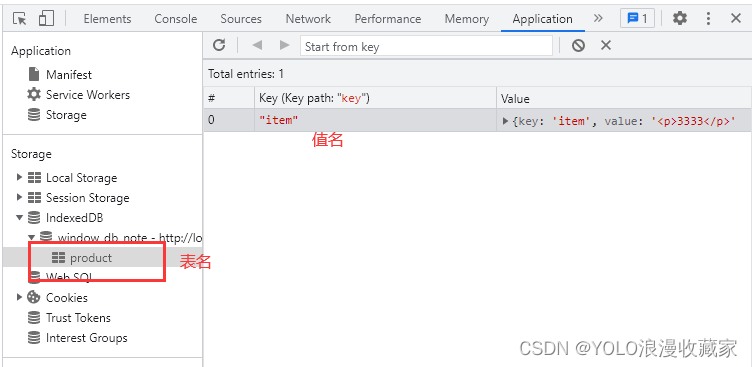
7、获取数据
get方法是获取定义的主键键值为输入数据的第一条数据,如果想获取匹配的所有数据就得用getAll方法进行获取。不过get、getAll方法需要查询整张表来获得结果,数据量大的时候效率很低。所以在日常使用中都是通过添加索引然后使用游标查询索引获取想要的数据。
// this.indexDB创建数据库时候存下的数据库对象 // itemName是存储的key // newValue是存储的value const transaction = this.indexDB.transaction('product', 'readwrite'); const store = transaction.objectStore('product'); const request=store.get('item'); request.onsuccess=function(e) { store.put({ key: 'item', value: '<p>3333</p>' }); console.info('获取数据成功') }; request.onerror=function(e) { console.info('获取数据失败') };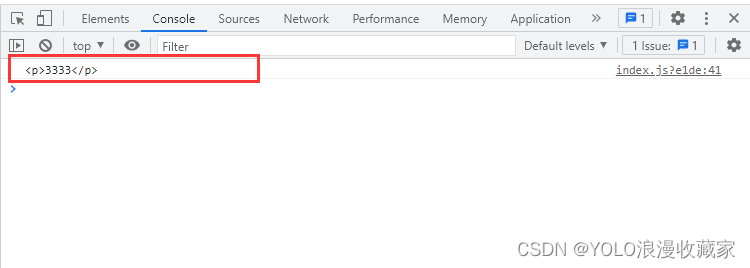
8、更新数据
更新数据操作其实就是添加和获取合二为一,在获取成功的回调函数里面进行数据的添加从而覆盖掉原来的数据:
讯享网// this.indexDB创建数据库时候存下的数据库对象 // itemName是存储的key // newValue是存储的value const transaction = this.indexDB.transaction('product', 'readwrite'); const store = transaction.objectStore('product'); const request=store.get('item'); request.onsuccess=function(e) { store.put({ key: 'item', value: '<p>4444</p>' }); };
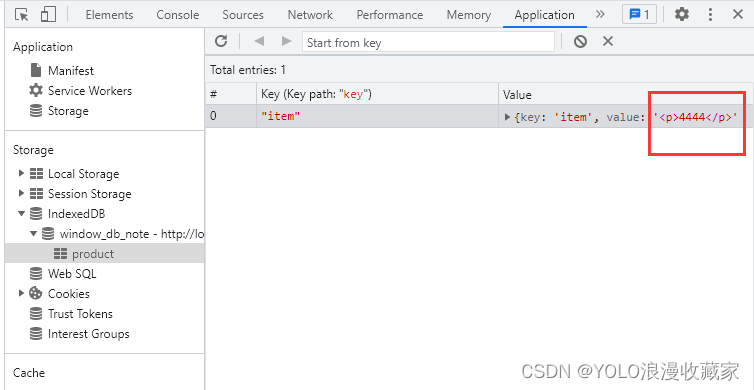
9、删除数据
// this.indexDB创建数据库时候存下的数据库对象 // itemName是存储的key // newValue是存储的value const transaction = this.indexDB.transaction('product', 'readwrite'); const store = transaction.objectStore('product'); const request=store.delete('item'); request.onsuccess=function(e) { console.info('删除数据成功') }; request.onerror=function(e) { console.info('删除数据失败') };10、遍历数据
使用指针对象IDBCursor遍历数据
讯享网objectStore.openCursor().onsuccess = function () { const cursor = e.target.result if (cursor) { console.log(cursor.key) // 当前遍历数据的主键 console.log(cursor.value) // 当前遍历的数据 cursor.continue() // 继续下一个 } }
可以通过配置IDBKeyRange来设定查询范围
// 游标查询范围内的多个: // 除了bound 还有 only,lowerBound, upperBound 方法,还可以指明是否排除边界值 const range = IDBKeyRange.bound([min1, min2, min3], [max1, max2, max3]) // 传入的 prev 表示是降序遍历游标,默认是next表示升序;如果索引不是unique的,而你又不想访问重复的索引,可以使用nextunique或prevunique,这时每次会得到key最小的那个数据 dbIndex.openCursor(range, "prev").onsuccess = e => { let cursor = e.target.result; if (cursor) { let data = cursor.value // 数据的处理就在这里。。。 [ 理解 cursor.key,cursor.primaryKey,cursor.value ] cursor.continue() } else { // 游标遍历结束! } }需要说明的是 IDBKeyRange.bound([min1, min2, min3], [max1, max2, max3]) 的范围如下:
讯享网max1 > min1 || max1 === min1 && max2 > min2 || max1 === min1 && max2 === min2 && max3 > min3 // 好好理解一下这个 bound 的含义吧 !
11、使用promise封装上述方法
a.使用promise封装 open方法
/ * 打开/创建数据库 * @param {object} dbName 数据库的名字 * @param {string} storeName 仓库名称 * @param {string} version 数据库的版本 * @param {string} keyPath 主键键值,不传就自动创建主键 * @param {Array} index 索引数组 * @return {object} 该函数会返回一个数据库实例 */ type StoreOptions = { autoIncrement: boolean; keyPath?: string; }; export const openDB = function ( dbName: string, version: number, storeName: string, keyPath?: string, index?: Array<any[]> | undefined ) { return new Promise((resolve, reject) => { // 兼容浏览器 // eslint-disable-next-line @typescript-eslint/ban-ts-comment // @ts-ignore const { webkitIndexedDB, indexedDB, mozIndexedDB, msIndexedDB } = window; const indexDB = indexedDB || mozIndexedDB || webkitIndexedDB || msIndexedDB; let db = null; const request = indexDB.open(dbName, version); // 操作成功 request.onsuccess = function (event: any) { db = event?.target?.result; // 数据库对象 resolve({ code: 0, success: true, data: db, msg: "数据库打开成功!" }); }; // 操作失败 request.onerror = function () { resolve({ code: -1, success: false, data: null, msg: "数据库打开失败!" }); }; // 创建表和索引 request.onupgradeneeded = function (event: any) { // 数据库创建或升级的时候会触发 db = event?.target?.result; // 数据库对象 const storeOptions: StoreOptions = { autoIncrement: true, }; if (keyPath && keyPath !== "") { storeOptions.autoIncrement = false; storeOptions.keyPath = keyPath; } // 创建表 if (!db.objectStoreNames.contains(storeName)) { const store = db.createObjectStore(storeName, storeOptions); // 创建索引 // indexName索引列名称 // indexKey索引键值 if (index && index.length > 0) { index.forEach((item: any) => { if ( !item.indexName || !item.indexKey || item.options.unique === undefined ) { reject( "索引格式错误,请参照格式{indexName:'indexName',indexKey:'indexKey',{unique: false}}" ); } store.createIndex(item.indexName, item.indexKey, item.options); }); } } }; }); };b.使用promise封装 add方法
讯享网/ * 新增数据 * @param {object} db 数据库实例 * @param {string} storeName 仓库名称 * @param {object} dataConfig 添加的数据集合 / export const addData = function (db: any, storeName: string, dataConfig: any) { return new Promise((resolve, reject) => { if (!db) { reject("数据库不存在或没有初始化"); } if (!dataConfig || !dataConfig.value) { reject("value是必传项,参照格式{[keyPath]:'key',value:'value'}"); } const req = db .transaction([storeName], "readwrite") .objectStore(storeName) // 仓库对象 .add(dataConfig); // 操作成功 req.onsuccess = function () { resolve({ code: 0, success: true, data: null, msg: "数据写入成功!" }); }; // 操作失败 req.onerror = function () { const data = { code: -1, success: false, data: null, msg: "数据写入失败!", }; resolve(data); }; }); };
c.使用promise封装 put方法
/ * 更新数据 * @param {object} db 数据库实例 * @param {string} storeName 仓库名称 * @param {object} dataConfig 更新的数据集合 */ export const updateData = function ( db: any, storeName: string, dataConfig: any ) { return new Promise((resolve, reject) => { if (!db) { reject("数据库不存在或没有初始化"); } if (!dataConfig || !dataConfig.value) { reject("value是必传项,参照格式{[keyPath]:'key',value:'value'}"); } const req = db .transaction([storeName], "readwrite") .objectStore(storeName) .put(dataConfig); // 操作成功 req.onsuccess = function () { resolve({ code: 0, success: true, data: null, msg: "数据更新成功!" }); }; // 操作失败 req.onerror = function () { const data = { code: -1, success: false, data: null, msg: "数据更新失败!", }; resolve(data); }; }); };d.使用promise封装 get方法
讯享网/ * 查询数据 * @param {object} db 数据库实例 * @param {string} storeName 仓库名称 * @param {string} key 数据主键 / export const getData = function (db: any, storeName: string, key: string) { return new Promise((resolve, reject) => { if (!db) { reject("数据库不存在或没有初始化"); } const req = db .transaction([storeName], "readonly") .objectStore(storeName) // 仓库对象 .get(key); // 操作成功 req.onsuccess = function (e: { target: { result: any } }) { resolve({ code: 0, success: true, data: e?.target?.result, msg: "数据获取成功!", }); }; // 操作失败 req.onerror = function () { const data = { code: -1, success: false, data: null, msg: "数据获取失败!", }; resolve(data); }; }); };
d.使用promise封delete方法
/ * 删除数据 * @param {object} db 数据库实例 * @param {string} storeName 仓库名称 * @param {string} key 数据主键 / export const deleteData = function (db: any, storeName: string, key: string) { return new Promise((resolve, reject) => { if (!db) { reject("数据库不存在或没有初始化"); } const req = db .transaction([storeName], "readwrite") .objectStore(storeName) // 仓库对象 .delete(key); // 操作成功 req.onsuccess = function (e: { target: { result: any } }) { resolve({ code: 0, success: true, data: e?.target?.result, msg: "数据删除成功!", }); }; // 操作失败 req.onerror = function () { const data = { code: -1, success: false, data: null, msg: "数据删除失败!", }; resolve(data); }; }); };e.使用promise封装 游标查询方法
讯享网/ * 使用游标查询数据 * @param {object} db 数据库实例 * @param {string} storeName 仓库名称 * @param {string} indexKey 查询的索引的键值 * @param {string} index 查询的索引值 / export const getIndexData = function ( db: any, storeName: string, indexKey: string, index: string ) { return new Promise((resolve, reject) => { if (!db) { reject("数据库不存在或没有初始化"); } const keyRange = IDBKeyRange.only(index); const req = db .transaction([storeName], "readonly") .objectStore(storeName) // 仓库对象 .index(indexKey) .openCursor(keyRange, "next"); // 操作成功 req.onsuccess = function (e: { target: { result: any } }) { resolve({ code: 0, success: true, data: e?.target?.result, msg: "数据查询成功!", }); }; // 操作失败 req.onerror = function () { const data = { code: -1, success: false, data: null, msg: "数据查询失败!", }; resolve(data); }; }); };
详细封装文件查看请戳链接:
https://gitee.com/yinlingyun123/dragVue/blob/master/src/utils/indexDB.tsxhttps://gitee.com/yinlingyun123/dragVue/blob/master/src/utils/indexDB.tsx
indexDB常见错误:
1.transaction出错
Uncaught DOMException: Failed to execute ‘transaction’ on ‘IDBDatabase’: A version change transaction is running.
错误原因:
有一个事务在运行,不能打开第二个事务.
解决办法:
将transaction相关的代码写在objectStore.transaction.oncomplete中
var request = indexedDB.open('sql', 2); request.onupgradeneeded = function(event) { var db = event.target.result; var objectStore = db.createObjectStore("customers", { keyPath: "ssn" }); objectStore.transaction.oncomplete = function(event) { var customerObjectStore = db.transaction("customers", "readwrite") .objectStore("customers") .add({ id: "555-55-5555", name: "Donna", age: 32, email: "" }); }; };2.Cannot read错误
Uncaught TypeError: Cannot read property ‘xxx’ of undefined
错误原因:
因为indexDB代码都是异步代码,所以有些还没有定义部分的代码可能会优先执行,导致这个变量为undefined
3.尝试读取数据时候报错
Uncaught InvalidStateError: Failed to read the ‘result’ property from ‘IDBRequest’: The request has not finished
错误示范:
讯享网var r = indexedDB.open(); var db = null; r.onsuccess = function(event) { db = event.target.result); }
正确示范:
var r = indexedDB.open(); r.onsuccess = function(event) { var db = event.target.result; };4.Put的时候报错
failed to execute ‘put’ on ‘idbobjectstore’ evaluating the object store’s key path did not yield a value
错误原因:
储存数据的时候必须要带上object store的key一起储存,或者使用一个key:generator({autoIncrement: true})
示例:
讯享网var store = db.createObjectStore('my_store', {keyPath: 'key'}); store.put({key: 11, value: 33}); // OK store.put({value: 66}); // throws, since 'key' is not present var store = db.createObjectStore('my_store', {keyPath: 'key', autoIncrement: true}); store.put({key: 11, value: 33}); // OK, key generator set to 11 store.put({value: 66}); // OK, will have auto-generated key 12
5.createObjectStore undefined
Cannot read property ‘createObjectStore’ of undefined
错误原因:
这是因为indexedDB是异步的,你必须在回调函数中使用createObjectStore方法,即使你把createObjectStore调用写在open函数后面,也无法保证哪个先完成。
6.Failed to execute ‘createObjectStore’
Failed to execute ‘createObjectStore’ on ‘IDBDatabase’: The database is not running a version change transaction.
错误原因:
这是由于在success事件的回调中调用createObjectStore方法,该方法应该在upgradeneeded事件的回调中调用。
7.stores was not found.
Failed to exectue ‘transaction’ on ‘IDBDatabase’: One of the specified stores was not found.
错误原因:
这是因为upgradeneeded事件没有被触发。
这里需要注意upgradeneeded事件。首先,根据API,应该在upgradneeded事件的回调函数中调用createObjectStore方法创建store object,不应该在success的回调中,否则会报错。其次,当为open方法传入一个本域没有的数据库名时,会创建相应的数据库,并触发success、upgradeneeded事件,从而创建一个store object。但是,chrome54并不会触发upgradeneeded事件,造成store object不会被创建,后续在store object上创建事务并操作数据时候就会报错。Stackoverflow上提供的解决办法是,在open方法传入第二个参数(与已有version不同,且更大),这样就会触发chrome上的upgradeneeded事件了。不过,每次都需要调用db.version获取当前的版本号。
8.add出现错误
Failed to execute 'add' on 'IDBObjectStore': The transaction has finished.
错误原因:
transaction结束了,不能继续使用,所以才需要每次操作数据库都要获得一个
其他
IDBOpenDBRequest还有一个类似回调函数句柄——onupgradeneeded。
该句柄在我们请求打开的数据库的版本号和已经存在的数据库版本号不一致的时候调用。
indexedDB.open方法还有第二个可选参数,数据库版本号,数据库创建的时候默认版本号为1,当我们传入的版本号和数据库当前版本号不一致的时候onupgradeneeded就会被调用,当然我们不能试图打开比当前数据库版本低的version.
代码中定义了一个myDB对象,在创建indexedDB request的成功毁掉函数中,把request获取的DB对象赋值给了myDB的db属性,这样就可以使用myDB.db来访问创建的indexedDB了。
用indexedBD的时候要善用onerror来获取错误的信息,这样就知道哪里出错了。
参考文章链接:
- 前端indexDB数据库的使用 - 简书
- HTML5本地数据库--IndexDB的基本操作_ZacheryWu的博客-CSDN博客_indexdb 操作
- indexDB入门_小白目的博客-CSDN博客_indexdb
- IndexedBD的一些心得(总结)_PkJY的博客-CSDN博客
- HTML5-indexedDB使用常见错误总结_柒青衿的博客-CSDN博客
- indexedDB基本使用(内含案例)_小小白号的博客-CSDN博客_indexeddb使用
- indexedDB常见坑人错误_st紫月的博客-CSDN博客
- indexedDB学习小结_黑月DM的博客-CSDN博客
- indexedDB 小结_chui的博客-CSDN博客
- indexDB入门到精通,indexdb增删查改,封装indexdb类库,indexdb基本使用_淋雨一直走~的博客-CSDN博客_indexdb
- indexDB出坑指南 | enne5w4
版权声明:本文内容由互联网用户自发贡献,该文观点仅代表作者本人。本站仅提供信息存储空间服务,不拥有所有权,不承担相关法律责任。如发现本站有涉嫌侵权/违法违规的内容,请联系我们,一经查实,本站将立刻删除。
如需转载请保留出处:https://51itzy.com/kjqy/31376.html