
第一次接触threeJS,说实话,挺脑瓜子疼的!
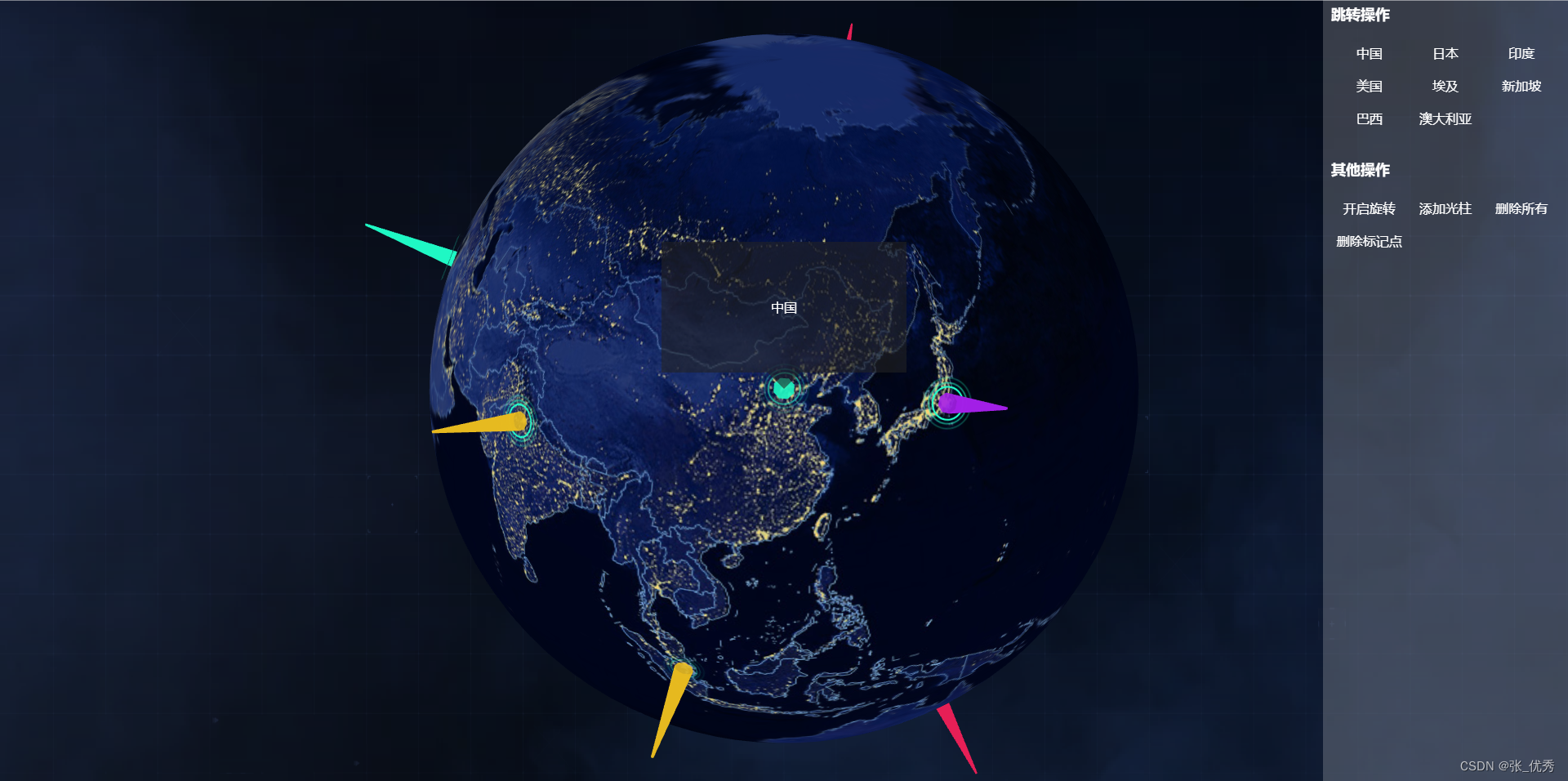
功能:3D地球(纹理贴图),地球上添加标记点(经纬度),点击标记点弹出对应的信息框,地球入场动画,相机移动动画等。
先开效果图吧
一:添加必要的依赖

yarn add three yarn add tween讯享网
讯享网import * as THREE from "three" import { OrbitControls } from "three/examples/jsm/controls/OrbitControls.js" import * as TWEEN from "tween"
二:组件代码
<template> <div style="width: 100%; height: 100%;"> <div id="layerMain"> <div>{


  { countryName }}</div> <div class="shape"></div> </div> <div ref="mapId" style="width: 100%; height: 100%;"></div> </div> </template> <script> import * as THREE from "three" import { OrbitControls } from "three/examples/jsm/controls/OrbitControls.js" import * as TWEEN from "tween" import map_img from '../../assets/images/map.jpg' import map_wl from '../../assets/images/wl.png' let camera, scene, controls, mesh; let group = new THREE.Group(); let radius = 70; let fov = 100; export default { name: 'index', data () { return { mapDom: null, renderer: null, animationType: true, // 地球入场动画 rotationY: true, // 地球自动旋转 meshAnimateType: false, // 标记点动画 lonlat: { x: 0, y: 0, z: 200 }, countryName: null, // 数据 } }, mounted () { this.info () }, methods: { // 初始化 info () { this.infoThree () this.infoBall () this.infoRender () this.renderer.domElement.addEventListener("click", this.infoMouse) }, // 基本配置 infoThree () { // 场景 scene = new THREE.Scene() // 渲染 this.renderer = new THREE.WebGLRenderer({ antialias: true, }) this.mapDom = this.$refs.mapId this.renderer.setSize(this.mapDom.clientWidth, this.mapDom.clientHeight) this.renderer.setClearColor(0x000, 0) this.mapDom.appendChild(this.renderer.domElement) // 相机 camera = new THREE.PerspectiveCamera( fov, this.mapDom.clientWidth / this.mapDom.clientHeight, 1, 1000 ) camera.position.set(0, 0, 200) camera.lookAt(0, 0, 0) // 鼠标 this.infoOrbitControls() }, // 重新渲染 infoRender() { this.renderer.clear() // 地球入场动画 if (this.animationType) this.ballAnimation() // 地球旋转 if (this.rotationY) this.ballRotationY() // 标记点动画 if (this.meshAnimateType) this.meshAnimate() this.renderer.render(scene, camera) requestAnimationFrame(this.infoRender) TWEEN.update() }, // 鼠标 infoOrbitControls() { controls = new OrbitControls(camera, this.renderer.domElement) controls.enableDamping = true controls.enableZoom = true controls.autoRotate = false controls.autoRotateSpeed = 2 controls.enablePan = true }, // 地球 infoBall() { // 纹理贴图 let textureLoader = new THREE.TextureLoader(); textureLoader.load(map_img, function (texture) { // 创建球 let geometry = new THREE.SphereGeometry(radius, 100, 100); let material = new THREE.MeshBasicMaterial({ map: texture, //设置颜色贴图属性值 }); //网格模型对象Mesh mesh = new THREE.Mesh(geometry, material); // 唯一标识 mesh.name = "ballMain"; // 添加到场景中 scene.add(mesh); }); }, // 地球入场动画 ballAnimation() { fov -= 0.6 if (fov <= 45) { this.animationType = false camera.position.set(0, 0, 200) camera.lookAt(0, 0, 0) this.infoOrbitControls() } else { camera = new THREE.PerspectiveCamera( fov, this.mapDom.clientWidth / this.mapDom.clientHeight, 1, 1000 ); camera.position.set(0, 0, 200) camera.lookAt(0, 0, 0) } }, // 地球自动旋转 ballRotationY() { scene.rotation.y += 0.003 }, // 添加纹理标记点 infoMark(item) { console.log(group) let cityGeometry = new THREE.PlaneBufferGeometry(1, 1) //默认在XOY平面上 let textureLoader = new THREE.TextureLoader() let texture = textureLoader.load(map_wl) let cityWaveMaterial = new THREE.MeshBasicMaterial({ color: item.color, map: texture, transparent: true, opacity: 0, side: THREE.DoubleSide }) let mesh = new THREE.Mesh(cityGeometry, cityWaveMaterial) const coord = this.lon2xyz(radius * 1.01, item.lon, item.lat) mesh.scale.set(2, 2, 2) // 唯一标识 mesh.name = item.name mesh.privateType = 'mark' mesh.position.set(coord.x, coord.y, coord.z) const coordVec3 = new THREE.Vector3( coord.x, coord.y, coord.z ).normalize() const meshNormal = new THREE.Vector3(0, 0, 1) mesh.quaternion.setFromUnitVectors(meshNormal, coordVec3) if (scene.getObjectByName(item.name) === undefined) { group.add(mesh) //网格模型添加到场景中 scene.add(group) this.meshAnimateType = true } }, // 标记点动画 meshAnimate() { for (let i = 0; i < group.children.length; i++) { if (group.children[i].privateType === "mark") { // 添加初始随机数,防止动画同步 group.children[i].material.opacity += Math.random() * 0.05 group.children[i].scale.set( group.children[i].material.opacity + 7, group.children[i].material.opacity + 7, group.children[i].material.opacity + 7 ) if (group.children[i].scale.x >= 9) { group.children[i].material.opacity = 0 } } } }, // 移动相机 cameraPos (objList) { this.frameDivClose () let layerObj = scene.getObjectByName(objList.name) if (layerObj) { scene.rotation.y = 0 this.rotationY = false new TWEEN.Tween( { x: this.lonlat.x, y: this.lonlat.y, z: this.lonlat.z } ) .to( { x: layerObj.position.x * 2.8, y: layerObj.position.y * 2.8, z: layerObj.position.z * 2.8}, 1500 ) .onUpdate( function () { camera.position.x = this.x camera.position.y = this.y camera.position.z = this.z camera.lookAt(0, 0, 0) }) .onComplete ( ()=> { this.retrievalLayer (objList.name) }) .easing(TWEEN.Easing.Sinusoidal.InOut) .start() this.lonlat = camera.position // 弹窗面板赋值 this.countryName = objList.name } else { console.log('图层数据已被全部删除,请重新刷新界面,或者重新调用数据初始化方法: this.infoMap ()') alert('图层数据已被全部删除,请重新刷新界面,或者重新调用数据初始化方法: this.infoMap ()') } }, // 检索指定的图层 retrievalLayer (name) { let layerObj = scene.getObjectByName(name) this.infoDiv(layerObj.position.x, layerObj.position.y, layerObj.position.z) }, // 鼠标事件(点击标记的点的事件) infoMouse(event) { event.preventDefault(); const raycaster = new THREE.Raycaster(); const mouse = new THREE.Vector2(); // 通过鼠标点击位置,计算出 raycaster 所需点的位置,以屏幕为中心点,范围 -1 到 1 let getBoundingClientRect = this.mapDom.getBoundingClientRect(); mouse.x = ((event.clientX - getBoundingClientRect.left) / this.mapDom.offsetWidth) * 2 - 1; mouse.y = -( (event.clientY - getBoundingClientRect.top) / this.mapDom.offsetHeight ) * 2 + 1; //通过鼠标点击的位置(二维坐标)和当前相机的矩阵计算出射线位置 raycaster.setFromCamera(mouse, camera); // 获取与射线相交的对象数组,其中的元素按照距离排序,越近的越靠前 let intersects = raycaster.intersectObjects(scene.children); // 点击对象的处理 for (let i = 0; i < intersects.length; i++) { if (intersects[i].object.name !== 'ballMain') { // 弹窗面板赋值 this.countryName = intersects[i].object.name let objList = { name: intersects[i].object.name } this.cameraPos (objList) return false } else { // 开启自动旋转 this.rotationY = true this.frameDivClose () } } }, // 标签 infoDiv(pointx, pointy, pointz) { // 坐标转换 let world_vector = new THREE.Vector3( pointx, pointy, pointz ) let vector = world_vector.project(camera) let halfWidth = this.mapDom.offsetWidth / 2, halfHeight = this.mapDom.offsetHeight / 2 let x = Math.round(vector.x * halfWidth + halfWidth) let y = Math.round(-vector.y * halfHeight + halfHeight) //创建div容器 let moonDiv = document.getElementById("layerMain") moonDiv.style.display = "block" moonDiv.style.left = x - 150 + "px" moonDiv.style.top = y - 180 + "px" }, // 关闭标签 frameDivClose() { let divHtml = document.getElementById("layerMain") divHtml.style.display = "none" }, // 添加光柱 infoColumn (item) { const material = new THREE.MeshBasicMaterial({ color: item.color, transparent: true, opacity: .9, side: THREE.DoubleSide }) const coord = this.lon2xyz(radius * 1.01, item.lon, item.lat) const coordVec3 = new THREE.Vector3(coord.x, coord.y, coord.z).normalize() const geometry = new THREE.CylinderGeometry(0.2, 2.8, 30) const mesh = new THREE.Mesh(geometry, material) mesh.name = item.name mesh.privateType = 'column' mesh.position.set(coord.x, coord.y, coord.z) mesh.quaternion.setFromUnitVectors(new THREE.Vector3(0, 1, 0), coordVec3) group.add(mesh) scene.add(group) }, // 删除所有标记点 delAll () { this.frameDivClose () group.traverse((item) => { if (item.type === 'Mesh') { item.geometry.dispose() item.material.dispose() } }) scene.remove(group) // 删除group中的children if (group.children && group.children.length > 0) { let i = 0 for (i; i < group.children.length; i++) { group.remove(group.children[i]) } } }, // 删除指定标记点 delMark (item) { this.frameDivClose () let layerObj = scene.getObjectByName(item.name) group.remove(layerObj) }, // 经纬度转坐标 lon2xyz(R, longitude, latitude) { const lon = (Number(longitude) + 90) * (Math.PI / 180) const lat = Number(latitude) * (Math.PI / 180) const x = R * Math.cos(lat) * Math.sin(lon) const y = R * Math.sin(lat) const z = R * Math.cos(lon) * Math.cos(lat) return { x, y, z } }, } } </script> <style lang="scss"> #layerMain { position: absolute; width: 300px; height: 160px; line-height: 160px; text-align: center; color: white; display: none; background-color: rgba(34,34,35,.6); .shape { position: absolute; margin: auto; left: 0; right: 0; width: 0; height: 0; bottom: -40px; border: 20px solid transparent; border-top-color: rgba(34,34,35,.6); } } </style>
三:父组件中的代码
讯享网<template> <div class="home"> <div class="rightMain"> <div class="title">跳转操作</div> <div class="cont"> <ul> <li v-for="(item, index) in objList" @click="cameraPos(item)">{


  { item.name }}</li> </ul> </div> <div class="title">其他操作</div> <div class="cont"> <ul> <li @click="rotationChange">{


  { rotation }}</li> <li @click="columnChange">添加光柱</li> <li @click="delAllChange">删除所有</li> <li @click="delMarkChange">删除美国标记点</li> </ul> </div> <div class="title">重置操作</div> <div class="cont"> <ul> <li @click="reset">初始化数据</li> </ul> </div> </div> <threeIndex ref="threeMapId"></threeIndex> </div> </template> <script> import threeIndex from '../components/three/Index' export default { name: 'HomeView', components: { threeIndex }, data () { return { objList: [ { lon: 116., lat: 39., name: "中国", color: '#1FFBC6' }, { lon: 139., lat: 35., name: "日本", color: '#A41FE8'}, { lon: 77., lat: 28., name: "印度", color: '#E8BB1F' }, { lon: -77.02238, lat: 38., name: "美国", color: '#E81F56' }, { lon: 31., lat: 30.085626, name: "埃及", color: '#1FFBC6' }, { lon: 103., lat: 1., name: '新加坡', color: '#E8BB1F' }, { lon: -47., lat: -15., name: '巴西', color: '#A41FE8' }, { lon: 149., lat: -35., name: '澳大利亚', color: '#E81F56' } ], objList_2: [ { lon: 116., lat: 39., name: "中国column", color: '#1FFBC6' }, { lon: 139., lat: 35., name: "日本column", color: '#A41FE8'}, { lon: 77., lat: 28., name: "印度column", color: '#E8BB1F' }, { lon: -77.02238, lat: 38., name: "美国column", color: '#E81F56' }, { lon: 31., lat: 30.085626, name: "埃及column", color: '#1FFBC6' }, { lon: 103., lat: 1., name: '新加坡column', color: '#E8BB1F' }, { lon: -47., lat: -15., name: '巴西column', color: '#A41FE8' }, { lon: 149., lat: -35., name: '澳大利亚column', color: '#E81F56' } ], rotation: '关闭旋转' } }, mounted () { this.infoMap () }, methods: { // 重置 reset () { this.infoMap () }, // 地球添加标记点 infoMap() { for (let i = 0; i < this.objList.length; i++) { this.$refs.threeMapId.infoMark(this.objList[i]); } }, // 移动相机 cameraPos(item) { this.$refs.threeMapId.cameraPos(item); }, // 开启或关闭地球自动旋转 rotationChange () { this.$refs.threeMapId.rotationY = !this.$refs.threeMapId.rotationY this.rotation = this.$refs.threeMapId.rotationY === true?'关闭旋转':'开启旋转' this.$refs.threeMapId.frameDivClose() }, // 添加光柱infoColumn columnChange () { for (let i = 0; i < this.objList_2.length; i++) { this.$refs.threeMapId.infoColumn(this.objList_2[i]); } }, // 删除所有标记点 delAllChange () { for (let i = 0; i < this.objList.length; i++) { this.$refs.threeMapId.delAll(this.objList[i]); } for (let i = 0; i < this.objList_2.length; i++) { this.$refs.threeMapId.delAll(this.objList_2[i]); } }, // 删除指定标记点 delMarkChange () { let item = { name: '美国' } this.$refs.threeMapId.delMark(item) }, } } </script> <style lang="scss"> .home { position: relative; width: 100%; height: 100%; overflow: hidden; background-image: url("../assets/images/back.png"); background-size: 100% 130%; .rightMain { position: absolute; right: 0; width: 300px; height: 100%; z-index: 100; padding: 10px; box-sizing: border-box; color: white; background-color: rgba(255,255,255, .2); .title { width: 100%; font-size: 18px; font-weight: bold; margin-bottom: 10px; } .cont { height: 150px; ul { padding: 0; margin-bottom: 0; li { list-style: none; float: left; width: 33.33%; padding: 10px 0; text-align: center; cursor: pointer; font-size: 14px; &:hover { color: aquamarine; } } } } } } </style>
四:项目gitee地址
mythree: 基于three的3D地球案例
版权声明:本文内容由互联网用户自发贡献,该文观点仅代表作者本人。本站仅提供信息存储空间服务,不拥有所有权,不承担相关法律责任。如发现本站有涉嫌侵权/违法违规的内容,请联系我们,一经查实,本站将立刻删除。
如需转载请保留出处:https://51itzy.com/kjqy/29332.html