
原文发布时间:2010-06-25
作者:毛毛虫
下面说一下转换器Extruder
该转换器的功能是使用固定的横截面剖面,从要素的原始几何创建长度、表面或立体几何。转换器属性如下:
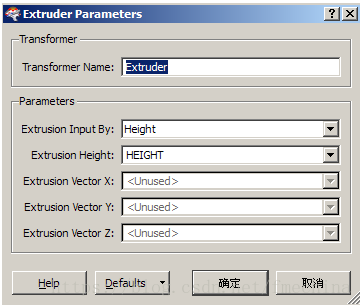
输入:1)如果输入的要素是表面(face)或面(area),则输出的是立体几何;2)如果输入的是线性要素,则输出的是复合表面(composite surface)几何。
通过对查询几何属性可以看出:
例如对于下面的图层:
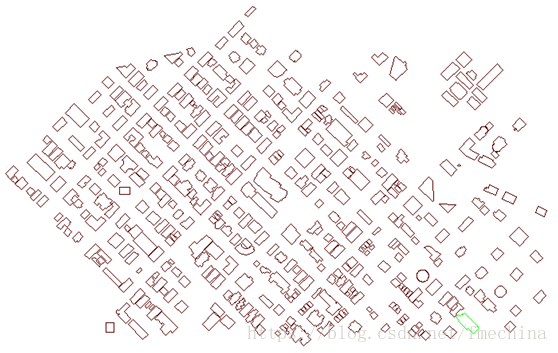
转换前的某个要素的几何属性如下:
Coord Dimension: 2D
Total Number of Coords: 5
Bounding Box:
Lower Left: (.,.)
Upper Right: (.,.)
Coordinate Listing:
----------------------------------
1: (., .)
2: (., .0)
3: (., .)
4: (., .)
5: (., .)
假设转换前的几何类型为fme_area,则转换后该要素的几何属性为:
Bounding Cube:
Lower Left: (.,.)
Upper Right: (.,.)
Z Range: 0.0 to 21.0
Geometry Type: IFMEExtrusion
Base:
Geometry Type: IFMEFace
Sidedness: `1-sided'
Front Appearance Reference: `<no_appearance>'
Area:
Geometry Type: IFMEPolygon
Boundary:
Geometry Type: IFMELine
Number of Coordinates: 5 -- Coordinate Dimension: 3
0: (.,.,0)
1: (.,.0,0)
2: (.,.,0)
3: (.,.,0)
4: (.,.,0)
Extrusion vector: <0,0,21>
而转换前的几何类型为fme_line,则转换后该要素的几何属性为:
Bounding Cube:
Lower Left: (.,.)
Upper Right: (.,.)
Z Range: 0.0 to 21.0
Geometry Type: IFMECompositeSurface
Sidedness: `1-sided'
Front Appearance Reference: `<no_appearance>'
Number of Surfaces: 4
--------------------------------------
Surface Number: 0
Geometry Type: IFMEFace
Sidedness: `1-sided'
Front Appearance Reference: `<no_appearance>'
Area:
Geometry Type: IFMEPolygon
Boundary:
Geometry Type: IFMELine
Number of Coordinates: 5 -- Coordinate Dimension: 3
0: (.,.,0)
1: (.,.0,0)
2: (.,.0,21)
3: (.,.,21)
4: (.,.,0)
--------------------------------------
Surface Number: 1
Geometry Type: IFMEFace
Sidedness: `1-sided'

Front Appearance Reference: `<no_appearance>'
Area:
Geometry Type: IFMEPolygon
Boundary:
Geometry Type: IFMELine
Number of Coordinates: 5 -- Coordinate Dimension: 3
0: (.,.0,0)
1: (.,.,0)
2: (.,.,21)
3: (.,.0,21)
4: (.,.0,0)
--------------------------------------
Surface Number: 2
Geometry Type: IFMEFace
Sidedness: `1-sided'
Front Appearance Reference: `<no_appearance>'
Area:
Geometry Type: IFMEPolygon
Boundary:
Geometry Type: IFMELine
Number of Coordinates: 5 -- Coordinate Dimension: 3
0: (.,.,0)
1: (.,.,0)
2: (.,.,21)
3: (.,.,21)
4: (.,.,0)
--------------------------------------
Surface Number: 3
Geometry Type: IFMEFace
Sidedness: `1-sided'
Front Appearance Reference: `<no_appearance>'
Area:
Geometry Type: IFMEPolygon
Boundary:
Geometry Type: IFMELine
Number of Coordinates: 5 -- Coordinate Dimension: 3
0: (.,.,0)
1: (.,.,0)
2: (.,.,21)
3: (.,.,21)
4: (.,.,0)
参数Extrusion Input By:挤压的数量可以设置为heigh(这种情况下挤压用在z轴的正方向上),或者设置为一个挤压矢量(这种情况用于任意方向的挤压)。
例如:
还是对于上面的面图层,部分图层显示如下:
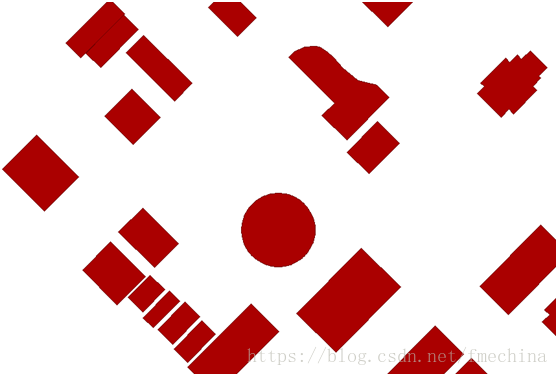
设置Extruder如下:
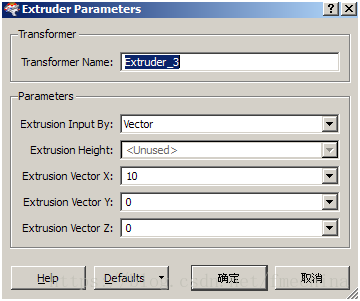
则得到的图层为:

查看某一要素的几何属性如下:
Bounding Cube:
Lower Left: (.,.0)
Upper Right: (.,.)
Z Range: 0.0 to 0.0
Geometry Type: IFMEExtrusion
Base:
Geometry Type: IFMEFace
Sidedness: `1-sided'
Front Appearance Reference: `<no_appearance>'
Area:
Geometry Type: IFMEPolygon
Boundary:
Geometry Type: IFMELine
Number of Coordinates: 5 -- Coordinate Dimension: 3
0: (.,.0,0)
1: (.,.,0)
2: (.,.,0)
3: (.,.,0)
4: (.,.0,0)
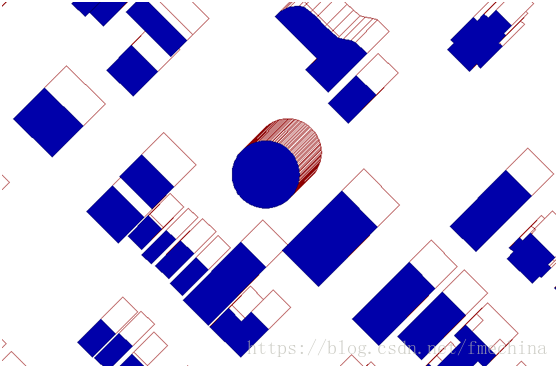
Extrusion vector: <10,0,0>
类似于3Daffine转换器的表示,转换矢量为<10,0,0>,即在x轴方向增厚了10。为了看的更加清楚,叠加原图层后的效果如下(蓝色为原图层):
注意:转换器Extruder只对表面(face)、面(area)和线(line)有影响。
版权声明:本文内容由互联网用户自发贡献,该文观点仅代表作者本人。本站仅提供信息存储空间服务,不拥有所有权,不承担相关法律责任。如发现本站有涉嫌侵权/违法违规的内容,请联系我们,一经查实,本站将立刻删除。
如需转载请保留出处:https://51itzy.com/kjqy/28376.html