
“大龟吃小鱼”小游戏开发
摘要
“大龟吃小鱼”游戏是基于python语言的pygame模块,尝试模拟实现网络小游戏“大鱼吃小鱼”的运行效果而进行的实践性单机小游戏项目。旨在对本段时间里的python学习效果进行考查与检验。本项目完全由本人对python基础知识以及pygame模块基础知识学习后独立完成开发。该小游戏项目模拟实现了添加背景音乐、对事件添加音效,游戏暂停、开始,随机生成游动小鱼,乌龟位置随光标移动,乌龟面向移动的方向,鲨鱼吃乌龟和其他鱼类,乌龟吃较小鱼、被较大鱼吃等功能。
1 引言
1.1 背景
当今游戏越来越氪金,游戏开发依旧是一个热门行业。但是开发的游戏能否赚到钱,还要看所开发游戏的质量。现在游戏越来越倾向于3D游戏和手游,腾讯算是国内3D手游界的元老了,知名度很高。虽然如此,但也抵挡不了经典游戏的流传。就拿俄罗斯方块来说,那是快跨世纪的经典了。当然经典是属于少数的,我们的知识也要跟上时代步伐。但是无论什么知识的学习,都得从基础开始,而python又是一门简单好用,功能强大的面向对象语言,非常适合其他编程语言薄弱或者零基础学员。所以,想要学得更深层次知识,首先也得从基础爬起。一些2D平面网络小游戏或者类似街霸游戏机的游戏都可以成为我们尝试模拟开发实现的好项目,先照着学着做,再学着去创造自己的游戏。
1.2 意义
1.3 相关研究
大鱼吃小鱼”是一款经典,被经常模仿的小游戏,至今还是很多人的回忆。为了编写程序,我还重新回去玩了几把。现在已经被模仿出很多款大鱼吃小鱼的游戏,但操作大致一样,只是画面更加美观,游戏的精灵对象更加丰富。它们的基本玩法都是通过移动鼠标带动小鱼移动,改变方向,躲避比自己个头大的鱼,追捕比自己小的鱼。期间会产生许多游来游去的鱼,这些鱼还有一定躲避和改变方向的能力。时不时还会响起警报,冲出一条鲨鱼。鲨鱼速度快,直接横穿游戏界面,带走旁边经过的小鱼。
1.4 实现的功能
根据“大鱼吃小鱼”游戏的基本玩法,应该模拟实现的基本功能如下:
(1) 添加背景音乐
(2) 鼠标控制主角乌龟的移动
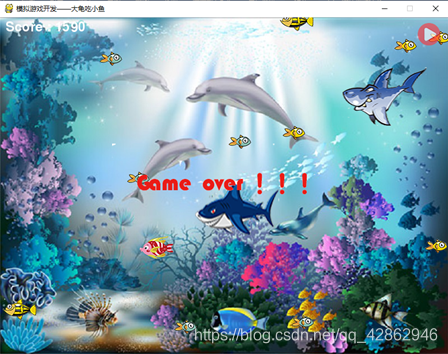
(3) 乌龟向左移动,头应该朝向左;向右移动时,头应该朝向右
(4) 随机产生小鱼、中鱼、大鱼和鲨鱼从游戏屏幕两侧游来
(5) 乌龟可以吃比自己小的鱼,可以被比自己大的鱼吃
(6) 乌龟吃鱼时,播放特定音效
(7) 乌龟吃鱼到一定数量会自动变大,设置两次变大过程
(8) 乌龟变大时播放特定音效
(9) 鲨鱼可以吃乌龟和所有鱼类
(10)鲨鱼出现前播放预警音效和显示警告标志,鲨鱼出现时播放特定音效
(11)添加游戏暂停和进行按钮
(12)实时统计乌龟吃鱼的得分,打印在窗体上。
(13)乌龟被吃,游戏停止,并在游戏屏幕中央打印出“Game Over!!!”
2. 系统结构
2.1 介绍
模拟实现的“大龟吃小鱼”只不过是个小型窗体游戏,所有游戏呈现的效果都是基于pygame的display模块的set_mode()方法创建的窗体实现的,然后通过循环一直去运行编写的程序,产生对应事件,除非达到指定的停止循环条件,程序才停止运行。而呈现的效果只不过是python高效的响应能力,每秒以人眼察觉不到的帧率刷新屏幕,让一张张图片(一点点像素)在窗体上飞速绘制。
2.2 系统中对象设计
| 名称 | 图标 | 大小 | 相关属性 |
|---|---|---|---|
| 小乌龟 |  讯享网 |
50*40 像素 | size =1/3/5 、score = 0 |
| 小鱼 |    |
40*25像素 | size = 0、spend = 3、live = True |
| 中鱼 |   |
60*40像素 | size = 2、speed = 2、live=True |
| 大鱼 |   |
80*50像素 | size = 4、speed = 3、live = True |
| 鲨鱼 |   |
150*100像素 | size = 6、 speed = 5、live = True |
相关描述:
(1)size表示对象大小关系,乌龟初始化为1,后边变大再修改为3,5。然后宽高分别变为原来1.4,1.8倍。其他对象size固定不变这样设计,为了满足大吃小的设定。
(2)score是小乌龟吃鱼所获得分数。吃小、中、大鱼分别加10、20、30分。
(3)speed是给鱼的游动速度
(4)live用于判断鱼是否被吃,被吃则置False,触发重置鱼位置的事件。
2.3 使用的模块方法
(1)display模块
set_mode(宽,高):创建窗体
set_cption(“…”):创建窗体标题
(2)mixer内的music模块——Pygame 中控制音频流的模块。load("….ogg"):载入音乐文件,创建了音乐对象
play():播放
set_colume():设置音量
pause():暂停音乐播放
unpause():恢复音乐播放
stop():结束播放呀
(3)mixer模块
pygame.mixer.Sound("….wav"): 使用前需先生成Sound()对象
play():播放
set_volume():设置音量
(5)mouse模块
set_visible():隐藏或显示鼠标光标
get_pos():获取鼠标光标的位置
(6)sprite 模块
spritecollide():方法用于检测某个精灵是否与指定的组中的其它精灵发生碰撞。
pygame.sprite.Sprite:动画精灵的基类:
(8)transform模块
flip():水平、垂直翻转图像
smoothscale():平滑缩放图像
(9)font
Font():设置文本字体和大小
render() 方法: 将显示的文字活生生的渲染成一个 Surface 对象
(10)surface.blit():将surface对象渲染到屏幕上
(11)time模块
delay():进行延迟。
time模块有一个 Clock类。实例化的Clock 对象有一个方法叫做 tick(),参数就是设置的帧率。
3 实现代码
3.1 打地基
游戏的实现需要一个地基,而进一步工作还需要一些材料。这里的地基就是窗体,材料就是开发过程中用到的素材(音乐、图像)。
先创建一个窗体,并导入音乐素材,顺便把主角小乌龟加入到窗体中。
创建一个musice文件夹存放音乐素材如下:
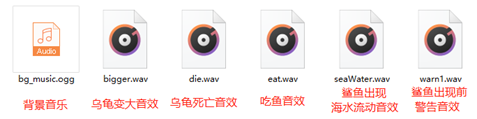
创建一个images文件夹存放图片素材如下:
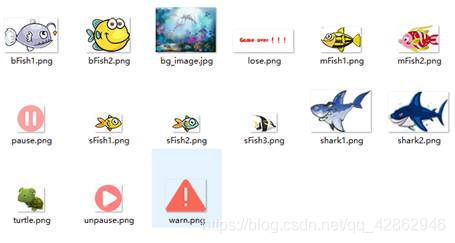
```python (1)创建乌龟模块,定义乌龟类 import pygame class Turtle(pygame.sprite.Sprite): def __init__(self,bg_size): pygame.sprite.Sprite.__init__(self) #生成乌龟图像 self.image = pygame.image.load("images/turtle.png").convert_alpha() #获取位置 self.rect = self.image.get_rect() self.width, self.height = bg_size[0],bg_size[1] #用于限制获得范围 #用于定位 self.rect.left, self.rect.top = \ (self.width - self.rect.width)//2, \ (self.height - self.rect.height) //2 (2)创建主模块(main.py) import pygame import sys import traceback #为了更好退出 from pygame.locals import * import turtle #导入自己编写的乌龟模块 pygame.init() pygame.mixer.init() #混音器初始化(可以省略) bg_size = width, height = 800,600 #规定窗体大小 screen = pygame.display.set_mode(bg_size) #创建窗体 pygame.display.set_caption("模拟游戏开发——大龟吃小鱼") #设置窗体标题 background = pygame.image.load('images/bg_image.jpg').convert_alpha() #加载背景图片 clock = pygame.time.Clock() #载入游戏音乐 pygame.mixer.music.load("music/bg_music.ogg") pygame.mixer.music.set_volume(0.2) die_sound = pygame.mixer.Sound("music/die.wav") die_sound.set_volume(0.2) eat_sound = pygame.mixer.Sound("music/eat.wav") eat_sound.set_volume(0.3) warn1_sound = pygame.mixer.Sound("music/warn1.wav") warn1_sound.set_volume(0.2) seaWater_sound = pygame.mixer.Sound("music/seaWater.wav") seaWater_sound.set_volume(0.2) bigger_sound = pygame.mixer.Sound("music/bigger.wav") bigger_sound.set_volume(0.2) def main(): pygame.mixer.music.play(-1) #无限循环播放bg_music tur = turtle.Turtle(bg_size) #生成乌龟对象 running = True #游戏循环运行条件 while running: for event in pygame.event.get(): if event.type == QUIT: pygame.quit() #解决关闭窗口不退出问题 sys.exit() #绘制背景图片 screen.blit(background,(0,0)) #绘制乌龟 screen.blit(tur.image,(tur.rect.left,tur.rect.top)) pygame.display.flip() #刷新页面 clock.tick(60) #设置帧率为每秒60帧 if __name__ == "__main__": try: main() except SystemExit: pass except: traceback.print_exc() pygame.quit() input() 讯享网
3.2 鼠标控制主角乌龟的移动

讯享网```python (1)修改乌龟模块 ……省略的代码…… #生成乌龟左右朝向的图像 self.Limage = pygame.image.load("images/turtle.png").convert_alpha() self.Rimage = pygame.transform.flip(self.Limage,True,False) #获取位置(左右朝向图片的位置应该一致) self.rect = self.Limage.get_rect() ……省略的代码 …… pygame.mouse.set_visible(False) #设置光标不可见 (2)主模块修改 ……省略代码…… #绘制背景图片 screen.blit(background,(0,0)) #判断乌龟移动方向,显示乌龟大小 new_pos = pygame.mouse.get_pos() if new_pos[0] - now_pos[0] > 0: screen.blit(tur.Rimage,tur.rect) else: screen.blit(tur.Limage,tur.rect) #将光标画在pygame,默认光标的位置 tur.rect.center = pygame.mouse.get_pos() pygame.display.flip() #刷新页面 ……省略的代码……
3.3 随机产生小鱼、中鱼、大鱼和鲨鱼从游戏屏幕两侧游来
创建鱼模块fish.py,定义不同鱼的类。这里给每种鱼2-3中类别,所以一个类中载入了2-3张图片。这些鱼实现了在窗体左右侧外某位置随机生成,然后一直游向窗体,当小鱼游过窗体时,在重置鱼的位置于窗体外左右侧外某位置随机生成,再重新游回屏幕,循环该过程,实现不间断的游鱼从屏幕两侧随机生成。
主模块先定义4个生成鱼的函数,让生成的每条鱼存于两个组中,方便后期使用。在应用函数生成对象后,再将组中每个对象绘制再屏幕上。
实现代码比较简单。
```pathon (1)定义fish.py模块 import pygame from random import * #小鱼 class SmallFish(pygame.sprite.Sprite): def __init__(self,bg_size): pygame.sprite.Sprite.__init__(self) #加载小鱼图片 self.img1 = pygame.image.load("images/sFish1.png").convert_alpha() self.img2 = pygame.image.load("images/sFish2.png").convert_alpha() self.img3 = pygame.image.load("images/sFish2.png").convert_alpha() self.rect = self.img1.get_rect() #获取位置 self.width, self.height = bg_size[0], bg_size[1] #用于限制获得范围 self.speed = 3 #定义小鱼游动速度 #在页面外部左方5个屏幕宽度范围内随机生成一只小鱼 self.rect.center = \ (randint(-5*self.width, 0),\ randint(0, self.height-self.rect.height)) #当鱼从左边游到窗体右边外,重置小鱼位置,否则就让小鱼继续向前游 def siwm(self): if self.rect.left > self.width: self.rect.center = \ (randint(-5 * self.width, 0),\ randint(0, self.height-self.rect.height)) else: self.rect.right += self.speed #中鱼类 class MidFish(pygame.sprite.Sprite): def __init__(self,bg_size): pygame.sprite.Sprite.__init__(self) #加载两种不同类型中鱼 self.img1 = pygame.image.load("images/mFish1.png").convert_alpha() self.img2 = pygame.image.load("images/mFish2.png").convert_alpha() self.rect = self.img1.get_rect() self.width, self.height = bg_size[0], bg_size[1] self.speed = 2 #在页面外部左方1-10个屏幕宽度范围内随机生成一只大鱼 self.rect.center = \ (randint(self.width,10 * self.width),\ randint(0, self.height-self.rect.height)) #当鱼从右边游到窗体左边外,重置小鱼位置,否则就让小鱼继续向前游 def siwm(self): if self.rect.right < 0: self.rect.center = \ (randint(self.width,10 * self.width),\ randint(0, self.height-self.rect.height)) else: self.rect.right -= self.speed #大鱼 class BigFish(pygame.sprite.Sprite): def __init__(self,bg_size): pygame.sprite.Sprite.__init__(self) #加载两种不同类型大鱼 self.img1 = pygame.image.load("images/bFish1.png").convert_alpha() self.img2 = pygame.image.load("images/bFish2.png").convert_alpha() self.rect = self.img1.get_rect() self.width, self.height = bg_size[0], bg_size[1] self.speed = 3 #在页面外左方15个屏幕宽度范围内随机生成一只大鱼 self.rect.center = \ (randint(-10*self.width, 0),\ randint(0, self.height-self.rect.height)) def siwm(self): if self.rect.left > self.width: self.rect.center = \ (randint(-15 * self.width, 0),\ randint(0, self.height-self.rect.height)) else: self.rect.right += self.speed #鲨鱼 class Shark(pygame.sprite.Sprite): def __init__(self,bg_size): pygame.sprite.Sprite.__init__(self) #加载鲨鱼 self.img1 = pygame.image.load("images/shark1.png").convert_alpha() self.img2 = pygame.image.load("images/shark2.png").convert_alpha() self.rect = self.img1.get_rect() self.width, self.height = bg_size[0], bg_size[1] self.speed = 5 #在页面外部右部5-20个屏幕宽度范围内随机生成一只鲨鱼 self.rect.center = \ (randint(5 * self.width,20 *self.width),\ randint(0, self.height-self.rect.height)) def siwm(self): if self.rect.right < 0: self.rect.center = \ (randint(5 * self.width,20 *self.width),\ randint(0, self.height-self.rect.height)) else: self.rect.right -= self.speed (2)主模块修改 ……省略的代码…… import fish #导入自己编写的鱼模块 ……省略的代码…… #添加鱼的函数,并将鱼类对象放到到两个组 def add_SmallFish(group1,group2,num): for i in range(num): fish_ = fish.SmallFish(bg_size) group1.add(fish_) group2.add(fish_) def add_MidFish(group1,group2,num): for i in range(num): fish_ = fish.MidFish(bg_size) group1.add(fish_) group2.add(fish_) def add_BigFish(group1,group2,num): for i in range(num): fish_ = fish.BigFish(bg_size) group1.add(fish_) group2.add(fish_) def add_Shark(group1,group2,num): for i in range(num): fish_ = fish.Shark(bg_size) group1.add(fish_) group2.add(fish_) def main(): ……省略的代码…… #生成鱼 fishes = pygame.sprite.Group() #存放小、中、大和鲨鱼 #3种小鱼各12条 small_fish1 = pygame.sprite.Group() add_SmallFish(small_fish1,fishes,12) small_fish2 = pygame.sprite.Group() add_SmallFish(small_fish2,fishes,12) small_fish3 = pygame.sprite.Group() add_SmallFish(small_fish3,fishes,12) #2种中鱼各8条 mid_fish1 = pygame.sprite.Group() add_MidFish(mid_fish1,fishes,8) mid_fish2 = pygame.sprite.Group() add_MidFish(mid_fish2,fishes,8) #2种大鱼各4条 big_fish1 = pygame.sprite.Group() add_BigFish(big_fish1,fishes,4) big_fish2 = pygame.sprite.Group() add_BigFish(big_fish2,fishes,4) #2种鲨鱼各1条 shark_fish1 = pygame.sprite.Group() add_Shark(shark_fish1,fishes,2) shark_fish2 = pygame.sprite.Group() add_Shark(shark_fish2,fishes,2) while running: …… 省略的代码…… #绘制背景图片 screen.blit(background,(0,0)) #绘制鱼 #小鱼 for each in small_fish1: each.siwm() screen.blit(each.img1, each.rect) for each in small_fish2: each.siwm() screen.blit(each.img2, each.rect) for each in small_fish3: each.siwm() screen.blit(each.img3, each.rect) #中鱼 for each in mid_fish1: each.siwm() screen.blit(each.img1, each.rect) for each in mid_fish2: each.siwm() screen.blit(each.img2, each.rect) #大鱼 for each in big_fish1: each.siwm() screen.blit(each.img1, each.rect) for each in big_fish2: each.siwm() screen.blit(each.img2, each.rect) #鲨鱼 for each in shark_fish1: each.siwm() screen.blit(each.img1, each.rect) for each in shark_fish2: each.siwm() screen.blit(each.img2, each.rect) ……省略的代码…… 3.4 乌龟可以吃比自己小的鱼,可以被比自己大的鱼吃
讯享网```pathon (1)修改的乌龟模块如下 在乌龟类添加属性:self.size = 1 (2)修改的鱼模块如下 a. #小鱼 class SmallFish(pygame.sprite.Sprite): def __init__(self,bg_size): ……省略的代码…… size = 0 #用于比较个头大小 self.live = True #用于判断是否还活着 #重置小鱼的位置 def reset(self): self.rect.center = \ (randint(-5 * self.width, 0),\ randint(0, self.height-self.rect.height)) b. #中鱼类 class MidFish(pygame.sprite.Sprite): def __init__(self,bg_size): ……省略的代码…… size = 2 #用于比较个头大小 self.live = True #用于判断是否还活着 #重置鱼的位置 def reset(self): self.rect.center = \ (randint(self.width,10 * self.width),\ randint(0, self.height-self.rect.height)) c. #大鱼 class BigFish(pygame.sprite.Sprite): def __init__(self,bg_size): ……省略的代码…… self.size = 4 self.live = True #用于判断是否还活着 #重置鱼的位置 def reset(self): self.rect.center = \ (randint(-15 * self.width, 0),\ randint(0, self.height-self.rect.height)) d.#鲨鱼 在鲨鱼类中添加属性self.seize = 6 (3)修改的主组模块如下 ……省略的代码…… shark_fish2 = pygame.sprite.Group() add_Shark(shark_fish2,fishes,2) shark_fish = [] #存放鲨鱼对象 for i in shark_fish1: shark_fish.append(i) for i in shark_fish2: shark_fish.append(i) running = True #游戏循环运行条件 while running: ……省略的代码…… #绘制鱼 #小鱼 for each in small_fish1: if each.live: #检测是否还活着 each.siwm() screen.blit(each.img1, each.rect) else: each.reset() each.live = True for each in small_fish2: if each.live: #检测是否还活着 each.siwm() screen.blit(each.img2, each.rect) else: each.reset() each.live = True for each in small_fish3: if each.live: #检测是否还活着 each.siwm() screen.blit(each.img3, each.rect) else: each.reset() each.live = True #中鱼 for each in mid_fish1: if each.live: #检测是否还活着 each.siwm() screen.blit(each.img1, each.rect) else: each.reset() each.live = True for each in mid_fish2: if each.live: #检测是否还活着 each.siwm() screen.blit(each.img2, each.rect) else: each.reset() each.live = True #大鱼 for each in big_fish1: if each.live: #检测是否还活着 each.siwm() screen.blit(each.img1, each.rect) else: each.reset() each.live = True for each in big_fish2: if each.live: #检测是否还活着 each.siwm() screen.blit(each.img2, each.rect) else: each.reset() each.live = True #鲨鱼 for each in shark_fish1: each.siwm() screen.blit(each.img1, each.rect) for each in shark_fish2: each.siwm() screen.blit(each.img2, each.rect) #鲨鱼的检测 for each in shark_fish: array = pygame.sprite.spritecollide(each,fishes,False) if array: for i in array: i.live = False #乌龟的检测 array = pygame.sprite.spritecollide(tur, fishes, False) if array: for i in array: if tur.size > i.size: i.live=False ……省略的代码……
3.5 完善小乌龟吃鱼事件
首先乌龟吃鱼时,应该播放特定音效,直接使用play()方法播放不填参数,默认播放依次。假如乌龟被吃,将乌龟画在窗体外,背景音乐停止,播放乌龟死亡音效,停止循环,游戏结束。
给乌龟类一个score属性,记录得分,吃下鱼得10分,中鱼得20分,大鱼得30分。
还应该让乌龟分数到达500时,另其变大到原来尺寸的1.4倍,分数达到1000时,变大为原来的1.8倍(这里经过计算,增大原来1.4倍刚好宽比中鱼大10个像素,增大原来1.8倍刚好宽比大鱼大10个像素)。图像变大利用pygame的transform模块smoothscale()方法实现。此时还需要在乌龟模块定义左右向的1.4倍、1.8倍图片。
此时居然乌龟比中鱼大,那么size设置为3,则乌龟可以吃中鱼了,而比大鱼大时,size设置为5,则可以吃大鱼了。乌龟变大时要播放变大音效,因为sroce可能跳过500和1000,直接往上增,所以我还定义了两个属性用于检测是否播放变大音效。
```pathon (1)乌龟类修改 import pygame class Turtle(pygame.sprite.Sprite): def __init__(self,bg_size): ……省略的代码…… self.rect = self.Limage.get_rect() #1.4倍原比例大小左右向乌龟 self.Limage1_4 = pygame.transform.smoothscale(self.Limage,\ (int(self.rect.width * 1.4),\ int(self.rect.height * 1.4))) self.Rimage1_4 = pygame.transform.flip(self.Limage1_4,True,False) #1.8倍原比例大小左右向乌龟 self.Limage1_8 = pygame.transform.smoothscale(self.Limage,\ (int(self.rect.width * 1.8),\ int(self.rect.height * 1.8))) self.Rimage1_8 = pygame.transform.flip(self.Limage1_8,True,False) #当score等于500,变身size=3(可吃size为0,2鱼),尺寸为70*70 #当score 等于1000,变身size=5(可吃size为0,2,4的鱼),尺寸90*90 self.score = 0 self.change1_music= 0 #是否播放第一次变声音乐 self.change2_music= 0 #是否播放第二次变声音乐 (2)主模块修改 ……省略的代码…… #乌龟的检测 array = pygame.sprite.spritecollide(tur, fishes, False) if array: for i in array: if tur.size > i.size: eat_sound.play() i.live=False if i.size == 0: tur.score += 10 elif i.size == 2: tur.score += 20 elif i.size == 4: tur.score += 30 else: running = False eat_sound.play() screen.blit(tur.Rimage,(width+10,0)) #将乌龟画在窗体外隐藏 pygame.time.delay(1000) pygame.mixer.music.stop() die_sound.play() else: #判断乌龟移动方向,显示乌龟大小 new_pos = pygame.mouse.get_pos() if tur.score < 500: if new_pos[0] - now_pos[0] > 0: screen.blit(tur.Rimage,tur.rect) else: screen.blit(tur.Limage,tur.rect) elif 500<=tur.score <1000: if new_pos[0] - now_pos[0] > 0: screen.blit(tur.Rimage1_4,tur.rect) else: screen.blit(tur.Limage1_4,tur.rect) tur.size = 3 tur.change1_music += 1 elif 1000<=tur.score: if new_pos[0] - now_pos[0] > 0: screen.blit(tur.Rimage1_8,tur.rect) else: screen.blit(tur.Limage1_8,tur.rect) tur.size = 5 tur.change2_music += 1 ……省略的代码…… 3.6 将分数打印在窗体左上角
将字体打印在屏幕上需要先将字体转化为surface对象,可以使用pygame的font模块的render()方法实现,然后直接blit(文字,位置)到屏幕上即可。
讯享网```pathon (1)主模块代码如下: ……省略的代码…… # 得分字体 score_font = pygame.font.Font(None, 36) #字体 while running: ……省略的代码…… # 绘制得分 score_text = score_font.render("Score : %s" % str(tur.score), True, (255,255,255)) screen.blit(score_text, (10, 5)) ……省略的代码
3.7 完善鲨鱼出现和吃鱼事件
鲨鱼出现前播放预警音效和显示警告标志,鲨鱼出现时播放特定音效。音效直接将到导入的对象play()即可,警示标志就是一张图片。
```python (1)主模块函数修改 ……省略的代码…… #鲨鱼到来警告标志 warn_tip = pygame.image.load("images/warn.png").convert_alpha() while running: ……省略的代码…… #鲨鱼 for each in shark_fish1: each.siwm() screen.blit(each.img1, each.rect) #鲨鱼快要出现时,发出警报(鲨鱼速度是4,所以要取个范围才能测试) if 3*width<= each.rect.left <=3*width+6: warn1_sound.play() #鲨鱼在这个位置范围时,显示警告标志 elif 3*width<= each.rect.left <=3*width+300: screen.blit(warn_tip,(width-70 , each.rect[1])) elif 2 * width <= each.rect.left <= 2 * width + 6: seaWater_sound.play() for each in shark_fish2: each.siwm() screen.blit(each.img2, each.rect) #鲨鱼快要出现时,发出警报(鲨鱼速度是4,所以要取个范围才能测试) if 3*width<= each.rect.left <=3*width+6: warn1_sound.play() #鲨鱼在这个位置范围时,显示警告标志 elif 3*width<= each.rect.left <=3*width+300: screen.blit(warn_tip,(width-70 , each.rect[1])) elif 2 * width <= each.rect.left <= 2 * width + 6: seaWater_sound.play() 3.8 添加游戏暂停和进行按钮
讯享网```pyhthon (1)主模块修改 ……省略的代码…… # 标志是否暂停游戏 paused = False pause_nor_image = pygame.image.load("images/unpause.png").convert_alpha() pause_pressed_image = pygame.image.load("images/pause.png").convert_alpha() paused_rect = pause_nor_image.get_rect() paused_rect.left, paused_rect.top = width - paused_rect.width - 15, 10 paused_image = pause_nor_image while running: ……省略的代码…… if not paused: #绘制背景图片 screen.blit(background,(0,0)) ……省略的代码…… #暂停时设置光标可见 if paused: pygame.mouse.set_visible(True) #设置光标可见 else: pygame.mouse.set_visible(False) #设置光标不可见 # 绘制得分 score_text = score_font.render("Score : %s" % str(tur.score), True, (255,255,255)) screen.blit(score_text, (10, 5)) # 绘制暂停按钮 screen.blit(paused_image, paused_rect) ……省略的代码……
3.9 游戏结束时,在游戏屏幕中央打印出“Game Over!!!”
游戏结束即乌龟死亡,被吃时,所以在乌龟检测后,假如被吃,就将实现准别的图像答应到屏幕中央即可。
```python ……省略的代码…… #存放打印的文字 msgs = [] while running: ……省略的代码…… #乌龟的检测 array = pygame.sprite.spritecollide(tur, fishes, False) else: running = False eat_sound.play() screen.blit(tur.Rimage,(width+10,0)) #将乌龟画在窗体外隐藏 pygame.time.delay(1000) pygame.mixer.music.stop() die_sound.play() #打印一张图片 msg = pygame.image.load('images/lose.png').convert_alpha() msg_pos = (width - msg.get_width()) // 2, \ (height - msg.get_height()) // 2 msgs.append((msg,msg_pos)) ……省略的代码…… #将光标画在pygame,默认光标的位置 tur.rect.center = pygame.mouse.get_pos() pygame.display.flip() #刷新页面 ……省略的代码…… 3.10 完善碰撞检测
讯享网```python (1)修改每一个类,添加mask属性。 添加语句如下: self.mask = pygame.mask.from_surface(self.img1) #将非透明部分标记为mask self.mask = pygame.mask.from_surface(self.img2) #将非透明部分标记为mask (2)修改主模块两处碰撞检测 在碰撞检测方法中添加参数:pygame.sprite.collide_mask
4. 实验结果
4.1 初始化界面
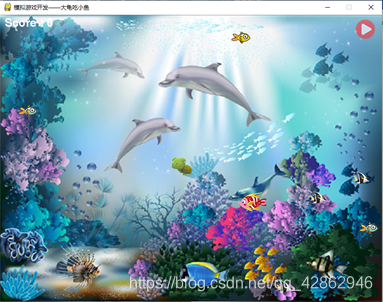
4.2 暂停效果
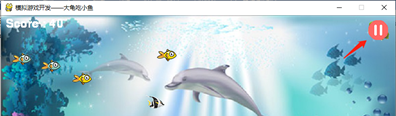
4.3 运行效果
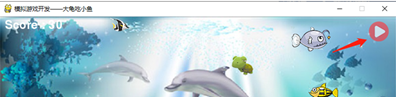
4.4 随之鼠标移动,小乌龟移动,并实时改变方向
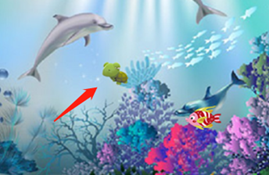
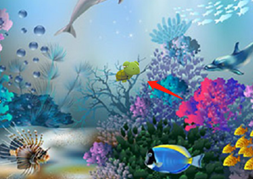
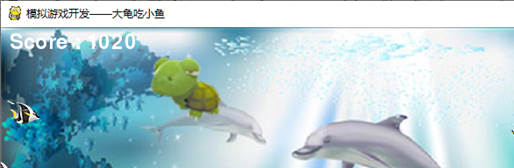
4.5 个头变化
当小乌龟分数到达500时,其个头变为原来1.4倍。
当小乌龟分数到达1000时,其个头变为原来1.8倍。


4.6 乌龟和鲨鱼吃较小鱼
这里只是实现一旦触碰就播放吃鱼音效,让较小的鱼消失,然后重置被吃鱼的位置于窗体以外。只是一瞬间,无法捕捉照片。
4.7 背景音乐、各种音效
游戏全程有背景音乐,吃较小鱼,乌龟尺寸变大、乌龟被吃,鲨鱼到来等都有音效。
4.8 鲨鱼靠近时显示警告标志

4.9 被鲨鱼吃掉,游戏结束
游戏只给乌龟一条命,被吃即游戏结束
5. 总结和展望
5.1 总结
程序虽然实现模拟的“大鱼吃小鱼”的基本功能,但是还是存在缺陷和未能实现的地方。
5.1.1 缺陷:
(1)碰撞检测时、可能肉眼看到还没触碰就检测到了碰撞。
原因:可能因为给每种小、中、大和鲨鱼分别增加了2到3中不同类型,所以pygame的from_surface模块的mask方法无法实现对所有对象,忽略图片对象透明部分。
图片已经做尽量裁剪缩小图像透明背景,此情况会有所改善。
(2)鼠标停止时,无论本来小乌龟的头面向哪个方向,都会改为方向向左
应有的效果应该是鼠标停止,小乌龟的头方向与刚刚移动方向一致。
产生原因:我是利用光标前后横坐标的差的正负代表小乌龟头面向做和面向右的,在判断时,光标停止即表示差等于0,此时多除一个判断条件,不知道如何处理,所以就默认归分到向左。
(3)程序只实现了乌龟吃鱼、鲨鱼吃鱼效果。
5.1.2 不足:
5.2展望
Python是这学期收获较多的课程之一,本学期真的是学到了东西,虽然还只是些皮毛,但相比以前的碌碌而过的其他学期,真的是莫大的进步改变。没想到疫情,让在家学习的我更加积极,这期间完全独立而且真正自己完成了几个项目。虽然项目有大有小,收获的有些也只是知识中皮毛,不懂的还是很多,但找到了方向,还有一颗真正学习的心,这段时间的学习会成为我大学来最刻苦铭心的一段记忆中。马上又假期,学习资料已经备好,爬虫和pygame,虽然遥远,但也要一点点努力靠近大数据和人工智能时代。我会更加努力……
版权声明:本文内容由互联网用户自发贡献,该文观点仅代表作者本人。本站仅提供信息存储空间服务,不拥有所有权,不承担相关法律责任。如发现本站有涉嫌侵权/违法违规的内容,请联系我们,一经查实,本站将立刻删除。
如需转载请保留出处:https://51itzy.com/kjqy/27260.html