
这里放了一个小强机器人的bag和我自己的bag包,以供大家测试。
前提:
1.需要三维激光启动节点,发布/points2(后面需要remap);
2.需要IMU发布imu 的相关消息 ,发布/imu(这里是我自己写的)。
注意3D需要rosbag record 记录上面两个消息,话题名自己根据自己修改,也可以 -a,记录所有的topic。
rosbag record /imu /rslidar_points讯享网
其他步骤和2D差不多:下面我直接给文件内容,看了2D,3D应该好理解很多。
资源处奉献了我的2d和3d配置文件,只需要改下urdf模型和重映射话题,就可以使用在自己的机器人上。
本文主要是大致流程,具体细节在下一个博客进行讲解,有很多小的坑,但是都是致命的。。。。

配置launch文件:myself_rslidar_3d.launch
讯享网<launch> <!-- <node pkg="tf" type="static_transform_publisher" name="base_laser_broadcaster" args="0 0 0 0 0 0 laserbase_footprint /base_footprint 20" /> --> <param name="robot_description" textfile="$(find cartographer_ros)/urdf/myself_robot.urdf" /> <node name="robot_state_publisher" pkg="robot_state_publisher" type="robot_state_publisher" /> <node name="cartographer_node" pkg="cartographer_ros" type="cartographer_node" args=" -configuration_directory $(find cartographer_ros)/configuration_files -configuration_basename myself_rslidar_3d.lua" output="screen"> <!--remap from="/odom" to="/xqserial_server/Odom" /--> <!--remap from="/imu" to="/imu_raw" / 如果发布的不是/imu 此处可以重映射为你的imu topic --> <remap from="/points2" to="/rslidar_points" /> </node> <node name="cartographer_occupancy_grid_node" pkg="cartographer_ros" type="cartographer_occupancy_grid_node" args="-resolution 0.05" /> <node name="rviz" pkg="rviz" type="rviz" required="true" args="-d $(find cartographer_ros)/configuration_files/rslidar_3d.rviz" /> </launch>
配置urdf文件:myself_robot.urdf
<robot name="myself_udrf"> <link name="base_link"/> <link name="rslidar"> <visual> <origin xyz="0 0 0" /> <geometry> <cylinder length="0.05" radius="0.05" /> </geometry> <material name="gray" /> </visual> </link> <joint name="laser2link" type="fixed"> <parent link="base_link" /> <child link="rslidar" /> <origin xyz="-0.25 0 0.4" rpy="0 0 0" /> </joint> <link name="imu"> <visual> <origin xyz="0 0 0" /> <geometry> <cylinder length="0.01" radius="0.01" /> </geometry> <material name="gray" /> </visual> </link> <joint name="imu2link" type="fixed"> <parent link="base_link" /> <child link="imu" /> <origin xyz="0 0 0" rpy="0 0 0" /> </joint> </robot> 配置lua文件:my_self_3d.lua
讯享网-- Copyright 2016 The Cartographer Authors -- -- Licensed under the Apache License, Version 2.0 (the "License"); -- you may not use this file except in compliance with the License. -- You may obtain a copy of the License at -- -- http://www.apache.org/licenses/LICENSE-2.0 -- -- Unless required by applicable law or agreed to in writing, software -- distributed under the License is distributed on an "AS IS" BASIS, -- WITHOUT WARRANTIES OR CONDITIONS OF ANY KIND, either express or implied. -- See the License for the specific language governing permissions and -- limitations under the License. include "map_builder.lua" include "trajectory_builder.lua" options = { map_builder = MAP_BUILDER, trajectory_builder = TRAJECTORY_BUILDER, map_frame = "map", tracking_frame = "imu", published_frame = "base_link", odom_frame = "odom", provide_odom_frame = true, publish_frame_projected_to_2d = false, use_odometry = false, use_nav_sat = false, use_landmarks = false, num_laser_scans = 0, num_multi_echo_laser_scans = 0, num_subdivisions_per_laser_scan = 1, num_point_clouds = 1, 注释这里换成1,如果你只有一个雷达的话 lookup_transform_timeout_sec = 0.2, submap_publish_period_sec = 0.3, pose_publish_period_sec = 5e-3, trajectory_publish_period_sec = 30e-3, rangefinder_sampling_ratio = 1., odometry_sampling_ratio = 1., fixed_frame_pose_sampling_ratio = 1., imu_sampling_ratio = 1., landmarks_sampling_ratio = 1., } TRAJECTORY_BUILDER_3D.num_accumulated_range_data = 1 #这里要修改为1 MAP_BUILDER.use_trajectory_builder_3d = true MAP_BUILDER.num_background_threads = 7 POSE_GRAPH.optimization_problem.huber_scale = 5e2 POSE_GRAPH.optimize_every_n_nodes = 320 POSE_GRAPH.constraint_builder.sampling_ratio = 0.03 POSE_GRAPH.optimization_problem.ceres_solver_options.max_num_iterations = 10 POSE_GRAPH.constraint_builder.min_score = 0.62 POSE_GRAPH.constraint_builder.global_localization_min_score = 0.66 return options
配置rviz文件:demo_3d.rviz这里使用的官方的
# Copyright 2016 The Cartographer Authors # # Licensed under the Apache License, Version 2.0 (the "License"); # you may not use this file except in compliance with the License. # You may obtain a copy of the License at # # http://www.apache.org/licenses/LICENSE-2.0 # # Unless required by applicable law or agreed to in writing, software # distributed under the License is distributed on an "AS IS" BASIS, # WITHOUT WARRANTIES OR CONDITIONS OF ANY KIND, either express or implied. # See the License for the specific language governing permissions and # limitations under the License. Panels: - Class: rviz/Displays Help Height: 78 Name: Displays Property Tree Widget: Expanded: - /Global Options1 - /Submaps1 - /PointCloud23 - /PointCloud23/Autocompute Value Bounds1 Splitter Ratio: 0. Tree Height: 817 - Class: rviz/Selection Name: Selection - Class: rviz/Tool Properties Expanded: - /2D Pose Estimate1 - /2D Nav Goal1 - /Publish Point1 Name: Tool Properties Splitter Ratio: 0. - Class: rviz/Views Expanded: - /Current View1 Name: Views Splitter Ratio: 0.5 - Class: rviz/Time Experimental: false Name: Time SyncMode: 0 SyncSource: PointCloud2 Visualization Manager: Class: "" Displays: - Alpha: 0.5 Cell Size: 1 Class: rviz/Grid Color: 160; 160; 164 Enabled: true Line Style: Line Width: 0.03 Value: Lines Name: Grid Normal Cell Count: 0 Offset: X: 0 Y: 0 Z: 0 Plane: XY Plane Cell Count: 100 Reference Frame: <Fixed Frame> Value: true - Class: rviz/TF Enabled: true Frame Timeout: 15 Frames: All Enabled: true base_link: Value: true horizontal_vlp16_link: Value: true imu_link: Value: true map: Value: true odom: Value: true vertical_vlp16_link: Value: true Marker Scale: 1 Name: TF Show Arrows: true Show Axes: true Show Names: true Tree: map: odom: base_link: horizontal_vlp16_link: {} imu_link: {} vertical_vlp16_link: {} Update Interval: 0 Value: true - Alpha: 1 Class: rviz/RobotModel Collision Enabled: false Enabled: true Links: All Links Enabled: true Expand Joint Details: false Expand Link Details: false Expand Tree: false Link Tree Style: Links in Alphabetic Order base_link: Alpha: 1 Show Axes: false Show Trail: false horizontal_vlp16_link: Alpha: 1 Show Axes: false Show Trail: false Value: true imu_link: Alpha: 1 Show Axes: false Show Trail: false Value: true vertical_vlp16_link: Alpha: 1 Show Axes: false Show Trail: false Value: true Name: RobotModel Robot Description: robot_description TF Prefix: "" Update Interval: 0 Value: true Visual Enabled: true - Alpha: 1 Autocompute Intensity Bounds: true Autocompute Value Bounds: Max Value: 7.6265 Min Value: 5.66667 Value: true Axis: Z Channel Name: intensity Class: rviz/PointCloud2 Color: 20; 220; 20 Color Transformer: FlatColor Decay Time: 0.1 Enabled: false Invert Rainbow: false Max Color: 255; 255; 255 Max Intensity: 4096 Min Color: 0; 0; 0 Min Intensity: 0 Name: PointCloud2 Position Transformer: XYZ Queue Size: 200 Selectable: true Size (Pixels): 3 Size (m): 0.03 Style: Flat Squares Topic: /horizontal_laser_3d Unreliable: false Use Fixed Frame: true Use rainbow: true Value: false - Alpha: 1 Autocompute Intensity Bounds: true Autocompute Value Bounds: Max Value: 5.6087 Min Value: 3.77875 Value: true Axis: Z Channel Name: intensity Class: rviz/PointCloud2 Color: 240; 220; 20 Color Transformer: FlatColor Decay Time: 0.1 Enabled: false Invert Rainbow: true Max Color: 255; 255; 255 Max Intensity: 4096 Min Color: 0; 0; 0 Min Intensity: 0 Name: PointCloud2 Position Transformer: XYZ Queue Size: 200 Selectable: true Size (Pixels): 3 Size (m): 0.03 Style: Flat Squares Topic: /vertical_laser_3d Unreliable: false Use Fixed Frame: true Use rainbow: true Value: false - Class: Submaps Enabled: true Name: Submaps Submap query service: /submap_query Topic: /submap_list Tracking frame: base_link Unreliable: false Value: true - Alpha: 1 Autocompute Intensity Bounds: true Autocompute Value Bounds: Max Value: 10 Min Value: -10 Value: false Axis: Z Channel Name: intensity Class: rviz/PointCloud2 Color: 0; 255; 0 Color Transformer: AxisColor Decay Time: 0 Enabled: true Invert Rainbow: false Max Color: 255; 255; 255 Max Intensity: 4096 Min Color: 0; 0; 0 Min Intensity: 0 Name: PointCloud2 Position Transformer: XYZ Queue Size: 20 Selectable: true Size (Pixels): 3 Size (m): 0.05 Style: Flat Squares Topic: /scan_matched_points2 Unreliable: false Use Fixed Frame: true Use rainbow: true Value: true - Class: rviz/MarkerArray Enabled: true Marker Topic: /trajectory_node_list Name: Trajectories Namespaces: "": true Queue Size: 100 Value: true - Class: rviz/MarkerArray Enabled: true Marker Topic: /landmark_poses_list Name: Landmark Poses Namespaces: "": true Queue Size: 100 Value: true - Class: rviz/MarkerArray Enabled: true Marker Topic: /constraint_list Name: Constraints Namespaces: "": true Queue Size: 100 Value: true Enabled: true Global Options: Background Color: 100; 100; 100 Fixed Frame: map Frame Rate: 30 Name: root Tools: - Class: rviz/Interact Hide Inactive Objects: true - Class: rviz/MoveCamera - Class: rviz/Select - Class: rviz/FocusCamera - Class: rviz/Measure - Class: rviz/SetInitialPose Topic: /initialpose - Class: rviz/SetGoal Topic: /move_base_simple/goal - Class: rviz/PublishPoint Single click: true Topic: /clicked_point Value: true Views: Current: Angle: 0 Class: rviz/TopDownOrtho Enable Stereo Rendering: Stereo Eye Separation: 0.06 Stereo Focal Distance: 1 Swap Stereo Eyes: false Value: false Name: Current View Near Clip Distance: 0.01 Scale: 10 Target Frame: <Fixed Frame> Value: TopDownOrtho (rviz) X: 0 Y: 0 Saved: ~ Window Geometry: Displays: collapsed: false Height: 1123 Hide Left Dock: false Hide Right Dock: false QMainWindow State: 000000ff00000000fd00000000001cc0fc0fb00000006c00069006f006e00000001eb0000006400fffffffb0000001e0054006f006f006c0006f0000ed000001df00000a3fb00000000f006f0df0000000000122fb000000f006f006c0006f000000d00000afb0000000c000003c0000000dd00fffffffb00000006c00069006f006e0000aa0000023a00000294fb00000000065006f0edee0000030bfb0000000c004b0069006e00000c000000000010f000003c0fc0fb0000001e0054006f006f006c0006f000000000000000000fb0000000a000000c0000000b000fffffffb00000006c00069006f006e0a000000b00000000000000000a9fc0fb0000000a0000004e000000e00000e0000003efc0fb00000006d0000000077e000002f600fffffffb00000006d00000000000000000000049e000003c0000000000000fc000000000000a0054006f006f006c000ffffffff0000000000000000 Selection: collapsed: false Time: collapsed: false Tool Properties: collapsed: false Views: collapsed: false Width: 1918 X: 0 Y: 24 用assets_writer_myself_3d.launch和assets_writer_myself_3d.lua
这里复制原始的assets_write一份,然后重命名,修改里面的urdf文件路径到自己的路径,然后就是一个lua文件,我没改多少,不过在后面出图会出多个视角的图,到时候不需要删了就行,其他都没啥的了。
讯享网 <launch> <node name="cartographer_assets_writer" pkg="cartographer_ros" required="true" type="cartographer_assets_writer" args=" -configuration_directory $(find cartographer_ros)/configuration_files -configuration_basename assets_writer_myself_3d.lua -urdf_filename $(find cartographer_ros)/urdf/myself_robot.urdf -bag_filenames $(arg bag_filenames) -pose_graph_filename $(arg pose_graph_filename)" output="screen"> </node> </launch>
VOXEL_SIZE = 5e-2 include "transform.lua" options = { tracking_frame = "imu", #这里的frame和建图的lua一致 pipeline = { { action = "min_max_range_filter", min_range = 1., max_range = 20., #设置范围,这个注释记得删,不知道注释格式就用#开头了 }, { action = "dump_num_points", }, { action = "fixed_ratio_sampler", sampling_ratio = 0.01, }, { action = "write_ply", filename = "points.ply" }, -- Gray X-Rays. These only use geometry to color pixels. { action = "write_xray_image", voxel_size = VOXEL_SIZE, filename = "xray_yz_all", transform = YZ_TRANSFORM, }, { action = "write_xray_image", voxel_size = VOXEL_SIZE, filename = "xray_xy_all", transform = XY_TRANSFORM, }, { action = "write_xray_image", voxel_size = VOXEL_SIZE, filename = "xray_xz_all", transform = XZ_TRANSFORM, }, -- Now we recolor our points by frame and write another batch of X-Rays. It -- is visible in them what was seen by the horizontal and the vertical -- laser. { action = "color_points", frame_id = "rslidar", color = { 255., 0., 0. }, }, { action = "write_xray_image", voxel_size = VOXEL_SIZE, filename = "xray_yz_all_color", transform = YZ_TRANSFORM, }, { action = "write_xray_image", voxel_size = VOXEL_SIZE, filename = "xray_xy_all_color", transform = XY_TRANSFORM, }, { action = "write_xray_image", voxel_size = VOXEL_SIZE, filename = "xray_xz_all_color", transform = XZ_TRANSFORM, }, } } return options 将pbstream文件转换成ply点云文件
讯享网#假设bag文件和pbstream文件保存在了home目录 roslaunch cartographer_ros assets_writer_myself_3d.launch bag_filenames:=${HOME}/2018-08-11-13-20-34.bag pose_graph_filename:=${HOME}/test_3d.pbfile
等待一段时间,处理完成后命令会自动退出,此时在bag文件旁边会生成一个.bag_points.ply后缀文件,这个就是点云文件。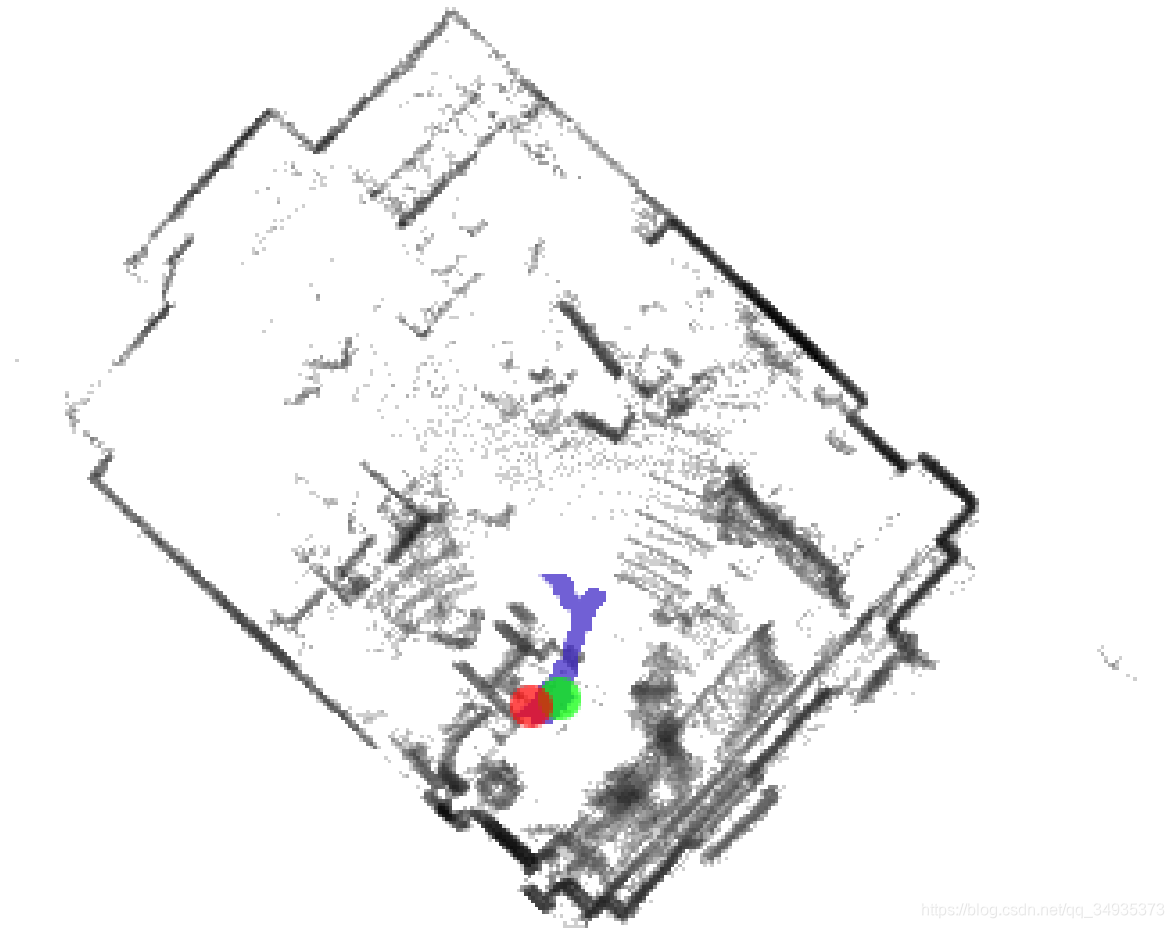
使用pcl工具将ply文件转换成pcd文件
sudo apt-get install pcl_tools讯享网#在小车主机上新开一个命令终端,假设ply文件在home目录 pcl_ply2pcd your.bag_points.ply test_3d.pcd
转换成功后就可以得到tes_3d.pcd文件,可以直接用pcl可视化工具查看
pcl_viewer test_3d.pcd 效果图如下:

参考:cartographer + velodyne64 + IMU建图_https://github.com/heatMa-CSDN博客_cartographer velodyne https://blog.csdn.net/u0/article/details/
版权声明:本文内容由互联网用户自发贡献,该文观点仅代表作者本人。本站仅提供信息存储空间服务,不拥有所有权,不承担相关法律责任。如发现本站有涉嫌侵权/违法违规的内容,请联系我们,一经查实,本站将立刻删除。
如需转载请保留出处:https://51itzy.com/kjqy/24953.html