
- Windows:
C:Users <您的用户名> .openclawopenclaw.json - macOS/Linux:
~/.openclaw/openclaw.json
如何找到配置文件:
Windows:
GPT plus 代充 只需 145# 方法一: 直接打开文件夹 explorer C:Users$env:USERNAME.openclaw # 方法二: 查看配置文件内容 type C:Users$env:USERNAME.openclawopenclaw.json
macOS/Linux:
# 方法一: 打开文件夹 open ~/.openclaw # macOS nautilus ~/.openclaw # Linux (GNOME) # 方法二: 查看配置文件内容 cat ~/.openclaw/openclaw.json
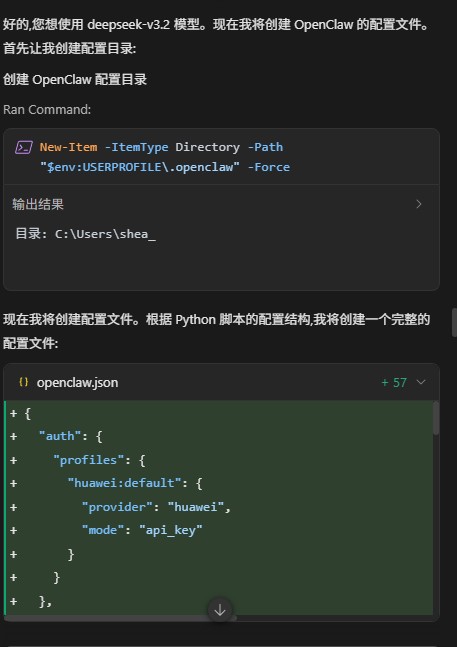
步骤 1: 打开配置文件
Windows:
GPT plus 代充 只需 145# 使用记事本打开 notepad C:Users$env:USERNAME.openclawopenclaw.json # 或使用 VS Code 打开 code C:Users$env:USERNAME.openclawopenclaw.json
macOS/Linux:
# 使用默认编辑器打开 open -e ~/.openclaw/openclaw.json # macOS (TextEdit) # 或使用 VS Code 打开 code ~/.openclaw/openclaw.json
步骤 2: 根据您的模型提供商修改配置
华为云 (MaaS) 配置
获取 API Key
- 访问: https://developer.huaweicloud.com/space/developerspace/tokens.html
- 登录华为云账号
- 创建或复制您的 API Key
配置文件内容
GPT plus 代充 只需 145{ "auth": { "profiles": { "huawei:default": { "provider": "huawei", "mode": "api_key" } } }, "models": { "providers": { "huawei": { "baseUrl": "https://api.modelarts-maas.com/openai/v1", "apiKey": "在这里粘贴您的华为云API Key", "api": "openai-completions", "models": [ { "id": "deepseek-v3.2", "name": "deepseek-v3.2" } ] } } }, "agents": { "defaults": { "model": { "primary": "huawei/deepseek-v3.2" }, "models": { "huawei/deepseek-v3.2": {} }, "workspace": "~/.openclaw/workspace", "compaction": { "mode": "safeguard" }, "maxConcurrent": 4, "subagents": { "maxConcurrent": 8 } } }, "messages": { "ackReactionScope": "group-mentions" }, "commands": { "native": "auto", "nativeSkills": "auto", "restart": true, "ownerDisplay": "raw" }, "session": { "dmScope": "per-channel-peer" }, "channels": {}, "gateway": { "mode": "local" }, "plugins": {} }
关键配置项说明
models.providers.huawei.apiKey: 您的华为云 API Keymodels.providers.huawei.models[0].id: 模型 ID (如 deepseek-v3.2, glm-5 等)agents.defaults.model.primary: 默认使用的模型,格式为huawei/ <模型id>
Doubao (火山引擎) 配置
获取 API Key 和 Endpoint ID
- 访问火山引擎控制台
- 进入"方舟大模型平台"
- 创建推理接入点,获取 Endpoint ID
- 获取 API Key
配置文件内容
{ "auth": { "profiles": { "doubao:default": { "provider": "doubao", "mode": "api_key" } } }, "models": { "providers": { "doubao": { "baseUrl": "https://ark.cn-beijing.volces.com/api/v3", "apiKey": "在这里粘贴您的Doubao API Key", "api": "openai-completions", "models": [ { "id": "在这里粘贴您的Endpoint ID", "name": "Doubao-1.8" } ] } } }, "agents": { "defaults": { "model": { "primary": "doubao/在这里粘贴您的Endpoint ID" }, "models": { "doubao/在这里粘贴您的Endpoint ID": {} }, "workspace": "~/.openclaw/workspace", "compaction": { "mode": "safeguard" }, "maxConcurrent": 4, "subagents": { "maxConcurrent": 8 } } }, "messages": { "ackReactionScope": "group-mentions" }, "commands": { "native": "auto", "nativeSkills": "auto", "restart": true, "ownerDisplay": "raw" }, "session": { "dmScope": "per-channel-peer" }, "channels": {}, "gateway": { "mode": "local" }, "plugins": {} }
关键配置项说明
models.providers.doubao.apiKey: 您的 Doubao API Keymodels.providers.doubao.models[0].id: 您的 Endpoint ID (如ep-306-abcde)agents.defaults.model.primary: 格式为doubao/
Anthropic 配置
获取 API Key
- 访问: https://console.anthropic.com/
- 登录或注册账号
- 在 API Keys 页面创建新的 API Key
配置文件内容
GPT plus 代充 只需 145{ "auth": { "profiles": { "anthropic:default": { "provider": "anthropic", "mode": "api_key" } } }, "models": { "providers": { "anthropic": { "baseUrl": "https://api.anthropic.com", "apiKey": "在这里粘贴您的Anthropic API Key", "api": "anthropic-chat", "models": [ { "id": "claude-3-5-sonnet-", "name": "claude-3-5-sonnet-" } ] } } }, "agents": { "defaults": { "model": { "primary": "anthropic/claude-3-5-sonnet-" }, "models": { "anthropic/claude-3-5-sonnet-": {} }, "workspace": "~/.openclaw/workspace", "compaction": { "mode": "safeguard" }, "maxConcurrent": 4, "subagents": { "maxConcurrent": 8 } } }, "messages": { "ackReactionScope": "group-mentions" }, "commands": { "native": "auto", "nativeSkills": "auto", "restart": true, "ownerDisplay": "raw" }, "session": { "dmScope": "per-channel-peer" }, "channels": {}, "gateway": { "mode": "local" }, "plugins": {} }
关键配置项说明
models.providers.anthropic.apiKey: 您的 Anthropic API Keymodels.providers.anthropic.api: 必须是anthropic-chatmodels.providers.anthropic.models[0].id: 模型名称 (如claude-3-5-sonnet-)agents.defaults.model.primary: 格式为anthropic/ <模型名称>
保存配置文件
编辑完成后,保存文件:
- 记事本:
Ctrl + S - VS Code:
Ctrl + S或Cmd + S(macOS)
优点: 不需要手动编辑 JSON 文件,减少格式错误。
步骤 1: 设置 gateway 模式
openclaw config set gateway.mode local
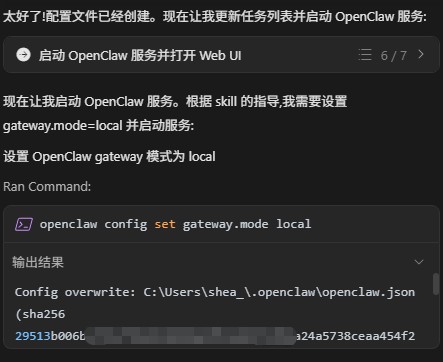
步骤 2: 配置华为云 (示例)
GPT plus 代充 只需 145# 设置 baseUrl openclaw config set models.providers.huawei.baseUrl https://api.modelarts-maas.com/openai/v1
设置 API Key
openclaw config set models.providers.huawei.apiKey “您的API Key”
设置 API 类型
openclaw config set models.providers.huawei.api “openai-completions”
设置模型列表 (JSON 格式)
openclaw config set models.providers.huawei.models –json ‘[{“id”:“deepseek-v3.2”,“name”:“deepseek-v3.2”}]’
设置默认模型
openclaw config set agents.defaults.model.primary “huawei/deepseek-v3.2”
步骤 3: 验证配置
# 查看完整配置 openclaw config get
查看特定配置项
openclaw config get models.providers.huawei.apiKey
到此这篇关于OpenClaw(二):配置教程的文章就介绍到这了,更多相关OpenClaw配置教程内容请搜索脚本之家以前的文章或继续浏览下面的相关文章,希望大家以后多多支持脚本之家!
版权声明:本文内容由互联网用户自发贡献,该文观点仅代表作者本人。本站仅提供信息存储空间服务,不拥有所有权,不承担相关法律责任。如发现本站有涉嫌侵权/违法违规的内容,请联系我们,一经查实,本站将立刻删除。
如需转载请保留出处:https://51itzy.com/kjqy/244807.html