
什么是fastboot
- fastboot是android使用的一种刷机方法。android系统设计了2种刷机方式:fastboot和recovery。
- fastboot使用usb作为物理传输。刷机其实是镜像传输+烧录,fastboot刷机时就是通过usb线来传输镜像的
- fastboot是uboot种的一个命令。uboot进行命令行中后,如果需要刷机,则可以在命令行中执行fastboot命令就可以让uboot进入fastboot模式,刷机就是在fastboot模式下进行的。
- fastboot需要主机端的fastboot软件配合。要实现fastboot刷机,只有开发板端uboot是不行的,还需要在主机有fastboot.exe配合。
- fastboot在开发板和主机间定义了一套协议。其实就是fastboot是我们在开发板和主机之间定义的一套协议,这套协议以usb为底层传输物理层,协议规定了主机fastbooot软件和开发板fastboot软件之间的信息传输规则。消息传递可以实现功能有:主机可以向开发板发送命令、开发板可以向主机发送回复、主机可以向开发板发送文件(download)

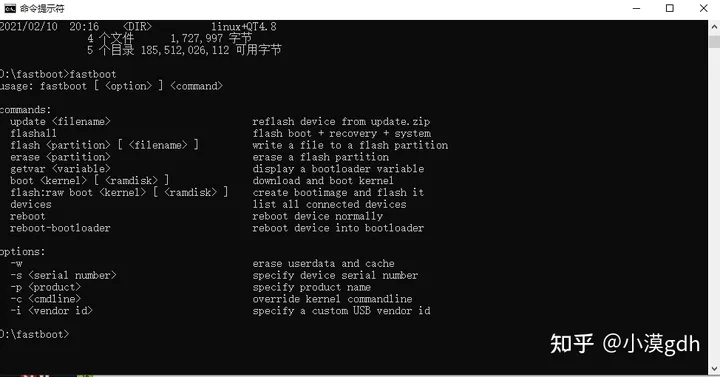
图1 fastboot运行演示

fastboot的工作原理
- uboot的fastboot的命令将开发板伪装成一个usb设备。开发板本身并不是一个usb设备,所以开发板直接插到电脑是没有反应的,没有提示发现设备需要装驱动的。伪装之后开发板就被主机windows识别成一个安卓手机了。
- 主机的fastboot软件和开发板的fastboot程序通信来工作。平时工作时,开发板端只要执行了fastboot命令进入fastboot模式即可,剩下的就不用管了。主机端通过运行fastboot命令,传递不同的参数来实现主机端和开发板端的通信。 譬如主机端执行fastboot devices,则这个命令通过usb线被传递到开发板中被开发板的fastboot程序接收,接收后去处理向主机端发送发聩信息,主机端接收到反馈信息后显示出来。
- 学习fastboot时分析代码的思路是:主机端:fastboot.exe的源代码没有,fastboot协议虽然能找到但是很枯燥,所以主机端没有去分析。开发板端:主要分析点就是uboot如何进入fastboot模式,fastboot模式下如何响应主机发送的各种命令。
fastboot源码分析
int do_fastboot (cmd_tbl_t *cmdtp, int flag, int argc, char *argv[]) { int ret = 1; int check_timeout = 0; uint64_t timeout_endtime = 0; uint64_t timeout_ticks = 0; long timeout_seconds = -1; int continue_from_disconnect = 0; if (set_partition_table()) return 1; /* Time out */ if (2 == argc) { long try_seconds; char *try_seconds_end; /* Check for timeout */ try_seconds = simple_strtol(argv[1], &try_seconds_end, 10); if ((try_seconds_end != argv[1]) && (try_seconds >= 0)) { check_timeout = 1; timeout_seconds = try_seconds; printf("Fastboot inactivity timeout %ld seconds\n", timeout_seconds); } } if (1 == check_timeout) { timeout_ticks = (uint64_t) (timeout_seconds * get_tbclk()); } do { continue_from_disconnect = 0; /* Initialize the board specific support */ if (0 == fastboot_init(&interface)) { int poll_status; /* If we got this far, we are a success */ ret = 0; timeout_endtime = get_ticks(); timeout_endtime += timeout_ticks; LCD_turnon(); while (1) { uint64_t current_time = 0; poll_status = fastboot_poll(); if (1 == check_timeout) current_time = get_ticks(); /* Check if the user wanted to terminate with ^C */ if ((poll_status != FASTBOOT_OK) && (ctrlc())) { printf("Fastboot ended by user\n"); continue_from_disconnect = 0; break; } if (FASTBOOT_ERROR == poll_status) { /* Error */ printf("Fastboot error \n"); break; } else if (FASTBOOT_DISCONNECT == poll_status) { /* break, cleanup and re-init */ printf("Fastboot disconnect detected\n"); continue_from_disconnect = 1; break; } else if ((1 == check_timeout) && (FASTBOOT_INACTIVE == poll_status)) { /* No activity */ if (current_time >= timeout_endtime) { printf("Fastboot inactivity detected\n"); break; } } else { /* Something happened */ /* Actual works of parsing are done by rx_handler */ if (1 == check_timeout) { /* Update the timeout endtime */ timeout_endtime = current_time; timeout_endtime += timeout_ticks; } } } /* while (1) */ } /* Reset the board specific support */ fastboot_shutdown(); LCD_setfgcolor(0x000010); LCD_setleftcolor(0x000010); LCD_setprogress(100); /* restart the loop if a disconnect was detected */ } while (continue_from_disconnect); return ret; } 讯享网
do_fastboot函数
- do_fastboot函数本身涉及到很多操作SD/Nand等磁盘的,主要目的就是为了刷机。要完整的分析fastboot的函数细节很复杂很麻烦,我们并不是要做这个。
关键点:rx_handler
- do_fastboot fastboot_poll fboot_usb_int_hndlr fboot_usb_pkt_receive fboot_usb_int_bulkout fastboot_interface->rx_handler(函数指针) 指向cmd_fastboot.c/rx_handler
- 最终uboot这边的fastboot是通过rx_handler函数来处理主机端fastboot软件发送过来的信息的。fastboot协议的命令实现都是在这个函数中体现的,所示这个函数就是重点
讯享网static int rx_handler (const unsigned char *buffer, unsigned int buffer_size) { int ret = 1; /* Use 65 instead of 64 null gets dropped strcpy's need the extra byte */ char response[65]; if (download_size) { /* Something to download */ if (buffer_size) { /* Handle possible overflow */ unsigned int transfer_size = download_size - download_bytes; if (buffer_size < transfer_size) transfer_size = buffer_size; /* Save the data to the transfer buffer */ memcpy (interface.transfer_buffer + download_bytes, buffer, transfer_size); download_bytes += transfer_size; /* Check if transfer is done */ if (download_bytes >= download_size) { /* Reset global transfer variable, Keep download_bytes because it will be used in the next possible flashing command */ download_size = 0; if (download_error) { /* There was an earlier error */ sprintf(response, "ERROR"); } else { /* Everything has transferred, send the OK response */ sprintf(response, "OKAY"); } fastboot_tx_status(response, strlen(response), FASTBOOT_TX_ASYNC); printf ("\ndownloading of %d bytes finished\n", download_bytes); LCD_setprogress(0); } ··· ··· //此处省略,如需可自己去看源码 else { /* A command */ /* Cast to make compiler happy with string functions */ const char *cmdbuf = (char *) buffer; /* Generic failed response */ sprintf(response, "FAIL"); /* reboot Reboot the board. */ if (memcmp(cmdbuf, "reboot", 6) == 0) { if (!strcmp(cmdbuf + 6, "-bootloader")) { strcpy((char *)interface.transfer_buffer, (char *)FASTBOOT_REBOOT_MAGIC); } else { memset(interface.transfer_buffer, 0x0, FASTBOOT_REBOOT_MAGIC_SIZE); } sprintf(response,"OKAY"); fastboot_tx_status(response, strlen(response), FASTBOOT_TX_SYNC); //udelay (); /* 1 sec */ do_reset (NULL, 0, 0, NULL); /* This code is unreachable, leave it to make the compiler happy */ return 0; } ··· ··· //此处省略,如需可自己去看源码
大文件download机制
- rx_handler函数中通过if和else分成了两部分,if部分负责处理download,else部分负责处理命令。usb传输单次传输最大只能有限个字节(64、256),因此当发送比较小的东西(譬如命令)时可以单词传输完毕;当发送比较大的东西时(譬如文件)就必须要分包发送。
download后的响应机制
- 开发板端通过fastboot_tx_status函数向主机发送响应,主机显示这个响应。
fastboot常用命令
- fastboot getvar:作用是得到一些fastboot中定义的变量名的值,譬如version、product、serialno、downloadsize
- fastboot erase:擦除
- fastboot download:下载
- fastboot boot:启动内核
- fastboot flash:烧录
- fastboot oem:oem是用户自定义的,其他命令都是fastboot协议定义的,但是有时候自带的命令不足以使用,oem厂商可能希望定义一些自己专有的命令,则可以使用oem命令。
版权声明:本文内容由互联网用户自发贡献,该文观点仅代表作者本人。本站仅提供信息存储空间服务,不拥有所有权,不承担相关法律责任。如发现本站有涉嫌侵权/违法违规的内容,请联系我们,一经查实,本站将立刻删除。
如需转载请保留出处:https://51itzy.com/kjqy/21576.html