
UCASE()函数是MySQL中的内置函数,用于将给定字符串的所有字符转换为大写。
用法:
UCASE(input_string)
参数:它采用一个参数,如下所示:
input_string:这是用于将该字符串转换为大写形式的字符串。
返回值:它返回一个新的大写字符串。
模块安装:使用以下命令安装mysql模块:
npm install mysql
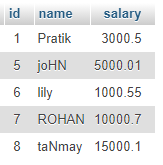
数据库:我们的SQL Publishers表预览以及示例数据如下所示:
范例1:
index.js
const mysql = require("mysql");
let db_con = mysql.createConnection({
host:"localhost",
user:"root",
password:'',
database:'gfg_db'
});
db_con.connect((err) => {
if (err) {
console.log("Database Connection Failed !!!", err);
return;
}
console.log("We are connected to gfg_db database");
// Here is the query
let query = "SELECT UCASE('This iNpUT
strinG @!#$%^&*()?') AS uppercase_name";
db_con.query(query, (err, rows) => {
if(err) throw err;
console.log(rows);
});

});
使用以下命令运行index.js文件:
node index.js
输出:

范例2:
index.js
const mysql = require("mysql");
let db_con = mysql.createConnection({
host:"localhost",
user:"root",
password:'',
database:'gfg_db'
});
db_con.connect((err) => {
if (err) {
console.log("Database Connection Failed !!!", err);
return;
}
console.log("We are connected to gfg_db database");
// Here is the query
let query = "SELECT name, UCASE(name)
AS uppercase_name FROM publishers";
db_con.query(query, (err, rows) => {
if(err) throw err;
console.log(rows);
});
});
使用以下命令运行index.js文件:
node index.js
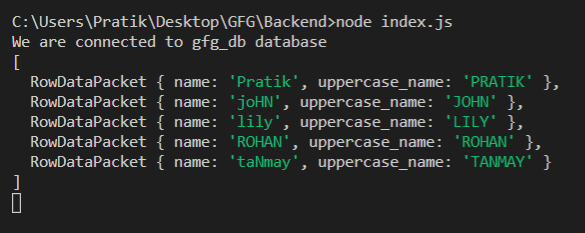
输出:
版权声明:本文内容由互联网用户自发贡献,该文观点仅代表作者本人。本站仅提供信息存储空间服务,不拥有所有权,不承担相关法律责任。如发现本站有涉嫌侵权/违法违规的内容,请联系我们,一经查实,本站将立刻删除。
如需转载请保留出处:https://51itzy.com/kjqy/17709.html