
一/创建自定义组件文件
在Components里面新建文件夹(pubu),点击pubu右键选择新建Components
具体参考链接 如何创建自定义组件
二/引用
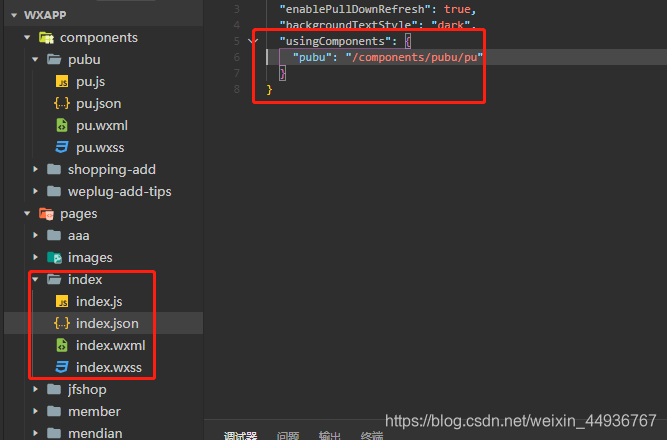
在父组件index.son文件中添加路径
“usingComponents”: {
“pubu”: “/components/pubu/pu”
}
讯享网
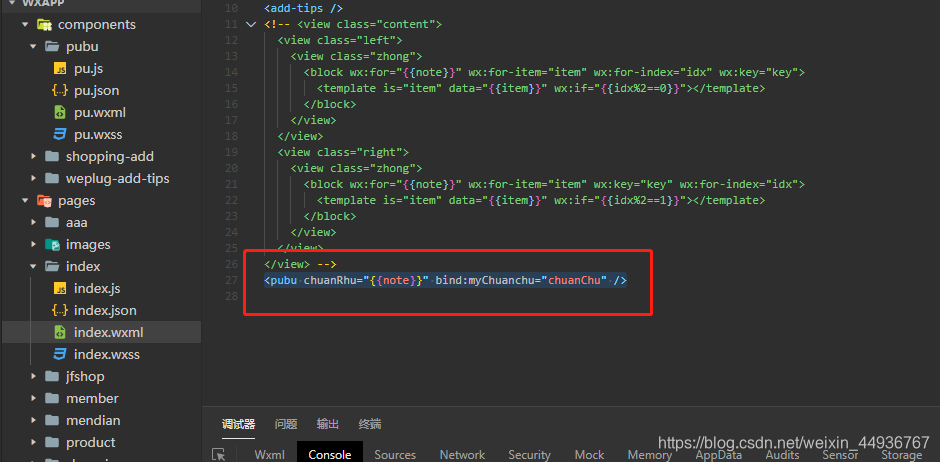
在父组件index.wxml引用
<pubu id="pubu" chuanRhu="{
   {note}}" bind:myChuanchu="chuanChu" /> //note传递的参数 //在父组件中,子组件的引用处,通过这个bind:myChuanchu事件绑定一个方法( chuanChu)
讯享网
父组件传入的信息

讯享网var app = getApp(); Page({
    data: {
    note: [{
    name: '瀑布流', heart_num: '1', title: '瀑布流', url: 'https://timgsa.baidu.com/timg?image&quality=80&size=b9999_10000&sec=44&di=f2bf27adba22a3d&imgtype=0&src=http%3A%2F%2Fa0.att.hudong.com%2F30%2F29%2F0084016.jpg', }, {
    name: '瀑布流', heart_num: '2', title: '瀑布流', url: 'http://img3.imgtn.bdimg.com/it/u=,&fm=26&gp=0.jpg', }, {
    name: '瀑布流', heart_num: '3', title: '瀑布流', url: 'http://img3.imgtn.bdimg.com/it/u=,&fm=26&gp=0.jpg', }, {
    name: '瀑布流', heart_num: '4', title: '瀑布流', url: 'https://timgsa.baidu.com/timg?image&quality=80&size=b9999_10000&sec=42&di=e25d8ac29e6d465d8d180c4767e55695&imgtype=0&src=http%3A%2F%2Fa4.att.hudong.com%2F27%2F67%2F0.jpg', }, {
    name: '瀑布流', heart_num: '5', title: '瀑布流', url: 'https://timgsa.baidu.com/timg?image&quality=80&size=b9999_10000&sec=42&di=e25d8ac29e6d465d8d180c4767e55695&imgtype=0&src=http%3A%2F%2Fa4.att.hudong.com%2F27%2F67%2F0.jpg', }, {
    name: '瀑布流', heart_num: '6', title: '瀑布流', url: 'http://img3.imgtn.bdimg.com/it/u=,&fm=26&gp=0.jpg', }, ] }, / * 生命周期函数--监听页面初次渲染完成 */ onReady: function () {
    var that = this; //初始化购物车组件 that.pubuFunction = that.selectComponent("#pubu"); }, //调用组件内部事件 demo: function (event) {
    var that = this; that.pubuFunction .demo(event); },
传入和传出讲解:
var app = getApp(); Component({
    / * 组件的属性列表 */ properties: {
    chuanRhu:Object,//定义传入的属性类型 //属性的类型可以为 String Number Boolean Object Array 其一,也可以为 null 表示不限制类型。 }, / * 组件的初始数据 */ data: {
    note: '', }, / * 组件的方法列表 */ methods: {
    chuanChu: function (e) {
   //绑定点击事件,点击时传回 var that = this; var note = this.data.note; //数据传出 var myChuanchu_shu = note; that.triggerEvent('myChuanchu', myChuanchu_shu) }, demo: function (e) {
   //绑定点击事件,点击时传回 console.log("组件内部事件"); } }, lifetimes: {
    // 在组件实例进入页面节点树时执行 attached: function () {
    var that = this; //数据传入 var note = this.data.chuanRhu;//获取传入数据 // console.log(note); that.setData({
    note: note }) }, // 在组件实例被从页面节点树移除时执行 detached: function () {
}, }, }) 讯享网//pu.wxml <view class="content"> <view class="left"> <view class="zhong"> <block wx:for="{
{note}}" wx:for-item="item" wx:for-index="idx" wx:key="key"> <view class="item" wx:if="{
{idx%2==0}}"> <image class="item-img" src="{
{item.url}}" mode="widthFix"></image> <view class="item-title-box"> <navigator url="url" class="item-title">{
{
item.title}}</navigator> </view> <view class="name"> <text class="name-title">{
{
item.title}}</text> <view class="heart_"> <text>{
{
item.heart_num}}</text> </view> </view> </view> </block> </view> </view> <view class="right"> <view class="zhong"> <block wx:for="{
{note}}" wx:for-item="item" wx:key="key" wx:for-index="idx"> <view class="item" wx:if="{
{idx%2==1}}" bindtap="chuanChu"> <image class="item-img" src="{
{item.url}}" mode="widthFix"></image> <view class="item-title-box"> <navigator url="url" class="item-title">{
{
item.title}}</navigator> </view> <view class="name"> <text class="name-title">{
{
item.title}}</text> <view class="heart_"> <text>{
{
item.heart_num}}</text> </view> </view> </view> </block> </view> </view> </view>
.content {
    padding: 0 10rpx; column-count: 2; column-gap: 0px; display: flex; justify-content: space-between; } .left,.right{
    flex: 0 0 50%; display: flex; flex-direction: column; } .zhong{
    margin: 0 10rpx; } .item {
    background-color: #fff; margin-bottom: 20rpx; } .item-img {
    width: 100% } .item-title {
    font-size: 24rpx; color: #1e1e1e; margin: 15rpx; line-height: 27rpx; } .item .name {
    display: flex; padding: 0 15rpx; margin-top: 20rpx; padding-bottom: 10rpx; align-items: center; font-size: 22rpx; color: #1e1e1e; } .name-title {
    margin-right: 20rpx; }
传出时父组件index.js
chuanChu: function (e) {
var that = this;
var Chuanchu_shuju = e.detail;//获取传出的值
console.log(Chuanchu_shuju);
}
具体的参考文档
微信官方文档
大致的流程
版权声明:本文内容由互联网用户自发贡献,该文观点仅代表作者本人。本站仅提供信息存储空间服务,不拥有所有权,不承担相关法律责任。如发现本站有涉嫌侵权/违法违规的内容,请联系我们,一经查实,本站将立刻删除。
如需转载请保留出处:https://51itzy.com/kjqy/16358.html