
操作平台:Centos 7
建议:执行本文操作前,请对linux系统先拍照存档,以免造成操作过程中出现错误,导致重装linux系统的尴尬!
上菜!上菜!
1.指定IP地址与域名之间的对应关系
[root@localhost ~]# vim /etc/hosts 讯享网
该处ip后跟的域名可随意写,但是不要与网络上现有的域名重名!

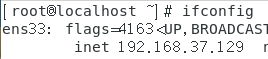
注意: 该处输入的ip地址是我本机电脑ip地址
2.使用ping命令检查域名解析
讯享网ping www.wb.com
ping www.wwbb.com

注:出现“64 bytes from......”说明可以查到,等它刷新两行即可关闭,需要手动关闭ping命令"ctrl+c"

3. 创建存放不同网站的根目录,并写入网站首页内容
讯享网[root@localhost ~]# mkdir -p /home/yuming/wb
[root@localhost ~]# mkdir -p /home/yuming/wwbb 讯享网[root@localhost ~]# echo "该网站域名是www.wb.com" > /home/yuming/wb/index.html
[root@localhost ~]# echo "该网站域名是www.wwbb.com" > /home/yuming/wwbb/index.html

4.修改主配置文件
讯享网[root@localhost ~]# vim /etc/httpd/conf/httpd.conf
把下面代码写进配置文件中(注:修改为自己的ip地址)
<VirtualHost 192.168.37.129> DocumentRoot /home/yuming/wb ServerName www.aaa.com <Directory "/home/yuming/wb"> AllowOverride None Require all granted </Directory> </VirtualHost> <VirtualHost 192.168.37.129> DocumentRoot /home/yuming/wwbb ServerName www.bbb.com <Directory "/home/yuming/wwbb"> AllowOverride None Require all granted </Directory> </VirtualHost> 
5.重启httpd服务
讯享网[root@localhost ~]# systemctl restart httpd
6.修改自定义网站目录的Selinux文件安全上下文
[root@localhost ~]# semanage fcontext -a -t httpd_sys_content_t /home/yuming 讯享网[root@localhost ~]# semanage fcontext -a -t httpd_sys_content_t /home/yuming/wb
[root@localhost ~]# semanage fcontext -a -t httpd_sys_content_t /home/yuming/wb/*讯享网[root@localhost ~]# semanage fcontext -a -t httpd_sys_content_t /home/yuming/wwbb
[root@localhost ~]# semanage fcontext -a -t httpd_sys_content_t /home/yuming/wwbb/*
7. 刷新Selinux安全上下文,使其立即生效
讯享网[root@localhost ~]# restorecon -Rv /home/yuming

8.使用域名测试网站
注意:此处查询不能在windows系统中查询,需要在linux系统中的FireFox中查询

出现该界面,则操作成功!
到此,一个ip绑定多个域名操作全部完成!
版权声明:本文内容由互联网用户自发贡献,该文观点仅代表作者本人。本站仅提供信息存储空间服务,不拥有所有权,不承担相关法律责任。如发现本站有涉嫌侵权/违法违规的内容,请联系我们,一经查实,本站将立刻删除。
如需转载请保留出处:https://51itzy.com/kjqy/15756.html