
目录
一.概述
二.DOTS详解
1.开发环境搭建
2.简单ECS程序
2.调试功能
3.常用API
4.系统之间的互相干扰
5.实体Entity的创建查找删除
6.使用批处理Gpu Instancing优化性能
7.World,System,Group
1)World
2)System
3)Group
8.组件Component介绍
1)组件Component的添加修改删除
3)状态组件
4)BufferElement
5)ChunkComponent介绍
一.概述
传统方式问题
1.数据冗余:unity脚本含有大量的冗余信息,比如说我们如果要将脚本挂载在物体上,脚本需要继承自MonoBehaviour类,而MonoBehaviour类中有很多的函数调用,其中相当一部分我们并不需要。
2.单线程处理:Unity中的脚本大多都是在主线程运行的,无法发挥cpu多核的优势
3.编译器问题:unity对于c#的代码调用是相对低效的。
DOTS技术
为了解决上述问题,unity推出了DOTS技术(Data-Oriented Technology Stack),中文名称:数据导向型技术堆栈。它主要包括一下三点
1.ECS(Entity Component System):数据和行为分离
2.Job System:多线程,充分发挥多核cpu的特性
3.Burst complier:编译生成高效的代码
二.DOTS详解
1.开发环境搭建
PackManager中安装Entites和Hybrid Renderer,若当前unity版本没有此安装包请查看预览包。
2.简单ECS程序
ECS(E:实体,C:组件,S:系统),ECS实际上是将数据和方法实现分离,数据放在组件里,具体实现的方法放在系统里,组件挂载在实体上,系统通过实体找到组件。
下面通过代码实现向Console打印的效果
//DataComponent.cs //存储数据组件 using Unity.Entities; public struct DataComponent:IComponentData { public float printData; }讯享网
讯享网//DataSystem.cs //数据系统 using UnityEngine; using Unity.Entities; public class DataSystem : ComponentSystem { /// <summary> /// 相当于update /// </summary> protected override void OnUpdate() { //获取所有DataCompoent类 Entities.ForEach((ref DataComponent datacomponent) => { Debug.Log(datacomponent.printData); }); } }
//DataMono.cs //挂载在物体上 using UnityEngine; using Unity.Entities; public class DataMono : MonoBehaviour, IConvertGameObjectToEntity { /// <summary> /// 当前物体转化为实体时会被调用一次 /// </summary> /// <param name="entity"></param> /// <param name="dstManager"></param> /// <param name="conversionSystem"></param> public void Convert(Entity entity, EntityManager dstManager, GameObjectConversionSystem conversionSystem) { //entity需要挂载的实体,new DataComponent():需要挂载的组件 dstManager.AddComponentData(entity, new DataComponent()); } }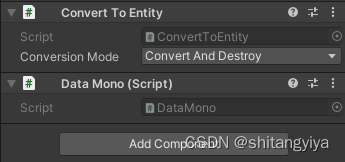
Convert To Entity组件,将物体转换为实体。
Console输出如下图所示

2.调试功能
菜单栏Window->Analysis->Entity Debugger
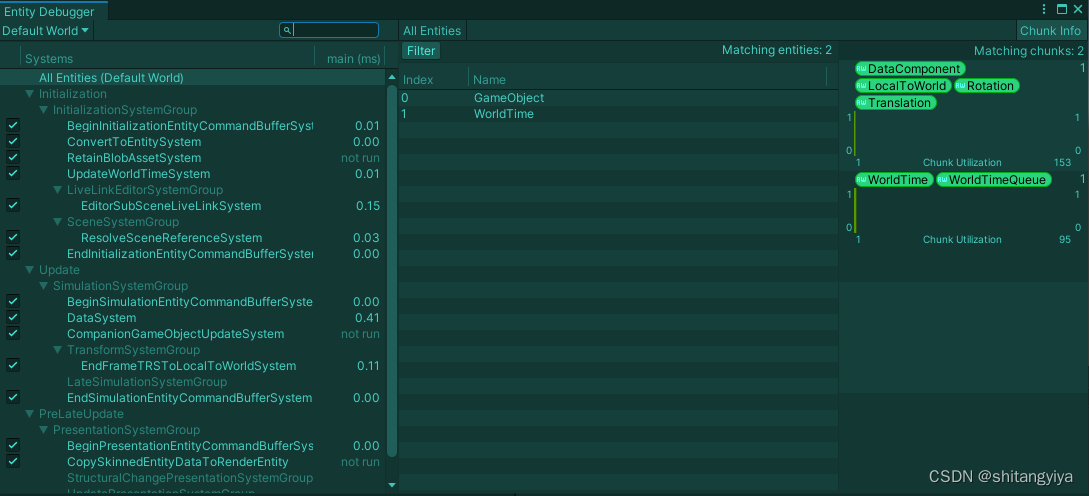
左边表示系统中有哪些正在运行的系统。All Entityes(Default World)点击后中间显示场景中所有的实体。右边Chunk Utiilization表示场景中所有实体的组件
3.常用API
using Unity.Transforms;
Translation
成员变量
| Translation.value | 物体的位置相当于position |
RotationEulerXYZ
成员变量
| RotationEulerXYZ.value | 控制物体的旋转 |
4.系统之间的互相干扰
[DisaleAutoCreation] 避免其他场景的系统的干扰
5.实体Entity的创建查找删除
1.创建
创建10000个物体
讯享网//ESCPrefabCreator.cs using UnityEngine; using Unity.Entities; using Unity.Transforms; public class ESCPrefabCreator : MonoBehaviour { public GameObject cube; private void Start() { //获得当前世界的设置 GameObjectConversionSettings tempSettings = GameObjectConversionSettings.FromWorld(World.DefaultGameObjectInjectionWorld, null); //将cube转换为实体存储下来 Entity tempEntityPrefab = GameObjectConversionUtility.ConvertGameObjectHierarchy(cube, tempSettings); //获得实体管理器 EntityManager tempEntityManager = World.DefaultGameObjectInjectionWorld.EntityManager; //设置位置 Translation translation = new Translation(); //实例化10000个实体 for (int i = 0;i < 100;i++) { translation.Value.x = 0; for (int j = 0;j < 100;j++) { Entity tempCube = tempEntityManager.Instantiate(tempEntityPrefab); //设置组件的值 tempEntityManager.SetComponentData(tempCube, translation); translation.Value.x += 2; } translation.Value.y += 2; } } }
上面是通过代码转化实体,那么我们改如何将场景里存在的物体转换成实体呢?我在上面说过给物体添加Convert To Entity组件即可进行转换,但通常场景中会包含着大量物体,给每一个物体手动添加Convert To Entity不太现实,于是Unity设计了一个Subscene的方法批量转换实体。
操作:将需要被转化的物体设置一个父物体,右键创建一个Subscene即可


介绍完如何转化实体,下面我来介绍从0开始创建实体
//CreateSinglon.cs using UnityEngine; using Unity.Entities; using Unity.Transforms; public class CreateSinglon : MonoBehaviour { void Start() { //创建一个实体 Entity tempEntity = World.DefaultGameObjectInjectionWorld.EntityManager.CreateEntity(typeof(DataComponent), typeof(RotationEulerXYZ)); //通过一个实体再创建一个实体 World.DefaultGameObjectInjectionWorld.EntityManager.Instantiate(tempEntity); } }我们通过这串代码创建了两个实体,如果我们想大批量创建实体怎么办?
接下来我们引入一个概念Chunk
chunk相当于一个块,ECS会将相同组件的实体添加到同一个chunk中,例如Entity1,Entity2都有A,B组件,Entity3,Entity4都有C组件,那么Entity1,2放置在Chunk1中,Entity3,4放置在Chunk2中。chunk具有一定的容量,当chunk放满时ECS会再开一个chunk放置实体,新开的块和原来的块在类型上是相同的,我们将同种类型的Chunk称之为ArchType(原型),我们可通过ArchType访问相同类型的块。ECS这样做的目的是为了提高创建和访问实体的性能。
讯享网//CreateEntites.cs using UnityEngine; using Unity.Entities; using Unity.Transforms; using Unity.Collections; public class CreateEntites : MonoBehaviour { void Start() { //创建一个实体 Entity tempEntity = World.DefaultGameObjectInjectionWorld.EntityManager. CreateEntity(typeof(DataComponent), typeof(RotationEulerXYZ)); //通过一个实体再创建一个实体 World.DefaultGameObjectInjectionWorld.EntityManager.Instantiate(tempEntity); //创建一个原型,包括DataCompont和RotationXYZ组件 EntityArchetype tempEntityArchetype = World.DefaultGameObjectInjectionWorld.EntityManager. CreateArchetype(typeof(DataComponent), typeof(RotationEulerXYZ)); //创建一个NativeArray,将实体添加到数组中,Allocator决定实体存储的模式 //NativeArray和数组差不多,用来存储物体,而JobSystem多线程无法使用普通数组,于是用NativeArray代替 NativeArray<Entity> tempNativeArray = new NativeArray<Entity>(5, Allocator.Temp); //通过原型创建5个实体 World.DefaultGameObjectInjectionWorld.EntityManager.CreateEntity(tempEntityArchetype, tempNativeArray); //通过实体创建5个实体 World.DefaultGameObjectInjectionWorld.EntityManager.Instantiate(tempEntity, tempNativeArray); } }
2.查找
//FindEntities.cs using System.Collections; using System.Collections.Generic; using UnityEngine; using Unity.Entities; using Unity.Transforms; using Unity.Collections; public class FindEntities : MonoBehaviour { void Start() { #region 创建 /*和CreateEntites创建代码相同*/ #endregion #region 查找 //方法1 //获得世界全部的实体 NativeArray<Entity> tempEntits = World.DefaultGameObjectInjectionWorld.EntityManager.GetAllEntities(); foreach(var item in tempEntits) { //打印实体的序号和名字 Debug.Log(item.Index + World.DefaultGameObjectInjectionWorld.EntityManager.GetName(item)); } //方法2 //根据该组建创建一个实体的查询 EntityQuery tempEntityQuery = World.DefaultGameObjectInjectionWorld.EntityManager. CreateEntityQuery(typeof(DataComponent), typeof(RotationEulerXYZ)); //创建一个NativeArray存储所有的查询结果 NativeArray<Entity> tempEntits2 = tempEntityQuery.ToEntityArray(Allocator.TempJob); foreach(var item in tempEntits2) { Debug.Log(item.Index + World.DefaultGameObjectInjectionWorld.EntityManager.GetName(item)); } //释放NativeArray tempEntits2.Dispose(); #endregion } } 3.删除
讯享网//删除 //方法1:删除单个物体 World.DefaultGameObjectInjectionWorld.EntityManager.DestroyEntity(tempEntity); //方法2:通过NativeArray删除 World.DefaultGameObjectInjectionWorld.EntityManager.DestroyEntity(tempEntityNativeArray); //方法3:通EntityQuery删除 World.DefaultGameObjectInjectionWorld.EntityManager.DestroyEntity(tempEntityQuery);
6.使用批处理Gpu Instancing优化性能

勾选材质里的Enable GPU Instancing
7.World,System,Group
World:相当于对ECS进行一个全局管理,场景里可以拥有多个world但是world之间无法进行通信。
System:只能存在与一个世界,同一世界不能有重复的系统
Group:一个特殊的系统,用来给系统做分类或者改变系统的执行顺序
1)World
构造函数
| World(string) | 创建一个名字为string的新世界 |
静态变量
| World.DefaultGameObjectInjectionWorld | 返回默认世界 |
| World.All | 返回所有世界的集合 |
成员变量
| World.Name | 获得该世界的名字 |
| World.Systems | 返回当前世界的所有系统 |
成员函数
| World.Dispose() | 销毁世界 |
| World.GetOrCreateSystem<T>() | 寻找世界里有没有该系统,若没有重新创建一个 |
| World.AddSystem<T>(T:ComponentSystemBase) | 添加系统 |
| World.DestroySystem(ComponentSystemBase) | 删除系统 |
| World.GetExistingSystem<T>() | 获得该系统 |
2)System
系统包括:SystemBase,ComponentSystem,JobComponentSystem,其中ComponentSystem只能在主线程上运行,JobComponentSytem可以提供多线程,但是需要手动管理JOB依赖,容易出错,SystemBase可以兼容以上两种,unity推荐使用SystemBase来进行管理
(1)三种系统声明
ComponentSystem
//DataSystem.cs //数据系统 using UnityEngine; using Unity.Entities; public class DataSystem : ComponentSystem { /// <summary> /// 相当于update /// </summary> protected override void OnUpdate() { //获取所有DataCompoent类 Entities.ForEach((ref DataComponent datacomponent) => { Debug.Log(datacomponent.printData); }); } }JobSytem和Burst编译器优化性能

讯享网//JobSystem.cs using Unity.Jobs; using Unity.Mathematics; using Unity.Transforms; using Unity.Entities; public class JobSystem : JobComponentSystem { protected override JobHandle OnUpdate(JobHandle inputDeps) { //使用JobSystem的方法修改物体的角度,WithBurst()用上Burst编译器,Schedule用上JobSystem JobHandle tempJobHandle = Entities.ForEach((ref RotationEulerXYZ rotation) => { rotation.Value = new float3(0, 45, 0); }).WithBurst().Schedule(inputDeps); return tempJobHandle; } }
SystemBase
//SystemBaseTest.cs using Unity.Entities; using Unity.Mathematics; using Unity.Transforms; public class SystemBaseTest : SystemBase { protected override void OnUpdate() { Entities.ForEach((ref Translation trans) => { trans.Value = new float3(1, 1, 1); }).Schedule(); } }(2)系统的生命周期
OnCreate->OnStartRunning->OnUpdate->OnStopRunning->OnDestroy
讯享网//SystemBaseTest.cs using Unity.Entities; public class SystemBaseTest : SystemBase { //创建时调用一次 protected override void OnCreate() { } //开始运行时调用一次 protected override void OnStartRunning() { } //持续调用 protected override void OnUpdate() { } //停止运行时创建一次 protected override void OnStopRunning() { } //摧毁时调用一次 protected override void OnDestroy() { } }
(3)系统对组件,实体的操控
1.World.EntityManager进行操控
2.Sytem自带方法
3.System成员变量Entites来访问
(4)SystemBase对实体进行修改等操作简述
EntityQuery entityQuery; //持续调用 protected override void OnUpdate() { //ref :读写 //in : 只读 Entities.ForEach((ref Translation trans, in DataComponent data) => { Debug.Log(trans.Value + " " + data.printData);//在ECS里面少用unity里面的操作 }).WithAll<DataComponent, Rotation>()//对含有DataCompoent,Rotation的实体进行操作,可以对筛选的组件做限制,<>可以继续添加 .WithAll<DataComponent, Rotation>()//筛选只要包含这两个组件当中任何一个的实体,可以在<>继续扩展 .WithNone<DataComponent>()//筛选不包含这个组件的实体,同样可以扩展 .WithChangeFilter<DataComponent>() //对参数值发生变化的实体做筛选,可以扩展 //使用这个筛选里面的组件必须在ForEach()里进行声明,比如说in DataComponent data .WithSharedComponentFilter(new ShareComponent() { data = 3 }) //选出具有特定共享组件的实体 .WithStoreEntityQueryInField(ref entityQuery) //将查询结果存储在一个变量上 //.Run(); //在主线程上运行 //.Schedule(); //多开一个线程运行 .WithBurst() //支持Burst编译器 .ScheduleParallel(); //多线程运行,在Burst编译器下运行效果好 }多线程访问共享数据介绍
当ECS开启多线程时会涉及到对数据的读写冲突,假如说1号线程在读,这时2号线程修改了数据,这样就会导致1号数据读取异常。在传统方法中Unity采用了锁的方式来解决这个问题,但是在ECS中并不是这样处理的。ECS提供了一个Native Container容器的方法,其中包含了四种容器,NativeArray,NativeHashMap,NativeMultiHashMap,NativeQueue这四个容器类似与c#的传统容器,但是不同的是在创建这四种容器时会创建分配器(Temp,JobTemp,Persistent),这三个分配器生命周期Temp<JobTemp <Persistent,性能Temp > JobTemp > Persistent,Temp使用与1帧内进行销毁,JobTemp适用于四帧内进行销毁,Persistent适合长久存在
多线程访问共享数据实操
NativeArray
方法1:通过WithDeallovateOnJobCompletion进行释放
讯享网 protected override void OnUpdate() { NativeArray<int> tempInt = new NativeArray<int>(5, Allocator.TempJob); Entities.ForEach((ref Translation trans, in DataComponent data) => { tempInt[0] = 5; }) .WithDeallocateOnJobCompletion(tempInt) //线程运行完自动释放 .WithBurst() //支持Burst编译器 .ScheduleParallel(); //多线程运行,在Burst编译器下运行效果好 }
方法二:通过CompleteDependency将线程阻塞到CompleteDependency之前,只有线程完成后才可以通过
protected override void OnUpdate() { NativeArray<int> tempInt = new NativeArray<int>(5, Allocator.TempJob); //ref :读写 //in : 只读 Entities.ForEach((ref Translation trans, in DataComponent data) => { tempInt[0] = 5; }) .WithBurst() //支持Burst编译器 .ScheduleParallel(); //多线程运行,在Burst编译器下运行效果好 CompleteDependency(); tempInt.Dispose();//释放 }Entites中对实体进行操作
方法1:直接修改
讯享网 protected override void OnUpdate() { Entities.ForEach((Entity entity, in DataComponent data) => { EntityManager.AddComponentData(entity, new DataComponent() { printData = 3 }); }) .WithStructuralChanges() //修改实体时需要加上这个 .WithoutBurst() .Run(); }
方法2:通过EntityCommandBuffer进行修改,性能更高,推荐使用
protected override void OnUpdate() { EntityCommandBuffer entityCommandBuffer = new EntityCommandBuffer(Allocator.TempJob); Entities.ForEach((Entity entity, in DataComponent data) => { entityCommandBuffer.AddComponent(entity, new DataComponent() { printData = 3 }); }) .WithoutBurst() .Run(); entityCommandBuffer.Playback(EntityManager); //在Foreach里设置命令,用这句代码进行执行 entityCommandBuffer.Dispose(); }JobWithCode的使用
用法和Entities类似,很多函数功能名字相同
讯享网 protected override void OnUpdate() { Job.WithCode(() => { }) .Schedule(); }
(5)ComponentSystem和JobCompentSytem调用实体简述
ComponentSystem中没有JobWithCode只有Entities,且没有限制修饰等其他操作
protected override void OnUpdate() { Entities.ForEach((Entity entity) => { }); }JobSystem中OnUpdate存在参数和返回值
讯享网 protected override JobHandle OnUpdate(JobHandle inputDeps) { JobHandle value = Entities.ForEach((Entity entity) => { }).Schedule(inputDeps); return value; }
(6)Job接口使用
Job相当与一个线程
//JobTest.cs using UnityEngine; using Unity.Jobs; using Unity.Collections; using Unity.Burst; public class JobTest : MonoBehaviour { /// <summary> /// 一个Job代表一个线程 /// </summary> [BurstCompile] //使用Busrt编译器 public struct Job1 : IJob { public int i, j; public int result; public void Execute() { result = i * j; } } void Update() { NativeList<JobHandle> jobHandlesList = new NativeList<JobHandle>(Allocator.Temp); for (int i = 0;i <10;i++) { Job1 job1 = new Job1 { i = 6, j = 7 }; JobHandle jobHandle = job1.Schedule(); jobHandlesList.Add(jobHandle); } //阻塞线程,等待所有线程完成 JobHandle.CompleteAll(jobHandlesList); jobHandlesList.Dispose(); } } 运行结果

上述代码只创建了一个线程,那么我们如何创建多个线程呢?我们可以通过一个容器将所有线程存储起来进行遍历或者释放
讯享网//JobTest.cs using UnityEngine; using Unity.Jobs; using Unity.Collections; public class JobTest : MonoBehaviour { /// <summary> /// 一个Job代表一个线程 /// </summary> public struct Job1 : IJob { public int i, j; public int result; public void Execute() { result = i * j; } } void Update() { NativeList<JobHandle> jobHandlesList = new NativeList<JobHandle>(Allocator.Temp); for (int i = 0;i <10;i++) { Job1 job1 = new Job1 { i = 6, j = 7 }; JobHandle jobHandle = job1.Schedule(); jobHandlesList.Add(jobHandle); } //阻塞线程,等待所有线程完成 JobHandle.CompleteAll(jobHandlesList); jobHandlesList.Dispose(); } }
(7)ParallelJbob
如果场景里有很多物体,我们要修改物体每次都需要遍历,而遍历是unity中非常常用的操作,于是Unity设计了一个IJobParallelFor接口来解决这个问题
经过测试,在场景中创建1000个物体并控制旋转,传统方法帧率稳定在50-60,使用上ParallelJob和Burst编译器后帧率稳定在230以上,性能提升非常明显
//JobTest.cs using System.Collections.Generic; using UnityEngine; using Unity.Jobs; using Unity.Collections; using Unity.Burst; using Unity.Mathematics; public class JobTest : MonoBehaviour { public float interval; public GameObject cubePrefab; private List<GameObject> goList = new List<GameObject>(); private void Start() { //在start函数中创建1000个物体 Vector3 tempVector3 = new Vector3(-interval, 0, 0); for (int i = 0;i <100;i++) { for (int j = 0;j <10;j++) { GameObject tempCube = GameObject.Instantiate(cubePrefab); goList.Add(tempCube); tempVector3.x += interval; tempCube.transform.position = tempVector3; } tempVector3.x = -interval; tempVector3.y += interval; } } void Update() { ParallelJob parallelJob = new ParallelJob(); NativeArray<float3> eulerAngles = new NativeArray<float3>(goList.Count,Allocator.TempJob); //初始化 for (int i = 0;i < goList.Count;i++) { eulerAngles[i] = goList[i].transform.eulerAngles; } parallelJob.eulerAngles = eulerAngles; parallelJob.daltaTime = Time.deltaTime; //第二个参数是批处理数量,批处理计数控制你将获得多少个Job //以及线程之间的工作量新分配的细化程度如何. //拥有较低的批处理数量,会使你在线程之间进行更均匀的工作分配. //但是它会带来一些开销,因此在某先情况下,稍微增加批次数量会更好 JobHandle jobHandle = parallelJob.Schedule(goList.Count, 10); jobHandle.Complete(); //将更改的角度赋值给物体,控制物体旋转 for (int i = 0; i < goList.Count; i++) { goList[i].transform.eulerAngles = eulerAngles[i]; } eulerAngles.Dispose(); } [BurstCompile] public struct ParallelJob : IJobParallelFor { public NativeArray<float3> eulerAngles; public float daltaTime; /// <summary> /// 将创建好ParalelJob后,就会并行处理数组或者一些操作 /// </summary> /// <param name="index"></param> public void Execute(int index) { //更改数组的角度 eulerAngles[index] += new float3(0, 30 * daltaTime, 0); } } }3)Group
| [UpdateInGroup(typeof(系统))] | 用来给系统分类,默认SimulationSystemGroup |
注意:关于删除系统的一个坑,删除系统前需要将系统移除Group
讯享网//TestWorld.cs using UnityEngine; using Unity.Entities; public class TestWorld : MonoBehaviour { void Start() { World tempWorld = new World("new"); //获取默认世界的一个系统 DataSystem dataSystem = World.DefaultGameObjectInjectionWorld.GetExistingSystem<DataSystem>(); //添加该系统到新世界 tempWorld.AddSystem(dataSystem); //找到组 InitializationSystemGroup group = World.DefaultGameObjectInjectionWorld.GetExistingSystem<InitializationSystemGroup>(); //从组中移除系统 group.RemoveSystemFromUpdateList(dataSystem); //销毁系统 tempWorld.DestroySystem(dataSystem); } }
8.组件Component介绍
1)组件Component的添加修改删除
添加
//为单个实体添加组件 //方法1 World.DefaultGameObjectInjectionWorld.EntityManager.AddComponent(tempEntity, typeof(DataComponent)); //方法2 World.DefaultGameObjectInjectionWorld.EntityManager.AddComponent<DataComponent>(tempEntity); //批量添加组件 //方法1:通过NativeArray World.DefaultGameObjectInjectionWorld.EntityManager.AddComponent<DataComponent>(tempNativeArray); //方法2:通过EntityQuery World.DefaultGameObjectInjectionWorld.EntityManager.AddComponent<DataComponent>(tempEntityQuery); //为一个实体添加多个组件 World.DefaultGameObjectInjectionWorld.EntityManager.AddComponents(tempEntity, new ComponentTypes(typeof(DataComponent), typeof(RotationEulerXYZ)));数据初始化
数据初始化有两个方法,一是通过AddComponentData通过代码在添加组件的同时初始化,二是为组件类添加[GenerateAuthoringComponent]特性,这样该组件就可以被挂载在物体上通过Inspector面板赋值
讯享网World.DefaultGameObjectInjectionWorld.EntityManager.AddComponentData(entity, new DataComponent() { printData = 5; });
组件的获取和修改
//组件获取 RotationEulerXYZ rotationEulerXYZ = World.DefaultGameObjectInjectionWorld.EntityManager.GetComponentData<RotationEulerXYZ>(tempEntity); //设置组件的值 World.DefaultGameObjectInjectionWorld.EntityManager.SetComponentData(tempEntity, new RotationEulerXYZ() { Value = new float3(1, 1, 1) });组件的删除
讯享网World.DefaultGameObjectInjectionWorld.EntityManager.RemoveComponent<RotationEulerXYZ>(tempEntity); World.DefaultGameObjectInjectionWorld.EntityManager.RemoveComponent<RotationEulerXYZ>(tempEntityNativeArray); World.DefaultGameObjectInjectionWorld.EntityManager.RemoveComponent<RotationEulerXYZ>(tempEntityQuery); World.DefaultGameObjectInjectionWorld.EntityManager.RemoveComponent(tempEntityQuery, new ComponentTypes(typeof(RotationEulerXYZ)));
2)ShareComponent
在创建实体的时候我们可能创建的实体拥有的组件相同,而组件时继承ICompoentData接口,相当于声明了两个一模一样的实体,为了避免这种情况提高性能,unity设计了一个ShareComponent组件。
ShareCompoent的简单使用
声明一个ShareComponent组件
//ShareComponent.cs using Unity.Entities; using System; //添加ISharedComponentData接口,必须实现IEquatable:判断相等接口 public struct ShareComponent : ISharedComponentData,IEquatable<ShareComponent> { public int data; public bool Equals(ShareComponent other) { return data == other.data; } //Hash算法 public override int GetHashCode() { int tempHash = 0; tempHash ^= data.GetHashCode(); return tempHash; } }声明一个代理挂载在含有Convert To Entity组件的物体上
讯享网//ShareMono.cs using UnityEngine; using Unity.Entities; public class ShareMono : MonoBehaviour, IConvertGameObjectToEntity { public void Convert(Entity entity, EntityManager dstManager, GameObjectConversionSystem conversionSystem) { dstManager.AddSharedComponentData(entity, new ShareComponent() { data = 5 }); } }
基本操作
//添加组件 World.DefaultGameObjectInjectionWorld.EntityManager.AddSharedComponentData(tempEntities); //设置组件 World.DefaultGameObjectInjectionWorld.EntityManager.SetSharedComponentData(tempEntities, new ShareComponent() { data = 10 }); //删除组件 World.DefaultGameObjectInjectionWorld.EntityManager.RemoveComponent<ShareComponent>(tempEntities); //查找组件 ShareComponent shareComponent = World.DefaultGameObjectInjectionWorld.EntityManager.GetSharedComponentData<ShareComponent>(tempEntities);注意1:使用共享组件时我们要尽量选择哪些不会经常变动的组件作为共享组件,因为修改实体共享组件的值,会导致这个实体被移动到新的块中,这种移动块的操作是比较消耗时间的(修改普通组件的是是不会改变块的实体)。共享实体可以节省内存,特别是要创建大量相同物体时,也不要滥用,否则有可能降低效率
注意2:一旦修改了实体的共享组件的值,则该实体会被存放到一个新的块中,因为它的共享组件发生了变化,相当于使用了新的共享组件
3)状态组件
ECS系统中没有回调,这就意味着Entity销毁时不会发出任何通知,我们如果要实现一些销毁后的操作就比较麻烦,所以unity设计了一个状态组件ISystemStateComponentData,当实体被销毁时状态组件不会被销毁,所以我们就可以在Entity销毁时在ISystemStateComponentData中留下一些实体销毁的信息。ISystemStateComponentData需要手动进行销毁
讯享网//Statement.cs using Unity.Entities; public struct StateComponent : ISystemStateComponentData { public int data; }
//StateMono using UnityEngine; using Unity.Entities; using Unity.Transforms; public class StateMono : MonoBehaviour { void Start() { //创建一个实体,添加三个组件 Entity tempEntity = World.DefaultGameObjectInjectionWorld.EntityManager. CreateEntity(typeof(StateComponent),typeof(RotationEulerXYZ),typeof(DataComponent)); //删除实体 World.DefaultGameObjectInjectionWorld.EntityManager.DestroyEntity(tempEntity); //为StateCompent修改值 World.DefaultGameObjectInjectionWorld.EntityManager.SetComponentData(tempEntity, new StateComponent() { data = 10 }); //删除StateCompoent后实体就被完全删除了 World.DefaultGameObjectInjectionWorld.EntityManager.RemoveComponent<StateComponent>(tempEntity); } }当我们删除实体操作没有进行的时候

可以从分析面板看出该实体挂在了三个组件
当我们执行删除实体后

可以看出实体并没有完全被删除,上面添加了CleanupEntity组件代表未完全删除实体,还保留了StateComponent组件用来保留一些数据,我们可以通过更改StateComponent里面的数据来判断该实体是否被销毁。
如果要完全删除实体,在删除实体后再删除StateCompoent,就能完全删除.
4)BufferElement
介绍
上面我们说过一个Entity不能创建相同的组件,那如果我们想创建多个相同的组件怎么办?unity设计了一个接口IBuffElementData(动态缓冲区)来存储很多组件,其中可以包含相同的,这个缓冲区可以类比与List集合
讯享网//BufferComponent.cs using Unity.Entities; [GenerateAuthoringComponent] public struct BufferComponent : IBufferElementData { public int data; }

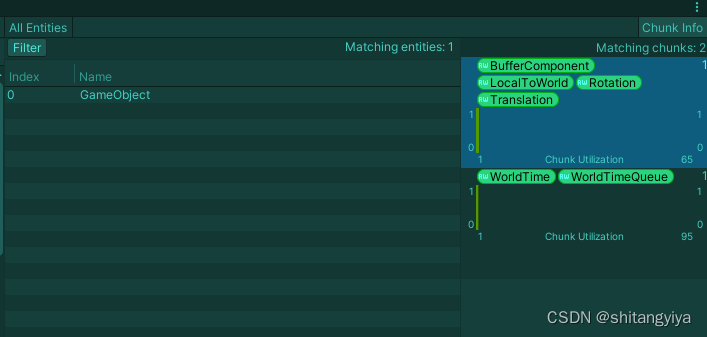
Values里Element的值对应的就是BufferComponent里的data,总共创建了3个data
可以看出运行时该实体被添加了一个BufferComponent组件
通过[GenerateAuthoringComponent]特性的方法挂载组件,组件里面只能写一个变量,如果我们想写多个变量怎么办,那我们只能自己写代理了
//BufferMono.cs using UnityEngine; using Unity.Entities; public class BufferMono : MonoBehaviour, IConvertGameObjectToEntity { public void Convert(Entity entity, EntityManager dstManager, GameObjectConversionSystem conversionSystem) { DynamicBuffer<BufferComponent> tempBuffer = dstManager.AddBuffer<BufferComponent>(entity); tempBuffer.Add(new BufferComponent() { data = 1,data2 = 3 }); tempBuffer.Add(new BufferComponent() { data = 2,data2 = 5}); tempBuffer.Add(new BufferComponent() { data = 3 }); } }上述代码往实体里面添加了三个相同的BuffeCompoent组件并且进行了赋值
BufferElement常用操作
讯享网//BufferTest using UnityEngine; using Unity.Entities; public class BufferTest : MonoBehaviour { private void Start() { //创建一个实体 Entity tempEntity = World.DefaultGameObjectInjectionWorld.EntityManager.CreateEntity(); //添加三个buffercomponent组件 DynamicBuffer<BufferComponent> tempBuffer = World.DefaultGameObjectInjectionWorld.EntityManager.AddBuffer<BufferComponent>(tempEntity); tempBuffer.Add(new BufferComponent() { data = 1, data2 = 3 }); tempBuffer.Add(new BufferComponent() { data = 2, data2 = 5 }); tempBuffer.Add(new BufferComponent() { data = 3 }); //获得该实体的所有BufferComponent DynamicBuffer<BufferComponent> bufferComponents = World.DefaultGameObjectInjectionWorld.EntityManager. GetBuffer<BufferComponent>(tempEntity); //遍历集合内容 foreach(var item in bufferComponents) { Debug.Log(item.data + ":" + item.data2); } //删除第0个组件 tempBuffer.RemoveAt(0); //插入新的组件 tempBuffer.Insert(0, new BufferComponent() { data = 11, data2 = 12 }); } }
5)ChunkComponent介绍
作用与共享组件类似,区别是对块组件修改时并不会像共享组件一样创建一个新的组件
//ChunkCompoent.cs using Unity.Entities; using UnityEngine; public class ChunkComponent : IComponentData { public int data; }讯享网//ChunkTest.cs using UnityEngine; using Unity.Entities; public class ChunkTest : MonoBehaviour { void Start() { //创建原型 EntityArchetype entityArchetype = World.DefaultGameObjectInjectionWorld.EntityManager. CreateArchetype(ComponentType.ChunkComponent(typeof(ChunkComponent))); //用原型创建实体 Entity entity = World.DefaultGameObjectInjectionWorld.EntityManager.CreateEntity(entityArchetype); //创建第二个实体 World.DefaultGameObjectInjectionWorld.EntityManager.CreateEntity(entityArchetype); //获得ArchtypeChunk并且修改值 ArchetypeChunk tempChunk = World.DefaultGameObjectInjectionWorld.EntityManager.GetChunk(entity); World.DefaultGameObjectInjectionWorld.EntityManager.SetChunkComponentData(tempChunk, new ChunkComponent() { data = 10 }); //移除组件 World.DefaultGameObjectInjectionWorld.EntityManager.RemoveChunkComponent<ChunkComponent>(entity); //获得ChunkComponent World.DefaultGameObjectInjectionWorld.EntityManager.GetChunkComponentData<ChunkComponent>(tempChunk); //给实体添加ChunkComponent World.DefaultGameObjectInjectionWorld.EntityManager.AddChunkComponentData<ChunkComponent>(entity); //实体存不存在ChunkComponent World.DefaultGameObjectInjectionWorld.EntityManager.HasChunkComponent<ChunkComponent>(entity); } }
9.总结
到这里DOTS的教学已经完结了,下面附上一个我用于测试的实例
三.DOTS测试案例
案例1:1万个小球下落
准备工作
在Package Manager中安装Unity Physics包,安装好后重启unity
制作小球预制体,挂载上Physics Shape(ECS中的碰撞器),Physics Body(ECS中的物理碰撞系统),Convert To Entity

设置Physics Shape的弹力值,Resitiution值越大弹力越大
在场景中挂载代码,并在Inspector面板赋值
//SphereManager.cs using System.Collections; using System.Collections.Generic; using UnityEngine; using Unity.Entities; using Unity.Transforms; using Unity.Mathematics; public class SphereManager : MonoBehaviour { public GameObject spb; //球体预制体 public int nums; //生成的球体数量 public float interval; //球体间隔比例 private BlobAssetStore blobAssetStore; private void Start() { //将小球转化为实体 blobAssetStore = new BlobAssetStore(); GameObjectConversionSettings setting = GameObjectConversionSettings.FromWorld(World.DefaultGameObjectInjectionWorld, blobAssetStore); Entity entity = GameObjectConversionUtility.ConvertGameObjectHierarchy(spb, setting); Translation translation = new Translation(); //生成1万个小球 for (int i = 0;i < nums;i++) { EntityManager entityManager = World.DefaultGameObjectInjectionWorld.EntityManager; Entity spbEntity = entityManager.Instantiate(entity); translation.Value = new float3(i % 16 *interval + UnityEngine.Random.Range(-0.1f,0.1f) , i / (16 * 16) * interval + UnityEngine.Random.Range(-0.1f, 0.1f), i / 16 % 16 * interval + UnityEngine.Random.Range(-0.1f, 0.1f)); entityManager.SetComponentData(spbEntity, translation); } } private void OnDestroy() { blobAssetStore.Dispose(); } } 
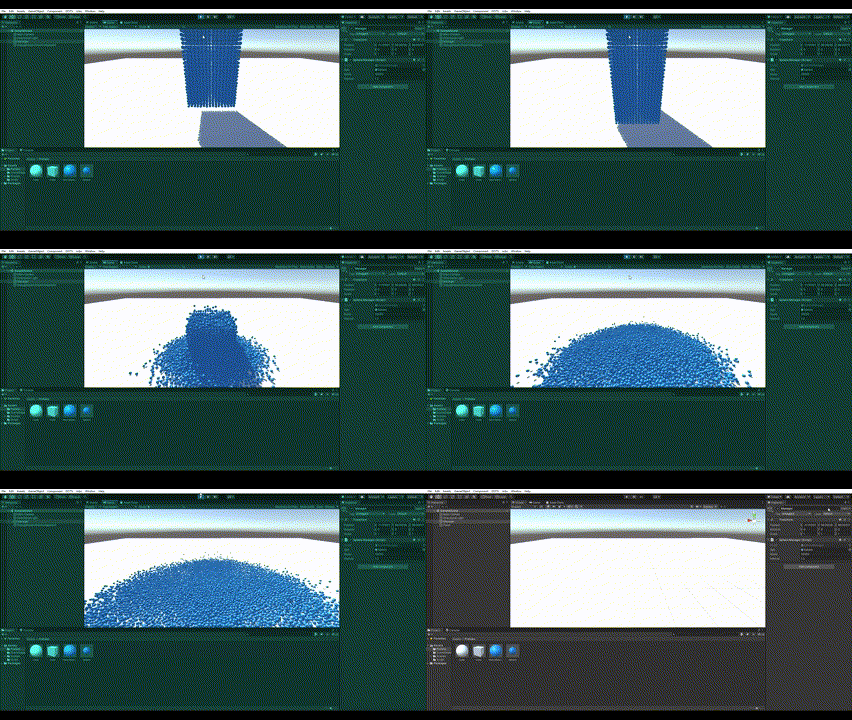
效果图 ,运行时记得开Burst编译器优化性能
案例2:鱼群移动
10000个鱼的鱼群移动,帧率稳定在150帧
讯享网//FishManager.cs using System.Collections; using System.Collections.Generic; using Unity.Entities; using Unity.Mathematics; using Unity.Transforms; using UnityEngine; public class FishManager : MonoBehaviour { public GameObject fishPrb; public int sum,radius; private BlobAssetStore blobAssetStore; public Transform center; EntityManager entityManager; private void Start() { //将小球转化为实体 blobAssetStore = new BlobAssetStore(); GameObjectConversionSettings setting = GameObjectConversionSettings.FromWorld(World.DefaultGameObjectInjectionWorld, blobAssetStore); Entity fishentity = GameObjectConversionUtility.ConvertGameObjectHierarchy(fishPrb, setting); Translation translation = new Translation(); entityManager = World.DefaultGameObjectInjectionWorld.EntityManager; //生产球形鱼群 for (int i = 0;i < sum;i++) { Entity fish = entityManager.Instantiate(fishentity); Vector3 tempDir = Vector3.Normalize(new Vector3(UnityEngine.Random.Range(-1f, 1f), UnityEngine.Random.Range(-1f, 1f), UnityEngine.Random.Range(-1f, 1f))) * radius; Vector3 final = center.position + tempDir; translation.Value = new float3(final.x, final.y, final.z); entityManager.SetComponentData(fish, translation); //设置每个鱼的位置 Rotation rotation = new Rotation(); rotation.Value = quaternion.LookRotationSafe(tempDir, math.up()); entityManager.SetComponentData(fish, rotation); } } private void OnDestroy() { blobAssetStore.Dispose(); } }
//TargetComponent.cs using System.Collections; using System.Collections.Generic; using UnityEngine; using Unity.Entities; [GenerateAuthoringComponent] public struct TargetComponent : IComponentData { } 讯享网//FishComponent.cs using System.Collections; using System.Collections.Generic; using UnityEngine; using Unity.Entities; [GenerateAuthoringComponent] public struct FishComponent : IComponentData { public float fishMoveSpeed, fishRotationSpeed; public float targetDirWeight, farAwayWeight, centerWeight; }
//BoidMoveSystem.cs using System.Collections; using System.Collections.Generic; using Unity.Entities; using Unity.Mathematics; using Unity.Transforms; using UnityEngine; public class BoidMoveSystem : SystemBase { protected override void OnUpdate() { float3 tempSumPos = float3.zero; float3 tempCenterPos = float3.zero; float3 tempTargetPos = float3.zero; float tempTime = Time.DeltaTime; int tempSumFish = 0; Entities.ForEach((Entity pEntity, ref Translation translation,ref Rotation rotation, ref FishComponent pfishComponent) => { tempSumPos += translation.Value; tempSumFish++; }).Run(); Entities.ForEach((Entity pEntity, ref Translation translation, ref Rotation rotation, ref TargetComponent targetComponent) => { tempTargetPos = translation.Value; }).Run(); tempCenterPos = tempSumPos / tempSumFish; Entities.ForEach((Entity pEntity, ref Translation translation, ref Rotation rotation, ref LocalToWorld pLocalToWorldComponentData, ref FishComponent pfishComponent) => { pLocalToWorldComponentData.Value = float4x4.TRS(translation.Value,rotation.Value,new float3(1, 1, 1)); float3 tempTargetDir = math.normalize(tempTargetPos - pLocalToWorldComponentData.Position); float3 tempFarAwayDir = math.normalize(tempSumFish * pLocalToWorldComponentData.Position - tempSumPos); float3 tempCenterDir = math.normalize(tempCenterPos - pLocalToWorldComponentData.Position); float3 tempSumDir = math.normalize(tempTargetDir * pfishComponent.targetDirWeight + tempFarAwayDir * pfishComponent.farAwayWeight + tempCenterDir * pfishComponent.centerWeight); float3 tempOffsetRotation = math.normalize(tempSumDir - pLocalToWorldComponentData.Forward); pLocalToWorldComponentData.Value = float4x4.TRS(pLocalToWorldComponentData.Position + pLocalToWorldComponentData.Forward * pfishComponent.fishMoveSpeed * tempTime, quaternion.LookRotationSafe(pLocalToWorldComponentData.Forward + tempOffsetRotation * pfishComponent.fishRotationSpeed * tempTime, math.up()), new float3(1, 1, 1)); translation.Value = pLocalToWorldComponentData.Position; rotation.Value = pLocalToWorldComponentData.Rotation; }).ScheduleParallel(); } } 
版权声明:本文内容由互联网用户自发贡献,该文观点仅代表作者本人。本站仅提供信息存储空间服务,不拥有所有权,不承担相关法律责任。如发现本站有涉嫌侵权/违法违规的内容,请联系我们,一经查实,本站将立刻删除。
如需转载请保留出处:https://51itzy.com/kjqy/14927.html