

1、概述

2、步骤
2.1、硬件连接

如下图为ili9341的扩展脚:

选择eduk1 的spi0 驱动ili9341,对应连线关系为:
| eduk1 |
ili9341 |
| GPIO_P07 |
SDI(MOSI) |
| GPIO_P06 |
CS |
| GPIO_P05 |
SCK |
| GPIO_P04 |
SDO(MISO) |
| GPIO_P22 |
LED |
| GPIO_P03 |
DC |
| GPIO_P02 |
RESET
|
| GND |
GND |
| 3V3 |
VCC |


2.2、初始化ili9341
步骤2.1完成了硬件的连接,接下来对ili9341进行软件初始化;首先需要选择一个solution,这里选择ota_demo,以此用例进行开发,把ili9341的显示能力集成到这个用例里,选择此用例的原因是后面需要借助OTA的能力对相册的图片进行升级;软件的用例选择和环境搭建请参考《HaaS EDU k1_day1_硬件介绍及开发环境搭建》 ;AliOS Things 3.3已经支持了对ili9341的驱动,具体细节可参考 components/drivers/external_device/ili9341/README.md,调用相关函数可实现画点画线等;根据步骤1的接线图,重新初始化ili9341,代码如下:
void user_ili9341_hw_init() { user_ili9341.spi_port = 0; //选择spi0 user_ili9341.spi_freq = ; user_ili9341.gpio_bgl_id = HAL_GPIO_PIN_P2_2; //GPIO_22 控制背光灯 user_ili9341.gpio_dc_id = HAL_GPIO_PIN_P0_3; user_ili9341.gpio_reset_id = HAL_GPIO_PIN_P0_2; ili9341_hw_init(&user_ili9341); return; }讯享网
2.3、解析bmp文件
AliOS Things 3.3 已经集成了ili9341驱动,但还不能直接显示一幅图片,本文介绍如何显示bmp格式的图片,ili9341 spi lcd支持的是16位色深的图片,所以我们需要将24位色深的bmp格式的图片转成16位的然后再送显;简单介绍下bmp格式的图片:BMP(全称Bitmap)是Windows操作系统中的标准图像文件格式,使用非常广。它采用位映射存储格式,除了图像深度可选以外,不采用其他任何压缩,因此,BMP文件所占用的空间很大。BMP文件的图像深度可选lbit、4bit、8bit及24bit。BMP文件存储数据时,图像的扫描方式是按从左到右、从下到上的顺序。其数据存储方式:
1.在windows中,颜色顺序为:B G R;
2.BMP的存储行顺序和图像显示顺序是上下颠倒的,即BMP存储的最后一行是真实图片显示的第一行;
另外BMP的组成为:位图信息+实际的图像数据;如下数据结构为bmp的图片信息头:
讯享网typedef struct { // BMP文件头结构 char magic[2]; // 位图文件的类型(BM)。 unsigned int size; // 位图文件的大小,以字节为单位 short reserved1; // 位图文件保留字(0) short reserved2; // 位图文件保留字(0) unsigned int offset; // 位图数据的起始位置,以相对于位图 } bmp_file_head_t; typedef struct { //图像信息区 unsigned int info_size; //本结构体所占用字节数(40bytes) int width; // 位图的宽度,以像素为单位,像素数量是4字节对齐的 int height; // 位图的高度,以像素为单位 unsigned short planes; // 目标设备的级别,必须为1 unsigned short count; // 每个像素所需的位数,必须是1(双色)// 4(16色),8(256色)或24(真彩色)之一 unsigned int compression; // 位图压缩类型,必须是 0(不压缩),// 1(BI_RLE8压缩类型)或2(BI_RLE4压缩类型)之一 unsigned int image_size; // 位图的大小,以字节为单位 unsigned int xmeter; // 位图水平分辨率,每米像素数 unsigned int ymeter; // 位图垂直分辨率,每米像素数 unsigned int cused; // 位图实际使用的颜色表中的颜色数 unsigned int cimportant; // 位图显示过程中重要的颜色数 } bmp_attr_info_t;
2.4、将24位RGB值转成16位RGB值
通过步骤2.3了解到BMP图片的构成,可根据上面的数据结构获取图片的色深,长和宽等信息,本文介绍的方案只支持320 * 240的图片,如下代码:
void pic_display(char *pic_path) { int fd = 0; int i = 0; int ret = 0; memset(pic_frame, 0x00, sizeof(pic_frame)); memset(tmp_buf, 0x00, sizeof(tmp_buf)); if(pic_path == NULL) { printf("pic path is null!\r\n"); return; } fd = aos_open(pic_path, O_RDONLY); if (fd < 0) { printf("open bmp %s failed\r\n", pic_path); } else { bmp_file_head_t bmp_head; bmp_attr_info_t bmp_attr; uint8_t tmp_color_r = 0; uint8_t tmp_color_g = 0; uint8_t tmp_color_b = 0; uint16_t color = 0; uint16_t tmp = 0; int line = 0; int column = 0; printf("open bmp success!\r\n"); ret = aos_read(fd, tmp_buf, 54); if (ret < 0) { printf("read file failed\r\n"); } bmp_head.magic[0] = tmp_buf[0]; bmp_head.magic[1] = tmp_buf[1]; bmp_head.size = EXTRACT_U32(&tmp_buf[2]); bmp_head.reserved1 = EXTRACT_U16(&tmp_buf[6]); bmp_head.reserved2 = EXTRACT_U16(&tmp_buf[8]); bmp_head.offset = EXTRACT_U32(&tmp_buf[10]); printf("bmp magic = %c%c\r\n", bmp_head.magic[0], bmp_head.magic[1]); printf("bmp size = %d\r\n", bmp_head.size); printf("bmp offset = %d\r\n", bmp_head.offset); memcpy(&bmp_attr, &tmp_buf[14], sizeof(bmp_attr)); printf("bmp w = %d, h = %d\r\n", bmp_attr.width, bmp_attr.height); printf("bmp count = %d\r\n", bmp_attr.count); printf("bmp body size = %d\r\n", bmp_attr.image_size); if ((bmp_head.magic[0] != 'B') || (bmp_head.magic[1] != 'M')) { printf("pic isn't bmp!\r\n"); } else { if((bmp_attr.count == 24) && (bmp_attr.width <= 320) && (bmp_attr.height <=240)) { memset(src_pic_frame, 0x00, sizeof(src_pic_frame)); ret = aos_read(fd, src_pic_frame, bmp_attr.image_size); if (ret < 0) { printf("read bmp body failed\r\n"); } else { i = 0; for (line = 239; line > 0; line--) { for (column = line * 960; column < (line * 960 + 959);) { tmp_color_b = src_pic_frame[column]; tmp_color_g = src_pic_frame[column + 1]; tmp_color_r = src_pic_frame[column + 2]; column = column + 3; tmp = (tmp_color_r >> 3) & 0xff; tmp = tmp << 11; color = tmp; tmp = (tmp_color_g >> 2) & 0xff; tmp = tmp << 5; color |= tmp; tmp = (tmp_color_b >> 3) & 0xff; color |= tmp; if (i < 320 * 240) { pic_frame[i++] = color; } else { printf("color numb err, column = %d\r\n", column); } } } } } } aos_close(fd); } ili9341_draw_frame(user_ili9341, pic_frame); printf("nano entry here!\r\n"); }
2.5、编译运行
2.5.1、将bmp图片制作和导入文件系统
2.5.2、代码添加
了解以上的步骤后,将本文的附件中的代码copy到一个单独的C文件中,比如bmp_parse.c,然后在 solutions/ota_demo/package.yaml 中增加 - ili9341: dev_aos 组件和 - "bmp_parse.c" 源文件;
接下来将bmp_parse.c中的函数 user_ili9341_hw_init() 和 pic_display(char pic_path) 在otaappdemo.c里的 application_start调用即可,其中pic_display(char pic_path) 的参数pic_path为bmp图片的存储路径即1中/data/xxx.bmp;如下图:

2.5.3、编译
完成以上所有步骤后,既可以编译和下载固件,具体参考《HaaS EDU k1_day1_硬件介绍及开发环境搭建》 ;
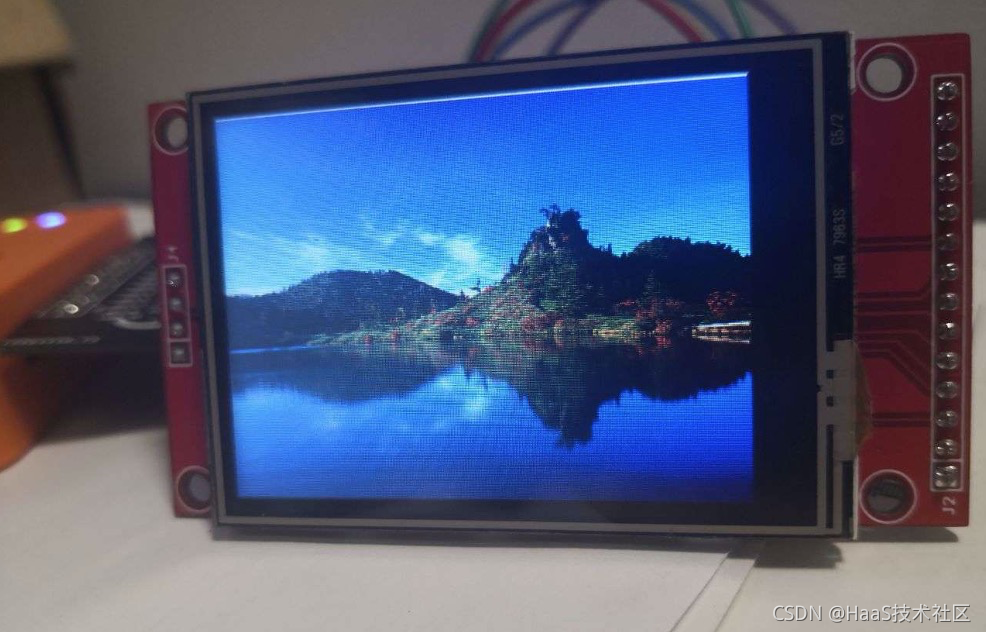
3、效果
4、附件
代码如下
讯享网#include <fcntl.h> #include "ili9341.h" #include "hal_iomux_haas1000.h" #define COLOR_RED (0xF800) #define COLOR_BREEN (0x07E0) #define COLOR_BLUE (0x001F) typedef struct { // BMP文件头结构 char magic[2]; // 位图文件的类型(BM)。 unsigned int size; // 位图文件的大小,以字节为单位 short reserved1; // 位图文件保留字(0) short reserved2; // 位图文件保留字(0) unsigned int offset; // 位图数据的起始位置,以相对于位图 } bmp_file_head_t; typedef struct { //图像信息区 unsigned int info_size; //本结构体所占用字节数(40bytes) int width; // 位图的宽度,以像素为单位,像素数量是4字节对齐的 int height; // 位图的高度,以像素为单位 unsigned short planes; // 目标设备的级别,必须为1 unsigned short count; // 每个像素所需的位数,必须是1(双色)// 4(16色),8(256色)或24(真彩色)之一 unsigned int compression; // 位图压缩类型,必须是 0(不压缩),// 1(BI_RLE8压缩类型)或2(BI_RLE4压缩类型)之一 unsigned int image_size; // 位图的大小,以字节为单位 unsigned int xmeter; // 位图水平分辨率,每米像素数 unsigned int ymeter; // 位图垂直分辨率,每米像素数 unsigned int cused; // 位图实际使用的颜色表中的颜色数 unsigned int cimportant; // 位图显示过程中重要的颜色数 } bmp_attr_info_t; typedef struct { bmp_file_head_t bmp_header; bmp_attr_info_t bmp_info; } bmp_file_info_t; #define EXTRACT_U16(d) (*((unsigned char *)(d)) | (*((unsigned char *)(d) + 1) << 8)) #define EXTRACT_U32(d) \ (*((unsigned char *)(d)) | (*((unsigned char *)(d) + 1) << 8) | \ (*((unsigned char *)(d) + 2) << 16) | (*((unsigned char *)(d) + 3) << 24)) uint16_t pic_frame[320 * 240]; uint8_t src_pic_frame[320 * 240 * 3]; uint8_t tmp_buf[100]; ili9341_dev_t user_ili9341 = {0}; void user_ili9341_hw_init() { user_ili9341.spi_port = 0; user_ili9341.spi_freq = ; user_ili9341.gpio_bgl_id = HAL_GPIO_PIN_P2_2; user_ili9341.gpio_dc_id = HAL_GPIO_PIN_P0_3; user_ili9341.gpio_reset_id = HAL_GPIO_PIN_P0_2; ili9341_hw_init(&user_ili9341); return; } void pic_display(char *pic_path) { int fd = 0; int i = 0; int ret = 0; memset(pic_frame, 0x00, sizeof(pic_frame)); memset(tmp_buf, 0x00, sizeof(tmp_buf)); if(pic_path == NULL) { printf("pic path is null!\r\n"); return; } fd = aos_open(pic_path, O_RDONLY); if (fd < 0) { printf("open bmp %s failed\r\n", pic_path); } else { bmp_file_head_t bmp_head; bmp_attr_info_t bmp_attr; uint8_t tmp_color_r = 0; uint8_t tmp_color_g = 0; uint8_t tmp_color_b = 0; uint16_t color = 0; uint16_t tmp = 0; int line = 0; int column = 0; printf("open bmp success!\r\n"); ret = aos_read(fd, tmp_buf, 54); if (ret < 0) { printf("read file failed\r\n"); } bmp_head.magic[0] = tmp_buf[0]; bmp_head.magic[1] = tmp_buf[1]; bmp_head.size = EXTRACT_U32(&tmp_buf[2]); bmp_head.reserved1 = EXTRACT_U16(&tmp_buf[6]); bmp_head.reserved2 = EXTRACT_U16(&tmp_buf[8]); bmp_head.offset = EXTRACT_U32(&tmp_buf[10]); printf("bmp magic = %c%c\r\n", bmp_head.magic[0], bmp_head.magic[1]); printf("bmp size = %d\r\n", bmp_head.size); printf("bmp offset = %d\r\n", bmp_head.offset); memcpy(&bmp_attr, &tmp_buf[14], sizeof(bmp_attr)); printf("bmp w = %d, h = %d\r\n", bmp_attr.width, bmp_attr.height); printf("bmp count = %d\r\n", bmp_attr.count); printf("bmp body size = %d\r\n", bmp_attr.image_size); if ((bmp_head.magic[0] != 'B') || (bmp_head.magic[1] != 'M')) { printf("pic isn't bmp!\r\n"); } else { if((bmp_attr.count == 24) && (bmp_attr.width <= 320) && (bmp_attr.height <=240)) { memset(src_pic_frame, 0x00, sizeof(src_pic_frame)); ret = aos_read(fd, src_pic_frame, bmp_attr.image_size); if (ret < 0) { printf("read bmp body failed\r\n"); } else { i = 0; for (line = 239; line > 0; line--) { for (column = line * 960; column < (line * 960 + 959);) { tmp_color_b = src_pic_frame[column]; tmp_color_g = src_pic_frame[column + 1]; tmp_color_r = src_pic_frame[column + 2]; column = column + 3; tmp = (tmp_color_r >> 3) & 0xff; tmp = tmp << 11; color = tmp; tmp = (tmp_color_g >> 2) & 0xff; tmp = tmp << 5; color |= tmp; tmp = (tmp_color_b >> 3) & 0xff; color |= tmp; if (i < 320 * 240) { pic_frame[i++] = color; } else { printf("color numb err, column = %d\r\n", column); } } } } } } aos_close(fd); } ili9341_draw_frame(user_ili9341, pic_frame); printf("nano entry here!\r\n"); }
开发者支持
如需更多技术支持,可加入钉钉开发者群,或者关注微信公众号。

更多技术与解决方案介绍,请访问HaaS官方网站https://haas.iot.aliyun.com。
版权声明:本文内容由互联网用户自发贡献,该文观点仅代表作者本人。本站仅提供信息存储空间服务,不拥有所有权,不承担相关法律责任。如发现本站有涉嫌侵权/违法违规的内容,请联系我们,一经查实,本站将立刻删除。
如需转载请保留出处:https://51itzy.com/kjqy/129202.html