
给自己笔记本换了网卡,不知道怎么验证蓝牙版本,怎么办呢,于是在网上就找到了这个软件,话不多说,下面就是网址
Bluetooth Version finder
https://www.sordum.org/10772/bluetooth-version-finder-v1-0/

不过也是可以手动查看的
Check Bluetooth Version manually
We can use Windows Device Manager to find out the Bluetooth version .
1. Make sure your Bluetooth is turned on. You can turn it on from the Action Center toggle, or you can open the Settings app and go to the Devices group of settings and turn it on from the Bluetooth tab

2. Right click the Start button to open its context menu and Select the item called “Device Manager”.

3. In Device Manager, expand the Bluetooth set of devices. You may see one or several devices under this. Look for Interl(R) Wireless Bluetooth(R) or your Bluetooth brand name. Right-click it, and select Properties.
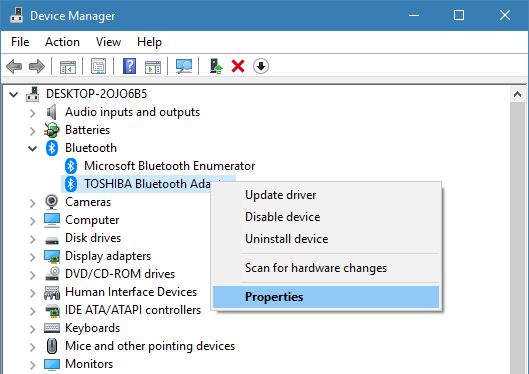
4. In the Properties window, go to the Advanced tab. Here, you will see a Firmware Version entry with something like LMP followed by a number, the number will correspond to the version of Bluetooth that you’re running.

The LMP versions Table:
LMP 9.x – Bluetooth 5.0
LMP 8.x – Bluetooth 4.2
LMP 7.x – Bluetooth 4.1
LMP 6.x – Bluetooth 4.0
LMP 5.x – Bluetooth 3.0 + HS
LMP 4.x – Bluetooth 2.1 + EDR
LMP 3.x – Bluetooth 2.0 + EDR
LMP 2.x – Bluetooth 1.2
LMP 1.x – Bluetooth 1.1
LMP 0.x – Bluetooth 1.0b
For instance, Bluetooth adapter’s LMP version 6.x indicates that your Bluetooth version is 4.0
版权声明:本文内容由互联网用户自发贡献,该文观点仅代表作者本人。本站仅提供信息存储空间服务,不拥有所有权,不承担相关法律责任。如发现本站有涉嫌侵权/违法违规的内容,请联系我们,一经查实,本站将立刻删除。
如需转载请保留出处:https://51itzy.com/kjqy/127623.html