
完整代码:https://download.csdn.net/download/_/
1 项目概述
1.1 概况
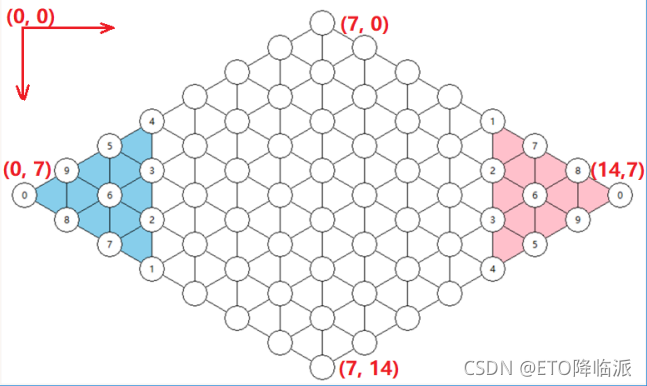
由六角形棋盘和带有两对0-9数字的十枚棋子组成,应用四则运算等规则向正对角内行棋。本项目只需要实现一个简化的双人对战棋盘。如图1:

讯享网
2.2 主要特点
规则比较简单,跟跳棋类似。
界面容易实现,基本没有动态元素。
双方轮流下子,单线程可以实现。
2.3 开发环境及运行环境
Pycharm及Anaconda上spyder。
Python环境:Python3.8。
Window环境运行。
2 需求分析
3.1 前端
一个考虑美化、用户体验的简易并且完备的前端。监听键盘、鼠标动作,实现按钮等控件操作,绘制文字、图片等,播放声音,游戏提示等。
3.2 单机版
3.2.1 行棋规则
移:任意棋子可以向与它相邻的空位平移一步。
邻:任意棋子可以跳过与它相邻的一枚棋子,但是不能连跳(跟跳棋类似)。如图
单跨:单跨是指棋子可以一次跨过与它在同一直线上的几枚棋子,但前提是:跨过的 几枚棋子的号码要通过四则运算计算出所要行跨的这枚棋子的号码数。
注意事项:
① 所跨过的棋子之间不论有多少空位,都可以一次跨过;
② 起点和落点在同一直线上,且落点必须在所跨过棋子最末棋前方相邻的空位上;
③ 跨过棋子的号码必须全部参与运算,而且只能参与一次运算。
3.2.2 胜负规则
3.2.3 图形界面
考虑与键鼠监控相结合,同时考虑项目本身特性以及用户友好性。
进入游戏之前,游戏双方可以输入姓名。
游戏中将叫停、悔棋和认输实现为界面上按钮,单跨时弹出表达式输入框,界面上显示姓名与得分以及一个计时器。
叫停或认输后通过弹窗宣布胜负。
3.2.4 键鼠监控
考虑与图形界面相结合,通过对鼠标位置的检测来判断当前操作并做出正确反映。键盘检测要能实现相应内容的输入。
3.3 网络版
3.3.1 服务器
实现连接用户、对局信息生成分配、消息转发等功能。
3.3.2 客户端多线程实现
单线程本机等待消息程序会卡死,键鼠操作失效,使用python中threading库实现一个接受消息放入队列的进程,用于处理消息。
3.3.3 通信协议
通信协议规范由教员提供,主要包含:注册信息、对局信息、下棋信息、叫停信息、认输信息、举报信息、超时信息等。
3.3.4 图形界面更新
不同于单机版,网络版的图形界面更新方式有两种,一种是对键鼠操作做出反应,另一种是消息处理获取信息进行更新。
3.3.5 棋盘坐标规定
国际数棋规定为 15 * 15 的菱形棋盘,棋子放置于交叉点,以左上角为坐标轴 原点(0, 0),横轴为 x 轴,纵轴为 y 轴,棋盘上角坐标为(7, 0),左角坐标为(0, 7), 右角坐标为(14, 7),下角坐标为(7, 14)。
3.4 AI版
3.4.1 评估函数
预测走棋之后的棋盘形势,为下一步的比较提供数据。
3.4.2 AI算法实现
使用极大极小值搜索算法获取每轮对弈中自己的最好位置和对手的最好位置,使用α-β剪枝算法实现当递归深度加深时计算的加速,使用历史启发式算法通过已经搜索过的结果来调整节点顺序实现加速。
4 关键函数
前端与后端作为整个国际数棋项目的基础,单机版是网络版的基础,网络版是AI版的基础,因此在函数使用上存在相互调用关系。在介绍关键函数时候,以函数最早出现的位置作为划分依据。
4.2.1 前端
前端最重要的就是要绘制出国际数棋的棋盘、棋子,其他功能基本都是作为用户体验的内容,可有可无。棋盘和棋子的绘制是前端的重中之重。
qianduan.py:

4.2.1.1 绘制棋盘
通过递归绘制出左侧棋盘,同理可得右侧棋盘。
def drawChessBoard(nameA, nameB, chessBoard, turn): if turn == 1: txt = big_Ziti.render('请' + nameA + '走棋', True, AtxtColor) screen.blit(txt, (150, 520)) else: txt = big_Ziti.render('请' + nameB + '走棋', True, BtxtColor) screen.blit(txt, (700, 520)) #画左侧棋盘 def drawLeft(x=0, y=7): #棋子与右上、右下两两连线 xx, yy = getChessPos(chessBoard, x, y) xUp, yUp = getChessPos(chessBoard, x+1, y+1) xDown, yDown = getChessPos(chessBoard, x+1, y-1) pygame.draw.line(screen, black, (xx, yy), (xUp, yUp), 3) pygame.draw.line(screen, black, (xx, yy), (xDown, yDown), 3) pygame.draw.line(screen, black, (xUp, yUp), (xDown, yDown), 3) x = x+1 #递归7次,完成左侧棋盘的绘制 if x >= 7: return drawLeft(x, y+1) drawLeft(x, y-1) #画右侧棋盘 def drawRight(x=14, y=7): xx, yy = getChessPos(chessBoard, x, y) xUp, yUp = getChessPos(chessBoard, x-1, y+1) xDown, yDown = getChessPos(chessBoard, x-1, y-1) pygame.draw.line(screen, black, (xx, yy), (xUp, yUp), 3) pygame.draw.line(screen, black, (xx, yy), (xDown, yDown), 3) pygame.draw.line(screen, black, (xUp, yUp), (xDown, yDown), 3) x = x-1 if x <= 7: return drawRight(x, y+1) drawRight(x, y-1) drawLeft(0, 7) drawRight(14, 7) #画格子 basicZiti = pygame.font.Font(None, 24) #在棋盘的65个坐标点上画小圆圈 for i in range(1, 65): x, y = getChessPos(chessBoard, chessBoard[i][0], chessBoard[i][1]) if i <= 10: pygame.draw.circle(screen, AcellColor, (x, y), cellRadius, 0) screen.blit(basicZiti.render(str(i - 1), True, black),(x - chessRadius/3 + 2, y - chessRadius / 3)) elif i <= 54: pygame.draw.circle(screen, cellColor, (x, y), cellRadius, 0) else: pygame.draw.circle(screen, BcellColor, (x, y), cellRadius, 0) if i == 64: screen.blit(basicZiti.render("0", True, black),(x - chessRadius/3 + 2, y - chessRadius / 3)) else: screen.blit(basicZiti.render(str(i-54), True, black),(x - chessRadius/3 + 2, y - chessRadius / 3)) 讯享网
4.2.1.2 绘制棋子
讯享网def drawChess(chessBoard): basicZiti = pygame.font.Font(None, 24) for i in range(1,65): if chessBoard[i][2] > 0: x, y = getChessPos(chessBoard, chessBoard[i][0], chessBoard[i][1]) if chessBoard[i][2] <= 10: pygame.draw.circle(screen, AchessColorOut, (x, y), chessRadius, 0) pygame.draw.circle(screen, AchessColorIn, (x, y), chessRadius - 3, 0) else: pygame.draw.circle(screen, BchessColorOut,(x, y), chessRadius, 0) pygame.draw.circle(screen, BchessColorIn,(x, y), chessRadius - 3,0) q = str((chessBoard[i][2] - 1) % 10) screen.blit(basicZiti.render(q, True, black), (x-4.5, y-7))
4.2.1.3 用户友好性
在用户选择棋子的时候,对棋子进行画一个圈进行提示:
def drawCircle(x,y): pygame.draw.circle(screen, yellow, (x + chessRadius, y + chessRadius), chessRadius + 3, 3) 4.2.2 单机版
讯享网chess_board = {
    29:[7,0,0], 22:[6,1,0], 37:[8,1,0], 16:[5,2,0], 30:[7,2,0], 44:[9,2,0], 11:[4,3,0], 23:[6,3,0], 38:[8,3,0], 50:[10,3,0], 5:[3,4,5], 17:[5,4,0], 31:[7,4,0], 45:[9,4,0], 55:[11,4,12], 6:[2,5,6], 12:[4,5,0], 24:[6,5,0], 39:[8,5,0], 51:[10,5,0], 61:[12,5,18], 10:[1,6,10], 3:[3,6,3], 18:[5,6,0], 32:[7,6,0], 46:[9,6,0], 57:[11,6,14], 62:[13,6,19], 1:[0,7,1], 7:[2,7,7], 13:[4,7,0], 25:[6,7,0], 40:[8,7,0], 52:[10,7,0], 60:[12,7,17], 64:[14,7,11], 9:[1,8,9], 4:[3,8,4], 19:[5,8,0], 33:[7,8,0], 47:[9,8,0], 56:[11,8,13], 63:[13,8,20], 8:[2,9,8], 14:[4,9,0], 26:[6,9,0], 41:[8,9,0], 53:[10,9,0], 59:[12,9,16], 2:[3,10,2], 20:[5,10,0], 34:[7,10,0], 48:[9,10,0], 58:[11,10,15], 15:[4,11,0], 27:[6,11,0], 42:[8,11,0], 54:[10,11,0], 21:[5,12,0], 35:[7,12,0], 49:[9,12,0], 28:[6,13,0], 43:[8,13,0], 36:[7,14,0], }
此后的网络版、AI版沿用此棋盘。
houduan.py:
4.2.2.1 “移”操作判断
#"移"操作 def yiJudge(chessBoard, source, goal): #求出起始点到目的点的距离 xDis = abs(chessBoard[source][0] - chessBoard[goal][0]) yDis = abs(chessBoard[source][1] - chessBoard[goal][1]) #目标点没有棋子占位 if chessBoard[source][2] == 0 or chessBoard[goal][2] != 0: return False if (xDis == yDis and xDis == 1) or (xDis == 0 and yDis == 2): return True return False 4.2.2.2 “邻”操作判断
讯享网#"邻"操作 def linJudge(chessBoard, source, goal): xDis = abs(chessBoard[source][0] - chessBoard[goal][0]) yDis = abs(chessBoard[source][1] - chessBoard[goal][1]) #斜跳:横纵差两格,纵跳:纵向差两格 if (xDis == yDis and xDis == 2) or (xDis == 0 and yDis == 4): #起始点到目标点中间格子坐标 xMid = (chessBoard[source][0] + chessBoard[goal][0]) / 2 yMid = (chessBoard[source][1] + chessBoard[goal][1]) / 2 mid = getChessIndex(chessBoard, xMid, yMid) #起始点到目标点中间有棋子 if chessBoard[mid][2] > 0: return True return False
4.2.2.3 “单跨”操作判断
global shizi shizi = '' #"单跨"操作 def dankuaJudge(chessBoard, source, goal): xDis = abs(chessBoard[source][0] - chessBoard[goal][0]) yDis = abs(chessBoard[source][1] - chessBoard[goal][1]) #判断单跨是否在一条直线上 if xDis != yDis or (xDis == 0 and yDis <= 4): return False #若在一条水平直线上,返回False if yDis == 0: return False #纵坐标差表示连线棋子数 cellNum = yDis #用列表存储连线上棋子的值 chessList = [] chessNum = yDis #起始点到目标点的单位向量 if xDis != 0: sgX = (chessBoard[goal][0] - chessBoard[source][0]) / xDis else: sgX = 0 sgY = (chessBoard[goal][1] - chessBoard[source][1]) / yDis if chessBoard[source][2] < 11: res = chessBoard[source][2] - 1 else: res = chessBoard[source][2] - 11 #斜着跨 if xDis != 0: lst = getChessIndex(chessBoard, chessBoard[source][0] + sgX * (cellNum - 1), chessBoard[source][1] + sgY * (cellNum - 1)) print(lst) if chessBoard[lst][2] == 0: return False #遍历连线间的所有格子 for i in range(1, cellNum): cell = getChessIndex(chessBoard, chessBoard[source][0] + sgX * i, chessBoard[source][1] + sgY * i) #如果这个格子上有棋子,将其值加入列表 if chessBoard[cell][2] > 0: chessNum += 1 if chessBoard[cell][2] < 11: chessList.append(chessBoard[cell][2] - 1) else: chessList.append(chessBoard[cell][2] - 11) #垂直跨同理 else: lst = getChessIndex(chessBoard, chessBoard[source][0], chessBoard[source][1] + sgY * (cellNum - 2)) if chessBoard[lst][2] == 0: return False #垂直跨越时格子数为一半 for i in range(1, int(cellNum / 2)): cell = getChessIndex(chessBoard, chessBoard[source][0], chessBoard[source][1] + sgY * i * 2) if chessBoard[cell][2] > 0: chessNum += 1 if chessBoard[cell][2] < 11: chessList.append(chessBoard[cell][2] - 1) else: chessList.append(chessBoard[cell][2] - 11) #两个棋子以下不能跨 if chessNum < 2: return False if chessBoard[source][2] < 11: sourceNum = chessBoard[source][2] - 1 else: sourceNum = chessBoard[source][2] - 11 root = Tk() Label(root, text = "请输入四则运算表达式").pack() Label(root, text = "可用数字: ").pack() Label(root, text = str(chessList)).pack() Label(root, text = "需要得到结果: ").pack() Label(root, text = str(sourceNum)).pack() b1 = Label(root, text = "请输入表达式:") root.geometry("%dx%d+%d+%d" % (500, 300, 480, (windowHeight) / 2)) button_text = StringVar() #管理部件上的字符 一般用于button上 b1.pack() # 这里的side可以赋值为LEFT RTGHT TOP BOTTOM xls = Entry(root, textvariable=button_text) button_text.set("") xls.pack() Button(root, text="确认", command=root.destroy).pack( expand=YES) root.mainloop() expression = button_text.get() global shizi shizi = expression exp = re.findall(r"\d+", expression) #将输入的字符串运算式的数字转换到为列表 exp = list(map(int,exp)) #将列表元素转换为整型 exp.sort() chessList.sort() #输入数字是否与棋子对应 if exp != chessList: root3 = Tk() Label(root3,text="错了,再想想").pack() root3.geometry("%dx%d+%d+%d" % (200, 100, (windowHeight + 650) / 2, (windowHeight + 50) / 2)) root3.mainloop() return False if formulaJudge(expression, res) == False: root3 = Tk() Label(root3,text="错了,再想想").pack() root3.geometry("%dx%d+%d+%d" % (200, 100, (windowHeight + 650) / 2, (windowHeight + 50) / 2)) root3.mainloop() return False return True def formulaJudge(expression, re): operator = {
   '+':1, '-':1, '*':2, '/':2, '(':3, ')':3} expStack = [] opeStack = [] for i in expression: if i not in operator: expStack.append(i) else: if not opeStack: opeStack.append(i) else: if i == ')': for j in opeStack[::-1]: if j != '(': expStack.append(j) opeStack.pop() else: opeStack.pop() break else: for j in opeStack[::-1]: if operator[j] >= operator[i] and j != '(': expStack.append(j) opeStack.pop() else: opeStack.append(i) break if not opeStack: opeStack.append(i) if opeStack: k = opeStack.pop() expStack.append(k) numStack = [] for i in expStack: if i not in operator: numStack.append(i) else: num2 = numStack.pop() num1 = numStack.pop() if i == '+': numStack.append(int(num1) + int(num2)) elif i == '-': numStack.append(int(num1) - int(num2)) elif i == '*': numStack.append(int(num1) * int(num2)) elif i == '/': numStack.append(int(num1) / int(num2)) else: return False if re == numStack.pop(): return True else: return False
solo.py:
单机版主函数中最重要的是实现国际数棋运行流程以及键鼠监控模块,通过pygame的函数可实现键鼠监控,通过while循环可实现对操作的循环读取。
4.2.2.4 单机版运行主函数
讯享网def SOLO(): nameA, nameB = getName('solo') #画前端 cb = copy.deepcopy(chess_board) stop = 0 od = 0 source = None goal = None img = pygame.image.load(way + "backgroud_pic.jpg") screen.blit(img, (0, 1)) drawButtom(nameA, nameB) drawChessBoard(nameA, nameB, cb, od) drawChess(cb) Scores(cb) pygame.display.flip() Astack = [] Bstack = [] tChange = time_now() Cchess = 0 over = 0 #键鼠检测 while 1: if over == 0: tNow = time_now() screen.blit(img, (0, 1)) drawTime(30 - time_sub(tNow, tChange), od) drawButtom(nameA, nameB) drawChessBoard(nameA, nameB, cb, od) Scores(cb) drawChess(cb) if Cchess == 1: drawCircle(x - chessRadius, y - chessRadius) pygame.display.flip() if time_sub(tNow, tChange) == 30: if od == 0: stop, over = gameOver(nameA, nameB, cb, 1, img) else: stop, over = gameOver(nameA, nameB, cb, 2, img) mouse = 0 for event in pygame.event.get(): #游戏结束 if event.type == QUIT or (event.type == KEYUP and event.key == K_ESCAPE): pygame.quit() sys.exit() #不结束游戏则获取鼠标所在位置的x,y坐标 elif event.type == MOUSEBUTTONUP: mouseX,mouseY = event.pos mouse = 1 if mouse == 1: index = getCoordinate(cb, mouseX, mouseY)#获得对应棋子编号 #认输 if ((AwantLose[0] < mouseX < AwantLose[0] + AwantLose[2]) and (AwantLose[1] < mouseY < AwantLose[1] + AwantLose[3])) and over == 0: stop = 1 elif ((BwantLose[0] < mouseX < BwantLose[0] + BwantLose[2]) and (BwantLose[1] < mouseY < BwantLose[1] + BwantLose[3])) and over == 0: stop = 2 #点击棋子 elif index != None and cb[index][2] > 0 and over == 0: cb, od, source, x, y = clickChess(nameA, nameB, index, cb, od, source, img) if x != -1: Cchess = 1 #点击目标 elif index!=None and cb[index][2] == 0 and source != None and over == 0: index, cb, od, source, goal, img, Astack, Bstack, finish = clickDst(nameA, nameB, index, cb, od, source, goal, img, Astack, Bstack) if finish == 1: tChange = time_now() Cchess = 0 #A悔棋 elif (AgetBack[0] < mouseX < AgetBack[0] + AgetBack[2]) and (AgetBack[1] < mouseY < AgetBack[1] + AgetBack[3]) and od == 0 and over == 0: cb, od, Astack, Bstack = AwantBack(nameA, nameB, cb, od, Astack, Bstack, img) #B悔棋 elif ((BgetBack[0] < mouseX < BgetBack[0] + AgetBack[2]) and (BgetBack[1] < mouseY < BgetBack[1] + BgetBack[3])) and od == 1 and over == 0: cb, od, Astack, Bstack = BwantBack(nameA, nameB, cb, od, Astack, Bstack, img) #A停棋 elif (AstopRect[0] < mouseX < AstopRect[0] + AstopRect[2]) and (AstopRect[1] < mouseY < AstopRect[1] + AstopRect[3]) and over == 0: cb, stop, od = Astop(cb, stop, od, img) #B停棋 elif (BstopRect[0] < mouseX < BstopRect[0] + BstopRect[2]) and (BstopRect[1] < mouseY < BstopRect[1] + BstopRect[3]) and over == 0: cb, stop, od = Bstop(cb, stop, od, img) else: click = pygame.mixer.Sound(way + '点击错误.wav') pygame.mixer.Sound.play(click) #结束游戏 if stop != 0: stop, over = gameOver(nameA, nameB, cb, stop, img) elif over == 1 and ((quitRect[0] < mouseX < quitRect[0] + quitRect[2]) and (quitRect[1] < mouseY < quitRect[1] + quitRect[3])): pygame.quit() sys.exit() elif over == 1 and ((againRect[0] < mouseX < againRect[0] + againRect[2]) and (againRect[1] < mouseY < againRect[1] + againRect[3])): cb.clear() again()
4.2.2.5 用户友好性
对于某些用户,考虑到他们喜欢乱点鼠标,因此在鼠标点击时设置判断条件,对错误的点击事件进行声音提示。同时设计下棋音效,提升游戏乐趣。
def clickChess(nameA, nameB, index, cb, od, source, img): if od == 1: if cb[index][2] <= 20 and cb[index][2] > 10: click = pygame.mixer.Sound(way + '点击错误.wav') pygame.mixer.Sound.play(click) return cb, od, source, -1, -1 if od == 0: if cb[index][2] <= 10 and 0 < cb[index][2]: click = pygame.mixer.Sound(way + '点击错误.wav') pygame.mixer.Sound.play(click) return cb, od, source, -1, -1 click = pygame.mixer.Sound(way + '下棋音效.wav') pygame.mixer.Sound.play(click) source = index x, y = getChessPos(cb, cb[index][0], cb[index][1]) screen.blit(img, (0, 1)) drawButtom(nameA, nameB) drawChessBoard(nameA, nameB, cb, od) Scores(cb) drawChess(cb) drawCircle(x - chessRadius, y - chessRadius) pygame.display.flip() return cb, od, source, x, y 讯享网def clickDst(nameA, nameB, index, cb, od, source, goal, img, Astack, Bstack): goal = index finish = 0 if od == 1 and cb[source][2] < 11: if moveChess(cb, source, goal): click = pygame.mixer.Sound(way + '下棋音效.wav') pygame.mixer.Sound.play(click) od = 0 Astack.append([source, goal]) finish = 1 elif od == 0 and cb[source][2] > 10: if moveChess(cb, source, goal): click = pygame.mixer.Sound(way + '下棋音效.wav') pygame.mixer.Sound.play(click) od = 1 Bstack.append([source, goal]) finish = 1 if finish == 0: click = pygame.mixer.Sound(way + '点击错误.wav') pygame.mixer.Sound.play(click) source = None screen.blit(img, (0, 1)) drawButtom(nameA, nameB) drawChessBoard(nameA, nameB, cb, od) Scores(cb) drawChess(cb) pygame.display.flip() return index, cb, od, source, goal, img, Astack, Bstack, finish
4.2.3 网络版
网络版最重要的是实现与服务器的交互能力,主要包含两类事件:1.对到来的消息进行处理,提取有用信息,更新自身棋盘等变量。2.对于我方的键鼠操作形成对应格式的消息,然后发送。
将这两部分内容写到两个文件里,形成Internet.py与Web.py。
Internet.py:
4.2.3.1 消息线程
考虑到游戏进程需要等待对方的消息进行更新,但如果对方思考下棋不发消息,这时候单线程就会直接卡死,因此要将接收消息进程独立出来。考虑用threading库实现:
q = [] def rcv_msg(player): while 1: revMsg = player.recv(1024) msg = revMsg.decode('utf-8') if msg != '': data = json.loads(msg) q.append(data) print(str(data)) 4.2.3.2 网络版主函数
因为有两种不同的更新棋盘的方式,所以主函数分为两部分:对消息提取的棋盘更新和对键鼠监控的棋盘更新。
讯享网def internet(): #联网,若未连接则弹出错误 try: player = socket(AF_INET, SOCK_STREAM) player.connect((IP, 50005)) except ConnectionRefusedError: root = Tk() root.title("错误") b1 = Label(root, text = "未连接网络") root.geometry("%dx%d+%d+%d" % (500, 300, 480, (windowHeight) / 2)) b1.pack() Button(root, text="确认", command = root.destroy).pack(expand = YES) root.mainloop() return t_msg = threading.Thread(target = rcv_msg, args = (player, )) t_msg.start() nameI = getName('web') #加入游戏 joinGame_msg(player, nameI) #画前端 cb = copy.deepcopy(chess_board) stop = 0 #叫停 od = 0 side = 0 source = None goal = None img = pygame.image.load(way + "backgroud_pic.jpg") screen.blit(img, (0, 1)) Astack = [] #记录A方的行棋 Bstack = [] x1, y1, x2, y2 = -1, -1, -1, -1 tChange = time_now() Cchess = 0 stop = 0 over = 0 match = 0 total = 0 while 1: if match == 1 and over == 0 and stop == 0: tNow = time_now() screen.blit(img, (0, 1)) drawTime(30 - time_sub(tNow, tChange), od) drawButtom(nameA, nameB, 'web') drawChessBoard(nameA, nameB, cb, od) Scores(cb) drawChess(cb) if Cchess == 1: drawCircle(x - chessRadius, y - chessRadius) pygame.display.flip() if time_sub(tNow, tChange) == 30: if od == 0: stop, over = gameOver(nameA, nameB, cb, 1, img) else: stop, over = gameOver(nameA, nameB, cb, 2, img) if len(q) == 0 and over == 0 and stop == 0: screen.blit(img, (0, 1)) drawMatch() pygame.display.flip() elif len(q) == 1 and match == 0 and over == 0 and stop == 0: match = 1 nameIt = q[0]['counterpart_name'] game_id = q[0]['game_id'] side = q[0]['side'] if side == 1: nameA = nameI nameB = nameIt elif side == 0: nameA = nameIt nameB = nameI screen.blit(img, (0, 1)) drawButtom(nameA, nameB, 'web') drawChessBoard(nameA, nameB, cb, 0) drawChess(cb) Scores(cb) pygame.display.flip() elif len(q) > 1 and over == 0 and stop == 0: msg = q[-1] q.pop() if 'status' in msg: if msg['status'] == 2: clientSendQuit(player, side) #棋子移动 if 'src' in msg and side != od: cb, od = ItClickDst(msg, nameA, nameB, cb, img, Astack, Bstack, side, od) tChange = time_now() total += 1 if 'request' in msg and side != od: if msg['request'] == 'quit' and side != od: if side == 0: stop, over = gameOver(nameA, nameB, cb, 1, img) else: stop, over = gameOver(nameA, nameB, cb, 2, img) elif msg['request'] == 'stop' in msg and side != od: stop = 3 elif msg['request'] == 'report' in msg and side != od: if side == 1: stop = 1 else: stop = 2 #结束游戏 if stop != 0: stop, over = gameOver(nameA, nameB, cb, stop, img) clientSendQuit(player, side) mouse = 0 for event in pygame.event.get(): #游戏结束 if event.type == QUIT or (event.type == KEYUP and event.key == K_ESCAPE): if match == 1: sendWantLose(player, game_id, side) clientSendQuit(player, side) pygame.quit() sys.exit() #不结束游戏则获取鼠标所在位置的x,y坐标 elif event.type == MOUSEBUTTONUP: mouseX,mouseY = event.pos mouse = 1 if mouse == 1 and len(q) >= 1: index = getCoordinate(cb, mouseX, mouseY)#获得对应棋子编号 #认输 if ((AwantLose[0] < mouseX < AwantLose[0] + AwantLose[2]) and (AwantLose[1] < mouseY < AwantLose[1] + AwantLose[3])) and side == 1 and over == 0: stop = 1 sendWantLose(player, game_id, side) clientSendQuit(player, side) elif ((BwantLose[0] < mouseX < BwantLose[0] + BwantLose[2]) and (BwantLose[1] < mouseY < BwantLose[1] + BwantLose[3])) and side == 0 and over == 0: stop = 2 sendWantLose(player, game_id, side) clientSendQuit(player, side) #点击棋子 elif index != None and cb[index][2] > 0 and od == side and over == 0: cb, od, source, x, y = clickChess(nameA, nameB, index, cb, od, source, img) if x != -1: Cchess = 1 x1 = cb[index][0] y1 = cb[index][1] #点击目标 elif index!=None and cb[index][2] == 0 and source != None and od == side and over == 0: re = clickDst(nameA, nameB, index, cb, od, source, goal, img, Astack, Bstack, side) if re != False: tChange = time_now() Cchess = 0 cb = re[1] od = re[2] source = re[3] goal = re[4] Astack = re[6] Bstack = re[7] x2 = cb[index][0] y2 = cb[index][1] if cb[index][2] <= 10: num = cb[index][2] - 1 elif cb[index][2] > 10: num = cb[index][2] - 11 sendMoveChess_msg(player, x1, y1, x2, y2, shizi, game_id, side, num) #countTime(nameA, nameB, od) #举报 elif (AgetBack[0] < mouseX < AgetBack[0] + AgetBack[2]) and (AgetBack[1] < mouseY < AgetBack[1] + AgetBack[3]) and side == 0 and over == 0: if weiLi(side, cb, total): sendWeiLi(player, game_id, side) stop = 1 elif ((BgetBack[0] < mouseX < BgetBack[0] + AgetBack[2]) and (BgetBack[1] < mouseY < BgetBack[1] + BgetBack[3])) and side == 1 and over == 0: if weiLi(side, cb, total): sendWeiLi(player, game_id, side) stop = 2 #A停棋 elif (AstopRect[0] < mouseX < AstopRect[0] + AstopRect[2]) and (AstopRect[1] < mouseY < AstopRect[1] + AstopRect[3]) and side == 1 and over == 0: cb, stop, od = Astop(cb, stop, od, img) sendStop_msg(player, game_id, side) clientSendQuit(player, side) #B停棋 elif (BstopRect[0] < mouseX < BstopRect[0] + BstopRect[2]) and (BstopRect[1] < mouseY < BstopRect[1] + BstopRect[3]) and side == 0 and over == 0: cb, stop, od = Bstop(cb, stop, od, img) sendStop_msg(player, game_id, side) clientSendQuit(player, side) else: click = pygame.mixer.Sound(way + '点击错误.wav') pygame.mixer.Sound.play(click) #结束游戏 if stop != 0: stop, over = gameOver(nameA, nameB, cb, stop, img) clientSendQuit(player, side) elif over == 1 and ((quitRect[0] < mouseX < quitRect[0] + quitRect[2]) and (quitRect[1] < mouseY < quitRect[1] + quitRect[3])): pygame.quit() sys.exit() elif over == 1 and ((againRect[0] < mouseX < againRect[0] + againRect[2]) and (againRect[1] < mouseY < againRect[1] + againRect[3])): cb.clear() again()
4.2.3.3 下棋信息
#生成下棋信息 def sendMoveChess_msg(player, x1, y1, x2, y2, exp, game_id, side, num): dict = {
    'type' : 1, 'msg' : {
    'game_id' : game_id, 'side' : side, 'num' : num, 'src' : {
    'x' : x1, 'y' : y1 }, 'dst' : {
    'x' : x2, 'y' : y2 }, 'exp' : exp } } player.send(str(json.dumps(dict)).encode())
4.2.4 AI版
4.2.4.1 AI版主函数
AI版中只需要通过消息进行棋盘更新,因此主函数从复杂性而言是小于网络版的主函数的。主函数实现如下:
讯享网def AI(): try: player = socket(AF_INET, SOCK_STREAM) player.connect((IP, 50005)) except ConnectionRefusedError: root = Tk() root.title("错误") b1 = Label(root, text = "未连接网络") root.geometry("%dx%d+%d+%d" % (500, 300, 480, (windowHeight) / 2)) b1.pack() Button(root, text="确认", command = root.destroy).pack(expand = YES) root.mainloop() return t_msg = threading.Thread(target = rcv_msg, args = (player, )) t_msg.start() nameI = '陈奕棠、戴浩淼' joinGame_msg(player, nameI) cb = copy.deepcopy(chess_board) stop = 0 od = 0 side = 0 source = None goal = None img = pygame.image.load(way + "backgroud_pic.jpg") screen.blit(img, (0, 1)) Astack = [] Bstack = [] x1, y1, x2, y2 = -1, -1, -1, -1 tChange = time_now() Cchess = 0 stop = 0 over = 0 match = 0 total = 0 while 1: if len(q) == 0 and over == 0 and stop == 0: screen.blit(img, (0, 1)) drawMatch() pygame.display.flip() elif len(q) == 1 and match == 0 and over == 0 and stop == 0: match = 1 nameIt = q[0]['counterpart_name'] game_id = q[0]['game_id'] side = q[0]['side'] if side == 1: nameA = nameI nameB = nameIt elif side == 0: nameA = nameIt nameB = nameI screen.blit(img, (0, 1)) drawButtom(nameA, nameB, 'web') drawChessBoard(nameA, nameB, cb, 0) drawChess(cb) Scores(cb) pygame.display.flip() elif len(q) > 1 and over == 0 and stop == 0: msg = q[-1] q.pop() if 'status' in msg: if msg['status'] == 2: clientSendQuit(player, side) elif msg['status'] == 3: if msg['side'] == side: sendChaoShi(player, side) if 'src' in msg and side != od: cb, od = ItClickDst(msg, nameA, nameB, cb, img, Astack, Bstack, side, od) tChange = time_now() total += 1 if 'request' in msg and side != od: if msg['request'] == 'quit' and side != od: if side == 0: stop, over = gameOver(nameA, nameB, cb, 1, img) else: stop, over = gameOver(nameA, nameB, cb, 2, img) elif msg['request'] == 'stop' in msg and side != od: stop = 3 elif msg['request'] == 'report' in msg and side != od: if side == 1: stop = 1 else: stop = 2 if od == side and match == 1 and stop == 0: #停棋 if AIstop(cb, side): sendStop_msg(player, game_id, side) print('aaa') clientSendQuit(player, side) stop = 3 source, goal, expression = bestMove(cb, side) index = getChessIndex(cb, cb[source][0], cb[source][1]) #点击目标 od = AIclickDst(nameA, nameB, cb, od, source, goal, img) x1, y1 = cb[source][0], cb[source][1] x2, y2 = cb[goal][0], cb[goal][1] if cb[goal][2] <= 10: num = cb[goal][2] - 1 elif cb[goal][2] > 10: num = cb[goal][2] - 11 sendMoveChess_msg(player, x1, y1, x2, y2, expression, game_id, side, num) if weiLi(side, cb, total): sendWeiLi(player, game_id, side) stop = 2
AIhouduan.py:
此文件主要实现AI版的搜索算法以及评估函数,是AI版最核心的部分。
4.2.4.2 评估函数
要得到最大的得分则需要把棋子下到对方棋盘的对应位置上,同时不同的棋子自身代表的权重也不一样。因此用棋子到对应位置距离以及自身权重作为参数来计算一步下棋的得分。
def evaluate(chessBoard, turn, side): total = 0 if side == 1: if turn == 1: for i in range(1, 11): x, y = chessToPos(chessBoard, i) j = i + 10 a, b = findPos(chessBoard, j) dis = 15 - ((x-a) 2 + (y-b) 2) 0.5 if i == 1: total += dis * 6 else: total += dis * i elif turn == 0: for i in range(11, 21): x, y = chessToPos(chessBoard, i) j = i - 10 a, b = findPos(chessBoard, j) dis = ((x-a) 2 + (y-b) 2) 0.5 - 15 if i == 11: total += dis * 6 else: total += dis * (i-10) if side == 0: if turn == 1: for i in range(1, 11): x, y = chessToPos(chessBoard, i) j = i + 10 a, b = findPos(chessBoard, j) dis = ((x-a) 2 + (y-b) 2) 0.5 - 15 if i == 1: total += dis * 11 else: total += dis * i elif turn == 0: for i in range(11, 21): x, y = chessToPos(chessBoard, i) j = i - 10 a, b = findPos(chessBoard, j) dis = 15 - ((x-a) 2 + (y-b) 2) 0.5 if i == 11: total += dis * 11 else: total += dis * (i-10) return total 4.2.4.3 alpaha_beta剪枝
当博弈树的层数变大时,遍历所有棋谱需要搜索的节点数目会指数级增长。我们就需要对所有叶子节点的评分,但这个不是必要的。
Alpha-Beta剪枝就是用来将搜索树中不需要搜索的分支裁剪掉,以提高运算速度。基本的原理是:
1.当一个 MIN 层节点的 α值 ≤ β值时 ,剪掉该节点的所有未搜索子节点
2.当一个 MAX 层节点的 α值 ≥ β值时 ,剪掉该节点的所有未搜索子节点
其中α值是该层节点当前最有利的评分,β值是父节点当前的α值,根节点因为是MAX层,所以 β值 初始化为正无穷大(+∞)。
子节点的β值是父节点的-α值,返回给父节点的评分是子节点的-α值。
初始化节点的α值,如果是MAX层,初始化α值为负无穷大(-∞),这样子节点的评分肯定比这个值大。如果是MIN层,初始化α值为正无穷大(+∞),这样子节点的评分肯定比这个值小。
讯享网def alpha_beta(chessBoard, depth, alpha, beta, turn, side): # alpha-beta剪枝 global best_move if AIstop(chessBoard, turn): return -INS if depth == 0: return evaluate(chessBoard, turn, side) move_list = allMove(chessBoard, turn) move_list.sort(key = getListIndex) for i in range(len(move_list)): move_list[i][4] = get_score(turn, move_list[i][0], move_list[i][2]) move_list.sort(key = getListIndex) score_list = [] good_move = move_list[0] for move in move_list: go(chessBoard, move[1], move[2]) if turn == 1: score = -alpha_beta(chessBoard, depth - 1, -beta, -alpha, 0, side) # 因为是一层选最大一层选最小,所以利用取负号来实现 else: score = -alpha_beta(chessBoard, depth - 1, -beta, -alpha, 1, side) score_list.append(score) goback(chessBoard, move[1], move[2]) if score > alpha: alpha = score if depth == maxDepth: best_move = move good_move = move if alpha >= beta: good_move = move break add_score(turn, good_move[0], good_move[2], depth) return alpha
history.py:
为了进一步加快AI思考的速度,我们引入历史启发式算法。
Alpha_Beta剪枝的效率取决于决策树的结构,如果搜索了没多久就发现能进行剪枝操作了就能减少计算量提升效率。
我们可以根据部分已经搜索过的结果来调整将要搜索的结点的顺序。因为,通常当一个局面经过搜索被认为较好时,其子结点中往往有一些与它相似的局面(如个别无关紧要的棋子位置有所不同)也是较好的。在搜索的过程中,每当发现一个好的走法,我们就给该走法累加一个增量以记录其“历史得分”,一个多次被搜索并认为是好的走法的“历史得分”就会较高。对于即将搜索的结点,按照“历史得分”的高低对它们进行排序,保证较好的走法(“历史得分”高的走法)排在前面,这样Alpha-Beta搜索就可以尽可能早地进行“裁剪”,从而保证了搜索的效率。
INS = 0x7fffffff history_board = [[0 for i in range(65)] for j in range(21)] def get_score(turn, index, goal): return history_board[index][goal] def add_score(turn, index, goal, depth): history_board[index][goal] += 2 << depth 4.3 运行流程图
4.3.1 单机版

4.3.2 网络版

4.3.3 AI版

5 使用说明
总运行文件为:shuqi.py,运行程序只需要运行该文件即可。
安装库:pip install pygame==2.0.1
在运行之前需要修改AI.py、Internet.py、solo.py中路径,可通过修改全局变量way实现,在引号中添加文件夹目录以读入背景图音效等文件。
网络版与AI版都需要修改Web.py中全局变量IP为所在网络的IP地址,同时在运行前也需要在config.txt中修改服务器IP地址,在server.py文件42行中修改config.txt文件地址以读入该文件。
如果出现字体不存在的问题,请自行下载相应字体或在qianduan.py文件中修改对应字体地址为已有字体地址。
6 优化与改进
- 网络版在匹配未成功时退出会导致通信错误,服务器会断开连接。
- 网络版无法重新开始游戏,因为等待队列没有删除上一个玩家。
- AI版递归深度太浅,水平不高。递归深度为4时会超时。
- AI版的评估函数不够合理,单纯依靠绝对距离计算得分有很大缺陷。
- AI版没有应用棋谱,在开局和收尾阶段依靠评估函数计算会有劣势。
版权声明:本文内容由互联网用户自发贡献,该文观点仅代表作者本人。本站仅提供信息存储空间服务,不拥有所有权,不承担相关法律责任。如发现本站有涉嫌侵权/违法违规的内容,请联系我们,一经查实,本站将立刻删除。
如需转载请保留出处:https://51itzy.com/kjqy/125873.html