
Inkscape官网
https://inkscape.org/
建议下载1.3版本
官方插件脚本文档
https://inkscape-extensions-guide.readthedocs.io/en/latest/index.html
但这个文档似乎和当前版本不符合,直接按照其内的方法写脚本会有问题
Inkscape插件加载目录
默认情况下,插件加载目录为
C:\User\用户名\AppData\Roaming\inkscape\extensions
也可以通过菜单、编辑、首选项、系统,设置这个目录
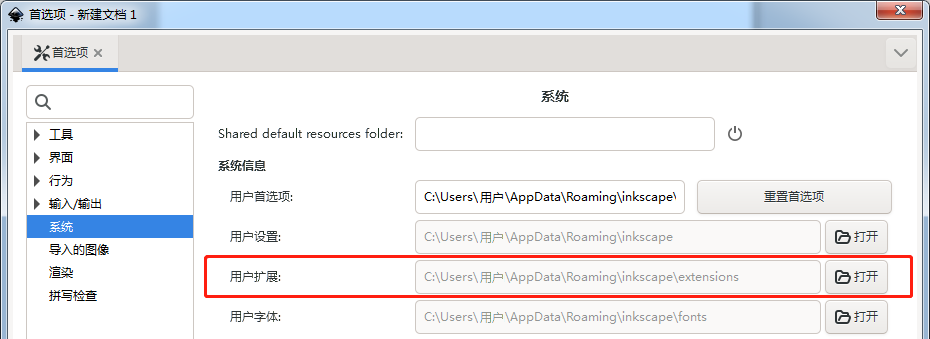
插件脚本
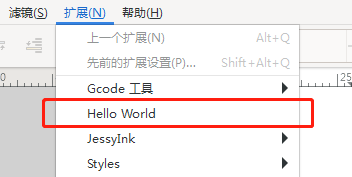
一个完整的Inkscape插件需要两个文件:*.inx、*.py,并且将这两个文件放到上面的目录,若格式正确,就能被加载出来,显示到扩展菜单下

以下为最基本的Hello World插件示例
hello_world.inx
<?xml version="1.0" encoding="UTF-8"?> <inkscape-extension xmlns="http://www.inkscape.org/namespace/inkscape/extension"> <!-- 1. Replace this with the title of your extension. This will Show in the extensions menu--> <_name>Hello World</_name> <!-- 2. Fill this in. It ensures that your extension has a unique ID --> <id>yourname.yourorganization.title</id> <!-- 3. Show the relative path to your extension. For example, `~/.config/inkscape/extensions/template.py` would be `template.py`--> <dependency type="file" location="inx">hello_world.py</dependency> <!-- <dependency type="executable" location="extensions">inkex.py</dependency> --> <effect> <object-type>all</object-type> <effects-menu> <!-- 4. Where is your extension located? (You can nest menus) --> <submenu _name="submenu"/> </effects-menu> </effect> <script> <!-- 5. Same as #4 --> <command location="inx" interpreter="python">hello_world.py</command> </script> </inkscape-extension>讯享网
hello_world.py
讯享网#!/usr/bin/env python # coding=utf-8 import inkex from inkex.elements import TextElement class Greet(inkex.GenerateExtension): def generate(self): # return inkex.errormsg(_("Hello")) textElement = TextElement() textElement.text = 'Hello World' return textElement if __name__ == '__main__': Greet().run()
若格式正确,加载之后就能在看到菜单、扩展、Hello World
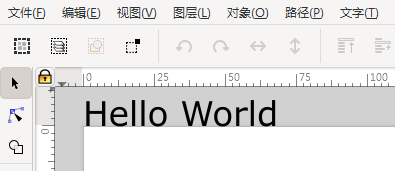
执行后能看到文档内被新建一个文本
参考文档
https://pdfroom.com/books/inkscape-guide-to-a-vector-drawing-program-4th-edition/eKRd6xyo2Zp/download
https://inkscape-extensions-guide.readthedocs.io/en/latest/index.html
https://inkscape.org/forums/beyond/cannot-import-inkex/
版权声明:本文内容由互联网用户自发贡献,该文观点仅代表作者本人。本站仅提供信息存储空间服务,不拥有所有权,不承担相关法律责任。如发现本站有涉嫌侵权/违法违规的内容,请联系我们,一经查实,本站将立刻删除。
如需转载请保留出处:https://51itzy.com/kjqy/125742.html