

前言
- 自定义View是Android开发中非常常用的知识
- 可是,在使用过程中,有些开发者会发现:为什么自定义View 中设置的
wrap_content属性不起作用(与match_parent相同作用)? - 今天,我将全面分析上述问题并给出解决方案。
Carson带你学Android自定义View文章系列:
Carson带你学Android:自定义View基础
Carson带你学Android:一文梳理自定义View工作流程
Carson带你学Android:自定义View Measure过程
Carson带你学Android:自定义View Layout过程
Carson带你学Android:自定义View Draw过程
Carson带你学Android:手把手教你写一个完整的自定义View
Carson带你学Android:Canvas类全面解析
Carson带你学Android:Path类全面解析
目录
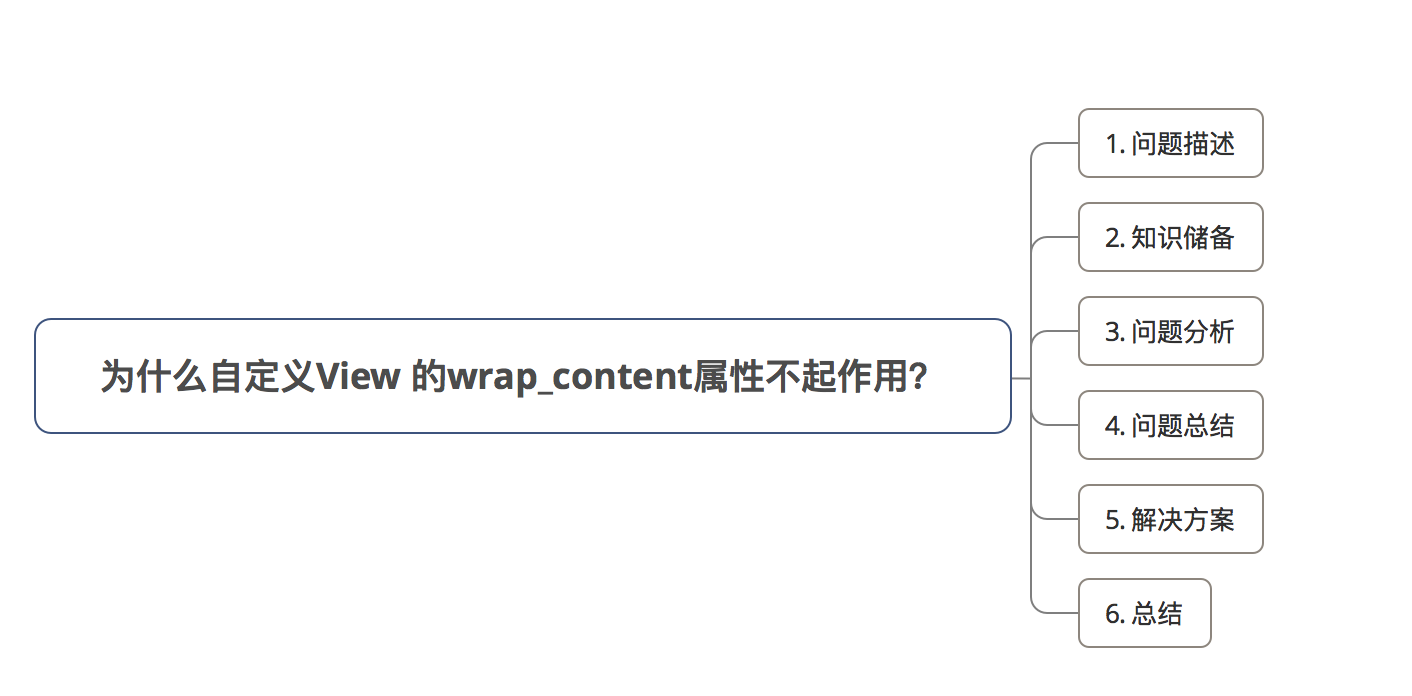
1. 问题描述
在使用自定义View时,View宽 / 高的wrap_content属性不起自身应有的作用,而且是起到与match_parent相同作用。
wrap_content与match_parent区别:
wrap_content:视图的宽/高被设定成刚好适应视图内容的最小尺寸match_parent:视图的宽/高被设置为充满整个父布局
(在Android API 8之前叫作fill_parent)
其实这里有两个问题:
- 问题1:
wrap_content属性不起自身应有的作用 - 问题2:
wrap_content起到与match_parent相同的作用
2. 知识储备
请分析 & 解决问题之前,请先看自定义View原理中(2)自定义View Measure过程 - 最易懂的自定义View原理系列
3. 问题分析
问题出现在View的宽 / 高设置,那我们直接来看自定义View绘制中第一步对View宽 / 高设置的过程:measure过程中的onMeasure()方法
onMeasure()
protected void onMeasure(int widthMeasureSpec, int heightMeasureSpec) { //参数说明:View的宽 / 高测量规格 //setMeasuredDimension() 用于获得View宽/高的测量值 //这两个参数是通过getDefaultSize()获得的 setMeasuredDimension(getDefaultSize(getSuggestedMinimumWidth(), widthMeasureSpec), getDefaultSize(getSuggestedMinimumHeight(), heightMeasureSpec)); } 讯享网
继续往下看getDefaultSize()
getDefaultSize()
- 作用:根据View宽/高的测量规格计算View的宽/高值
- 源码分析如下:
讯享网public static int getDefaultSize(int size, int measureSpec) { //参数说明: // 第一个参数size:提供的默认大小 // 第二个参数:宽/高的测量规格(含模式 & 测量大小) //设置默认大小 int result = size; //获取宽/高测量规格的模式 & 测量大小 int specMode = MeasureSpec.getMode(measureSpec); int specSize = MeasureSpec.getSize(measureSpec); switch (specMode) { // 模式为UNSPECIFIED时,使用提供的默认大小 // 即第一个参数:size case MeasureSpec.UNSPECIFIED: result = size; break; // 模式为AT_MOST,EXACTLY时,使用View测量后的宽/高值 // 即measureSpec中的specSize case MeasureSpec.AT_MOST: case MeasureSpec.EXACTLY: result = specSize; break; } //返回View的宽/高值 return result; }
从上面发现:
- 在
getDefaultSize()的默认实现中,当View的测量模式是AT_MOST或EXACTLY时,View的大小都会被设置成子View MeasureSpec的specSize。 - 因为AT_MOST对应wrap_content;EXACTLY对应match_parent,所以,默认情况下,
wrap_content和match_parent是具有相同的效果的。
解决了问题2:
wrap_content起到与match_parent相同的作用
那么有人会问:wrap_content和match_parent具有相同的效果,为什么是填充父容器的效果呢?
- 由于在
getDefaultSize()的默认实现中,当View被设置成wrap_content和match_parent时,View的大小都会被设置成子View MeasureSpec的specSize。 - 所以,这个问题的关键在于子View MeasureSpec的specSize的值是多少
我们知道,子View的MeasureSpec值是根据子View的布局参数(LayoutParams)和父容器的MeasureSpec值计算得来,具体计算逻辑封装在getChildMeasureSpec()里。
接下来,我们看生成子View MeasureSpec的方法:getChildMeasureSpec()的源码分析:
getChildMeasureSpec()
//作用: / 根据父视图的MeasureSpec & 布局参数LayoutParams,计算单个子View的MeasureSpec //即子view的确切大小由两方面共同决定:父view的MeasureSpec 和 子view的LayoutParams属性 public static int getChildMeasureSpec(int spec, int padding, int childDimension) { //参数说明 * @param spec 父view的详细测量值(MeasureSpec) * @param padding view当前尺寸的的内边距和外边距(padding,margin) * @param childDimension 子视图的布局参数(宽/高) //父view的测量模式 int specMode = MeasureSpec.getMode(spec); //父view的大小 int specSize = MeasureSpec.getSize(spec); //通过父view计算出的子view = 父大小-边距(父要求的大小,但子view不一定用这个值) int size = Math.max(0, specSize - padding); //子view想要的实际大小和模式(需要计算) int resultSize = 0; int resultMode = 0; //通过父view的MeasureSpec和子view的LayoutParams确定子view的大小 // 当父view的模式为EXACITY时,父view强加给子view确切的值 //一般是父view设置为match_parent或者固定值的ViewGroup switch (specMode) { case MeasureSpec.EXACTLY: // 当子view的LayoutParams>0,即有确切的值 if (childDimension >= 0) { //子view大小为子自身所赋的值,模式大小为EXACTLY resultSize = childDimension; resultMode = MeasureSpec.EXACTLY; // 当子view的LayoutParams为MATCH_PARENT时(-1) } else if (childDimension == LayoutParams.MATCH_PARENT) { //子view大小为父view大小,模式为EXACTLY resultSize = size; resultMode = MeasureSpec.EXACTLY; // 当子view的LayoutParams为WRAP_CONTENT时(-2) } else if (childDimension == LayoutParams.WRAP_CONTENT) { //子view决定自己的大小,但最大不能超过父view,模式为AT_MOST resultSize = size; resultMode = MeasureSpec.AT_MOST; } break; // 当父view的模式为AT_MOST时,父view强加给子view一个最大的值。(一般是父view设置为wrap_content) case MeasureSpec.AT_MOST: // 道理同上 if (childDimension >= 0) { resultSize = childDimension; resultMode = MeasureSpec.EXACTLY; } else if (childDimension == LayoutParams.MATCH_PARENT) { resultSize = size; resultMode = MeasureSpec.AT_MOST; } else if (childDimension == LayoutParams.WRAP_CONTENT) { resultSize = size; resultMode = MeasureSpec.AT_MOST; } break; // 当父view的模式为UNSPECIFIED时,父容器不对view有任何限制,要多大给多大 // 多见于ListView、GridView case MeasureSpec.UNSPECIFIED: if (childDimension >= 0) { // 子view大小为子自身所赋的值 resultSize = childDimension; resultMode = MeasureSpec.EXACTLY; } else if (childDimension == LayoutParams.MATCH_PARENT) { // 因为父view为UNSPECIFIED,所以MATCH_PARENT的话子类大小为0 resultSize = 0; resultMode = MeasureSpec.UNSPECIFIED; } else if (childDimension == LayoutParams.WRAP_CONTENT) { // 因为父view为UNSPECIFIED,所以WRAP_CONTENT的话子类大小为0 resultSize = 0; resultMode = MeasureSpec.UNSPECIFIED; } break; } return MeasureSpec.makeMeasureSpec(resultSize, resultMode); - 关于getChildMeasureSpec()里对于子View的测量模式和大小的判断逻辑有点复杂;
- 别担心,我已经帮大家总结好。具体子View的测量模式和大小请看下表:
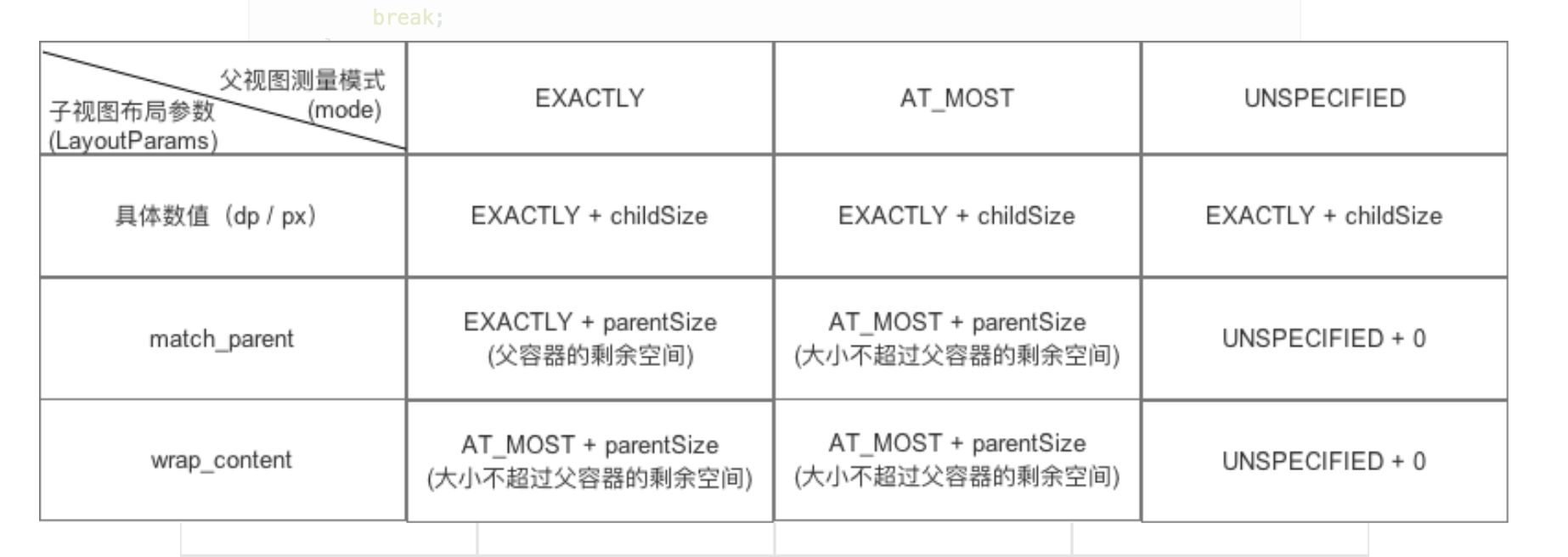
从上面可以看出,当子View的布局参数使用wrap_content或wrap_content时:
- 子View的specMode模式:AT_MOST
- 子View的specSize(宽 / 高):parenSize = 父容器当前剩余空间大小 = match_content
4. 问题总结
- 在
onMeasure()中的getDefaultSize()的默认实现中,当View的测量模式是AT_MOST或EXACTLY时,View的大小都会被设置成子View MeasureSpec的specSize。 - 因为AT_MOST对应
wrap_content;EXACTLY对应match_parent,所以,默认情况下,wrap_content和match_parent是具有相同的效果的。
- 因为在计算子View MeasureSpec的
getChildMeasureSpec()中,子View MeasureSpec在属性被设置为wrap_content或match_parent情况下,子View MeasureSpec的specSize被设置成parenSize = 父容器当前剩余空间大小

所以:wrap_content起到了和match_parent相同的作用:等于父容器当前剩余空间大小
5. 解决方案:
当自定义View的布局参数设置成wrap_content时时,指定一个默认大小(宽 / 高)。
具体是在复写
onMeasure()里进行设置
讯享网 @Override protected void onMeasure(int widthMeasureSpec, int heightMeasureSpec) { super.onMeasure(widthMeasureSpec, heightMeasureSpec); // 获取宽-测量规则的模式和大小 int widthMode = MeasureSpec.getMode(widthMeasureSpec); int widthSize = MeasureSpec.getSize(widthMeasureSpec); // 获取高-测量规则的模式和大小 int heightMode = MeasureSpec.getMode(heightMeasureSpec); int heightSize = MeasureSpec.getSize(heightMeasureSpec); // 设置wrap_content的默认宽 / 高值 // 默认宽/高的设定并无固定依据,根据需要灵活设置 // 类似TextView,ImageView等针对wrap_content均在onMeasure()对设置默认宽 / 高值有特殊处理,具体读者可以自行查看 int mWidth = 400; int mHeight = 400; // 当布局参数设置为wrap_content时,设置默认值 if (getLayoutParams().width == ViewGroup.LayoutParams.WRAP_CONTENT && getLayoutParams().height == ViewGroup.LayoutParams.WRAP_CONTENT) { setMeasuredDimension(mWidth, mHeight); // 宽 / 高任意一个布局参数为= wrap_content时,都设置默认值 } else if (getLayoutParams().width == ViewGroup.LayoutParams.WRAP_CONTENT) { setMeasuredDimension(mWidth, heightSize); } else if (getLayoutParams().height == ViewGroup.LayoutParams.WRAP_CONTENT) { setMeasuredDimension(widthSize, mHeight); }
这样,当你的自定义View的宽 / 高设置成wrap_content属性时就会生效了。
特别注意
网上流传着这么一个解决方案:
@Override protected void onMeasure(int widthMeasureSpec, int heightMeasureSpec) { super.onMeasure(widthMeasureSpec, heightMeasureSpec); // 获取宽-测量规则的模式和大小 int widthMode = MeasureSpec.getMode(widthMeasureSpec); int widthSize = MeasureSpec.getSize(widthMeasureSpec); // 获取高-测量规则的模式和大小 int heightMode = MeasureSpec.getMode(heightMeasureSpec); int heightSize = MeasureSpec.getSize(heightMeasureSpec); // 设置wrap_content的默认宽 / 高值 // 默认宽/高的设定并无固定依据,根据需要灵活设置 // 类似TextView,ImageView等针对wrap_content均在onMeasure()对设置默认宽 / 高值有特殊处理,具体读者可以自行查看 int mWidth = 400; int mHeight = 400; // 当模式是AT_MOST(即wrap_content)时设置默认值 if (widthMode == MeasureSpec.AT_MOST && heightMode == MeasureSpec.AT_MOST) { setMeasuredDimension(mWidth, mHeight); // 宽 / 高任意一个模式为AT_MOST(即wrap_content)时,都设置默认值 } else if (widthMode == MeasureSpec.AT_MOST) { setMeasuredDimension(mWidth, heightSize); } else if (heightMode == MeasureSpec.AT_MOST) { setMeasuredDimension(widthSize, mHeight); } - 上述的解决方案是:通过判断测量模式是否ATMOST从而来判断View的参数是否是
wrap_content - 可是,通过下表发现:View的
AT_MOST模式对应的不只是wrap_content,也有可能是match_parent
即当父View是
AT_MOST、View的属性设置为match_parent时
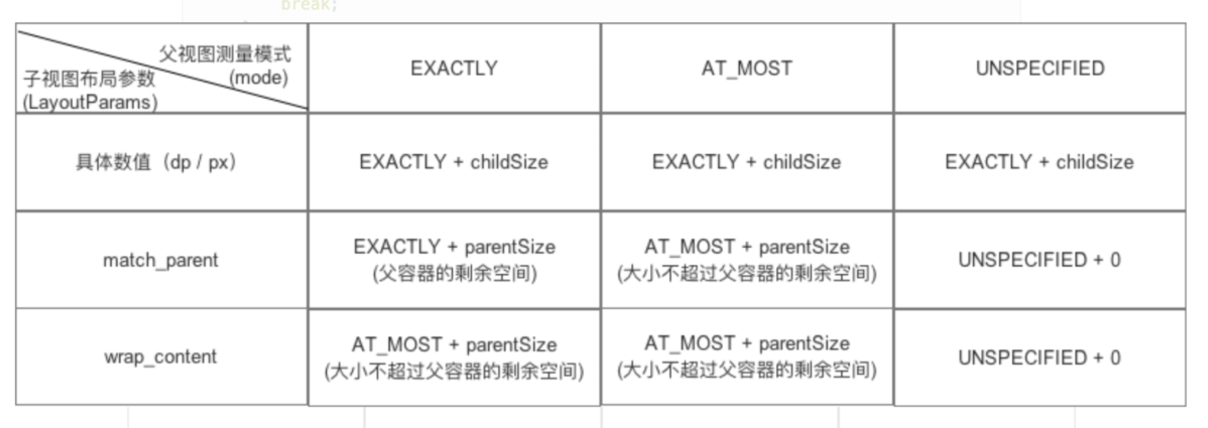
- 如果还是按照上述的做法,当父View为
AT_MOST、View为match_parent时,该View的match_parent的效果不就等于wrap_content吗?
答:是,当父View为AT_MOST、View为match_parent时,该View的match_parent的效果就等于wrap_content 。上述方法存在逻辑错误,但由于这种情况非常特殊的,所以导致最终的结果没有错误。具体分析请看下面例子:
讯享网<?xml version="1.0" encoding="utf-8"?> <RelativeLayout xmlns:android="http://schemas.android.com/apk/res/android" xmlns:cust="http://schemas.android.com/apk/res-auto" android:id="@+id/activity_main" android:layout_width="match_parent" android:layout_height="match_parent"> <-- 父View设为wrap_content,即AT_MOST模式 --> <LinearLayout android:layout_width="wrap_content" android:layout_height="wrap_content"> <scut.com.learncustomview.TestMeasureView <-- 子View设为match_parent --> android:layout_width="match_parent" android:layout_height="match_parent" /> </LinearLayout> </RelativeLayout>
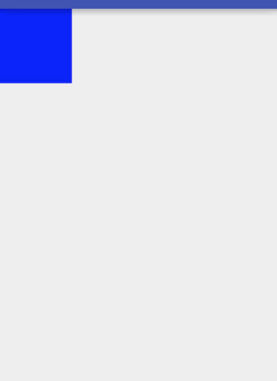
从上面的效果可以看出,View大小 = 默认值
我再将子View的属性改为wrap_content:
<?xml version="1.0" encoding="utf-8"?> <RelativeLayout xmlns:android="http://schemas.android.com/apk/res/android" xmlns:cust="http://schemas.android.com/apk/res-auto" android:id="@+id/activity_main" android:layout_width="match_parent" android:layout_height="match_parent"> <-- 父View设为wrap_content,即AT_MOST模式 --> <LinearLayout android:layout_width="wrap_content" android:layout_height="wrap_content"> <scut.com.learncustomview.TestMeasureView <-- 子View设为wrap_content --> android:layout_width="wrap_content" android:layout_height="wrap_content" /> </LinearLayout> </RelativeLayout>
从上面的效果可以看出,View大小还是等于默认值。
同上述分析
- 对于第一种情况:当父View为
AT_MOST、View为match_parent时,该View的match_parent的效果就等于wrap_content,上面说了这种情况很特殊:父View的大小能刚好包裹子View,子View的大小充满父View的大小。
也就是说:父View的大小是看子View的,子View的大小又是看父View的。
- 那么到底是谁看谁的大小呢?
答: - 如果没设置默认值,就继续往上层VIew充满大小,即从父View的大小等于顶层View的大小(),那么子View的大小 = 父View的大小
- 如果设置了默认值,就用默认值。
相信看到这里你已经看懂了:
- 其实上面说的解决方案(通过判断测量模式是否
AT_MOST从而来判断View的参数是否是wrap_content)只是在逻辑上表示有些错误,但从最终结果上来说是没有错的 - 因为当父View为
AT_MOST、View为match_parent时,该View的match_parent的效果就等于wrap_content
- 如果没设置默认值,就继续往上层VIew充满大小,即从父View的大小等于顶层View的大小(),那么子View的大小 = 父View的大小
- 如果设置了默认值,就用默认值。
为了更好的表示判断逻辑,我建议你们用本文提供的解决方案,即根据布局参数判断默认值的设置
6. 总结
- 本文对自定义View中 wrap_content属性不起作用进行了详细分析和给出了解决方案
- Carson带你学Android自定义View文章系列:
Carson带你学Android:自定义View基础
Carson带你学Android:一文梳理自定义View工作流程
Carson带你学Android:自定义View Measure过程
Carson带你学Android:自定义View Layout过程
Carson带你学Android:自定义View Draw过程
Carson带你学Android:手把手教你写一个完整的自定义View
Carson带你学Android:Canvas类全面解析
Carson带你学Android:Path类全面解析
欢迎关注Carson_Ho的CSDN博客 与 公众号!
博客链接:https://carsonho.blog.csdn.net/

版权声明:本文内容由互联网用户自发贡献,该文观点仅代表作者本人。本站仅提供信息存储空间服务,不拥有所有权,不承担相关法律责任。如发现本站有涉嫌侵权/违法违规的内容,请联系我们,一经查实,本站将立刻删除。
如需转载请保留出处:https://51itzy.com/kjqy/125683.html