
目录
一、什么是MyBatis?
二、MyBatis快速入门
三、Mapper代理开发
四、MyBatis核心配置文件
五、配置文件完成增删改查
5.1 环境准备
5.2 功能清单列表
5.2.1 查询
5.2.2 添加
5.2.3 修改
5.2.4 删除
六、MyBatis参数传递
七、注解完成增删改查
八、MyBatis的逆向工程
九、分页插件
一、什么是MyBatis?
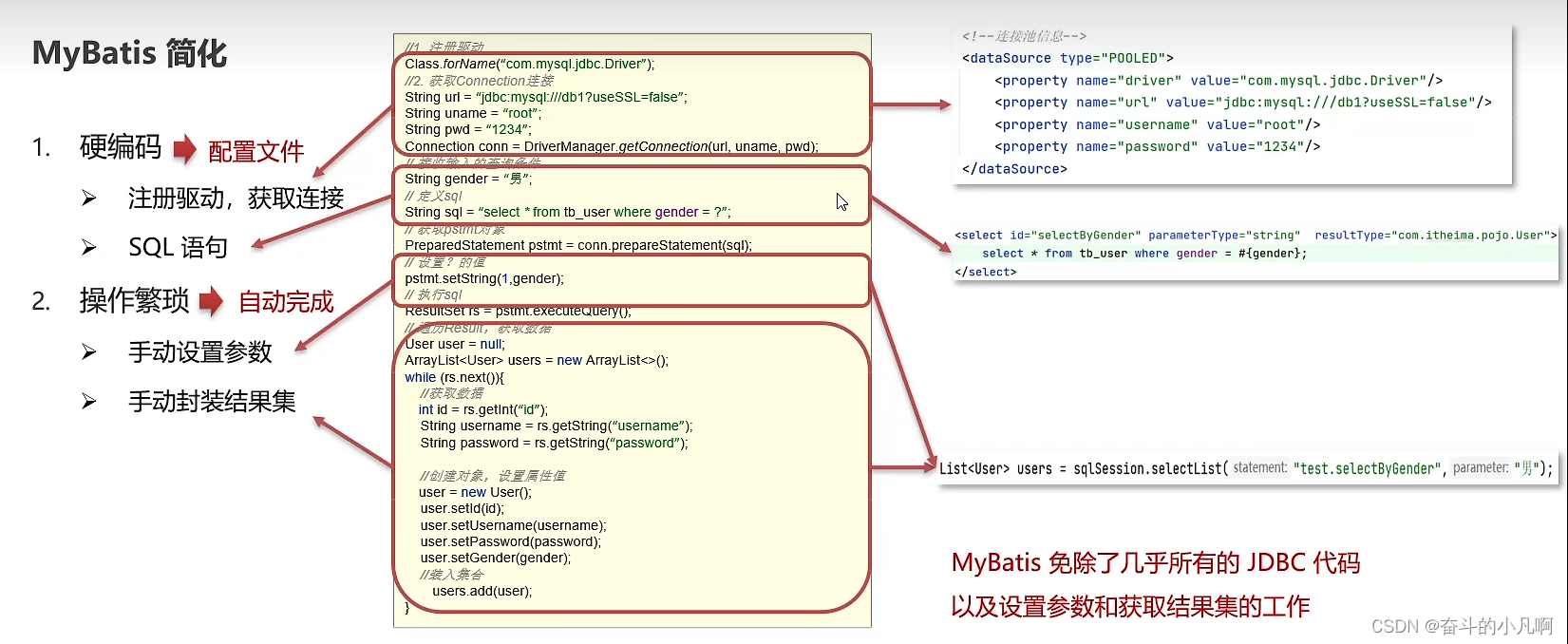
- MyBatis是一款优秀的持久层框架,用于简化JDBC开发。
- MyBatis本来是Apache的一个开源项目iBatis,2010年这个项目由apache software foundation迁移到了google code,并且改名为MyBatis。2013年11月迁移到Github
- 官网:http://mybatis.org/mybatis-3/zh/index.html
持久层:负责将数据保存到数据库的安那一层代码。
JavaEE三层架构:表现层、业务层、持久层
框架:框架就是一个半成品软件,是一套可重用的、通用的。软件基础代码模型。
在框架的基础上构建软件编写更加高效、规范、通用、可扩展。
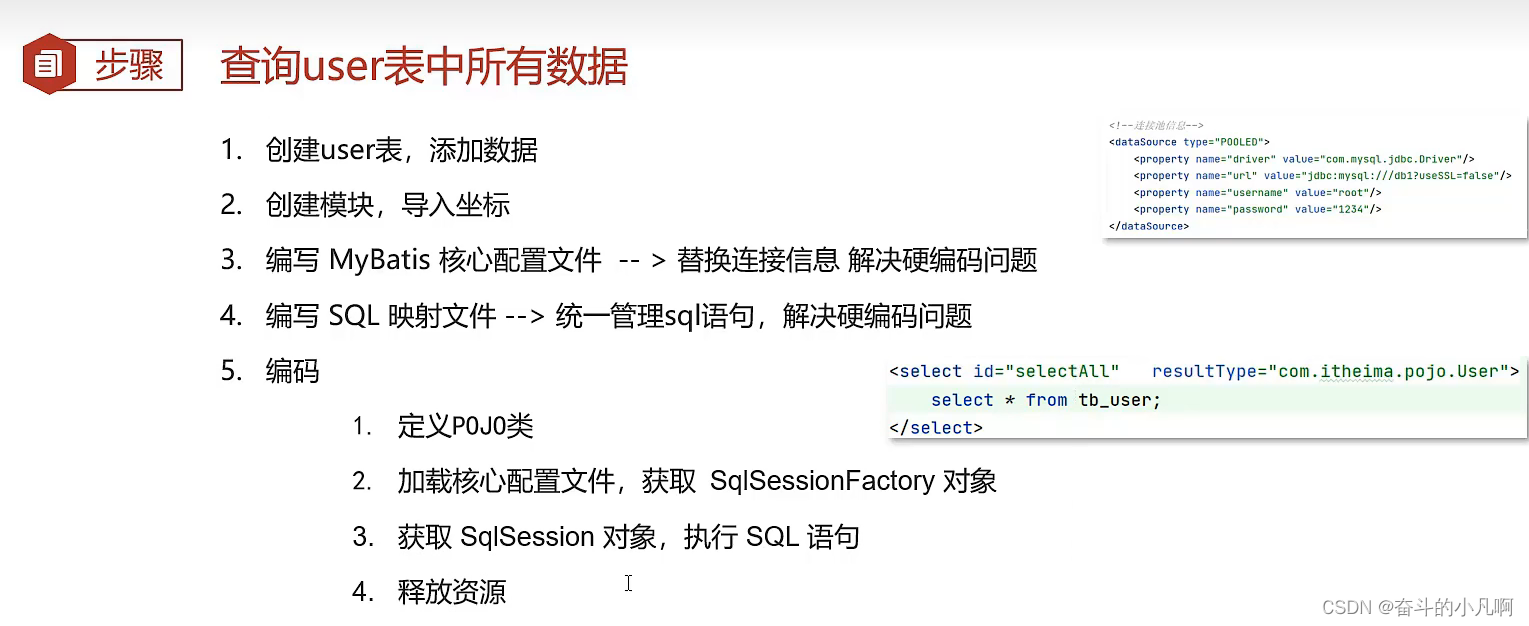
二、MyBatis快速入门
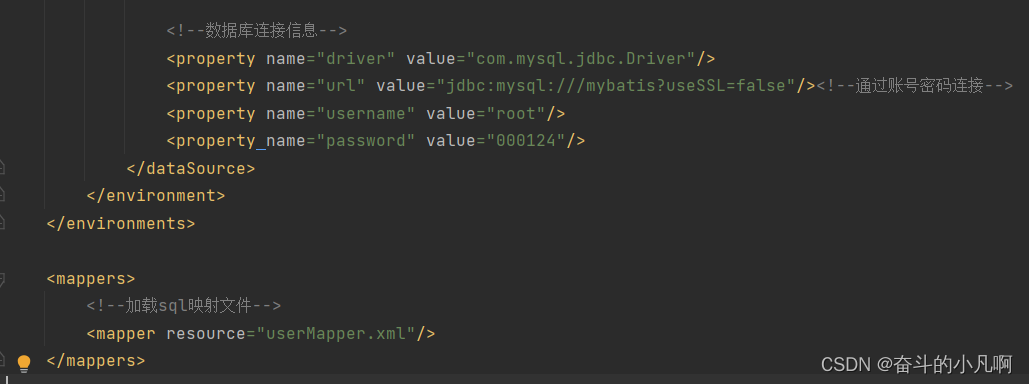
 mybatis-config.xml的基础配置:
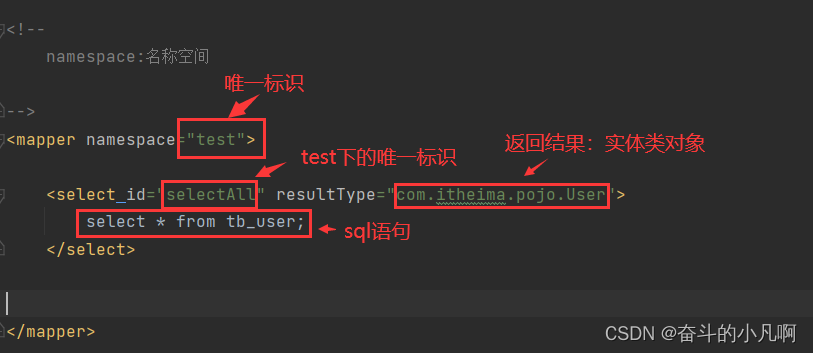
userMapper:
 Java代码:
public class MyBatisDemo { public static void main(String[] args) throws IOException { //加载mybatis的核心配置文件,获取SqlSessionFactory String resource = "mybatis-config.xml"; //返回一个字节输入流 InputStream inputStream = Resources.getResourceAsStream(resource); SqlSessionFactory sqlSessionFactory = new SqlSessionFactoryBuilder().build(inputStream); //2.获取SqlSession对象,用它来执行sql SqlSession sqlSession = sqlSessionFactory.openSession(); //3.执行sql List<User> users = sqlSession.selectList("test.selectAll"); System.out.println(users); //4.释放资源 sqlSession.close(); } }讯享网
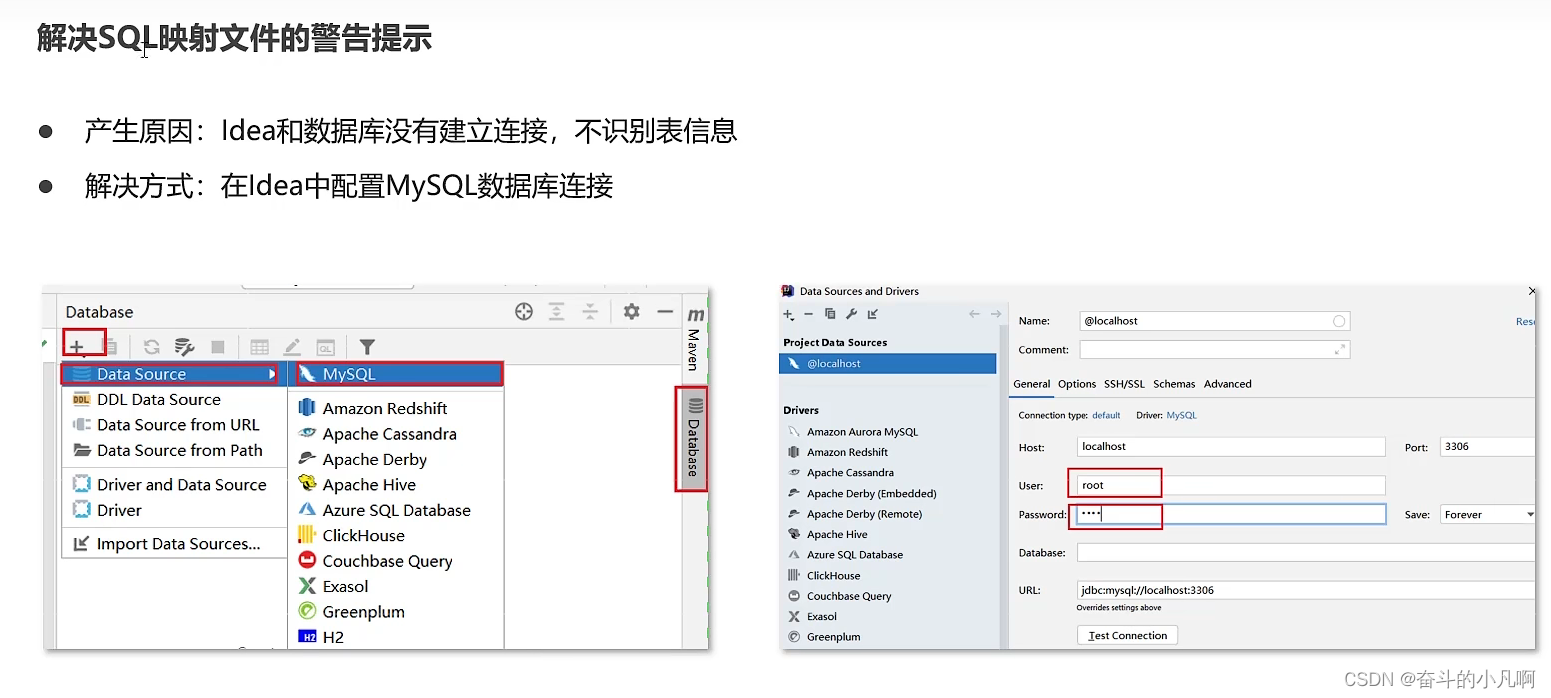
三、Mapper代理开发
目的:
1. 解决原生方式中的硬编码。
2.简化后期执行SQL

步骤:使用Mapper代理方式完成入门案例
- 定义与sql映射文件(.xml文件)同名的Mapper接口,并且将Mapper接口和sql映射文件放置在同一目录下
- 设置sql映射文件的namesapce属性为Mapper全限定名
- 在Mapper接口中定义方法,方法名就是sql映射文件中sql语句中的id,并保持参数类型和返回值类型一致
- 编码



讯享网/ * MyBatis 代理开发 */ public class MyBatisDemo2 { public static void main(String[] args) throws IOException { //加载mybatis的核心配置文件,获取SqlSessionFactory String resource = "mybatis-config.xml"; //返回一个字节输入流 InputStream inputStream = Resources.getResourceAsStream(resource); SqlSessionFactory sqlSessionFactory = new SqlSessionFactoryBuilder().build(inputStream); //2.获取SqlSession对象,用它来执行sql SqlSession sqlSession = sqlSessionFactory.openSession(); //3.执行sql //List<User> users = sqlSession.selectList("test.selectAll"); //3.1获取UserMapper接口的代理对象 UserMapper userMapper = sqlSession.getMapper(UserMapper.class); List<User> users = userMapper.selectAll(); System.out.println(users); //4.释放资源 sqlSession.close(); } }
四、MyBatis核心配置文件
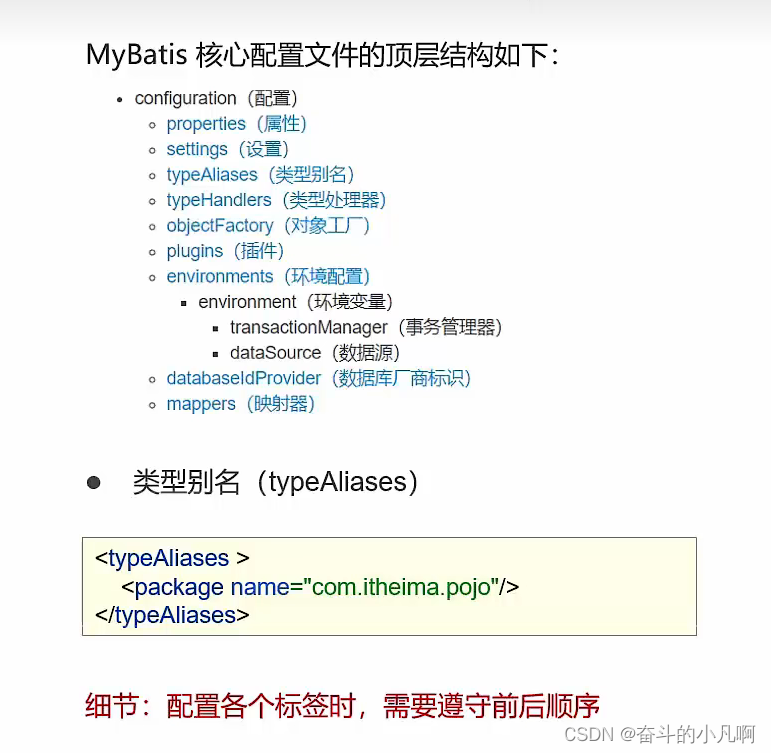
五、配置文件完成增删改查
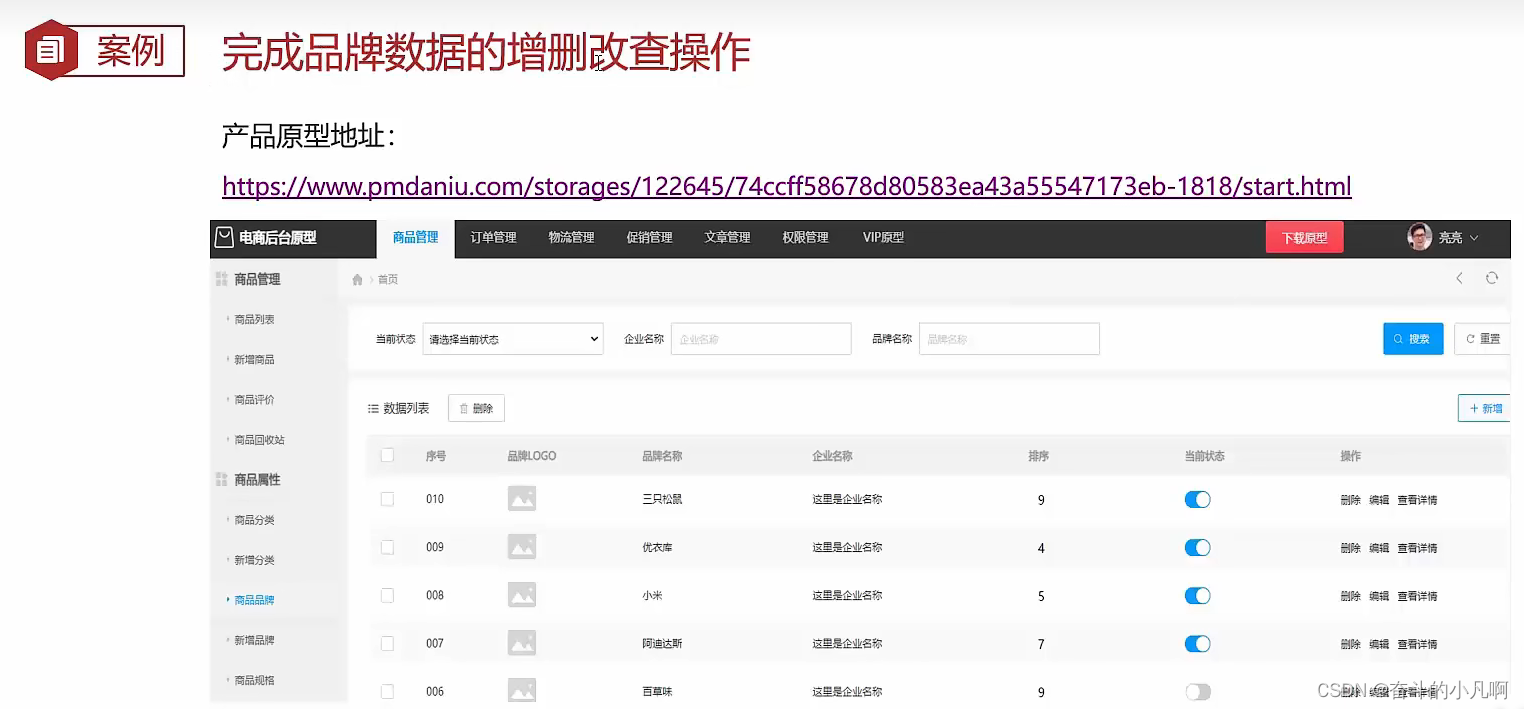
5.1 环境准备
- 数据库表tb_brand
- 实体类Brand
- 测试用例
- 安装MyBatisX插件
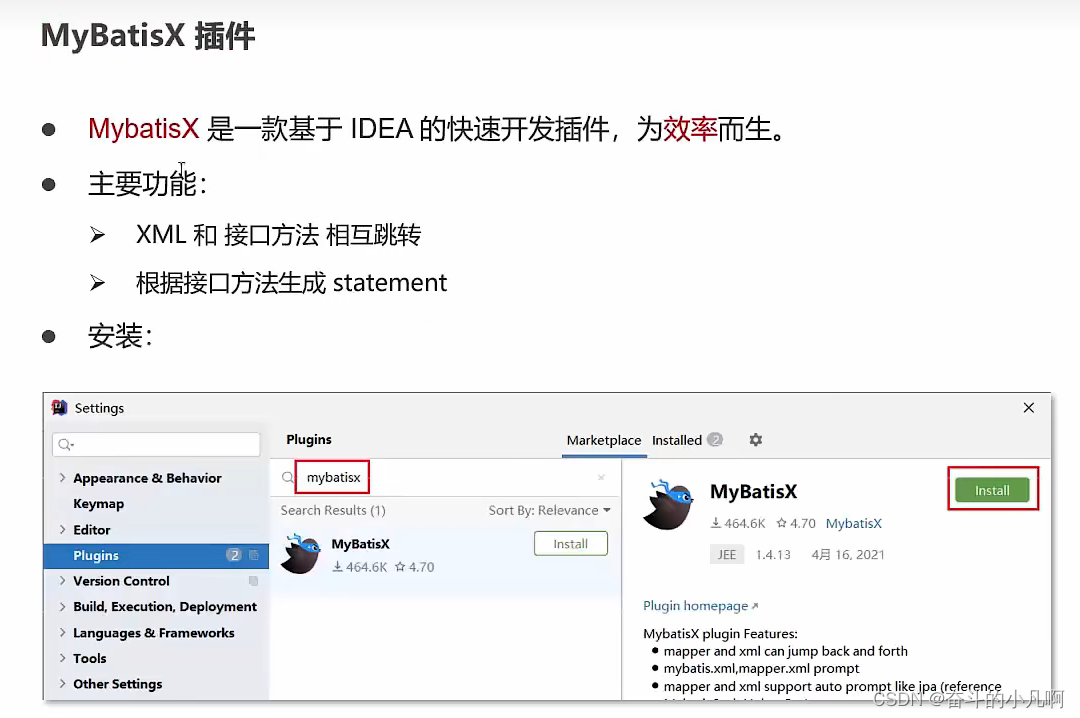
建议安装1.4X版本,该版本下的resultType实体类对象别名不爆红
5.2 功能清单列表
5.2.1 查询
- 查询所有数据
- 查看详情
- 条件查询
1. 查询所有数据
①编写接口的方法:Mapper接口
- 参数:无
- 结果:List<Brand>
②Map接口
List<Brand> selectAll();编写SQL语句:编写SQL映射文件
讯享网<select id="selectById" resultType="brand"> select * from tb_brand; </select>③执行方法,测试
@Test public void testSelectAll() throws IOException { //1.获取SqlSessionFactory //加载mybatis的核心配置文件,获取SqlSessionFactory String resource = "mybatis-config.xml"; //返回一个字节输入流 InputStream inputStream = Resources.getResourceAsStream(resource); SqlSessionFactory sqlSessionFactory = new SqlSessionFactoryBuilder().build(inputStream); //2. 获取sqlSession对象 SqlSession sqlSession = sqlSessionFactory.openSession(); //3. 获取Mapper接口的代理对象 BrandMapper brandMapper = sqlSession.getMapper(BrandMapper.class); //4. 执行方法 List<Brand> brands = brandMapper.selectAll(); System.out.println(brands); //5. 释放资源 sqlSession.close(); }
解决数据库表的列名(brand_name)与实体类(brandName)的属性名不匹配方案:
数据库表的字段名称和实体类属性名称不一样,则不能自动封装数据
方案一:起别名:对不一样的列名起别名,让别名和实体类的属性名也一样
缺点:每次查询都要定义一次别名
讯享网 <select id="selectAll" resultType="brand"> select id, brand_name as brandName, company_name as companyName, ordered,description, status from tb_brand; </select>
改进:
采用 sql片段
<sql id="brand_column"> id, brand_name as brandName, company_name as companyName, ordered, description, status </sql> <select id="selectAll" resultType="brand"> select <include refid="brand_column"></include> from tb_brand; </select>缺点:不灵活
改进:
使用resultMap
resultMap:id为唯一标识
1.定义<resultMap>标签
2.<select>标签中使用resultMap属性来替换resultType属性
- id:完成主键字段的映射
- column:数据库表的列名
- property:对应的实体类属性名
讯享网<resultMap id="brandResultMap" type="brand"> <result column="brand_name" property="brandName"/> <result column="compnamy_name" property="companyName"/> </resultMap> <select id="selectAll" resultMap="brandResultMap"> select * from tb_brand; </select>
方案二:在mybatis-config.xml中设置<configuration>中的<setting>标签的value值为true
- 是否开启驼峰命名自动映射,即从经典数据库列名 A_COLUMN 映射到经典 Java 属性名 aColumn。
<settings> <setting name="mapUnderscoreToCamelCase" value="true"/> </settings>讯享网<!-- namespace:名称空间 --> <mapper namespace="com.itheima.mapper.BrandMapper"> <!-- 数据库表的字段名称和实体类属性名称不一样,则不能自动封装数据 *方案一:起别名:对不一样的列名起别名,让别名和实体类的属性名也一样 *缺点:每次查询都要定义一次别名 <select id="selectAll" resultType="brand"> select id, brand_name as brandName, company_name as companyName, ordered, description, status from tb_brand; </select> *改进: sql片段 <sql id="brand_column"> id, brand_name as brandName, company_name as companyName, ordered, description, status </sql> <select id="selectAll" resultType="brand"> select <include refid="brand_column"></include> from tb_brand; </select> *缺点:不灵活 *resultMap:id为唯一标识 1.定义<resultMap>标签 2.<select>标签中使用resultMap属性来替换resultType属性 <resultMap id="brandResultMap" type="brand"> id:完成主键字段的映射 column:数据库表的列名 property:对应的实体类属性名 <result column="brand_name" property="brandName"/> <result column="compnamy_name" property="companyName"/> </resultMap> <select id="selectAll" resultMap="brandResultMap"> select * from tb_brand; </select> *方案二:在mybatis-config.xml中设置<configuration>中的<setting>标签的value值为true 是否开启驼峰命名自动映射,即从经典数据库列名 A_COLUMN 映射到经典 Java 属性名 aColumn。 <settings> <setting name="mapUnderscoreToCamelCase" value="faulse"/> </settings> --> <resultMap id="brandResultMap" type="brand"> <result column="brand_name" property="brandName"/> <!--column:数据库表的列名 property:对应的实体类属性名--> <result column="compnamy_name" property="companyName"/> </resultMap> <select id="selectAll" resultMap="brandResultMap"> select * from tb_brand; </select> <!-- <select id="selectAll" resultType="brand"> select * from tb_brand; </select>--> </mapper>
2. 查看详情
①编写接口的方法:Mapper接口
- 参数:id
- 结果:Brand对象
②Map接口
Brand selectById(int id);编写SQL语句:编写SQL映射文件
讯享网<select id="selectAllById" resultMap="brandResultMap"> select * from tb_brand where id = #{id}; </select>*参数占位符 1. #{}:将其替换为 ? ,为了防止SQL注入 2. ${}:拼SQL,会存在SQl注入 3. 使用时机: *参数传递时,用#{} *表名或者列名不固定的情况下,${}一定会存在SQL注入问题 * 参数类型:parameterType:用于设置参数类型,可以省略 * 特殊字符处理: 1.转义字符(eg:'<'转义为'<') 2.CDATA区(CD+enter,CD提示,将符号写在括号内) <![CDATA[ ]]>③执行方法,测试
讯享网<resultMap id="brandResultMap" type="brand"> <result column="brand_name" property="brandName"/> <!--column:数据库表的列名 property:对应的实体类属性名--> <result column="company_name" property="companyName"/> </resultMap> <!-- *参数占位符 1. #{}:将其替换为 ? ,为了防止SQL注入 2. ${}:拼SQL,会存在SQl注入 3. 使用时机: *参数传递时,用#{} *表名或者列名不固定的情况下,${}一定会存在SQL注入问题 * 参数类型:parameterType:可以省略 *特殊字符处理: 1.转义字符(eg:'<'转义为'<') 2.CDATA区(CD+enter,将符号写在括号内) --> <select id="selectAllById" resultMap="brandResultMap"> select * from tb_brand where id = #{id}; </select>
3. 条件查询
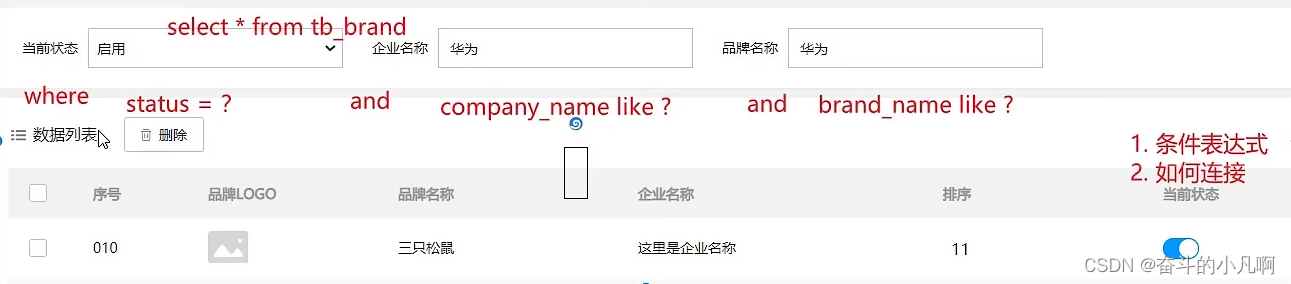
- 多条件查询:
①编写接口的方法:
- 参数:所有查询条件
- 结果:List<Brand>
②编写SQL语句
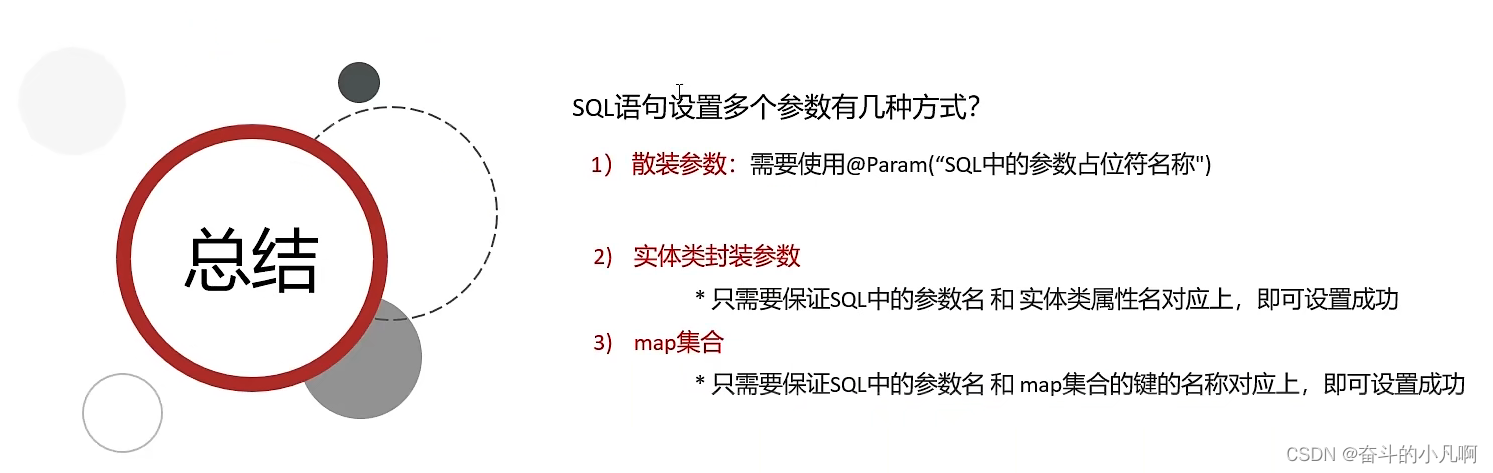
散装参数(Mapper接口):
List<Brand> selectByCondition(@Param("status") int status, @Param("companyName") String companyName, @Param("brandName") String brandName);对象参数(Mapper接口):
讯享网List<Brand> selectByCondition(Brand brand);map集合(Mapper接口):
List<Brand> selectByCondition(Map map);SQL语句:编写SQL映射文件
讯享网<select id="selectByCondition" resultMap="brandResultMap"> select * from tb_brand where status = #{status} and company_name like #{companyName} and brand_name like #{brandName} </select>③执行方法,测试
参数接收: * 1.散装参数(如果方法中有多个参数,需要使用@Param(“SQL参数占位符名称”)讯享网@Test public void testSelectByCondition() throws IOException { //接收参数: int status = 1; String companyName = "华为"; String brandName = "华为"; //处理参数 companyName = "%" + companyName + "%"; brandName = "%" + brandName + "%"; //1.获取SqlSessionFactory //加载mybatis的核心配置文件,获取SqlSessionFactory String resource = "mybatis-config.xml"; //返回一个字节输入流 InputStream inputStream = Resources.getResourceAsStream(resource); SqlSessionFactory sqlSessionFactory = new SqlSessionFactoryBuilder().build(inputStream); //2. 获取sqlSession对象 SqlSession sqlSession = sqlSessionFactory.openSession(); //3. 获取Mapper接口的代理对象 BrandMapper brandMapper = sqlSession.getMapper(BrandMapper.class); //4. 执行方法 List<Brand> brands = brandMapper.selectByCondition(status, companyName, brandName); System.out.println(brands); //5. 释放资源 sqlSession.close(); }* 2.对象参数讯享网 @Test public void testSelectByCondition() throws IOException { //接收参数: int status = 1; String companyName = "华为"; String brandName = "华为"; //处理参数 companyName = "%" + companyName + "%"; brandName = "%" + brandName + "%"; //1.获取SqlSessionFactory //加载mybatis的核心配置文件,获取SqlSessionFactory String resource = "mybatis-config.xml"; //返回一个字节输入流 InputStream inputStream = Resources.getResourceAsStream(resource); SqlSessionFactory sqlSessionFactory = new SqlSessionFactoryBuilder().build(inputStream); //2. 获取sqlSession对象 SqlSession sqlSession = sqlSessionFactory.openSession(); //3. 获取Mapper接口的代理对象 BrandMapper brandMapper = sqlSession.getMapper(BrandMapper.class); //4. 执行方法 List<Brand> brands = brandMapper.selectByCondition(status, companyName, brandName); System.out.println(brands); //5. 释放资源 sqlSession.close(); } * 3.map集合参数讯享网@Test public void testSelectByCondition() throws IOException { //接收参数: int status = 1; String companyName = "华为"; String brandName = "华为"; //处理参数 companyName = "%" + companyName + "%"; brandName = "%" + brandName + "%"; //封装对象 Map map = new HashMap(); map.put("status",status); map.put("companyName",companyName); map.put("brandName",brandName); //1.获取SqlSessionFactory //加载mybatis的核心配置文件,获取SqlSessionFactory String resource = "mybatis-config.xml"; //返回一个字节输入流 InputStream inputStream = Resources.getResourceAsStream(resource); SqlSessionFactory sqlSessionFactory = new SqlSessionFactoryBuilder().build(inputStream); //2. 获取sqlSession对象 SqlSession sqlSession = sqlSessionFactory.openSession(); //3. 获取Mapper接口的代理对象 BrandMapper brandMapper = sqlSession.getMapper(BrandMapper.class); //4. 执行方法 List<Brand> brands = brandMapper.selectByCondition(map); System.out.println(brands); //5. 释放资源 sqlSession.close(); }
- 动态条件查询:
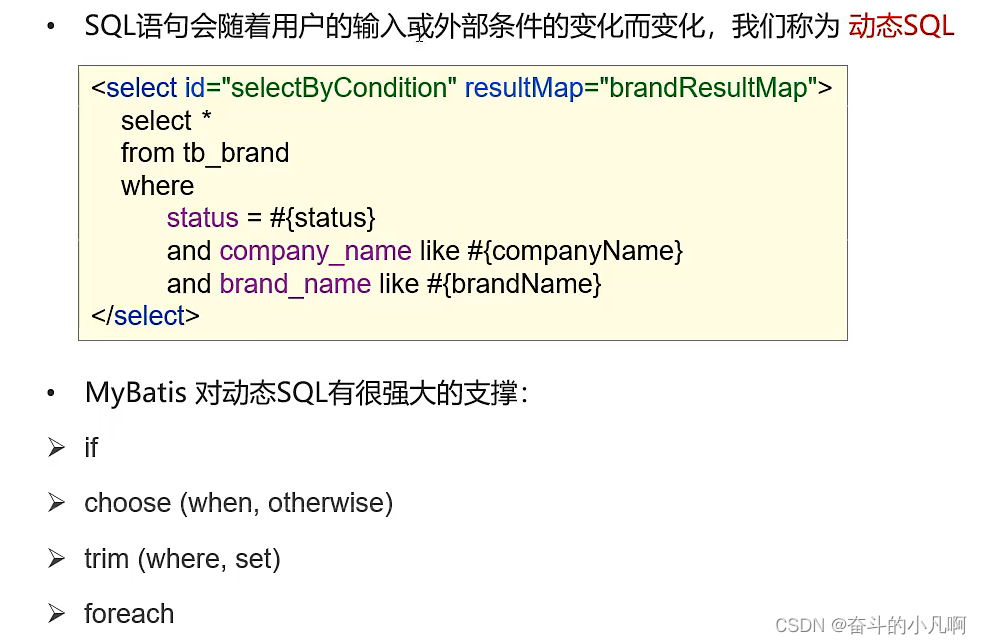
多条件-动态条件查询
①编写接口的方法:Mapper接口
参数:所有查询条件
结果:List<Brand>
②Map接口
List<Brand> selectByCondition(@Param("status") int status, @Param("companyName") String companyName, @Param("brandName") String brandName);编写SQL语句:编写SQL映射文件
讯享网<select id="selectByCondition" resultMap="brandResultMap"> select * from tb_brand <where> <if test="status != null"> status = #{status} </if> <if test="companyName != null and companyName!= ''"> and company_name like #{companyName} </if> <if test="brandName != null and brandName!= ''"> and brand_name like #{brandName} </if> </where> </select>③执行方法,测试
多条件-动态条件查询 if:条件判断 test:逻辑表达式 问题:只有没有第一个条件时会出现SQL语法错误 *恒等式:添加"1=1"并将后续语句改为条件一致,构造SQL讯享网select * from tb_brand where 1 = 1 <if test="status != null"> and status = #{status} </if> <if test="companyName != null and companyName!= ''"> and company_name like #{companyName} </if> <if test="brandName != null and brandName!= ''"> and brand_name like #{brandName} </if>*用标签<where> 替换 where 关键字讯享网select * from tb_brand <where> <if test="status != null"> status = #{status} </if> <if test="companyName != null and companyName!= ''"> and company_name like #{companyName} </if> <if test="brandName != null and brandName!= ''"> and brand_name like #{brandName} </if> </where>@Test public void testSelectByCondition() throws IOException { //接收参数: int status = 1; String companyName = "华为"; String brandName = "华为"; //处理参数 companyName = "%" + companyName + "%"; brandName = "%" + brandName + "%"; //封装对象 /* Brand brand = new Brand(); brand.setStatus(status); brand.setCompanyName(companyName); brand.setBrandName(brandName);*/ Map map = new HashMap(); map.put("status",status); map.put("companyName",companyName); map.put("brandName",brandName); //1.获取SqlSessionFactory //加载mybatis的核心配置文件,获取SqlSessionFactory String resource = "mybatis-config.xml"; //返回一个字节输入流 InputStream inputStream = Resources.getResourceAsStream(resource); SqlSessionFactory sqlSessionFactory = new SqlSessionFactoryBuilder().build(inputStream); //2. 获取sqlSession对象 SqlSession sqlSession = sqlSessionFactory.openSession(); //3. 获取Mapper接口的代理对象 BrandMapper brandMapper = sqlSession.getMapper(BrandMapper.class); //4. 执行方法 // List<Brand> brands = brandMapper.selectByCondition(status, companyName, brandName); // List<Brand> brands = brandMapper.selectByCondition(brand); List<Brand> brands = brandMapper.selectByCondition(map); System.out.println(brands); //5. 释放资源 sqlSession.close(); }


单条件-动态条件查询
- 从多个条件中选择一个
- choose(when,otherwise):选择,类似于Java中的switch语句
①编写接口的方法:Mapper接口
- 参数:所有查询条件
- 结果:List<Brand>
②Mapper接口
讯享网List<Brand> selectByConditionSingle(Brand brand);编写SQL语句:编写SQL映射文件
<select id="selectByConditionSingle" resultMap="brandResultMap"> <!-- select *--> <!-- from tb_brand--> <!-- where--> <!-- <choose><!–相当于switch–>--> <!-- <when test="status != null">--> <!-- status = #{status}--> <!-- </when><!–相当于case–>--> <!-- <when test="companyName != null and companyName!= ''">--> <!-- company_name like #{companyName}--> <!-- </when><!–相当于case–>--> <!-- <when test="brandName != null and brandName!= ''">--> <!-- brand_name like #{brandName}--> <!-- </when><!–相当于case–>--> <!-- <otherwise><!–相当于default–>--> <!-- 1 = 1--> <!-- </otherwise>--> <!-- </choose>--> <!-- </select>--> select * from tb_brand <where> <choose><!--相当于switch--> <when test="status != null"> status = #{status} </when><!--相当于case--> <when test="companyName != null and companyName!= ''"> company_name like #{companyName} </when><!--相当于case--> <when test="brandName != null and brandName!= ''"> brand_name like #{brandName} </when><!--相当于case--> </choose> </where> </select>③执行方法,测试
讯享网单条件-动态条件查询 choose(when,otherwise):选择,类似于Java中的switch语句 test:逻辑表达式 问题:只有没有条件时会出现SQL语法错误 *恒等式:添加"1=1"构造SQL使之符合语法。<select id="selectByConditionSingle" resultMap="brandResultMap"> select * from tb_brand where <choose><!--相当于switch--> <when test="status != null"> status = #{status} </when><!--相当于case--> <when test="companyName != null and companyName!= ''"> company_name like #{companyName} </when><!--相当于case--> <when test="brandName != null and brandName!= ''"> brand_name like #{brandName} </when><!--相当于case--> <otherwise><!--相当于default--> 1 = 1 </otherwise> </choose> </select>讯享网 *用标签<where> 替换 where 关键字<select id="selectByConditionSingle" resultMap="brandResultMap"> select * from tb_brand <where> <choose><!--相当于switch--> <when test="status != null"> status = #{status} </when><!--相当于case--> <when test="companyName != null and companyName!= ''"> company_name like #{companyName} </when><!--相当于case--> <when test="brandName != null and brandName!= ''"> brand_name like #{brandName} </when><!--相当于case--> </choose> </where> </select>讯享网@Test public void testSelectByCondition() throws IOException { //接收参数: int status = 1; String companyName = "华为"; String brandName = "华为"; //处理参数 companyName = "%" + companyName + "%"; brandName = "%" + brandName + "%"; //封装对象 Brand brand = new Brand(); //brand.setStatus(status); brand.setCompanyName(companyName); //brand.setBrandName(brandName); //1.获取SqlSessionFactory //加载mybatis的核心配置文件,获取SqlSessionFactory String resource = "mybatis-config.xml"; //返回一个字节输入流 InputStream inputStream = Resources.getResourceAsStream(resource); SqlSessionFactory sqlSessionFactory = new SqlSessionFactoryBuilder().build(inputStream); //2. 获取sqlSession对象 SqlSession sqlSession = sqlSessionFactory.openSession(); //3. 获取Mapper接口的代理对象 BrandMapper brandMapper = sqlSession.getMapper(BrandMapper.class); //4. 执行方法 // List<Brand> brands = brandMapper.selectByCondition(status, companyName, brandName); // List<Brand> brands = brandMapper.selectByCondition(brand); List<Brand> brands = brandMapper.selectByCondition(map); System.out.println(brands); //5. 释放资源 sqlSession.close(); }
5.2.2 添加
①编写接口的方法:Mapper接口
void add(Brand brand);- 参数:除id之外的所有数据
- 结果:void
②编写SQL语句、编写SQL映射文件
讯享网<insert id="add"> insert into tb_brand (brand_name, company_name, ordered, description, status) values (#{brandName},#{companyName},#{ordered},#{description},#{status}); </insert>
③执行方法,测试
@Test public void testadd() throws IOException { //接收参数: int status = 1; String companyName = "波导手机"; String brandName = "波导"; String description = "手机中的战斗机"; int ordered = 100; //封装对象 Brand brand = new Brand(); brand.setStatus(status); brand.setCompanyName(companyName); brand.setBrandName(brandName); brand.setDescription(description); brand.setOrdered(ordered); //1.获取SqlSessionFactory //加载mybatis的核心配置文件,获取SqlSessionFactory String resource = "mybatis-config.xml"; //返回一个字节输入流 InputStream inputStream = Resources.getResourceAsStream(resource); SqlSessionFactory sqlSessionFactory = new SqlSessionFactoryBuilder().build(inputStream); //2. 获取sqlSession对象 // SqlSession sqlSession = sqlSessionFactory.openSession(); SqlSession sqlSession = sqlSessionFactory.openSession(true); //3. 获取Mapper接口的代理对象 BrandMapper brandMapper = sqlSession.getMapper(BrandMapper.class); //4. 执行方法 brandMapper.add(brand); //提交事务 // sqlSession.commit(); //5. 释放资源 sqlSession.close(); }Mybatis事务:
openSession():默认开启事务,进行增删改后需要使用sqlSession.commit();手动提交事务
openSession(true):可以设置为自动提交事务(默认为false:手动提交事务)
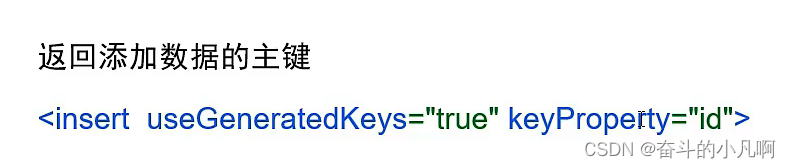
添加---主键返回
在数据添加成功后,需要获取插入数据库数据的主键的值
比如:添加订单和订单项
1.添加订单
2.添加订单项,订单项中需要设置所属订单的id
讯享网 <insert id="add" useGeneratedKeys="true" keyProperty="id"> insert into tb_brand (brand_name, company_name, ordered, description, status) values (#{brandName},#{companyName},#{ordered},#{description},#{status}); </insert>
5.2.3 修改
- 修改所有字段
- 修改动态字段
1.修改所有字段
①编写接口的方法:Mapper接口
void update(Brand brand);- 参数:所有数据
- 结果:void
②编写SQL语句:编写SQL映射文件
讯享网 <update id="update"> update tb_brand set brand_name = #{brandName}, company_name = #{companyName}, ordered = #{ordered}, description = #{description}, status = #{status} where id = #{id}; </update>
③执行方法,测试
/ * 修改 * @throws IOException */ @Test public void testUpdate() throws IOException { //接收参数: int status = 1; String companyName = "波导手机"; String brandName = "波导"; String description = "波导手机,手机中的战斗机"; int ordered = 200; int id = 5; //封装对象 Brand brand = new Brand(); brand.setStatus(status); brand.setCompanyName(companyName); brand.setBrandName(brandName); brand.setDescription(description); brand.setOrdered(ordered); brand.setId(id); //1.获取SqlSessionFactory //加载mybatis的核心配置文件,获取SqlSessionFactory String resource = "mybatis-config.xml"; //返回一个字节输入流 InputStream inputStream = Resources.getResourceAsStream(resource); SqlSessionFactory sqlSessionFactory = new SqlSessionFactoryBuilder().build(inputStream); //2. 获取sqlSession对象 SqlSession sqlSession = sqlSessionFactory.openSession(true); //3. 获取Mapper接口的代理对象 BrandMapper brandMapper = sqlSession.getMapper(BrandMapper.class); //4. 执行方法 int count = brandMapper.update(brand); System.out.println(count); //5. 释放资源 sqlSession.close(); }2. 修改动态字段
①编写接口的方法:Mapper接口
讯享网void update(Brand brand);
- 参数:所有数据
- 结果:void
②编写SQL语句:编写SQL映射文件
<update id="update"> update tb_brand <set> <if test="brandName != null and brandName!= ''"> brand_name = #{brandName}, </if> <if test="companyName != null and brandName!= ''"> company_name = #{companyName}, </if> <if test="ordered != null"> ordered = #{ordered}, </if> <if test="description != null and brandName!= ''"> description = #{description}, </if> <if test="status != null"> status = #{status} </if> </set> where id = #{id}; </update>③执行方法,测试
讯享网/ * 修改动态字段 * @throws IOException */ @Test public void testUpdate() throws IOException { //接收参数: int status = 0; String companyName = "波导手机"; String brandName = "波导"; String description = "波导手机,手机中的战斗机"; int ordered = 200; int id = 7; //封装对象 Brand brand = new Brand(); brand.setStatus(status); // brand.setCompanyName(companyName); // brand.setBrandName(brandName); // brand.setDescription(description); // brand.setOrdered(ordered); brand.setId(id); //1.获取SqlSessionFactory //加载mybatis的核心配置文件,获取SqlSessionFactory String resource = "mybatis-config.xml"; //返回一个字节输入流 InputStream inputStream = Resources.getResourceAsStream(resource); SqlSessionFactory sqlSessionFactory = new SqlSessionFactoryBuilder().build(inputStream); //2. 获取sqlSession对象 SqlSession sqlSession = sqlSessionFactory.openSession(true); //3. 获取Mapper接口的代理对象 BrandMapper brandMapper = sqlSession.getMapper(BrandMapper.class); //4. 执行方法 int count = brandMapper.update(brand); System.out.println(count); //5. 释放资源 sqlSession.close(); }
5.2.4 删除
- 删除一个
- 批量删除
1. 删除一个
①编写接口的方法:Mapper接口
void update(Brand brand);
- 参数:id
- 结果:void
②编写SQL语句:编写SQL映射文件
讯享网<select id="deleteById"> delete from tb_brand where id = #{id}; </select>③执行方法,测试
/ * 根据Id删除一个 * @throws IOException */ @Test public void testDeleteById() throws IOException { //接收参数: int id = 9; //1.获取SqlSessionFactory //加载mybatis的核心配置文件,获取SqlSessionFactory String resource = "mybatis-config.xml"; //返回一个字节输入流 InputStream inputStream = Resources.getResourceAsStream(resource); SqlSessionFactory sqlSessionFactory = new SqlSessionFactoryBuilder().build(inputStream); //2. 获取sqlSession对象 SqlSession sqlSession = sqlSessionFactory.openSession(true); //3. 获取Mapper接口的代理对象 BrandMapper brandMapper = sqlSession.getMapper(BrandMapper.class); //4. 执行方法 brandMapper.deleteById(id); //5. 释放资源 sqlSession.close(); }
2. 批量删除
①编写接口的方法:Mapper接口
讯享网void update(Brand brand);
- 参数:id数组
- 结果:void
②编写SQL语句:编写SQL映射文件
<!-- Mybatis会将数组参数封装为一个Map集合。 *默认:array = 数组 *可以使用@Param注解改变map集合的默认key名称 --> <!-- <delete id="deleteByIds"> delete from tb_brand where id in /* separator:分隔符 open:循环开始前的字符 close:循环结束后的字符 */ <foreach collection="ids" item="id" separator="," open="(" close=")"> #{id} </foreach>; </delete>--> <delete id="deleteByIds"> delete from tb_brand where id in /* separator:分隔符 open:循环开始前的字符 close:循环结束后的字符 */ <foreach collection="array" item="id" separator="," open="(" close=")"> #{id} </foreach>; </delete>③执行方法,测试
讯享网/ * 根据Id删除一个 * @throws IOException */ @Test public void testDeleteById() throws IOException { //接收参数: int id = 9; //1.获取SqlSessionFactory //加载mybatis的核心配置文件,获取SqlSessionFactory String resource = "mybatis-config.xml"; //返回一个字节输入流 InputStream inputStream = Resources.getResourceAsStream(resource); SqlSessionFactory sqlSessionFactory = new SqlSessionFactoryBuilder().build(inputStream); //2. 获取sqlSession对象 SqlSession sqlSession = sqlSessionFactory.openSession(true); //3. 获取Mapper接口的代理对象 BrandMapper brandMapper = sqlSession.getMapper(BrandMapper.class); //4. 执行方法 brandMapper.deleteById(id); //5. 释放资源 sqlSession.close(); }注意:
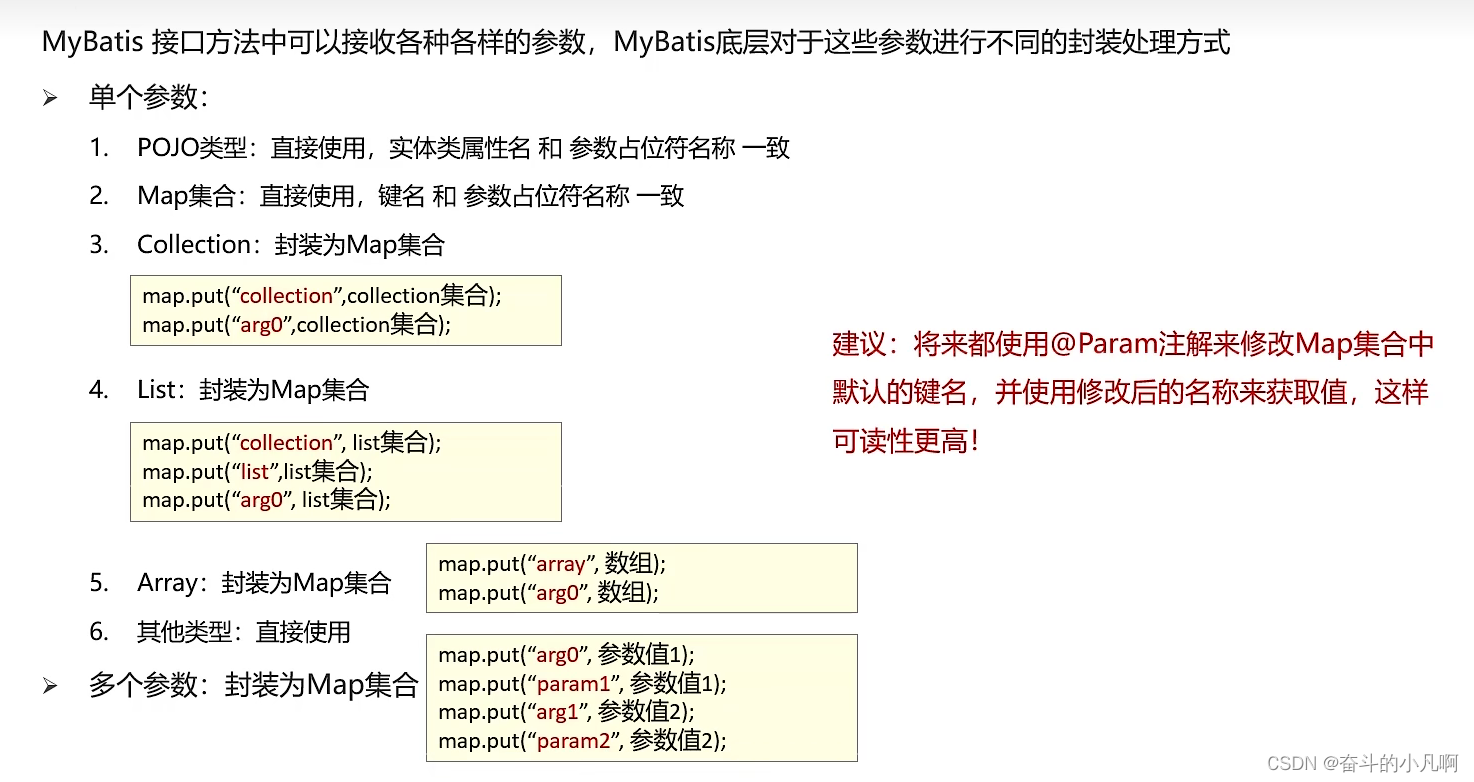
Mybatis会将数组参数封装为一个Map集合。 *默认:array = 数组 *可以使用@Param注解改变map集合的默认key名称讯享网delete from tb_brand where id in /* separator:分隔符 open:循环开始前的字符 close:循环结束后的字符 */ <foreach collection="ids" item="id" separator="," open="(" close=")"> #{id} </foreach>;
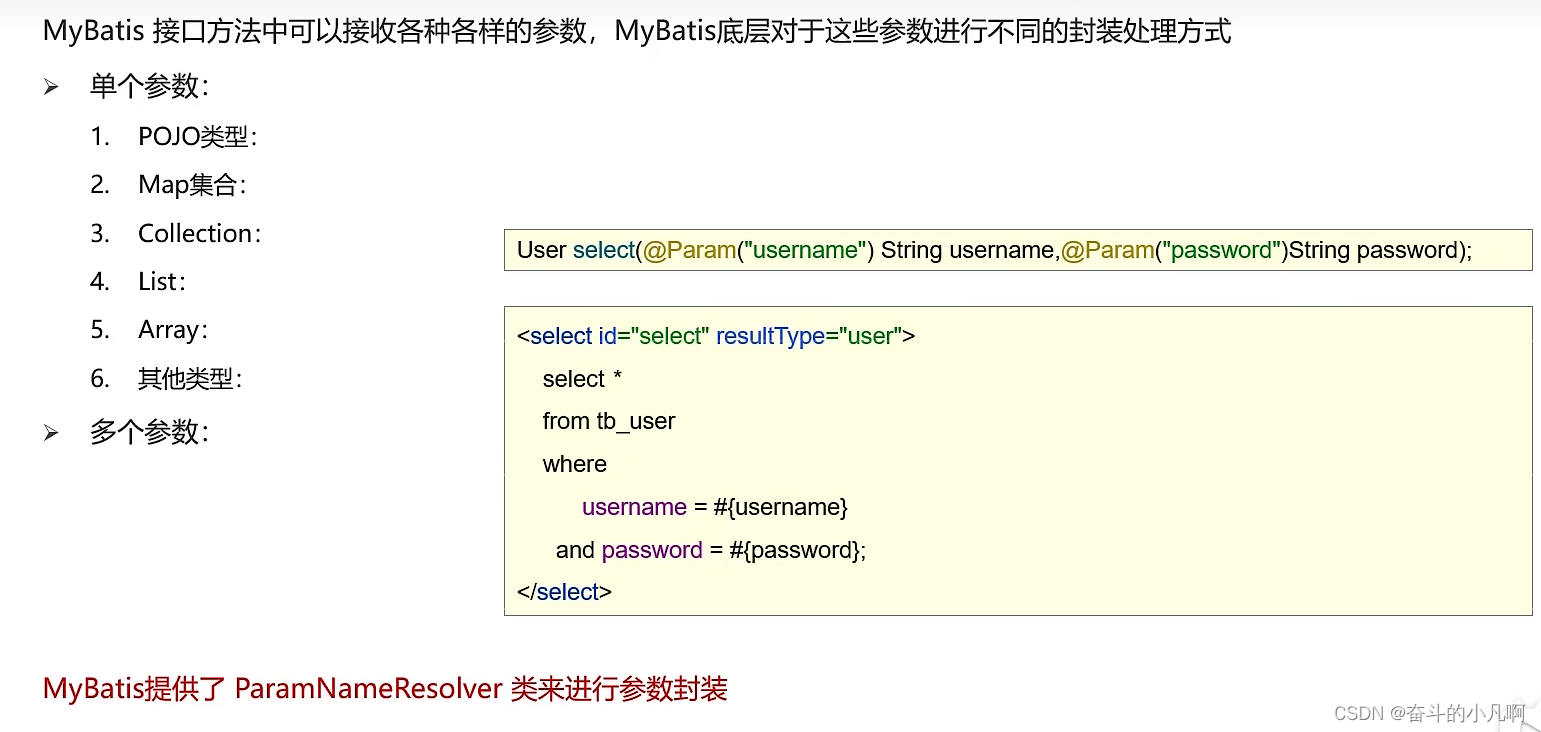
六、MyBatis参数传递
七、注解完成增删改查

使用注解来映射简单语句会使代码显得更加简洁,但对于稍微复杂一点的语句,Java 注解不仅力不从心,还会让本就复杂的 SQL 语句更加混乱不堪。 因此,如果你需要做一些很复杂的操作,最好用 XML 来映射语句。
选择何种方式来配置映射,以及是否应该要统一映射语句定义的形式,完全取决于你和你的团队。 换句话说,永远不要拘泥于一种方式,你可以很轻松地在基于注解和 XML 的语句映射方式间自由移植和切换。
八、MyBatis的逆向工程
自动生成Mapper接口和对应的实体类以及映射文件
generatorConfig.xml:
<?xml version="1.0" encoding="UTF-8"?> <!DOCTYPE generatorConfiguration PUBLIC "-//mybatis.org//DTD MyBatis Generator Configuration 1.0//EN" "http://mybatis.org/dtd/mybatis-generator-config_1_0.dtd"> <generatorConfiguration> <!-- targetRuntime: 执行生成的逆向工程的版本 MyBatis3Simple: 生成基本的CRUD(清新简洁版) MyBatis3: 生成带条件的CRUD(奢华尊享版) --> <context id="DB2Tables" targetRuntime="MyBatis3"> <!-- 数据库的连接信息 --> <jdbcConnection driverClass="com.mysql.cj.jdbc.Driver" connectionURL="jdbc:mysql://localhost:3306/ssm?serverTimezone=UTC" userId="root" password="4"> </jdbcConnection> <!-- javaBean的生成策略--> <javaModelGenerator targetPackage="com.itguigu.mybatis.pojo" targetProject=".\src\main\java"> <property name="enableSubPackages" value="true" /> <property name="trimStrings" value="true" /> </javaModelGenerator> <!-- SQL映射文件的生成策略 --> <sqlMapGenerator targetPackage="com.itguigu.mybatis.mapper" targetProject=".\src\main\resources"> <property name="enableSubPackages" value="true" /> </sqlMapGenerator> <!-- Mapper接口的生成策略 --> <javaClientGenerator type="XMLMAPPER" targetPackage="com.atguigu.mybatis.mapper" targetProject=".\src\main\java"> <property name="enableSubPackages" value="true" /> </javaClientGenerator> <!-- 逆向分析的表 --> <!-- tableName设置为*号,可以对应所有表,此时不写domainObjectName --> <!-- domainObjectName属性指定生成出来的实体类的类名 --> <table tableName="t_emp" domainObjectName="Emp"/> <table tableName="t_dept" domainObjectName="Dept"/> </context> </generatorConfiguration>mybatis-config.xml:
讯享网<?xml version="1.0" encoding="UTF-8" ?> <!DOCTYPE configuration PUBLIC "-//mybatis.org//DTD Config 3.0//EN" "http://mybatis.org/dtd/mybatis-3-config.dtd"> <configuration> <properties resource="jdbc.properties"></properties> <settings> <setting name="mapUnderscoreToCamelCase" value="true"/> </settings> <typeAliases> <package name="com.itguigu.mybatis.pojo"/> </typeAliases> <environments default="development"> <environment id="development"> <transactionManager type="JDBC"/> <dataSource type="POOLED"> <property name="driver" value="${jdbc.driver}"/> <property name="url" value="${jdbc.url}"/> <property name="username" value="${jdbc.username}"/> <property name="password" value="${jdbc.password}"/> </dataSource> </environment> </environments> <!--引入mybatis的映射文件--> <mappers> <package name="com.itguigu.mybatis.mapper"/> </mappers> </configuration>
pom文件中引入的依赖:
<packaging>jar</packaging> <!--mybatis核心jar包--> <dependencies> <dependency> <groupId>org.mybatis</groupId> <artifactId>mybatis</artifactId> <version>3.5.7</version> </dependency> <!-- junit测试 --> <dependency> <groupId>junit</groupId> <artifactId>junit</artifactId> <version>4.12</version> <scope>test</scope> </dependency> <!-- log4j日志 --> <dependency> <groupId>log4j</groupId> <artifactId>log4j</artifactId> <version>1.2.17</version> </dependency> <dependency> <groupId>mysql</groupId> <artifactId>mysql-connector-java</artifactId> <version>8.0.16</version> </dependency> </dependencies> <!-- 控制Maven在构建过程中相关配置 --> <build> <!-- 构建过程中用到的插件 --> <plugins> <!-- 具体插件,逆向工程的操作是以构建过程中插件形式出现的 --> <plugin> <groupId>org.mybatis.generator</groupId> <artifactId>mybatis-generator-maven-plugin</artifactId> <version>1.3.0</version> <!-- 插件的依赖 --> <dependencies> <!-- 逆向工程的核心依赖 --> <dependency> <groupId>org.mybatis.generator</groupId> <artifactId>mybatis-generator-core</artifactId> <version>1.3.2</version> </dependency> <!-- MySQL驱动 --> <dependency> <groupId>mysql</groupId> <artifactId>mysql-connector-java</artifactId> <version>8.0.16</version> </dependency> </dependencies> </plugin> </plugins> </build>然后点击Idea中右侧Maven中的mybatis-generator插件即可自动生成。
九、分页插件
limit index,pageSize
index:当前页的起始索引,index=(pageNum-1)*pageSize
pageSize:每页显示条数
pageNum:当前页的页码
count:总记录数
totalPage:总页数
if(count%pageSize !=0){
totalPage+=1;
}
导入依赖:
讯享网 <dependency> <groupId>com.github.pagehelper</groupId> <artifactId>pagehelper</artifactId> <version>5.2.0</version> </dependency>
同时还需要在核心配置文件中配置:
<plugins> <plugin interceptor="com.github.pagehelper.PageInterceptor"></plugin> </plugins>查询功能开启前要开启分页功能:
讯享网Page<Object> page = PageHelper.startPage(1, 4);
分页数据:
PageInfo<Emp> pageInfo = new PageInfo<>(emps, 5);分页相关数据:
PageInfo{
pageNum=8, pageSize=4, size=2, startRow=29, endRow=30, total=30, pages=8,
list=Page{count=true, pageNum=8, pageSize=4, startRow=28, endRow=32, total=30,
pages=8, reasonable=false, pageSizeZero=false},
prePage=7, nextPage=0, isFirstPage=false, isLastPage=true, hasPreviousPage=true,
hasNextPage=false, navigatePages=5, navigateFirstPage4, navigateLastPage8,
navigatepageNums=[4, 5, 6, 7, 8]
}
pageNum:当前页的页码
pageSize:每页显示的条数
size:当前页显示的真实条数
total:总记录数
pages:总页数
prePage:上一页的页码
nextPage:下一页的页码
isFirstPage/isLastPage:是否为第一页/最后一页
hasPreviousPage/hasNextPage:是否存在上一页/下一页
navigatePages:导航分页的页码数
navigatepageNums:导航分页的页码,[1,2,3,4,5]
版权声明:本文内容由互联网用户自发贡献,该文观点仅代表作者本人。本站仅提供信息存储空间服务,不拥有所有权,不承担相关法律责任。如发现本站有涉嫌侵权/违法违规的内容,请联系我们,一经查实,本站将立刻删除。
如需转载请保留出处:https://51itzy.com/kjqy/123857.html