
目录
前言
一、准备工作
二、实现过程
1.类的确定及其属性和行为
2.全局常量和变量的定义
3.每个行为的实现
3.1蛇的初始化
3.2蛇的移动
3.3蛇的绘制
3.4食物的初始化
3.5绘制食物
3.6吃食物
3.7失败判定
三、完整代码
四、运行效果展示
五、游戏安装包
总结
前言
六一儿童节到了,无论是大朋友还是小朋友,相信大家心里都藏有一颗向往浪漫的童真的心。贪吃蛇是一款经典的单机小游戏,大家在小时候应该都接触过。今天,我将用C++来复刻这款游戏,并祝福所有大朋友小朋友六一儿童节快乐,永远童心未泯。

一、准备工作
前置知识:1.easyx图形库的编程。
2.C++编程的相关知识,如类、构造函数、友元等等。

1.安装好Visual Studio,用来编写C++代码以及使用easyx图形库。
2.在Visual Studio中构建一个空项目。
3.安装好easyx图形库。
如果大家不太了解easyx图形库的安装以及使用,可以参考以下内容:
- easyx图形库一基本绘图与文字绘制_哔哩哔哩_bilibili
- C语言图形库EasyX安装及基本使用_easyx图形库_@梅哲仁.的博客-CSDN博客
二、实现过程
首先,在正式开始敲代码之前,我们首先需要做的是厘清思路。
第一,我们需要创建一些什么类呢?第二,类的属性和行为有哪些呢?第三,类与类之间是否有联系呢?第四,我们需要在全局定义哪些常量呢?带着这些问题,我们慢慢往下走。
1.类的确定及其属性和行为
首先,我们需要定义一个蛇类,蛇的属性有蛇头部的朝向、蛇的长度、蛇的每一个结点的坐标;蛇的行为有蛇的初始化、移动、绘制蛇、吃食物以及失败判定。具体代码如下:
#define MAXLEN 1600 //蛇的最大长度 typedef struct { int x; int y; }SnakeNode; //创建蛇的类 class Snake { friend class Food; //蛇的友元为食物 public: Snake(); //初始化 void Move(); //移动 void Draw(); //绘制蛇 bool Eat(Food food); //吃食物 bool Defeat(); //失败判定 private: int dirt; //朝向 int length; //长度 SnakeNode node[MAXLEN]; //蛇的结点 };讯享网
然后,我们需要定义一个食物类,食物的属性有坐标、分数(这个可有可无);食物的行为有食物的初始化、绘制食物。具体代码如下:
讯享网//创建食物的类 class Food { friend class Snake; //食物的友元为蛇 public: Food(Snake snake); //食物初始化 void Draw(); //绘制食物 private: int x, y; //坐标 int score; //分数 };
最后,蛇与食物应该互为友元,因为蛇在吃食物时需要访问食物的私有成员才能进行是否吃到了食物的判定,食物是否重新生成也需要访问蛇的私有成员来进行判定。
2.全局常量和变量的定义
我们需要定义游戏整个场景的大小,蛇的朝向所代表的数值,蛇的速度,蛇的每一个结点大小,食物的大小。具体代码如下:
//定义场景大小 #define WIDTH 1040 #define HEIGHT 640 //定义食物以及蛇的大小 #define SIZE 20 //定义蛇的朝向 #define UP 1 #define DOWN -1 #define LEFT 2 #define RIGHT -2 int speed = 150; //蛇的速度(用在睡眠函数里面)3.每个行为的实现
3.1蛇的初始化
在游戏开始时,我们首先需要确定一下蛇的位置,蛇的长度以及蛇的朝向。具体实现代码如下:
讯享网//蛇的初始化 Snake::Snake() { this->dirt = RIGHT; this->length = 3; //下标是0的位置为蛇的头部 for (int i = 0; i < length; i++) { this->node[i].x = 60 - ((i + 1) * SIZE); this->node[i].y = 0; } }
3.2蛇的移动
在蛇移动的过程中,有两种情况,一种是我不按转向键,蛇自动向朝向的方向移动,另一种是我按下转向键,蛇的朝向改变。具体代码如下:
SnakeNode tmp[MAXLEN]; //用另外一个数组来存储蛇原来的位置 //移动 void Snake::Move() { //将原来的蛇结点拷贝一份 for (int i = 0; i < this->length; i++) { tmp[i].x = this->node[i].x; tmp[i].y = this->node[i].y; } int status = 0;//用来判断是否点击了转向按键 if (this->dirt == RIGHT) { //判断是否转向 if (GetAsyncKeyState('W') && status == 0) { //this->node[0].y -= SIZE; this->dirt = UP; status = 1; } else if (GetAsyncKeyState('S') && status == 0) { this->dirt = DOWN; status = 1; } else { this->node[0].x += SIZE; } } if (this->dirt == DOWN) { //判断是否转向 if (GetAsyncKeyState('A') && status == 0) { //this->node[0].x -= SIZE; this->dirt = LEFT; status = 1; } else if (GetAsyncKeyState('D') && status == 0) { this->node[0].x += SIZE; this->dirt = RIGHT; status = 1; } else { this->node[0].y += SIZE; } } if (this->dirt == LEFT) { //判断是否转向 if (GetAsyncKeyState('W') && status == 0) { //this->node[0].y -= SIZE; this->dirt = UP; status = 1; } else if (GetAsyncKeyState('S') && status == 0) { this->node[0].y += SIZE; this->dirt = DOWN; status = 1; } else { this->node[0].x -= SIZE; } } if (this->dirt == UP) { //判断是否转向 if (GetAsyncKeyState('A') && status == 0) { this->node[0].x -= SIZE; this->dirt = LEFT; status = 1; } else if (GetAsyncKeyState('D') && status == 0) { this->node[0].x += SIZE; this->dirt = RIGHT; status = 1; } else { this->node[0].y -= SIZE; } } //移动 for (int i = 1; i < this->length; i++) { this->node[i].x = tmp[i - 1].x; this->node[i].y = tmp[i - 1].y; } Sleep(speed); }3.3蛇的绘制
遍历蛇中每一个结点的坐标,将其输出到屏幕当中。具体代码如下:
讯享网//绘制蛇 void Snake::Draw() { cleardevice();//清空原先的绘图 srand((unsigned)time(NULL));//设置随机数种子 for (int i = 0; i < this->length; i++) { setfillcolor(RGB(rand()%256,rand()%256,rand()%256)); fillrectangle(this->node[i].x, this->node[i].y, this->node[i].x + SIZE, this->node[i].y + SIZE); } }
3.4食物的初始化
食物的坐标不能够与蛇某个结点的坐标重合,因此在食物的坐标随机生成后,需要遍历蛇中的每一结点,判断是否重合。如果重合,则重新生成食物坐标,如果没有重合,则成功执行完该函数。具体代码如下:
//食物的初始化 Food::Food(Snake snake) { table: srand((unsigned)time(NULL)); this->x = (rand() % (WIDTH / SIZE)) * SIZE; this->y = (rand() % (HEIGHT / SIZE)) * SIZE; this->score = rand() % 10+1; for (int i = 0; i < snake.length; i++) { if (snake.node[i].x == this->x && snake.node[i].y == this->y) { goto table; } } } 3.5绘制食物
讯享网//绘制食物 void Food::Draw() { setfillcolor(GREEN); fillrectangle(this->x, this->y, this->x + SIZE, this->y + SIZE); }
3.6吃食物
当蛇的头结点的坐标与食物的坐标重合时,我们就可以认为蛇吃到了这个食物。吃到食物后,蛇的长度就会增加。增加的这个结点的坐标位置我们需要通过倒数两个结点的坐标来进行判断。具体代码如下:
//吃食物 bool Snake::Eat(Food food) { if (food.x == this->node[0].x && food.y == this->node[0].y) { if (this->node[length - 1].x - this->node[length - 2].x == 0 && this->node[length - 1].y - this->node[length - 2].y == -20) { this->length++; this->node[length - 1].x = this->node[length - 2].x; this->node[length - 1].y = this->node[length - 2].y-SIZE; } if (this->node[length - 1].x - this->node[length - 2].x == 0 && this->node[length - 1].y - this->node[length - 2].y == 20) { this->length++; this->node[length - 1].x = this->node[length - 2].x; this->node[length - 1].y = this->node[length - 2].y+SIZE; } if (this->node[length - 1].x - this->node[length - 2].x == 20 && this->node[length - 1].y - this->node[length - 2].y == 0) { this->length++; this->node[length - 1].x = this->node[length - 2].x+SIZE; this->node[length - 1].y = this->node[length - 2].y; } if (this->node[length - 1].x - this->node[length - 2].x == -20 && this->node[length - 1].y - this->node[length - 2].y == 0) { this->length++; this->node[length - 1].x = this->node[length - 2].x-SIZE; this->node[length - 1].y = this->node[length - 2].y; } return true; } return false; }3.7失败判定
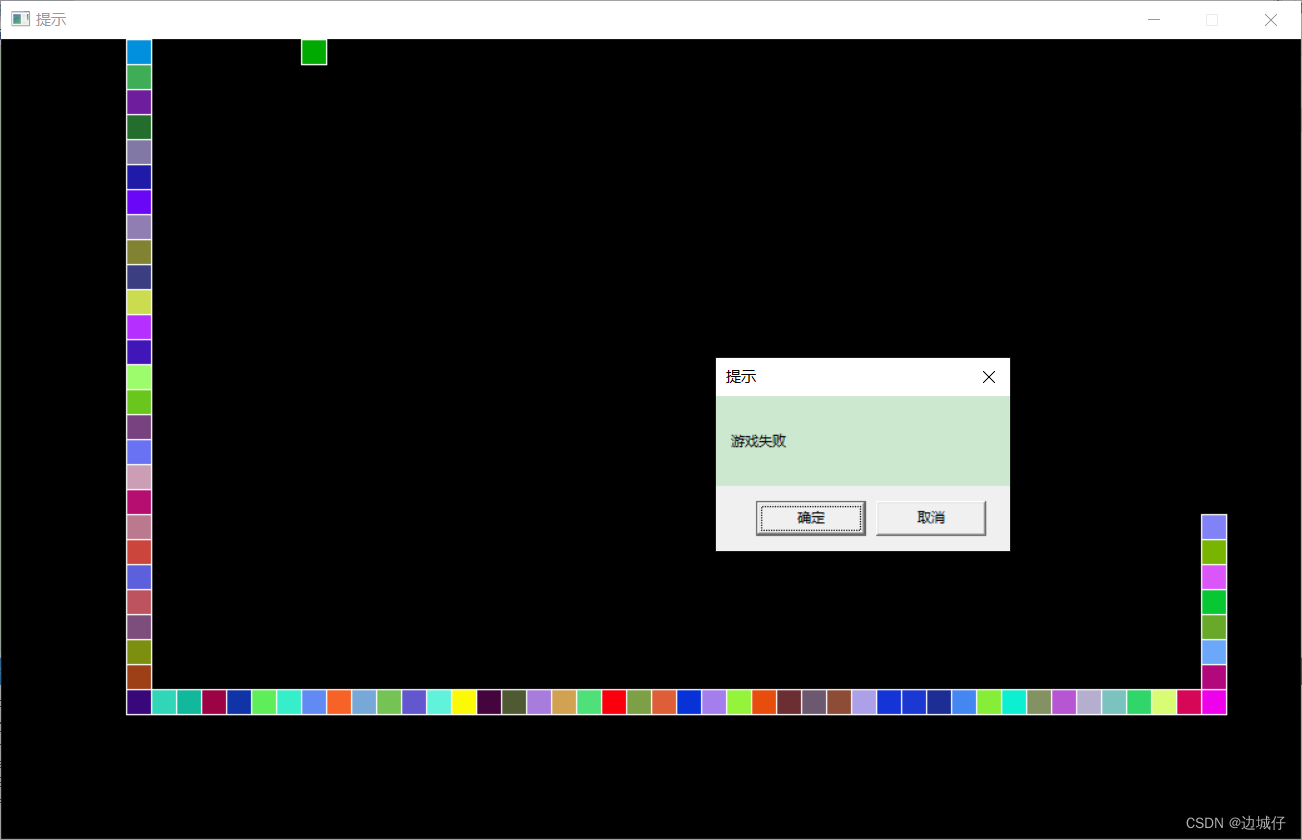
当蛇头结点的坐标等于其他结点的坐标时,视为蛇撞到了自己,这是第一种失败情况;当蛇头结点的坐标超过边界时,这是第二种失败情况。具体代码如下:
讯享网//失败判定 bool Snake::Defeat() { //1.碰到边界 if (this->node[0].x < 0 || this->node[0].x >= WIDTH || this->node[0].y < 0 || this->node[0].y >= HEIGHT) { return true; } //2.碰到自己的身体 for (int i = 1; i < this->length; i++) { if (this->node[0].x == this->node[i].x && this->node[0].y == this->node[i].y) { return true; } } return false; }
三、完整代码
完整的代码如下面所示:
#include<iostream> using namespace std; #include<easyx.h> //包含图形库头文件 #include<stdlib.h> #include<time.h> //定义场景大小 #define WIDTH 1040 #define HEIGHT 640 //定义食物以及蛇的大小 #define SIZE 20 //定义蛇的朝向 #define UP 1 #define DOWN -1 #define LEFT 2 #define RIGHT -2 //蛇的最大长度 #define MAXLEN 1600 typedef struct { int x; int y; }SnakeNode; SnakeNode tmp[MAXLEN]; //用另外一个数组来存储蛇原来的位置 int speed = 150; //蛇的速度(用在睡眠函数里面) //创建蛇的类 class Snake { friend class Food; public: Snake(); //初始化 void Move(); //移动 void Draw(); //绘制蛇 bool Eat(Food food); //吃食物 bool Defeat(); //失败判定 private: int dirt; //朝向 int length; //长度 SnakeNode node[MAXLEN]; //蛇的结点 }; //创建食物的类 class Food { friend class Snake; public: Food(Snake snake); //食物初始化 void Draw(); //绘制食物 private: int x, y; //坐标 int score; //分数 }; int main() { initgraph(WIDTH, HEIGHT); Snake snake; table: Food food(snake); while (1) { BeginBatchDraw(); FlushBatchDraw(); snake.Draw(); food.Draw(); FlushBatchDraw(); EndBatchDraw();//双缓冲,防止屏幕一闪一闪的 if (snake.Eat(food)) { goto table; } if (snake.Defeat()) { break; } snake.Move(); } //提示失败信息 HWND window = GetHWnd(); SetWindowText(window, "提示"); MessageBox(window, "游戏失败","提示",MB_OKCANCEL); return 0; } //蛇的初始化 Snake::Snake() { this->dirt = RIGHT; this->length = 3; //下标是0的位置为蛇的头部 for (int i = 0; i < length; i++) { this->node[i].x = 60 - ((i + 1) * SIZE); this->node[i].y = 0; } } //移动 void Snake::Move() { //将原来的蛇结点拷贝一份 for (int i = 0; i < this->length; i++) { tmp[i].x = this->node[i].x; tmp[i].y = this->node[i].y; } int status = 0;//用来判断是否点击了转向按键 if (this->dirt == RIGHT) { //判断是否转向 if (GetAsyncKeyState('W') && status == 0) { //this->node[0].y -= SIZE; this->dirt = UP; status = 1; } else if (GetAsyncKeyState('S') && status == 0) { this->dirt = DOWN; status = 1; } else { this->node[0].x += SIZE; } } if (this->dirt == DOWN) { //判断是否转向 if (GetAsyncKeyState('A') && status == 0) { //this->node[0].x -= SIZE; this->dirt = LEFT; status = 1; } else if (GetAsyncKeyState('D') && status == 0) { this->node[0].x += SIZE; this->dirt = RIGHT; status = 1; } else { this->node[0].y += SIZE; } } if (this->dirt == LEFT) { //判断是否转向 if (GetAsyncKeyState('W') && status == 0) { //this->node[0].y -= SIZE; this->dirt = UP; status = 1; } else if (GetAsyncKeyState('S') && status == 0) { this->node[0].y += SIZE; this->dirt = DOWN; status = 1; } else { this->node[0].x -= SIZE; } } if (this->dirt == UP) { //判断是否转向 if (GetAsyncKeyState('A') && status == 0) { this->node[0].x -= SIZE; this->dirt = LEFT; status = 1; } else if (GetAsyncKeyState('D') && status == 0) { this->node[0].x += SIZE; this->dirt = RIGHT; status = 1; } else { this->node[0].y -= SIZE; } } //移动 for (int i = 1; i < this->length; i++) { this->node[i].x = tmp[i - 1].x; this->node[i].y = tmp[i - 1].y; } Sleep(speed); } //绘制蛇 void Snake::Draw() { cleardevice();//清空原先的绘图 srand((unsigned)time(NULL));//设置随机数种子 for (int i = 0; i < this->length; i++) { setfillcolor(RGB(rand()%256,rand()%256,rand()%256)); fillrectangle(this->node[i].x, this->node[i].y, this->node[i].x + SIZE, this->node[i].y + SIZE); } } //吃食物 bool Snake::Eat(Food food) { if (food.x == this->node[0].x && food.y == this->node[0].y) { if (this->node[length - 1].x - this->node[length - 2].x == 0 && this->node[length - 1].y - this->node[length - 2].y == -20) { this->length++; this->node[length - 1].x = this->node[length - 2].x; this->node[length - 1].y = this->node[length - 2].y-SIZE; } if (this->node[length - 1].x - this->node[length - 2].x == 0 && this->node[length - 1].y - this->node[length - 2].y == 20) { this->length++; this->node[length - 1].x = this->node[length - 2].x; this->node[length - 1].y = this->node[length - 2].y+SIZE; } if (this->node[length - 1].x - this->node[length - 2].x == 20 && this->node[length - 1].y - this->node[length - 2].y == 0) { this->length++; this->node[length - 1].x = this->node[length - 2].x+SIZE; this->node[length - 1].y = this->node[length - 2].y; } if (this->node[length - 1].x - this->node[length - 2].x == -20 && this->node[length - 1].y - this->node[length - 2].y == 0) { this->length++; this->node[length - 1].x = this->node[length - 2].x-SIZE; this->node[length - 1].y = this->node[length - 2].y; } return true; } return false; } //失败判定 bool Snake::Defeat() { //1.碰到边界 if (this->node[0].x < 0 || this->node[0].x >= WIDTH || this->node[0].y < 0 || this->node[0].y >= HEIGHT) { return true; } //2.碰到自己的身体 for (int i = 1; i < this->length; i++) { if (this->node[0].x == this->node[i].x && this->node[0].y == this->node[i].y) { return true; } } return false; } //食物的初始化 Food::Food(Snake snake) { table: srand((unsigned)time(NULL)); this->x = (rand() % (WIDTH / SIZE)) * SIZE; this->y = (rand() % (HEIGHT / SIZE)) * SIZE; this->score = rand() % 10+1; for (int i = 0; i < snake.length; i++) { if (snake.node[i].x == this->x && snake.node[i].y == this->y) { goto table; } } } //绘制食物 void Food::Draw() { setfillcolor(GREEN); fillrectangle(this->x, this->y, this->x + SIZE, this->y + SIZE); }四、运行效果展示
五、游戏安装包
1.游戏安装包已经上传到我的CSDN,可以在我的主页提取(如果您没有在我的主页上找到该资源,可能是资源还在审核当中,麻烦耐心等待一下哦~)

2.迅雷云盘下载: https://pan.xunlei.com/s/VNWq7w_-_1i58yJfHDILani7A1?pwd=n6ha# 提取码:n6ha
游戏安装包以及贪吃蛇游戏的图标如下图所示,希望您能喜欢这份六一儿童节礼物!

总结
如果您觉得本篇文章不错的话,不如将它分享出去吧!让更多的人感受这份童真快乐。最后,再次祝愿所有大朋友小朋友六一快乐!
版权声明:本文内容由互联网用户自发贡献,该文观点仅代表作者本人。本站仅提供信息存储空间服务,不拥有所有权,不承担相关法律责任。如发现本站有涉嫌侵权/违法违规的内容,请联系我们,一经查实,本站将立刻删除。
如需转载请保留出处:https://51itzy.com/kjqy/123382.html