
从我第一天了解到javascript开始,就听说在这里是没有类的。其实一开始我是沮丧的,尽管我并不知道有没有“类”对编程究竟有多大影响,不过有缺憾总是让人感觉遗憾,哪怕这是一个你可能永远不会用到的东西。确实,在没有任何自定义“类”的情况下,也能做出一款打飞机的游戏。
我们用到的是EaselJS中所定义的一些可以重复使用的对象,并且这些对象包含一些类似于类的行为,比如可以new 一个新的对象实例。为方便理解,我们在这里先把这些称作类。
在EaselJS中类的关系结构图:
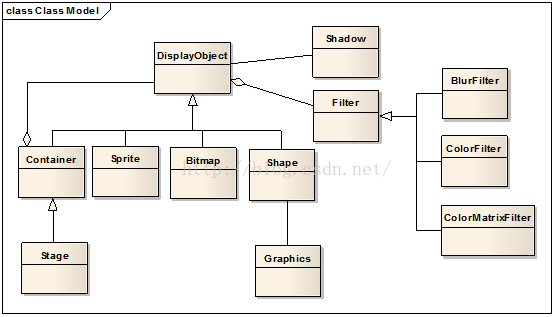
偶然间找到了这张图,EaselJS中类的结构变的一目了然,元素的基类是DisplayObject,Container同做动画用的Sprite、显示图片的Bitmap、显示 图形的Shape、甚至包括Filter,基类都是DisplayObject,而stage则是继承自Container。
令人欣慰的是,在EaselJS中我们同样可以通过继承现有这些类的方式来创建自己的类,通过继承而来的新类,对EaselJS现有的元素进行功能上进行扩展,调用方式跟创建Sprite/Shape这些也没什么太大的不同,并且可以重复使用。我总觉得这好过使用javascript创建一个“模拟类",一般直接使用javascript来创建模拟类的代码看起来是这样的:
function Shape(color){ this.color=color; } Shape.prototype.size=50; Shape.prototype.draw=function(){ ..... } 讯享网
必须在定义Shape的变量和成员函数时使用prototype才能保证使用你创建的Shape实例化的对象能够拥这些变量和成员函数(读起来真别扭,因为在javascript中并没有类的概念,我们所定义的Shape也是一个对象,不使用prototype的话,定义的size只是Shape对象的一个私有变量;而prototype的功能是使你定义的size和draw指向Shape的父类,这是一个虚拟的父类,但是通过prototype定义后,在示例化Shape时,由于它的父类包含着size和draw,所以其他由shape实例化而来的对象也会拥有size和draw。)
真够令人迷茫的,万幸,使用EaselJS,你可以这样来实现一个自定义类:
讯享网(function() { function Button(label) { this.Container_constructor(); this.label = label; } var p = createjs.extend(Button, createjs.Container); p.draw = function() { this.Container_draw(); // 自定义Button的draw() } window.Button = createjs.promote(Button, "Container"); }());
这里是使用一个container来实现一个按钮,createjs.extend表明了Button的继承关系,它继承自Container,最后的window.Button = createjs.promote(Button, "Container")也非常重要,它允许你的在Button中可以重写Container的成员函数,并且在调用Container的成员函数时,加一个Container的前缀。最后赋值给window.Button,使得你自定的Button被加载到window中,可以被调用。
这是一个最基本的格式,用一个例子来演示一下,我们在游戏中经常会使用到按钮,如果每次都要先绘制一个Shape然后添加上Text作为label,再添加鼠标滑过等状态的响应函数,就会有大量的重复动作,所以我们可以来做一个Button类,需要按钮的时候,只要使用new Button();就可以创造一个新的按钮。
(function(){ function Button(color, label){ this.Container_constructor(); this.color = color; this.label = label; this.setup(); } var p = createjs.extend(Button, createjs.Container); p.setup = function(){ var text = new createjs.Text(this.label, "20px Arial", "#000"); text.textBaseline = "top"; text.textAlign = "center"; var width = text.getMeasuredWidth()+30; var height = text.getMeasuredHeight()+20; text.x = width/2; text.y = 10; var background = new createjs.Shape(); background.graphics.beginFill(this.color).drawRoundRect(0,0,width,height,10); this.addChild(background, text); this.on("click", this.handleClick); this.on("rollover", this.handleRollOver); this.on("rollout", this.handleRollOver); this.cursor = "pointer"; this.mouseChildren = false; this.offset = Math.random()*10; this.count = 0; } p.handleClick = function (event) { alert("You clicked on a button: "+this.label); } ; p.handleRollOver = function(event) { this.alpha = event.type == "rollover" ? 0.4 : 1; }; window.Button = createjs.promote(Button, "Container"); }());讯享网var b1 = new Button("red", "OK!click it"); stage.addChild(b1);
当然你可以给你自定义的类添加一些EaselJS基类中所没有的方法,比如可以使用Shape,做一个可以随时间明暗变化的气泡,只要做一个继承自Shape的类,然后添加一个调节透明的自定义方法,并在tick中调用。

<pre class="javascript" name="code">(function(){ function Orb(color, size){ this.Shape_constructor(); this.color = color; this.size = size; this.setup(); } var p = createjs.extend(Orb, createjs.Shape); p.count = 0; p.setup = function(){ this.alpha = Math.random(); this.graphics.beginFill(this.color).drawCircle(0, 0, this.size); this.on('tick', this.pulse); } p.pulse = function(){ this.alpha = Math.cos(this.count++ * 0.1) * 0.4 + 0.6; } window.Orb = createjs.promote(Orb, "Shape"); }());讯享网
格式都是一样,只有setup不同,这里给自定义类添加了一个pulse的方法,改变透明度,然后保存这段js并添加到你的网页中,我想在鼠标点击的位置产生一个气泡,代码如下:讯享网<pre class="javascript" name="code"><script> var stage; function init(){ stage = new createjs.Stage('game'); stage.enableMouseOver(); var bg = new createjs.Shape(); bg.graphics.beginFill('#A9BBC9').drawRect(0, 0, stage.canvas.width, stage.canvas.height); stage.addChild(bg); stage.on('stagemousedown', drawOrb); createjs.Ticker.on('tick',stage); } function drawOrb(e){ var randomColor = '#' + Math.floor(Math.random() * ).toString(16); var randomSize = Math.floor(Math.random() * 100) + 20; var orb = new Orb(randomColor, randomSize); orb.x = e.stageX; orb.y = e.stageY; stage.addChild(orb); } </script>
讯享网随着点击,桌面上会产生一个个大小颜色不同的气泡,忽明忽暗.
讯享网
所有的气泡都可以随时间产生明暗不同的变化,这说明没有用prototype, pulse方法在所有实例中都是存在的,而且彼此独立,最重要的是你可以在你的代码中直接调用。比如给Orb再添加一个类方法 讯享网p.say = function(str){ if(!str){ alert("hello,i am shape!"); }else{ alert(str); } }
var b1 = new Orb("red", 20); var b2 = new Orb("blue", 30); b1.say(); b2.say();这时候的效果肯定是弹出一个hello,i am shape!的对话框
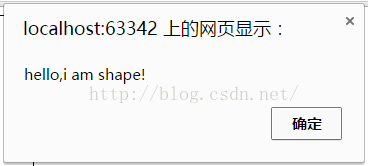
现在把代码改成这样:
讯享网var b1 = new Orb("red", 20); var b2 = new Orb("blue", 30); b1.say("i am red"); b2.say("i am blue");
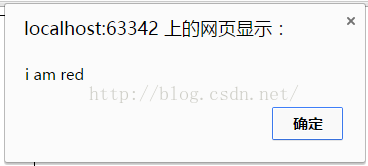
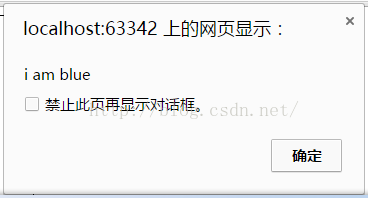
好了,你可以通过扩展EaselJS中的任何元素去定义一个自己的类了,不管是Shape还是Sprite都可以!
版权声明:本文内容由互联网用户自发贡献,该文观点仅代表作者本人。本站仅提供信息存储空间服务,不拥有所有权,不承担相关法律责任。如发现本站有涉嫌侵权/违法违规的内容,请联系我们,一经查实,本站将立刻删除。
如需转载请保留出处:https://51itzy.com/kjqy/122498.html