
在了解javaagent的创建后,今天将尝试一种更高级的用法——类替换,并用其实现Http请求地址的记录功能。javaagent允许我们在项目启动时的类加载阶段或者项目运行后进行类的替换,两者的替换方式相同,都是借助入口函数Instrumentation对象进行操作,回顾下两种方式的入口函数:
1.perman入口函数,由JVM参数配置在程序启动时的类加载阶段引入
详见《Java探针-javaagent由浅入深(一)》
import java.lang.instrument.Instrumentation; public class MyAgent{ public static void premain(String agentOps,Instrumentation inst){ System.out.println("MyAgent:Hello Main Method"); } } 讯享网
2.agentmain函数,可在程序运行时动态引入
详见《Java探针-javaagent由浅入深(二)》
讯享网/* * Copyright (c) 1994, 2003, Oracle and/or its affiliates. All rights reserved. * DO NOT ALTER OR REMOVE COPYRIGHT NOTICES OR THIS FILE HEADER. * * This code is free software; you can redistribute it and/or modify it * under the terms of the GNU General Public License version 2 only, as * published by the Free Software Foundation. Oracle designates this * particular file as subject to the "Classpath" exception as provided * by Oracle in the LICENSE file that accompanied this code. * * This code is distributed in the hope that it will be useful, but WITHOUT * ANY WARRANTY; without even the implied warranty of MERCHANTABILITY or * FITNESS FOR A PARTICULAR PURPOSE. See the GNU General Public License * version 2 for more details (a copy is included in the LICENSE file that * accompanied this code). * * You should have received a copy of the GNU General Public License version * 2 along with this work; if not, write to the Free Software Foundation, * Inc., 51 Franklin St, Fifth Floor, Boston, MA 02110-1301 USA. * * Please contact Oracle, 500 Oracle Parkway, Redwood Shores, CA 94065 USA * or visit www.oracle.com if you need additional information or have any * questions. */ /*- * HTTP stream opener */ package sun.net.www.protocol.http; import java.io.IOException; import java.net.URL; import java.net.Proxy; / open an http input stream given a URL */ public class Handler extends java.net.URLStreamHandler { protected String proxy; protected int proxyPort; protected int getDefaultPort() { return 80; } public Handler () { proxy = null; proxyPort = -1; } public Handler (String proxy, int port) { this.proxy = proxy; this.proxyPort = port; } protected java.net.URLConnection openConnection(URL u) throws IOException { return openConnection(u, (Proxy)null); } protected java.net.URLConnection openConnection(URL u, Proxy p) throws IOException { return new HttpURLConnection(u, p, this); } }
可以借助Instrumentation的addTransformer方法添加ClassFileTransformer对象对指定的类进行替换,因为需求是记录http请求的地址,我们需要找到一个合适的切入点加入我们自己的代码,同时要保证其原有的功能不受影响,经过一番考虑我决定从sun.net.www.protocol.http下的Handler类入手,这个类的作用是根据给定的URL创建HttpsURLConnection对象,我们就在这个类的openConnection方法中进行请求地址的记录,该类的原始代码如下:
/* * Copyright (c) 2001, 2003, Oracle and/or its affiliates. All rights reserved. * DO NOT ALTER OR REMOVE COPYRIGHT NOTICES OR THIS FILE HEADER. * * This code is free software; you can redistribute it and/or modify it * under the terms of the GNU General Public License version 2 only, as * published by the Free Software Foundation. Oracle designates this * particular file as subject to the "Classpath" exception as provided * by Oracle in the LICENSE file that accompanied this code. * * This code is distributed in the hope that it will be useful, but WITHOUT * ANY WARRANTY; without even the implied warranty of MERCHANTABILITY or * FITNESS FOR A PARTICULAR PURPOSE. See the GNU General Public License * version 2 for more details (a copy is included in the LICENSE file that * accompanied this code). * * You should have received a copy of the GNU General Public License version * 2 along with this work; if not, write to the Free Software Foundation, * Inc., 51 Franklin St, Fifth Floor, Boston, MA 02110-1301 USA. * * Please contact Oracle, 500 Oracle Parkway, Redwood Shores, CA 94065 USA * or visit www.oracle.com if you need additional information or have any * questions. */ /*- * HTTP stream opener */ package sun.net.www.protocol.https; import java.io.IOException; import java.net.URL; import java.net.Proxy; / open an http input stream given a URL */ public class Handler extends sun.net.www.protocol.http.Handler { protected String proxy; protected int proxyPort; protected int getDefaultPort() { return 443; } public Handler () { proxy = null; proxyPort = -1; } public Handler (String proxy, int port) { this.proxy = proxy; this.proxyPort = port; } protected java.net.URLConnection openConnection(URL u) throws IOException { return openConnection(u, (Proxy)null); } protected java.net.URLConnection openConnection(URL u, Proxy p) throws IOException { return new HttpsURLConnectionImpl(u, p, this); } } 修改后的代码如下:
讯享网package sun.net.www.protocol.http; import java.io.*; import java.lang.reflect.Constructor; import java.lang.reflect.InvocationTargetException; import java.net.Proxy; import java.net.URL; / open an http input stream given a URL */ public class Handler extends java.net.URLStreamHandler { protected String proxy; protected int proxyPort; protected int getDefaultPort() { return 80; } public Handler () { proxy = null; proxyPort = -1; } public Handler (String proxy, int port) { this.proxy = proxy; this.proxyPort = port; } protected java.net.URLConnection openConnection(URL u) throws IOException { return openConnection(u, (Proxy)null); } protected java.net.URLConnection openConnection(URL u, Proxy p) throws IOException { / * 记录请求URL */ File file=new File("D:\\HTTPRequestHistory.txt"); if(!file.exists()){ file.createNewFile(); } try(FileOutputStream fileOutputStream=new FileOutputStream(file,true); OutputStreamWriter outputStreamWriter=new OutputStreamWriter(fileOutputStream); BufferedWriter bufferedWriter=new BufferedWriter(outputStreamWriter)) { bufferedWriter.write(u.toString()+"\r\n"); } try { / * 完成记录动作后,需要保证原有功能的正常使用,需要返回HttpURLConnection * 因为原有的HttpURLConnection构造方法是protect访问权限,所以需要利用反射创建对象 */ //获取原始代码中使用的构造器 Constructor<HttpURLConnection> cont = HttpURLConnection.class.getDeclaredConstructor(URL.class, Proxy.class); //设置访问权限 cont.setAccessible(true); //返回对象 return cont.newInstance(u,p); } catch (NoSuchMethodException e) { e.printStackTrace(); } catch (IllegalAccessException e) { e.printStackTrace(); } catch (InstantiationException e) { e.printStackTrace(); } catch (InvocationTargetException e) { e.printStackTrace(); } return null; } public static void main(String[] args) { } }
这里需要注意的是方法参数、返回值、方法数量都应和原始代码保持一直,这样才能避免调用时出现异常,在这一点上,可以假想我们所写的类与原始类实现了相同的接口,除此之外,全类名(包括包名)需和原始代码保持一致,不然替换时就会抛出异常。

以preman为例进行类的替换:
package edu.haye; import java.io.*; import java.lang.instrument.ClassFileTransformer; import java.lang.instrument.IllegalClassFormatException; import java.lang.instrument.Instrumentation; import java.security.ProtectionDomain; public class HttpAgent { public static void premain(String agentOps, Instrumentation inst){ System.out.println("HttpAgent init"); inst.addTransformer(new ClassFileTransformer() { @Override public byte[] transform(ClassLoader loader, String className, Class<?> classBeingRedefined, ProtectionDomain protectionDomain, byte[] classfileBuffer) throws IllegalClassFormatException { //这里的className并不是sun.net.www.protocol.http.Handler if("sun/net/www/protocol/http/Handler".equals(className)){ try( //读取我们自己编写的类文件进行替换 InputStream inputStream = new FileInputStream("D:\\Handler.class") ){ System.out.println(className + " has bean replaced"); byte[] newClassBuffer =new byte[inputStream.available()]; inputStream.read(newClassBuffer); return newClassBuffer; } catch (FileNotFoundException e) { e.printStackTrace(); } catch (IOException e) { e.printStackTrace(); } } return classfileBuffer; } }); } public static void main(String[] args) { } } 测试类代码如下:
讯享网package edu.haye; import java.io.*; import java.net.URL; import java.net.URLConnection; public class MainRequest { public static void main(String[] args) throws IOException { URL url=new URL("http://www.hao123.com"); URLConnection conn = url.openConnection(); InputStream in = conn.getInputStream(); try( InputStreamReader inputStreamReader=new InputStreamReader(in); BufferedReader bufferedReader=new BufferedReader(inputStreamReader) ){ String content; while ((content=bufferedReader.readLine())!=null){ System.out.println(content); } } } }
运行前我们需要将自己编译后的Handler类放在D盘下,以便于javaagent进行读取和替换,这里当然也可以把编译后的类文件放入javaagent的jar包,只要保证程序运行时可以读到该文件即可,运行测试代码前要设置JVM参数引用javaagent:
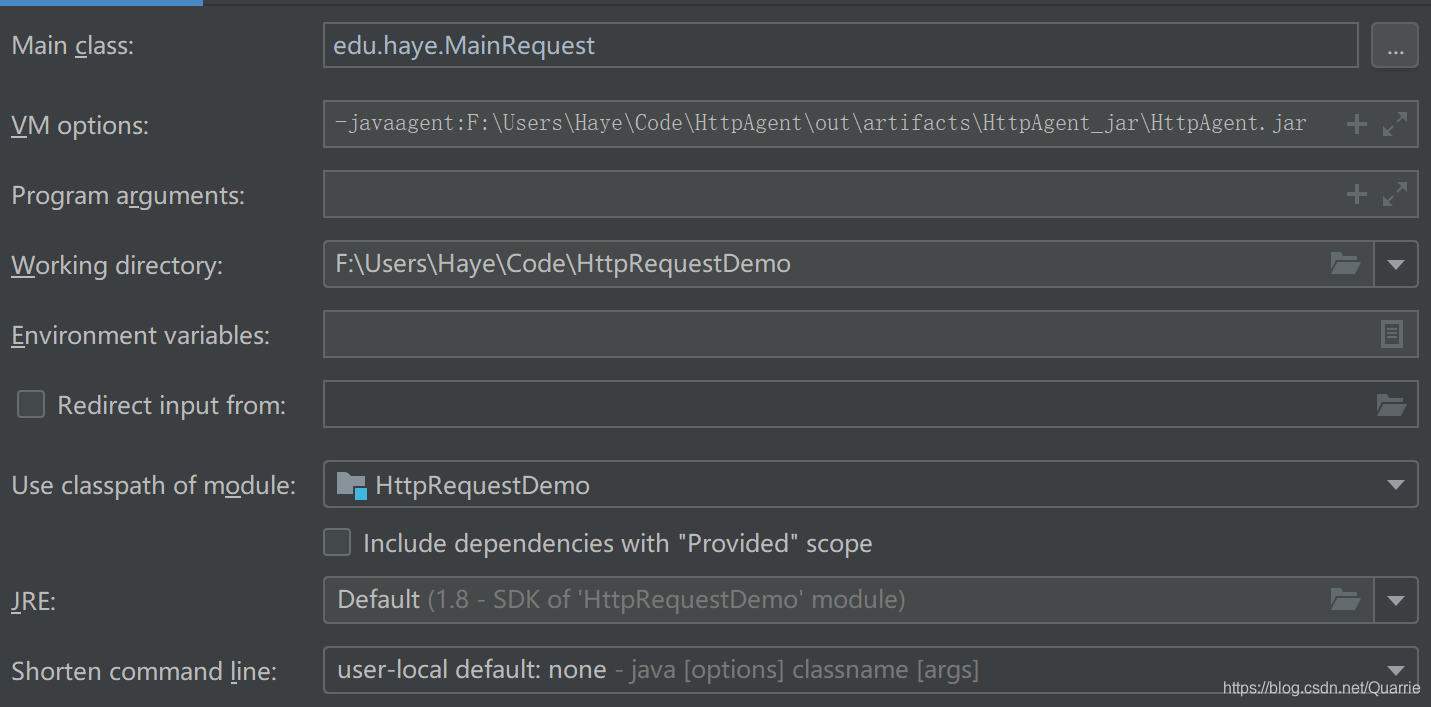
执行测试类的Main方法后便可在D盘下生成HTTPRequestHistory.txt文件,里面记录了每次请求的地址,因为只对http请求的handler做了处理,所以https请求是不会被记录的。如果将HttpRequestDemo工程视为真正的工程项目,引入这个访问记录功能对工程代码完全没有侵入,仅仅是加入了一行JVM参数而已。
版权声明:本文内容由互联网用户自发贡献,该文观点仅代表作者本人。本站仅提供信息存储空间服务,不拥有所有权,不承担相关法律责任。如发现本站有涉嫌侵权/违法违规的内容,请联系我们,一经查实,本站将立刻删除。
如需转载请保留出处:https://51itzy.com/kjqy/120822.html