
目录
Runtime 运行时类概述
exec(String command) 参数格式详解
exec(String command, String[] envp)
exec(String command, String[] envp, File dir)
exec(String[] cmdarray, String[] envp, File dir)
运行 VBS 脚本文件
Runtime 做 CMD 操作
复制文件、文件夹
删除文件、文件夹
cmd 常用命令
Runtime 运行时类概述
1、每个 Java 应用程序都有一个 java.lang.Runtime 类实例,使应用程序能够与其运行的环境相连接。
2、应用程序不能创建自己的 Runtime 类实例,可以通过 getRuntime 静态方法获取当前运行时机制(Runtime)
3、每一个JAVA程序实际上都是启动了一个JVM进程,每一个JVM进程都对应一个Runtime实例
4、得到了当前的Runtime对象的引用,就可以调用Runtime对象的方法去控制Java虚拟机的状态和行为。
long |
maxMemory() |
返回Java虚拟机将尝试使用的最大内存量。如果内存本身没有限制,则返回值 Long.MAX_VALUE,以字节为单位。 |
long |
totalMemory() |
返回Java虚拟机中的内存总量。目前为当前和后续对象提供的内存总量,以字节为单位。 |
void |
gc() |
运行垃圾回收器。调用此方法意味着 Java 虚拟机做了一些努力来回收未用对象,以便能够快速地重用这些对象当前占用的内存。 |
void |
exit(int status) |
通过启动其关闭序列来终止当前正在运行的Java虚拟机。status作为状态码,根据惯例,非零的状态码表示非正常终止。关闭之后,任务管理器中的进程也会结束。 |
Process |
exec(String command) |
在单独的进程中执行指定的字符串命令。参数:command - 一条指定的系统命令。返回:一个新的 Process 对象,用于管理子进程 |
Process |
exec(String[] cmdarray) |
在单独的进程中执行指定的命令和参数。 |
Process |
exec(String[] cmdarray, String[] envp) |
在指定环境的单独进程中执行指定的命令和参数。 |
Process |
exec(String[] cmdarray, String[] envp, File dir) |
在指定的环境和工作目录的单独进程中执行指定的命令和参数。 |
public static void main(String[] args) throws UnsupportedEncodingException { Runtime runtime = Runtime.getRuntime(); System.out.println("-------str变量未使用前-------------"); System.out.println("JVM试图使用的最大内存量:"+runtime.maxMemory()+"字节"); System.out.println("JVM空闲内存量:"+runtime.freeMemory()+"字节"); System.out.println("JVM内存总量:"+runtime.totalMemory()+"字节"); String str = "00"; for (int i=0;i<2000;i++){ str += "xx"+i; } System.out.println("-------str变量使用后-------------"); System.out.println("JVM试图使用的最大内存量:"+runtime.maxMemory()+"字节"); System.out.println("JVM空闲内存量:"+runtime.freeMemory()+"字节"); System.out.println("JVM内存总量:"+runtime.totalMemory()+"字节"); runtime.gc(); System.out.println("-------垃圾回收后-------------"); System.out.println("JVM试图使用的最大内存量:"+runtime.maxMemory()+"字节"); System.out.println("JVM空闲内存量:"+runtime.freeMemory()+"字节"); System.out.println("JVM内存总量:"+runtime.totalMemory()+"字节"); }讯享网
讯享网public static void runtimeTest11() throws InterruptedException { Runtime runtime = Runtime.getRuntime(); System.out.println("程序开始,延时10s后程序退出..."); Thread.sleep(10000); runtime.exit(0); System.out.println("JVM已经关闭,此句不会被输出..."); }
/ * 打开指定的程序 * 如windows自带的:记事本程序notepad、计算器程序:notepad.exe、服务程序:services.msc 等等 * 以及安装的第三方程序:D:\Foxmail_7.2\Foxmail.exe、D:\gxg_client\Client.exe 等等 * 或者直接传参,如打开potPlayer播放视频:"D:\PotPlayer\PotPlayerMini.exe E:\xfmovie\WoxND7209-mobile.mp4" * @param appNameORPath:取值如上所示 */ public static final void runExtApp(String appNameORPath) { try { Runtime runtime = Runtime.getRuntime(); runtime.exec(appNameORPath); } catch (IOException e) { e.printStackTrace(); } }上面这种写法,经过反复实践验证后,通常只对 "windows自带的程序"、"*.exe"(写全路径)程序有效。
exec(String command) 参数格式详解
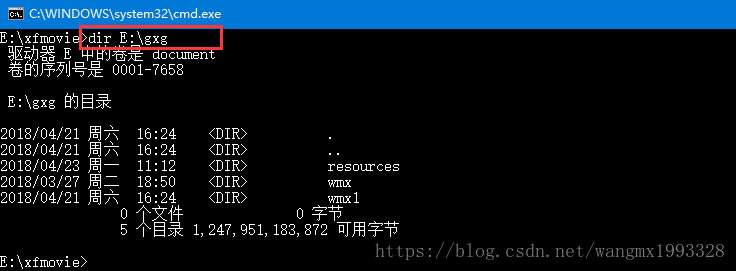
错误示范:cmd 中有很多类似如下的指令,如目录统计:"dir"、文件(夹)复制:"copy"、删除文件:del 等等
讯享网public static void main(String[] args) { try { Runtime runtime = Runtime.getRuntime(); /这样运行是报错: Cannot run program "dir": 即默认把"dir"当在程序进行运行了*/ runtime.exec("dir E:\\gxg"); } catch (IOException e) { e.printStackTrace(); } }
正确示范:cmd /c
1、已经知道 exec(String xxx),不加前缀时默认只能执行 windows 自带的程序或者可执行的 exe 文件,对于其它 cmd 指令必须调用 windows 的 cmd 程序来执行
2、格式:exec("cmd /c xxx"):cmd 表示调用 windows 的 cmd 程序来执行后面的 "xxx" 指令,/c 是参数
3、无论什么指令,都建议加上"cmd /c",这是实际开发中常用的方式:
1)"exec("cmd /c echo 123")":不会弹出 cmd 窗口,也不会一闪而过,直观上看不到任何东西
2)"exec("cmd /c dir E:\\gxg")":不会弹出 cmd 窗口,也不会一闪而过,直观上看不到任何东西
3)"exec("cmd /c E:\\jarDir\\test.jar")":可执行 jar 程序必须加"cmd /c"运行
4)"exec("cmd /c E:\\Study_Note\\html\\Html_in-depth.docx")":打开指定文档,也可以是其它格式,如png、jpg、pptx、pdf等等,会调用它们的默认程序来打开它们
5)"exec("cmd /c D:\\PotPlayer\\PotPlayerMini.exe")":exe 程序前面加不加"cmd /c"都能正常运行
6)exec("cmd /c calc"):windows 自带的程序前面加不加 cmd /c 都能正常运行

public static void main(String[] args) {
    try {
        Runtime runtime = Runtime.getRuntime();
        /*runtime.exec("cmd /c echo 123");*/
        /*runtime.exec("cmd /c dir E:\\gxg");*/
        /*runtime.exec("cmd /c E:\\jarDir\\test.jar");*/
        /*runtime.exec("cmd /c E:\\Study_Note\\html\\Html_in-depth.docx");*/
        /*runtime.exec("cmd /c D:\\PotPlayer\\PotPlayerMini.exe");*/
        runtime.exec("cmd /c calc");
    } catch (IOException e) {
        e.printStackTrace();
    }
}
正确是否:cmd /c start
1、exec("cmd /c dir E:\\gxg"):它默认是不会弹出 cmd 面板的,如果希望它弹出时,则可以加上 "start" 参数
1)exec("cmd /c start echo 123"):弹出 cmd 框显示字符“123”
2)exec("cmd /c start dir E:\\gxg"):弹出 cmd 框显示"E:\\gxg"目录的详细信息
3)exec("cmd /c start E:\\xfmovie\\a.txt"):会打开 a.txt 文件,因为没有 cmd 输出内容,所以不会弹出 cmd 框,与不加 "start" 参数是一样的
4)exec("cmd /c start notepad"):会打开记事本,但不会弹出 cmd 框,与不加 "strat" 时一样
讯享网public static void main(String[] args) { try { Runtime runtime = Runtime.getRuntime(); /*runtime.exec("cmd /c start echo 123");*/ /*runtime.exec("cmd /c start dir E:\\gxg");*/ /*runtime.exec("cmd /c start E:\\xfmovie\\a.txt");*/ runtime.exec("cmd /c start notepad"); } catch (IOException e) { e.printStackTrace(); } }
exec(String command, String[] envp)
1、在指定环境的单独进程中执行指定的字符串命令。
2、参数:command - 一条指定的系统命令,其中可以设置变量,包括windows中的环境变量;
3、参数:envp - 字符串数组,其中每个元素的环境变量的设置格式为 name=value,name值为command中的变量名称;如果子进程应该继承当前进程的环境,或该参数为 null。
4、返回:一个新的 Process 对象,用于管理子进程
5、通俗的讲就是在 exec(String command) 的基础上,加了可以为指令(command)动态设置变量值了
public static void main(String[] args) { try { Runtime runtime = Runtime.getRuntime(); Process process = runtime.exec("cmd /c dir %targetDir%", new String[]{"targetDir=E:\\gxg"}); InputStream inputStream = process.getInputStream(); InputStreamReader streamReader = new InputStreamReader(inputStream,"gbk"); BufferedReader bufferedReader = new BufferedReader(streamReader); String readLine ; while ((readLine = bufferedReader.readLine())!=null){ System.out.println(readLine); } } catch (IOException e) { e.printStackTrace(); } }1、没有加"start"参数,所以并不会弹出cmd框
2、%tartgetDir%类似windows环境变量的写法,变量必须用"%%"扣起来,后面字符串数组中用"key=value"的形式,key名称必须与前面的变量名称相同
3、new InputStreamReader(inputStream,"gbk"):将字节流转字符流并采用"gbk"编码,否则中文乱码,接着使用缓冲流读取数据
讯享网public static void main(String[] args) { try { Runtime runtime = Runtime.getRuntime(); Process process = runtime.exec("cmd /c dir %JAVA_HOME%",null);//可以直接获取windows系统的环境变量值 InputStream inputStream = process.getInputStream(); InputStreamReader streamReader = new InputStreamReader(inputStream,"gbk"); BufferedReader bufferedReader = new BufferedReader(streamReader); String readLine ; while ((readLine = bufferedReader.readLine())!=null){ System.out.println(readLine); } } catch (IOException e) { e.printStackTrace(); } }
exec(String command, String[] envp, File dir)
1、参数:dir - 子进程的工作目录;如果子进程应该继承当前进程的工作目录,则该参数为 null。
2、通俗的讲就是在exec(String command,String[] envp)的基础上,加上了可以在指定目录执行子进程了。如下是没指定dir时,会以当前进程的工作目录执行
public static void main(String[] args) { try { //使用命令行程序"WolCmd"做主机的网络唤醒时 Runtime runtime = Runtime.getRuntime(); Process process = runtime.exec("cmd /c WolCmd.exe 1CB72CEFBA3D 192.168.1.20 255.255.255.0 100", null,new File("D:\\program")); InputStream inputStream = process.getInputStream(); InputStreamReader streamReader = new InputStreamReader(inputStream,"gbk"); BufferedReader bufferedReader = new BufferedReader(streamReader); String readLine ; while ((readLine = bufferedReader.readLine())!=null){ System.out.println(readLine); } } catch (IOException e) { e.printStackTrace(); } }
exec(String[] cmdarray, String[] envp, File dir)
1、上面重载方法中的 command 参数适合程序与参数路径中不带空格的命令,如:"cmd /c del E:/wmx/log.txt"、"cmd /c D:\PotPlayer\PotPlayerMini.exe E:/wmx/zl2.mp4"
2、cmdarray 参数是 cmd 指令数组,适合程序和参数路径中带空格的命令,程序路径形如“C:\Program Files (x86)\Microsoft Office\root\Office16\WINWORD.EXE”,或参数路径形如“E:\wmx 笔记\Map in-depth.docx”。
3、envp:参数值,提供给command/cmdarray中参数的值
4、dir:cmd程序启动的目录
讯享网 public void ProcessTest () { try { / 指定cmd指令数组 * 只要有空格,则必须采用如下方式分开写。 * 用Runtime.exec(String command)方法是不行的*/ String[] paramArr = new String[2]; paramArr[0] = "C:\\Program Files (x86)\\Microsoft Office\\root\\Office16\\WINWORD.EXE"; paramArr[1] = "E:\\wmx\\Map_in-depth.docx"; Runtime runtime = Runtime.getRuntime(); Process process = runtime.exec(paramArr); / 休眠10秒后,关闭WINWORD.EXE程序*/ Thread.sleep(10000); if (process.isAlive()) { process.destroy(); } } catch (IOException e) { e.printStackTrace(); } catch (InterruptedException e) { e.printStackTrace(); } }
运行 VBS 脚本文件
/ * 控制电脑系统音量 * <p/> * 约定在应用根目录下的 temp 目录中放置3个vbs文件 * volumeMute.vbs:用于静音 * volumeAdd.vbs:增加音量 * volumeMinus.vbs:减小音量 * 文件以及文件的内容采用 Java 代码动态生成,不存在时则新建,存在时则直接调用 * * @param type 0:静音/取消静音 1:增加音量 2:减小音量 */ private static void controlSystemVolume(String type) { try { if (type == null || "".equals(type.trim())) { logger.info("type 参数为空,不进行操作..."); } /tempFile:vbs 文件 * vbsMessage:vbs 文件的内容*/ String vbsMessage = ""; File tempFile = null; Runtime runtime = Runtime.getRuntime(); switch (type) { case "0": tempFile = new File("temp", "volumeMute.vbs"); vbsMessage = !tempFile.exists() ? "CreateObject(\"Wscript.Shell\").Sendkeys \"棴\"" : ""; break; case "1": tempFile = new File("temp", "volumeAdd.vbs"); vbsMessage = !tempFile.exists() ? "CreateObject(\"Wscript.Shell\").Sendkeys \"棷\"" : ""; break; case "2": tempFile = new File("temp", "volumeMinus.vbs"); vbsMessage = !tempFile.exists() ? "CreateObject(\"Wscript.Shell\").Sendkeys \"棶\"" : ""; break; default: return; } / * 当3个vbs文件不存在时,则创建它们,应用默认编码为 utf-8 时,创建的 vbs 脚本运行时报错 * 于是使用 OutputStreamWriter 将 vbs 文件编码改成gbd就正常了 */ if (!tempFile.exists() && !vbsMessage.equals("")) { if (!tempFile.getParentFile().exists()) { tempFile.getParentFile().mkdirs(); } tempFile.createNewFile(); FileOutputStream fileOutputStream = new FileOutputStream(tempFile); OutputStreamWriter outputStreamWriter = new OutputStreamWriter(fileOutputStream, "GBK"); outputStreamWriter.write(vbsMessage); outputStreamWriter.flush(); outputStreamWriter.close(); logger.info("vbs 文件不存在,新建成功:" + tempFile.getAbsolutePath()); } runtime.exec("wscript " + tempFile.getAbsolutePath()).waitFor(); logger.info("音量控制完成."); } catch (IOException e) { e.printStackTrace(); } catch (InterruptedException e) { e.printStackTrace(); } }src/main/java/org/example/uitls/RuntimeUtil.java · 汪少棠/java-se - Gitee.com。
Runtime 做 CMD 操作
复制文件、文件夹
windows 系统中复制文件,除了使用 Java SE 中的 IO 流、或者类似第三方如 Apache 的 FileUtils 等进行操作外,其实windows自身的cmd指令也是可以的:
讯享网/ * 复制文件 * * @param sourcePath :源文件 或者 源目录(当时目录时,只会复制其下面子一级中的所有文件) * @param targetPath :文件存放的目标目录或文件 * @return */ public static final boolean copyPath(String sourcePath, String targetPath) { boolean result = false; try { if (StringUtils.isBlank(sourcePath) || !new File(sourcePath).exists()) { return result; } if (StringUtils.isBlank(targetPath)) { return result; } Runtime runtime = Runtime.getRuntime(); Process process = runtime.exec("cmd /c copy " + sourcePath + " " + targetPath); InputStreamReader streamReader = new InputStreamReader(process.getInputStream(),"gbk"); BufferedReader bufferedReader = new BufferedReader(streamReader); String readLine ; while ((readLine = bufferedReader.readLine())!=null){ System.out.println(readLine); } } catch (IOException e) { e.printStackTrace(); } return result; } public static void main(String[] args) { System.out.println(copyPath("E:\\gxg\\wmx\\logs", "E:\\wmx")); }
/ * 复制目录:包括目录下所有子孙文件、文件夹 * * @param sourcePath :源文件 或者 源目录(当时目录时,会复制其下面所有所以子孙文件和文件夹) * @param targetPath :文件存放的目标目录或文件 * @return */ public static final boolean copyDir(String sourcePath, String targetPath) { boolean result = false; try { if (StringUtils.isBlank(sourcePath) || !new File(sourcePath).exists()) { return result; } if (StringUtils.isBlank(targetPath)) { return result; } Runtime runtime = Runtime.getRuntime(); Process process = runtime.exec("cmd /c xcopy /e " + sourcePath + " " + targetPath); InputStreamReader streamReader = new InputStreamReader(process.getInputStream(),"gbk"); BufferedReader bufferedReader = new BufferedReader(streamReader); String readLine ; while ((readLine = bufferedReader.readLine())!=null){ System.out.println(readLine); } } catch (IOException e) { e.printStackTrace(); } return result; }删除文件、文件夹
讯享网/ * 删除文件:只支持删除文件,不支持删除文件夹 * * @param sourcePath :源文件路径 * @return */ public static final boolean deleteFile(String sourcePath) { boolean result = false; try { if (StringUtils.isBlank(sourcePath) || !new File(sourcePath).exists()) { return result; } if (new File(sourcePath).isDirectory()){ return result; } Runtime runtime = Runtime.getRuntime(); Process process = runtime.exec("cmd /c del " + sourcePath); InputStreamReader streamReader = new InputStreamReader(process.getInputStream(),"gbk"); BufferedReader bufferedReader = new BufferedReader(streamReader); result = true; String readLine ; while ((readLine = bufferedReader.readLine())!=null){ System.out.println(readLine); } } catch (IOException e) { e.printStackTrace(); } return result; }
/ * 删除文件夹:整个文件夹都会删除掉,包括自己以及下面所有子孙 * * @param sourcePath :源文件路径 * @return */ public static final boolean deleteDir(String sourcePath) { boolean result = false; try { if (StringUtils.isBlank(sourcePath) || !new File(sourcePath).exists()) { return result; } Runtime runtime = Runtime.getRuntime(); Process process = runtime.exec("cmd /c rd/s/q " + sourcePath); InputStreamReader streamReader = new InputStreamReader(process.getInputStream(),"gbk"); BufferedReader bufferedReader = new BufferedReader(streamReader); result = true; String readLine ; while ((readLine = bufferedReader.readLine())!=null){ System.out.println(readLine); } } catch (IOException e) { e.printStackTrace(); } return result; } cmd 常用命令
| gpedit.msc-----组策略 | explorer-------打开资源管理器 | Nslookup-------IP地址侦测器 |
| logoff---------注销命令 | tsshutdn-------60秒倒计时关机命令 | lusrmgr.msc----本机用户和组 |
| services.msc---本地服务设置 | oobe/msoobe /a----检查XP是否激活 | notepad--------打开记事本 |
| cleanmgr-------垃圾整理 | net start messenger----开始信使服务 | compmgmt.msc---计算机管理 |
| net stop messenger-----停止信使服务 | conf-----------启动netmeeting | dvdplay--------DVD播放器 |
| charmap--------启动字符映射表 | diskmgmt.msc---磁盘管理实用程序 | calc-----------启动计算器 |
| dfrg.msc-------磁盘碎片整理程序 | chkdsk.exe-----Chkdsk磁盘检查 | devmgmt.msc--- 设备管理器 |
| regsvr32 /u *.dll----停止dll文件运行 | drwtsn32------ 系统医生 | rononce -p ----15秒关机 |
| dxdiag---------检查DirectX信息 | regedt32-------注册表编辑器 | Msconfig.exe---系统配置实用程序 |
| rsop.msc-------组策略结果集 | mem.exe--------显示内存使用情况 | regedit.exe----注册表 |
| winchat--------XP自带局域网聊天 | progman--------程序管理器 | winmsd---------系统信息 |
| perfmon.msc----计算机性能监测程序 | winver---------检查Windows版本 | sfc /scannow-----扫描错误并复原 |
| taskmgr-----任务管理器(2000/xp/2003 | winver---------检查Windows版本 | wmimgmt.msc----打开windows管理体系结构(WMI) |
| wupdmgr--------windows更新程序 | wscript--------windows脚本宿主设置 | write----------写字板 |
| winmsd---------系统信息 | wiaacmgr-------扫描仪和照相机向导 | winchat--------XP自带局域网聊天 |
| mem.exe--------显示内存使用情况 | Msconfig.exe---系统配置实用程序 | mplayer2-------简易widnows media player |
| mspaint--------画图板 | mplayer2-------媒体播放机 | mstsc----------远程桌面连接 |
| magnify--------放大镜实用程序 | mmc------------打开控制台 | mobsync--------同步命令 |
| devmgmt.msc--- 设备管理器 | dfrg.msc-------磁盘碎片整理程序 | diskmgmt.msc---磁盘管理实用程序 |
| dcomcnfg-------打开系统组件服务 | ddeshare-------打开DDE共享设置 | dvdplay--------DVD播放器 |
| notepad--------打开记事本 | nslookup-------网络管理的工具向导 | ntbackup-------系统备份和还原 |
| sigverif-------文件签名验证程序 | sysedit--------系统配置编辑器 | sndrec32-------录音机 |
| shrpubw--------创建共享文件夹 | secpol.msc-----本地安全策略 | services.msc---本地服务设置 |
| Sndvol32-------音量控制程序 | sfc.exe--------系统文件检查器 | tsshutdn-------60秒倒计时关机命令 |
| taskmgr--------任务管理器 | eventvwr-------事件查看器 | explorer-------打开资源管理器 |
| progman--------程序管理器 | regedit.exe----注册表 | calc-----------启动计算器 |
| osk------------打开屏幕键盘 | explorer-------打开资源管理器 | gpedit.msc-----组策略 |
版权声明:本文内容由互联网用户自发贡献,该文观点仅代表作者本人。本站仅提供信息存储空间服务,不拥有所有权,不承担相关法律责任。如发现本站有涉嫌侵权/违法违规的内容,请联系我们,一经查实,本站将立刻删除。
如需转载请保留出处:https://51itzy.com/kjqy/120608.html