
背景
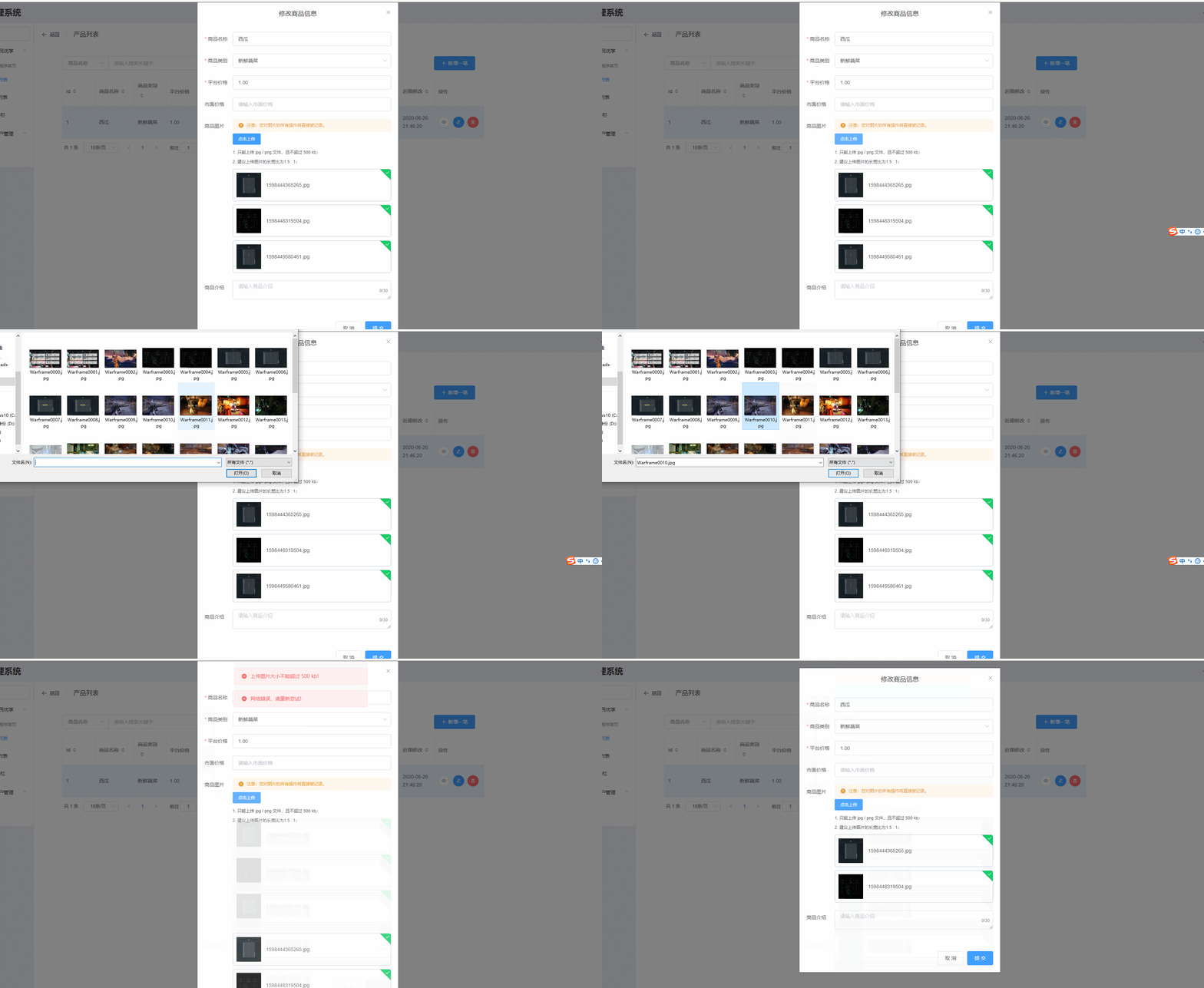
最近使用 element-ui 的 upload 组件上传图片列表,发现当选择上传的图片出错时,会将上一张图片删除了。
效果如下:
讯享网
代码:
<template> <el-upload :action="action" :file-list="fileList" list-type="picture" :on-remove="handleRemove" :before-upload="beforeUpload" > <el-button size="small" type="primary">点击上传</el-button> <div slot="tip" class="el-upload__tip"> <p>1. 只能上传 jpg / png 文件,且不超过 500 kb;</p> <p>2. 建议上传图片的长宽比为1.5 : 1;</p> </div> </el-upload> </template> <script> export default {
     name: "uploadImageList", props: {
     action: {
     type: String, }, imageUrlList: {
     type: Array, }, }, data() {
     return {
     fileList: [], limit: 4, }; }, watch: {
     imageUrlList(list) {
     this.fileList = []; list.forEach((element) => {
     this.fileList.push({
     name: element, url: `${
      this.$store.state.server_url}/upload/${
      element}`, }); }); }, }, mounted() {
     this.imageUrlList.forEach((element) => {
     this.fileList.push({
     name: element, url: `${
      this.$store.state.server_url}/upload/${
      element}`, }); }); }, methods: {
     beforeUpload(file) {
     const isJPG = file.type === "image/jpeg"; const isLt2M = file.size / 1024 / 1024 < 0.5; if (!isJPG) {
     this.$message.error("上传头像图片只能是 JPG 格式!"); } if (!isLt2M) {
     this.$message.error("上传图片大小不能超过 500 kb!"); } return isJPG && isLt2M; }, handleRemove(file) {
     this.$emit("delUploadImage", file.name); }, }, }; </script>
讯享网
原因分析
上面代码中,在 beforeUpload 事件中添加用户上传文件的判断操作。但该事件放回 false 时,会自动终止上传事件。但是呢!由于 上传失败后,组件会自动执行 on-remove 事件。而我这里因为需求的原因设置on-remove 会触发父组件的 delUploadImage 事件,导致了多删除了一次。所以就用上面这种情况出现了。
要点:
当
beforeUpload事件返回false时,element-ui组件upload会自动执行一次on-remove事件。
解决方法
1. 不自定义 on-remove 事件
这一点就不用分析了。前面提到,出现这个的原因是系统自动调用了 on-remove 事件。不自定义 on-remove 事件,让系统执行默认的 on-remove 方法。也就不会出现冲突了。
2. 在 on-remove 事件中添加判断,区分已上传的图片和出错的图片
第一种方法虽然简单,但是很多情况下,不得不自定义 on-remove 事件。那这是我们就需要在 on-remove 事件做个判断了。判断如果要删除的文件是错误的文件,就不执行自定义的 on-remove 的方法。
例如:
因为上传成功的图片都会存放到 file-list 属性中,那我们只需判断要删除的图片是否在其中就好了。
讯享网handleRemove(file) {
    if(this.imageUrlList.indexOf(file) > -1){
    this.$emit("delUploadImage", file.name); } }
3. 不使用 beforeUpload 事件来判断上传文件是否符合要求
不适用 beforeUpload 来判断,那就不会自动执行 on-remove 事件。
那判断该在哪里进行了?
我们可以在用户选择文件后读取文件信息来进行判断,而不是在上传前来进行判断。可以在upload 组件的 on-change 事件中进行。
| 参数 | 说明 | 类型 |
|---|---|---|
| on-change | 文件状态改变时的钩子,添加文件、上传成功和上传失败时都会被调用 | function(file, fileList) |

这里涉及到三点
- 判断的时机,
on-change事件 - 停止
upload组件的选中文件后默认进行上传的功能。这个可用通过设置auto-upload属性来关闭参数 说明 类型 auto-upload 是否在选取文件后立即进行上传 boolean - 判断通过后,怎么触发上传事件?可以通过
submit方法来实现。方法名 说明 参数 submit 手动上传文件列表 —
关于第三点,需要讲解一下如何调用 submit 方法:
upload 如何使用 Methods 里的方法
关于这一点,其实只要我们明白一点就行了。
element-ui是什么?
element-ui是 vue 的第三方组件库。
也就是说,upload 是一个组件。那我们想要在当前组件中调用 upload 的方法,不就变成了父组件调用子组件的方法的问题了吗?
更多关于 vue 父子组件的通讯可以参考:《Vue 的父组件和子组件之数据传输、方法互调》 、《Vue 组件间通讯之非父子组件间通讯——事件总线(EventBus)》
所以我们可以这么做:
<template> <el-upload ref="uploadList" :action="action" :file-list="fileList" :auto-upload="false" list-type="picture" :on-change="change" :on-remove="handleRemove" > <el-button size="small" type="primary">点击上传</el-button> <div slot="tip" class="el-upload__tip"> <p>1. 只能上传 jpg / jpeg / png 文件,且不超过 500 kb;</p> <p>2. 建议上传图片的长宽比为1.5 : 1;</p> </div> </el-upload> </template> <script> export default {
     name: "uploadImageList", props: {
     action: {
     type: String, }, imageUrlList: {
     type: Array, }, }, data() {
     return {
     fileList: [], }; }, watch: {
     imageUrlList(list) {
     this.fileList = []; list.forEach((element) => {
     this.fileList.push({
     name: element, url: `${
      this.$store.state.server_url}/upload/${
      element}`, }); }); }, }, mounted() {
     this.imageUrlList.forEach((element) => {
     this.fileList.push({
     name: element, url: `${
      this.$store.state.server_url}/upload/${
      element}`, }); }); }, methods: {
     change(file, fileList){
     const typeList = ["image/jpeg","image/png", "image/jpg"] const isLt2M = file.raw.size / 1024 / 1024 < 0.5; if (typeList.indexOf(file.raw.type) < 0) {
     this.$message.error("上传图片只能是 jpg / png / jpeg 格式!"); fileList.pop(); this.fileList = fileList; return false; } if (!isLt2M) {
     this.$message.error("上传图片大小不能超过 500 kb!"); fileList.pop(); this.fileList = fileList; return false; } this.$refs['uploadList'].submit(); }, handleRemove(file) {
     this.$emit("delUploadImage", file.name); }, }, }; </script>
修改后,效果如下: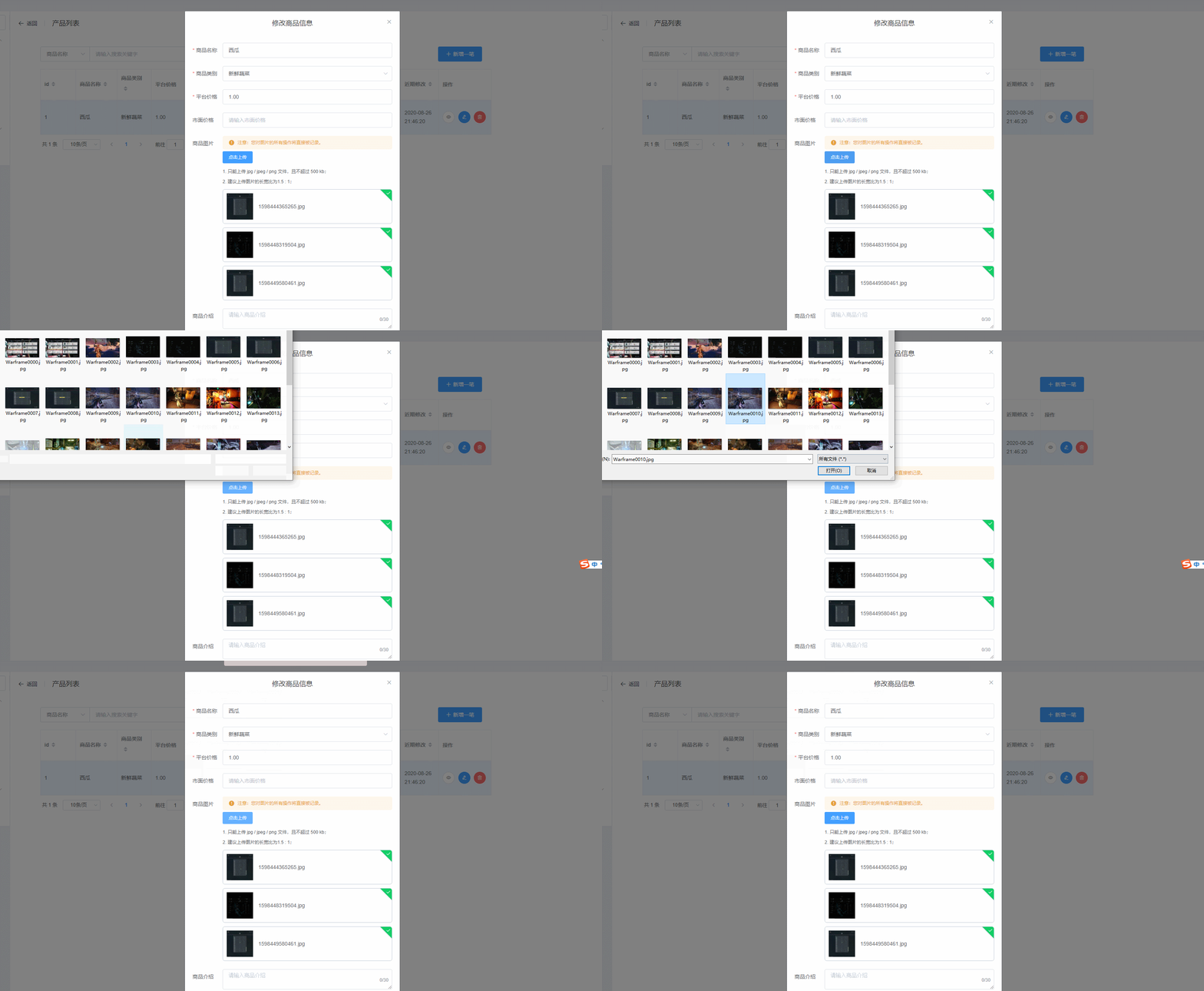
完整的组件代码如下:
讯享网<template> <el-upload ref="uploadList" class="text-l" :action="action" :file-list="fileList" :auto-upload="false" list-type="picture" :limit="limit" :on-change="change" :on-exceed="handleExceed" :on-remove="handleRemove" :on-success="handleSuccess" > <el-button size="small" type="primary">点击上传</el-button> <div slot="tip" class="el-upload__tip"> <p>1. 只能上传 jpg / jpeg / png 文件,且不超过 500 kb;</p> <p>2. 建议上传图片的长宽比为1.5 : 1;</p> </div> </el-upload> </template> <script> export default {
     name: "uploadImageList", props: {
     action: {
     type: String, }, imageUrlList: {
     type: Array, }, }, data() {
     return {
     fileList: [], limit: 4, }; }, watch: {
     imageUrlList(list) {
     this.fileList = []; list.forEach((element) => {
     this.fileList.push({
     name: element, url: `${
      this.$store.state.server_url}/upload/${
      element}`, }); }); }, }, mounted() {
     this.imageUrlList.forEach((element) => {
     this.fileList.push({
     name: element, url: `${
      this.$store.state.server_url}/upload/${
      element}`, }); }); }, methods: {
     change(file, fileList){
     const typeList = ["image/jpeg","image/png", "image/jpg"] const isLt2M = file.raw.size / 1024 / 1024 < 0.5; if (typeList.indexOf(file.raw.type) < 0) {
     this.$message.error("上传图片只能是 jpg / png / jpeg 格式!"); fileList.pop(); this.fileList = fileList; return false; } if (!isLt2M) {
     this.$message.error("上传图片大小不能超过 500 kb!"); fileList.pop(); this.fileList = fileList; return false; } this.$refs['uploadList'].submit(); }, handleExceed() {
     this.$message({
     message: `一个商品只能添加${
      this.limit}张图片。`, type: "warning", }); }, handleSuccess(res, file, fileList) {
     console.log(fileList); console.log(res); fileList.forEach((element) => {
     if (element.response) {
     element.name = element.response.data; this.imageUrlList.push(element.response.data); } }); this.$emit("updateImgSrcList", this.imageUrlList); }, handleRemove(file) {
     this.$emit("delUploadImage", file.name); }, }, }; </script>
版权声明:本文内容由互联网用户自发贡献,该文观点仅代表作者本人。本站仅提供信息存储空间服务,不拥有所有权,不承担相关法律责任。如发现本站有涉嫌侵权/违法违规的内容,请联系我们,一经查实,本站将立刻删除。
如需转载请保留出处:https://51itzy.com/kjqy/119761.html