
概述
Trex是什么?
- 使用scapy来构建数据包模板;或者从pcap文件中读取数据包模板;
- 利用dpdk发送数据包;(重写指定变化的部分)
兼具了python构建流的效率和dpdk发包的高性能。
能做什么?
- 替换smartbit来做流量稳定性及压力测试和部分性能测试(不能做RFC2544测试);
- 构建复杂的数据流压测;
- 放大和回放数据包;
- 支持python接口调用测试仪,可以进行一些测试自动化的编排;
试用结论
优点:
- 非常强大,性能非常高的测试仪;
- 无状态方式下流量可以任意定义,秒杀其他商用测试仪;
- 有状态方式下,理论上通过回放包方式可以构建很复杂的流量,并且可以放大流量;
缺点:
- 与BPS一样,有状态的协议栈不是真实的,是通过回放数据包来模拟的,代理场景下,可能会有些回放失败的情况,而且相较于BPS,对于回放失败,缺少基于流的统计;
- 有学习成本,复杂一些流量情况,需要自己查官方文档来解决问题,也不排除有bug;
总结:
- 可以作为流量工具,构造背景流量;
- 无状态模式的统计很精确,可以用来测试驱动等;
- 不能等同于真实业务!真实的客户端服务器测试必不可少!
传送门
- 官方主页: https://trex-tgn.cisco.com/trex/doc/index.html
- github: https://github.com/cisco-system-traffic-generator
- scapy: https://scapy.readthedocs.io/en/latest/usage.html
安装说明
- 上传软件包到linux服务器上,解压到/opt目录下
- ./dpdk_setup_ports.py -t 确定一下要划入测试仪的接口pci号:
| ID | NUMA | PCI | MAC | Name | Driver | Linux IF | Active | +====+======+=========+===================+=============+=========+==========+==========+ | 0 | -1 | 03:00.0 | 00:10:f3:66:1b:99 | Device 10fb | igb_uio | | | +----+------+---------+-------------------+-------------+---------+----------+----------+ | 1 | -1 | 03:00.1 | 00:10:f3:66:1b:9a | Device 10fb | igb_uio | | | +----+------+---------+-------------------+-------------+---------+----------+----------+ | 2 | -1 | 04:00.0 | 00:10:f3:66:1b:9b | Device 10fb | igb_uio | | | +----+------+---------+-------------------+-------------+---------+----------+----------+ | 3 | -1 | 04:00.1 | 00:10:f3:66:1b:9c | Device 10fb | igb_uio | | | +----+------+---------+-------------------+-------------+---------+----------+----------+ 讯享网
- 创建配置文件
讯享网[root@localhost v2.81]# cat /etc/trex_cfg.yaml Config file generated by dpdk_setup_ports.py - version: 2 port_limit: 4 rx_desc: 4096 tx_desc: 4096 interfaces: ['03:00.0', '03:00.1'] port_info: - ip: 1.1.1.2 default_gw: 1.1.1.1 - ip: 2.2.2.2 default_gw: 2.2.2.1
- 启动测试仪服务端,使用trex-stateless-gui客户端连接测试仪:./t-rex-64 -i
工作模式
stateless - STL
- l2 为2层模式,需要改变mac,vlan等可以用二层模式转发;
- l3 为3层模式,port上的有固定的IP地址,并且指定了网关地址,可以回复ARP;
默认使用l3模式即可。
stateful - STF
有状态的发包,类似于BPS测试仪。
将一条流的client和server数据包分开发送,DUT上能建立完整的会话,因此这个状态是模拟的有状态;
简述工作流:
- 数据包中提取流,解析出client和server(UDP第一个包为client,TCP syn为client);
- yaml文件中定义好client和server的范围,指定回放哪些数据包;
- 重写数据包需要变化的字段,发送数据包;
yaml样例:
cat cap2/dns_test.yaml - duration : 10.0 generator : distribution : "seq" clients_start : "16.0.0.1" 1 clients_end : "16.0.0.255" servers_start : "48.0.0.1" 2 servers_end : "48.0.0.255" clients_per_gb : 201 min_clients : 101 dual_port_mask : "1.0.0.0" tcp_aging : 1 udp_aging : 1 cap_info : - name: cap2/dns.pcap 3 cps : 1.0 4 ipg : 10000 5 rtt : 10000 6 w : 1 数据包样例:

讯享网
- 官方文档参考: https://trex-tgn.cisco.com/trex/doc/trex_manual.html
- IPv6 支持: https://trex-tgn.cisco.com/trex/doc/trex_manual.html#_ipv6_support
另外还有一个ASTF模式(Advance STF),会使用socket来回放报文。 暂时没有研究。
对比
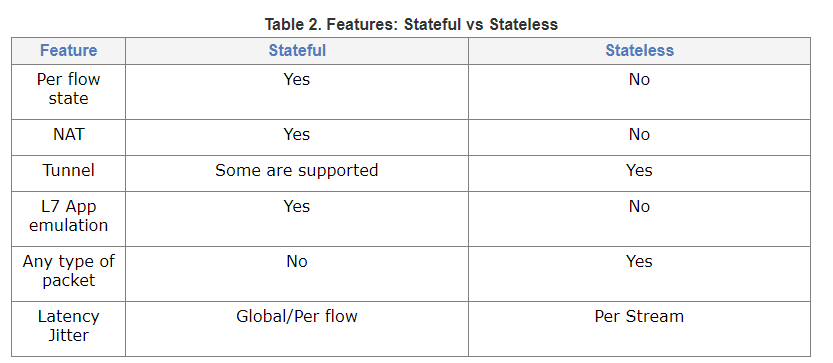
实操举例
环境准备
- 安装好Trex;
- 配置好port的pci号及IP地址, 如下:
讯享网[firewall@localhost v2.81]$ cat /etc/trex_cfg.yaml Config file generated by dpdk_setup_ports.py - version: 2 port_limit: 4 rx_desc: 4096 tx_desc: 4096 interfaces: ['03:00.0', '03:00.1', '04:00.0', '04:00.1'] port_info: - ip: 1.1.1.2 default_gw: 1.1.1.1 - ip: 2.2.2.2 default_gw: 2.2.2.1 - ip: 3.3.3.2 default_gw: 3.3.3.1 - ip: 4.4.4.2 default_gw: 4.4.4.1 platform: master_thread_id: 0 latency_thread_id: 1 dual_if: - socket: 0 threads: [2] - socket: 0 threads: [3]
注意:
- port的ip在port进入service模式后,可以响应ARP请求;
- port上指定的default_gw, 即直连设备配置的地址,所有发送的数据包,如果不是特别定义,默认都会发向default_gw;
STL 使用案例
无状态方式发包,可以使用两种客户端: trex-stateless-gui (图形界面)和trex-console(交互式命令行)。无论使用哪一种,都需要先启动测试仪,开启服务: sudo ./t-rex-64 -i
拓扑环境:
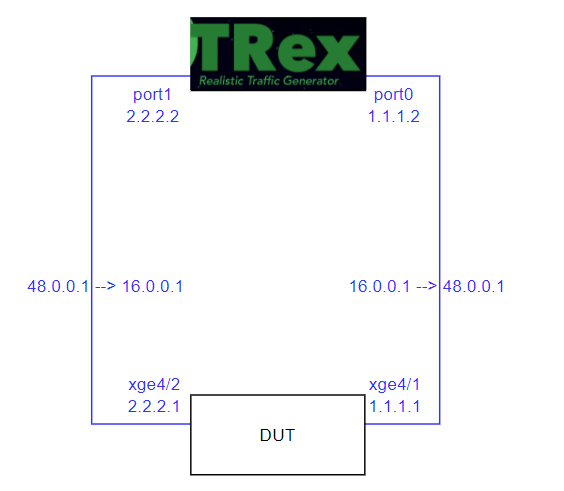
如上图,我们使用Trex的一对port与DUT直连,模拟的流量见图示;
DUT上需要配置
- 接口上IP地址:
interface xge4/1 ip address 1.1.1.1/24 ! interface xge4/2 ip address 2.2.2.1/24 ! - 去往Trex各port模拟的网段的路由:
讯享网ip route 16.0.0.0/8 1.1.1.2 ip route 48.0.0.0/8 2.2.2.2
注意stl工作模式下,设置port为service模式,port可以回复ARP请求以及IPv6的NS请求。
例子1: 图形界面控制
使用图形界面控制测试仪,构造并发送20条UDP流。
操作步骤:
- 管理员方式运行trex-stateless-gui, 连接服务器
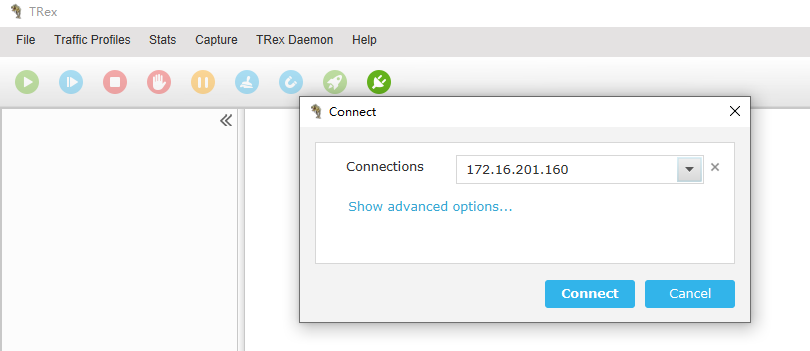
- 占用端口
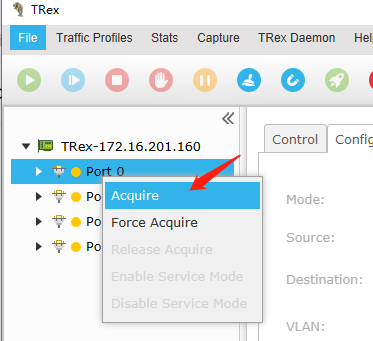
- 配置control
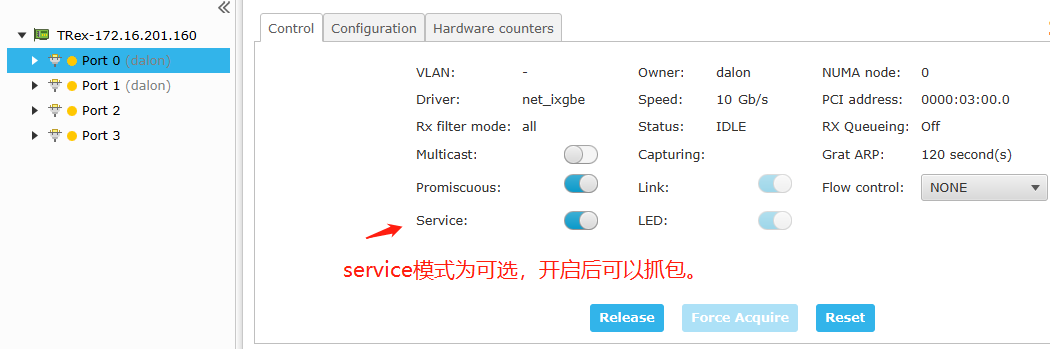
- 配置config
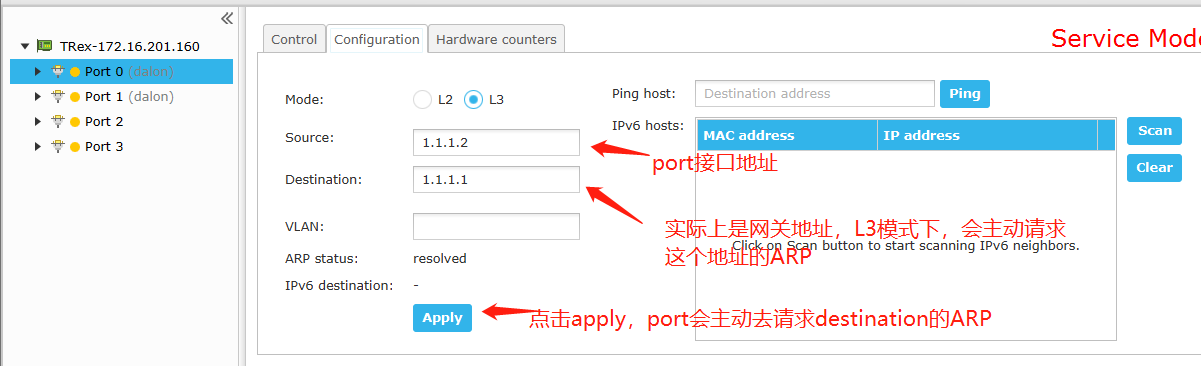
- 新建profile
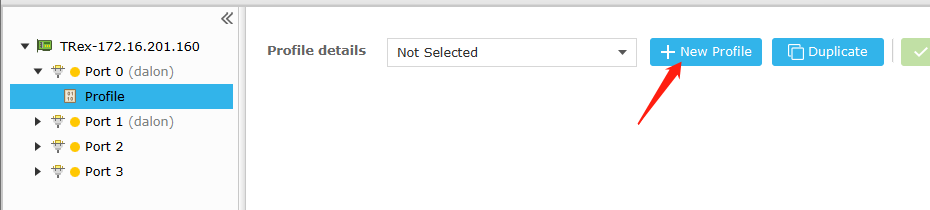
- 新建流
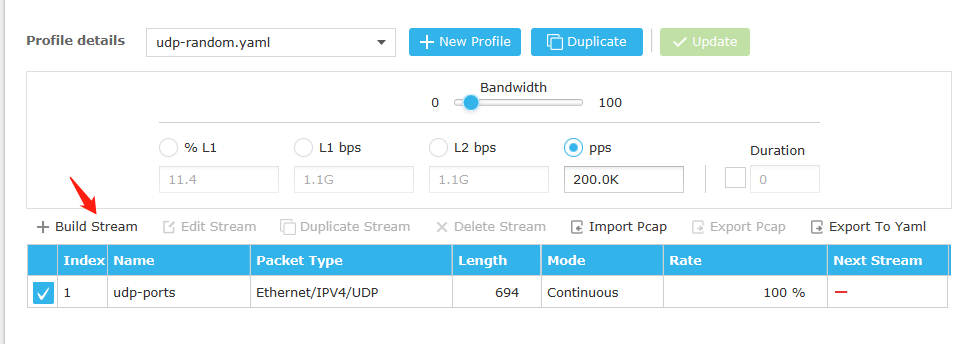
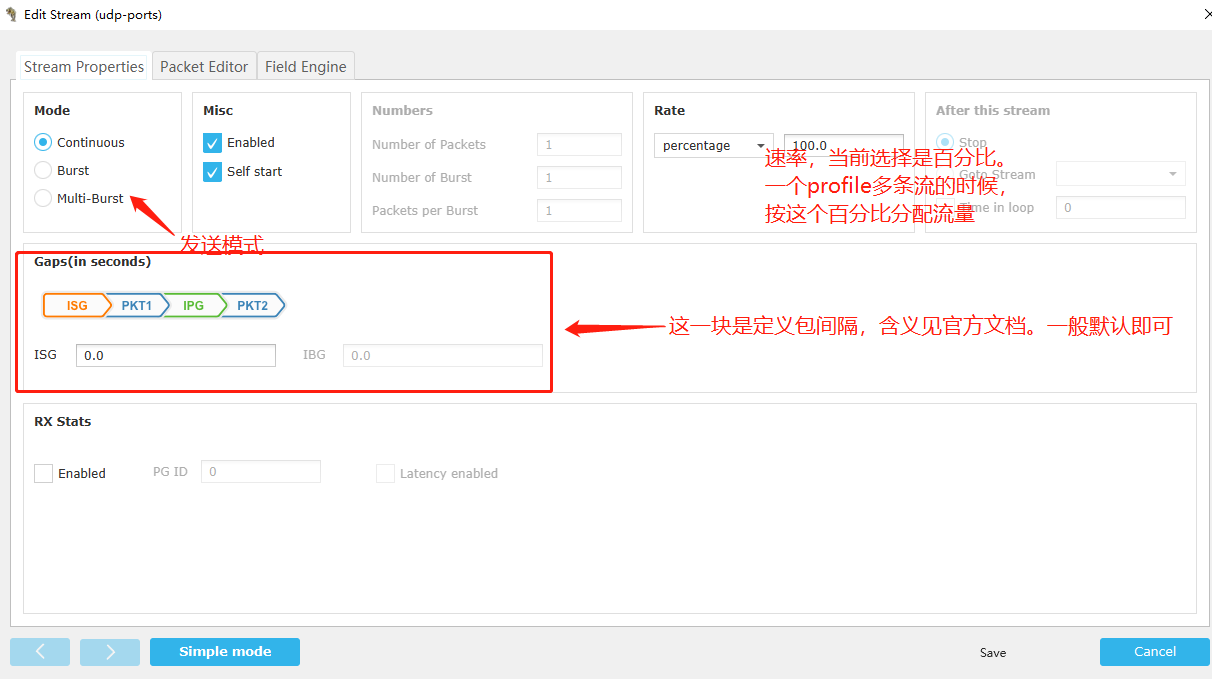

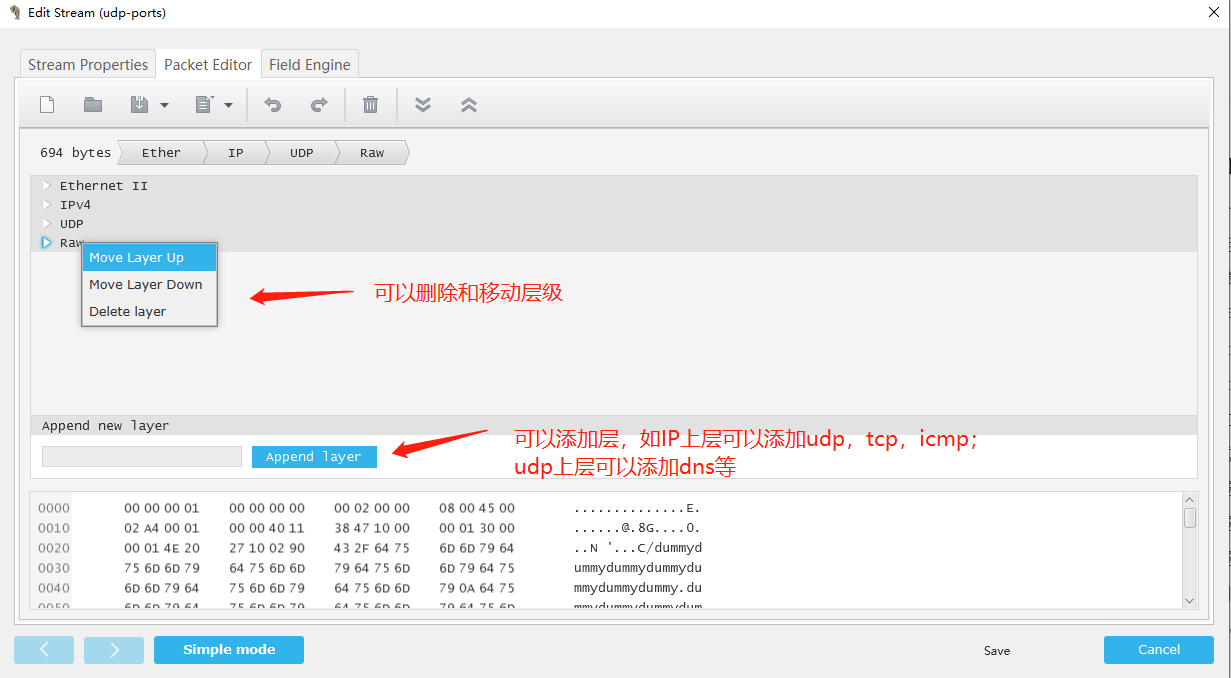
定义源IP为16.0.0.1, 目的IP为48.0.0.1;源端口为10000, 目的端口为20000
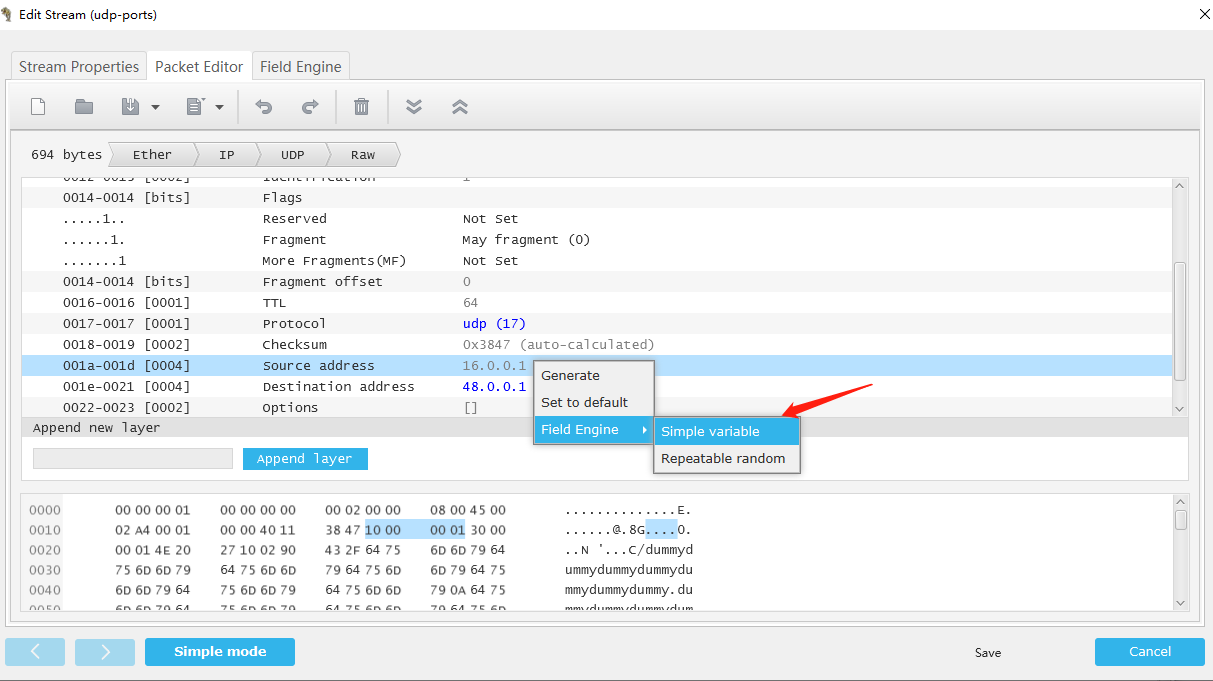
- 将ip_src,从16.0.0.1 到16.0.0.20 变化
IP地址变化,校验和需要定义成自动计算:
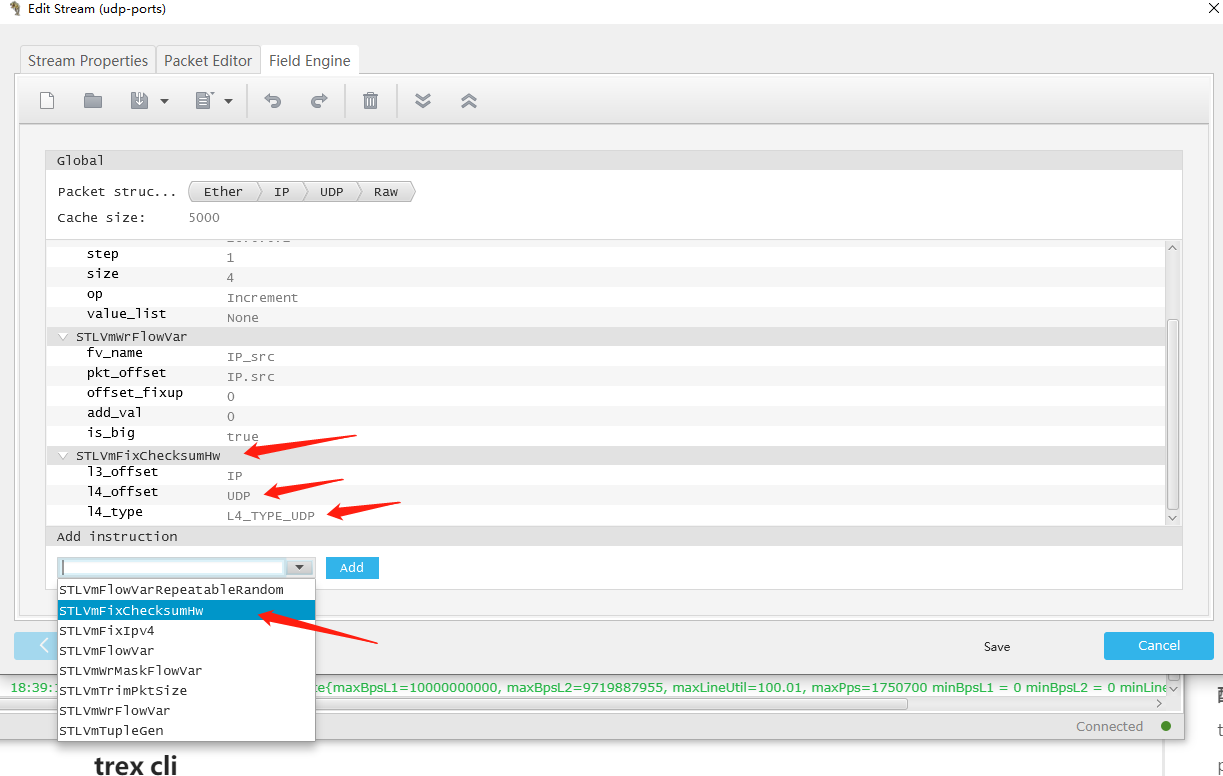
点击下边的save按钮,保存;
- port1同理进行编辑,将源目标IP、post与port0的调换一下,这样双向流量就组成了完整会话了。
- 配置流量发送大小:
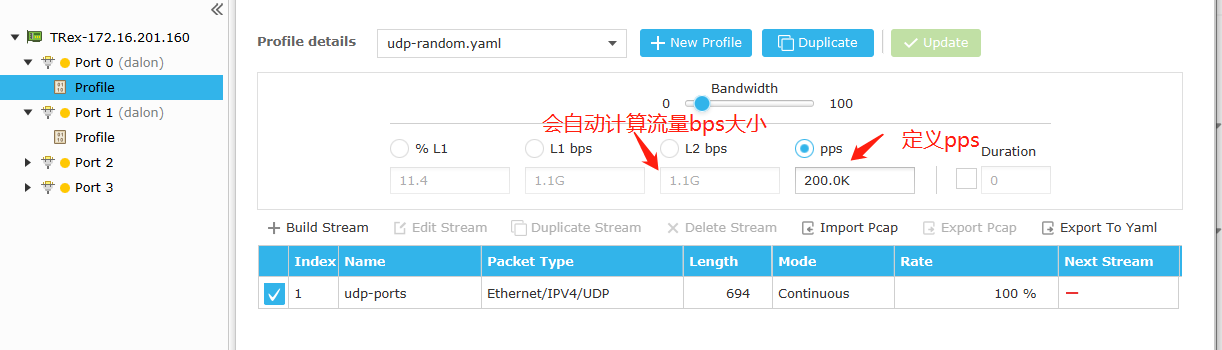
- 每个port都点击运行,发送流量
流量统计:
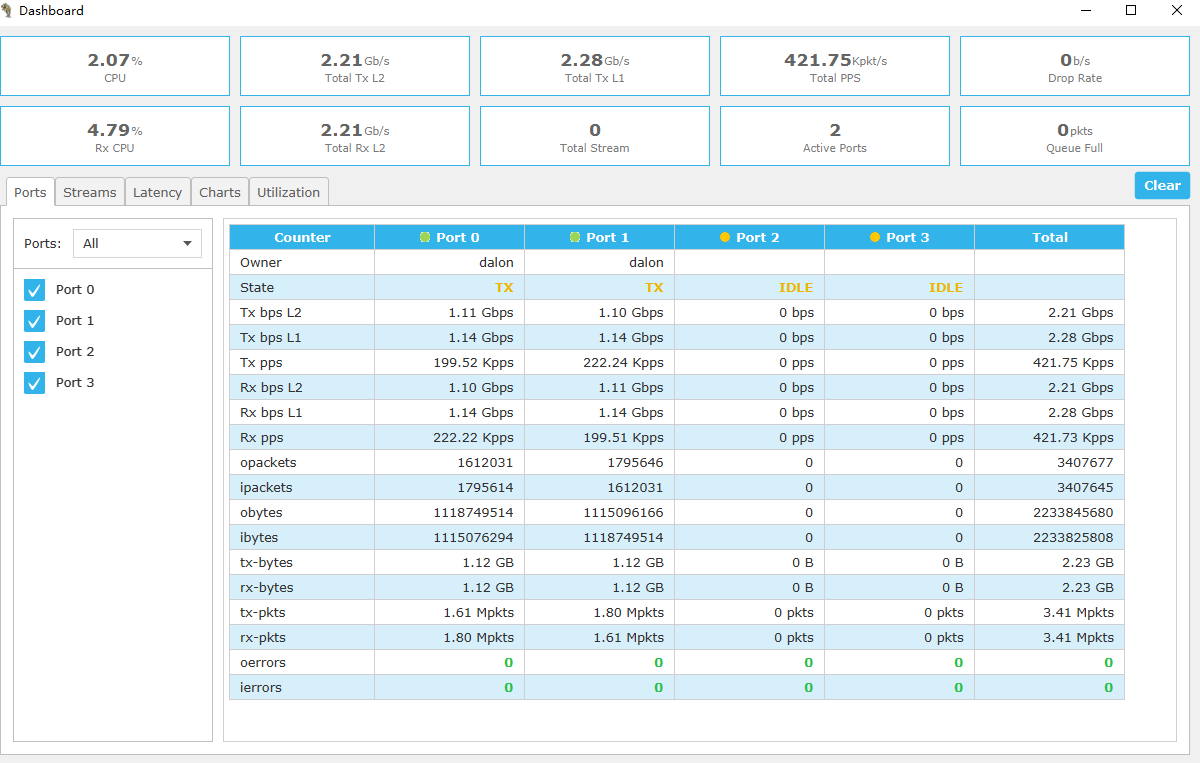
例子2: 命令行方式发送流量
本例使用命令行方式来发送流量,有必要先介绍一下trex-console。
trex-console简介
官方文档: https://trex-tgn.cisco.com/trex/doc/trex_stateless.html
trex-console 是一个交互式的命令行客户端。使用命令行方式登录到测试仪,可以完成trex-stateless-gui的所有功能,并且提供更加灵活的数据包模板构建方法:
大概工作流如下:
- 定义好python的数据包模板;
- 使用trex-console命令行指定模板发送数据包;
scapy构建数据包模板(源码预置的python脚本放在stl目录下):
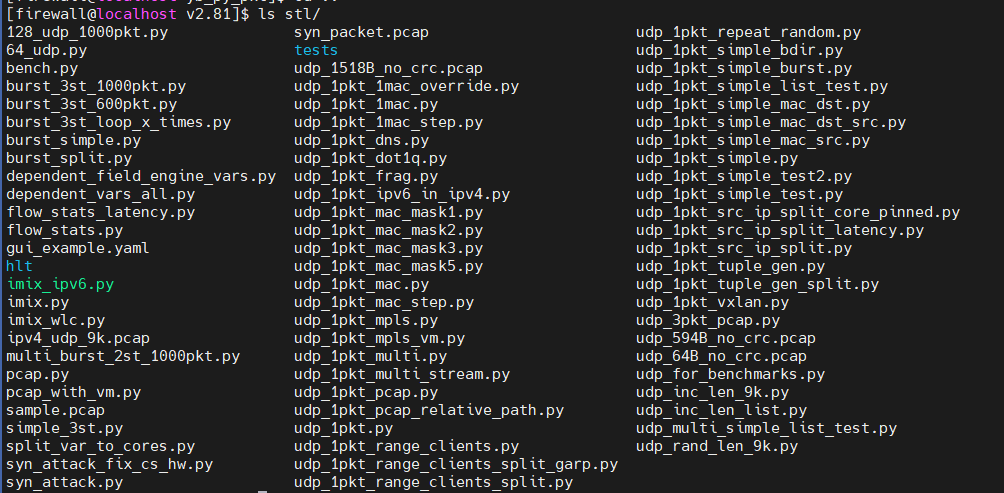
- 需要注意的是,官方提供的数据模板,源IP为16.0.0.1,目的IP为48.0.0.1,因此设备上需要对这两个网段配置好路由: ip route 16.0.0.0/8 port0_ip, ip route 48.0.0.0/8 port1_ip
- 数据包模板的参考文档
https://trex-tgn.cisco.com/trex/doc/trex_stateless.html#_traffic_profile_tutorials
操作步骤:
- 连接到测试仪:
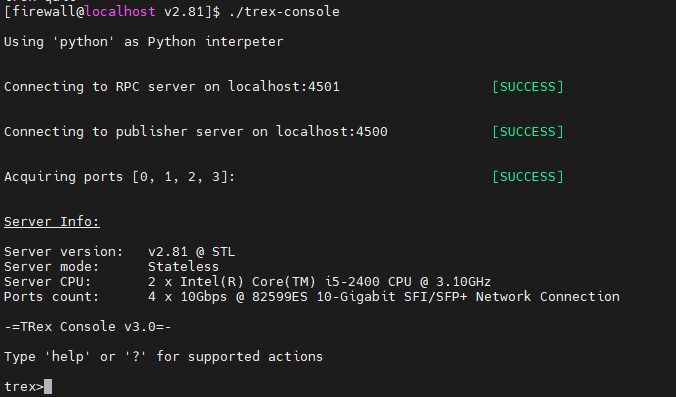
- 开启service模式(service模式下,port才会响应ARP请求)
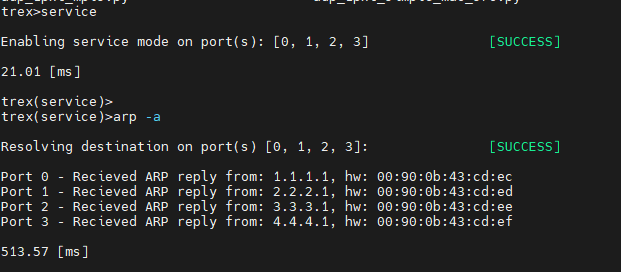
- arp -a命令后,设备上可以看到arp表项产生;
- service --off 可以停止service模式;
- portattr --prom on 开启混杂模式;
- portattr -p 0 查看port0的端口属性;
- 指定p0发送流量(service模式下需要–force)
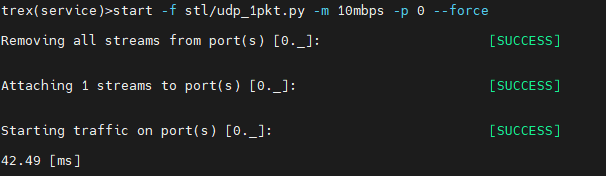
- 使用tui命令查看统计
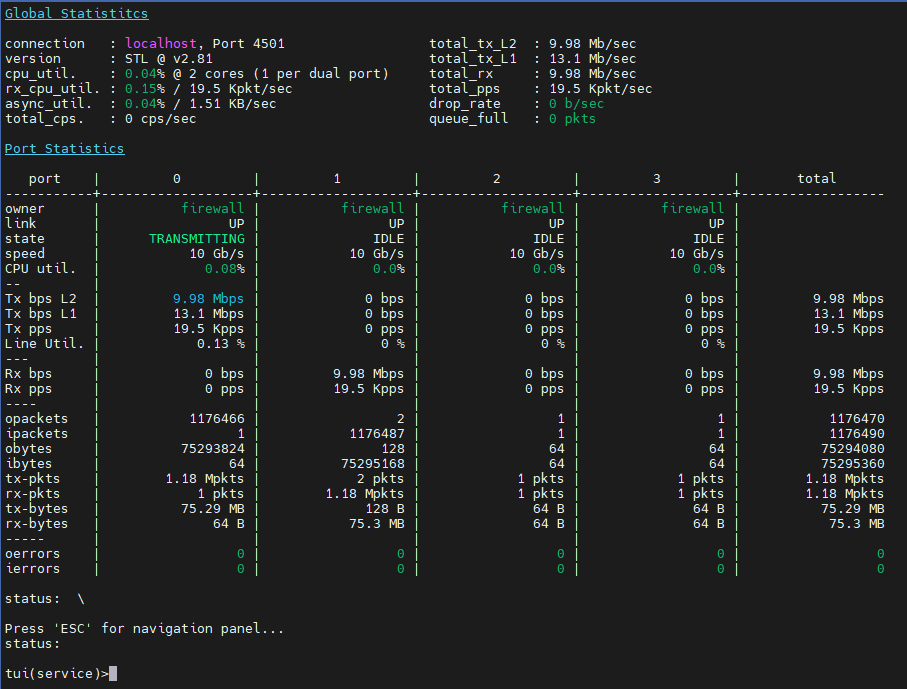
- ESC可以唤出菜单,可以clear统计以及退出;
- 其他常用命令:
- pause -a 可以停止所有流量发送;
- resume -a 可以恢复所有流量
- stop -a 停止所有流量
例子3: 自定义py流量模板
建议新建一个文件夹,用来存放自己的流量模板: 例如mkdir /opt/trex/v2.81/yb_py_pkt
操作步骤:
- 进入该文件夹,创建一个流模板文件:
# cat yb_py_pkt/udp_vxlan_dir.py # -*- coding: utf-8 -*- from scapy.layers.vxlan import VXLAN from trex_stl_lib.api import * """ vxlan 双向stream模板 """ class STLS1(object): def __init__(self): pass def create_stream(self): return STLStream( packet=STLPktBuilder( pkt=Ether() / IP() / UDP() / VXLAN(vni=1008) / Ether() / IP() / UDP() / ('x' * 100) ), mode=STLTXCont()) def get_streams(self, direction=0, kwargs): # create 1 stream if direction == 0: src_ip = "16.0.0.1" dst_ip = "48.0.0.1" sport = 3399 dport = 4798 else: src_ip, dst_ip = dst_ip, src_ip sport, dport = dport, sport pkt = STLPktBuilder( pkt = Ether() / IP(src=src_ip, dst=dst_ip) / UDP(sport=sport, dport=dport) / VXLAN(vni=1008) / Ether() / IP() / UDP() / ('x'*100) ) return [STLStream(packet=pkt, mode=STLTXCont())] def register(): return STLS1() - 进入trex-console命令行,发送流量
trex(service)>start -f yb_py_pkt/udp_vxlan_dir.py -m 10kbps -p 0 1 --force
附:抓包方法
讯享网trex(service)>capture record start --rx 3 --limit 200 1 Starting packet capturing up to 200 packets [SUCCESS] * Capturing ID is set to '4' * 2 * Please call 'capture record stop --id 4 -o <out.pcap>' when done * trex(service)>capture 3 Active Recorders ID | Status | Packets | Bytes | TX Ports | RX Ports ------------------------------------------------------------------------------------------------------ 4 | ACTIVE | [0/200] | 0 B | - | 3 trex(service)>start -f stl/imix.py -m 1kpps -p 0 --force 4 Removing all streams from port(s) [0]: [SUCCESS] Attaching 3 streams to port(s) [0]: [SUCCESS] Starting traffic on port(s) [0]: [SUCCESS] 20.42 [ms] trex(service)>capture 5 Active Recorders ID | Status | Packets | Bytes | TX Ports | RX Ports ------------------------------------------------------------------------------------------------------ 4 | ACTIVE | [200/200] | 74.62 KB | - | 3 trex(service)>capture record stop --id 4 -o /tmp/rx_3.pcap 6 Stopping packet capture 4 [SUCCESS] Writing 200 packets to '/tmp/rx_3.pcap' [SUCCESS] Removing PCAP capture 4 from server [SUCCESS] trex(service)>
STF 使用案例
拓扑环境
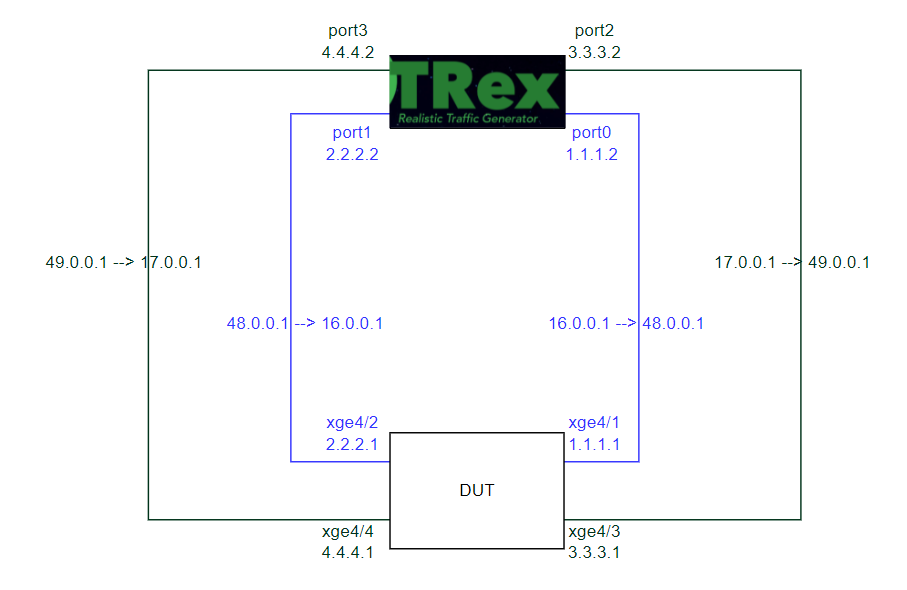
如上,Trex使用4个port,与DUT连好线路。
DUT上需要配置:
- 设备接口IP地址
interface xge4/1 ip address 1.1.1.1/24 ! interface xge4/2 ip address 2.2.2.1/24 ! interface xge4/3 ip address 3.3.3.1/24 allow ping ! interface xge4/4 ip address 4.4.4.1/24 allow ping - 去往Trex port模拟的网段的路由:
讯享网ip route 16.0.0.0/8 1.1.1.2 ip route 48.0.0.0/8 2.2.2.2 ip route 17.0.0.0/8 3.3.3.2 ip route 49.0.0.0/8 4.4.4.2
- Trex port的地址的静态ARP(IPV6的话,需要配置静态ndp, 我们暂时不支持)
Trex port的mac地址我们可以这样获得: [root@localhost v2.81]# ./dpdk_setup_ports.py -t +----+------+---------+-------------------+-------------+---------+----------+----------+ | ID | NUMA | PCI | MAC | Name | Driver | Linux IF | Active | +====+======+=========+===================+=============+=========+==========+==========+ | 0 | -1 | 03:00.0 | 00:10:f3:66:1b:99 | Device 10fb | igb_uio | | | +----+------+---------+-------------------+-------------+---------+----------+----------+ | 1 | -1 | 03:00.1 | 00:10:f3:66:1b:9a | Device 10fb | igb_uio | | | +----+------+---------+-------------------+-------------+---------+----------+----------+ | 2 | -1 | 04:00.0 | 00:10:f3:66:1b:9b | Device 10fb | igb_uio | | | +----+------+---------+-------------------+-------------+---------+----------+----------+ | 3 | -1 | 04:00.1 | 00:10:f3:66:1b:9c | Device 10fb | igb_uio | | | +----+------+---------+-------------------+-------------+---------+----------+---------- 然后设备上配置: arp static 1.1.1.2 00-10-f3-66-1b-99 arp static 2.2.2.2 00-10-f3-66-1b-9a arp static 3.3.3.2 00-10-f3-66-1b-9b arp static 4.4.4.2 00-10-f3-66-1b-9c 例子1: 发送混合流量
完成上面的环境配置后,发送混合流,非常简单:
- 进入trex路径下,执行命令:
./t-rex-64 -f cap2/sfr.yaml -m 1 -d 100
讯享网./t-rex-64 -f cap2/sfr.yaml -m 1 -d 100 -Per port stats table ports | 0 | 1 | 2 | 3 ----------------------------------------------------------------------------------------- opackets | 53675 | 54998 | 53618 | 54967 obytes | | | | ipackets | 54998 | 53675 | 54967 | 53618 ibytes | | | | ierrors | 0 | 0 | 0 | 0 oerrors | 0 | 0 | 0 | 0 Tx Bw | 34.56 Mbps | 93.39 Mbps | 34.51 Mbps | 93.43 Mbps -Global stats enabled Cpu Utilization : 0.7 % 38.1 Gb/core Platform_factor : 1.0 Total-Tx : 255.89 Mbps Total-Rx : 255.81 Mbps Total-PPS : 59.74 Kpps Total-CPS : 2.25 Kcps Expected-PPS : 300.64 Kpps Expected-CPS : 4.51 Kcps Expected-BPS : 1.06 Gbps Active-flows : 1600 Clients : 254 Socket-util : 0.0100 % Open-flows : 8580 Servers : 65534 Socket : 1600 Socket/Clients : 6.3 drop-rate : 0.00 bps current time : 4.7 sec test duration : 95.3 sec
- 我们挑一个比较简单的yaml文件,来看看
[root@localhost v2.81]# cat cap2/http.yaml - duration : 0.1 generator : distribution : "seq" clients_start : "16.0.0.1" clients_end : "16.0.1.255" servers_start : "48.0.0.1" servers_end : "48.0.255.255" clients_per_gb : 201 min_clients : 101 dual_port_mask : "1.0.0.0" # 多对port时,第二对端口IP变化的方法 tcp_aging : 0 udp_aging : 0 cap_ipg : true # 是否遵循pcap包的时间间隔 cap_info : - name: avl/delay_10_rtp_160k_full.pcap # 指定回放的数据包 cps : 2.776 ipg : 10000 rtt : 10000 w : 1 plugin_id : 1 # 上述的pcap文件可以多个,就可以组成复杂的混合流了 例子2: 回放oracle数据包
- 抓取数据包,注意一定要是一条完整的流(TCP需要包含三次握手);
- 建议新建一个文件夹,来存放数据包,例如 mkdir yb_stf, 将数据包上传到该文件夹下;
- 在yb_stf下新建一个oracle.yaml文件
讯享网[root@localhost v2.81]# cat yb_stf/oracle.yaml - duration : 0.1 generator : distribution : "seq" clients_start : "16.0.0.1" clients_end : "16.0.0.255" servers_start : "48.0.0.1" servers_end : "48.0.0.10" clients_per_gb : 201 min_clients : 101 dual_port_mask : "1.0.0.0" tcp_aging : 0 udp_aging : 0 cap_ipg : true cap_info : - name: yb_stf/oracle.pcap cps : 2.776 ipg : 10000 rtt : 10000 w : 1
- 发送流量:
./t-rex-64 -f yb_stf/oracle.yaml -m 1000 -d 100
其他
- 穿越SNAT, 命令带上 --learn-mode 1 就行了,server端的port会学习源地址;
- 其他实例请参考: https://trex-tgn.cisco.com/trex/doc/trex_manual.html#_introduction
版权声明:本文内容由互联网用户自发贡献,该文观点仅代表作者本人。本站仅提供信息存储空间服务,不拥有所有权,不承担相关法律责任。如发现本站有涉嫌侵权/违法违规的内容,请联系我们,一经查实,本站将立刻删除。
如需转载请保留出处:https://51itzy.com/kjqy/118533.html