
大数据工具之dbt
简介
ETL,是英文Extract-Transform-Load的缩写,用来描述将数据从来源端经过抽取(extract)、转换(transform)、加载(load)至目的端的过程。ETL一词较常用在数据仓库.
dbt 是一个很不错的进行ETL中的T处理的工具,灵活简单,我们需要写的就是select 语句,剩下的dbt 帮助我们进行处理
官网地址:https://docs.getdbt.com/
环境要求
1、Python版本需要3.7及以上
2、需要拉取国外镜像,有可能失败,添加国内镜像 daocloud镜像加速器:
curl -sSL https://get.daocloud.io/daotools/set_mirror.sh | sh -s http://d1d9aef0.m.daocloud.io 该脚本可以将 --registry-mirror 加入到你的 Docker 配置文件 /etc/docker/daemon.json 中 讯享网
Docker安装
github地址:https://github.com/dbt-labs/dbt-core/tree/v1.0.0/docker
因为dbt一般依赖定时任务驱动执行数据转换,所以在官方的基础镜像上将crontab打包进去,一共四个文件(注意路径目录):
crontab
讯享网# /etc/crontab: system-wide crontab # Unlike any other crontab you don't have to run the `crontab' # command to install the new version when you edit this file # and files in /etc/cron.d. These files also have username fields, # that none of the other crontabs do. SHELL=/bin/sh PATH=/usr/local/sbin:/usr/local/bin:/sbin:/bin:/usr/sbin:/usr/bin # Example of job definition: # .---------------- minute (0 - 59) # | .------------- hour (0 - 23) # | | .---------- day of month (1 - 31) # | | | .------- month (1 - 12) OR jan,feb,mar,apr ... # | | | | .---- day of week (0 - 6) (Sunday=0 or 7) OR sun,mon,tue,wed,thu,fri,sat # | | | | | # * * * * * user-name command to be executed #17 * * * * root cd / && run-parts --report /etc/cron.hourly #25 6 * * * root test -x /usr/sbin/anacron || ( cd / && run-parts --report /etc/cron.daily ) #47 6 * * 7 root test -x /usr/sbin/anacron || ( cd / && run-parts --report /etc/cron.weekly ) #52 6 1 * * root test -x /usr/sbin/anacron || ( cd / && run-parts --report /etc/cron.monthly ) #每小时执行一次dbt项目 0 0 0/1 * * root cd /usr/app/dbt_project && dbt run > /var/log/dbt-crontab.log 2>&1
Dockerfile
ARG BASE_IMAGE=python:3.8-slim-bullseye FROM $BASE_IMAGE RUN apt-get update \ && apt-get dist-upgrade -y \ && apt-get install -y --no-install-recommends \ git \ ssh-client \ software-properties-common \ make \ build-essential \ ca-certificates \ libpq-dev \ cron \ vim \ && apt-get clean \ && rm -rf /var/lib/apt/lists/* /tmp/* /var/tmp/* COPY ./requirements.txt / COPY ./entrypoint.sh / RUN chmod +x entrypoint.sh RUN pip install --upgrade pip setuptools RUN pip install --requirement requirements.txt ENV PYTHONIOENCODING=utf-8 ENV LANG C.UTF-8 WORKDIR /usr/app VOLUME /usr/app RUN /etc/init.d/cron start ENTRYPOINT ["/entrypoint.sh"] entrypoint.sh
讯享网#!/bin/bash set -x # 保存环境变量,开启crontab服务 env >> /etc/default/locale /etc/init.d/cron start /bin/bash
requirements.txt
agate==1.6.3 attrs==21.2.0 Babel==2.9.1 certifi==2021.10.8 cffi==1.15.0 charset-normalizer==2.0.8 click==8.0.3 colorama==0.4.4 dbt-core==1.0.0 dbt-extractor==0.4.0 dbt-postgres==1.0.0 future==0.18.2 hologram==0.0.14 idna==3.3 importlib-metadata==4.8.2 isodate==0.6.0 Jinja2==2.11.3 jsonschema==3.1.1 leather==0.3.4 Logbook==1.5.3 MarkupSafe==2.0.1 mashumaro==2.9 minimal-snowplow-tracker==0.0.2 msgpack==1.0.3 networkx==2.6.3 packaging==21.3 parsedatetime==2.4 psycopg2-binary==2.9.2 pycparser==2.21 pyparsing==3.0.6 pyrsistent==0.18.0 python-dateutil==2.8.2 python-slugify==5.0.2 pytimeparse==1.1.8 pytz==2021.3 PyYAML==6.0 requests==2.26.0 six==1.16.0 sqlparse==0.4.2 text-unidecode==1.3 typing-extensions==3.10.0.2 urllib3==1.26.7 Werkzeug==2.0.2 zipp==3.6.0 执行docker build,制作镜像:
讯享网docker build --tag dbt:v1.0.0 .
docker compose启动:
version: '3' services: dbt: image: dbt:v1.0.0 container_name: dbt volumes: - /root/docker_vol/dbt/app:/usr/app # dbt project - /root/docker_vol/dbt/dbt-profiles:/root/.dbt # dbt profiles - /root/docker_vol/dbt/crontab-conf/crontab:/etc/crontab # crontab config tty: true stdin_open: true 构建项目
创建一个新的 dbt 项目
讯享网[root@paratera128 dbt]# docker exec -it dbt /bin/bash root@08fb74a70adf:/usr/app# dbt init dbt_project 07:05:56 Running with dbt=1.0.0 Which database would you like to use? [1] mariadb [2] mysql [3] mysql5 (Don't see the one you want? https://docs.getdbt.com/docs/available-adapters) Enter a number: 3 07:06:08 Profile dbt_project written to /root/.dbt/profiles.yml using target's sample configuration. Once updated, you'll be able to start developing with dbt. 07:06:08 Your new dbt project "dbt_project" was created! For more information on how to configure the profiles.yml file, please consult the dbt documentation here: https://docs.getdbt.com/docs/configure-your-profile One more thing: Need help? Don't hesitate to reach out to us via GitHub issues or on Slack: https://community.getdbt.com/ Happy modeling! root@08fb74a70adf:/usr/app# ls dbt_project logs
修改配置文件
进入挂载卷vol下profiles目录,修改profiles.yml文件,根据target修改对应环境配置即可:
dbt_project: target: dev outputs: dev: type: mysql server: 192.168.137.128 port: 3306 database: matomo schema: matomo username: root password: root driver: MySQL ODBC 8.0 ANSI Driver prod: type: mysql server: [server/host] port: [port] # optional database: [schema] # optional, should be same as schema schema: [schema] username: [username] password: [password] driver: MySQL ODBC 8.0 ANSI Driver 调试测试
讯享网root@08fb74a70adf:/usr/app# dbt debug 07:35:34 Running with dbt=1.0.0 dbt version: 1.0.0 python version: 3.8.12 python path: /usr/local/bin/python os info: Linux-3.10.0-1160.el7.x86_64-x86_64-with-glibc2.2.5 Using profiles.yml file at /root/.dbt/profiles.yml Using dbt_project.yml file at /usr/app/dbt_project.yml Configuration: profiles.yml file [OK found and valid] dbt_project.yml file [OK found and valid] Required dependencies: - git [OK found] Connection: server: 192.168.137.128 port: 3306 database: None schema: matomo user: root Connection test: [OK connection ok] All checks passed!
应用范例
有需求如下:
有原始表:matomo_log_visit,希望对数据进行如下处理
1、过滤数据,作为下一步的数据依据,因为只是过程数据,所以生成视图表:matomo_log_visit_material_view
2、从上一步视图数据中摘取有意义的字段插入物理表:matomo_log_visit_material
3、为了优化性能,希望对于产生的数据希望是以增量的形式生成

从dbt_project.yml项目配置文件可以看出,dbt run执行的脚本路径如下:
models: dbt_project: # Config indicated by + and applies to all files under models/example/ example: +materialized: table #如果.sql脚本不指定类型,默认生成table dbt 执行models脚本,生成的视图或者物理表名称都跟脚本名称一样,所以两步处理脚本如下:
matomo_log_visit_material_view.sql
讯享网{


  { config(materialized='view')}} SELECT a.*,now() as create_time FROM matomo.matomo_log_visit a WHERE idsite = 1 and visit_total_time > 0
matomo_log_visit_material.sql
select idvisit,idsite,user_id,visit_first_action_time,visit_total_time,visit_goal_buyer,referer_type,location_ip,create_time from {


  { ref('matomo_log_visit_material_view') }}
设置执行顺序:
schema.yml
讯享网version: 2 models: - name: matomo_log_visit_material_view description: "A starter dbt model" columns: - name: idvisit description: "The primary key for this table" tests: - unique - not_null - name: matomo_log_visit_material description: "A starter dbt model" columns: - name: idvisit description: "The primary key for this table" tests: - unique - not_null
执行dbt run
root@1dc4f79d8882:/usr/app/dbt_project# dbt run 07:16:40 Running with dbt=1.0.0 07:16:41 Found 2 models, 4 tests, 0 snapshots, 0 analyses, 170 macros, 0 operations, 0 seed files, 0 sources, 0 exposures, 0 metrics 07:16:41 07:16:41 Concurrency: 1 threads (target='dev') 07:16:41 07:16:41 1 of 2 START view model matomo.matomo_log_visit_material_view................... [RUN] 07:16:41 1 of 2 OK created view model matomo.matomo_log_visit_material_view.............. [SUCCESS 0 in 0.09s] 07:16:41 2 of 2 START table model matomo.matomo_log_visit_material....................... [RUN] 07:16:41 2 of 2 OK created table model matomo.matomo_log_visit_material.................. [SUCCESS 8176 in 0.17s] 07:16:41 07:16:41 Finished running 1 view model, 1 table model in 0.32s. 07:16:41 07:16:41 Completed successfully 07:16:41 07:16:41 Done. PASS=2 WARN=0 ERROR=0 SKIP=0 TOTAL=2 可以看到分别生成了视图和物理表:
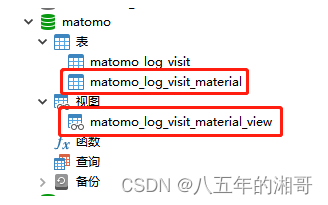
到这里,其实已经完成了前两步,第三步还没有达到增量的效果,这一点可以通过两次执行dbt run看出来,数据量没变,create_time时间变了,说明是整体更新,不是增量更新!
怎么处理呢?
首先:对于视图表来说,他只是一个虚拟存在的表,不涉及到物理表譬如寻址那种性能损耗比较大的问题,所以我们明确的可以知道要进行修改的脚本是matomo_log_visit_material.sql
然后,对于增量更新来说,常用的参照物是有序id,时间等字段
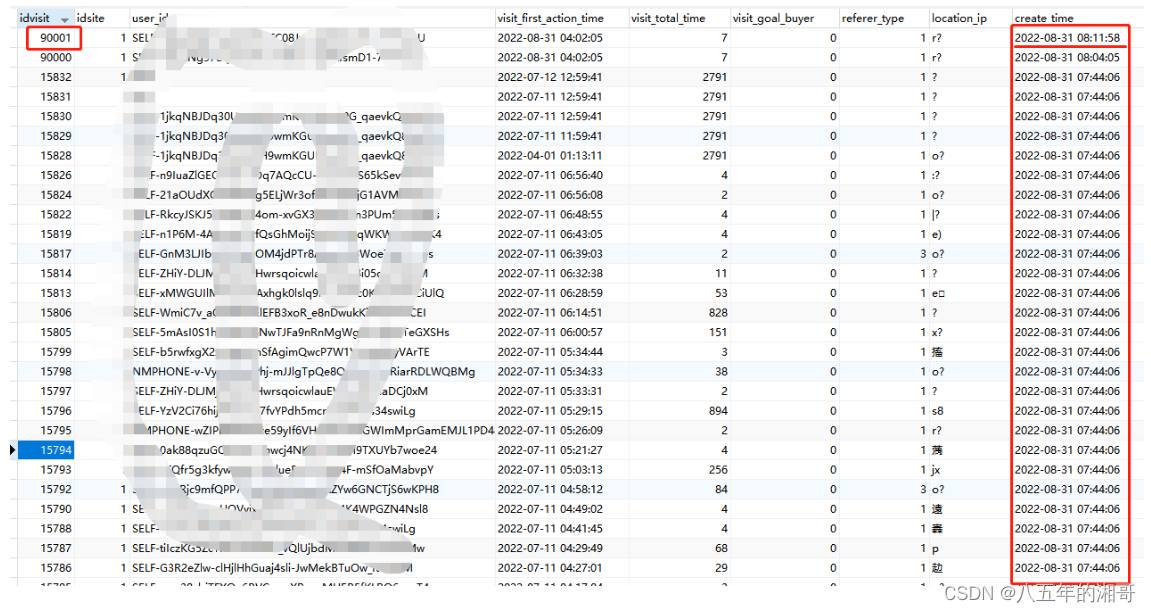
1、如果使用id,那么我们取最大id跟新行数据id比较,我们修改matomo_log_visit_material.sql如下:
讯享网{


  { config(materialized='incremental', unique_key='visit_first_action_time') }} select idvisit,idsite,user_id,visit_first_action_time,visit_total_time,visit_goal_buyer,referer_type,location_ip,create_time from {


  { ref('matomo_log_visit_material_view') }} {% if is_incremental() %} idvisit > (select max(idvisit) from {


  { this }}) {% endif %}
往原始表中新增一条数据,idvisit字段值比库中最大值还大,再次执行dbt run,你会发现并不会整体更新:
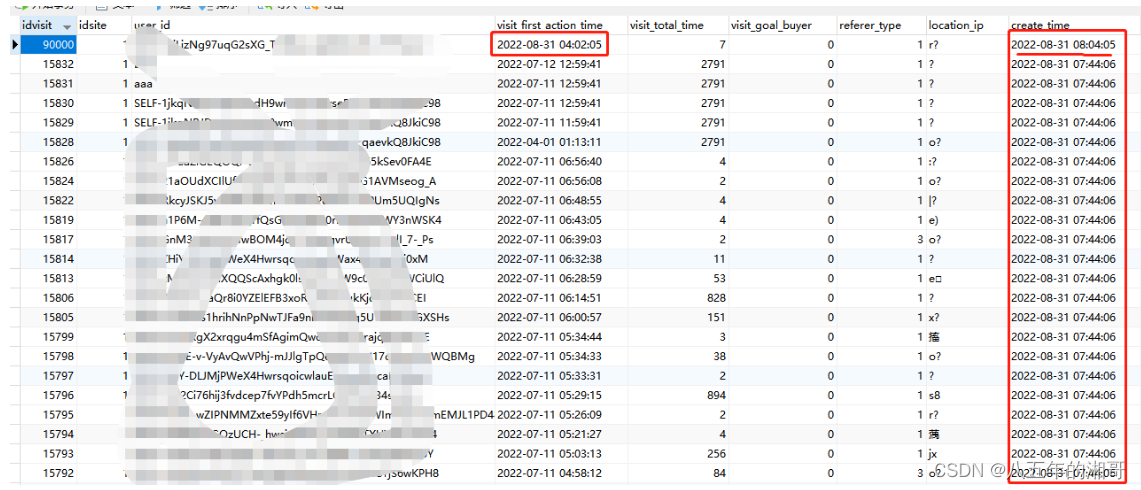
2、如果使用时间,我们可以取最大时间跟当前时间比较,我们修改matomo_log_visit_material.sql如下:
{


  { config(materialized='incremental', unique_key='visit_first_action_time') }} select idvisit,idsite,user_id,visit_first_action_time,visit_total_time,visit_goal_buyer,referer_type,location_ip,create_time from {


  { ref('matomo_log_visit_material_view') }} where {% if is_incremental() %} visit_first_action_time >= (select max(visit_first_action_time) from {


  { this }}) {% endif %}
往原始表新增一条数据,visit_first_action_time字段时间设置成比当前库中最大时间还大,再次执行dbt run,你会发现并不会整体更新:
项目文档
- 生成
讯享网root@1dc4f79d8882:/usr/app/dbt_project# dbt docs generate 09:11:41 Running with dbt=1.0.0 09:11:41 Found 2 models, 4 tests, 0 snapshots, 0 analyses, 170 macros, 0 operations, 0 seed files, 0 sources, 0 exposures, 0 metrics 09:11:41 09:11:42 Concurrency: 1 threads (target='dev') 09:11:42 09:11:42 Done. 09:11:42 Building catalog 09:11:42 Catalog written to /usr/app/dbt_project/target/catalog.json
- 部署(静态服务)
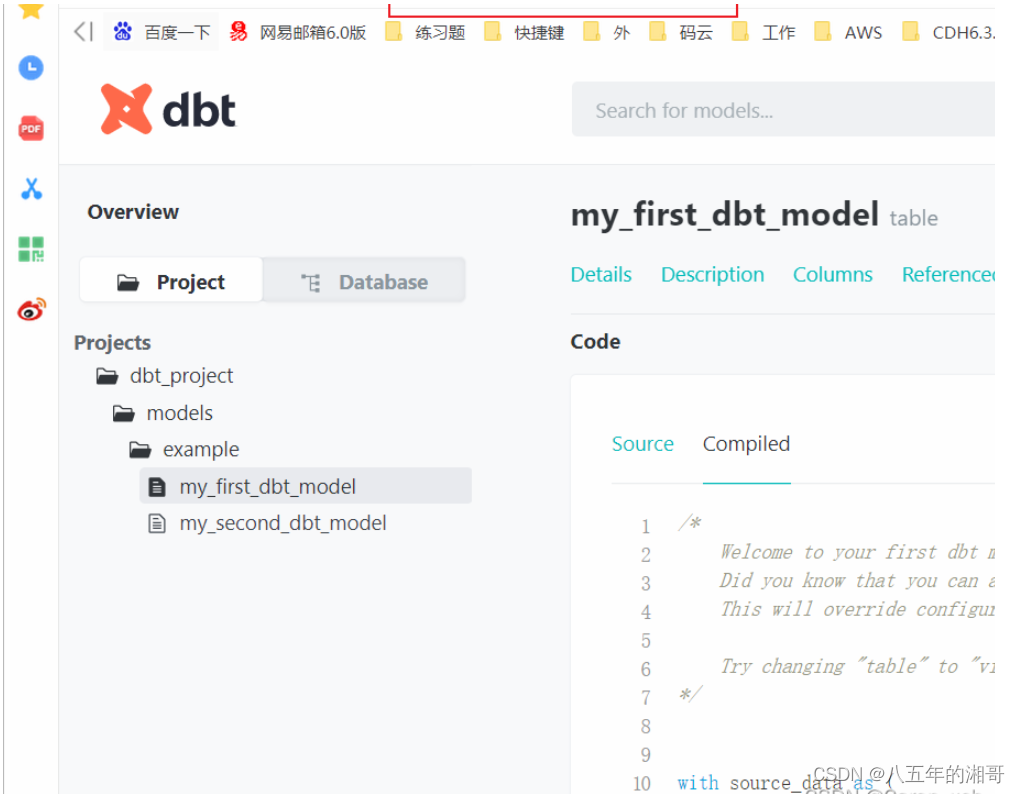
root@1dc4f79d8882:/usr/app/dbt_project# dbt docs serve 09:13:45 Running with dbt=1.0.0 09:13:45 Serving docs at 0.0.0.0:8080 09:13:45 To access from your browser, navigate to: http://localhost:8080 09:13:45 09:13:45 09:13:45 Press Ctrl+C to exit. - 访问

版权声明:本文内容由互联网用户自发贡献,该文观点仅代表作者本人。本站仅提供信息存储空间服务,不拥有所有权,不承担相关法律责任。如发现本站有涉嫌侵权/违法违规的内容,请联系我们,一经查实,本站将立刻删除。
如需转载请保留出处:https://51itzy.com/kjqy/117269.html