
二者相同点:都是存储大文件以及超大文件的,例如:大型文本信息,图片,电影等。
二者不同点:
- clob:主要存储大型文本信息,在MySQL中字段类型通常设置为text,默认大小,通常是字符流
- bolb:主要存储图片电影等大型信息,在MySQL中字段类型通常设置为blob,默认大小,通常是字节流
- 附加:在oracle中:Clob就是Clob,Blob就是Blob
Clob的操作:插入大型文件内容:
/ * 插入大文本文件:clob * @return */ public static int insertContext() {


   Connection conn = null; PreparedStatement st=null; int result=0; Reader r = null; try {


   conn=JdbcUtil.conn(); st=conn.prepareStatement("insert into t1(context) values(?)"); try {


          r=new FileReader("D:"+File.separator+"xxx"+File.separator+"xxx"+File.separator+"xxx"+File.separator+"Lesson 36"+File.separator+"Lesson 28.java"); } catch (FileNotFoundException e) {


   e.printStackTrace(); } st.setCharacterStream(1, r); result = st.executeUpdate(); } catch (SQLException e) {


   e.printStackTrace(); }finally {


   if(r!=null) {


   try {


   r.close(); } catch (IOException e) {


   e.printStackTrace(); } } JdbcUtil.close(conn, st); } return result; }
讯享网
要注意:添加的时候数据传输集使用st.setCharacterStream(),以字符流的形式从文件中读取出来插入到数据库中,当然,也可以使用setString(),但此时就得自己指定一个字符串了,而不再是以流的形式了。
Clob的操作:读取大型文件内容:
讯享网/ * 查询大文件 */ public static void selectContext(int id) {


   Connection conn = null; PreparedStatement st = null; ResultSet rs = null; try {


   conn=JdbcUtil.conn(); st=conn.prepareStatement("select context from t1 where id=?"); st.setInt(1, id); rs = st.executeQuery(); if(rs.next()) {


   Reader r = rs.getCharacterStream("context"); BufferedReader br = new BufferedReader(r); String line=""; try {


   while((line=br.readLine())!=null) {


   System.out.println(line); } } catch (IOException e) {


   e.printStackTrace(); } } } catch (SQLException e) {


   e.printStackTrace(); }finally {


   JdbcUtil.close(conn, st, rs); } }
要注意:读取的时候依旧是以流的形式进行读取rs.getCharacterStream().
Blob的操作:插入大型图片

/ * 插入大型图片,电影 * @return */ public static int insertBlog() {


   Connection conn=null; PreparedStatement st = null; int result=0; InputStream in = null; conn=JdbcUtil.conn(); try {


   st=conn.prepareStatement("insert into t1(context) values(?)"); try {


          in=new FileInputStream("D:"+File.separator+"xxx"+File.separator+"xx"+File.separator+"xxx"+File.separator+"Lesson 35"+File.separator+"jdbc设计原理.png"); } catch (FileNotFoundException e) {


   e.printStackTrace(); } st.setBinaryStream(1, in); result = st.executeUpdate(); } catch (SQLException e) {


   e.printStackTrace(); }finally {


   if(in!=null) {


   try {


   in.close(); } catch (IOException e) {


   e.printStackTrace(); } } JdbcUtil.close(conn, st); } return result; }
要注意:此时就是以字节流的形式插入了
讯享网/ * 按照id查询 * @param id */ public static void selectBlob(int id) {


   Connection conn = null; PreparedStatement st = null; ResultSet rs = null; BufferedInputStream bis = null; BufferedOutputStream bos = null; try {


   conn=JdbcUtil.conn(); st=conn.prepareStatement("select context from t1 where id=?"); st.setInt(1, id); rs = st.executeQuery(); if(rs.next()) {


   InputStream in = rs.getBinaryStream("context"); OutputStream out = new FileOutputStream("D:"+File.separator+"10.png"); bos = new BufferedOutputStream(out); bis=new BufferedInputStream(in); byte[] buff = new byte[1024]; int len=0; while((len=bis.read(buff))!=-1) {


   bos.write(buff, 0, len); bos.flush(); } } } catch (Exception e) {


   e.printStackTrace(); }finally {


   if(bis!=null) {


   try {


   bis.close(); } catch (IOException e) {


   e.printStackTrace(); } } if(bos!=null) {


   try {


   bos.close(); } catch (IOException e) {


   e.printStackTrace(); } } JdbcUtil.close(conn, st, rs); } }
要注意:同样的,读取的时候也是字节流,并以字节缓冲流的形式写入文件中。

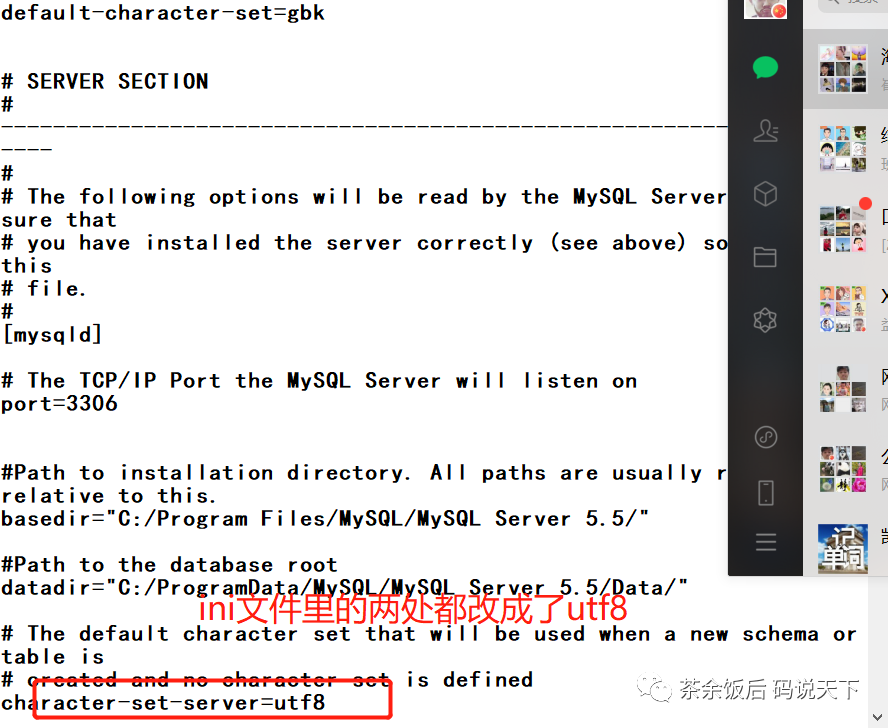
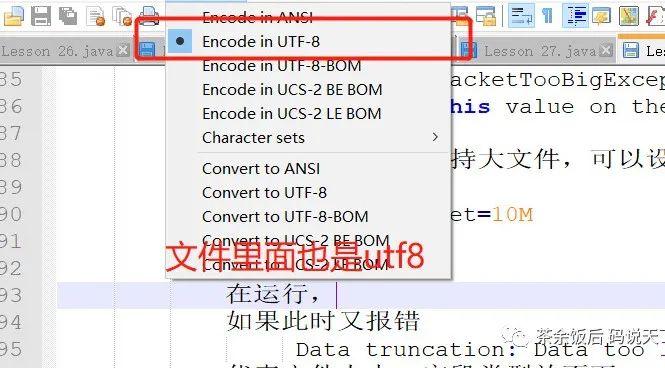
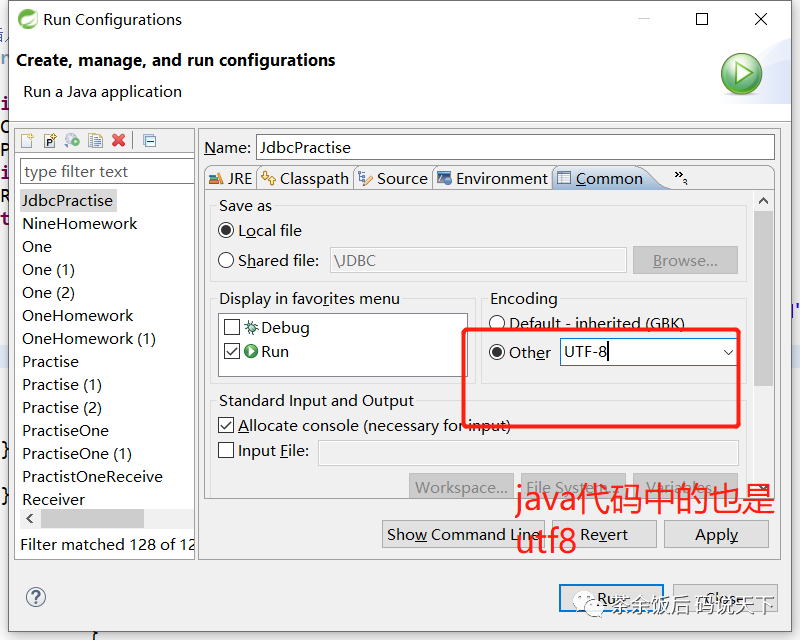
注意:查询显示以及数据库中的显示都有可能出现乱码状态,要想解决这些问题:需要以下三个步骤:
第一步:MySQL中的my.ini文件中的两处改动为utf8
第二步:大型文本文件的编码风格:
第三步:JavaIDE中也需要改动为同样的编码风格:
版权声明:本文内容由互联网用户自发贡献,该文观点仅代表作者本人。本站仅提供信息存储空间服务,不拥有所有权,不承担相关法律责任。如发现本站有涉嫌侵权/违法违规的内容,请联系我们,一经查实,本站将立刻删除。
如需转载请保留出处:https://51itzy.com/kjqy/116357.html