
SpringBoot微信公众号开发
环境准备
- 微信测试公众号申请
访问https://weixin..com/,点击公众号,申请一个订阅号(个人能申请订阅号,服务号只有企业才能申请)。

- 公众号填写服务器配置
注意:服务器提交需要在域名配置好和服务器已经配置好时才能提交,否则会报错。
[外链图片转存失败,源站可能有防盗链机制,建议将图片保存下来直接上传(img-X6JALoJf-59)(https://gitee.com/lzp/pic-go-img/raw/master/img/8579.png)]
- 内网穿透配置(花生壳)
公众号服务器配置时需要配置域名,我们使用花生壳将内网映射到外网,方便我们本地调试。

- 创建springboot项目,配置依赖
开发环境:IDEA,JDK8,SpringBoot2.6.3
<dependency> <groupId>org.springframework.boot</groupId> <artifactId>spring-boot-starter-web</artifactId> </dependency> <dependency> <groupId>org.springframework.boot</groupId> <artifactId>spring-boot-starter-test</artifactId> <scope>test</scope> </dependency> <dependency> <groupId>org.projectlombok</groupId> <artifactId>lombok</artifactId> </dependency> <dependency> <groupId>org.apache.commons</groupId> <artifactId>commons-lang3</artifactId> <version>3.12.0</version> </dependency> 讯享网
接入微信服务器
验证消息的确来自微信服务器
| 参数 | 描述 |
|---|---|
| signature | 微信加密签名,signature结合了开发者填写的token参数和请求中的timestamp参数、nonce参数。 |
| timestamp | 时间戳 |
| nonce | 随机数 |
| echostr | 随机字符串 |
开发者通过检验signature对请求进行校验(下面有校验方式)。若确认此次GET请求来自微信服务器,请原样返回echostr参数内容,则接入生效,成为开发者成功,否则接入失败。加密/校验流程如下:
1)将token、timestamp、nonce三个参数进行字典序排序 2)将三个参数字符串拼接成一个字符串进行sha1加密 3)开发者获得加密后的字符串可与signature对比,标识该请求来源于微信
java接入实例代码
讯享网import com.lzp.wechat.utils.WeChatUtil; import org.springframework.web.bind.annotation.GetMapping; import org.springframework.web.bind.annotation.RequestParam; import org.springframework.web.bind.annotation.RestController; / * 接入微信服务器 */ @RestController public class SignatureController {
    / * <验证消息的确来自微信服务器> * 开发者通过检验signature对请求进行校验(下面有校验方式)。若确认此次GET请求来自微信服务器,请原样返回echostr参数内容,则接入生效, * 成为开发者成功,否则接入失败。加密/校验流程如下: * 1)将token、timestamp、nonce三个参数进行字典序排序 * 2)将三个参数字符串拼接成一个字符串进行sha1加密 * 3)开发者获得加密后的字符串可与signature对比,标识该请求来源于微信 * * @param signature 微信加密签名,signature结合了开发者填写的token参数和请求中的timestamp参数、nonce参数。 * @param timestamp 时间戳 * @param nonce 随机数 * @param echostr 随机字符串 * @return string & null */ @GetMapping("/") public String checkSignature(@RequestParam("signature") String signature, @RequestParam("timestamp") String timestamp, @RequestParam("nonce") String nonce, @RequestParam("echostr") String echostr) {
    // 验证sha1加密后的字符串是否与signature一致 boolean flag = new WeChatUtil().validParams(signature, timestamp, nonce); // 如果一致,原样返回echostr参数内容 if (flag) {
    return echostr; } return null; } }
import org.apache.commons.lang3.StringUtils; import java.security.MessageDigest; import java.security.NoSuchAlgorithmException; import java.util.Arrays; / * 微信工具类 */ public class WeChatUtil {
    // 公众号服务器配置页面的token private static final String token = "LZPWECHAT"; / * 验证sha1加密后的字符串是否与signature一致 * * @param signature 微信加密签名 * @param timestamp 时间戳 * @param nonce 随机字符串 * @return 是否来源于微信服务器 */ public boolean validParams(String signature, String timestamp, String nonce) {
    // 将token、timestamp、nonce三个参数进行字典序排序 String[] arr = new String[]{
   timestamp, nonce, token}; Arrays.sort(arr); // 将三个参数字符串拼接成一个字符串进行sha1加密 StringBuffer sb = new StringBuffer(); for (String s : arr) {
    sb.append(s); } String formattedText = sha1(sb.toString()); // 获得加密后的字符串可与signature对比,标识该请求来源于微信 if (StringUtils.equals(formattedText, signature)) {
    return true; } return false; } / * 将字符串进行sha1加密 * * @param str 需要加密的字符串 * @return 加密后的内容 */ public String sha1(String str) {
    try {
    MessageDigest digest = MessageDigest.getInstance("SHA-1"); digest.update(str.getBytes()); byte messageDigest[] = digest.digest(); // Create Hex String StringBuffer hexString = new StringBuffer(); // 字节数组转换为 十六进制 数 for (int i = 0; i < messageDigest.length; i++) {
    String shaHex = Integer.toHexString(messageDigest[i] & 0xFF); if (shaHex.length() < 2) {
    hexString.append(0); } hexString.append(shaHex); } return hexString.toString(); } catch (NoSuchAlgorithmException e) {
    e.printStackTrace(); } return ""; } / * 解析xml */ public static Map<String, String> parseXml(HttpServletRequest request) throws Exception {
    Map<String, String> map = new HashMap<>(); // 从request中获取输入流 InputStream inputStream = request.getInputStream(); // 读取输入流 SAXReader saxReader = new SAXReader(); Document document = saxReader.read(inputStream); // 获取根节点 Element root = document.getRootElement(); // 获取根节点的所有子节点 List<Element> elements = root.elements(); // 遍历所有子节点元素存入map中 for (Element element : elements) {
    map.put(element.getName(), element.getText()); } // 释放资源 inputStream.close(); return map; } }
基础消息能力
接收普通消息
当普通微信用户向公众账号发消息时,微信服务器将POST消息的XML数据包到开发者填写的URL上。
请注意:
- 关于重试的消息排重,推荐使用msgid排重。
- 微信服务器在五秒内收不到响应会断掉连接,并且重新发起请求,总共重试三次。假如服务器无法保证在五秒内处理并回复,可以直接回复空串,微信服务器不会对此作任何处理,并且不会发起重试。详情请见“发送消息-被动回复消息”。
- 如果开发者需要对用户消息在5秒内立即做出回应,即使用“发送消息-被动回复消息”接口向用户被动回复消息时,可以在
公众平台官网的开发者中心处设置消息加密。开启加密后,用户发来的消息和开发者回复的消息都会被加密(但开发者通过客服接口等API调用形式向用户发送消息,则不受影响)。关于消息加解密的详细说明,请见“发送消息-被动回复消息加解密说明”。 各消息类型的推送XML数据包结构如下:
文本消息
讯享网<xml> <ToUserName><![CDATA[toUser]]></ToUserName> <FromUserName><![CDATA[fromUser]]></FromUserName> <CreateTime></CreateTime> <MsgType><![CDATA[text]]></MsgType> <Content><![CDATA[this is a test]]></Content> <MsgId>23456</MsgId> </xml>
| 参数 | 描述 |
|---|---|
| ToUserName | 开发者微信号 |
| FromUserName | 发送方帐号(一个OpenID) |
| CreateTime | 消息创建时间 (整型) |
| MsgType | 消息类型,文本为text |
| Content | 文本消息内容 |
| MsgId | 消息id,64位整型 |
接收普通消息代码
import com.lzp.wechat.service.MessageService; import org.springframework.beans.factory.annotation.Autowired; import org.springframework.web.bind.annotation.PostMapping; import org.springframework.web.bind.annotation.RestController; import javax.servlet.http.HttpServletRequest; @RestController public class MessageController {
    @Autowired private MessageService messageService; / * 接收普通消息 */ @PostMapping(value = "/wechat") public String textMessage(HttpServletRequest request) {
String returnMessage = messageService.messageHandle(request); return returnMessage; } } 讯享网import com.alibaba.fastjson.JSON; import com.lzp.wechat.service.MessageService; import com.lzp.wechat.utils.WeChatUtil; import lombok.extern.slf4j.Slf4j; import org.springframework.stereotype.Service; import javax.servlet.http.HttpServletRequest; import java.util.Map; @Slf4j @Service public class MessageServiceImpl implements MessageService {
@Override public String messageHandle(HttpServletRequest request) {
try {
// 解析请求消息 Map<String, String> requestMap = WeChatUtil.parseXml(request); log.info("接收到的消息内容:{}", JSON.toJSONString(requestMap)); } catch (Exception e) {
e.printStackTrace(); log.error("消息处理异常:{}", e.getMessage()); } return "OK"; } }
测试结果

[外链图片转存失败,源站可能有防盗链机制,建议将图片保存下来直接上传(img-rbmh5aaP-60)(https://gitee.com/lzp/pic-go-img/raw/master/img/8601.png)]
被动回复用户消息
当用户发送消息给公众号时(或某些特定的用户操作引发的事件推送时),会产生一个POST请求,开发者可以在响应包(Get)中返回特定XML结构,来对该消息进行响应(现支持回复文本、图片、图文、语音、视频、音乐)。严格来说,发送被动响应消息其实并不是一种接口,而是对微信服务器发过来消息的一次回复。
微信服务器在将用户的消息发给公众号的开发者服务器地址(开发者中心处配置)后,微信服务器在五秒内收不到响应会断掉连接,并且重新发起请求,总共重试三次,如果在调试中,发现用户无法收到响应的消息,可以检查是否消息处理超时。关于重试的消息排重,有msgid的消息推荐使用msgid排重。事件类型消息推荐使用FromUserName + CreateTime 排重。
如果开发者希望增强安全性,可以在开发者中心处开启消息加密,这样,用户发给公众号的消息以及公众号被动回复用户消息都会继续加密,详见被动回复消息加解密说明。
假如服务器无法保证在五秒内处理并回复,必须做出下述回复,这样微信服务器才不会对此作任何处理,并且不会发起重试(这种情况下,可以使用客服消息接口进行异步回复),否则,将出现严重的错误提示。详见下面说明:
1、直接回复success(推荐方式) 2、直接回复空串(指字节长度为0的空字符串,而不是XML结构体中content字段的内容为空)
一旦遇到以下情况,微信都会在公众号会话中,向用户下发系统提示“该公众号暂时无法提供服务,请稍后再试”:
1、开发者在5秒内未回复任何内容 2、开发者回复了异常数据,比如JSON数据等
另外,请注意,回复图片(不支持gif动图)等多媒体消息时需要预先通过素材管理接口上传临时素材到微信服务器,可以使用素材管理中的临时素材,也可以使用永久素材。
各消息类型需要的XML数据包结构如下:
回复文本消息
<xml> <ToUserName><![CDATA[toUser]]></ToUserName> <FromUserName><![CDATA[fromUser]]></FromUserName> <CreateTime></CreateTime> <MsgType><![CDATA[text]]></MsgType> <Content><![CDATA[你好]]></Content> </xml> | 参数 | 是否必须 | 描述 |
|---|---|---|
| ToUserName | 是 | 接收方帐号(收到的OpenID) |
| FromUserName | 是 | 开发者微信号 |
| CreateTime | 是 | 消息创建时间 (整型) |
| MsgType | 是 | 消息类型,文本为text |
| Content | 是 | 回复的消息内容(换行:在content中能够换行,微信客户端就支持换行显示) |
回复普通文本消息
回复普通文本消息代码
讯享网/ * 接收普通消息,被动回复用户消息 */ @PostMapping(value = "/wechat") public String textMessage(HttpServletRequest request, HttpServletResponse response) {
    String returnMessage = messageService.messageHandle(request, response); return returnMessage; }
import com.alibaba.fastjson.JSON; import com.lzp.wechat.entity.message.*; import com.lzp.wechat.service.MessageService; import com.lzp.wechat.utils.WeChatUtil; import com.thoughtworks.xstream.XStream; import lombok.extern.slf4j.Slf4j; import org.apache.commons.lang3.StringUtils; import org.springframework.stereotype.Service; import javax.servlet.ServletOutputStream; import javax.servlet.http.HttpServletRequest; import javax.servlet.http.HttpServletResponse; import java.util.Map; @Slf4j @Service public class MessageServiceImpl implements MessageService {
    @Override public String messageHandle(HttpServletRequest request, HttpServletResponse response) {
    try {
    // 处理中文乱码 request.setCharacterEncoding("utf-8"); response.setCharacterEncoding("utf-8"); // 解析请求消息 Map<String, String> requestMap = WeChatUtil.parseXml(request); log.info("接收到的消息内容:{}", JSON.toJSONString(requestMap)); // 回复消息 /*String responseXml = "<xml><ToUserName><![CDATA[" + requestMap.get("FromUserName") + "]]></ToUserName" + "><FromUserName><![CDATA[" + requestMap.get("ToUserName") + "]]></FromUserName><CreateTime" + "></CreateTime><MsgType><![CDATA[" + requestMap.get("MsgType") + "]]></MsgType><Content" + "><![CDATA[最喜欢小猪猪了~]]></Content></xml>";*/ String responseXml = replyMessage(requestMap); log.info("回复用户[{}]到的消息内容:{}", requestMap.get("ToUserName"), responseXml); ServletOutputStream outputStream = response.getOutputStream(); outputStream.write(responseXml.getBytes()); outputStream.close(); } catch (Exception e) {
    e.printStackTrace(); log.error("消息处理异常:{}", e.getMessage()); } return "OK"; } // 处理回复消息 private String replyMessage(Map<String, String> requestMap) {
    String respMsg = null; BaseMessage msg = null; String msgType = requestMap.get("MsgType"); switch (msgType) {
    case "text": msg = dealTextMassage(requestMap); break; case "image": break; case "voice": break; case "video": break; case "shortvideo": break; case "location": break; case "link": break; default: break; } // 将消息对象转换成xml if (StringUtils.isNotBlank(msgType)) {
    respMsg = beanToXml(msg); } log.info("回复的消息内容:{}", respMsg); return respMsg; } / * 将消息对象转换成xml * * @param msg * @return */ private String beanToXml(BaseMessage msg) {
    XStream xStream = new XStream(); xStream.processAnnotations(new Class[]{
   TextMessage.class, ImageMessage.class, VoiceMessage.class, VideoMessage.class, MusicMessage.class, NewsMessage.class}); String xml = xStream.toXML(msg); return xml; } / * 处理文本类型消息内容 * * @param requestMap * @return */ private BaseMessage dealTextMassage(Map<String, String> requestMap) {
TextMessage textMessage = new TextMessage(requestMap, "欢迎关注隐约雷鸣的测试公众号!"); return textMessage; } } 讯享网import com.thoughtworks.xstream.annotations.XStreamAlias; import lombok.Data; import lombok.NoArgsConstructor; import java.util.Map; / * 消息基类 * * @author 李志鹏 * @date 2022/01/29 下午8:21 */ @XStreamAlias("xml") @Data @NoArgsConstructor public class BaseMessage {
// 接收方帐号(收到的OpenID) @XStreamAlias("ToUserName") private String toUserName; // 开发者微信号 @XStreamAlias("FromUserName") private String fromUserName; // 消息创建时间 (整型) @XStreamAlias("CreateTime") private Integer createTime; // 消息类型 @XStreamAlias("MsgType") private String msgType; public BaseMessage(Map<String, String> requestMap) {
this.toUserName = requestMap.get("FromUserName"); this.fromUserName = requestMap.get("ToUserName"); this.createTime = (int) System.currentTimeMillis(); } }
import com.thoughtworks.xstream.annotations.XStreamAlias; import lombok.Data; import lombok.NoArgsConstructor; import java.util.Map; / * 文本消息 * * @author 李志鹏 * @date 2022/01/29 下午8:30 */ @XStreamAlias("xml") @Data @NoArgsConstructor public class TextMessage extends BaseMessage {
    // 回复的消息内容(换行:在content中能够换行,微信客户端就支持换行显示) @XStreamAlias("Content") private String content; public TextMessage(Map<String, String> requestMap, String content) {
    super(requestMap); // 设置文本msgType为text this.setMsgType("text"); this.content = content; } }
测试结果
[外链图片转存失败,源站可能有防盗链机制,建议将图片保存下来直接上传(img-DXn5OcYv-61)(https://gitee.com/lzp/pic-go-img/raw/master/img/8567.png)]
接入智能对话机器人
阿里云开通智能对话机器人
进入阿里云官网,开通智能对话机器人
[外链图片转存失败,源站可能有防盗链机制,建议将图片保存下来直接上传(img-0JMhfZhF-65)(https://gitee.com/lzp/pic-go-img/raw/master/img/8245.png)]
进入控制人,新建机器人


启用闲聊,绑定类目
[外链图片转存失败,源站可能有防盗链机制,建议将图片保存下来直接上传(img-QHpBPC7W-65)(https://gitee.com/lzp/pic-go-img/raw/master/img/8605.png)]
[外链图片转存失败,源站可能有防盗链机制,建议将图片保存下来直接上传(img-j332Qh5I-66)(https://gitee.com/lzp/pic-go-img/raw/master/img/8574.png)]

发布机器人
[外链图片转存失败,源站可能有防盗链机制,建议将图片保存下来直接上传(img-40XN8JQr-66)(https://gitee.com/lzp/pic-go-img/raw/master/img/8049.png)]
公众号对接智能对话机器人
引入SDK
讯享网<dependency> <groupId>com.aliyun</groupId> <artifactId>tea-openapi</artifactId> <version>0.0.19</version> </dependency> <dependency> <groupId>com.aliyun</groupId> <artifactId>chatbot</artifactId> <version>2.0.1</version> </dependency>
阿里云-云小蜜智能对话机器人工具类
import com.aliyun.chatbot.Client; import com.aliyun.chatbot.models.ChatRequest; import com.aliyun.chatbot.models.ChatResponse; import com.aliyun.teaopenapi.models.Config; / * 阿里云-云小蜜智能对话机器人 */ public class ChatBootUtil {
    // AccessKey ID private static final String accessKeyId = "你的accessKeyId"; // AccessKey Secret private static final String accessKeySecret = "你的accessKeySecret"; / * 使用AK&SK初始化账号Client * * @param accessKeyId * @param accessKeySecret * @return Client * @throws Exception */ public static Client createClient(String accessKeyId, String accessKeySecret) throws Exception {
    Config config = new Config() .setAccessKeyId(accessKeyId) .setAccessKeySecret(accessKeySecret); // 访问的域名 config.endpoint = "chatbot.cn-shanghai.aliyuncs.com"; return new Client(config); } / * 对话 * * @param reqMsg * @return */ public static ChatResponse chat(String reqMsg) throws Exception {
    Client client = createClient(accessKeyId, accessKeySecret); ChatRequest chatRequest = new ChatRequest() .setUtterance(reqMsg) .setInstanceId("chatbot-cn-I3z7I3jbaa"); return client.chat(chatRequest); } }
accessKeyId和accessKeySecret在阿里云配置

公众号回复文本消息功能交给智能机器人回复
讯享网/ * 处理文本类型消息内容 * 对接阿里云-云小蜜智能对话机器人,实现对话聊天 * * @param requestMap * @return */ private BaseMessage dealTextMassage(Map<String, String> requestMap) {
    TextMessage textMessage = null; String content = requestMap.get("Content"); try {
    // 调用智能机器人,获取回复消息内容 ChatResponse chatResponse = ChatBootUtil.chat(content); String respMsg = chatResponse.getBody().getMessages().get(0).getText().getContent(); textMessage = new TextMessage(requestMap, respMsg); } catch (Exception e) {
    log.error("调用阿里云-云小蜜智能对话机器人异常,异常原因:{}", e.getMessage()); e.printStackTrace(); } return textMessage; }
测试结果

回复图片消息
<xml> <ToUserName><![CDATA[toUser]]></ToUserName> <FromUserName><![CDATA[fromUser]]></FromUserName> <CreateTime></CreateTime> <MsgType><![CDATA[image]]></MsgType> <Image> <MediaId><![CDATA[media_id]]></MediaId> </Image> </xml> | 参数 | 是否必须 | 说明 |
|---|---|---|
| ToUserName | 是 | 接收方帐号(收到的OpenID) |
| FromUserName | 是 | 开发者微信号 |
| CreateTime | 是 | 消息创建时间 (整型) |
| MsgType | 是 | 消息类型,图片为image |
| MediaId | 是 | 通过素材管理中的接口上传多媒体文件,得到的id。 |
讯享网import com.thoughtworks.xstream.annotations.XStreamAlias; import lombok.Data; import lombok.NoArgsConstructor; import java.util.Map; / * 图片消息 */ @XStreamAlias("xml") @Data @NoArgsConstructor public class ImageMessage extends BaseMessage {
    // 通过素材管理中的接口上传多媒体文件,得到的id @XStreamAlias("MediaId") private String mediaId; public ImageMessage(Map<String, String> requestMap, String mediaId) {
    super(requestMap); this.setMsgType("image"); this.mediaId = mediaId; } }
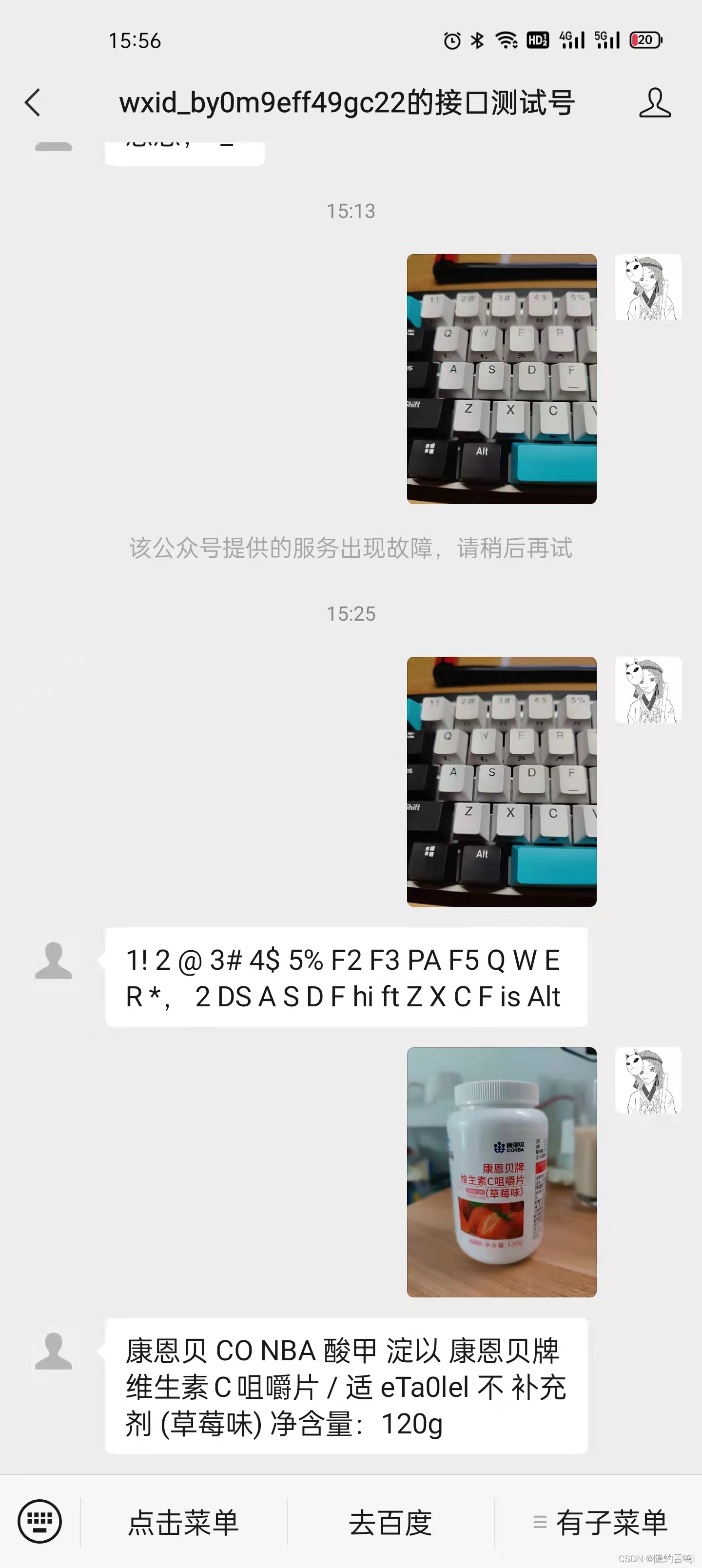
对接阿里云实现文字识别功能
代码实现
import com.alibaba.fastjson.JSON; import com.alibaba.fastjson.JSONObject; import com.aliyun.ocr_api.Client; import com.aliyun.ocr_api.models.RecognizeGeneralRequest; import com.aliyun.ocr_api.models.RecognizeGeneralResponse; import com.aliyun.teaopenapi.models.Config; / * 通用文字识别(阿里云) */ public class RecognizeCharacterUtil {
    // AccessKey ID private static final String accessKeyId = "LTAI5tMxcEsSoeEiRHKg4xYJ"; // AccessKey Secret private static final String accessKeySecret = "WdSkxvhNjXZHvM7bpcU1V6lECRT2YN"; / * 使用AK&SK初始化账号Client * * @param accessKeyId * @param accessKeySecret * @return Client * @throws Exception */ public static Client createClient(String accessKeyId, String accessKeySecret) throws Exception {
    Config config = new Config() // 您的AccessKey ID .setAccessKeyId(accessKeyId) // 您的AccessKey Secret .setAccessKeySecret(accessKeySecret); // 访问的域名 config.endpoint = "ocr-api.cn-hangzhou.aliyuncs.com"; return new Client(config); } / * 上传图片地址,识别图片中的文字 * * @param url * @return * @throws Exception */ public static String RecognizeCharacter(String url) throws Exception {
Client client = createClient(accessKeyId, accessKeySecret); RecognizeGeneralRequest request = new RecognizeGeneralRequest(); request.setUrl(url); RecognizeGeneralResponse response = client.recognizeGeneral(request); String data = response.getBody().getData(); JSONObject jsonObject = JSON.parseObject(data); return jsonObject.getString("content"); } } 讯享网/ * 处理图片类型消息(图片识别) * * @param requestMap * @return */ private BaseMessage dealImageMessage(Map<String, String> requestMap) {
TextMessage textMessage = null; String picUrl = requestMap.get("PicUrl"); String content = ""; try {
content = RecognizeCharacterUtil.RecognizeCharacter(picUrl); } catch (Exception e) {
e.printStackTrace(); log.info("图片识别异常:{}", e.getMessage()); } textMessage = new TextMessage(requestMap, content); return textMessage; }
测试结果
回复语音消息
<xml> <ToUserName><![CDATA[toUser]]></ToUserName> <FromUserName><![CDATA[fromUser]]></FromUserName> <CreateTime></CreateTime> <MsgType><![CDATA[voice]]></MsgType> <Voice> <MediaId><![CDATA[media_id]]></MediaId> </Voice> </xml> | 参数 | 是否必须 | 说明 |
|---|---|---|
| ToUserName | 是 | 接收方帐号(收到的OpenID) |
| FromUserName | 是 | 开发者微信号 |
| CreateTime | 是 | 消息创建时间戳 (整型) |
| MsgType | 是 | 消息类型,语音为voice |
| MediaId | 是 | 通过素材管理中的接口上传多媒体文件,得到的id |
讯享网import com.thoughtworks.xstream.annotations.XStreamAlias; import lombok.Data; import lombok.NoArgsConstructor; import java.util.Map; / * 语音消息 */ @XStreamAlias("xml") @Data @NoArgsConstructor public class VoiceMessage extends BaseMessage {
    // 通过素材管理中的接口上传多媒体文件,得到的id @XStreamAlias("MediaId") private String mediaId; public VoiceMessage(Map<String, String> requestMap, String mediaId) {
    super(requestMap); this.setMsgType("voice"); this.mediaId = mediaId; } }
回复视频消息
<xml> <ToUserName><![CDATA[toUser]]></ToUserName> <FromUserName><![CDATA[fromUser]]></FromUserName> <CreateTime></CreateTime> <MsgType><![CDATA[video]]></MsgType> <Video> <MediaId><![CDATA[media_id]]></MediaId> <Title><![CDATA[title]]></Title> <Description><![CDATA[description]]></Description> </Video> </xml> | 参数 | 是否必须 | 说明 |
|---|---|---|
| ToUserName | 是 | 接收方帐号(收到的OpenID) |
| FromUserName | 是 | 开发者微信号 |
| CreateTime | 是 | 消息创建时间 (整型) |
| MsgType | 是 | 消息类型,视频为video |
| MediaId | 是 | 通过素材管理中的接口上传多媒体文件,得到的id |
| Title | 否 | 视频消息的标题 |
| Description | 否 | 视频消息的描述 |
讯享网import com.thoughtworks.xstream.annotations.XStreamAlias; import lombok.Data; import lombok.NoArgsConstructor; import java.util.Map; / * 视频消息 */ @XStreamAlias("xml") @Data @NoArgsConstructor public class VideoMessage extends BaseMessage {
    // 通过素材管理中的接口上传多媒体文件,得到的id @XStreamAlias("MediaId") private String mediaId; // 视频消息的标题 @XStreamAlias("Title") private String title; // 视频消息的描述 @XStreamAlias("Description") private String description; public VideoMessage(Map<String, String> requestMap, String mediaId, String title, String description) {
    super(requestMap); this.setMsgType("video"); this.mediaId = mediaId; this.title = title; this.description = description; } }
回复音乐消息
<xml> <ToUserName><![CDATA[toUser]]></ToUserName> <FromUserName><![CDATA[fromUser]]></FromUserName> <CreateTime></CreateTime> <MsgType><![CDATA[music]]></MsgType> <Music> <Title><![CDATA[TITLE]]></Title> <Description><![CDATA[DESCRIPTION]]></Description> <MusicUrl><![CDATA[MUSIC_Url]]></MusicUrl> <HQMusicUrl><![CDATA[HQ_MUSIC_Url]]></HQMusicUrl> <ThumbMediaId><![CDATA[media_id]]></ThumbMediaId> </Music> </xml> | 参数 | 是否必须 | 说明 |
|---|---|---|
| ToUserName | 是 | 接收方帐号(收到的OpenID) |
| FromUserName | 是 | 开发者微信号 |
| CreateTime | 是 | 消息创建时间 (整型) |
| MsgType | 是 | 消息类型,音乐为music |
| Title | 否 | 音乐标题 |
| Description | 否 | 音乐描述 |
| MusicURL | 否 | 音乐链接 |
| HQMusicUrl | 否 | 高质量音乐链接,WIFI环境优先使用该链接播放音乐 |
| ThumbMediaId | 是 | 缩略图的媒体id,通过素材管理中的接口上传多媒体文件,得到的id |
讯享网import com.thoughtworks.xstream.annotations.XStreamAlias; import lombok.Data; import lombok.NoArgsConstructor; import java.util.Map; / * 音乐消息 */ @XStreamAlias("xml") @Data @NoArgsConstructor public class MusicMessage extends BaseMessage {
    // 音乐消息 @XStreamAlias("Music") private Music music; public MusicMessage(Map<String, String> requestMap, Music music) {
    super(requestMap); this.setMsgType("music"); this.music = music; } }
import com.thoughtworks.xstream.annotations.XStreamAlias; import lombok.AllArgsConstructor; import lombok.Data; import lombok.NoArgsConstructor; / * 音乐消息实体类 */ @Data @NoArgsConstructor @AllArgsConstructor public class Music {
    // 音乐标题 @XStreamAlias("Title") private String title; // 音乐描述 @XStreamAlias("Description") private String description; // 音乐链接 @XStreamAlias("MusicUrl") private String musicUrl; // 高质量音乐链接,WIFI环境优先使用该链接播放音乐 @XStreamAlias("HQMusicUrl") private String hQMusicUrl; // 缩略图的媒体id,通过素材管理中的接口上传多媒体文件,得到的id @XStreamAlias("ThumbMediaId") private String thumbMediaId; }
回复图文消息
讯享网<xml> <ToUserName><![CDATA[toUser]]></ToUserName> <FromUserName><![CDATA[fromUser]]></FromUserName> <CreateTime></CreateTime> <MsgType><![CDATA[news]]></MsgType> <ArticleCount>1</ArticleCount> <Articles> <item> <Title><![CDATA[title1]]></Title> <Description><![CDATA[description1]]></Description> <PicUrl><![CDATA[picurl]]></PicUrl> <Url><![CDATA[url]]></Url> </item> </Articles> </xml>
| 参数 | 是否必须 | 说明 |
|---|---|---|
| ToUserName | 是 | 接收方帐号(收到的OpenID) |
| FromUserName | 是 | 开发者微信号 |
| CreateTime | 是 | 消息创建时间 (整型) |
| MsgType | 是 | 消息类型,图文为news |
| ArticleCount | 是 | 图文消息个数;当用户发送文本、图片、语音、视频、图文、地理位置这六种消息时,开发者只能回复1条图文消息;其余场景最多可回复8条图文消息 |
| Articles | 是 | 图文消息信息,注意,如果图文数超过限制,则将只发限制内的条数 |
| Title | 是 | 图文消息标题 |
| Description | 是 | 图文消息描述 |
| PicUrl | 是 | 图片链接,支持JPG、PNG格式,较好的效果为大图360200,小图200200 |
| Url | 是 | 点击图文消息跳转链接 |
回复图文消息代码
import com.thoughtworks.xstream.annotations.XStreamAlias; import lombok.Data; import lombok.NoArgsConstructor; import java.util.List; import java.util.Map; / * 图文消息 */ @XStreamAlias("xml") @Data @NoArgsConstructor public class NewsMessage extends BaseMessage {
    // 图文消息个数;当用户发送文本、图片、语音、视频、图文、地理位置这六种消息时,开发者只能回复1条图文消息;其余场景最多可回复8条图文消息 @XStreamAlias("ArticleCount") private String articleCount; // 图文消息信息,注意,如果图文数超过限制,则将只发限制内的条数 @XStreamAlias("Articles") private List<Article> articles; / * 只回复一个图文消息 */ public NewsMessage(Map<String, String> requestMap, List<Article> articles) {
    super(requestMap); this.setMsgType("news"); this.articleCount = "1"; this.articles = articles; } / * 可设置回复多个图文消息 */ public NewsMessage(Map<String, String> requestMap, String articleCount, List<Article> articles) {
super(requestMap); this.setMsgType("news"); this.articleCount = articleCount; this.articles = articles; } } 讯享网import com.thoughtworks.xstream.annotations.XStreamAlias; import lombok.AllArgsConstructor; import lombok.Data; import lombok.NoArgsConstructor; / * 图文消息实体类 */ @Data @NoArgsConstructor @AllArgsConstructor @XStreamAlias("item") public class Article {
// 图文消息标题 @XStreamAlias("Title") private String title; // 图文消息描述 @XStreamAlias("Description") private String description; // 图片链接,支持JPG、PNG格式,较好的效果为大图360*200,小图200*200 @XStreamAlias("PicUrl") private String picUrl; // 点击图文消息跳转链接 @XStreamAlias("Url") private String url; }
/ * 处理文本类型消息内容 * 1.对接阿里云-云小蜜智能对话机器人,实现对话聊天 * 2.回复图文消息 * * @param requestMap * @return */ private BaseMessage dealTextMassage(Map<String, String> requestMap) {
    TextMessage textMessage = null; String content = requestMap.get("Content"); try {
    // 用户输入图文时回复一个图文消息 if (StringUtils.equals("图文", content)) {
    ArrayList<Article> articles = new ArrayList<>(); Article article = new Article(); article.setTitle("吾皇万睡!"); article.setPicUrl("http://mmbiz.qpic.cn/mmbiz_jpg/lqCDmZcwKKIbTy8Seic0F45np8ZS38H3aHzGJoqSia0nc9t5umyeEhwhXXec7u8TzIRBxZkHliaMCqalYTW89Goaw/0"); article.setUrl("http://www.baidu.com"); article.setDescription("这就是吾皇!"); articles.add(article); NewsMessage newsMessage = new NewsMessage(requestMap, articles); return newsMessage; } // 调用智能机器人,获取回复消息内容 ChatResponse chatResponse = ChatBootUtil.chat(content); String respMsg = chatResponse.getBody().getMessages().get(0).getText().getContent(); textMessage = new TextMessage(requestMap, respMsg); } catch (Exception e) {
    log.error("调用阿里云-云小蜜智能对话机器人异常,异常原因:{}", e.getMessage()); e.printStackTrace(); } return textMessage; }
测试结果

获取AccessToken
access_token是公众号的全局唯一接口调用凭据,公众号调用各接口时都需使用access_token。开发者需要进行妥善保存。access_token的存储至少要保留512个字符空间。access_token的有效期目前为2个小时,需定时刷新,重复获取将导致上次获取的access_token失效。
公众平台的API调用所需的access_token的使用及生成方式说明:
1、建议公众号开发者使用中控服务器统一获取和刷新access_token,其他业务逻辑服务器所使用的access_token均来自于该中控服务器,不应该各自去刷新,否则容易造成冲突,导致access_token覆盖而影响业务;
2、目前access_token的有效期通过返回的expires_in来传达,目前是7200秒之内的值。中控服务器需要根据这个有效时间提前去刷新新access_token。在刷新过程中,中控服务器可对外继续输出的老access_token,此时公众平台后台会保证在5分钟内,新老access_token都可用,这保证了第三方业务的平滑过渡;
3、access_token的有效时间可能会在未来有调整,所以中控服务器不仅需要内部定时主动刷新,还需要提供被动刷新access_token的接口,这样便于业务服务器在API调用获知access_token已超时的情况下,可以触发access_token的刷新流程。
4、对于可能存在风险的调用,在开发者进行获取 access_token调用时进入风险调用确认流程,需要用户管理员确认后才可以成功获取。具体流程为:
开发者通过某IP发起调用->平台返回错误码[89503]并同时下发模板消息给公众号管理员->公众号管理员确认该IP可以调用->开发者使用该IP再次发起调用->调用成功。
如公众号管理员第一次拒绝该IP调用,用户在1个小时内将无法使用该IP再次发起调用,如公众号管理员多次拒绝该IP调用,该IP将可能长期无法发起调用。平台建议开发者在发起调用前主动与管理员沟通确认调用需求,或请求管理员开启IP白名单功能并将该IP加入IP白名单列表。
公众号和小程序均可以使用AppID和AppSecret调用本接口来获取access_token。AppID和AppSecret可在“微信公众平台-开发-基本配置”页中获得(需要已经成为开发者,且帐号没有异常状态)。调用接口时,请登录“微信公众平台-开发-基本配置”提前将服务器IP地址添加到IP白名单中,点击查看设置方法,否则将无法调用成功。小程序无需配置IP白名单。
接口调用请求说明
讯享网https请求方式: GET https://api.weixin..com/cgi-bin/token?grant_type=client_credential&appid=APPID&secret=APPSECRET
参数说明
| 参数 | 是否必须 | 说明 |
|---|---|---|
| grant_type | 是 | 获取access_token填写client_credential |
| appid | 是 | 第三方用户唯一凭证 |
| secret | 是 | 第三方用户唯一凭证密钥,即appsecret |
正常情况下,微信会返回下述JSON数据包给公众号:
{
   "access_token":"ACCESS_TOKEN","expires_in":7200}
参数说明
| 参数 | 说明 |
|---|---|
| access_token | 获取到的凭证 |
| expires_in | 凭证有效时间,单位:秒 |
错误时微信会返回错误码等信息,JSON数据包示例如下(该示例为AppID无效错误):
讯享网{
   "errcode":40013,"errmsg":"invalid appid"}
返回码说明
| 返回码 | 说明 |
|---|---|
| -1 | 系统繁忙,此时请开发者稍候再试 |
| 0 | 请求成功 |
| 40001 | AppSecret错误或者AppSecret不属于这个公众号,请开发者确认AppSecret的正确性 |
| 40002 | 请确保grant_type字段值为client_credential |
| 40164 | 调用接口的IP地址不在白名单中,请在接口IP白名单中进行设置。 |
| 89503 | 此IP调用需要管理员确认,请联系管理员 |
| 89501 | 此IP正在等待管理员确认,请联系管理员 |
| 89506 | 24小时内该IP被管理员拒绝调用两次,24小时内不可再使用该IP调用 |
| 89507 | 1小时内该IP被管理员拒绝调用一次,1小时内不可再使用该IP调用 |
定时任务获取access_token代码示例
import com.alibaba.fastjson.JSONObject; import com.lzp.wechat.common.constants.RedisConstants; import com.lzp.wechat.common.utils.RedisCacheUtils; import com.lzp.wechat.entity.AccessToken; import com.lzp.wechat.service.AccessTokenService; import lombok.extern.slf4j.Slf4j; import org.springframework.beans.factory.annotation.Autowired; import org.springframework.scheduling.annotation.EnableScheduling; import org.springframework.scheduling.annotation.Scheduled; import org.springframework.stereotype.Component; @Slf4j @Component @EnableScheduling public class AccessTokenTask {
    @Autowired private AccessTokenService accessTokenService; @Autowired private RedisCacheUtils redisCacheUtils; / * access_token 是公众的全局唯一调用凭据 * access_token 的有效期为 2 个小时,需要定时刷新 access_token,重复获取会导致之前一次获取的失效 * 延迟一秒执行,每7000秒刷新一次 * access_token存入redis */ @Scheduled(initialDelay = 1000, fixedDelay = 7000 * 1000) public void getAccessToken() {
String result = accessTokenService.getAccessToken(); AccessToken accessToken = JSONObject.parseObject(result, AccessToken.class); String access_token = accessToken.getAccess_token(); redisCacheUtils.set(RedisConstants.ACCESS_TOKEN, access_token); log.info("微信access_token保存成功:{}", access_token); } } 讯享网import cn.hutool.http.HttpUtil; import com.lzp.wechat.entity.WeiXinParameter; import com.lzp.wechat.service.AccessTokenService; import lombok.extern.slf4j.Slf4j; import org.springframework.beans.factory.annotation.Autowired; import org.springframework.stereotype.Service; @Slf4j @Service public class AccessTokenServiceImpl implements AccessTokenService {
@Autowired private WeiXinParameter weiXinParameter; / * 获取access_token * * @return */ @Override public String getAccessToken() {
String url = weiXinParameter.getAccessTokenUrl(); String appId = weiXinParameter.getAppId(); String appSecret = weiXinParameter.getAppSecret(); url = url.replace("APPID", appId).replace("APPSECRET", appSecret); return HttpUtil.get(url); } }
import lombok.Data; import org.springframework.beans.factory.annotation.Value; import org.springframework.context.annotation.PropertySource; import org.springframework.stereotype.Component; @Data @Component @PropertySource(value = {
   "classpath:weixin.properties"}, encoding = "UTF-8") public class WeiXinParameter {
    @Value("${weixin.appid}") private String appId; @Value("${weixin.appsecret}") private String appSecret; @Value("${weixin.token}") private String token; @Value("${weixin.getAccessTokenUrl}") private String accessTokenUrl; @Value("${weixin.createMenuUrl}") private String createMenuUrl; }
配置文件weixin.properties
讯享网weixin.appid=wxc93e2d4af200af2e weixin.appsecret=7aeded8d7532e1813edb9357b9e5c6f2 weixin.token=LZPWECHAT weixin.getAccessTokenUrl=https://api.weixin..com/cgi-bin/token?grant_type=client_credential&appid=APPID&secret=APPSECRET weixin.createMenuUrl=https://api.weixin..com/cgi-bin/menu/create?access_token=ACCESS_TOKEN weixin.queryMenuUrl=https://api.weixin..com/cgi-bin/get_current_selfmenu_info?access_token=ACCESS_TOKEN weixin.deleteMenuUrl=https://api.weixin..com/cgi-bin/menu/delete?access_token=ACCESS_TOKEN weixin.setIndustryUrl=https://api.weixin..com/cgi-bin/template/api_set_industry?access_token=ACCESS_TOKEN weixin.getIndustryUrl=https://api.weixin..com/cgi-bin/template/get_industry?access_token=ACCESS_TOKEN weixin.sendTemplateMessageUrl=https://api.weixin..com/cgi-bin/message/template/send?access_token=ACCESS_TOKEN
自定义菜单
创建菜单
- 自定义菜单最多包括3个一级菜单,每个一级菜单最多包含5个二级菜单。
- 一级菜单最多4个汉字,二级菜单最多8个汉字,多出来的部分将会以“…”代替。
- 创建自定义菜单后,菜单的刷新策略是,在用户进入公众号会话页或公众号profile页时,如果发现上一次拉取菜单的请求在5分钟以前,就会拉取一下菜单,如果菜单有更新,就会刷新客户端的菜单。测试时可以尝试取消关注公众账号后再次关注,则可以看到创建后的效果。
自定义菜单接口可实现多种类型按钮,如下:
- click:点击推事件用户点击click类型按钮后,微信服务器会通过消息接口推送消息类型为event的结构给开发者(参考消息接口指南),并且带上按钮中开发者填写的key值,开发者可以通过自定义的key值与用户进行交互;
- view:跳转URL用户点击view类型按钮后,微信客户端将会打开开发者在按钮中填写的网页URL,可与网页授权获取用户基本信息接口结合,获得用户基本信息。
- scancode_push:扫码推事件用户点击按钮后,微信客户端将调起扫一扫工具,完成扫码操作后显示扫描结果(如果是URL,将进入URL),且会将扫码的结果传给开发者,开发者可以下发消息。
- scancode_waitmsg:扫码推事件且弹出“消息接收中”提示框用户点击按钮后,微信客户端将调起扫一扫工具,完成扫码操作后,将扫码的结果传给开发者,同时收起扫一扫工具,然后弹出“消息接收中”提示框,随后可能会收到开发者下发的消息。
- pic_sysphoto:弹出系统拍照发图用户点击按钮后,微信客户端将调起系统相机,完成拍照操作后,会将拍摄的相片发送给开发者,并推送事件给开发者,同时收起系统相机,随后可能会收到开发者下发的消息。
- pic_photo_or_album:弹出拍照或者相册发图用户点击按钮后,微信客户端将弹出选择器供用户选择“拍照”或者“从手机相册选择”。用户选择后即走其他两种流程。
- pic_weixin:弹出微信相册发图器用户点击按钮后,微信客户端将调起微信相册,完成选择操作后,将选择的相片发送给开发者的服务器,并推送事件给开发者,同时收起相册,随后可能会收到开发者下发的消息。
- location_select:弹出地理位置选择器用户点击按钮后,微信客户端将调起地理位置选择工具,完成选择操作后,将选择的地理位置发送给开发者的服务器,同时收起位置选择工具,随后可能会收到开发者下发的消息。
- media_id:下发消息(除文本消息)用户点击media_id类型按钮后,微信服务器会将开发者填写的永久素材id对应的素材下发给用户,永久素材类型可以是图片、音频、视频 、图文消息。请注意:永久素材id必须是在“素材管理/新增永久素材”接口上传后获得的合法id。
- view_limited:跳转图文消息URL用户点击view_limited类型按钮后,微信客户端将打开开发者在按钮中填写的永久素材id对应的图文消息URL,永久素材类型只支持图文消息。请注意:永久素材id必须是在“素材管理/新增永久素材”接口上传后获得的合法id。
- article_id:用户点击 article_id 类型按钮后,微信客户端将会以卡片形式,下发开发者在按钮中填写的图文消息
- article_view_limited:类似 view_limited,但不使用 media_id 而使用 article_id
注意: 草稿接口灰度完成后,将不再支持图文信息类型的 media_id 和 view_limited,有需要的,请使用 article_id 和 article_view_limited 代替
请注意,3到8的所有事件,仅支持微信iPhone5.4.1以上版本,和Android5.4以上版本的微信用户,旧版本微信用户点击后将没有回应,开发者也不能正常接收到事件推送。9~12,是专门给第三方平台旗下未微信认证(具体而言,是资质认证未通过)的订阅号准备的事件类型,它们是没有事件推送的,能力相对受限,其他类型的公众号不必使用。
接口调用请求说明
http请求方式:POST(请使用https协议) https://api.weixin..com/cgi-bin/menu/create?access_token=ACCESS_TOKEN
参数说明
| 参数 | 是否必须 | 说明 |
|---|---|---|
| button | 是 | 一级菜单数组,个数应为1~3个 |
| sub_button | 否 | 二级菜单数组,个数应为1~5个 |
| type | 是 | 菜单的响应动作类型,view表示网页类型,click表示点击类型,miniprogram表示小程序类型 |
| name | 是 | 菜单标题,不超过16个字节,子菜单不超过60个字节 |
| key | click等点击类型必须 | 菜单KEY值,用于消息接口推送,不超过128字节 |
| url | view、miniprogram类型必须 | 网页 链接,用户点击菜单可打开链接,不超过1024字节。 type为miniprogram时,不支持小程序的老版本客户端将打开本url。 |
| media_id | media_id类型和view_limited类型必须 | 调用新增永久素材接口返回的合法media_id |
| appid | miniprogram类型必须 | 小程序的appid(仅认证公众号可配置) |
| pagepath | miniprogram类型必须 | 小程序的页面路径 |
| article_id | article_id类型和article_view_limited类型必须 | 发布后获得的合法 article_id |
返回结果
正确时的返回JSON数据包如下:
{
   "errcode":0,"errmsg":"ok"}
错误时的返回JSON数据包如下(示例为无效菜单名长度):
讯享网{
   "errcode":40018,"errmsg":"invalid button name size"}
查询菜单
接口调用请求说明
http请求方式: GET(请使用https协议)https://api.weixin..com/cgi-bin/get_current_selfmenu_info?access_token=ACCESS_TOKEN
删除菜单
请求说明
http请求方式:GET https://api.weixin..com/cgi-bin/menu/delete?access_token=ACCESS_TOKEN
创建、查询、删除菜单代码实现
import cn.hutool.http.HttpUtil; import com.alibaba.fastjson.JSON; import com.lzp.wechat.common.constants.RedisConstants; import com.lzp.wechat.common.utils.RedisCacheUtils; import com.lzp.wechat.entity.button.*; import lombok.extern.slf4j.Slf4j; import org.junit.jupiter.api.Test; import org.springframework.beans.factory.annotation.Autowired; import org.springframework.beans.factory.annotation.Value; import org.springframework.boot.test.context.SpringBootTest; import org.springframework.context.annotation.PropertySource; @Slf4j @SpringBootTest @PropertySource(value = {
   "classpath:weixin.properties"}, encoding = "UTF-8") public class ButtonTest {
    @Value("${weixin.createMenuUrl}") private String CREATE_MENU_URL; @Value("${weixin.queryMenuUrl}") private String QUERY_MENU_URL; @Value("${weixin.deleteMenuUrl}") private String DELETE_MENU_URL; @Autowired private RedisCacheUtils redisCacheUtils; / * 创建菜单 */ @Test public void createMenuTest() {
    // 菜单对象 Button button = new Button(); // 一级菜单 button.getButton().add(new ClickButton("点击菜单", "1")); button.getButton().add(new ViewButton("去百度", "http://www.baidu.com")); // 一级菜单包含子菜单 SubButton subButton = new SubButton("有子菜单"); subButton.getSub_button().add(new ClickButton("点击", "31")); subButton.getSub_button().add(new ViewButton("网易新闻", "http://news.163.com")); subButton.getSub_button().add(new PicPhotoOrAlbumButton("文字识别", "33")); button.getButton().add(subButton); String buttonJson = JSON.toJSONString(button); log.info("创建菜单json:{}", buttonJson); String access_token = redisCacheUtils.get(RedisConstants.ACCESS_TOKEN).toString(); CREATE_MENU_URL = CREATE_MENU_URL.replace("ACCESS_TOKEN", access_token); String result = HttpUtil.post(CREATE_MENU_URL, buttonJson); log.info("创建菜单响应:{}", result); } / * 查询菜单 */ @Test public void queryMenu() {
    String access_token = redisCacheUtils.get(RedisConstants.ACCESS_TOKEN).toString(); QUERY_MENU_URL = QUERY_MENU_URL.replace("ACCESS_TOKEN", access_token); String result = HttpUtil.get(QUERY_MENU_URL); log.info("查询菜单响应:{}", result); } / * 删除菜单 */ @Test public void deleteMenu() {
    String access_token = redisCacheUtils.get(RedisConstants.ACCESS_TOKEN).toString(); DELETE_MENU_URL = DELETE_MENU_URL.replace("ACCESS_TOKEN", access_token); String result = HttpUtil.get(DELETE_MENU_URL); log.info("删除菜单响应:{}", result); } }
测试效果

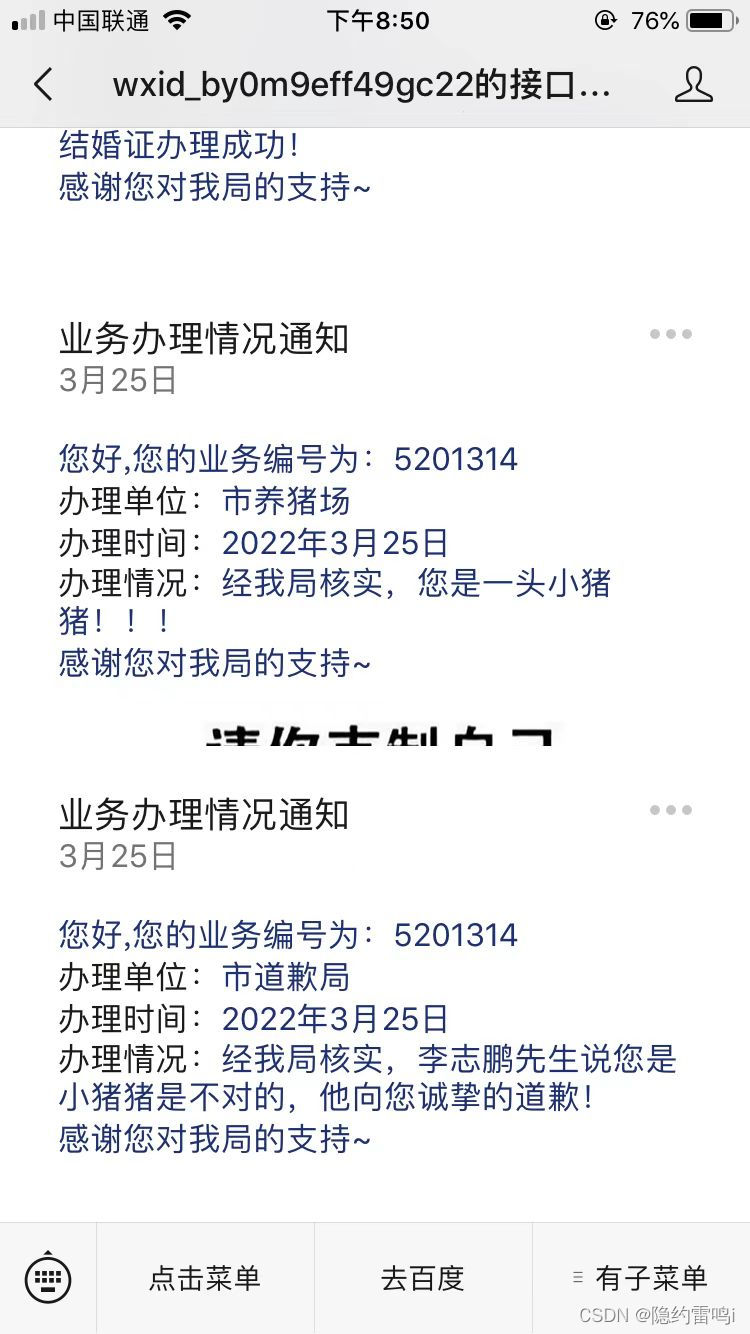
发送模板消息
关于使用规则,请注意:
- 所有服务号都可以在功能->添加功能插件处看到申请模板消息功能的入口,但只有认证后的服务号才可以申请模板消息的使用权限并获得该权限;
- 需要选择公众账号服务所处的2个行业,每月可更改1次所选行业;
- 在所选择行业的模板库中选用已有的模板进行调用;
- 每个账号可以同时使用25个模板。
- 当前每个账号的模板消息的日调用上限为10万次,单个模板没有特殊限制。【2014年11月18日将接口调用频率从默认的日1万次提升为日10万次,可在MP登录后的开发者中心查看】。当账号粉丝数超过10W/100W/1000W时,模板消息的日调用上限会相应提升,以公众号MP后台开发者中心页面中标明的数字为准。
关于接口文档,请注意:
- 模板消息调用时主要需要模板ID和模板中各参数的赋值内容;
- 模板中参数内容必须以".DATA"结尾,否则视为保留字;
- 模板保留符号""。
设置所属行业
设置行业可在微信公众平台后台完成,每月可修改行业1次,帐号仅可使用所属行业中相关的模板,为方便第三方开发者,提供通过接口调用的方式来修改账号所属行业,具体如下:
接口调用请求说明

http请求方式: POST https://api.weixin..com/cgi-bin/template/api_set_industry?access_token=ACCESS_TOKEN
POST数据说明
POST数据示例如下:
讯享网{
    "industry_id1":"1", "industry_id2":"4" }
参数说明
| 参数 | 是否必须 | 说明 |
|---|---|---|
| access_token | 是 | 接口调用凭证 |
| industry_id1 | 是 | 公众号模板消息所属行业编号 |
| industry_id2 | 是 | 公众号模板消息所属行业编号 |
获取设置的行业信息
获取帐号设置的行业信息。可登录微信公众平台,在公众号后台中查看行业信息。为方便第三方开发者,提供通过接口调用的方式来获取帐号所设置的行业信息,具体如下:
接口调用请求说明
http请求方式:GET https://api.weixin..com/cgi-bin/template/get_industry?access_token=ACCESS_TOKEN
参数说明
| 参数 | 是否必须 | 说明 |
|---|---|---|
| access_token | 是 | 接口调用凭证 |
返回说明
正确调用后的返回示例:
{
    "primary_industry":{
   "first_class":"运输与仓储","second_class":"快递"}, "secondary_industry":{
   "first_class":"IT科技","second_class":"互联网|电子商务"} }
返回参数说明
| 参数 | 是否必填 | 说明 |
|---|---|---|
| access_token | 是 | 接口调用凭证 |
| primary_industry | 是 | 帐号设置的主营行业 |
| secondary_industry | 是 | 帐号设置的副营行业 |
发送模板消息
接口调用请求说明
http请求方式: POST https://api.weixin..com/cgi-bin/message/template/send?access_token=ACCESS_TOKEN
POST数据说明
POST数据示例如下:
讯享网 {
    "touser":"OPENID", "template_id":"ngqIpbwh8bUfcSsECmogfXcV14J0tQlEpBO27izEYtY", "url":"http://weixin..com/download", "miniprogram":{
    "appid":"xiaochengxuappid12345", "pagepath":"index?foo=bar" }, "data":{
    "first": {
    "value":"恭喜你购买成功!", "color":"#" }, "keyword1":{
    "value":"巧克力", "color":"#" }, "keyword2": {
    "value":"39.8元", "color":"#" }, "keyword3": {
    "value":"2014年9月22日", "color":"#" }, "remark":{
    "value":"欢迎再次购买!", "color":"#" } } }
参数说明
| 参数 | 是否必填 | 说明 |
|---|---|---|
| touser | 是 | 接收者openid |
| template_id | 是 | 模板ID |
| url | 否 | 模板跳转链接(海外帐号没有跳转能力) |
| miniprogram | 否 | 跳小程序所需数据,不需跳小程序可不用传该数据 |
| appid | 是 | 所需跳转到的小程序appid(该小程序appid必须与发模板消息的公众号是绑定关联关系,暂不支持小游戏) |
| pagepath | 否 | 所需跳转到小程序的具体页面路径,支持带参数,(示例index?foo=bar),要求该小程序已发布,暂不支持小游戏 |
| data | 是 | 模板数据 |
| color | 否 | 模板内容字体颜色,不填默认为黑色 |
注:url和miniprogram都是非必填字段,若都不传则模板无跳转;若都传,会优先跳转至小程序。开发者可根据实际需要选择其中一种跳转方式即可。当用户的微信客户端版本不支持跳小程序时,将会跳转至url。
返回码说明
在调用模板消息接口后,会返回JSON数据包。正常时的返回JSON数据包示例:
 {
    "errcode":0, "errmsg":"ok", "msgid": }
代码实现
讯享网import com.lzp.wechat.entity.WeiXinBaseResponse; import com.lzp.wechat.entity.templateMessage.IndustryRequest; import com.lzp.wechat.entity.templateMessage.IndustryResponse; import com.lzp.wechat.entity.templateMessage.TemplateMessageRequest; import com.lzp.wechat.entity.templateMessage.TemplateMessageResponse; import com.lzp.wechat.service.TemplateMessageService; import io.swagger.annotations.Api; import io.swagger.annotations.ApiImplicitParam; import io.swagger.annotations.ApiOperation; import org.springframework.beans.factory.annotation.Autowired; import org.springframework.web.bind.annotation.*; @RestController @Api(tags = "模板消息接口") public class TemplateMessageController {
    @Autowired private TemplateMessageService templateMessageService; @PostMapping("/setIndustry") @ApiOperation(value = "设置所属行业", notes = "需要选择公众账号服务所处的2个行业,每月可更改1次所选行业") @ApiImplicitParam(paramType = "body", name = "industryRequest", value = "所属行业请求实体", required = true, dataType = "String") public WeiXinBaseResponse setIndustry(@RequestBody IndustryRequest industryRequest) {
    return templateMessageService.setIndustry(industryRequest); } @GetMapping("/getIndustry") @ApiOperation(value = "获取设置的行业信息", notes = "获取设置的行业信息") public IndustryResponse getIndustry() {
    return templateMessageService.getIndustry(); } @PostMapping("/sendTemplateMessage") @ApiOperation(value = "发送模板消息", notes = "发送模板消息") @ApiImplicitParam(paramType = "body", name = "templateMessageRequest", value = "模板消息请求实体", required = true, dataType = "String") public TemplateMessageResponse sendTemplateMessage(@RequestBody TemplateMessageRequest templateMessageRequest) {
    return templateMessageService.sendTemplateMessage(templateMessageRequest); } }
@Data @NoArgsConstructor @AllArgsConstructor @ApiModel(value = "模板消息请求实体") public class TemplateMessageRequest {
@ApiModelProperty(value = "接收者openid", notes = "接收者openid") private String touser; @ApiModelProperty(value = "模板ID", notes = "模板ID") private String template_id; @ApiModelProperty(value = "模板跳转链接", notes = "海外帐号没有跳转能力") private String url; @ApiModelProperty(value = "跳小程序所需数据", notes = "不需跳小程序可不用传该数据") private Miniprogram miniprogram; @ApiModelProperty(value = "模板数据", notes = "模板数据") private BusinessHandleData data; } 讯享网@Data @NoArgsConstructor @AllArgsConstructor @ApiModel(value = "跳小程序所需数据,不需跳小程序可不用传该数据") public class Miniprogram {
@ApiModelProperty(value = "所需跳转到的小程序appid", notes = "该小程序appid必须与发模板消息的公众号是绑定关联关系,暂不支持小游戏") private String appid; @ApiModelProperty(value = "所需跳转到小程序的具体页面路径", notes = "支持带参数,(示例index?foo=bar),要求该小程序已发布,暂不支持小游戏") private String pagepath; }
@Data @NoArgsConstructor @AllArgsConstructor @ApiModel(value = "模板样式") public class TemplateStyle {
@ApiModelProperty(value = "内容", notes = "内容") private String value; @ApiModelProperty(value = "字体颜色", notes = "字体颜色") private String color; } 讯享网@Data @NoArgsConstructor @AllArgsConstructor @Accessors @ApiModel(value = "业务办理情况数据") public class BusinessHandleData {
@ApiModelProperty(value = "业务编号", notes = "业务编号") private TemplateStyle businessNo; @ApiModelProperty(value = "办理单位", notes = "办理单位") private TemplateStyle handleCompany; @ApiModelProperty(value = "办理时间", notes = "办理时间") private TemplateStyle handleDateTime; @ApiModelProperty(value = "办理情况", notes = "办理情况") private TemplateStyle handleResult; @ApiModelProperty(value = "其它内容", notes = "其它内容") private TemplateStyle content; }import cn.hutool.http.HttpUtil; import com.alibaba.fastjson.JSON; import com.lzp.wechat.common.constants.RedisConstants; import com.lzp.wechat.common.utils.RedisCacheUtils; import com.lzp.wechat.entity.WeiXinBaseResponse; import com.lzp.wechat.entity.WeiXinParameter; import com.lzp.wechat.entity.templateMessage.IndustryRequest; import com.lzp.wechat.entity.templateMessage.IndustryResponse; import com.lzp.wechat.entity.templateMessage.TemplateMessageRequest; import com.lzp.wechat.entity.templateMessage.TemplateMessageResponse; import com.lzp.wechat.service.TemplateMessageService; import lombok.extern.slf4j.Slf4j; import org.springframework.beans.factory.annotation.Autowired; import org.springframework.stereotype.Service; @Slf4j @Service public class TemplateMessageServiceImpl implements TemplateMessageService {
@Autowired private WeiXinParameter weiXinParameter; @Autowired private RedisCacheUtils redisCacheUtils; @Override public WeiXinBaseResponse setIndustry(IndustryRequest industryRequest) {
String access_token = redisCacheUtils.get(RedisConstants.ACCESS_TOKEN).toString(); String url = weiXinParameter.getSetIndustryUrl(); url = url.replace("ACCESS_TOKEN", access_token); String result = HttpUtil.post(url, JSON.toJSONString(industryRequest)); log.info("调用腾讯设置所属行业响应:{}", result); return JSON.parseObject(result, WeiXinBaseResponse.class); } @Override public IndustryResponse getIndustry() {
String access_token = redisCacheUtils.get(RedisConstants.ACCESS_TOKEN).toString(); String url = weiXinParameter.getGetIndustryUrl(); url = url.replace("ACCESS_TOKEN", access_token); String result = HttpUtil.get(url); log.info("调用腾讯获取所属行业响应:{}", result); return JSON.parseObject(result, IndustryResponse.class); } @Override public TemplateMessageResponse sendTemplateMessage(TemplateMessageRequest request) {
String access_token = redisCacheUtils.get(RedisConstants.ACCESS_TOKEN).toString(); String url = weiXinParameter.getSendTemplateMessageUrl(); url = url.replace("ACCESS_TOKEN", access_token); String result = HttpUtil.post(url, JSON.toJSONString(request)); log.info("调用腾讯发送模板消息响应:{}", result); return JSON.parseObject(result, TemplateMessageResponse.class); } }
测试效果
素材管理
新增临时素材
公众号经常有需要用到一些临时性的多媒体素材的场景,例如在使用接口特别是发送消息时,对多媒体文件、多媒体消息的获取和调用等操作,是通过media_id来进行的。素材管理接口对所有认证的订阅号和服务号开放。通过本接口,公众号可以新增临时素材(即上传临时多媒体文件)。使用接口过程中有任何问题,可以前往微信开放社区 #公众号 专区发帖交流
注意点:
1、临时素材media_id是可复用的。
2、媒体文件在微信后台保存时间为3天,即3天后media_id失效。
3、上传临时素材的格式、大小限制与公众平台官网一致。
图片(image): 10M,支持PNG\JPEG\JPG\GIF格式
语音(voice):2M,播放长度不超过60s,支持AMR\MP3格式
视频(video):10MB,支持MP4格式
缩略图(thumb):64KB,支持JPG格式
4、需使用https调用本接口。
接口调用请求说明
http请求方式:POST/FORM,使用https https://api.weixin..com/cgi-bin/media/upload?access_token=ACCESS_TOKEN&type=TYPE 调用示例(使用curl命令,用FORM表单方式上传一个多媒体文件): curl -F media=@test.jpg “https://api.weixin..com/cgi-bin/media/upload?access_token=ACCESS_TOKEN&type=TYPE”
参数说明
| 参数 | 是否必须 | 说明 |
|---|---|---|
| access_token | 是 | 调用接口凭证 |
| type | 是 | 媒体文件类型,分别有图片(image)、语音(voice)、视频(video)和缩略图(thumb) |
| media | 是 | form-data中媒体文件标识,有filename、filelength、content-type等信息 |
返回说明
正确情况下的返回JSON数据包结果如下:
{
"type":"TYPE","media_id":"MEDIA_ID","created_at":} | 参数 | 描述 |
|---|---|
| type | 媒体文件类型,分别有图片(image)、语音(voice)、视频(video)和缩略图(thumb,主要用于视频与音乐格式的缩略图) |
| media_id | 媒体文件上传后,获取标识 |
| created_at | 媒体文件上传时间戳 |
代码实现
讯享网import com.lzp.wechat.service.MediaService; import io.swagger.annotations.Api; import io.swagger.annotations.ApiOperation; import org.springframework.beans.factory.annotation.Autowired; import org.springframework.web.bind.annotation.PostMapping; import org.springframework.web.bind.annotation.RequestMapping; import org.springframework.web.bind.annotation.RequestPart; import org.springframework.web.bind.annotation.RestController; import org.springframework.web.multipart.MultipartFile; @RestController @Api(tags = "素材管理接口") @RequestMapping("/media") public class MediaController {
    @Autowired private MediaService mediaService; @PostMapping("/upload") @ApiOperation(value = "新增临时素材", notes = "新增临时素材") public String mediaUpload(@RequestPart("file") MultipartFile file) {
    return mediaService.mediaUpload(file); } }
import cn.hutool.core.io.IoUtil; import com.lzp.wechat.common.constants.RedisConstants; import com.lzp.wechat.common.utils.RedisCacheUtils; import com.lzp.wechat.entity.WeiXinParameter; import com.lzp.wechat.service.MediaService; import lombok.extern.slf4j.Slf4j; import org.apache.http.HttpEntity; import org.apache.http.client.methods.CloseableHttpResponse; import org.apache.http.client.methods.HttpPost; import org.apache.http.entity.mime.MultipartEntityBuilder; import org.apache.http.entity.mime.content.FileBody; import org.apache.http.impl.client.HttpClients; import org.springframework.beans.factory.annotation.Autowired; import org.springframework.stereotype.Service; import org.springframework.web.multipart.MultipartFile; import java.io.File; import java.io.InputStream; @Slf4j @Service public class MediaServiceImpl implements MediaService {
    @Autowired private WeiXinParameter weiXinParameter; @Autowired private RedisCacheUtils redisCacheUtils; @Override public String mediaUpload(MultipartFile multipartFile) {
    String result = ""; String access_token = redisCacheUtils.get(RedisConstants.ACCESS_TOKEN).toString(); String url = weiXinParameter.getMediaUploadUrl(); url = url.replace("ACCESS_TOKEN", access_token).replace("TYPE", "image"); HttpPost httpPost = new HttpPost(url); File file = this.multipartFileToFile(multipartFile); FileBody fileBody = new FileBody(file); HttpEntity reqEntity = MultipartEntityBuilder.create() .addPart("media", fileBody) .build(); httpPost.setEntity(reqEntity); try {
    CloseableHttpResponse httpResponse = HttpClients.createDefault().execute(httpPost); InputStream inputStream = httpResponse.getEntity().getContent(); result = IoUtil.read(inputStream, "utf-8"); log.info("调用腾讯新增临时素材响应:{}", result); } catch (Exception e) {
    e.printStackTrace(); log.error("新增临时素材异常:{}", e.getMessage()); } return result; } / * MultipartFile类型转换为File类型 * * @param multipartFile * @return */ public static File multipartFileToFile(MultipartFile multipartFile) {
    // 获取文件名 String fileName = multipartFile.getOriginalFilename(); // 获取文件后缀 String suffix = fileName.substring(fileName.lastIndexOf(".")); try {
    File file = File.createTempFile(System.currentTimeMillis() + "", suffix); multipartFile.transferTo(file); return file; } catch (Exception e) {
    e.printStackTrace(); log.error("MultipartFile类型转换为File类型异常:{}", e.getMessage()); } return null; } }
测试结果

获取临时素材
公众号可以使用本接口获取临时素材(即下载临时的多媒体文件)。
本接口即为原“下载多媒体文件”接口。
接口调用请求说明
http请求方式: GET,https调用 https://api.weixin..com/cgi-bin/media/get?access_token=ACCESS_TOKEN&media_id=MEDIA_ID 请求示例(示例为通过curl命令获取多媒体文件) curl -I -G “https://api.weixin..com/cgi-bin/media/get?access_token=ACCESS_TOKEN&media_id=MEDIA_ID”
参数说明
| 参数 | 是否必须 | 说明 |
|---|---|---|
| access_token | 是 | 调用接口凭证 |
| media_id | 是 | 媒体文件ID |
返回说明
正确情况下的返回HTTP头如下:
讯享网HTTP/1.1 200 OK Connection: close Content-Type: image/jpeg Content-disposition: attachment; filename="MEDIA_ID.jpg" Date: Sun, 06 Jan 2013 10:20:18 GMT Cache-Control: no-cache, must-revalidate Content-Length: curl -G "https://api.weixin..com/cgi-bin/media/get?access_token=ACCESS_TOKEN&media_id=MEDIA_ID"
如果返回的是视频消息素材,则内容如下:
{
    "video_url":DOWN_URL }
代码实现
讯享网@GetMapping("/get") @ApiOperation(value = "获取临时素材", notes = "获取临时素材") public void getMediaById(@RequestParam("media_id") String media_id, HttpServletResponse response) {
    mediaService.getMediaById(media_id, response); }
@Override public void getMediaById(String media_id, HttpServletResponse response) {
    String access_token = redisCacheUtils.get(RedisConstants.ACCESS_TOKEN).toString(); String url = weiXinParameter.getMediaGetUrl(); url = url.replace("ACCESS_TOKEN", access_token).replace("MEDIA_ID", media_id); byte[] bytes = HttpUtil.downloadBytes(url); try {
    OutputStream outputStream = response.getOutputStream(); outputStream.write(bytes); } catch (IOException e) {
    e.printStackTrace(); } }
测试结果

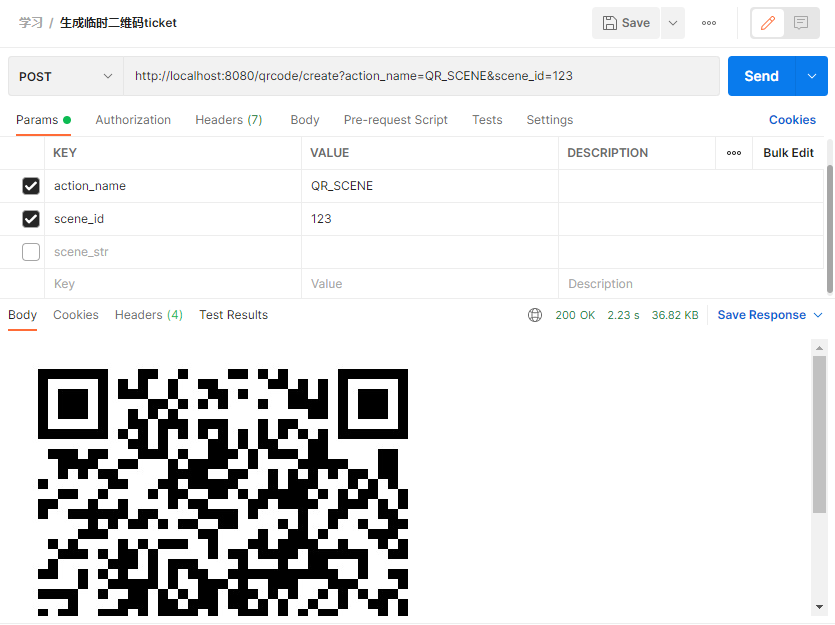
生成二维码
目前有2种类型的二维码:
1、临时二维码,是有过期时间的,最长可以设置为在二维码生成后的30天(即秒)后过期,但能够生成较多数量。临时二维码主要用于帐号绑定等不要求二维码永久保存的业务场景 2、永久二维码,是无过期时间的,但数量较少(目前为最多10万个)。永久二维码主要用于适用于帐号绑定、用户来源统计等场景。
用户扫描带场景值二维码时,可能推送以下两种事件:
如果用户还未关注公众号,则用户可以关注公众号,关注后微信会将带场景值关注事件推送给开发者。
如果用户已经关注公众号,在用户扫描后会自动进入会话,微信也会将带场景值扫描事件推送给开发者。
获取带参数的二维码的过程包括两步,首先创建二维码ticket,然后凭借ticket到指定URL换取二维码。
创建二维码ticket
每次创建二维码ticket需要提供一个开发者自行设定的参数(scene_id),分别介绍临时二维码和永久二维码的创建二维码ticket过程。
临时二维码请求说明
http请求方式: POST URL: https://api.weixin..com/cgi-bin/qrcode/create?access_token=TOKEN POST数据格式:json POST数据例子:{“expire_seconds”: , “action_name”: “QR_SCENE”, “action_info”: {“scene”: {“scene_id”: 123}}} 或者也可以使用以下POST数据创建字符串形式的二维码参数:{“expire_seconds”: , “action_name”: “QR_STR_SCENE”, “action_info”: {“scene”: {“scene_str”: “test”}}}
永久二维码请求说明
http请求方式: POST URL: https://api.weixin..com/cgi-bin/qrcode/create?access_token=TOKEN POST数据格式:json POST数据例子:{“action_name”: “QR_LIMIT_SCENE”, “action_info”: {“scene”: {“scene_id”: 123}}} 或者也可以使用以下POST数据创建字符串形式的二维码参数: {“action_name”: “QR_LIMIT_STR_SCENE”, “action_info”: {“scene”: {“scene_str”: “test”}}}
参数说明
| 参数 | 说明 |
|---|---|
| expire_seconds | 该二维码有效时间,以秒为单位。 最大不超过(即30天),此字段如果不填,则默认有效期为60秒。 |
| action_name | 二维码类型,QR_SCENE为临时的整型参数值,QR_STR_SCENE为临时的字符串参数值,QR_LIMIT_SCENE为永久的整型参数值,QR_LIMIT_STR_SCENE为永久的字符串参数值 |
| action_info | 二维码详细信息 |
| scene_id | 场景值ID,临时二维码时为32位非0整型,永久二维码时最大值为(目前参数只支持1–) |
| scene_str | 场景值ID(字符串形式的ID),字符串类型,长度限制为1到64 |
返回说明
正确的Json返回结果:
讯享网{
   "ticket":"gQH47joAAAAAAAAAASxodHRwOi8vd2VpeGluLnFxLmNvbS9xL2taZ2Z3TVRtNzJXV1Brb3ZhYmJJAAIEZ23sUwMEmm 3sUw==","expire_seconds":60,"url":"http://weixin..com/q/kZgfwMTm72WWPkovabbI"}
| 参数 | 说明 |
|---|---|
| ticket | 获取的二维码ticket,凭借此ticket可以在有效时间内换取二维码。 |
| expire_seconds | 该二维码有效时间,以秒为单位。 最大不超过(即30天)。 |
| url | 二维码图片解析后的地址,开发者可根据该地址自行生成需要的二维码图片 |
通过ticket换取二维码
获取二维码ticket后,开发者可用ticket换取二维码图片。请注意,本接口无须登录态即可调用。
请求说明
HTTP GET请求(请使用https协议)https://mp.weixin..com/cgi-bin/showqrcode?ticket=TICKET 提醒:TICKET记得进行UrlEncode
返回说明
ticket正确情况下,http 返回码是200,是一张图片,可以直接展示或者下载。
HTTP头(示例)如下: Accept-Ranges:bytes Cache-control:max-age= Connection:keep-alive Content-Length:28026 Content-Type:image/jpg Date:Wed, 16 Oct 2013 06:37:10 GMT Expires:Wed, 23 Oct 2013 14:37:10 +0800 Server:nginx/1.4.1
错误情况下(如ticket非法)返回HTTP错误码404。
代码实现
import com.lzp.wechat.service.QrCodeService; import io.swagger.annotations.Api; import io.swagger.annotations.ApiOperation; import org.springframework.beans.factory.annotation.Autowired; import org.springframework.web.bind.annotation.PostMapping; import org.springframework.web.bind.annotation.RequestParam; import org.springframework.web.bind.annotation.RestController; import javax.servlet.http.HttpServletResponse; @RestController @Api(tags = "二维码接口") public class QrCodeController {
    @Autowired private QrCodeService qrCodeService; @PostMapping("/qrcode/create") @ApiOperation(value = "生成二维码", notes = "临时二维码&永久二维码") @ApiImplicitParams({
    @ApiImplicitParam(paramType = "query", name = "action_name", value = "二维码类型", required = true, dataType = "String"), @ApiImplicitParam(paramType = "query", name = "scene_id", value = "场景值ID", required = false, dataType = "Integer"), @ApiImplicitParam(paramType = "query", name = "scene_str", value = "场景值ID(字符串形式的ID)", required = false, dataType = "String") }) public void createQrCode(@RequestParam("action_name") String action_name, @RequestParam(value = "scene_id", required = false) Integer scene_id, @RequestParam(value = "scene_str", required = false) String scene_str, HttpServletResponse response) {
qrCodeService.createQrCode(action_name, scene_id, scene_str, response); } } 讯享网import cn.hutool.http.HttpUtil; import com.alibaba.fastjson.JSON; import com.lzp.wechat.common.constants.RedisConstants; import com.lzp.wechat.common.utils.RedisCacheUtils; import com.lzp.wechat.entity.WeiXinParameter; import com.lzp.wechat.entity.qrCode.ActionInfo; import com.lzp.wechat.entity.qrCode.QrCodeRequest; import com.lzp.wechat.entity.qrCode.QrCodeResponse; import com.lzp.wechat.entity.qrCode.Scene; import com.lzp.wechat.service.QrCodeService; import lombok.extern.slf4j.Slf4j; import org.springframework.beans.factory.annotation.Autowired; import org.springframework.stereotype.Service; import javax.servlet.http.HttpServletResponse; import java.io.IOException; import java.io.OutputStream; @Slf4j @Service public class QrCodeServiceImpl implements QrCodeService {
@Autowired private WeiXinParameter weiXinParameter; @Autowired private RedisCacheUtils redisCacheUtils; @Override public void createQrCode(String action_name, Integer scene_id, String scene_str, HttpServletResponse response) {
// 1.创建二维码ticket String access_token = redisCacheUtils.get(RedisConstants.ACCESS_TOKEN).toString(); String getQrCodeTicketUrl = weiXinParameter.getGetQrCodeTicketUrl(); getQrCodeTicketUrl = getQrCodeTicketUrl.replace("TOKEN", access_token); Scene scene = new Scene().setScene_id(scene_id).setScene_str(scene_str); QrCodeRequest qrCodeRequest = new QrCodeRequest().setExpire_seconds().setAction_name(action_name).setAction_info(new ActionInfo(scene)); String result = HttpUtil.post(getQrCodeTicketUrl, JSON.toJSONString(qrCodeRequest)); log.info("调用腾讯创建二维码ticket响应:{}", result); QrCodeResponse qrCodeResponse = JSON.parseObject(result, QrCodeResponse.class); // 2.通过ticket换取二维码 String showQrCodeUrl = weiXinParameter.getShowQrCodeUrl(); showQrCodeUrl = showQrCodeUrl.replace("TICKET", qrCodeResponse.getTicket()); byte[] bytes = HttpUtil.downloadBytes(showQrCodeUrl); try {
OutputStream outputStream = response.getOutputStream(); outputStream.write(bytes); } catch (IOException e) {
e.printStackTrace(); } } }
测试结果
用户管理
根据openid获取微信用户信息
获取用户基本信息(UnionID机制)
在关注者与公众号产生消息交互后,公众号可获得关注者的OpenID(加密后的微信号,每个用户对每个公众号的OpenID是唯一的。对于不同公众号,同一用户的openid不同)。公众号可通过本接口来根据OpenID获取用户基本信息,包括语言和关注时间。
请注意,如果开发者有在多个公众号,或在公众号、移动应用之间统一用户帐号的需求,需要前往微信开放平台(open.weixin..com)绑定公众号后,才可利用UnionID机制来满足上述需求。
UnionID机制说明:
开发者可通过OpenID来获取用户基本信息。特别需要注意的是,如果开发者拥有多个移动应用、网站应用和公众帐号,可通过获取用户基本信息中的unionid来区分用户的唯一性,因为只要是同一个微信开放平台帐号下的移动应用、网站应用和公众帐号,用户的unionid是唯一的。换句话说,同一用户,对同一个微信开放平台下的不同应用,unionid是相同的。
请注意: 20年6月8日起,用户关注来源“微信广告(ADD_SCENE_WECHAT_ADVERTISEMENT)”从“其他(ADD_SCENE_OTHERS)”中拆分给出,2021年12月27日之后,不再输出头像、昵称信息。
获取用户基本信息(包括UnionID机制)
开发者可通过OpenID来获取用户基本信息。请使用https协议。
接口调用请求说明 http请求方式: GET https://api.weixin..com/cgi-bin/user/info?access_token=ACCESS_TOKEN&openid=OPENID&lang=zh_CN
参数说明
| 参数 | 是否必须 | 说明 |
|---|---|---|
| access_token | 是 | 调用接口凭证 |
| openid | 是 | 普通用户的标识,对当前公众号唯一 |
| lang | 否 | 返回国家地区语言版本,zh_CN 简体,zh_TW 繁体,en 英语 |
返回说明
正常情况下,微信会返回下述JSON数据包给公众号:
{
    "subscribe": 1, "openid": "o6_bmjrPTlm6_2sgVt7hMZOPfL2M", "language": "zh_CN", "subscribe_time": , "unionid": " o6_bmasdasdsad6_2sgVt7hMZOPfL", "remark": "", "groupid": 0, "tagid_list":[128,2], "subscribe_scene": "ADD_SCENE_QR_CODE", "qr_scene": 98765, "qr_scene_str": "" }
参数说明
| 参数 | 说明 |
|---|---|
| subscribe | 用户是否订阅该公众号标识,值为0时,代表此用户没有关注该公众号,拉取不到其余信息。 |
| openid | 用户的标识,对当前公众号唯一 |
| language | 用户的语言,简体中文为zh_CN |
| subscribe_time | 用户关注时间,为时间戳。如果用户曾多次关注,则取最后关注时间 |
| unionid | 只有在用户将公众号绑定到微信开放平台帐号后,才会出现该字段。 |
| remark | 公众号运营者对粉丝的备注,公众号运营者可在微信公众平台用户管理界面对粉丝添加备注 |
| groupid | 用户所在的分组ID(兼容旧的用户分组接口) |
| tagid_list | 用户被打上的标签ID列表 |
| subscribe_scene | 返回用户关注的渠道来源,ADD_SCENE_SEARCH 公众号搜索,ADD_SCENE_ACCOUNT_MIGRATION 公众号迁移,ADD_SCENE_PROFILE_CARD 名片分享,ADD_SCENE_QR_CODE 扫描二维码,ADD_SCENE_PROFILE_LINK 图文页内名称点击,ADD_SCENE_PROFILE_ITEM 图文页右上角菜单,ADD_SCENE_PAID 支付后关注,ADD_SCENE_WECHAT_ADVERTISEMENT 微信广告,ADD_SCENE_REPRINT 他人转载 ,ADD_SCENE_LIVESTREAM 视频号直播,ADD_SCENE_CHANNELS 视频号 , ADD_SCENE_OTHERS 其他 |
| qr_scene | 二维码扫码场景(开发者自定义) |
| qr_scene_str | 二维码扫码场景描述(开发者自定义) |
错误时微信会返回错误码等信息,JSON数据包示例如下(该示例为AppID无效错误):
讯享网{
   "errcode":40013,"errmsg":"invalid appid"}
代码实现
import com.lzp.wechat.service.WeiXinUserInfoService; import io.swagger.annotations.Api; import io.swagger.annotations.ApiImplicitParam; import io.swagger.annotations.ApiOperation; import org.springframework.beans.factory.annotation.Autowired; import org.springframework.web.bind.annotation.GetMapping; import org.springframework.web.bind.annotation.RequestParam; import org.springframework.web.bind.annotation.RestController; @RestController @Api(tags = "微信用户信息接口") public class WeiXinUserInfoController {
    @Autowired private WeiXinUserInfoService weiXinUserInfoService; @GetMapping("/getUserInfoByOpenid") @ApiOperation(value = "根据openid获取用户信息", notes = "根据openid获取用户信息") @ApiImplicitParam(paramType = "query", name = "openid", value = "微信id", required = true, dataType = "String") public String getUserInfoByOpenId(@RequestParam("openid") String openid) {
return weiXinUserInfoService.getUserInfoByOpenId(openid); } } 讯享网import cn.hutool.http.HttpUtil; import com.lzp.wechat.common.constants.RedisConstants; import com.lzp.wechat.common.utils.RedisCacheUtils; import com.lzp.wechat.entity.WeiXinParameter; import com.lzp.wechat.service.WeiXinUserInfoService; import lombok.extern.slf4j.Slf4j; import org.springframework.beans.factory.annotation.Autowired; import org.springframework.stereotype.Service; @Slf4j @Service public class WeiXinUserInfoServiceImpl implements WeiXinUserInfoService {
@Autowired private WeiXinParameter weiXinParameter; @Autowired private RedisCacheUtils redisCacheUtils; @Override public String getUserInfoByOpenId(String openid) {
String access_token = redisCacheUtils.get(RedisConstants.ACCESS_TOKEN).toString(); String url = weiXinParameter.getGetUserInfoByOpenIdUrl(); url = url.replace("ACCESS_TOKEN", access_token).replace("OPENID", openid); String result = HttpUtil.get(url); log.info("调用腾讯获取用户信息响应:{}", result); return result; } }
版权声明:本文内容由互联网用户自发贡献,该文观点仅代表作者本人。本站仅提供信息存储空间服务,不拥有所有权,不承担相关法律责任。如发现本站有涉嫌侵权/违法违规的内容,请联系我们,一经查实,本站将立刻删除。
如需转载请保留出处:https://51itzy.com/kjqy/114434.html