
一、游戏简介与规则
游戏共有5个回合,每个回合中会有随机产生的飞碟飞过屏幕,玩家需要做的事情就是用鼠标尽量快和多地点击飞碟。
每个飞碟对应一定的分数:
【红色飞碟 3分】、【绿色飞碟 2分】、【蓝色飞碟 1分】
游戏的目的是在规定回合内得到尽可能高的分数。
二、代码框架
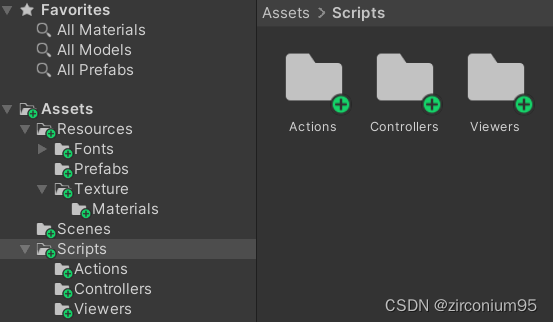
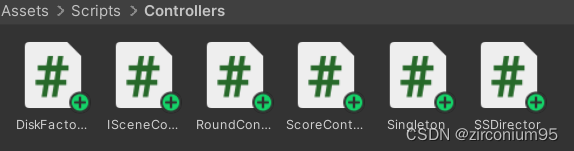
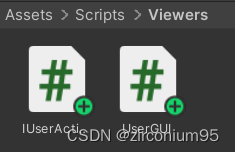
延用了上一个游戏中的框架,包括动作Actions与动作管理器Controllers、场景控制器和用户GUI,更新部分:
- 动作由移动船只、移动角色变成了移动飞碟
- 将主控制器RoundController的功能分散到几个控制器上,包括分数控制器ScoreController、飞碟产生器DiskFactory
- 增加了场景单实例的代码
根据Adapter模式对场景控制器调用的接口作了修改:
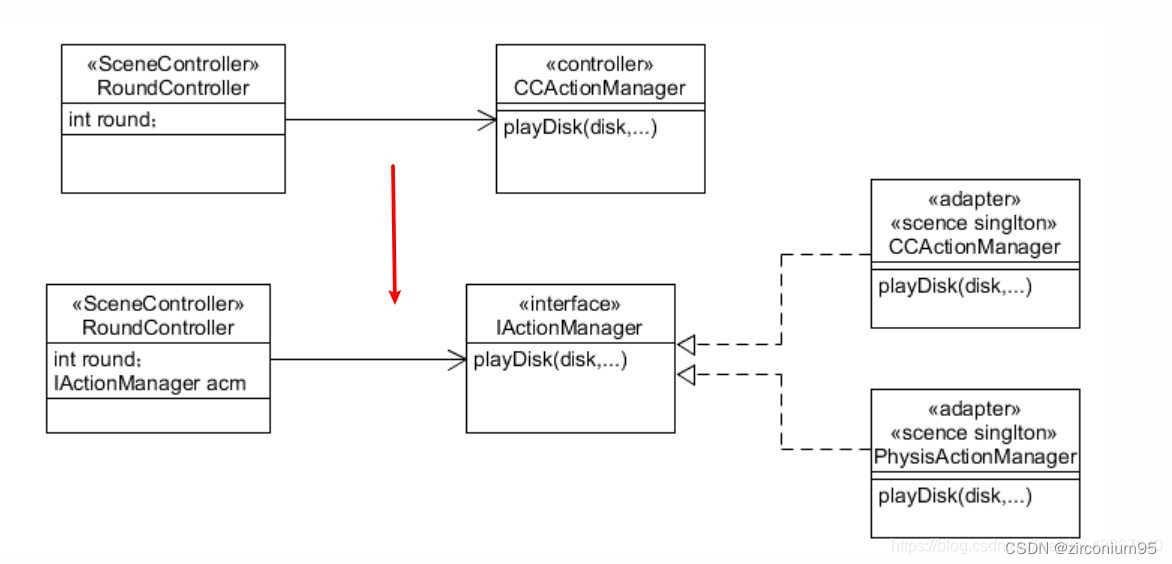
- 保留CCActionManager的同时增加了PhysicActionManager,它们实现了同一个接口IActionManager,分别表示运动学运动(不考虑刚体)与物理运动(考虑刚体)

三、模型预制
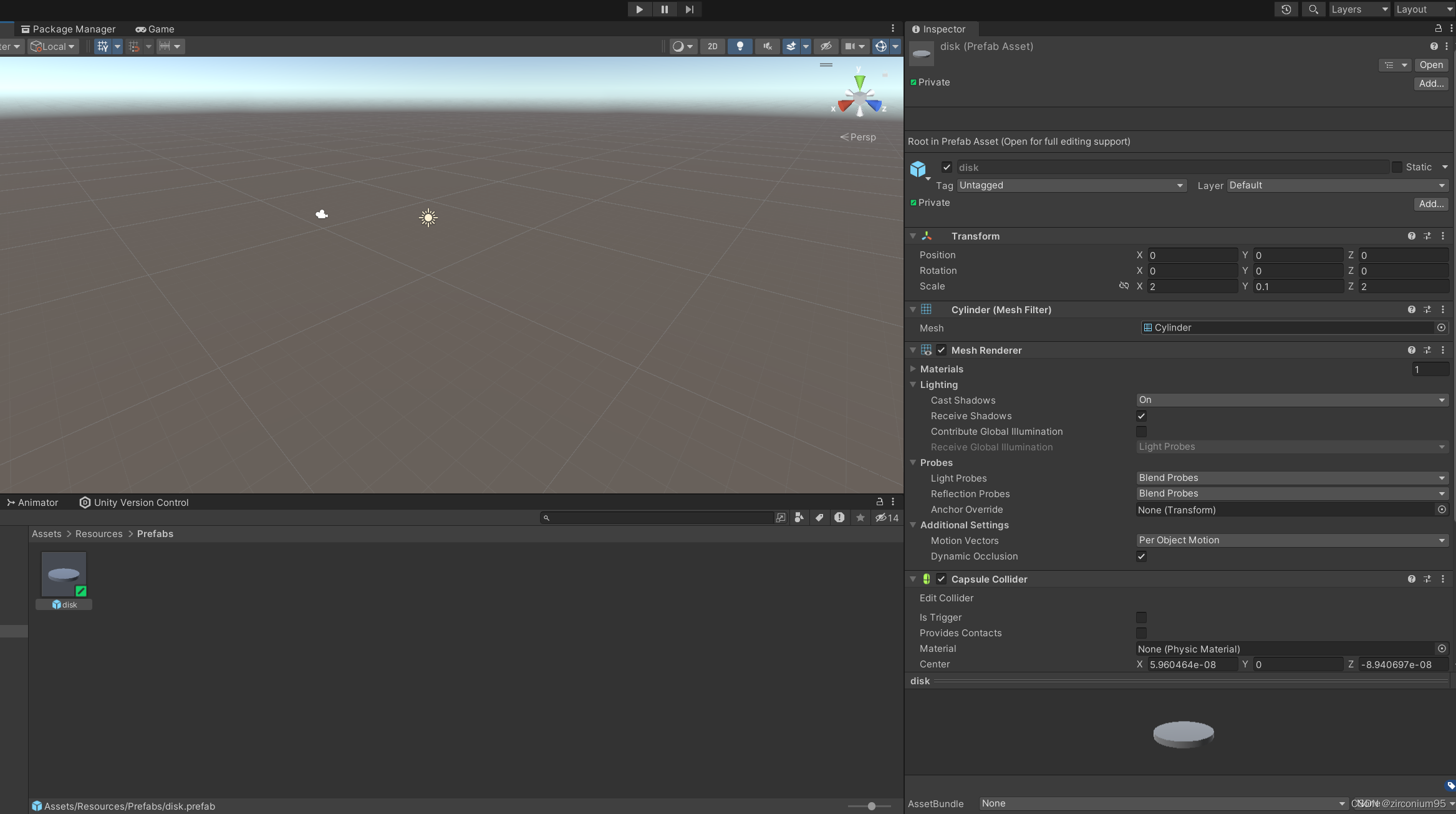
使用Cylinder制作飞碟预制,自主调整Scale调节飞碟形状,飞碟的Material可根据个人喜好设置颜色与纹理。
四、代码实现
(一)Actions动作与动作管理器
1. SSAction 动作基类
public class SSAction : ScriptableObject { public bool enable = true; public bool destroy = false; public GameObject gameObject { get; set;} public Transform transform {get; set;} public IActionCallback callback {get; set;} protected SSAction() {} // Start is called before the first frame update public virtual void Start() { throw new System.NotImplementedException(); } // Update is called once per frame public virtual void Update() { throw new System.NotImplementedException(); } } 讯享网
2.1. CCFlyAction 飞碟动作类
讯享网//飞碟从界面左右两侧飞入,离开界面时运动结束 public class CCFlyAction : SSAction { public float speedX; public float speedY; public static CCFlyAction GetSSAction(float x, float y) { CCFlyAction action = ScriptableObject.CreateInstance<CCFlyAction>(); action.speedX = x; action.speedY = y; return action; } // Start is called before the first frame update public override void Start() { } // Update is called once per frame public override void Update() { //Debug.Log("flyaction update"); if (this.transform.gameObject.activeSelf == false) {//飞碟已经被"销毁" this.destroy = true; this.callback.SSActionEvent(this); return; } Vector3 vec3 = Camera.main.WorldToScreenPoint (this.transform.position); if (vec3.x < -100 || vec3.x > Camera.main.pixelWidth + 100 || vec3.y < -100 || vec3.y > Camera.main.pixelHeight + 100) { this.destroy = true; this.callback.SSActionEvent(this); return; } transform.position += new Vector3(speedX, speedY, 0) * Time.deltaTime * 2; } }
2.2 PhysicFlyAction
与CCFlyAction同样继承自SSAction,不过现在只需要一个水平方向的初速度,垂直方向因为有重力作用所以不用额外给它速度。
Update函数里可以看到21q32w3sa 两种运动的明显差别,CCFlyAction在Update函数中通过position.translate来改变物体的位置,而PhysicFlyAction什么都不用做,物体自身带有的物理属性(重力和初速度)会使它动起来。
另外需要注意的是做物理运动时要将isKinematic设为false,反之要设为true(这是CCFlyAction唯一需要修改的地方)
public class PhysicFlyAction : SSAction { public float speedX; public static PhysicFlyAction GetSSAction(float x) { PhysicFlyAction action = ScriptableObject.CreateInstance<PhysicFlyAction>(); action.speedX = x; return action; } // Start is called before the first frame update public override void Start() { gameObject.GetComponent<Rigidbody>().isKinematic = false; gameObject.GetComponent<Rigidbody>().velocity = new Vector3(speedX * 10, 0, 0); gameObject.GetComponent<Rigidbody>().drag = 1; } // Update is called once per frame public override void Update() { //Debug.Log("flyaction update"); if (this.transform.gameObject.activeSelf == false) {//飞碟已经被"销毁" //Debug.Log("1"); this.destroy = true; this.callback.SSActionEvent(this); return; } Vector3 vec3 = Camera.main.WorldToScreenPoint (this.transform.position); if (vec3.x < -100 || vec3.x > Camera.main.pixelWidth + 100 || vec3.y < -100 || vec3.y > Camera.main.pixelHeight + 100) { //Debug.Log("2"); this.destroy = true; this.callback.SSActionEvent(this); return; } } } 3. IActionCallback 事件回调接口
讯享网public enum SSActionEventType:int {Started, Completed} public interface IActionCallback { //回调函数 void SSActionEvent(SSAction source, SSActionEventType events = SSActionEventType.Completed, int intParam = 0, string strParam = null, Object objectParam = null); }
4. SSActionManager 动作管理类基类
public class SSActionManager : MonoBehaviour { private Dictionary<int, SSAction> actions = new Dictionary<int, SSAction>(); private List<SSAction> waitingAdd = new List<SSAction>(); private List<int> waitingDelete = new List<int>(); // Start is called before the first frame update protected void Start() { } // Update is called once per frame protected void Update() { //Debug.Log("ssactionmanager update"); foreach (SSAction ac in waitingAdd) { actions[ac.GetInstanceID()] = ac; } waitingAdd.Clear(); //Debug.Log(actions.Count); foreach(KeyValuePair<int, SSAction> kv in actions) { SSAction ac = kv.Value; if (ac.destroy) { waitingDelete.Add(ac.GetInstanceID()); } else if (ac.enable) { //Debug.Log("ssactionmanager update"); ac.Update(); } } foreach(int key in waitingDelete) { SSAction ac = actions[key]; actions.Remove(key); Destroy(ac); } waitingDelete.Clear(); } public void RunAction(GameObject gameObject, SSAction action, IActionCallback manager) { //Debug.Log("run action"); action.gameObject = gameObject; action.transform = gameObject.transform; action.callback = manager; waitingAdd.Add(action); action.Start(); } public int RemainActionCount() { return actions.Count; } } 5. CCActionManager 动作管理类
动作结束时会调用动作管理者实现的回调函数,即IActionCallback接口中的SSActionEventType,动作管理者将动作绑定的游戏对象(飞碟)销毁。
讯享网public class CCActionManager : SSActionManager, IActionCallback { public RoundController sceneController; public CCFlyAction action; // Start is called before the first frame update protected new void Start() { sceneController = (RoundController)SSDirector.getInstance().currentSceneController; sceneController.actionManager = this; } // Update is called once per frame // protected new void Update() // { // } public void SSActionEvent(SSAction source, SSActionEventType events = SSActionEventType.Completed, int intParam = 0, string strParam = null, Object objectParam = null) { factory.FreeDisk(source.transform.gameObject); } public void MoveDisk(GameObject disk) { action = CCFlyAction.GetSSAction(disk.GetComponent<DiskAttributes>().speedX, disk.GetComponent<DiskAttributes>().speedY); RunAction(disk, action, this); } }
6. IActionManager
public interface IActionManager { void Fly(GameObject disk); int RemainActionCount() ; } 7. PhysicActionManager
SSActionManager类没有变,CCActionManager和PhysicActionManager两个动作管理器依然继承自它,主要包含一些动作的管理。
讯享网public class PhysicActionManager : SSActionManager, IActionCallback, IActionManager { public RoundController sceneController; public PhysicFlyAction action; public DiskFactory factory; // Start is called before the first frame update protected new void Start() { sceneController = (RoundController)SSDirector.getInstance().currentSceneController; sceneController.actionManager = this as IActionManager; factory = Singleton<DiskFactory>.Instance; } public void SSActionEvent(SSAction source, SSActionEventType events = SSActionEventType.Completed, int intParam = 0, string strParam = null, Object objectParam = null) { factory.FreeDisk(source.transform.gameObject); } public override void MoveDisk(GameObject disk) { action = PhysicFlyAction.GetSSAction(disk.GetComponent<DiskAttributes>().speedX); RunAction(disk, action, this); } public void Fly(GameObject disk) { MoveDisk(disk); } public int RemainActionCount() { return actions.Count; } }
(二)Controllers 控制器
1. DiskFactory 飞碟生成器
用于生产飞碟。
public class MyException : System.Exception { public MyException() { } public MyException(string message) : base(message) { } } public class DiskAttributes : MonoBehaviour { //public GameObject gameobj; public int score; public float speedX; public float speedY; } public class DiskFactory : MonoBehaviour { List<GameObject> used; List<GameObject> free; System.Random rand; // Start is called before the first frame update void Start() { used = new List<GameObject>(); free = new List<GameObject>(); rand = new System.Random(); //Disk disk = GetDisk(1); } public GameObject GetDisk(int round) { GameObject disk; if (free.Count != 0) { disk = free[0]; free.Remove(disk); } else { disk = GameObject.Instantiate(Resources.Load("Prefabs/disk", typeof(GameObject))) as GameObject; disk.AddComponent<DiskAttributes>(); } //根据不同round设置diskAttributes的值 //随意的旋转角度 disk.transform.localEulerAngles = new Vector3(-rand.Next(20,40),0,0); DiskAttributes attri = disk.GetComponent<DiskAttributes>(); attri.score = rand.Next(1,4); //由分数来决定速度、颜色、大小 attri.speedX = (rand.Next(1,5) + attri.score + round) * 0.2f; attri.speedY = (rand.Next(1,5) + attri.score + round) * 0.2f; if (attri.score == 3) { disk.GetComponent<Renderer>().material.color = Color.red; disk.transform.localScale += new Vector3(-0.5f,0,-0.5f); } else if (attri.score == 2) { disk.GetComponent<Renderer>().material.color = Color.green; disk.transform.localScale += new Vector3(-0.2f,0,-0.2f); } else if (attri.score == 1) { disk.GetComponent<Renderer>().material.color = Color.blue; } //飞碟可从四个方向飞入(左上、左下、右上、右下) int direction = rand.Next(1,5); if (direction == 1) { disk.transform.Translate(Camera.main.ScreenToWorldPoint(new Vector3(0, Camera.main.pixelHeight * 1.5f, 8))); attri.speedY *= -1; } else if (direction == 2) { disk.transform.Translate(Camera.main.ScreenToWorldPoint(new Vector3(0, Camera.main.pixelHeight * 0f, 8))); } else if (direction == 3) { disk.transform.Translate(Camera.main.ScreenToWorldPoint(new Vector3(Camera.main.pixelWidth, Camera.main.pixelHeight * 1.5f, 8))); attri.speedX *= -1; attri.speedY *= -1; } else if (direction == 4) { disk.transform.Translate(Camera.main.ScreenToWorldPoint(new Vector3(Camera.main.pixelWidth, Camera.main.pixelHeight * 0f, 8))); attri.speedX *= -1; } used.Add(disk); disk.SetActive(true); Debug.Log("generate disk"); return disk; } public void FreeDisk(GameObject disk) { disk.SetActive(false); //将位置和大小恢复到预制,这点很重要! disk.transform.position = new Vector3(0, 0,0); disk.transform.localScale = new Vector3(2f,0.1f,2f); if (!used.Contains(disk)) { throw new MyException("Try to remove a item from a list which doesn't contain it."); } Debug.Log("free disk"); used.Remove(disk); free.Add(disk); } } 2. Singleton 单实例代码
讯享网public class Singleton<T> : MonoBehaviour where T : MonoBehaviour { protected static T instance; public static T Instance { get { if (instance == null) { instance = (T)FindObjectOfType (typeof(T)); if (instance == null) { Debug.LogError ("An instance of " + typeof(T) + " is needed in the scene, but there is none."); } } return instance; } } }
3. ISceneController 场景控制器接口
public interface ISceneController { void LoadSource(); } 4. SSDirector 导演类
讯享网public class SSDirector : System.Object { private static SSDirector _instance; public ISceneController currentSceneController {get; set;} public static SSDirector getInstance() { if (_instance == null) { _instance = new SSDirector(); } return _instance; } }
5. ScoreController 计分器
public class ScoreController : MonoBehaviour { int score; public RoundController roundController; public UserGUI userGUI; // Start is called before the first frame update void Start() { roundController = (RoundController)SSDirector.getInstance().currentSceneController; roundController.scoreController = this; userGUI = this.gameObject.GetComponent<UserGUI>(); } public void Record(GameObject disk) { score += disk.GetComponent<DiskAttributes>().score; userGUI.score = score; } } 6. RoundController 主控制器
讯享网public class RoundController : MonoBehaviour, ISceneController, IUserAction { int round = 0; int max_round = 5; float timer = 0.5f; GameObject disk; DiskFactory factory ; public IActionManager actionManager; public ScoreController scoreController; public UserGUI userGUI; // Start is called before the first frame update void Start() { } // Update is called once per frame void Update() { if (userGUI.mode == 0) return; if (userGUI.isKinematic == false) { actionManager = gameObject.GetComponent<PhysicActionManager>() as IActionManager; } else { actionManager = gameObject.GetComponent<CCActionManager>() as IActionManager; } GetHit(); gameOver(); if (round > max_round) { return; } timer -= Time.deltaTime; if (timer <= 0 && actionManager.RemainActionCount() == 0) { //if (timer <= 0) { //从工厂中得到10个飞碟,为其加上动作 for (int i = 0; i < 10; ++i) { disk = factory.GetDisk(round); actionManager.Fly(disk); //Thread.Sleep(100); } round += 1; if (round <= max_round) { userGUI.round = round; } timer = 4.0f; } } void Awake() { SSDirector director = SSDirector.getInstance(); director.currentSceneController = this; director.currentSceneController.LoadSource(); gameObject.AddComponent<UserGUI>(); gameObject.AddComponent<PhysicActionManager>(); gameObject.AddComponent<CCActionManager>(); gameObject.AddComponent<ScoreController>(); gameObject.AddComponent<DiskFactory>(); factory = Singleton<DiskFactory>.Instance; userGUI = gameObject.GetComponent<UserGUI>(); } public void LoadSource() { } public void gameOver() { if (round > max_round && actionManager.RemainActionCount() == 0) //if (round > max_round) userGUI.gameMessage = "Game Over!"; } public void GetHit() { if (Input.GetButtonDown("Fire1")) { Camera ca = Camera.main; Ray ray = ca.ScreenPointToRay(Input.mousePosition); //Return the ray's hit RaycastHit hit; if (Physics.Raycast(ray, out hit)) { scoreController.Record(hit.transform.gameObject); hit.transform.gameObject.SetActive(false); } } } }
(三)Viewers 用户接口与用户GUI
1. IUserAction 用户接口
public interface IUserAction { void gameOver(); void GetHit(); } 2. UserGUI 用户界面
讯享网public class UserGUI : MonoBehaviour { public int mode; public int score; public int round; public string gameMessage; public bool isKinematic; private IUserAction action; public GUIStyle bigStyle, blackStyle, smallStyle;//自定义字体格式 public Font pixelFont; private int menu_width = Screen.width / 5, menu_height = Screen.width / 10;//主菜单每一个按键的宽度和高度 // Start is called before the first frame update void Start() { isKinematic = true; mode = 0; gameMessage = ""; action = SSDirector.getInstance().currentSceneController as IUserAction; //pixelStyle //pixelFont = Font.Instantiate(Resources.Load("Fonts/ThaleahFat", typeof(Font))) as Font; //if (pixelFont == null) Debug.Log("null"); //pixelFont.fontSize = 50; //pixelFont = Arial; //大字体初始化 bigStyle = new GUIStyle(); bigStyle.normal.textColor = Color.white; bigStyle.normal.background = null; bigStyle.fontSize = 50; bigStyle.alignment=TextAnchor.MiddleCenter; //black blackStyle = new GUIStyle(); blackStyle.normal.textColor = Color.black; blackStyle.normal.background = null; blackStyle.fontSize = 50; blackStyle.alignment=TextAnchor.MiddleCenter; //小字体初始化 smallStyle = new GUIStyle(); smallStyle.normal.textColor = Color.white; smallStyle.normal.background = null; smallStyle.fontSize = 20; smallStyle.alignment=TextAnchor.MiddleCenter; } // Update is called once per frame void Update() { } void OnGUI() { //GUI.skin.button.font = pixelFont; GUI.skin.button.fontSize = 20; switch(mode) { case 0: mainMenu(); break; case 1: GameStart(); break; } } void mainMenu() { GUI.Label(new Rect(Screen.width / 2 - menu_width * 0.5f, Screen.height * 0.1f, menu_width, menu_height), "Hit UFO", bigStyle); bool button = GUI.Button(new Rect(Screen.width / 2 - menu_width * 0.5f, Screen.height * 3 / 7, menu_width, menu_height), "Start"); if (button) { mode = 1; } } void GameStart() { GUI.Label(new Rect(300, 60, 50, 200), gameMessage, bigStyle); GUI.Label(new Rect(0,0,100,50), "Score: " + score, smallStyle); GUI.Label(new Rect(560,0,100,50), "Round: " + round, smallStyle); if (GUI.Button(new Rect(Screen.width / 2 - menu_width * 0.9f, 0, menu_width * 1.8f, menu_height), "Kinematic/Not Kinematic")) { isKinematic = !isKinematic; } } }
五、游戏演示
演示视频:3dunity入门游戏——打飞碟_哔哩哔哩_bilibili
参考博客:unity 简易游戏打飞碟V2-CSDN博客
版权声明:本文内容由互联网用户自发贡献,该文观点仅代表作者本人。本站仅提供信息存储空间服务,不拥有所有权,不承担相关法律责任。如发现本站有涉嫌侵权/违法违规的内容,请联系我们,一经查实,本站将立刻删除。
如需转载请保留出处:https://51itzy.com/kjqy/108499.html