
图像处理基本方法-在BMP图片上画矩形-纯c语言实现
之前使用过c语言调用opencv实现在bmp图片上画矩形功能。
这次决定抛开opencv库,仅使用c语言完成该功能。
主要代码思路,根据设置的矩形的起点和终点的坐标,循环遍历这两个坐标组合成的矩形图形,并设置这些矩形图形上的点的RGB颜色为设置的RGB的值。
绘制矩形的代码
 for (i = iStartY; i <= iEndY; i++) {
    for (j = iStartX; j<= iEndX; j++) {
    if(i == iStartY || j == iStartX || i == iEndY || j== iEndX) {
    int ntmp = (iHeight -1 - i)*iBmpBit*iWidth + (j )*iBmpBit; if(ntmp >= 0 && ntmp <= iBmpSize) {
    ptnBufRead[ntmp + 0] = u8B; ptnBufRead[ntmp + 1] = u8G; ptnBufRead[ntmp + 2] = u8R; } } } }
讯享网
实现代码
讯享网/* * file:testRectangle.c * date:2021-06-06 * version:1.0.0.1 * author:jack8126 * description: bmp file, draw a rectangular picture */ #include <stdio.h> #include <fcntl.h> #include <stdlib.h> #include <math.h> #include <time.h> #include <string.h> #define PRINT_CTRL 1 typedef unsigned char WORD8; /* 8位无符号整型 */ typedef unsigned short WORD16; /* 16位无符号整型 */ typedef unsigned int WORD32; /* 32位无符号整型 */ typedef unsigned char BYTE; /* 8位无符号整型 */ typedef signed int INT; /* 32位有符号整型 */ typedef signed char CHAR; /* 8位有符号字符型 */ typedef signed long LONG; /* 32位有符号长整型 */ typedef unsigned long uLONG; /* 32位无符号长整型 */ typedef signed short SHORT; /* 16位有符号整型 */ typedef void *LPVOID; /* 空类型 */ typedef unsigned char BOOLEAN; /* 布尔类型 */ #pragma pack(push) #pragma pack(1) typedef struct INFOHEADER {
    WORD32 biSize; WORD32 biWidth; WORD32 biHeight; WORD16 biPlanes; WORD16 biBitCount; WORD32 biCompression; WORD32 biSizeImage; WORD32 biXPelsPerMeter; WORD32 biYPelsPerMeter; WORD32 biClrUsed; WORD32 biClrImportant; }BITMAPINFOHEADER; typedef struct tagBITMAPFILEHEADER {
    WORD16 bfType; WORD32 bfSize; WORD16 bfReserved1; WORD16 bfReserved2; WORD32 bfOffBits; } BITMAPFILEHEADER; #pragma pack(pop) int bmpRectangleProccess(char u8PicNameiIn[], char u8PicNameOut[], INT iStartX, INT iStartY, INT iEndX, INT iEndY, BYTE u8R, BYTE u8G, BYTE u8B) {
    INT ptn1Fd; INT fileLong = 0; BITMAPFILEHEADER bmp_file_header_save = {
   0}; BITMAPINFOHEADER bmp_info_header_save = {
   0}; //FILE* fdRead = NULL; FILE* fdWrite = NULL; int bmpSize = 0; INT nWriteLen = 0; BYTE *ptnBufRead = NULL; INT readLen = 0; INT i = 0; INT j = 0; INT iWidth = 0; INT iHeight = 0; INT iBmpBit = 3; int iBmpSize = 0; if ((access(u8PicNameiIn, F_OK))!= 0) {
    printf("%s not found\n", u8PicNameiIn); return -1; } // read bmp input file ptn1Fd = open(u8PicNameiIn, O_RDONLY); printf("open file name %s ptn1Fd %d \n",u8PicNameiIn,ptn1Fd); if (ptn1Fd < 0) {
    printf("open %s error\n", u8PicNameiIn); return 1; } fileLong = lseek(ptn1Fd, 0, SEEK_END); printf("the pic size fileLong is %d.\r\n",fileLong); bmpSize = fileLong - 54; iBmpSize = bmpSize; lseek(ptn1Fd, 0, SEEK_SET); readLen = read(ptn1Fd, &bmp_file_header_save, 14); lseek(ptn1Fd, 14, SEEK_SET); readLen = read(ptn1Fd, &bmp_info_header_save, 40); lseek(ptn1Fd, 54, SEEK_SET); printf("read bmp_header.biHeight=%d,biWidth=%d\r\n", bmp_info_header_save.biHeight,bmp_info_header_save.biWidth); nWriteLen = bmp_info_header_save.biHeight*bmp_info_header_save.biWidth*3; printf("nWriteLen = %d\n\r",nWriteLen); iWidth = bmp_info_header_save.biWidth; iHeight = bmp_info_header_save.biHeight; printf("bmpSize=%d\r\n",bmpSize); ptnBufRead = (BYTE *)malloc(bmpSize); if (ptnBufRead == NULL) {
    printf("malloc ptnBuf failed.\r\n"); close(ptn1Fd); return -1; } memset(ptnBufRead, 0, bmpSize); // read bmp file readLen = read(ptn1Fd, ptnBufRead, bmpSize); // draw a rectangle #if 1 for (i = iStartY; i <= iEndY; i++) {
    for (j = iStartX; j<= iEndX; j++) {
    if(i == iStartY || j == iStartX || i == iEndY || j== iEndX) {
    int ntmp = (iHeight -1 - i)*iBmpBit*iWidth + (j )*iBmpBit; if(ntmp >= 0 && ntmp <= iBmpSize) {
    ptnBufRead[ntmp + 0] = u8B; ptnBufRead[ntmp + 1] = u8G; ptnBufRead[ntmp + 2] = u8R; } } } } #endif // save output file fdWrite = fopen(u8PicNameOut, "w+"); // write bmp file header fwrite(&bmp_file_header_save, 1, 14, fdWrite); fseek(fdWrite,0,SEEK_END); // write bmp info header fwrite(&bmp_info_header_save, 1, 40, fdWrite); //lseek(ptn1Fd, 54, SEEK_SET); fseek(fdWrite,0,SEEK_END); // write bmp data fwrite(ptnBufRead, 1, nWriteLen, fdWrite); // release if(NULL != ptnBufRead) {
    free(ptnBufRead); ptnBufRead = NULL; } if(ptn1Fd) {
    close(ptn1Fd); } //fclose(fdRead); if(fdWrite) {
    fclose(fdWrite); fdWrite = NULL; } } //主函数 int main(int argc, char * * argv) {
    BYTE u8PicNameRead[64] = {
   0}; BYTE u8PicNameOut[64] = {
   0}; int iBmpBit = 3; int iBmpBitTmp = 0; struct timeval tStartTime; struct timeval tEndTime; int isecond = 0; int iusecond = 0; int iStartX = 0; int iStartY = 0; int iEndX = 0; int iEndY = 0; int iWidth = 0; int iHeigth = 0; BYTE u8R = 0; BYTE u8G = 0; BYTE u8B = 0; if(argc < 10) {
    printf("please input like this:\r\n"); printf("./testRectangle.bin test.bmp test-out.bmp 200 180 390 420 255 255 255 \r\n"); printf("test.bmp ---------- input file \r\n"); printf("test-out.bmp ----------output file \r\n"); printf("200 --------------- start x \r\n"); printf("180 ---------------- start y \r\n"); printf("390 -----------------end x\r\n"); printf("420 ---------------- end y \r\n"); printf("255 ---------------- B \r\n"); printf("255 ---------------- G \r\n"); printf("255 ---------------- R \r\n"); return -1; } printf("argv[1]=%s\r\n",argv[1]); printf("argv[2]=%s,\r\n",argv[2]); sprintf(u8PicNameRead,"%s",argv[1]); sprintf(u8PicNameOut,"%s",argv[2]); printf("u8PicNameRead=%s\r\n",u8PicNameRead); iStartX = atoi(argv[3]); iStartY = atoi(argv[4]); iEndX = atoi(argv[5]); iEndY = atoi(argv[6]); u8R = atoi(argv[7]); u8G = atoi(argv[8]); u8B = atoi(argv[9]); printf("iStartX = %d\r\n",iStartX); printf("iStartY = %d\r\n",iStartY); printf("iEndX = %d\r\n",iEndX); printf("iEndY = %d\r\n",iEndY); printf("u8R = %d\r\n",u8R); printf("u8G = %d\r\n",u8G); printf("u8B = %d\r\n",u8B); gettimeofday(&tStartTime, NULL); //printf("tStartTime time.tv_sec = %d, time.tv_usec = %d.\r\n", tStartTime.tv_sec, tStartTime.tv_usec); //generateBmpFunc(u8PicNameOut,iWidth,iHeigth,NULL,iBmpBit,u8R,u8G,u8B); bmpRectangleProccess(u8PicNameRead,u8PicNameOut, iStartX, iStartY, iEndX, iEndY, u8R, u8G, u8B); gettimeofday(&tEndTime, NULL); if(tEndTime.tv_sec >= tStartTime.tv_sec) {
    isecond = tEndTime.tv_sec-tStartTime.tv_sec; } if(tEndTime.tv_usec >= tStartTime.tv_usec) {
    iusecond = tEndTime.tv_usec-tStartTime.tv_usec; } else {
    isecond--; iusecond = tEndTime.tv_usec-tStartTime.tv_usec + ; } //printf("tEndTime time.tv_sec = %d, time.tv_usec = %d.\r\n", tEndTime.tv_sec, tEndTime.tv_usec); printf("make rectangle use time tv_sec=%ds, ms=%d, tv_usec=%dus\r\n",isecond,iusecond/1000,iusecond); printf("u8PicNameOut=%s\r\n",u8PicNameOut); return 0; }
编译程序
编译命令如下
gcc testRectangle.c -o testRectangle.bin
执行完上述命令之后,会生成testRectangle.bin文件,后面执行程序时需要该文件。


执行程序
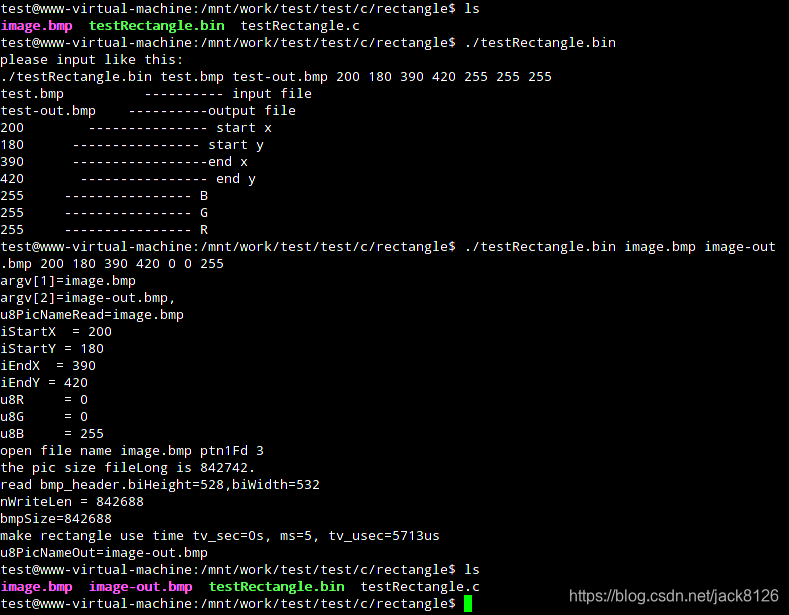
使用如下命令执行程序,在bmp图片上完成矩形图形的绘制。
./testRectangle.bin image.bmp image-out.bmp 200 180 390 420 0 0 255 执行完上述命令后,生成image-out.bmp文件。
如想修改矩形的大小,修改上述200 180 390 420数字即可。
如想修改矩形的颜色,修改上述0 0 255的色彩信息即可。
执行完之后的效果,跟使用opencv绘制矩形的效果一样。
参考网页
https://blog.csdn.net/jack8126/article/details/
版权声明:本文内容由互联网用户自发贡献,该文观点仅代表作者本人。本站仅提供信息存储空间服务,不拥有所有权,不承担相关法律责任。如发现本站有涉嫌侵权/违法违规的内容,请联系我们,一经查实,本站将立刻删除。
如需转载请保留出处:https://51itzy.com/kjqy/108496.html