
介绍Security中的自定义验证方法,继承UserDetailsService接口在实现类中连接数据库DB进行登录验证业务。
验证与授权
在上一章中简单地介绍了在「WebSecurityConfigurerAdapter」的子类中的如何定义验证与授权,来完成用户名称与密码的登录验证与授权功能。
- 验证方法 protected void configure(AuthenticationManagerBuilder auth)
- 授权方法 protected void configure(HttpSecurity http)
可以查看上一篇
Springboot+Security 入门培训 9 Security 登录过滤器 初始化
验证方法
@Override protected void configure(AuthenticationManagerBuilder auth) throws Exception {
    PasswordEncoder encoder = PasswordEncoderFactories.createDelegatingPasswordEncoder(); auth.inMemoryAuthentication() .withUser("zht"). password(encoder.encode("")).roles("USER") .and() .withUser("admin"). password(encoder.encode("")).roles("ADMIN"); }
讯享网
设置用户名称zht密码为普通用户, 用户名称admint密码为普管理员用户。这样在登录页面中可以录入上面的用户名称与密码来验证成功,验证成功后可以直接获得对应的用户权限的授权内容。在通过这些授权内容获得有权限访问的url路径内容。
授权方法
讯享网protected void configure(HttpSecurity http) throws Exception {
    http.authorizeRequests() .antMatchers("/zht/temp1").permitAll() .antMatchers("/zht").hasRole("USER") .antMatchers("/admin").hasRole("ADMIN") .anyRequest().authenticated() .and().formLogin() .and() .logout().logoutSuccessUrl("/logout").permitAll() .and().httpBasic(); }
这样设置只能验证几个固定用户,演示还可以但是在正式开发中就不行了。在开发中我们会把用户信息保存在数据库的表中,我们需要动态获得用户验证信息内容。
1 用户验证接口 UserDetailsService
使用UserDetailsService接口来自定义自己的信息验证服务。在实现类中重写loadUserByUsername方法来完成用户名称与密码验证的过程,在返回UserDetails类对象。
UserDetailsService接口
package org.springframework.security.core.userdetails; public interface UserDetailsService {
    UserDetails loadUserByUsername(String var1) throws UsernameNotFoundException; }
UserDetailsService接口实security包中自己定义的接口不需要我们来创建。我们直接继承使用就可以了。
ZhtDetailsServiceImpl类
讯享网@Component public class ZhtDetailsServiceImpl implements UserDetailsService {
    //用户验证方法 public UserDetails loadUserByUsername(String username) throws UsernameNotFoundException {
    //用户登录名称验证 if (username == null) {
    throw new UsernameNotFoundException("用户名称有错误 : " + username); } //密码转换器生成 PasswordEncoder encoder = PasswordEncoderFactories.createDelegatingPasswordEncoder(); String password = encoder.encode(""); //security权限设置 ADMIN USER  Collection<GrantedAuthority> authorities = new ArrayList(); authorities.add(new SimpleGrantedAuthority("ADMIN")); //验证成功信息设置 User user = new User(username, password, authorities); return user; } }
创建一个验证实现类,继承org.springframework.security.core.userdetails.UserDetailsService接口,在覆盖loadUserByUsername方法写验证过程。
- User user = new User(username, password, authorities); 在User 类中定义动态验证器。
与前端页面获得到的用户名称,密码进行验证。
前端登录页面用户可以录入任何用户名称,密码一定是就可以登录成功。
WebSecurityConfigurerAdapter子类中configure(AuthenticationManagerBuilder auth)设置自定义用户验证信息服务。
@Autowired UserDetailsService service; @Override public void configure(AuthenticationManagerBuilder auth) throws Exception {
    //自定义用户验证信息服务 auth.userDetailsService(service); }
WebSecurityConfig类
讯享网@EnableWebSecurity public class WebSecurityConfig extends WebSecurityConfigurerAdapter {
    //这里设置认证与授权信息内容 //用户名与密码验证 //AuthenticationManagerBuilder auth 验证方法 @Autowired UserDetailsService service; @Override public void configure(AuthenticationManagerBuilder auth) throws Exception {
    //自定义用户验证信息服务 auth.userDetailsService(service); } @Override protected void configure(HttpSecurity http) throws Exception {
    http.authorizeRequests(). antMatchers("/zht/temp1").permitAll() .anyRequest() .authenticated() .and().formLogin() .and().httpBasic(); } }
浏览器中http://localhost:9089/login ,在用户名称随便录入用户名称,密码必须是.
2 自定义数据库连接验证信息服务
本文介绍如何使用数据库中的数据来验证登录信息内容。
创建一个简单的用户登录验证信息表。
CREATE TABLE sys_zht ( name VARCHAR(100) NOT NULL, pawd VARCHAR(100) NOT NULL, role VARCHAR(100) NOT NULL, CONSTRAINT account_pk PRIMARY KEY (name) ); insert into sys_zht values('zht','','ADMIN'); insert into sys_zht values('user','','USER'); xml查询sql
讯享网<mapper namespace="cn.core.my.app.Controller.UserDao"> <select id="findUser" resultType="map"> select * from sys_zht where name=#{username} </select> </mapper>
- 创建用户查询登录sql文信息内容
UserDao接口
@Mapper public interface UserDao {
public List<Map> findUser(Map map); } - 定义 spring MyBatis 用户登录查询接口,创建查询方法List
登录验证业务
讯享网@Component public class ZhtDetailsServiceImpl implements UserDetailsService {
    @Autowired UserDao dao; public UserDetails loadUserByUsername(String username) throws UsernameNotFoundException {
    //查询数据库获得用户登录信息 Map par=new HashMap(); par.put("username",username); List list=dao.findUser(par); //没有查询出用户信息 if(list.isEmpty()){
    throw new UsernameNotFoundException("用户名称有错误 : " + username); } Map up=(Map)list.get(0); //密码转换器生成 PasswordEncoder encoder = PasswordEncoderFactories.createDelegatingPasswordEncoder(); String password = encoder.encode((String) up.get("pawd")); //security权限设置 ADMIN USER Collection<GrantedAuthority> authorities = new ArrayList(); authorities.add(new SimpleGrantedAuthority((String)up.get("role"))); //验证成功信息设置 User user = new User((String)up.get("name"),password, authorities); return user; } }
- 用登录名称查询数据用户表数据库。==方法参数(username)==等于登录名称
- 判断这个用户名称是否存在。
- 将查询出来的用户密码与用户名称,用户权限转入验证器中。
User user = new User((String)up.get("name"),password, authorities); - security 对验证器中的用户名称,密码与页面上获得用户名称密码进行对象。
在浏览器中录入http://localhost:9089/login 出现登录页面。在用户名称和密码中录入sys_zht表中保存的数据登录成功。
3 自定义JSP登录功能
我们一直在使用Security 页面进行用户身份验证,在实际开发中我们要使用自己的登录页面来进行用户身份验证,现在我们开创建一个自己的登录验证页面信心内容。
1 定义一个登录spring 容器
讯享网@Controller @RequestMapping("/zht") public class ZhtController {
    / * 登录初始页面 / @GetMapping("/login") public String login() {
    return "login"; } @RequestMapping("/index") public String index(Model map,String test) {
    //获得登录成功中Security保存的用户名称 Authentication an= SecurityContextHolder. getContext().getAuthentication(); System.out.println(an.getName()); return "index"; } ......其他代码 }
2 创建登录页面 login.jsp
<%@ page language="java" import="java.util.*" pageEncoding="utf-8"%>
<html>
<body>
<form action="/amdin/login" method="post">
<input type="text" id="user" name="user" />
<input type="password" id="pass" name="pass">
<input type="test" name="_csrf" value="${_csrf.token}">
<input type="submit" value="登录"/>
</form>
</body>
</html>
- 登录的form 一定是method=“post” 功能。
- 页面设置一个csrf令牌属性。
3 index登录成功转发页面
讯享网<%@ page language="java" import="java.util.*" pageEncoding="utf-8"%> <html xmlns="http://www.w3.org/1999/xhtml"> <head> <meta http-equiv="Content-Type" content="text/html;charset=utf-8" /> <title>zhtbs</title> <link rel="stylesheet" href="../static/css/css.css" /> <style type="text/css"> </style> </head> <body> <h1>${name}</h1> <a href="../zht/temp2">访问测试</a> <table class="zht1" style="width:100%"> <tr> <th width="15%">名字</th><th>备注</th></tr> <tr><td>名字</td><td>备注</td></tr> </table> </body> </html>
4 配置登录授权 WebSecurityConfig类

@Override public void configure(AuthenticationManagerBuilder auth) throws Exception {
    //登录验证 auth.userDetailsService(service); } @Override protected void configure(HttpSecurity http) throws Exception {
//url路径授权 http.authorizeRequests(). antMatchers("/zht/temp1","/zht/login").permitAll() .anyRequest().authenticated() .and().formLogin() .loginProcessingUrl("/admin/login") .loginPage("/zht/login") .usernameParameter("user").passwordParameter("pass") .defaultSuccessUrl("/zht/index", true) .failureUrl("/login?error=true") .and() .httpBasic(); } - antMatchers("/zht/login") 方法中必须装入登录页面的访问url路径。
- loginProcessingUrl("/admin/login") 路径一定要和登录页面中的from action="/amdin/login" 一致。
- usernameParameter(“user”).passwordParameter(“pass”) 对象 from页面中的用户名称,与密码的名称属性。
- defaultSuccessUrl("/zht/index", true) 登录成功的转发页面路径。
授权与页面元素对应关系
讯享网--------------登录也 --------------- <form action="/amdin/login" method="post"> <-------| <input type="text" id="user" name="user" /> <-----| | <input type="password" id="pass" name="pass"> <--|| | <input type="submit" value="登录"/> || | </form> || | --------------WebSecurityConfig --------------- || | protected void configure(HttpSecurity http) || | throws Exception { || | http.formLogin() || | .loginProcessingUrl("/admin/login") <-------||-| .loginPage("/zht/login") || .usernameParameter("user") <--------------|| .passwordParameter("pass") <--------------| .defaultSuccessUrl("/zht/index", true) .failureUrl("/login?error=true") .and() .httpBasic(); }
浏览器中录入 http://localhost:9089
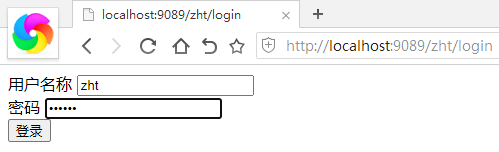
输入正确的用户名称与密码,点击登录按钮。验证成功后页面跳转到 /zht/index 路径的页面。
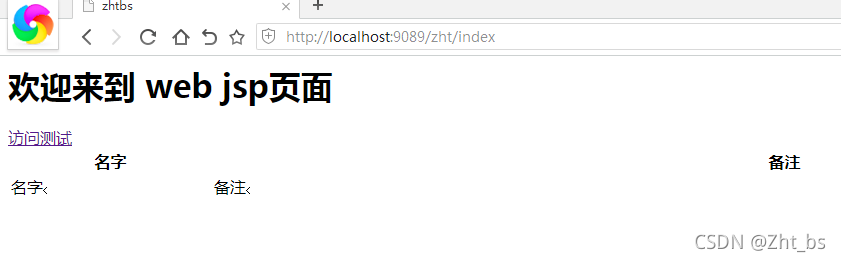
4 CSRF策略
CSRF (Cross-Site Request Forgery) 是 Web 应用程序中的一个漏洞,很多网络攻击都是利用它来发起攻击。简而言之,在Security 验证的时候准备2种CSRF策略,1接受CSRF策略的请求,2不需要CSRF策略的请求。
1 接受CSRF策略配置方式
CSRF策略生成令牌流程
- (服务器)访问登录页面时生成令牌并一起发送。令牌在会话中保存。
- (客户端)在提交登录验证表单中,要包含从服务器收到的令牌信息。
- (服务器)将保存的令牌与客户端发送的令牌进行核对。
Spring Security 默认这个策略。登录和注销表单中 _csrf 属性对应的是 CSRF 策略令牌。如果不发送令牌,Security 验证的时候会发生错误或者不进行用户验证。
login.jsp登录页面
<form action="/admin/login" method="post"> 用户名称<input type="text" id="user" name="user" /><br> 密码<input type="password" id="pass" name="pass"><br> <input type="hidden" name="_csrf" value="${_csrf.token}"> <input type="submit" value="登录"/> </form> ${_csrf.token}<br> ${_csrf.headerName}<br> </body> - _csrf属性,form中的 _csrf属性值保存CSRF策略令牌值,在 _csrf.token获得服务器中的CSRF策略令牌值。
- _csrf.token 服务器中的CSRF策略令牌值
- _csrf.headerName 服务器中的CSRF策略令牌名称
用户登录验证请求“action =”/admin/login“”时检查 _csrf值是否存在, _csrf 没有的时候 Security 验证发生错误。
2 不需要CSRF策略配置方式
用户不需要进行CSRF策略配置的时候,在服务中不会生成csrf令牌,Security 验证的时候也不会进行csrf令牌值的比对。
login.jsp登录页面
讯享网<form action="/admin/login" method="post"> 用户名称<input type="text" id="user" name="user" /><br> 密码<input type="password" id="pass" name="pass"><br> <input type="submit" value="登录"/> </form> </body>
- 页面中不需要 _csrf属性
最关键的步骤来了,我们需要在WebSecurityConfig 类的configure(HttpSecurity http) 方法中设置登录的授权设置来关闭CSRF策略验证。
protected void configure(HttpSecurity http) throws Exception { http.authorizeRequests() .antMatchers("/zht/temp1","/zht/login").permitAll() .anyRequest().authenticated(); //关闭CSRF策略验证 http.csrf().disable() .loginProcessingUrl("/admin/login") .loginPage("/zht/login") .usernameParameter("user") .passwordParameter("pass") .defaultSuccessUrl("/zht/index", true) .failureUrl("/login?error=true") .and().httpBasic(); } - csrf().disable() 使用这个方法关闭CSRF策略验证。
5 注销功能
Security 注销的时候也分CSRF策略,验证CSRF策略的时候,注销也需要加入_csrf键值。如果没有使用CSRF策略就不需要设置 __csrf键值了。
index页面
讯享网<form action="/logout" method="post"> <input type="submit" value="注销" /> <input type="hidden" name="${_csrf.parameterName}" value="${_csrf.token}"/> </form>
WebSecurityConfig类
protected void configure(HttpSecurity http) throws Exception {
.......代码 http.logout(). logoutUrl("/logout"). logoutSuccessUrl("/zht/login"). permitAll(); } - logoutUrl 对应url action="/logout" 路径
- logoutSuccessUrl 注销成功或返回登录页面
6 静态资源授权
在web项目中设置不进行过滤的共通静态资源。
- configure(WebSecurity web) 在WebSecurityConfig 类中覆盖configure方法,在configure方法中设置不需要授权过滤的资源路径信息内容。
WebSecurityConfig.java
讯享网@Override public void configure(WebSecurity web) throws Exception {
    //静态资源信息过得 web.ignoring().antMatchers("/js/", "/css/"); }
JSP页面中引入资源
<link rel="stylesheet" href="../css/css.css"/> <script src="../js/jquery/3.4.1/jquery.min.js"></script> 登录验证与信息反馈
在用户登录失败的后,服务会产生大量的错误提示信息,这些提示信息需要反馈到前台登录页面中,样用户看到这些错误提示信息内容。
创建用户验证登录ZhtDetailsServiceImpl类
1 HttpServletRequest request 类中引入request对象
2 UserDao dao 引入数据库操作对象
3 验证用户是否为空,验证失败后信息放入throw new BadCredentialsException异常中
4 验证用户数据库中是否存在,验证失败后信息放入BadCredentialsException异常中
4 验证用户密码是否正确,验证失败后信息放入BadCredentialsException异常中
5 将用户登录信息放入security 验证器中,通过security安全机制进行验证。
验证器 org.springframework.security.core.userdetails.User
ZhtDetailsServiceImpl类
讯享网@Component public class ZhtDetailsServiceImpl implements UserDetailsService {
    @Autowired UserDao dao; @Autowired private HttpServletRequest request; //获得请求对象 //登录业务验证方法 public UserDetails loadUserByUsername(String username) throws AuthenticationException {
    //用户登录名称验证 if (username == null) {
    throw new BadCredentialsException("用户名称不能为空"); } Map par=new HashMap(); par.put("username",username); //查询数据库,获得用户基础信息内容 List list=dao.findUser(par); if(list.isEmpty()){
    throw new BadCredentialsException("用户名称有错误:" + username); } Map up=(Map)list.get(0); //密码转换器生成 PasswordEncoder encoder = PasswordEncoderFactories.createDelegatingPasswordEncoder(); String password = encoder.encode((String) up.get("pawd"));//获得数据库中的密码 String pass=request.getParameter("pass");//获得前台中的数据库密码 if(!up.get("pawd").equals(pass)){
    throw new BadCredentialsException("用户密码有错误:" + username); } //security权限设置 ADMIN USER Collection<GrantedAuthority> authorities = new ArrayList(); authorities.add(new SimpleGrantedAuthority((String)up.get("role"))); //authorities.add(new SimpleGrantedAuthority("ROLE_"+"ADMIN")); //验证成功信息设置 User user = new User((String)up.get("name"),password, authorities); return user; } }
login登录页面
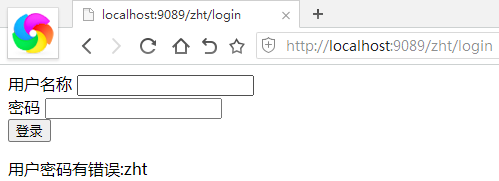
<html> <body> <form action="/admin/login" method="post"> 用户名称 <input type="text" id="user" name="user" /><br> 密码 <input type="password" id="pass" name="pass"><br> <input type="hidden" name="_csrf" value="${_csrf.token}"> <input type="submit" value="登录"/> </form> ${sessionScope.SPRING_SECURITY_LAST_EXCEPTION.message}<br> </body> </html> 在登录页面的session对象中取出security 验证的错误信息内容。
1 JSP的session名称是sessionScope
2 Thymeleaf模板中session对象名称是#session
讯享网<span th:if="${#session!=null}" th:text="${session?.SPRING_SECURITY_LAST_EXCEPTION?.message}" style="color:red;"></span> //BadCredentialsException 异常抛出错误才可以在SPRING_SECURITY_LAST_EXCEPTION中 //throw new BadCredentialsException("用户密码有错误:" + username);
- ${sessionScope.SPRING_SECURITY_LAST_EXCEPTION.message} 抛出的异常提示信息保存保存为
- ${sessionScope.SPRING_SECURITY_LAST_EXCEPTION.class}
异常种类
| 名称 | 说明 |
|---|---|
| BadCredentialsException | 用户没有对应的用户名与密码 |
| AccountExpiredException | 账户过期“isAccountNonExpired()” |
| AccountLockedException | 账户被锁定“isAccountNonLocked()” |
| CredentialExpiredException | 资格过期“isCredentialNonExpired()” |
| DisabledException | 帐户不可用“isEnabled()” |
在登录页面中返回验证失败信息
代码示例下载地址
10-SpringSecurity 数据库DB验证.zip
链接:https://pan.baidu.com/s/1rDpcZtdBA6i7vBmYTMwcUA
提取码:1234
本站地址下载 10-SpringSecurity 数据库DB验证.zip
版权声明:本文内容由互联网用户自发贡献,该文观点仅代表作者本人。本站仅提供信息存储空间服务,不拥有所有权,不承担相关法律责任。如发现本站有涉嫌侵权/违法违规的内容,请联系我们,一经查实,本站将立刻删除。
如需转载请保留出处:https://51itzy.com/kjqy/100609.html