
思路 动态绘制带xyz坐标线的立方体需要知道立方体共12条边
先绘制带箭头的xyz三条线
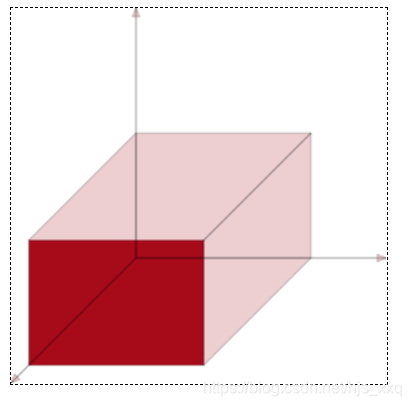
讯享网
上代码 讯享网
mounted() {
let xNum = this.diagnosisMsg.score_info.score_x
let yNum = this.diagnosisMsg.score_info.score_y
let zNum = this.diagnosisMsg.score_info.score_z
this.$nextTick(function () {
this.lifangti(xNum, yNum, zNum)
this.jiantou(this.xwinth / 3, this.yheight - this.yheight / 3, “x”)
this.jiantou(this.xwinth / 3, this.yheight / 3, “y”)
this.jiantou(this.xwinth / 3, this.yheight - this.yheight / 3, “z”)
})
},
methods: {
jiantou(xl, yl, type) {
var myCanvas = document.querySelector("#canvasId")

讯享网 var context = myCanvas.getContext("2d") if (type === "x") { var start = { x: xl, y: yl, } var end = { x: this.xwinth, y: yl, } } else if (type === "y") { var start = { x: xl, y: this.yheight - yl, } var end = { x: xl, y: 0, } } else { var start = { x: xl, y: yl, } var end = { x: 0, y: this.yheight, } } // 计算两点距离,主要是为了计算斜率 var distanceX = end.x - start.x, distanceY = end.y - start.y var distance = Math.sqrt(distanceY * distanceY + distanceX * distanceX) // 箭头的尺寸 var distanceArrow = 7, sharpeArrow = 3 // 先确定轴线与三角两个尖角点交汇坐标 var arrowMoveTo = { x: start.x + (distanceArrow * distanceX) / distance, y: start.y + (distanceArrow * distanceY) / distance, } var arrowLineTo = { x: end.x - (distanceArrow * distanceX) / distance, y: end.y - (distanceArrow * distanceY) / distance, } // 4个对称点坐标 var arrowTo1 = { x: arrowMoveTo.x - (sharpeArrow * distanceY) / distance, y: arrowMoveTo.y + (sharpeArrow * distanceX) / distance, } var arrowTo2 = { x: arrowMoveTo.x + (sharpeArrow * distanceY) / distance, y: arrowMoveTo.y - (sharpeArrow * distanceX) / distance, } var arrowTo3 = { x: arrowLineTo.x - (sharpeArrow * distanceY) / distance, y: arrowLineTo.y + (sharpeArrow * distanceX) / distance, } var arrowTo4 = { x: arrowLineTo.x + (sharpeArrow * distanceY) / distance, y: arrowLineTo.y - (sharpeArrow * distanceX) / distance, } // 设置线的粗细和断点,转角样式 context.lineWidth = 1 context.lineCap = "round" context.lineJoin = "round" // 绘制方法 var draw = function (arrow) { arrow = arrow || "single" // 清除画布 context.clearRect(0, 0, context.width, context.height) // 开始绘制 context.beginPath() context.moveTo(start.x, start.y) context.lineTo(end.x, end.y) // 两个结束对称点 context.lineTo(arrowTo3.x, arrowTo3.y) context.lineTo(arrowTo4.x, arrowTo4.y) // 回到结束点 context.lineTo(end.x, end.y) context.strokeStyle = "RGB(241,227,227)" context.globalAlpha = 0.3; // context.fill(); // 闭合,描边与填充 context.closePath() context.stroke() context.fill() } // 绘制单箭头 draw() }, lifangti(x, y, z) { var myCanvas = document.querySelector("#canvasId") var context = myCanvas.getContext("2d") //获取元素canvas的宽和高 this.xwinth = myCanvas.clientWidth this.yheight = myCanvas.clientHeight this.xb = this.xwinth / 3 this.yb = this.yheight / 3 this.zb = Math.sqrt(Math.pow(this.xb, 2) + Math.pow(this.yb, 2)) //根据勾股定理计算出z的边长 console.log(this.xb, this.yb, this.zb, "立方体的3个边长长度") //x线 立方体一共12条边 x y z 分别各有四条 context.beginPath() context.moveTo(this.xwinth / 3, this.yb * 2) context.lineTo(this.xb + (this.xwinth - this.xb) * x, this.yb * 2) //y线 context.moveTo(this.xwinth / 3, this.yb * 2) context.lineTo( this.xwinth / 3, this.yheight - this.yb - (this.yheight - this.yb) * y ) //z线 前提是正方形内画 context.moveTo(this.xwinth / 3, this.yb * 2) //因为是正方形 所以可以得出 z在x的落点距离 和 y的落点距离 var xluo = Math.sqrt(Math.pow(this.zb - this.zb * z, 2)) / 2 console.log(xluo, "x落点的距离") context.moveTo(xluo, this.yheight - xluo - (this.yheight - this.yb) * y) context.lineTo(xluo, this.yheight - xluo) context.lineTo(xluo + (this.xwinth - this.xb) * x, this.yheight - xluo) context.lineTo( xluo + (this.xwinth - this.xb) * x, this.yheight - xluo - (this.yheight - this.yb) * y ) context.lineTo(xluo, this.yheight - xluo - (this.yheight - this.yb) * y) context.fillStyle = "rgba(184, 28, 32, 0.5)" context.fill() context.lineTo( xluo + (this.xwinth - this.xb) * x, this.yheight - xluo - (this.yheight - this.yb) * y ) context.lineTo( this.xb + (this.xwinth - this.xb) * x, this.yheight - this.yb - (this.yheight - this.yb) * y ) context.lineTo( this.xb, this.yheight - this.yb - (this.yheight - this.yb) * y ) context.fillStyle = "rgba(184, 28, 32, 0.2)" context.fill() // context.globalAlpha = 0.4; context.lineTo( this.xb + (this.xwinth - this.xb) * x, this.yheight - this.yb - (this.yheight - this.yb) * y ) context.lineTo(this.xb + (this.xwinth - this.xb) * x, this.yb * 2) context.lineTo(xluo + (this.xwinth - this.xb) * x, this.yheight - xluo) context.lineTo( xluo + (this.xwinth - this.xb) * x, this.yheight - xluo - (this.yheight - this.yb) * y ) context.fillStyle = "rgba(184, 28, 32, 0.4)" context.fill() // context.stroke() },
},
版权声明:本文内容由互联网用户自发贡献,该文观点仅代表作者本人。本站仅提供信息存储空间服务,不拥有所有权,不承担相关法律责任。如发现本站有涉嫌侵权/违法违规的内容,请联系我们,一经查实,本站将立刻删除。
如需转载请保留出处:https://51itzy.com/kjqy/89178.html