
内核中设备树文档
参考文档:Documentation/devicetree/bindings/interrupt-controller/interrupts.txt
在设备树中有两个定义
1.interrupt client nodes(中断客户端节点)
// Example 1: interrupt-parent = <&intc1>; //指定使用哪个controller的中断控制器 interrupts = <5 0>, <6 0>; //指定使用的中断号 // Example 2: interrupts-extended = <&intc1 5 1>, <&intc2 1 0>; //用一个属性描述两个变量 讯享网
2.interrupt controller nodes(中断控制器节点)
2.1 当#interupt-cells=< 1 >时
别的节点要使用这个中断控制器时,只需要一个 cell 来表明使用“哪一个中断”。
讯享网// Example: vic: intc@ {
    compatible = "arm,versatile-vic"; interrupt-controller; //表明是一个中断控制器 #interrupt-cells = <1>; //指定cell的个数 reg = <0x 0x1000>; }; sic: intc@ {
    compatible = "arm,versatile-sic"; interrupt-controller; //表明是一个中断控制器 #interrupt-cells = <1>; reg = <0x 0x1000>; interrupt-parent = <&vic>; //这里引用vic,说明vic是它的父中断节点 interrupts = <31>; /* Cascaded to vic */ //使用vic的31号中断,因为interupt-cells设置了1,这里只填写1个值 };
2.2 当#interrupt-cless=< 2 >时
需要一个cell表明使用“哪一个中断”,一个cell来描述中断:
// cell = <2>是第二个的数值,触发方式填写内容 // 1 = low-to-high edge triggered // 2 = high-to-low edge triggered // 4 = active high level-sensitive // 8 = active low level-sensitive // Example: i2c@7000c000 {
    gpioext: gpio-adnp@41 {
    compatible = "ad,gpio-adnp"; reg = <0x41>; interrupt-parent = <&gpio>; interrupts = <160 1>; //指定中断号、触发条件 gpio-controller; #gpio-cells = <1>; interrupt-controller; #interrupt-cells = <2>; nr-gpios = <64>; }; sx8634@2b {
    compatible = "smtc,sx8634"; reg = <0x2b>; interrupt-parent = <&gpioext>; //使用中断gpio-adnp@41 interrupts = <3 0x8>; //3中断号,低电平触发 #address-cells = <1>; #size-cells = <0>; threshold = <0x40>; sensitivity = <7>; }; };
总结
在设备树中使用中断时,需要指定所需要的中断控制器节点,需要指定使用中断对应的物理接口,button的话就是一个gpio口。
interrupt-parent=<&xxxx>; //指定使用哪个接口
interrupts=< xxx xxx >; //指定使用哪个中断号,#interrupt-cells如果是2的话,还要指定中断的出发方式。
内核中获取设备树中断信息
不用设备树,而用板级信息获取方式
讯享网/* platform_get_resource - get a resource for a device. * @dev: platform device,@type: resource type,@num: resource index */ struct resource *platform_get_resource(struct platform_device *dev, unsigned int type, unsigned int num);
设备树信息获取方式
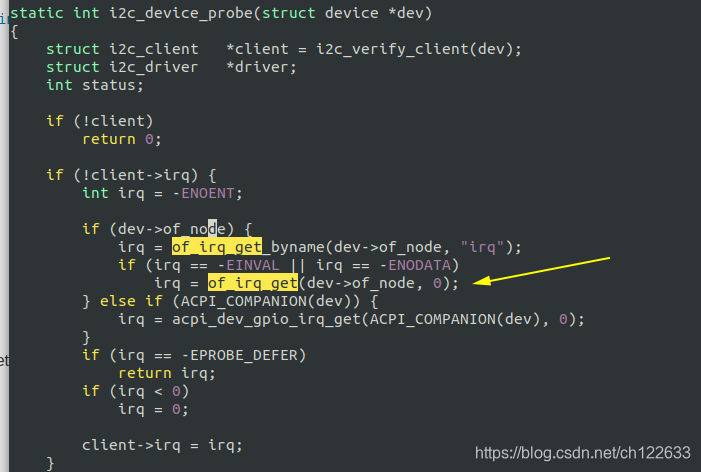
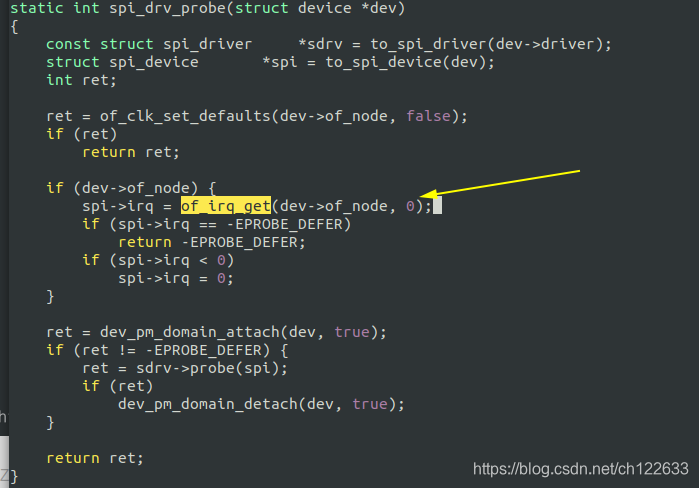
//用device_node*设备树节点,index序号,获取中断号 extern int of_irq_get(struct device_node *dev, int index); I2C设备获取中断号

SPI设备获取中断号
其他情况
如果既不能转换为paltform_device,也不是i2c或spi,在驱动程序中需要自行调用of_irq_get去解析设备树,得到中断号。
GPIO的中断设备树和内核处理
对 于 GPIO 按 键 , 我 们 并 不 需 要 去 写 驱 动 程 序 , 使 用 内 核 自 带 的 驱 动 程 序drivers/input/keyboard/gpio_keys.c 就可以,然后你需要做的只是修改设备树指定引脚及键值。
讯享网//Example nodes: gpio_keys {
    compatible = "gpio-keys"; // 如果用内核gpio,必须是gpio-keys的子节点 #address-cells = <1>; #size-cells = <0>; autorepeat; button@21 {
    label = "GPIO Key UP"; //按键的描述名称 linux,code = <103>; //输入事件的代码 gpios = <&gpio1 0 1>; //指定的设备树GPIO,gpios和interrupts可以省略其中一个。 }; button@22 {
    label = "GPIO Key DOWN"; //按键的描述名称 linux,code = <108>; //输入事件的代码 interrupts = <1 IRQ_TYPE_LEVEL_HIGH 7>; //对应的书中中断线 }; //... };
示例:
 gpio-keys {
    button@1 {
    gpios = <&gpio7 9 GPIO_ACTIVE_LOW>; linux,code = <KEY_A>; label = "GPIO KEY_A"; linux,input-type = <1>; gpio-key,wakeup = <1>; debounce-interval = <100>; pinctrl-names = "default"; pinctrl-0 = <&keyabtn>; }; };
版权声明:本文内容由互联网用户自发贡献,该文观点仅代表作者本人。本站仅提供信息存储空间服务,不拥有所有权,不承担相关法律责任。如发现本站有涉嫌侵权/违法违规的内容,请联系我们,一经查实,本站将立刻删除。
如需转载请保留出处:https://51itzy.com/kjqy/88806.html