
我们在linux下开发项目,有时会对外提供动态库,像*.so.1.0.0这样子的文件,另外提供相应的头文件。用户拿到动态库和头文件说明,就可以使用动态库里的function。
那随之而来的一个问题是,动态库的升级问题,我们的动态库更改了一个bug,升级了一个版本,那使用我们动态库的应用程序需要重新编译吗?运行时会产生异常吗?linux下是怎么规范这些内容的呐?
大家一定听说过windows下的dll hell。
Linux中的.so文件 是动态链接的产物
共享库理解为提供各种功能函数的集合,对外提供标准的接口
Linux中命名系统中共享库的规则
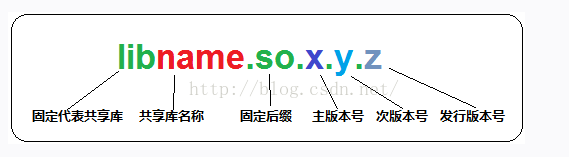
主版本号:不同的版本号之间不兼容
次版本号:增量升级 向后兼容
发行版本号:对应次版本的错误修正和性能提升,不影响兼容性
下面说说linux下动态库的命名规范。
为方便管理依赖关系,创建或部署共享库时,必须遵循统一约定的规则才行,其中包括动态库的命名规则及其部署方式。
共享库命名约定
1) 每个动态库有一个包含了真正的库代码的文件名,通常被称为库的 realname ,命名格式通常为
libxxx.so.x.y.z,其中so后缀中的x为主版本号,y为副版本号,z为发行版本号。例如,我的linux系统机器上zlib共享库的realname为 libz.so.1.2.8,这个文件是含有可执行的二进制代码的。
2) 每个动态库都有一个以"lib"为前缀且以".so.x"为结尾的被称为 soname
的特定名称,其中x为主版本号,soname命名格式通常为libxxx.so.x。例如,我的linux系统机器上zlib共享库的soname为libz.so.1。这个soname包含了动态库的主版本号,这个doname一般会包含在库代码的头文件中,这个可以使用 readelf -d 读取出来,使用这个动态库的程序的二进制ELF的头文件中包含有这个动态库的soname。程序运行时会按照这个名称去找真正的库文件。
3) 此外,编译链依赖了共享库的应用模块时,链接器只认不带任何版本号的共享库名, 可以将库名称作" linker name。例如,我的linux系统机器上zlib共享库的linkername为libz.so。也即,链接使用了动态库的程序时查找的动态库名称。例如:gcc -o test test.o -lz , 链接时就会找libz.so 。若没有这个文件,链接器就报错。
下面的内容转自:http://tldp.org/HOWTO/Program-Library-HOWTO/shared-libraries.html

以实际例子的形式,详细地阐述了realname soname linkername 之间的关系。
3. Shared Libraries
Shared libraries are libraries that are loaded by programs when they start. When a shared library is installed properly, all programs that start afterwards automatically use the new shared library. It's actually much more flexible and sophisticated than this, because the approach used by Linux permits you to:
- update libraries and still support programs that want to use older, non-backward-compatible versions of those libraries;
- override specific libraries or even specific functions in a library when executing a particular program.
- do all this while programs are running using existing libraries.
3.1. Conventions
For shared libraries to support all of these desired properties, a number of conventions and guidelines must be followed. You need to understand the difference between a library's names, in particular its ``soname'' and ``real name'' (and how they interact). You also need to understand where they should be placed in the filesystem.
3.1.1. Shared Library Names
Every shared library has a special name called the ``soname''. The soname has the prefix ``lib'', the name of the library, the phrase ``.so'', followed by a period and a version number that is incremented whenever the interface changes (as a special exception, the lowest-level C libraries don't start with ``lib''). A fully-qualified soname includes as a prefix the directory it's in; on a working system a fully-qualified soname is simply a symbolic link to the shared library's ``real name''.
Every shared library also has a ``real name'', which is the filename containing the actual library code. The real name adds to the soname a period, a minor number, another period, and the release number. The last period and release number are optional. The minor number and release number support configuration control by letting you know exactly what version(s) of the library are installed. Note that these numbers might not be the same as the numbers used to describe the library in documentation, although that does make things easier.
In addition, there's the name that the compiler uses when requesting a library, (I'll call it the ``linker name''), which is simply the soname without any version number.
The key to managing shared libraries is the separation of these names. Programs, when they internally list the shared libraries they need, should only list the soname they need. Conversely, when you create a shared library, you only create the library with a specific filename (with more detailed version information). When you install a new version of a library, you install it in one of a few special directories and then run the program ldconfig(8). ldconfig examines the existing files and creates the sonames as symbolic links to the real names, as well as setting up the cache file /etc/ld.so.cache (described in a moment).
ldconfig doesn't set up the linker names; typically this is done during library installation, and the linker name is simply created as a symbolic link to the ``latest'' soname or the latest real name. I would recommend having the linker name be a symbolic link to the soname, since in most cases if you update the library you'd like to automatically use it when linking. I asked H. J. Lu why ldconfig doesn't automatically set up the linker names. His explanation was basically that you might want to run code using the latest version of a library, but might instead want development to link against an old (possibly incompatible) library. Therefore, ldconfig makes no assumptions about what you want programs to link to, so installers must specifically modify symbolic links to update what the linker will use for a library.
Thus, /usr/lib/libreadline.so.3 is a fully-qualified soname, which ldconfig would set to be a symbolic link to some realname like /usr/lib/libreadline.so.3.0. There should also be a linker name, /usr/lib/libreadline.so which could be a symbolic link referring to /usr/lib/libreadline.so.3.
版权声明:本文内容由互联网用户自发贡献,该文观点仅代表作者本人。本站仅提供信息存储空间服务,不拥有所有权,不承担相关法律责任。如发现本站有涉嫌侵权/违法违规的内容,请联系我们,一经查实,本站将立刻删除。
如需转载请保留出处:https://51itzy.com/kjqy/87169.html