
VOC目标检测数据集的格式
其中图片存放在JPEGImages文件夹中,标注是xml文件,存储在Annotations文件中
关于train集和val集的txt划分存放在ImageSets文件夹下面的Main文件夹下

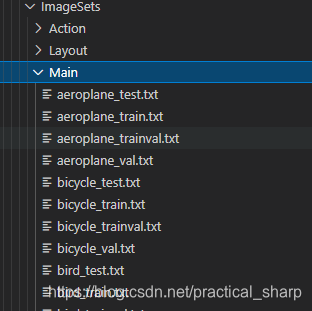
如下是VOC2012某张图片的标注信息xml文件
<annotation> <folder>VOC2012</folder> <filename>2008_006604.jpg</filename> <source> <database>The VOC2008 Database</database> <annotation>PASCAL VOC2008</annotation> <image>flickr</image> </source> <size> <width>500</width> <height>375</height> <depth>3</depth> </size> <segmented>0</segmented> <object> <name>aeroplane</name> <pose>Frontal</pose> <truncated>1</truncated> <occluded>0</occluded> <bndbox> <xmin>1</xmin> <ymin>97</ymin> <xmax>500</xmax> <ymax>375</ymax> </bndbox> <difficult>0</difficult> </object> </annotation> 这里是一篇关于VOC数据集标注格式的介绍
https://blog.csdn.net/m0_/article/details/
NWPU VHR-10数据集的格式

打开NWPU数据集的格式,只有简单的几个文件夹,标注信息是txt文件,存放在ground truth中。
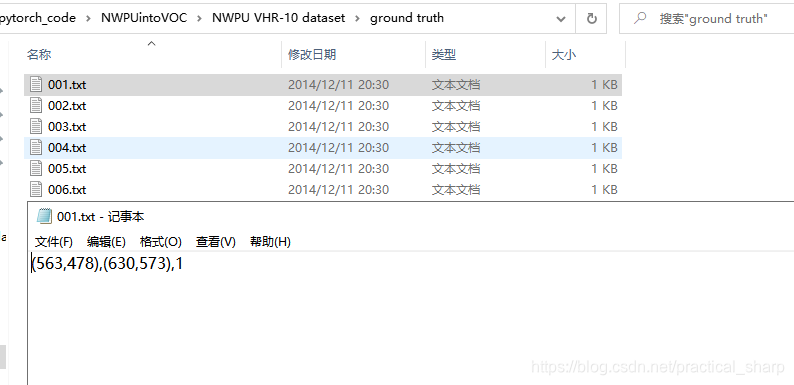
采用的是字符串的标注信息。每个目标的标注信息为(x1,y1),(x2,y2),class_number五个数字表示。
只有positive image set中的图片有标注信息txt文件,每个txt文件的行数不固定,取决于该正样本图片中存在的目标个数。
negative image set中的图片没有标注信息txt文件。
在negative image set文件夹中有150张图片,这些图片中没有检测目标。


在positive image set文件夹中有650张图片,某一张正样本图片,有很多飞机模板目标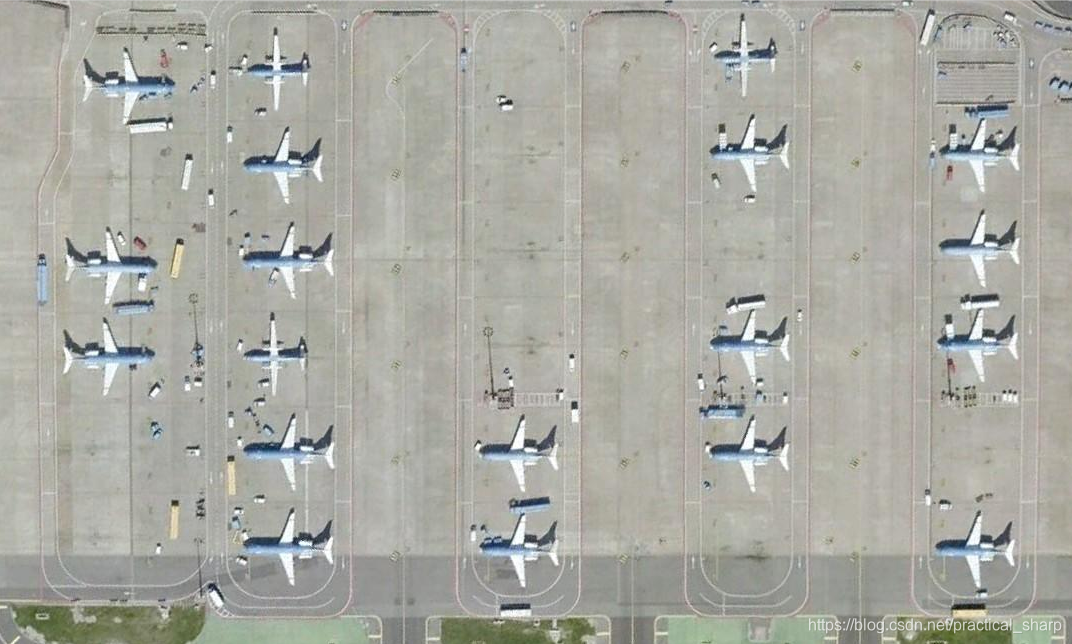
所以说NWPU数据集的格式非常不规范,不利于数据预处理和运行,格式划分的非常随意,标注信息也不利于读取。将NWPU数据集的格式转换成VOC数据集的格式尤为重要。
总结一些坑
- NWPU数据集负样本图片在negative image set中,也是从001.jpg开始的,非常不友好。需要将正样本图片重命名为000001 - 000650.jpg,需要将负样本图片重命名为000651 - 000800.jpg。同时输出图片的路径为/JPEGImages/
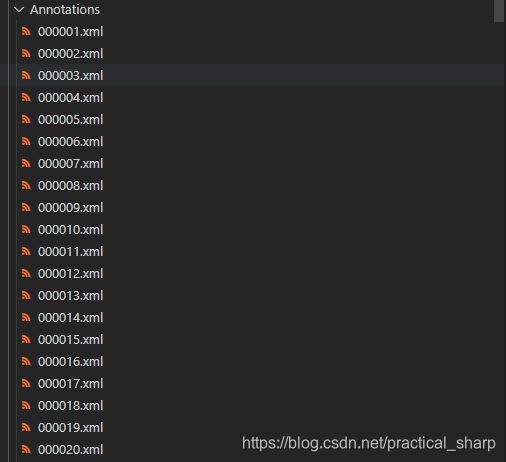
- NWPU数据集负样本没有标注信息txt文件,这里也需要对负样本图片生成VOC标注格式的xml文件,里面包括图片的size信息,不含object对象的包围框信息。负样本输出的标注xml文件命名范围为000651 - 000800.xml,输出路径为/Annotations/
- 正样本输出标注信息xml文件命名范围为000001 - 000650.xml,输出路径为/Annotations/
转换代码
讯享网""" code by lyf0801 in 2021.03.14 """ import shutil from lxml.etree import Element,SubElement,tostring from xml.dom.minidom import parseString import xml.dom.minidom import os import sys from PIL import Image # 处理NWPU VHR-10数据集中的txt标注信息转换成 xml文件 # 此处的path应该传入的是NWPU VHR-10数据集文件夹下面的ground truth文件夹的目录 # 即 path = "D:/pytorch_code/NWPUintoVOC/NWPU VHR-10 dataset/ground truth" def deal(path): files=os.listdir(path) # files获取所有标注txt文件的文件名 # 此处可以自行设置输出路径 按照VOC数据集的格式,xml文件应该输出在数据集文件下面的Annotations文件夹下面 outpath = "D:/pytorch_code/NWPUintoVOC/NWPU VHR-10 dataset/Annotations/" # 如果输出文件夹不存在,就创建它 if os.path.exists(outpath) == False: os.mkdir(outpath) # 遍历所有的txt标注文件,一共650个txt文件 for file in files: filename=os.path.splitext(file)[0] # 获取ground truth文件夹中标注txt文件的文件名,比如如果文件名为001.txt,那么filename = '001' print(filename) sufix=os.path.splitext(file)[1]# 获取标注txt文件的后缀名 判断是否为txt if sufix=='.txt': # 标注txt文件中每一行代表一个目标,(x1,y1),(x2,y2),class_number来表示 xmins=[] ymins=[] xmaxs=[] ymaxs=[] names=[] # num,xmins,ymins,xmaxs,ymaxs,names=readtxt(path + '/' + file) # 调用readtxt文件获取信息,转到readtxt函数 path_txt = path + '/' + file # 获取txt标注文件的路径信息 # 打开txt标注文件 with open(path_txt, 'r') as f: contents = f.read() # 将txt文件的信息按行读取到contents列表中 print("contents:") print(contents) """一个输出例子: contents: (563,478),(630,573),1 """ objects=contents.split('\n') # 以换行划分每一个目标的标注信息,因为每一个目标的标注信息在txt文件中为一行 print("objects:") print(objects) """ objects: ['(563,478),(630,573),1 ', ''] """ for i in range(objects.count('')): objects.remove('') # 将objects中的空格移除 print("objects:") print(objects) """ objects: ['(563,478),(630,573),1 '] """ num=len(objects) # 获取一个标注文件的目标个数,objects中一个元素代表的信息就是一个检测目标 #print(num) # 遍历 objects列表,获取每一个检测目标的五维信息 for objecto in objects: print("objecto:") print(objecto) xmin=objecto.split(',')[0] # xmin = '(563' xmin=xmin.split('(')[1] # xmin = '563' 可能存在空格 xmin=xmin.strip() # strip函数去掉字符串开头结尾的空格符 ymin=objecto.split(',')[1] # ymin = '478)' print("ymin:") print(ymin) ymin=ymin.split(')')[0] # ymin = '478' 可能存在空格 ymin=ymin.strip() # strip函数去掉字符串开头结尾的空格符 xmax=objecto.split(',')[2] # xmax同理 xmax=xmax.split('(')[1] xmax=xmax.strip() ymax=objecto.split(',')[3] # ymax同理 ymax=ymax.split(')')[0] ymax=ymax.strip() name=objecto.split(',')[4] # 与上 同理 name=name.strip() if name=="1 " or name=="1": # 将数字信息转换成label字符串信息 name='airplane' elif name=="2 "or name=="2": name='ship' elif name== "3 "or name=="3": name='storage tank' elif name=="4 "or name=="4": name='baseball diamond' elif name=="5 "or name=="5": name='tennis court' elif name=="6 "or name=="6": name='basketball court' elif name=="7 "or name=="7": name='ground track field' elif name=="8 "or name=="8": name='harbor' elif name=="9 "or name=="9": name='bridge' elif name=="10 "or name=="10": name='vehicle' else: print(path) # print(xmin,ymin,xmax,ymax,name) xmins.append(xmin) ymins.append(ymin) xmaxs.append(xmax) ymaxs.append(ymax) names.append(name) print("num,xmins,ymins,xmaxs,ymaxs,names") print(num,xmins,ymins,xmaxs,ymaxs,names) """ num,xmins,ymins,xmaxs,ymaxs,names 1 ['563'] ['478'] ['630'] ['573'] ['airplane'] """ print("num,xmins,ymins,xmaxs,ymaxs,names") print(num,xmins,ymins,xmaxs,ymaxs,names) filename_fill = str(int(filename)).zfill(6) # 将xml的文件名填充为6位数。比如1.xml就改为00001.xml filename_jpg = filename_fill + ".jpg" # 由于xml中存储的文件名为000001.jpg 所以还得对所有的NWPU数据集中的图片进行重命名 dealpath = outpath + filename_fill +".xml" # 注意,经过重命名转换之后,图片都存放在D:/pytorch_code/NWPUintoVOC/NWPU VHR-10 dataset/JPEGImages/中 imagepath = "D:/pytorch_code/NWPUintoVOC/NWPU VHR-10 dataset/JPEGImages/" + filename_fill + ".jpg" with open(dealpath, 'w') as f: img=Image.open(imagepath) # 根据图片的地址打开图片并获取图片的宽 和 高 width=img.size[0] height=img.size[1] # 将图片的宽和高以及其他和VOC数据集向对应的信息 writexml(dealpath,filename_jpg,num,xmins,ymins,xmaxs,ymaxs,names, height, width) # 同时也得给negatiive image set文件夹下面的所有负样本图片生成xml标注 negative_path = "D:/pytorch_code/NWPUintoVOC/NWPU VHR-10 dataset/negative image set/" negative_images = os.listdir(negative_path) for file in negative_images: filename = file.split('.')[0] # 获取文件名,不包括后缀名 filename_fill = str(int(filename) + 650).zfill(6) # 将xml的文件名填充为6位数。同时加上650,比如1.xml就改为00001.xml filename_jpg = filename_fill + '.jpg' # 比如第一个负样本001.jpg的filename_jpg 为000651.jpg 重命名为6位数 print(filename_fill) 生成不含目标的xml文件 dealpath = outpath + filename_fill +".xml" # 注意,经过重命名转换之后,图片都存放在D:/pytorch_code/NWPUintoVOC/NWPU VHR-10 dataset/JPEGImages/中 imagepath = "D:/pytorch_code/NWPUintoVOC/NWPU VHR-10 dataset/JPEGImages/" + filename_fill + ".jpg" with open(dealpath, 'w') as f: img = Image.open(imagepath) width = img.size[0] height = img.size[1] # 将宽高和空的目标标注信息写入xml标注 writexml(dealpath,filename_jpg,num = 0,xmins = [],ymins = [],xmaxs = [],ymaxs = [],names = [],width=width,height=height) # with open() # NWPU数据集中标注的五维信息 (x1,y1) denotes the top-left coordinate of the bounding box, # (x2,y2) denotes the right-bottom coordinate of the bounding box # 所以 xmin = x1 ymin = y1, xmax = x2, ymax = y2 同时要注意这里的相对坐标是以图片左上角为坐标原点计算的 # VOC数据集对于包围框标注的格式是bounding-box(包含左下角和右上角xy坐标 # 将从txt读取的标注信息写入到xml文件中 def writexml(path,filename,num,xmins,ymins,xmaxs,ymaxs,names,height, width):# Nwpu-vhr-10 < 1000*600 node_root=Element('annotation') node_folder=SubElement(node_root,'folder') node_folder.text="VOC2012" node_filename=SubElement(node_root,'filename') node_filename.text="%s" % filename node_size=SubElement(node_root,"size") node_width = SubElement(node_size, 'width') node_width.text = '%s' % width node_height = SubElement(node_size, 'height') node_height.text = '%s' % height node_depth = SubElement(node_size, 'depth') node_depth.text = '3' for i in range(num): node_object = SubElement(node_root, 'object') node_name = SubElement(node_object, 'name') node_name.text = '%s' % names[i] node_name = SubElement(node_object, 'pose') node_name.text = '%s' % "unspecified" node_name = SubElement(node_object, 'truncated') node_name.text = '%s' % "0" node_difficult = SubElement(node_object, 'difficult') node_difficult.text = '0' node_bndbox = SubElement(node_object, 'bndbox') node_xmin = SubElement(node_bndbox, 'xmin') node_xmin.text = '%s'% xmins[i] node_ymin = SubElement(node_bndbox, 'ymin') node_ymin.text = '%s' % ymins[i] node_xmax = SubElement(node_bndbox, 'xmax') node_xmax.text = '%s' % xmaxs[i] node_ymax = SubElement(node_bndbox, 'ymax') node_ymax.text = '%s' % ymaxs[i] xml = tostring(node_root, pretty_print=True) dom = parseString(xml) with open(path, 'wb') as f: f.write(xml) return # 该代码主要解决的是图片的重命名问题,因为voc的图片是从000001.jpg开始,而且是6位数 def imag_rename(old_path, new_path,start_number = 0): filelist = os.listdir(old_path) # 该文件夹下所有的文件(包括文件夹) if os.path.exists(new_path) == False: os.mkdir(new_path) for file in filelist: # 遍历所有文件 Olddir = os.path.join(old_path, file) # 原来的文件路径 if os.path.isdir(Olddir): # 如果是文件夹则跳过 continue filename = os.path.splitext(file)[0] # 文件名 filetype = os.path.splitext(file)[1] # 文件扩展名 if filetype == '.jpg': Newdir = os.path.join(new_path, str(int(filename) + start_number).zfill(6) + filetype) # 用字符串函数zfill 以0补全所需位数 shutil.copyfile(Olddir, Newdir) if __name__ == "__main__": # # 由于xml中存储的文件名为000001.jpg 所以还得对所有的NWPU数据集中的图片进行重命名处理 # 解决positive image set文件夹中的重命名问题,start_number = 0 old_path = "D:/pytorch_code/NWPUintoVOC/NWPU VHR-10 dataset/positive image set/" new_path = "D:/pytorch_code/NWPUintoVOC/NWPU VHR-10 dataset/JPEGImages/" imag_rename(old_path, new_path) # 解决negative image set文件夹中的重命名问题,start_number = 650 old_path = "D:/pytorch_code/NWPUintoVOC/NWPU VHR-10 dataset/negative image set/" new_path = "D:/pytorch_code/NWPUintoVOC/NWPU VHR-10 dataset/JPEGImages/" imag_rename(old_path,new_path,start_number = 650) # path指定的是标注txt文件所在的路径 path = "D:/pytorch_code/NWPUintoVOC/NWPU VHR-10 dataset/ground truth" deal(path) # VOC 数据集中的负样本是如何标注的,关于NWPU中的负样本图片也没有得到解决? # 如何划分NWPU的train集合和 val集合也是一个问题??? # 随机划分吗?
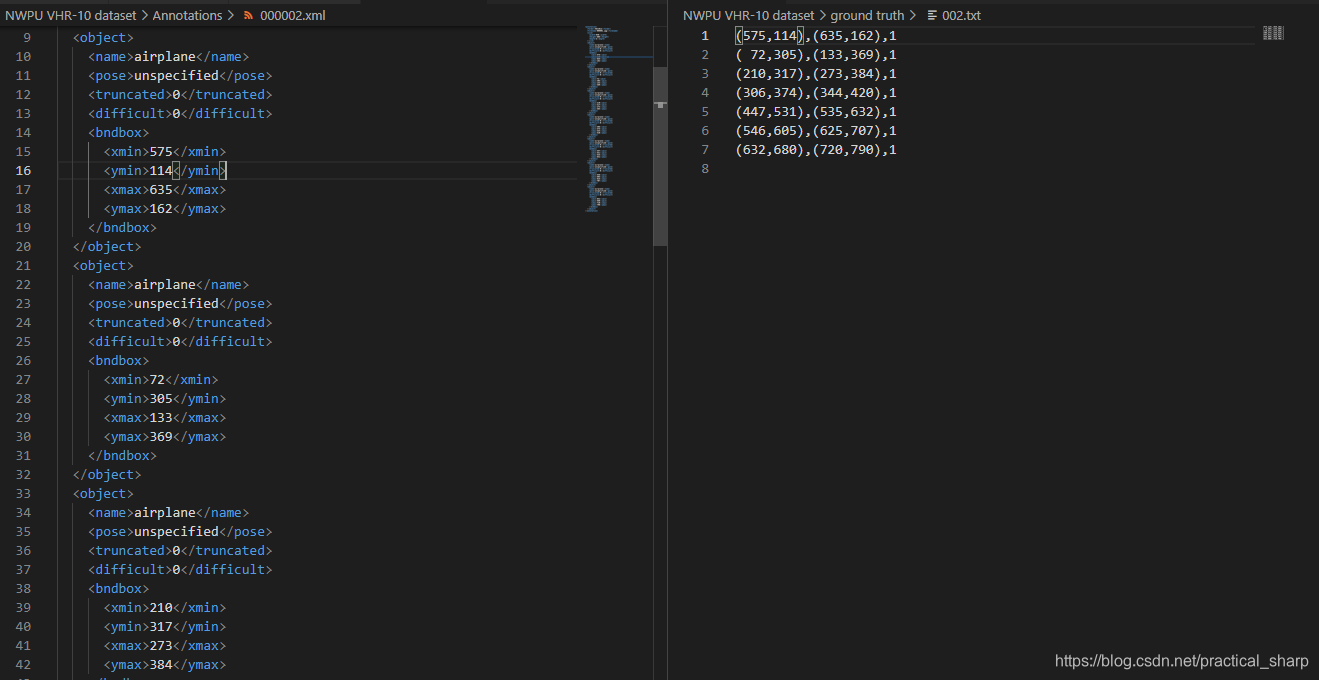
经过核对,生成的xml文件和image文件信息完全和VOC2012数据集的格式完美匹配
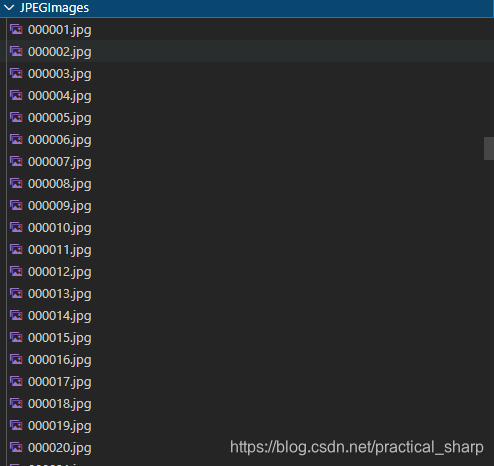
可以看到生成的xml文件 和 NWPU标注的txt文件完全匹配。
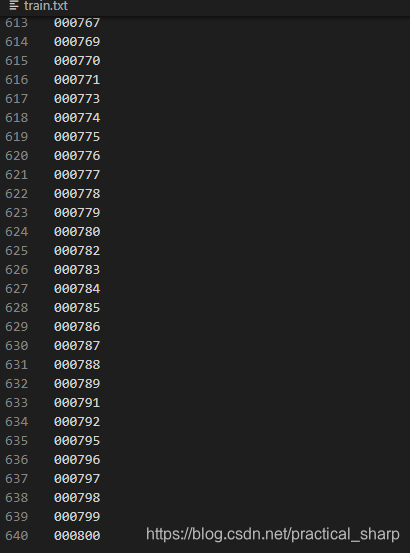
最后的问题NWPU数据集压根就没有划分训练集和测试集的txt文件,这里必须手动划分,只能写一个split_data的脚本了
""" this code was inspired by https://github.com/WZMIAOMIAO/deep-learning-for-image-processing/blob/master/pytorch_object_detection/faster_rcnn/split_data.py recode by lyf0801 in 2021.03.14 """ import os import random files_path = "./NWPU VHR-10 dataset/Annotations/" if not os.path.exists(files_path): print("文件夹不存在") exit(1) val_rate = 0.2 # 设置train数据集占80%,测试占20% files_name = sorted([file.split(".")[0] for file in os.listdir(files_path)]) files_num = len(files_name) print(files_num) val_index = random.sample(range(0, files_num), k=int(files_num*val_rate)) train_files = [] val_files = [] for index, file_name in enumerate(files_name): if index in val_index: val_files.append(file_name) else: train_files.append(file_name) try: train_f = open("train.txt", "x") eval_f = open("val.txt", "x") train_f.write("\n".join(train_files)) eval_f.write("\n".join(val_files)) except FileExistsError as e: print(e) exit(1) 得到划分后的train.txt和val.txt
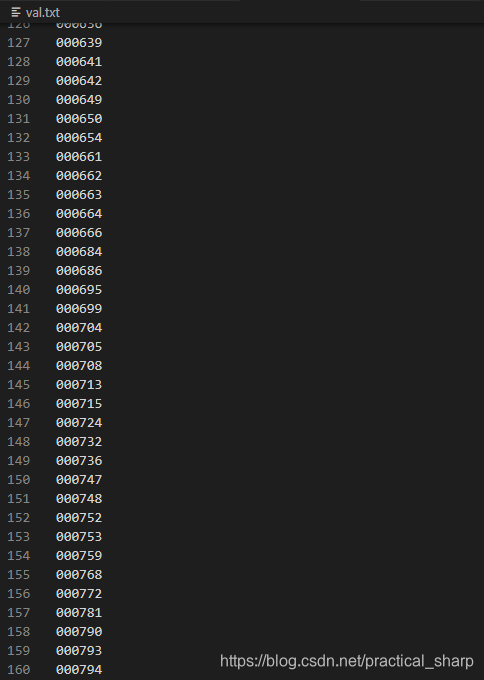
由于 是均匀随机划分的。
然后自己手动改一个json类别信息对应文件
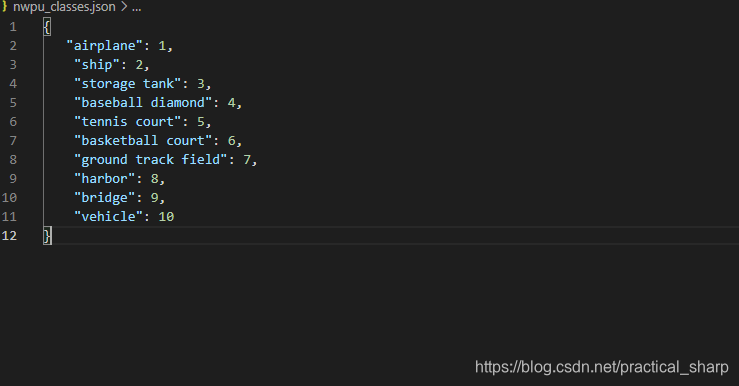
至此,NWPU数据集的格式完全转换成了VOC2012数据集的标注格式。
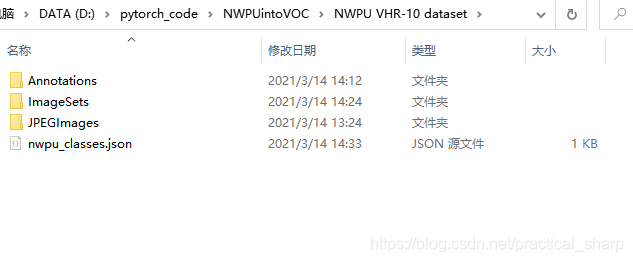
在pytorch中,还得给数据集写一个脚本用于定义Dataset class
讯享网""" this code was inspired by https://github.com/WZMIAOMIAO/deep-learning-for-image-processing/blob/master/pytorch_object_detection/faster_rcnn/mydataset.py recode by lyf0801 in 2021.03.14 """ from torch.utils.data import Dataset import os import torch import json from PIL import Image from lxml import etree class NWPUVHR10DataSet(Dataset): """读取解析NWPU VHR-10数据集""" def __init__(self, nwpu_root, transforms,txt_name: str = "train.txt"): self.root = os.path.join(nwpu_root, "NWPU VHR-10 dataset") self.img_root = os.path.join(self.root, "JPEGImages") self.annotations_root = os.path.join(self.root, "Annotations") # read train.txt or val.txt file txt_path = os.path.join(self.root, "ImageSets", "Main", txt_name) assert os.path.exists(txt_path), "not found {} file.".format(txt_name) with open(txt_path) as read: self.xml_list = [os.path.join(self.annotations_root, line.strip() + ".xml") for line in read.readlines()] # check file assert len(self.xml_list) > 0, "in '{}' file does not find any information.".format(txt_path) for xml_path in self.xml_list: assert os.path.exists(xml_path), "not found '{}' file.".format(xml_path) # read class_indict json_file = './NWPU VHR-10 dataset/nwpu_classes.json' assert os.path.exists(json_file), "{} file not exist.".format(json_file) json_file = open(json_file, 'r') self.class_dict = json.load(json_file) self.transforms = transforms def __len__(self): return len(self.xml_list) def __getitem__(self, idx): # read xml xml_path = self.xml_list[idx] with open(xml_path) as fid: xml_str = fid.read() xml = etree.fromstring(xml_str) data = self.parse_xml_to_dict(xml)["annotation"] img_path = os.path.join(self.img_root, data["filename"]) image = Image.open(img_path) if image.format != "JPEG": raise ValueError("Image '{}' format not JPEG".format(img_path)) boxes = [] labels = [] iscrowd = [] assert "object" in data, "{} lack of object information.".format(xml_path) for obj in data["object"]: xmin = float(obj["bndbox"]["xmin"]) xmax = float(obj["bndbox"]["xmax"]) ymin = float(obj["bndbox"]["ymin"]) ymax = float(obj["bndbox"]["ymax"]) boxes.append([xmin, ymin, xmax, ymax]) labels.append(self.class_dict[obj["name"]]) if "difficult" in obj: iscrowd.append(int(obj["difficult"])) else: iscrowd.append(0) # convert everything into a torch.Tensor boxes = torch.as_tensor(boxes, dtype=torch.float32) labels = torch.as_tensor(labels, dtype=torch.int64) iscrowd = torch.as_tensor(iscrowd, dtype=torch.int64) image_id = torch.tensor([idx]) area = (boxes[:, 3] - boxes[:, 1]) * (boxes[:, 2] - boxes[:, 0]) target = {
   } target["boxes"] = boxes target["labels"] = labels target["image_id"] = image_id target["area"] = area target["iscrowd"] = iscrowd if self.transforms is not None: image, target = self.transforms(image, target) return image, target def get_height_and_width(self, idx): # read xml xml_path = self.xml_list[idx] with open(xml_path) as fid: xml_str = fid.read() xml = etree.fromstring(xml_str) data = self.parse_xml_to_dict(xml)["annotation"] data_height = int(data["size"]["height"]) data_width = int(data["size"]["width"]) return data_height, data_width def parse_xml_to_dict(self, xml): """ 将xml文件解析成字典形式,参考tensorflow的recursive_parse_xml_to_dict Args: xml: xml tree obtained by parsing XML file contents using lxml.etree Returns: Python dictionary holding XML contents. """ if len(xml) == 0: # 遍历到底层,直接返回tag对应的信息 return {
   xml.tag: xml.text} result = {
   } for child in xml: child_result = self.parse_xml_to_dict(child) # 递归遍历标签信息 if child.tag != 'object': result[child.tag] = child_result[child.tag] else: if child.tag not in result: # 因为object可能有多个,所以需要放入列表里 result[child.tag] = [] result[child.tag].append(child_result[child.tag]) return {
   xml.tag: result} def coco_index(self, idx): """ 该方法是专门为pycocotools统计标签信息准备,不对图像和标签作任何处理 由于不用去读取图片,可大幅缩减统计时间 Args: idx: 输入需要获取图像的索引 """ # read xml xml_path = self.xml_list[idx] with open(xml_path) as fid: xml_str = fid.read() xml = etree.fromstring(xml_str) data = self.parse_xml_to_dict(xml)["annotation"] data_height = int(data["size"]["height"]) data_width = int(data["size"]["width"]) # img_path = os.path.join(self.img_root, data["filename"]) # image = Image.open(img_path) # if image.format != "JPEG": # raise ValueError("Image format not JPEG") boxes = [] labels = [] iscrowd = [] for obj in data["object"]: xmin = float(obj["bndbox"]["xmin"]) xmax = float(obj["bndbox"]["xmax"]) ymin = float(obj["bndbox"]["ymin"]) ymax = float(obj["bndbox"]["ymax"]) boxes.append([xmin, ymin, xmax, ymax]) labels.append(self.class_dict[obj["name"]]) iscrowd.append(int(obj["difficult"])) # convert everything into a torch.Tensor boxes = torch.as_tensor(boxes, dtype=torch.float32) labels = torch.as_tensor(labels, dtype=torch.int64) iscrowd = torch.as_tensor(iscrowd, dtype=torch.int64) image_id = torch.tensor([idx]) area = (boxes[:, 3] - boxes[:, 1]) * (boxes[:, 2] - boxes[:, 0]) target = {
   } target["boxes"] = boxes target["labels"] = labels target["image_id"] = image_id target["area"] = area target["iscrowd"] = iscrowd return (data_height, data_width), target @staticmethod def collate_fn(batch): return tuple(zip(*batch)) """ import transforms from draw_box_utils import draw_box from PIL import Image import json import matplotlib.pyplot as plt import torchvision.transforms as ts import random # read class_indict category_index = {} try: json_file = open('./NWPU VHR-10 dataset/nwpu_classes.json', 'r') class_dict = json.load(json_file) category_index = {v: k for k, v in class_dict.items()} except Exception as e: print(e) exit(-1) data_transform = { "train": transforms.Compose([transforms.ToTensor(), transforms.RandomHorizontalFlip(0.5)]), "val": transforms.Compose([transforms.ToTensor()]) } # load train data set train_data_set = NWPUVHR10DataSet(os.getcwd(), data_transform["train"],"train.txt") print(len(train_data_set)) for index in random.sample(range(0, len(train_data_set)), k=5): img, target = train_data_set[index] img = ts.ToPILImage()(img) draw_box(img, target["boxes"].numpy(), target["labels"].numpy(), [1 for i in range(len(target["labels"].numpy()))], category_index, thresh=0.5, line_thickness=5) plt.imshow(img) plt.show() """
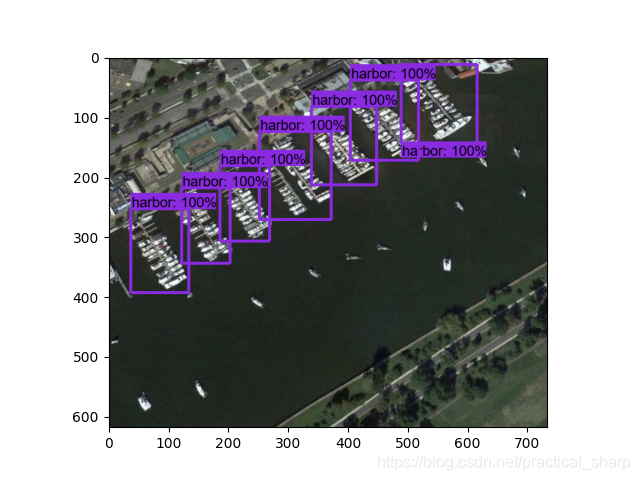
通过脚本打印出来的标注信息图片可视化结果为:
版权声明:本文内容由互联网用户自发贡献,该文观点仅代表作者本人。本站仅提供信息存储空间服务,不拥有所有权,不承担相关法律责任。如发现本站有涉嫌侵权/违法违规的内容,请联系我们,一经查实,本站将立刻删除。
如需转载请保留出处:https://51itzy.com/kjqy/86395.html