
目录
1. 加载动画
1.1 通过assets加载
1.2 通过网络url加载
1.3 通过raw加载
1.4 通过本地文件加载
2. 常用功能
2.1 播放和停止
2.2 设置重复次数
2.3 设置重复Mode
2.4 获取动画时长
2.5 动画监听
2.5.1 AnimatorListener
2.5.2 AnimatorListenerAdapter
2.6 设置播放速度
2.7 暂停、继续
2.8 获取和设置帧
3. 分析
3.1 流程分析
3.2 json分析
3.3 源码分析
3.3.1 解析json文件到LottieComposition
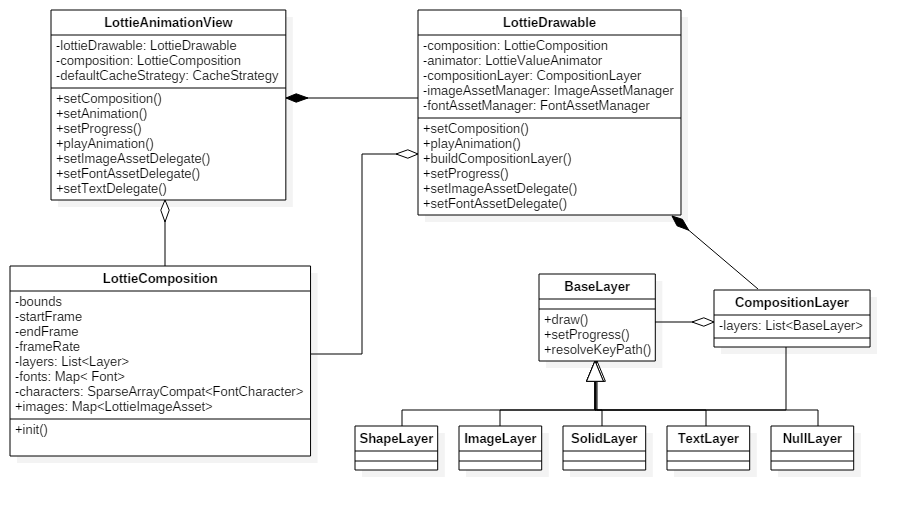
3.3.2 LottieComposition转化为CompositionLayer
3.3.3 动画绘制
4. 性能
4.1 加载耗时
4.2 UI耗时
5. 拓展
5.1 lottie转视频
5.2 动态修改lottie
6. 避坑
这篇博客总结一下lottie的使用。lottie多火这个我不多说了,这篇文章除了介绍最基本的加载动画功能外,还对lottie的常用API、性能、以及一些拓展的高级用法和源码做了分析和总结。希望看到这篇博客的朋友,不仅仅是来学看如何使用lottie,而是能更深入的了解一些lottie的高级用法,同时对性能有所了解。更重要的是,能对lottie的原理和源码有进一步的深入了解,进而探索lottie的一些高级用法。最后,本文会总结lottie的一些坑,也希望大家在使用的过程中可以注意一下。
1. 加载动画
lottie支持多种方式加载:assets,raw,网络url,本地文件等。且大都支持两种加载方式。一种是通过LottieAnimationView简便的加载,一种是通过LottieCompositionFactory加载。
1.1 通过assets加载
(1)如果lottie仅有json,没有images文件夹,那么可以直接简易地加载:
// 通过assets简易地加载无images文件夹lottie private void loadLottieWithAssets() { mLottieView.setAnimation("lottie.json"); mLottieView.playAnimation(); }讯享网
也可以使用LottieCompositionFactory加载:
讯享网// 通过assets目录使用LottieCompositionFactory加载lottie private void loadLottieWithAssets() { LottieCompositionFactory.fromAsset(this, "lottie.json") .addListener(new LottieListener<LottieComposition>() { @Override public void onResult(LottieComposition result) { mLottieView.setComposition(result); mLottieView.playAnimation(); } }); }
(2)如果lottie既包含json又包含一个images文件夹的话,那么只能通过简易地方式加载,此外还需要调用setImageAssetsFolder:
// 通过assets目录加载包含Images文件夹的lottie private void loadLottieWithAssets() { mLottieView.setImageAssetsFolder("lottie/images"); mLottieView.setAnimation("lottie/data.json"); mLottieView.playAnimation(); }1.2 通过网络url加载
支持zip包和json两种类型的url,且均支持简易加载和复杂方式加载。
(1)简易的方式加载
讯享网// 通过网络zip加载lottie private void loadLottieWithZipUrl() { mLottieView.setAnimationFromUrl("http://xxxxx.zip"); mLottieView.playAnimation(); }
(2)使用LottieCompositionFactory加载:
// 通过网络zip加载lottie private void loadLottieWithZipUrl() { LottieCompositionFactory.fromUrl(this, "http://xxxxx.zip") .addListener(new LottieListener<LottieComposition>() { @Override public void onResult(LottieComposition result) { mLottieView.setComposition(result); mLottieView.playAnimation(); } }); }1.3 通过raw加载
raw加载的功能比assets强大,支持zip包和json文件。
(1)使用简易地方式加载
讯享网// 通过raw加载lottie private void loadLottieWithRaw() { mLottieView.setAnimation(R.raw.lottie); mLottieView.playAnimation(); }
(2)使用LottieCompositionFactory加载
// 通过raw加载lottie private void loadLottieWithRaw() { LottieCompositionFactory.fromRawRes(this, R.raw.a) .addListener(new LottieListener<LottieComposition>() { @Override public void onResult(LottieComposition result) { mLottieView.setComposition(result); mLottieView.playAnimation(); } }); }1.4 通过本地文件加载
(1)加载本地json
可以通过简易方式加载:
讯享网private void loadLottieWithLocalJson() { try { mLottieView.setAnimation(new FileInputStream("/sdcard/lottie.json"), null); mLottieView.playAnimation(); } catch (FileNotFoundException e) { e.printStackTrace(); } }
也可以通过LottieCompositionFactory加载:
private void loadLottieWithLocalJson() { try { LottieCompositionFactory.fromJsonInputStream(new FileInputStream("/sdcard/lottie.json"), null) .addListener(new LottieListener<LottieComposition>() { @Override public void onResult(LottieComposition result) { mLottieView.setComposition(result); mLottieView.playAnimation(); } }); } catch (FileNotFoundException e) { e.printStackTrace(); } }(2)本地zip包加载
不支持简易方式,只能通过LottieCompositionFactory加载。
讯享网// 通过sd卡zip包加载lottie private void loadLottieWithLocalZip() { try { LottieCompositionFactory.fromZipStream(new ZipInputStream( new FileInputStream("/sdcard/a.zip")), null) .addListener(new LottieListener<LottieComposition>() { @Override public void onResult(final LottieComposition lottieComposition) { if (lottieComposition != null) { mLottieView.setComposition(lottieComposition); mLottieView.playAnimation(); } } }); } catch (FileNotFoundException e) { if (DEBUG) { Log.d(TAG, "e:" + e.getMessage()); } } }
2. 常用功能
2.1 播放和停止
mLottieView.playAnimation(); //播放动画 mLottieView.cancelAnimation(); //停止动画2.2 设置重复次数
默认为0,不重复播放;可以设置重复次数,例如3;如果需要重复循环播放,可以设置INFINITE。loop方法已经弃用。
讯享网mLottieView.setRepeatCount(ValueAnimator.INFINITE);
2.3 设置重复Mode
当重复次数设置为INFINITE,可以设置重复模式,反向或重新开始,默认是RESTART。
mLottieView.setRepeatMode(LottieDrawable.REVERSE); //反向 mLottieView.setRepeatMode(LottieDrawable.RESTART); //重新开始2.4 获取动画时长
返回lottie动画的持续时长,单位ms。
讯享网// 第一种 long duration = mLottieView.getDuration(); // 第二种 float duration = composition.getDuration();
2.5 动画监听
2.5.1 AnimatorListener
使用AnimatorListener对lottie动画进行监听:
mLottieView.addAnimatorListener(new Animator.AnimatorListener() { @Override public void onAnimationStart(Animator animation) { } @Override public void onAnimationEnd(Animator animation) { } @Override public void onAnimationCancel(Animator animation) { } @Override public void onAnimationRepeat(Animator animation) { } });2.5.2 AnimatorListenerAdapter
如果不需要监听动画的所有生命周期,可以使用AnimatorListenerAdapter,减少冗余代码。例如我们只想要动画结束的回调:
讯享网mLottieView.addAnimatorListener(new AnimatorListenerAdapter() { @Override public void onAnimationEnd(Animator animation) { super.onAnimationEnd(animation); } });
2.6 设置播放速度
默认为1,可以设置小数:
mLottieView.setSpeed(0.5f);2.7 暂停、继续
讯享网mLottieView.pauseAnimation(); //暂停动画 mLottieView.resumeAnimation(); //继续动画
2.8 获取和设置帧
int frame = mLottieView.getFrame();// 获取动画当前帧 mLottieView.setFrame(45); //把动画设置到第几帧3. 分析
3.1 流程分析

(1)Lottie 先将动画 json文件转换为 LottieComposition 数据对象。
(2)LottieAnimationView 将数据对象 LottieComposition 和渲染能力委托给 LottieDrawable 处理, LottieDrawable 将数据对象 LottieComposition 组建为具有 draw 能力的 BaseLayer。
(3)在 LottieAnimationView 需要绘制时,LottieDrawable调用自己的动画执行方法,触发各个层级 BaseLayer 的渲染,从而形成动画效果。
3.2 json分析
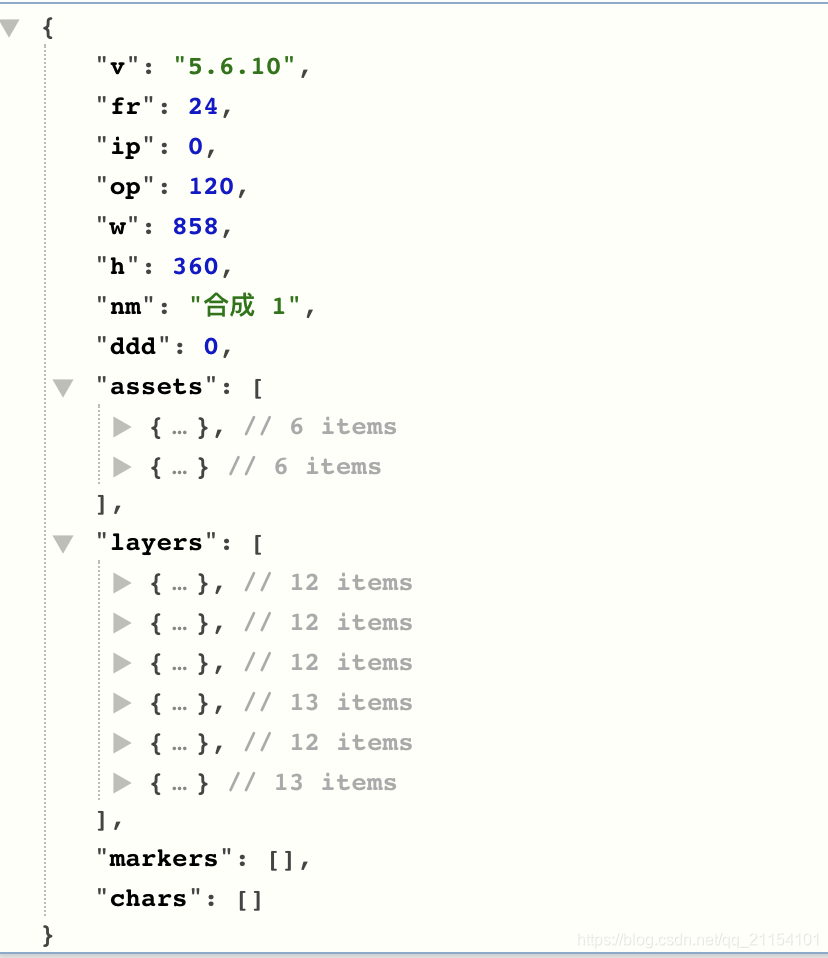
其中黄框里的是对动画基础信息的描述:
(1)fr:帧率

(2)ip:起始帧
(3)op:结束帧
(4)w:动画宽度
(5)h:动画高度
红框里的是对动画资源的描述:
(1)assets:动画用到的图片资源
(2)fonts:动画用到的字体
(3)layers:图层
3.3 源码分析
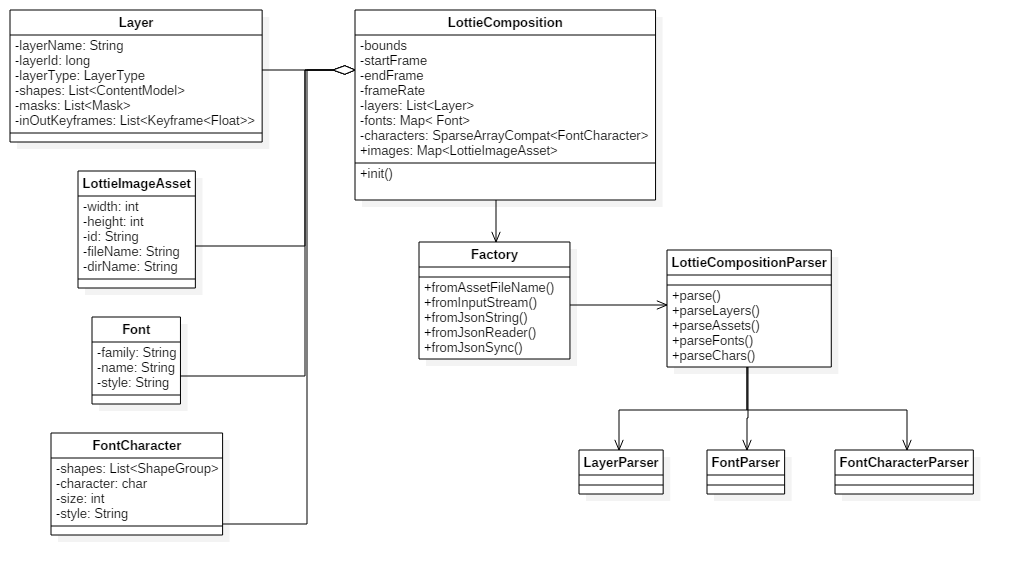
3.3.1 解析json文件到LottieComposition
3.3.2 LottieComposition转化为CompositionLayer
3.3.3 动画绘制
(1)LottieAnimationView调用playAnimation。
讯享网 @MainThread public void playAnimation() { if (isShown()) { lottieDrawable.playAnimation(); enableOrDisableHardwareLayer(); } else { playAnimationWhenShown = true; } }
(2)委托给LottieDrawable,调用playAnimation。
@MainThread public void playAnimation() { if (compositionLayer == null) { lazyCompositionTasks.add(new LazyCompositionTask() { @Override public void run(LottieComposition composition) { playAnimation(); } }); return; } if (systemAnimationsEnabled || getRepeatCount() == 0) { animator.playAnimation(); } if (!systemAnimationsEnabled) { setFrame((int) (getSpeed() < 0 ? getMinFrame() : getMaxFrame())); animator.endAnimation(); } }(3)LottieDrawable持有LottieValueAnimator,控制动画的进度和更新:notifyStart方法通知为LottieDrawable设置动画监听器;setFrame方法设置动画开始帧,同时回调onAnimationUpdate。
讯享网 @MainThread public void playAnimation() { running = true; notifyStart(isReversed()); setFrame((int) (isReversed() ? getMaxFrame() : getMinFrame())); lastFrameTimeNs = 0; repeatCount = 0; postFrameCallback(); }
public void setFrame(float frame) { if (this.frame == frame) { return; } this.frame = MiscUtils.clamp(frame, getMinFrame(), getMaxFrame()); lastFrameTimeNs = 0; notifyUpdate(); }讯享网 void notifyUpdate() { for (ValueAnimator.AnimatorUpdateListener listener : updateListeners) { listener.onAnimationUpdate(this); } }
(4)LottieDrawable在onAnimationUpdate回调中,告诉CompositionLayer设置进度。
private final ValueAnimator.AnimatorUpdateListener progressUpdateListener = new ValueAnimator.AnimatorUpdateListener() { @Override public void onAnimationUpdate(ValueAnimator animation) { if (compositionLayer != null) { compositionLayer.setProgress(animator.getAnimatedValueAbsolute()); } } };(5)遍历所包含的BaseLayer,设置进度,把动画进度传递到各个图层。
讯享网@Override public void setProgress(@FloatRange(from = 0f, to = 1f) float progress) { super.setProgress(progress); if (timeRemapping != null) { // The duration has 0.01 frame offset to show end of animation properly. // https://github.com/airbnb/lottie-android/pull/766 // Ignore this offset for calculating time-remapping because time-remapping value is based on original duration. float durationFrames = lottieDrawable.getComposition().getDurationFrames() + 0.01f; float compositionDelayFrames = layerModel.getComposition().getStartFrame(); float remappedFrames = timeRemapping.getValue() * layerModel.getComposition().getFrameRate() - compositionDelayFrames; progress = remappedFrames / durationFrames; } if (timeRemapping == null) { progress -= layerModel.getStartProgress(); } if (layerModel.getTimeStretch() != 0) { progress /= layerModel.getTimeStretch(); } for (int i = layers.size() - 1; i >= 0; i--) { layers.get(i).setProgress(progress); } }
(6)BaseLayer先改变当前动画的属性值,再设置有蒙层的 mask 或 matter 和当前关键帧的进度。
void setProgress(@FloatRange(from = 0f, to = 1f) float progress) { // Time stretch should not be applied to the layer transform. transform.setProgress(progress); if (mask != null) { for (int i = 0; i < mask.getMaskAnimations().size(); i++) { mask.getMaskAnimations().get(i).setProgress(progress); } } if (layerModel.getTimeStretch() != 0) { progress /= layerModel.getTimeStretch(); } if (inOutAnimation != null) { // Time stretch needs to be divided again for the inOutAnimation. inOutAnimation.setProgress(progress / layerModel.getTimeStretch()); } if (matteLayer != null) { // The matte layer's time stretch is pre-calculated. float matteTimeStretch = matteLayer.layerModel.getTimeStretch(); matteLayer.setProgress(progress * matteTimeStretch); } for (int i = 0; i < animations.size(); i++) { animations.get(i).setProgress(progress); } }(7)在BaseKeyframeAnimation设置完进度后,会通知BaseLayer重绘。
讯享网public void setProgress(@FloatRange(from = 0f, to = 1f) float progress) { if (keyframesWrapper.isEmpty()) { return; } if (progress < getStartDelayProgress()) { progress = getStartDelayProgress(); } else if (progress > getEndProgress()) { progress = getEndProgress(); } if (progress == this.progress) { return; } this.progress = progress; if (keyframesWrapper.isValueChanged(progress)) { notifyListeners(); } }
(8)BaseLayer通知LottieDrawable重绘。
@Override public void onValueChanged() { invalidateSelf(); }4. 性能
4.1 加载耗时
我们大部分的场景是使用本地zip包加载lottie,因此我们以此场景进行性能测试:
讯享网 |
如下是10次的耗时统计: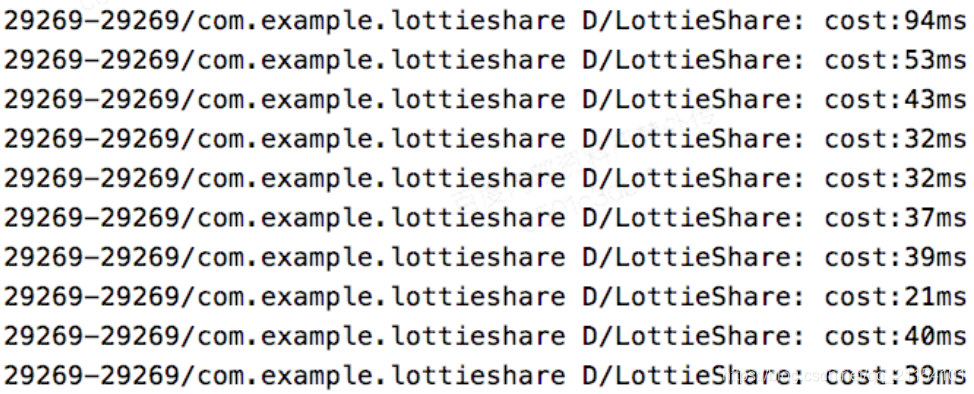
可以看到,第一次加载lottie耗时是后面9次的两倍以上。这是因为lottie自己有缓存,加载时,会先去缓存中取:
public static LottieTask<LottieComposition> fromZipStream(final ZipInputStream inputStream, @Nullable final String cacheKey) { return cache(cacheKey, new Callable<LottieResult<LottieComposition>>() { @Override public LottieResult<LottieComposition> call() { return fromZipStreamSync(inputStream, cacheKey); } }); }讯享网 private static LottieTask<LottieComposition> cache( @Nullable final String cacheKey, Callable<LottieResult<LottieComposition>> callable) { final LottieComposition cachedComposition = cacheKey == null ? null : LottieCompositionCache.getInstance().get(cacheKey); if (cachedComposition != null) { return new LottieTask<>(new Callable<LottieResult<LottieComposition>>() { @Override public LottieResult<LottieComposition> call() { return new LottieResult<>(cachedComposition); } }); } if (cacheKey != null && taskCache.containsKey(cacheKey)) { return taskCache.get(cacheKey); } LottieTask<LottieComposition> task = new LottieTask<>(callable); if (cacheKey != null) { task.addListener(new LottieListener<LottieComposition>() { @Override public void onResult(LottieComposition result) { taskCache.remove(cacheKey); } }); task.addFailureListener(new LottieListener<Throwable>() { @Override public void onResult(Throwable result) { taskCache.remove(cacheKey); } }); taskCache.put(cacheKey, task); } return task; }
4.2 UI耗时
加载lottie冷启和热启耗时都这么多,那实际对UI线程的影响也是如此吗?我们测一下:
long start = System.currentTimeMillis(); loadLottieWithLocalZip(); long end = System.currentTimeMillis(); Log.d(TAG, "cost:" + (end - start) + "ms");以下是10次的耗时数据,可以看到,耗时在0-2ms:
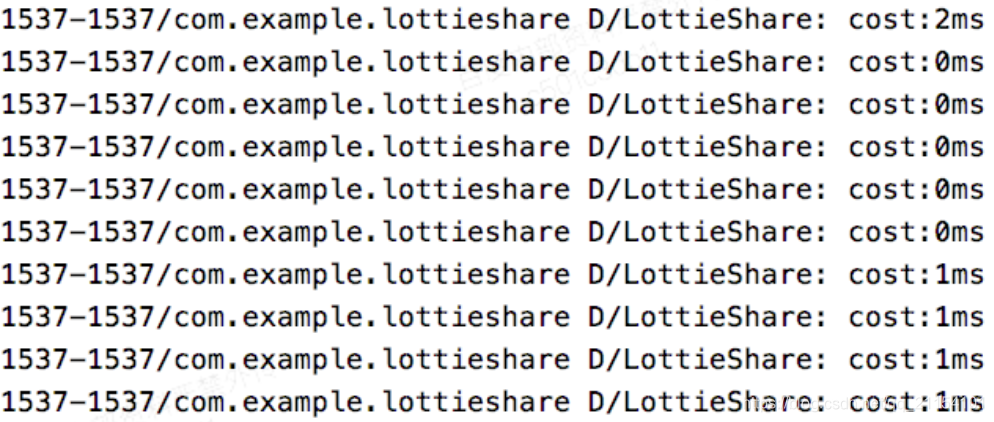
由此可见,lottie加载会使用异步线程,对UI线程的阻塞很小。跟踪源码也可以看到,LottieTask使用了线程池,这个线程池用于LottieComposition的解析:
讯享网public class LottieTask<T> { / * Set this to change the executor that LottieTasks are run on. This will be the executor that composition parsing and url * fetching happens on. * * You may change this to run deserialization synchronously for testing. */ @SuppressWarnings("WeakerAccess") public static Executor EXECUTOR = Executors.newCachedThreadPool();
5. 拓展
5.1 lottie转视频
动画执行的过程,其实在我们看来,就仿佛播放了一段视频。那么,我们是否可以将lottie动画转化为视频呢?答案是可以的。大体分为如下几个步骤:
(1)获取lottie动画的每一帧
(2)把lottie每一帧绘制的内容转bitmap
(3)把bitmap保存到本地jpg文件
(4)使用MediaCodec或者ffmpeg把一系列的jpg图片编码为视频
private void convertLottieToVideo() { // 1、获取LottieResult LottieResult<LottieComposition> lottieResult = LottieCompositionFactory.fromRawResSync(this, R.raw.lottie); // 2、获取composition LottieComposition composition = lottieResult.getValue(); LottieDrawable lottieDrawable = new LottieDrawable(); // 3、为LottieDrawable设置composition lottieDrawable.setComposition(composition); float max = composition.getDurationFrames(); // 4、设置帧(如果对视频的帧率不要求太高,可以隔x帧取一帧) for (int i = 0; i < max; i++) { lottieDrawable.setFrame(i); // 5、把每一帧的LottieDrawable转Bitmap Bitmap bitmap = drawableToBitmap(lottieDrawable); // 6、保存bitmap到jpg文件 saveBitmap(bitmap, i + ".jpg"); // 7、使用ffmpeg或MediaCodec把list<ImageFile>转视频 convertImgToVideo(); } }5.2 动态修改lottie
暂时空着
6. 避坑
lottie使用起来非常方便,但是也存在一些坑。
(1)lottie使用的图片要压缩,否则lottie在解析图片时会oom。
(2)不要对lottie设置字体,因为android和iOS的系统字体是不一样的,会crash。
(3)不要使用遮罩等复杂的特效,会极大的影响性能,造成卡顿掉帧。
(4)不支持3D动效。
(5)lottie的高版本对Android版本有要求,所以,升级lottie时需要注意兼容低版本机型。
(6)lottie的画布宽高要和内容宽高相适应,否则端上使用起来很困难。
最后,分享一款免费看热门电影和电视剧的app,仅限Android:

版权声明:本文内容由互联网用户自发贡献,该文观点仅代表作者本人。本站仅提供信息存储空间服务,不拥有所有权,不承担相关法律责任。如发现本站有涉嫌侵权/违法违规的内容,请联系我们,一经查实,本站将立刻删除。
如需转载请保留出处:https://51itzy.com/kjqy/85847.html