
拿到一台服务器,硬盘6T,但按正常流程做分区时,但最大只能分区2T。想要把6T全部划为一个分区,做一个目录/data
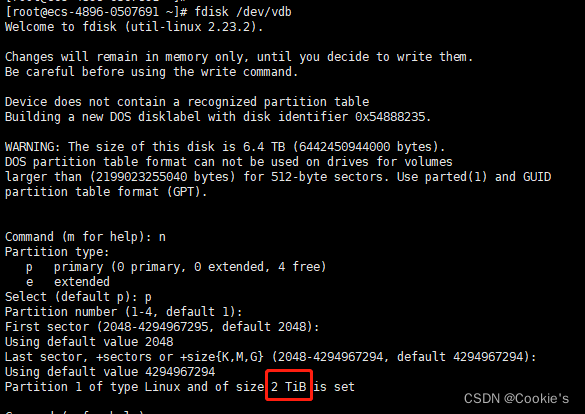
根据信息提示,当前分区格式为MSDOS(MBR)分区类型,需要格式化为GPT类型。使用MBR分区表的硬盘最多只能划分4个主分区磁盘,并且MBR最大仅支持2TB的硬盘,如果需要分区的硬盘容量大于2TB,则需要使用GPT类型,GPT分区表类型不受分区个数、硬盘大小的限制,最大支持18EB。
格式化操作如下:
[root@ecs-4896-0 ~]# yum install -y gdisk
[root@ecs-4896-0 ~]# gdisk /dev/vdb
GPT fdisk (gdisk) version 0.8.10Partition table scan:
MBR: MBR only
BSD: not present
APM: not present
GPT: not present
*
Found invalid GPT and valid MBR; converting MBR to GPT format
in memory. THIS OPERATION IS POTENTIALLY DESTRUCTIVE! Exit by
typing 'q' if you don't want to convert your MBR partitions
to GPT format!
*
Command (? for help): wDo you want to proceed? (Y/N): y
OK; writing new GUID partition table (GPT) to /dev/vdb.
The operation has completed successfully.

至此,格式化完毕。分区格式
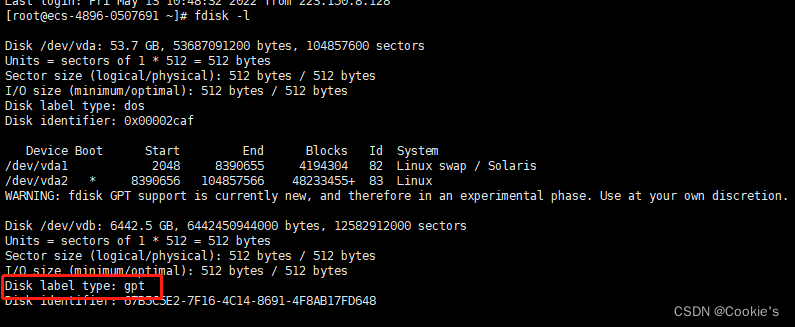
之后对磁盘进行正常分区即可。
[root@ecs-4896-0 ~]# fdisk /dev/vdb
WARNING: fdisk GPT support is currently new, and therefore in an experimental phase. Use at your own discretion.
Welcome to fdisk (util-linux 2.23.2).
Command (m for help): n
Partition number (1-128, default 1):
First sector (34-, default 2048):
Last sector, +sectors or +size{K,M,G,T,P} (2048-, default ):
Created partition 1
Command (m for help): w
The partition table has been altered!Calling ioctl() to re-read partition table.
Syncing disks.
[root@ecs-4896-0 ~]#
[root@ecs-4896-0 ~]#
[root@ecs-4896-0 ~]# fdisk -lDisk /dev/vda: 53.7 GB, bytes, sectors
Units = sectors of 1 * 512 = 512 bytes
Sector size (logical/physical): 512 bytes / 512 bytes
I/O size (minimum/optimal): 512 bytes / 512 bytes
Disk label type: dos
Disk identifier: 0x00002cafDevice Boot Start End Blocks Id System
/dev/vda1 2048 82 Linux swap / Solaris
/dev/vda2 * + 83 Linux
WARNING: fdisk GPT support is currently new, and therefore in an experimental phase. Use at your own discretion.Disk /dev/vdb: 6442.5 GB, 00 bytes, sectors
Units = sectors of 1 * 512 = 512 bytes
Sector size (logical/physical): 512 bytes / 512 bytes
I/O size (minimum/optimal): 512 bytes / 512 bytes
Disk label type: gpt
Disk identifier: 97D1E419-AC63-4EA3-B9A9-3661E4D3AD17
# Start End Size Type Name
1 2048 5.9T Linux filesyste
版权声明:本文内容由互联网用户自发贡献,该文观点仅代表作者本人。本站仅提供信息存储空间服务,不拥有所有权,不承担相关法律责任。如发现本站有涉嫌侵权/违法违规的内容,请联系我们,一经查实,本站将立刻删除。
如需转载请保留出处:https://51itzy.com/kjqy/85196.html