
1. 任务要求
1)BOM对象模型;
2)掌握document对象的重要属性和方法;
3)JavaScript与CSS交互。
2. 需求说明
带按钮的轮换显示的横幅广告,五张广告图片循环显示,并且下面的标题随图片显示不同的内容,单击数字按钮时可以即时显示对应的图片和相应的标题,如下图所示。

3. 实现思路
1)使用到对图片的隐藏(none)和显现(block);

2)首先在函数show()里定义一个数组titles;
3)写一个for循环,用于判断当点击 的对应数字与i相同时,就将对应序号的图片以及相关文字显示描述出来。否则,将图片隐藏,文字只显示数字。
4. 实现代码
function show(n){ var titles=new Array("圆明园","天安门","故宫","长城","黄鹤楼");//数组文字部分可更改 for(var i=1;i<=5;i++){ var img=document.getElementById("Rotator_"+i); var title=document.getElementById("fig_"+i); if(n==i){ img.style.display="block";//显示当前图片 title.innerHTML=titles[i-1];//显示文字 title.className="numberOver";//更新class属性 } else{ img.style.display="none";//隐藏图片 title.innerHTML=i;//显示数字 title.className="number";//更新class属性 } } }讯享网
5. 运行结果
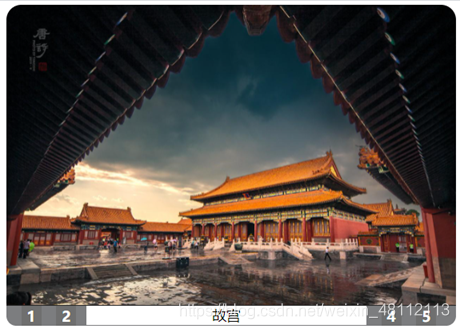
6. 其他代码
.html
讯享网<!DOCTYPE html>
<html>
<head>
<meta charset="utf-8" />
<title>带按钮的横幅壁纸</title>
	<link href="css/adRotator.css" rel="stylesheet" type="text/css" />
	<script src="js/ad.js"></script>
</head>
<body onLoad=show(1)>
	<div class="adver">
		<img src="img/ad1.jpg" alt="广告图片" id="Rotator_1"/> //五张图片需要存放在对应位置上(图片可按自己喜好更改)
		<img src="img/ad2.jpg" alt="广告图片" id="Rotator_2"/>
		<img src="img/ad3.jpg" alt="广告图片" id="Rotator_3"/>
		<img src="img/ad4.jpg" alt="广告图片" id="Rotator_4"/>
		<img src="img/ad5.jpg" alt="广告图片" id="Rotator_5"/>
		<div class="Rotator_bg">
			<div class="number" id="fig_1" onclick="show(1)">1</div>
			<div class="number" id="fig_2" onclick="show(2)">2</div>
			<div class="number" id="fig_3" onclick="show(3)">3</div>
			<div class="number" id="fig_4" onclick="show(4)">4</div>
			<div class="number" id="fig_5" onclick="show(5)">5</div>
		</div>
	</div>
</body>
</html>
.css
body{ margin:0; margin-top:3px; padding:0; font-size:12px; line-height:20px; color:#333; } .adver{ width:450px; border:solid 1px #ffffff; margin-left:auto; margin-right:auto; border-radius: 10px; } .Rotator_bg{ background-color: #7c7d7f; height:20px; border-top:solid 1px #; border-bottom-left-radius: 10px; border-bottom-right-radius: 10px; } .number{ font-size: 14px; font-weight: bold; color: #FFF; background-color:#6f6f6f; display: block; border: 1px solid #6f6f6f; width:18px; height:18px; text-align: center; margin-left:15px; cursor:pointer; float:left; } .numberOver{ color:#000000; font-size:14px; width:280px; height:19px; background-color:#FFF; text-align:center; float:left; display: block; margin-left:10px; border-bottom: 1px solid #7C7D7F; } .main{ width:95%; margin-left:auto; margin-right:auto; } .left_indent{ padding-left:20px; } .red{ color:#F00; } .adver img{ width:450px; border-top-left-radius: 15px; border-top-right-radius: 15px; }
版权声明:本文内容由互联网用户自发贡献,该文观点仅代表作者本人。本站仅提供信息存储空间服务,不拥有所有权,不承担相关法律责任。如发现本站有涉嫌侵权/违法违规的内容,请联系我们,一经查实,本站将立刻删除。
如需转载请保留出处:https://51itzy.com/kjqy/84025.html