
官网手册:Quick Start | Electron
1. 安装Electron
npm install -g electron
2. 安装Electron-forge
npm install -g electron-forge
3. 配置ELECTRON_MIRROR为国内源
npm config set registry https://registry.npm.taobao.org
然后在C:\Users\Administrator\.npmrc里增加如下设置
electron_mirror=https://npm.taobao.org/mirrors/electron/
如果您使用的是yarn,请将 ~/.npmrc里添加以下配置
ELECTRON_MIRROR=https://npm.taobao.org/mirrors/electron/
4. 新建项目 app
electron-forge init myapp
C:\Users\chais>electron-forge init myapp √ Checking your system √ Initializing Project Directory √ Initializing Git Repository √ Copying Starter Files √ Initializing NPM Module √ Installing NPM Dependencies讯享网
5. init完成之后,静态文件存放在 src 文件夹(可以放入已编辑好的H5网页),入口文件为 index.js,代码如下:
讯享网import { app, BrowserWindow, Menu, globalShortcut, autoUpdater, dialog, contentTracing } from 'electron'
// 安装/卸载时处理创建/删除Windows上的快捷方式
if (require('electron-squirrel-startup')) {
  app.quit();
}
// Keep a global reference of the window object, if you don't, the window will
// be closed automatically when the JavaScript object is garbage collected.
let mainWindow
// 定义运行事件
function go () {
  // 取消顶部菜单栏
  Menu.setApplicationMenu(null)
  // 创建窗口
  mainWindow = new BrowserWindow({
    width: 1280,
    height: 1024,
    frame: false
  })
  // 应用打开全屏显示
  mainWindow.setFullScreen(true)
  // 退出取消全屏
  globalShortcut.register('ESC', () => {
    mainWindow.setFullScreen(false)
  })

  // and load the index.html of the app.
  mainWindow.loadURL(`file://${__dirname}/index.html`);

  // Open the DevTools.打开开发工具
  mainWindow.webContents.openDevTools();

  // Emitted when the window is closed.窗口关闭事件
  mainWindow.on('closed', () => {
    // Dereference the window object, usually you would store windows
    // in an array if your app supports multi windows, this is the time
    // when you should delete the corresponding element.
    mainWindow = null;
  });
}
// 定时查询更新函数(凌晨1点)
function interval () {
  let t = new Date()
  let time
  if (t.getHours() > 1) {
    time = (27 - t.getHours())*60*60000 - t.getMinutes()*60000 - t.getSeconds()*1000
  } else {
    time = (3 - t.getHours())*60*60000 - t.getMinutes()*60000 - t.getSeconds()*1000
  }
  setTimeout(() => {
    setInterval(() => {
      autoUpdater.checkForUpdates()
    }, 60000*60*24)
  }, time)
}
// 创建窗口函数
const createWindow = () => {
  if (process.argv[1] == '--squirrel-firstrun') {
    go()
    return
  }
  // 设置自动更新访问地址
  autoUpdater.setFeedURL('https://xxx/')
  // 自动更新事件
  autoUpdater.on('update-downloaded', function() {
    // 下载完成,更新前端显示
    autoUpdater.quitAndInstall()
  })
  // 倒计时至凌晨3点检测更新
  interval()
  try {
    autoUpdater.checkForUpdates()
  } catch (ex) {
    go()
    return
  }
  // go 事件这里不能省去GO事件
  go()
}
// 应用初始化事件
app.on('ready', createWindow);

// 应用退出事件
app.on('window-all-closed', () => {
  // On OS X it is common for applications and their menu bar
  // to stay active until the user quits explicitly with Cmd + Q
  if (process.platform !== 'darwin') {
    app.quit();
  }
});
// 应用激活事件
app.on('activate', () => {
  // On OS X it's common to re-create a window in the app when the
  // dock icon is clicked and there are no other windows open.
  console.log('activate')
  if (mainWindow === null) {
    createWindow();
  }
});
5. 进去myapp 文件夹执行下面的命令来启动app
npm start
6. 打包,执行 npm run make
C:\Users\chais\myapp>npm run make > project1@1.0.0 make > electron-forge make √ Checking your system √ Resolving Forge Config We need to package your application before we can make it Downloading tmp-16744-1-SHASUMS256.txt-8.2.0 [============================================>] 100.0% of 5.65 kB (5.65 kB/s) √ Preparing to Package Application for arch: x64 / Compiling ApplicationFailed to compile file: C:\Users\chais\AppData\Local\Temp\electron-packager\win32-x64\project1-win32-x64\resources\app\src\files\video.js C:/Users/chais/AppData/Local/Temp/electron-packager/win32-x64/myapp-win32-x64/resources/app/src/files/video.js: Unexpected token (88:17) √ Compiling Application √ Preparing native dependencies √ Packaging Application Making for the following targets: √ Making for target: squirrel - On platform: win32 - For arch: x64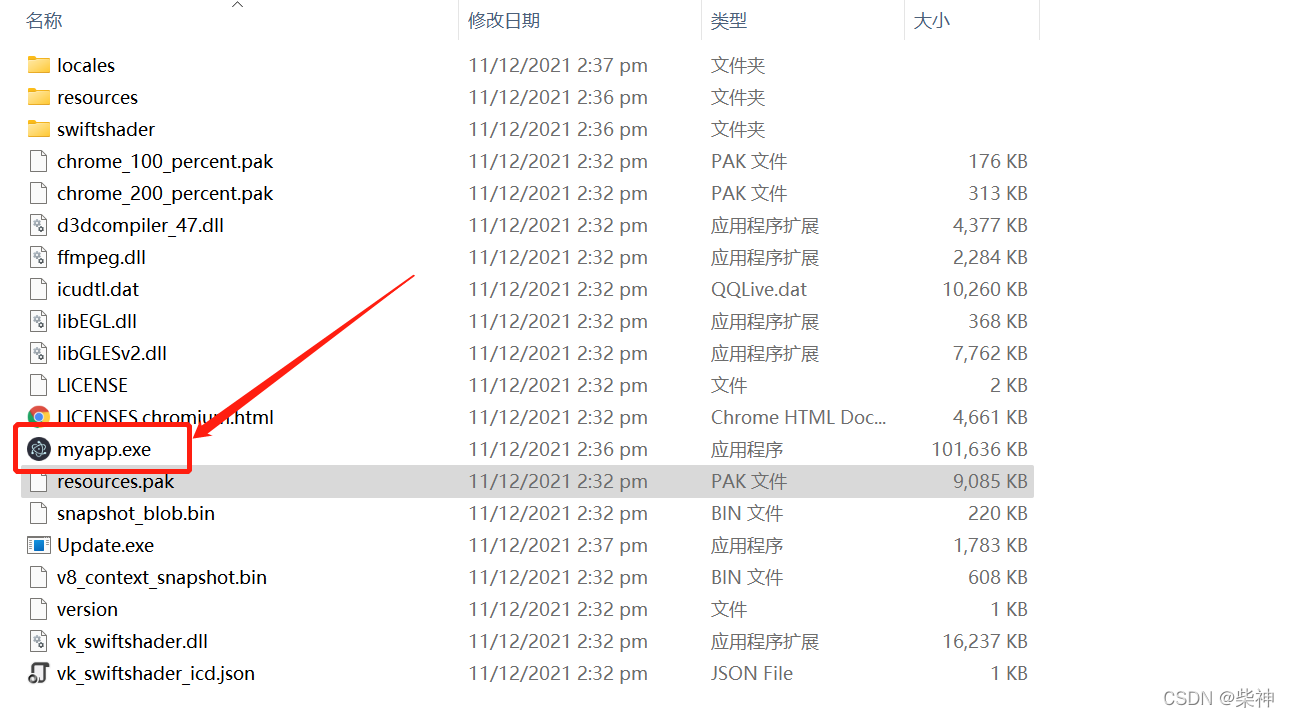
版权声明:本文内容由互联网用户自发贡献,该文观点仅代表作者本人。本站仅提供信息存储空间服务,不拥有所有权,不承担相关法律责任。如发现本站有涉嫌侵权/违法违规的内容,请联系我们,一经查实,本站将立刻删除。
如需转载请保留出处:https://51itzy.com/kjqy/82542.html