
先上图
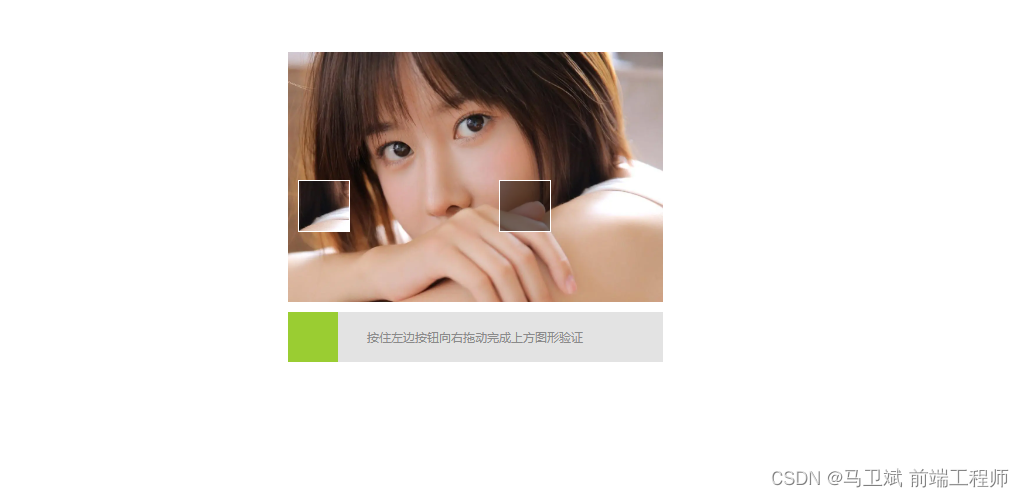

代码:
<!DOCTYPE html>
<html lang="en">
<head>
    <meta charset="UTF-8">
    <title>滑动验证码</title>
    <style>
        * {
            margin: 0;
            padding: 0;
        }

        .box {
            position: relative;
            width: 375px;
            margin: 100px auto;
        }

        .check {
            width: 375px;
            height: 250px;
            background-size: 100% 100%;
            background-image: url("https://img0.baidu.com/it/u=1566675905,2132741662&fm=253&fmt=auto&app=120&f=JPEG?w=1280&h=800");
        }

        .check-content {
            position: absolute;
            top: 100px;
            left: 280px;
            width: 50px;
            height: 50px;
            background: rgba(0, 0, 0, 0.5);
            border: 1px solid #ffffff;
        }

        .check-block {
            width: 50px;
            height: 50px;
            border: 1px solid #ffffff;
            background-image: inherit;
            background-repeat: inherit;
            background-size: 375px 250px;
            background-position: -280px -100px;
            position: absolute;
            top: 100px;
            left: 10px;
        }

        .drag {
            width: 375px;
            height: 50px;
            background-color: #e3e3e3;
            margin-top: 10px;
            position: relative;
        }

        .drag-block {
            width: 50px;
            height: 50px;
            background: yellowgreen;
            z-index: 10;
            position: absolute;
            top: 0;
            left: 0;
        }

        .drag-tips {
            width: 95%;
            height: 100%;
            margin: 0 auto;
            text-align: center;
            line-height: 50px;
            font-size: 12px;
            color: #8a8a8a;
        }
    </style>
</head>
<body>
<div class="box">
    <div class="check">
        <div class="check-content"></div>
        <div class="check-block"></div>
    </div>
    <div class="drag">
        <div class="drag-block"></div>
        <div class="drag-tips">按住左边按钮向右拖动完成上方图形验证</div>
    </div>
</div>

<script>
    // 获取校验区
    const drag = document.querySelector('.drag')

    // 获取两个滑块和拖动按钮
    const dragBlock = document.querySelector('.drag-block')
    const content = document.querySelector('.check-content')
    const check = document.querySelector('.check-block')

    // 随机生成一个x,y坐标 用于设置校验块的位置
    let x = parseInt(Math.random() * 325)
    let y = parseInt(Math.random() * 200)

    // 定义一个运动状态 如果为true代表鼠标已经按下
    let animating = false
    // 存储鼠标按下的x坐标
    let startX = 0
    // 存储移动的位置
    let offsetX = 0

    content.style.cssText = `left:${x}px;top:${y}px`
    check.style.cssText = `background-position:-${x}px - ${y}px;top:${y}px`

    // 添加鼠标移动事件
    drag.addEventListener('mousemove', e => {
        // 判断运动状态
        if (!animating) {
            return
        }
        // 计算移动的位置
        offsetX = e.pageX - startX
        // 判断移动距离是否正确
        if (offsetX < 0 || offsetX > 350) {
            return
        }
        // 修改可移动盒子的x轴坐标
        dragBlock.style.transform = `translateX(${offsetX}px)`
        // 设置被验证滑块的left值
        check.style.left = `${offsetX}px`
    })

    // 添加鼠标按下事件
    dragBlock.addEventListener('mousedown', (e) => {
        animating = true
        startX = e.pageX
    })

    // 添加鼠标弹起事件
    document.addEventListener('mouseup', () => {
        animating = false
        // 根据移动的位置判断是否成功
        if (offsetX >= x - 2 && offsetX <= x + 2) {
            alert('成功')
        } else {
            // 验证失败 滑块和被验证块回复坐标
            dragBlock.style.transform = `translateX(0px)`
            check.style.left = `0px`
        }
    })
</script>
</body>
</html>
讯享网
版权声明:本文内容由互联网用户自发贡献,该文观点仅代表作者本人。本站仅提供信息存储空间服务,不拥有所有权,不承担相关法律责任。如发现本站有涉嫌侵权/违法违规的内容,请联系我们,一经查实,本站将立刻删除。
如需转载请保留出处:https://51itzy.com/kjqy/81618.html